
图片浏览(CATransition)转场动画
Main.storyboard
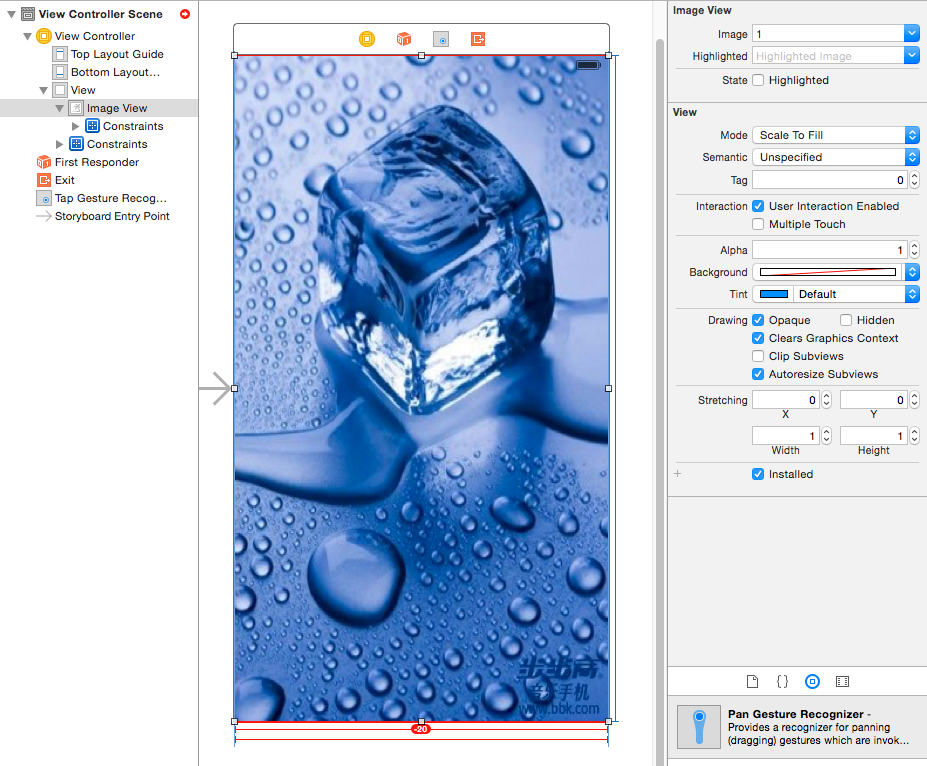
ViewController.m
//
// ViewController.m
// 8A04.图片浏览(转场动画)
//
// Created by huan on 16/2/4.
// Copyright © 2016年 huanxi. All rights reserved.
//
#import "ViewController.h"
#define AnimationDuration 2
@interface ViewController ()
@property (weak, nonatomic) IBOutlet UIImageView *imageView;
-(IBAction)tapView:(UITapGestureRecognizer *)sender;
@property (nonatomic, strong) NSMutableArray *imgs;
@property (nonatomic, assign) NSInteger currentImgIndex;//当前的索引
@end
@implementation ViewController
-(NSMutableArray *)imgs{
if (!_imgs) {
_imgs = [NSMutableArray array];
for (NSInteger i = 1; i < 10; i++) {
NSString *imgName = [NSString stringWithFormat:@"%ld",i];
[_imgs addObject:imgName];
}
}
return _imgs;
}
- (void)viewDidLoad {
[super viewDidLoad];
// Do any additional setup after loading the view, typically from a nib.
NSLog(@"%@",self.imgs);
}
- (void)didReceiveMemoryWarning {
[super didReceiveMemoryWarning];
// Dispose of any resources that can be recreated.
}
-(IBAction)tapView:(UITapGestureRecognizer *)tap{
//实现判断图片的左半边还是右半边
//获取触摸点
CGPoint point = [tap locationInView:tap.view];
NSLog(@"%@", NSStringFromCGPoint(point));
if (point.x <= tap.view.bounds.size.width *0.5) {
NSLog(@"上一张");
[self previous];
}else{
NSLog(@"下一张");
[self next];
}
}
-(void)previous{
//判断当前图片是不是第一张
if (self.currentImgIndex == 0) {
return;
}
//减索引 改图片
self.currentImgIndex --;
self.imageView.image = [UIImage imageNamed:self.imgs[self.currentImgIndex]];
//转场动画
CATransition *animation = [CATransition animation];
animation.type = @"push";
//默认就是fromLeft
animation.subtype = @"fromLeft";
animation.duration = AnimationDuration;
[self.imageView.layer addAnimation:animation forKey:nil];
}
/**
* 提示:转场动画的类型(type)和子类型(subtype)能用字符串常量就用字符串常量
*/
/**
*******************************************************
type:动画类型(比如:滴水效果,翻转效果...)
-------------------------------------------------------
fade kCATransitionFade 交叉淡化过渡
moveIn kCATransitionMoveIn 新视图移到旧视图上面
push kCATransitionPush 新视图把旧视图推出去
reveal kCATransitionReveal 将旧视图移开,显示下面的新视图
pageCurl 向上翻一页
pageUnCurl 向下翻一页
rippleEffect 滴水效果
suckEffect 收缩效果,如一块布被抽走
cube 立方体效果
oglFlip 上下左右翻转效果
rotate 旋转效果
cameraIrisHollowClose 相机镜头关上效果(不支持过渡方向)
cameraIrisHollowOpen 相机镜头打开效果(不支持过渡方向)
*******************************************************
subtype: 动画方向(比如说是从左边进入,还是从右边进入...)
------------------------------------------------------
kCATransitionFromRight;
kCATransitionFromLeft;
kCATransitionFromTop;
kCATransitionFromBottom;
当 type 为@"rotate"(旋转)的时候,它也有几个对应的 subtype,分别为:
90cw 逆时针旋转 90°
90ccw 顺时针旋转 90°
180cw 逆时针旋转 180°
180ccw 顺时针旋转 180°
**/
-(void)next{
//判断当前图片是不是最好一张
if(self.currentImgIndex == self.imgs.count - 1){
NSLog(@"已经是最好一张");
return;
}
//加索引 改图片
self.currentImgIndex ++;
self.imageView.image = [UIImage imageNamed:self.imgs[self.currentImgIndex]];
//设置图片的时候,使用转场动画
CATransition *animation = [CATransition animation];
//设置转场动画的类型
// `fade', `moveIn', `push' and `reveal'.
//fade 渐变 moveIn 直接移动
animation.type = @"rotate";
// animation.type = kCATransitionPush;
//设置转场动画的子类型
// `fromLeft', `fromRight', `fromTop' and
// * `fromBottom' fromLeft 从左边开始推
animation.subtype = @"90cw";
animation.duration = AnimationDuration;
[self.imageView.layer addAnimation:animation forKey:nil];
}
@end
图片浏览(CATransition)转场动画的更多相关文章
- CATransition转场动画
背景: 最近在温习动画,分享个简单系统的转场动画 viewcontroller *VC=[self.storyboard instantiateViewControllerWithIdentifier ...
- core Animation之CATransition(转场动画)
用于做转场动画,能够为层提供移出屏幕和移入屏幕的动画效果.iOS比Mac OS X的转场动画效果少一点 UINavigationController就是通过CATransition实现了将控制器的视图 ...
- 之四:CATransition - 转场动画
关键属性: type 过渡效果 kCATransitionFade 淡出 kCATransitionMoveIn 覆盖原图 kCATransitionPush 推出 kCATransition ...
- CATransition 转场动画解析
http://blog.csdn.net/mad2man/article/details/17260901
- iOS 转场动画核心内容
CATransition——转场动画 CATransition是CAAnimation的子类,用于做转场动画,能够为层提供移出屏幕和移入屏幕的动画效果.iOS比Mac OS X的转场动画效果少一点. ...
- iOS:核心动画之转场动画CATransition
转场动画——CATransition CATransition是CAAnimation的子类,用于做转场动画,能够为层提供移出屏幕和移入屏幕的动画效果.iOS比Mac OS X的转场动画效果少一点 U ...
- ios手势复习值之换图片-转场动画(纯代码)
目标:实现通过手势进行图片的切换 通过左扫右扫 来实现(纯代码) 添加三个属性 1uiImageView 用来显示图片的view 2 index 用来表示图片的索引 3 ISLeft 判断是不是向 ...
- iOS CATransition 自定义转场动画
https://www.jianshu.com/p/39c051cfe7dd CATransition CATransition 是CAAnimation的子类(如下图所示),用于控制器和控制器之间的 ...
- CATransition自定义转场动画
我们可以通过CATransiton来自定义一些漂亮的转场动画, CATransition继承自CAAnimation, 所以用法跟CAAnimation差不多 先直接上一个代码: #import &q ...
随机推荐
- LinQ高级查询
1.模糊查询 con.Users.Where(a =>a.UserName.Contains(name)).ToList(); //包含name con.Users.Where(a =>a ...
- ECharts-基于Canvas,纯Javascript图表库,提供直观,生动,可交互,可个性化定制的数据可视化图表
ECharts http://ecomfe.github.com/echarts 基于Canvas,纯Javascript图表库,提供直观,生动,可交互,可个性化定制的数据可视化图表.创新的拖拽重计算 ...
- jquery获取所选元素的outerHTML
大家都知道原生js可以获取匹配元素的内部html和外部html,内部是innerHTML,外部是outerHTML,原生js的dom对象是存在这两个属性的. 如果用jQuery如何获取匹配元素(包括自 ...
- 关于JS 事件冒泡和onclick,click,on()事件触发顺序
今天在给JQgrid中的标签添加click事件的时候,发现一个问题. JQgrid的table中,点击任何位置,都会勾选点击行的checkbox,而我希望在点击我的标签的时候,不要勾选checkbox ...
- ubuntu-apache如何解决跨域资源访问
参考:http://blog.csdn.net/emily201314/article/details/52877277 步骤1 #打开apache的headers模块 sudo a2enmod he ...
- SQLserver聚集表、堆和索引
SQL Server 表使用下列两种方法之一来组织其分区中的数据页: 聚集表是有聚集索引的表.数据行基于聚集索引键按顺序存储.聚集索引按 B 树索引结构实现,B 树索引结构支持基于聚集索引键值对行进行 ...
- Java Reflection
Java语言的反射机制 1. Java反射的含义:获取应用中正在运行的Java对象. 2. Java反射机制: 在运行的程序中,对于任意的类,都可以知道这个类的属性.方法以及构造函数,对于任意对象都可 ...
- apktool+dex2jar+xjad反编译android程序
1 将MyAdroid.apk拷贝到E:\disapk 2 下载apktool1.5.2.tar.bz2 和 apktool-install-windows-r05-ibot.tar.bz2 并解压到 ...
- MacDev.Mach-O.Programming-Part-III:MachOView-v2.4.9200.dmg-crash
MachOView-v2.4.9200.dmg Crash 在OS X(其版本号: 10.11.6 (15G31))下载MachOView-2.4.9200.dmg后,打开Fat Binary后,Ma ...
- 【bzoj3211】花神游历各国
Description Input Output 每次x=1时,每行一个整数,表示这次旅行的开心度 Sample Input 4 1 100 5 551 1 2 2 1 2 1 1 2 2 2 ...