
一文读懂 Android TouchEvent 事件分发、拦截、处理过程
什么是事件?事件是用户触摸手机屏幕,引起的一系列TouchEvent,包括ACTION_DOWN、ACTION_MOVE、ACTION_UP、ACTION_CANCEL等,这些action组合后变成点击事件、长按事件等。
在这篇文章中,用打Log测试的方法来了解Android TouchEvent 事件分发,拦截,处理过程。虽然看了一些其他的文章和源码及相关的资料,但是还是觉得需要打下Log和画图来了解一下,不然很容易忘记了事件传递的整个过程。所以写下这篇文章,达到看完这篇文章基本可以了解整个过程,并且可以自己画图画出来给别人看。
先看几个类,主要是画出一个3个ViewGroup叠加的界面,并在事件分发、拦截、处理时打下Log.
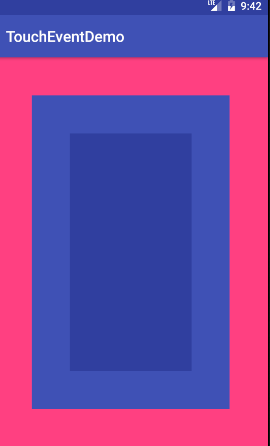
GitHub地址:https://github.com/libill/TouchEventDemo
一、通过打log分析事件分发
这里在一个Activity上添加三个ViewGroup来分析,这里值得注意的是Activity、View是没有onInterceptTouchEvent方法的。
一、了解Activity、ViewGroup1、ViewGroup2、ViewGroup3四个类
activity_main.xml
 <?xml version="1.0" encoding="utf-8"?>

 	<android.support.constraint.ConstraintLayout xmlns:android="http://schemas.android.com/apk/res/android"

 xmlns:app="http://schemas.android.com/apk/res-auto"

 xmlns:tools="http://schemas.android.com/tools"

 android:layout_width="match_parent"

 android:layout_height="match_parent"

 tools:context="com.touchevent.demo.MyActivity">

 	<com.touchevent.demo.ViewGroup1

     android:layout_width="match_parent"

     android:layout_height="match_parent"

     android:background="@color/colorAccent">

     <com.touchevent.demo.ViewGroup2

         android:layout_width="match_parent"

         android:layout_height="match_parent"

         android:layout_margin="50dp"

         android:background="@color/colorPrimary">

         <com.touchevent.demo.ViewGroup3

             android:layout_width="match_parent"

             android:layout_height="match_parent"

             android:layout_margin="50dp"

             android:background="@color/colorPrimaryDark">

         </com.touchevent.demo.ViewGroup3>

     </com.touchevent.demo.ViewGroup2>

 	</com.touchevent.demo.ViewGroup1>

 </android.support.constraint.ConstraintLayout>
主界面:MainActivity.java
 public class MyActivity extends AppCompatActivity {

     private final static String TAG = MyActivity.class.getName();

     @Override

     protected void onCreate(Bundle savedInstanceState) {

         super.onCreate(savedInstanceState);

         setContentView(R.layout.activity_main);

     }

     @Override

     public boolean dispatchTouchEvent(MotionEvent ev) {

         Log.i(TAG, "dispatchTouchEvent    action:" + StringUtils.getMotionEventName(ev));

         boolean superReturn = super.dispatchTouchEvent(ev);

         Log.d(TAG, "dispatchTouchEvent    action:" + StringUtils.getMotionEventName(ev) + " " + superReturn);

         return superReturn;

     }

     @Override

     public boolean onTouchEvent(MotionEvent ev) {

         Log.i(TAG, "onTouchEvent          action:" + StringUtils.getMotionEventName(ev));

         boolean superReturn = super.onTouchEvent(ev);

         Log.d(TAG, "onTouchEvent          action:" + StringUtils.getMotionEventName(ev) + " " + superReturn);

         return superReturn;

     }

 }
三个ViewGroup,里面的代码完全一样:ViewGroup1.java,ViewGroup2.java,ViewGroup3.java。由于代码一样所以只贴其中一个类。
 public class ViewGroup1 extends LinearLayout {

     private final static String TAG = ViewGroup1.class.getName();

     public ViewGroup1(Context context) {

         super(context);

     }

     public ViewGroup1(Context context, AttributeSet attrs) {

         super(context, attrs);

     }

     @Override

     public boolean dispatchTouchEvent(MotionEvent ev) {

         Log.i(TAG, "dispatchTouchEvent    action:" + StringUtils.getMotionEventName(ev));

         boolean superReturn = super.dispatchTouchEvent(ev);

         Log.d(TAG, "dispatchTouchEvent    action:" + StringUtils.getMotionEventName(ev) + " " + superReturn);

         return superReturn;

     }

     @Override

     public boolean onInterceptTouchEvent(MotionEvent ev) {

         Log.i(TAG, "onInterceptTouchEvent action:" + StringUtils.getMotionEventName(ev));

         boolean superReturn = super.onInterceptTouchEvent(ev);

         Log.d(TAG, "onInterceptTouchEvent action:" + StringUtils.getMotionEventName(ev) + " " + superReturn);

         return superReturn;

     }

     @Override

     public boolean onTouchEvent(MotionEvent ev) {

         Log.i(TAG, "onTouchEvent          action:" + StringUtils.getMotionEventName(ev));

         boolean superReturn = super.onTouchEvent(ev);

         Log.d(TAG, "onTouchEvent          action:" + StringUtils.getMotionEventName(ev) + " " + superReturn);

         return superReturn;

     }

 }
二、不拦截处理任何事件
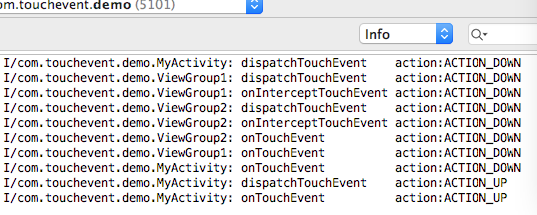
添加没有拦截处理任何事件的代码,看看事件是怎么传递的,选择Info,查看Log.
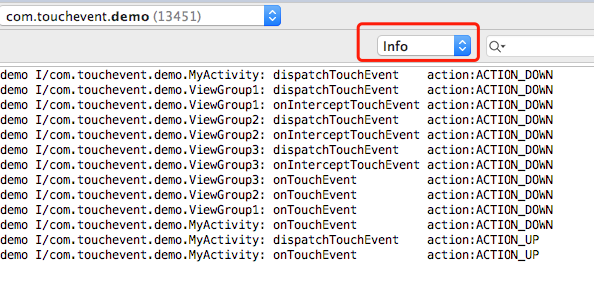
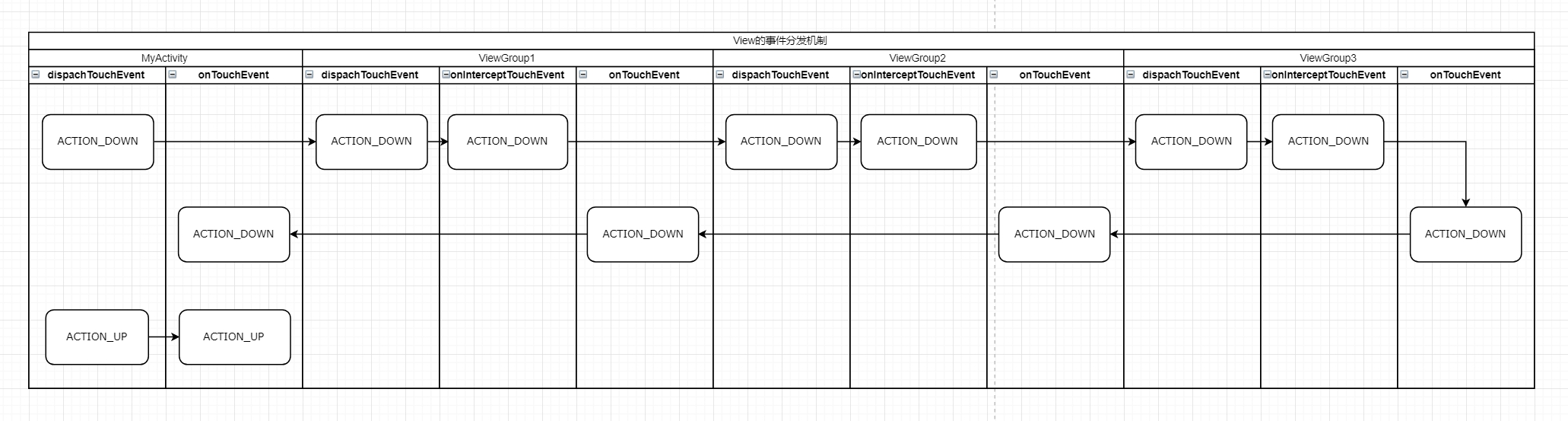
从流程图可以看出,事件分发从Activity开始,然后分发到ViewGroup,在这个过程中,只要ViewGroup没有拦截处理,最后还是会回到Activity的onTouchEvent方法。
三、ViewGroup2的dispatchTouchEvent返回true
把ViewGroup2.java的dispatchTouchEvent修改一下,return 返回true使事件不在分发
@Override

public boolean dispatchTouchEvent(MotionEvent ev) {

 Log.i(TAG, "dispatchTouchEvent    action:" + StringUtils.getMotionEventName(ev));

 Log.d(TAG, "onInterceptTouchEvent action:" + StringUtils.getMotionEventName(ev) + " " + true);

 return true;

}
此时的Log
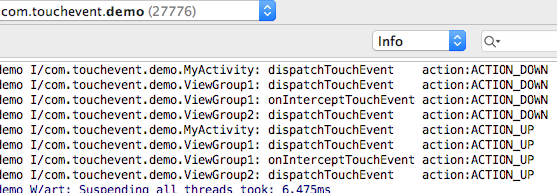
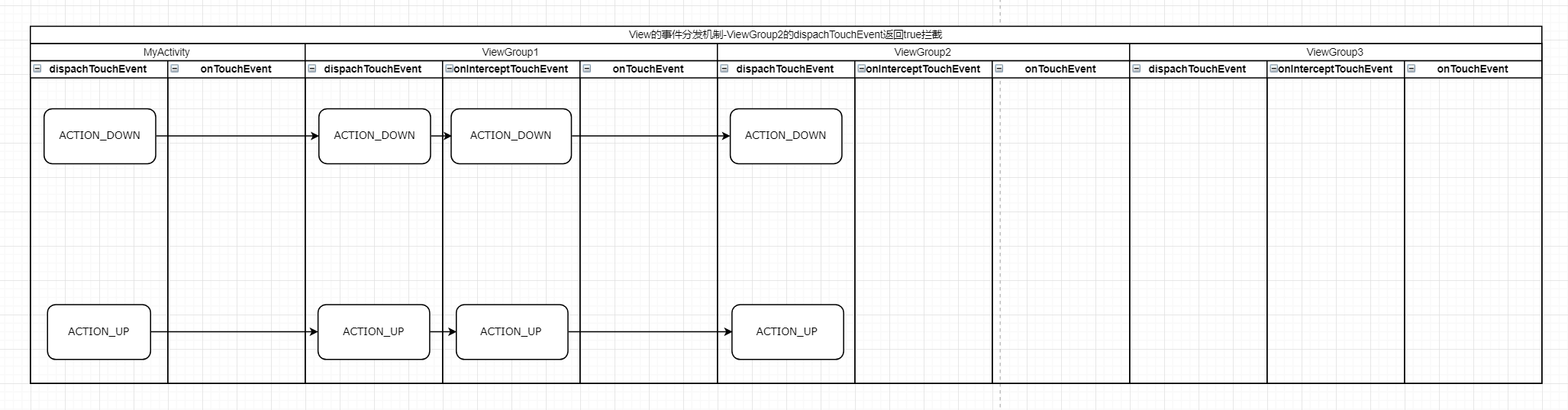
从图片可以看出,当ViewGroupon2的dispatchTouchEvent返回true后,事件不会再分发传送到ViewGroup3了,也不会分发到Activity的onTouchEvent了。而是事件到了ViewGroupon2的dispatchTouchEvent后,就停止了。dispatchTouchEvent返回true表示着事件不用再分发下去了。
四、ViewGroup2的onInterceptTouchEvent返回true
把ViewGroup2.java的onInterceptTouchEvent修改一下,return 返回true把事件拦截了
@Override

public boolean dispatchTouchEvent(MotionEvent ev) {

    Log.i(TAG, "dispatchTouchEvent    action:" + StringUtils.getMotionEventName(ev));

    boolean superReturn = super.dispatchTouchEvent(ev);

    Log.d(TAG, "dispatchTouchEvent    action:" + StringUtils.getMotionEventName(ev) + " " + superReturn);

    return superReturn;

}

@Override

public boolean onInterceptTouchEvent(MotionEvent ev) {

    Log.i(TAG, "onInterceptTouchEvent action:" + StringUtils.getMotionEventName(ev));

    Log.d(TAG, "onInterceptTouchEvent action:" + StringUtils.getMotionEventName(ev) + " " + true);

    return true;

}
此时的Log
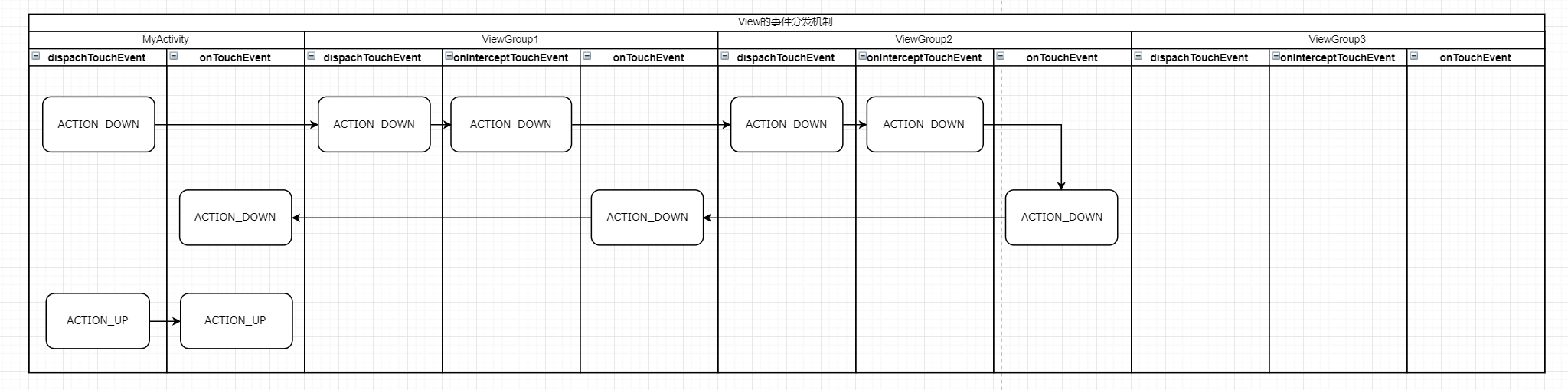
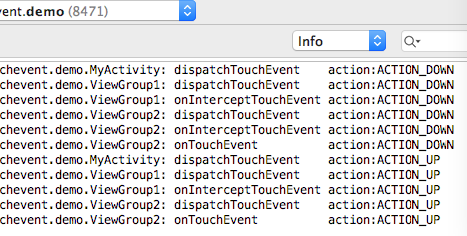
可以看出ViewGroup2拦截了事件,就不会继续分发到ViewGroup3;而且ViewGroup3拦截了事件又不处理事件,会把事件传递到Activity的onTouchEvent方法。
五、ViewGroup2的onInterceptTouchEvent、onTouchEvent返回true
把ViewGroup2.java的onTouchEvent修改一下,return 返回true把事件处理了
@Override

public boolean onInterceptTouchEvent(MotionEvent ev) {

    Log.i(TAG, "onInterceptTouchEvent action:" + StringUtils.getMotionEventName(ev));

    Log.d(TAG, "onInterceptTouchEvent action:" + StringUtils.getMotionEventName(ev) + " " + true);

    return true;

}

@Override

public boolean onTouchEvent(MotionEvent ev) {

    Log.i(TAG, "onTouchEvent          action:" + StringUtils.getMotionEventName(ev));

    Log.d(TAG, "onTouchEvent          action:" + StringUtils.getMotionEventName(ev) + " " + true);

    return true;

}
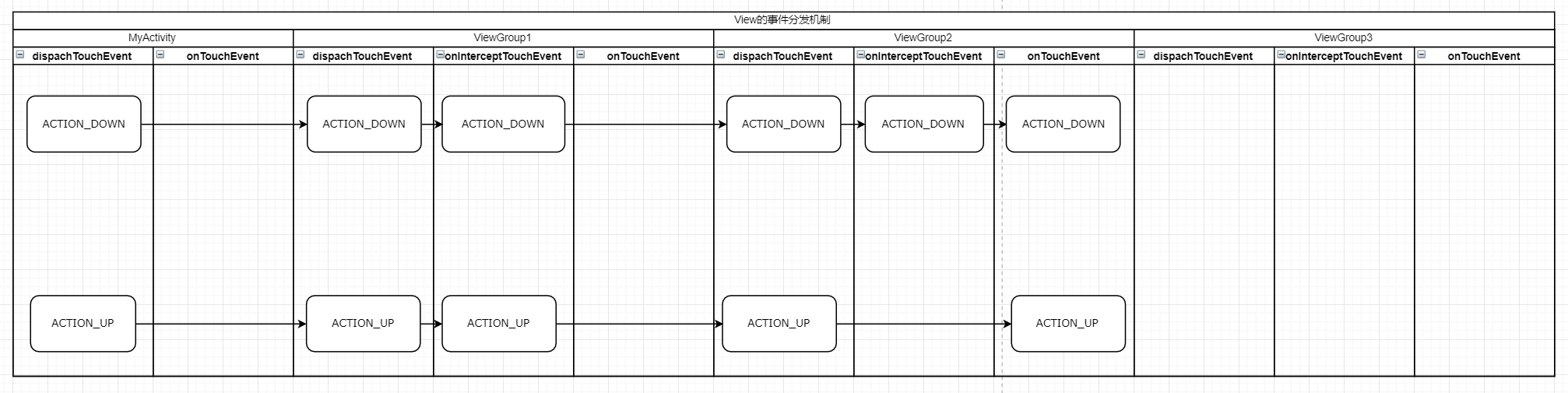
从流程可以总结出,当ViewGroup2的onInterceptTouchEvent、onTouchEvent都返回true时,事件最终会走到ViewGroup2的onTouchEvent方法处理事件,后续的事件都会走到这里来。
上面通过log分析很清楚了,是不是就这样够了?其实还不行,还要从源码的角度去分析下,为什么事件会这样分发。
二、通过源码分析事件分发
一、Activity的dispatchTouchEvent
先看看Activity下的dispatchTouchEvent
public boolean dispatchTouchEvent(MotionEvent ev) {

    if (ev.getAction() == MotionEvent.ACTION_DOWN) {

        onUserInteraction();

    }

    if (getWindow().superDispatchTouchEvent(ev)) {

        return true;

    }

    return onTouchEvent(ev);

}
onUserInteraction方法
public void onUserInteraction() {

}
从代码可以了解
调用Activity的onUserInteraction方法,action为down时会进去onUserInteraction方法,但是这个是空方法不做任何事情,可以忽略。
调用window的superDispatchTouchEvent方法,返回true时事件分发处理结束,否则会调用Activity的onTouchEvent方法。
调用Activity的onTouchEvent方法,进入这个条件的方法是window的superDispatchTouchEvent方法返回false。从上面的分析(二、不拦截处理任何事件)可以知道,所有子View的dispatchTouchEvent、onInterceptTouchEvent、onTouchEvent都返回false时会调动Activity的onTouchEvent方法,这个时候也是使window的superDispatchTouchEvent方法返回false成立。
二、window的superDispatchTouchEvent
Activity的getWindow方法
public Window getWindow() {

    return mWindow;

}
mWindow是如何赋值的?
是在Activity的attach方法赋值的,其实mWindow是PhoneWindow。
Activity的attach方法
final void attach(Context context, ActivityThread aThread,

        Instrumentation instr, IBinder token, int ident,

        Application application, Intent intent, ActivityInfo info,

        CharSequence title, Activity parent, String id,

        NonConfigurationInstances lastNonConfigurationInstances,

        Configuration config, String referrer, IVoiceInteractor voiceInteractor,

        Window window, ActivityConfigCallback activityConfigCallback) {

    attachBaseContext(context);

    mFragments.attachHost(null /*parent*/);

    mWindow = new PhoneWindow(this, window, activityConfigCallback);

    mWindow.setWindowControllerCallback(this);

    mWindow.setCallback(this);

    mWindow.setOnWindowDismissedCallback(this);

    mWindow.getLayoutInflater().setPrivateFactory(this);

	...

}
PhoneWindow的superDispatchTouchEvent方法
private DecorView mDecor;

@Override

public boolean superDispatchTouchEvent(MotionEvent event) {

    return mDecor.superDispatchTouchEvent(event);

}
DevorView的superDispatchTouchEvent
public boolean superDispatchTouchEvent(MotionEvent event) {

    return super.dispatchTouchEvent(event);

}
而mDecor是一个继承FrameLayout的DecorView,就这样把事件分发到ViewGroup上了。
三、ViewGroup的dispatchTouchEvent
3.1 ViewGroup拦截事件的情况
        // Check for interception.

        final boolean intercepted;

        if (actionMasked == MotionEvent.ACTION_DOWN

                || mFirstTouchTarget != null) {

            final boolean disallowIntercept = (mGroupFlags & FLAG_DISALLOW_INTERCEPT) != 0;

            if (!disallowIntercept) {

                intercepted = onInterceptTouchEvent(ev);

                ev.setAction(action); // restore action in case it was changed

            } else {

                intercepted = false;

            }

        } else {

            // There are no touch targets and this action is not an initial down

            // so this view group continues to intercept touches.

            intercepted = true;

        }
这里分为2种情况会判断是否需要拦截,也就是当某一条件成立时,会执行onInterceptTouchEvent判断是否需要拦截事件。
当actionMasked == MotionEvent.ACTION_DOWN时。
当mFirstTouchTarget != null时。mFirstTouchTarget是成功处理事件的ViewGroup的子View,也就是ViewGroup的子View在以下情况返回true时,这个在log分析流程图轻易得到:
2.1 dispatchTouchEvent返回true
2.2 如果子View是ViewGroup时,onInterceptTouchEvent、onTouchEvent返回true
另外还有一种情况是disallowIntercept为true时,intercepted直接赋值false不进行拦截。FLAG_DISALLOW_INTERCEPT是通过requestDisallowInterceptTouchEvent方法来设置的,用于在子View中设置,设置后ViewGroup只能拦截down事件,无法拦截其他move、up、cancel事件。为什么ViewGroup还能拦截down事件呢?因为ViewGroup在down事件时进行了重置,看看以下代码
// Handle an initial down.

if (actionMasked == MotionEvent.ACTION_DOWN) {

    // Throw away all previous state when starting a new touch gesture.

    // The framework may have dropped the up or cancel event for the previous gesture

    // due to an app switch, ANR, or some other state change.

    cancelAndClearTouchTargets(ev);

    resetTouchState();

}

private void resetTouchState() {

    clearTouchTargets();

    resetCancelNextUpFlag(this);

    mGroupFlags &= ~FLAG_DISALLOW_INTERCEPT;

    mNestedScrollAxes = SCROLL_AXIS_NONE;

}
通过源码可以了解到,ViewGroup拦截事件后,不再调用onInterceptTouchEvent,而是直接交给mFirstTouchTarget的onTouchEvent处理,如果该onTouchEvent不处理最终会交给Activity的onTouchEvent。
3.2 ViewGroup不拦截事件的情况
ViewGroup不拦截事件时,会遍历子View,使事件分发到子View进行处理。
final View[] children = mChildren;

for (int i = childrenCount - 1; i >= 0; i--) {

    final int childIndex = getAndVerifyPreorderedIndex(

            childrenCount, i, customOrder);

    final View child = getAndVerifyPreorderedView(

            preorderedList, children, childIndex);

    // If there is a view that has accessibility focus we want it

    // to get the event first and if not handled we will perform a

    // normal dispatch. We may do a double iteration but this is

    // safer given the timeframe.

    if (childWithAccessibilityFocus != null) {

        if (childWithAccessibilityFocus != child) {

            continue;

        }

        childWithAccessibilityFocus = null;

        i = childrenCount - 1;

    }

    if (!canViewReceivePointerEvents(child)

            || !isTransformedTouchPointInView(x, y, child, null)) {

        ev.setTargetAccessibilityFocus(false);

        continue;

    }

    newTouchTarget = getTouchTarget(child);

    if (newTouchTarget != null) {

        // Child is already receiving touch within its bounds.

        // Give it the new pointer in addition to the ones it is handling.

        newTouchTarget.pointerIdBits |= idBitsToAssign;

        break;

    }

    resetCancelNextUpFlag(child);

    if (dispatchTransformedTouchEvent(ev, false, child, idBitsToAssign)) {

        // Child wants to receive touch within its bounds.

        mLastTouchDownTime = ev.getDownTime();

        if (preorderedList != null) {

            // childIndex points into presorted list, find original index

            for (int j = 0; j < childrenCount; j++) {

                if (children[childIndex] == mChildren[j]) {

                    mLastTouchDownIndex = j;

                    break;

                }

            }

        } else {

            mLastTouchDownIndex = childIndex;

        }

        mLastTouchDownX = ev.getX();

        mLastTouchDownY = ev.getY();

        newTouchTarget = addTouchTarget(child, idBitsToAssign);

        alreadyDispatchedToNewTouchTarget = true;

        break;

    }

}
3.2.1 寻找可接收事件的子View
通过canViewReceivePointerEvents判断子View是否能够接收到点击事件。必须符合2种情况,缺一不可:1、点击事件的坐标落在在子View的区域内;2、子View没有正在播放动画。满足条件后,调用dispatchTransformedTouchEvent,其实也是调用子View的dispatchTouchEvent。
private static boolean canViewReceivePointerEvents(@NonNull View child) {

    return (child.mViewFlags & VISIBILITY_MASK) == VISIBLE

            || child.getAnimation() != null;

}

protected boolean isTransformedTouchPointInView(float x, float y, View child,

        PointF outLocalPoint) {

    final float[] point = getTempPoint();

    point[0] = x;

    point[1] = y;

    transformPointToViewLocal(point, child);

    final boolean isInView = child.pointInView(point[0], point[1]);

    if (isInView && outLocalPoint != null) {

        outLocalPoint.set(point[0], point[1]);

    }

    return isInView;

}

private boolean dispatchTransformedTouchEvent(MotionEvent event, boolean cancel,

        View child, int desiredPointerIdBits) {

    final boolean handled;

    final int oldAction = event.getAction();

    if (cancel || oldAction == MotionEvent.ACTION_CANCEL) {

        event.setAction(MotionEvent.ACTION_CANCEL);

        if (child == null) {

            handled = super.dispatchTouchEvent(event);

        } else {

            handled = child.dispatchTouchEvent(event);

        }

        event.setAction(oldAction);

        return handled;

    }

    ...

    // Perform any necessary transformations and dispatch.

    if (child == null) {

        handled = super.dispatchTouchEvent(transformedEvent);

    } else {

        final float offsetX = mScrollX - child.mLeft;

        final float offsetY = mScrollY - child.mTop;

        transformedEvent.offsetLocation(offsetX, offsetY);

        if (! child.hasIdentityMatrix()) {

            transformedEvent.transform(child.getInverseMatrix());

        }

        handled = child.dispatchTouchEvent(transformedEvent);

    }

    // Done.

    transformedEvent.recycle();

    return handled;

}
当dispatchTransformedTouchEvent返回true时,结束for循环遍历,赋值newTouchTarget,相当于发现了可以接收事件的View,不用再继续找了。
newTouchTarget = addTouchTarget(child, idBitsToAssign);

alreadyDispatchedToNewTouchTarget = true;

break;
在addTouchTarget方法赋值mFirstTouchTarget。
private TouchTarget addTouchTarget(@NonNull View child, int pointerIdBits) {

    final TouchTarget target = TouchTarget.obtain(child, pointerIdBits);

    target.next = mFirstTouchTarget;

    mFirstTouchTarget = target;

    return target;

}
3.2.2 ViewGroup自己处理事件
另一种情况是mFirstTouchTarget为空时,ViewGroup自己处理事件,这里注意第三个参数为null,ViewGroup的super.dispatchTouchEvent将调用View的dispatchTouchEvent。
if (mFirstTouchTarget == null) {

    // No touch targets so treat this as an ordinary view.

    handled = dispatchTransformedTouchEvent(ev, canceled, null,

            TouchTarget.ALL_POINTER_IDS);

}
3.3 View处理点击事件的过程
View的dispatchTouchEvent是怎么处理事件的呢?
public boolean dispatchTouchEvent(MotionEvent event) {

    boolean result = false;

	...

    if (onFilterTouchEventForSecurity(event)) {

        if ((mViewFlags & ENABLED_MASK) == ENABLED && handleScrollBarDragging(event)) {

            result = true;

        }

        //noinspection SimplifiableIfStatement

        ListenerInfo li = mListenerInfo;

        if (li != null && li.mOnTouchListener != null

                && (mViewFlags & ENABLED_MASK) == ENABLED

                && li.mOnTouchListener.onTouch(this, event)) {

            result = true;

        }

        if (!result && onTouchEvent(event)) {

            result = true;

        }

    }

	...

    return result;

}
首先使用onFilterTouchEventForSecurity方法过滤不符合应用安全策略的触摸事件。
 public boolean onFilterTouchEventForSecurity(MotionEvent event) {

     //noinspection RedundantIfStatement

     if ((mViewFlags & FILTER_TOUCHES_WHEN_OBSCURED) != 0

             && (event.getFlags() & MotionEvent.FLAG_WINDOW_IS_OBSCURED) != 0) {

         // Window is obscured, drop this touch.

         return false;

     }

     return true;

 }
mOnTouchListener != null判断是否设置了OnTouchEvent,设置了就执行mOnTouchListener.onTouch并返回true,不再执行onTouchEvent。这里得出OnTouchEvent的优先级高于OnTouchEvent,便于使用setOnTouchListener设置处理点击事件。
另一种情况是进入onTouchEvent进行处理。
 public boolean onTouchEvent(MotionEvent event) {

     final float x = event.getX();

     final float y = event.getY();

     final int viewFlags = mViewFlags;

     final int action = event.getAction();

     final boolean clickable = ((viewFlags & CLICKABLE) == CLICKABLE

             || (viewFlags & LONG_CLICKABLE) == LONG_CLICKABLE)

             || (viewFlags & CONTEXT_CLICKABLE) == CONTEXT_CLICKABLE;

     if ((viewFlags & ENABLED_MASK) == DISABLED) {

         if (action == MotionEvent.ACTION_UP && (mPrivateFlags & PFLAG_PRESSED) != 0) {

             setPressed(false);

         }

         mPrivateFlags3 &= ~PFLAG3_FINGER_DOWN;

         // A disabled view that is clickable still consumes the touch

         // events, it just doesn't respond to them.

         return clickable;

     }

 	...

 }
当View不可用时,依然会处理事件,只是看起来不可用。
接着执行mTouchDelegate.onTouchEvent
if (mTouchDelegate != null) {

    if (mTouchDelegate.onTouchEvent(event)) {

        return true;

    }

}
下面看看up事件是怎么处理的
/**

 * <p>Indicates this view can display a tooltip on hover or long press.</p>

 * {@hide}

 */

static final int TOOLTIP = 0x40000000;

if (clickable || (viewFlags & TOOLTIP) == TOOLTIP) {

    switch (action) {

        case MotionEvent.ACTION_UP:

            mPrivateFlags3 &= ~PFLAG3_FINGER_DOWN;

            if ((viewFlags & TOOLTIP) == TOOLTIP) {

                handleTooltipUp();

            }

            if (!clickable) {

                removeTapCallback();

                removeLongPressCallback();

                mInContextButtonPress = false;

                mHasPerformedLongPress = false;

                mIgnoreNextUpEvent = false;

                break;

            }

            boolean prepressed = (mPrivateFlags & PFLAG_PREPRESSED) != 0;

            if ((mPrivateFlags & PFLAG_PRESSED) != 0 || prepressed) {

                // take focus if we don't have it already and we should in

                // touch mode.

                boolean focusTaken = false;

                if (isFocusable() && isFocusableInTouchMode() && !isFocused()) {

                    focusTaken = requestFocus();

                }

                if (prepressed) {

                    // The button is being released before we actually

                    // showed it as pressed.  Make it show the pressed

                    // state now (before scheduling the click) to ensure

                    // the user sees it.

                    setPressed(true, x, y);

                }

                if (!mHasPerformedLongPress && !mIgnoreNextUpEvent) {

                    // This is a tap, so remove the longpress check

                    removeLongPressCallback();

                    // Only perform take click actions if we were in the pressed state

                    if (!focusTaken) {

                        // Use a Runnable and post this rather than calling

                        // performClick directly. This lets other visual state

                        // of the view update before click actions start.

                        if (mPerformClick == null) {

                            mPerformClick = new PerformClick();

                        }

                        if (!post(mPerformClick)) {

                            performClickInternal();

                        }

                    }

                }

                if (mUnsetPressedState == null) {

                    mUnsetPressedState = new UnsetPressedState();

                }

                if (prepressed) {

                    postDelayed(mUnsetPressedState,

                            ViewConfiguration.getPressedStateDuration());

                } else if (!post(mUnsetPressedState)) {

                    // If the post failed, unpress right now

                    mUnsetPressedState.run();

                }

                removeTapCallback();

            }

            mIgnoreNextUpEvent = false;

            break;

            ...

    }

    return true;

}
从上面代码可以了解,clickable、TOOLTIP(长按)有一个为true时,就会消耗事件,使onTouchEvent返回true。其中PerformClick内部调用了performClick方法。
public boolean performClick() {

    // We still need to call this method to handle the cases where performClick() was called

    // externally, instead of through performClickInternal()

    notifyAutofillManagerOnClick();

    final boolean result;

    final ListenerInfo li = mListenerInfo;

    if (li != null && li.mOnClickListener != null) {

        playSoundEffect(SoundEffectConstants.CLICK);

        li.mOnClickListener.onClick(this);

        result = true;

    } else {

        result = false;

    }

    sendAccessibilityEvent(AccessibilityEvent.TYPE_VIEW_CLICKED);

    notifyEnterOrExitForAutoFillIfNeeded(true);

    return result;

}
如果View设置了OnClickListener,那performClick会调用内部的onClick方法。
public void setOnClickListener(@Nullable OnClickListener l) {

    if (!isClickable()) {

        setClickable(true);

    }

    getListenerInfo().mOnClickListener = l;

}

public void setOnLongClickListener(@Nullable OnLongClickListener l) {

    if (!isLongClickable()) {

        setLongClickable(true);

    }

    getListenerInfo().mOnLongClickListener = l;

}
通过setOnClickListener设置clickable,通过setOnLongClickListener设置LONG_CLICKABLE长按事件。设置后使得onTouchEvent返回true。到这里我们已经分析完成点击事件的分发过程了。
本文地址:http://libill.github.io/2019/09/09/android-touch-event/
本文参考以下内容:
1、《Android开发艺术探索》
一文读懂 Android TouchEvent 事件分发、拦截、处理过程的更多相关文章
- 一文读懂Android进程及TCP动态心跳保活
一直以来,APP进程保活都是 各软件提供商 和 个人开发者 头疼的问题.毕竟一切的商业模式都建立在用户对APP的使用上,因此保证APP进程的唤醒,提升用户的使用时间,便是软件提供商和个人开发者的永恒追 ...
- kubernetes基础——一文读懂k8s
容器 容器与虚拟机对比图(左边为容器.右边为虚拟机) 容器技术是虚拟化技术的一种,以Docker为例,Docker利用Linux的LXC(LinuX Containers)技术.CGroup(Co ...
- 一文读懂高性能网络编程中的I/O模型
1.前言 随着互联网的发展,面对海量用户高并发业务,传统的阻塞式的服务端架构模式已经无能为力.本文(和下篇<高性能网络编程(六):一文读懂高性能网络编程中的线程模型>)旨在为大家提供有用的 ...
- 即时通讯新手入门:一文读懂什么是Nginx?它能否实现IM的负载均衡?
本文引用了“蔷薇Nina”的“Nginx 相关介绍(Nginx是什么?能干嘛?)”一文部分内容,感谢作者的无私分享. 1.引言 Nginx(及其衍生产品)是目前被大量使用的服务端反向代理和负载均衡 ...
- Android Touch事件分发过程
虽然网络上已经有非常多关于这个话题的优秀文章了,但还是写了这篇文章,主要还是为了加强自己的记忆吧,自己过一遍总比看别人的分析要深刻得多.那就走起吧. 简单演示样例 先看一个演示样例 : 布局文件 : ...
- 大数据篇:一文读懂@数据仓库(PPT文字版)
大数据篇:一文读懂@数据仓库 1 网络词汇总结 1.1 数据中台 数据中台是聚合和治理跨域数据,将数据抽象封装成服务,提供给前台以业务价值的逻辑概念. 数据中台是一套可持续"让企业的数据用起 ...
- Android View 事件分发机制 源码解析 (上)
一直想写事件分发机制的文章,不管咋样,也得自己研究下事件分发的源码,写出心得~ 首先我们先写个简单的例子来测试View的事件转发的流程~ 1.案例 为了更好的研究View的事件转发,我们自定以一个My ...
- Android之事件分发机制
本文主要包括以下内容 view的事件分发 viewGroup的事件分发 首先来看两张图 在执行touch事件时 首先执行dispatchTouchEvent方法,执行事件分发. 再执行onInterc ...
- 【转】Android TouchEvent事件传递机制
Android TouchEvent事件传递机制 事件机制参考地址: http://www.cnblogs.com/sunzn/archive/2013/05/10/3064129.html ht ...
随机推荐
- CSS3 filter 模糊滤镜的应用
CSS3 filter 模糊滤镜的应用 在segmentfault上回答过的一个问题,如何将网页CSS背景图高斯模糊且全屏显示当时没有深入了解,只觉得滤镜应该只是应用于图片上的.而且各大网站的de ...
- 湫湫系列故事——设计风景线 HDU - 4514
题目链接:https://vjudge.net/problem/HDU-4514 题意:判断没有没有环,如果没有环,通俗的讲就是找出一条最长的路,相当于一笔画能画多长. 思路:dfs判环. 最后就是没 ...
- 在 树莓派(Raspberry PI) 中使用 Docker 运行 MySQL
在 树莓派(Raspberry PI) 中使用 Docker 运行 MySQL 本文主要利用 biarms 提供的 Dockerfile 进行安装. 笔者最新发现! MySQL 5.7 Docker ...
- ext container的使用的场景
container 是 panel 简化,他称之为容器,而panel则是面板. 如果不需要类似Ext.panel.Panel,Ext.window.Window和Ext.tab.Panel 等功能,则 ...
- 【Java例题】8.1手工编写加法器的可视化程序
1. 手工编写加法器的可视化程序. 一个Frame窗体容器,布局为null,三个TextField组件,一个Button组件. Button组件上添加ActionEvent事件监听器ActionLis ...
- 记一次织梦cms渗透测试
记一次织梦cms渗透测试 0x01 前言 本次测试的整个流程:枚举用户名-针对性暴破-登录后台-后台编辑php文件getshell. 0x02 过程 1.登录功能模块存在用户名枚举缺陷,利用此权限先枚 ...
- 干货 |《从Lucene到Elasticsearch全文检索实战》拆解实践
1.题记 2018年3月初,萌生了一个想法:对Elasticsearch相关的技术书籍做拆解阅读,该想法源自非计算机领域红火已久的[樊登读书会].得到的每天听本书.XX拆书帮等. 目前市面上Elast ...
- [科研民工笔记1]安装Ubuntu到U盘
主要是台式机只有一块固态,暂时没有加固态的打算,所以就买了一个64g的闪迪cz73,装了Ubuntu.以后可能考虑加一块硬盘. 前期准备:VMware.官网下载安装包(这里以16.04为例) 第一部分 ...
- javaweb基础整理随笔-----上传与下载步骤详解
这次整理的是上传与下载的原生代码解析: 上传:1.对页面的要求:enctype="multipart/form-data" method="post" ...
- element ui 登录验证,路由守卫
<template> <!-- el-form :label-position="labelPosition" 设置label的位置 :model 用来给表单设置 ...