
爬虫学习(二)--爬取360应用市场app信息
欢迎加入python学习交流群 667279387
爬虫学习
爬虫学习(一)—爬取电影天堂下载链接
爬虫学习(二)–爬取360应用市场app信息
代码环境:windows10, python 3.5
主要用的软件包:SQLAlchemy,re
初学爬虫,没有使用scrapy框架,而是自己简单打了一个框架。代码里面也没有考虑记录日志以及错误处理等方面的内容,只是能简单工作。如果需要可以在此源码的基础上面进行修改。源码下载地址在文章末尾。
1、分析网页源码
本次抓取主要抓取了app名字,下载次数,评分,开发公司,最新版本号,更新时间。
先打开一个具体的软件页面进行查看网页源码
http://zhushou.360.cn/detail/index/soft_id/77208下面是截取含有具体信息的两个网页源码的片段。
<h2 id="app-name"><span title="360手机卫士-一键连免费wifi">360手机卫士-一键连免费wi...</span><cite class="verify_tag"></cite><cite class="white_tag"></cite></h2>

<div class="pf">                                            <span class="s-1 js-votepanel">8.8<em>分</em></span>

<span class="s-2"><a href="#comment-list" id="comment-num"><span class="js-comments review-count-all" style="margin:0;">0</span>条评价</a></span>

<span class="s-3">下载:187373万次</span>

<span class="s-3">15.82M</span>
<td width="50%"><strong>作者:</strong>北京奇虎科技有限公司</td>

<td width="50%"><strong>更新时间:</strong>2017-09-13</td>

                                                                                                        <td><strong>版本:</strong>7.7.4<!--versioncode:257--><!--updatetime:2017-09-13--></td>

                                                                                                                                                                            <td><strong>系统:</strong>Android 4.0.3以上</td>                                                                                                                                                                                                                                                                                                                       <td colspan="2"><strong>语言:</strong>中文</td>
本次解析也没有xpath解析,而是直接用正则来匹配。下面是正则匹配时用到的代码。
r_name = re.compile(u"<title>(.*?)_360手机助手</title>", re.DOTALL)

r_download_num = re.compile(u'<span class="s-3">下载:(.*?)次</span>', re.DOTALL)

r_score = re.compile(u'<span class="s-1 js-votepanel">(.*?)<em>分</em>', re.DOTALL)

r_author = re.compile(u"<strong>作者:</strong>(.*?)</td>", re.DOTALL)

r_version = re.compile(u"<strong>版本:</strong>(.*?)<!--", re.DOTALL)

r_update_time = re.compile(u"<strong>更新时间:</strong>(.*?)</td>", re.DOTALL)
下面是解析页面的用法
m = r_name.search(html)

app_name = m.group(m.lastindex).strip()
其他字段的解析基本类似。
2、设计数据库字段
这里是利用了SQLAlchemy来实现ORM。
class App360(BaseModel):

    __tablename__ = 'app360'

    id = Column(Integer, primary_key=True, autoincrement=True)

    soft_id = Column(Integer, nullable=False)

    name = Column(String(100), nullable=False)

    author = Column(String(50), nullable=False)

    download_num = Column(String(50), nullable=False)

    score = Column(Float, nullable=False)

    # comments_num = Column(Integer, nullable=False)

    update_time = Column(DateTime, nullable=False)

    version = Column(String(50))
数据库管理的代码,主要实现了数据库的初始化,以及数据的插入和查询。
class DbManager(object):

    def __init__(self, Dbstring):

        self.engine = create_engine(Dbstring, echo=True)

        self._dbSession = scoped_session(

            sessionmaker(

                autocommit=False,

                autoflush=False,

                bind=self.engine

            )

        )

    def init_db(self):

        BaseModel.metadata.create_all(self.engine)

    def closeDB(self):

        self._dbSession().close()

    def getAppWithSoftId(self, soft_id):

        db_item = self._dbSession().query(App360).filter(App360.soft_id == soft_id).first()

        if db_item:

            return db_item

        else:

            return None

    def saveAppItem(self, app_object):

        db_item = self._dbSession().query(App360).filter(App360.soft_id == app_object.soft_id).first()

        if not db_item:

            self._dbSession().add(app_object)

            self._dbSession().commit()
3、抓取页面
获取到一个页面里出来的所有app的soft_id
r_url = re.compile(u'<a sid="(.*?)" href=', re.DOTALL)

def get_onePage_SoftId(url):

    res_html = do_request(url)

    soft_ids = r_url.findall(res_html)

    return soft_ids
获取单个app的详细信息
def get_app_detail(soft_id):

    db_item = db.getAppWithSoftId(soft_id)

    if not db_item:

        url = "http://zhushou.360.cn/detail/index/soft_id/" + str(soft_id)

        app_html = do_request(url)

        app_item = extract_details(app_html, soft_id)

        db.saveAppItem(app_object=app_item)
这里简单粗暴的用了多个循环来获取,实际考虑性能的话,此处应该优化 。后续有时间了再学习研究下怎么优化。
    for url in start_urls:

        for i in range(50):

            url = "http://zhushou.360.cn"+url+"?page=%s"%i

            ids = get_onePage_SoftId(url)

            for id in ids:

                get_app_detail(id)
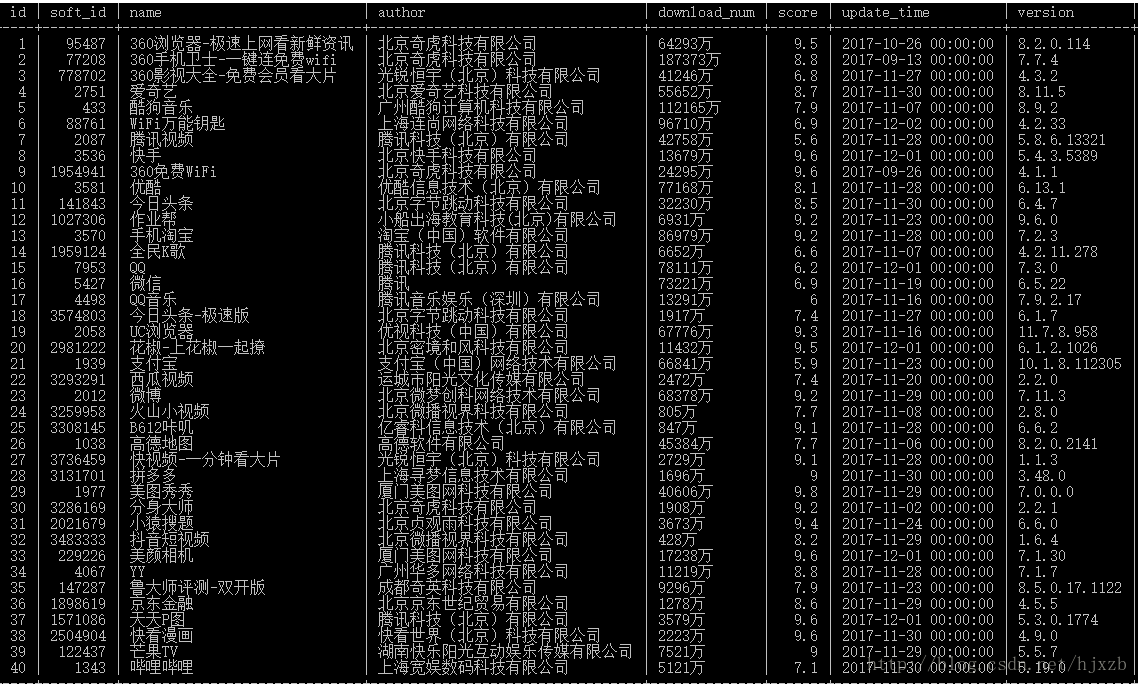
获取到的数据截图如下:
源码下载地址:
链接:https://pan.baidu.com/s/1sl6xPEl 密码:k48g
————————————————————————————
后续经过改进,用了并行处理,快了很多,7000多条记录,大概10来分钟全部下载好了。
from utils import *

from concurrent import futures

from models import DbManager, App360

def get_app_detail(soft_id):

    db_item = db.getAppWithSoftId(soft_id)

    if not db_item:

        url = "http://zhushou.360.cn/detail/index/soft_id/" + str(soft_id)

        app_html = do_request(url)

        app_item = extract_details(app_html, soft_id)

        db.saveAppItem(app_object=app_item)

def get_onePage_SoftId(url):

    res_html = do_request(url)

    soft_ids = r_url.findall(res_html)

    if soft_ids:

        return soft_ids

    else:

        return []

if __name__=="__main__":

    # 初始化数据库

    DB_CONNECT_STRING = 'mysql+pymysql://root:hillstone@localhost:3306/app?charset=utf8'

    db = DbManager(Dbstring=DB_CONNECT_STRING)

    db.init_db()

    for url in start_urls:

        for i in range(50):

            one_url = "http://zhushou.360.cn"+url+"?page=%s"%str(i)

            #ids = get_onePage_SoftId(url)

            executor = futures.ThreadPoolExecutor(max_workers=20)

            results = executor.map(get_app_detail, get_onePage_SoftId(one_url))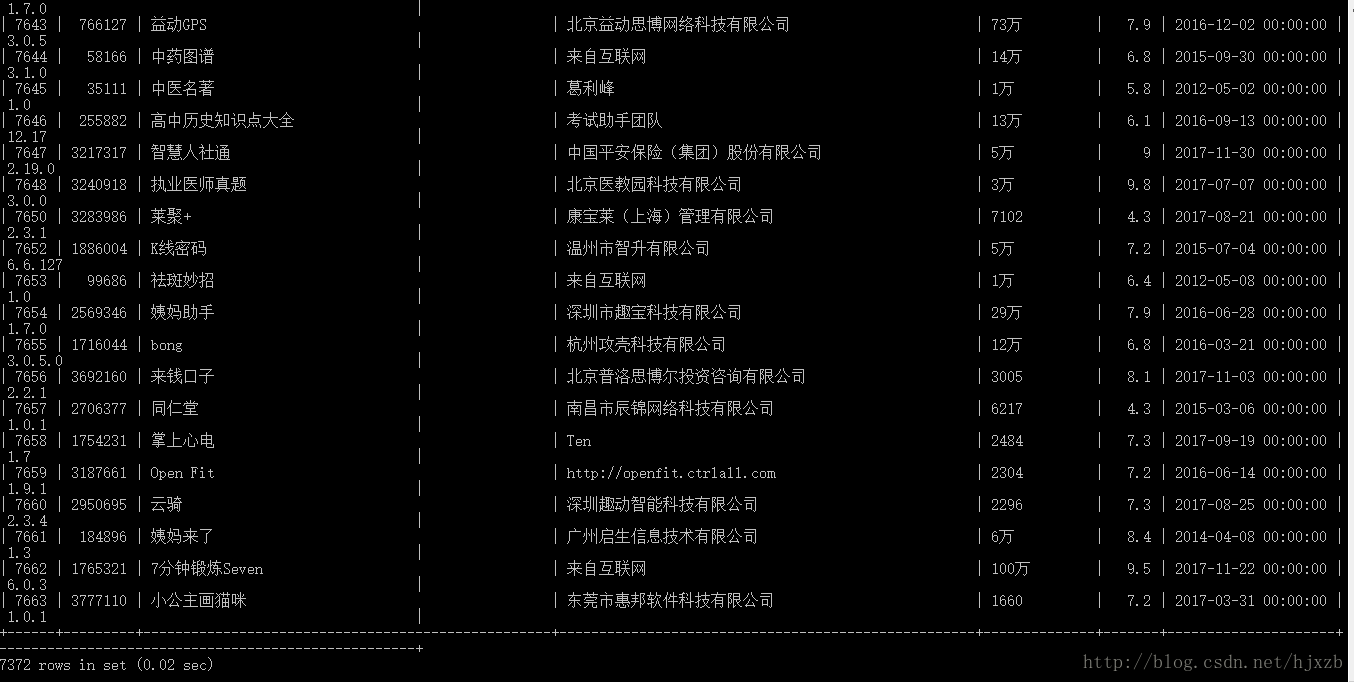
更新后的代码地址:
https://github.com/Zhanben/python/tree/master/360Spider
如果源码对你有用,请评论下博客说声谢谢吧~
欢迎加入python学习交流群 667279387
爬虫学习(二)--爬取360应用市场app信息的更多相关文章
- Python爬虫学习(二) ——————爬取前程无忧招聘信息并写入excel
作为一名Pythoner,相信大家对Python的就业前景或多或少会有一些关注.索性我们就写一个爬虫去获取一些我们需要的信息,今天我们要爬取的是前程无忧!说干就干!进入到前程无忧的官网,输入关键字&q ...
- Python爬虫使用selenium爬取qq群的成员信息(全自动实现自动登陆)
前言 本文的文字及图片来源于网络,仅供学习.交流使用,不具有任何商业用途,版权归原作者所有,如有问题请及时联系我们以作处理. 作者: python小爬虫 PS:如有需要Python学习资料的小伙伴可以 ...
- Python 爬虫入门(二)——爬取妹子图
Python 爬虫入门 听说你写代码没动力?本文就给你动力,爬取妹子图.如果这也没动力那就没救了. GitHub 地址: https://github.com/injetlee/Python/blob ...
- python爬虫学习(7) —— 爬取你的AC代码
上一篇文章中,我们介绍了python爬虫利器--requests,并且拿HDU做了小测试. 这篇文章,我们来爬取一下自己AC的代码. 1 确定ac代码对应的页面 如下图所示,我们一般情况可以通过该顺序 ...
- 爬虫学习--MOOC爬取豆瓣top250
scrapy框架 scrapy是一套基于Twisted的异步处理框架,是纯python实现的爬虫框架,用户只需要定制开发几个模块就可以轻松实现一个爬虫,用来抓取网页内容或者各种图片. scrapy E ...
- python爬虫学习之爬取全国各省市县级城市邮政编码
实例需求:运用python语言在http://www.ip138.com/post/网站爬取全国各个省市县级城市的邮政编码,并且保存在excel文件中 实例环境:python3.7 requests库 ...
- python - 爬虫入门练习 爬取链家网二手房信息
import requests from bs4 import BeautifulSoup import sqlite3 conn = sqlite3.connect("test.db&qu ...
- [python爬虫] Selenium定向爬取虎扑篮球海量精美图片
前言: 作为一名从小就看篮球的球迷,会经常逛虎扑篮球及湿乎乎等论坛,在论坛里面会存在很多精美图片,包括NBA球队.CBA明星.花边新闻.球鞋美女等等,如果一张张右键另存为的话真是手都点疼了.作为程序员 ...
- 萌新学习Python爬取B站弹幕+R语言分词demo说明
代码地址如下:http://www.demodashi.com/demo/11578.html 一.写在前面 之前在简书首页看到了Python爬虫的介绍,于是就想着爬取B站弹幕并绘制词云,因此有了这样 ...
随机推荐
- docker showdoc安装
自动脚本安装 前言 自动脚本脚本利用docker来安装运行环境,适用于linux服务器.如果你的服务器没有docker服务,脚本会尝试安装之.安装docker的过程可能有些慢.如果你已经安装过dock ...
- java中继承,子类是否继承父类的构造函数
java中继承,子类是否继承父类的构造函数 java继承中子类是不会继承父类的构造函数的,只是必须调用(隐式或者显式) 下面来看例子: public class TestExtends { publi ...
- PHP Laravel 6.2 中用于用户登录的新密码确认流程
Laravel 发布了 v6.2 版本,它添加了一个新的密码确认功能,该功能使你可以要求已登录的用户重新输入密码,然后才能访问路由. 在你执行敏感操作的时候,这个功能就类似GitHub确认对话框.在 ...
- C语言作业|08
问题 答案 这个作业的属于那个课程 C语言程序设计II 这个作业要求在哪里 https://edu.cnblogs.com/campus/zswxy/CST2019-2/homework/9977 我 ...
- Javascript脚本语言
找组件用 id (唯一) 2.name 样式 使用分类 1 页面中 2 建JS文件 可以放在head也可以在body 工作区可以有 1 全局变量 2 由多个函数构成 标签编辑器 onChange 改变 ...
- vue-cli从2升级到3报错error 404 Not Found: @wry/context@^0.4.0
vue3出来了,想尝尝鲜. 于是按官方的方法卸载2安装3. npm uninstall vue-cli -g npm install -g @vue/cli 但是报错了 error 404 Not F ...
- python2中的SSL:CERTIFICATE_VERIFY_FAILED错误的解决办法
在使用urllib2访问一个自签名的https链接时,对于python2.6以下版本,TLS握手期间是不会检查服务器X509的证书签名是否是CA的可信任根证书.不过python2.7以后改变了这种情况 ...
- C#泛型自己的理解和总结
万事开头难,今天先从随笔开始,记录工作中平时不太注意到的知识点.今天开始说下泛型. 泛型在我们项目中很是常见,使用很广泛,我觉的它有以下几个优点. 1.安全性. 2.性能. 3.二进制代码的重用. 4 ...
- 今天是python专场UDP socket 链接
type = SOCK_DGRAM UDP 协议的通信优势 允许一个服务器的同时和多个客户端通信 server import socket sk = socket.socket(type=socket ...
- OAuth 2.0 概念及授权流程梳理
本文可以转载,但请注明出处https://www.cnblogs.com/hellxz/p/oauth2_process.html OAuth2 的概念 OAuth是一个关于授权的开放网络标准,OAu ...