
pytorch笔记
Tensor create
#创建特定shape value为random值的tensor

input = torch.rand((64,64,3))
Tensor slice
- 以[2,3]矩阵为例,slice后可以得到任意shape的矩阵,并不是说一定会小于2行3列.
import torch

truths=torch.Tensor([[1,2,3],[4,5,6]])

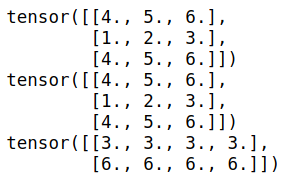
#代表新生成一个[3,]的矩阵,行位置分别取原先矩阵的第1,第0,第1行.

print(truths[[1,0,1],:])

print(truths[[1,0,1]]) #等同于truths[[1,0,1],:]

#代表新生成一个[,4]的矩阵,列位置分别取原先矩阵的第2,第2,第2,第2列

print(truths[:,[2,2,2,2]])
输出
- 用bool型的tensor去切片
import torch

x = torch.tensor([[1,2,3],[4,5,6]])

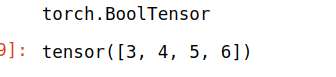
index = x>2

print(index.type())

x[index]
tensor扩展
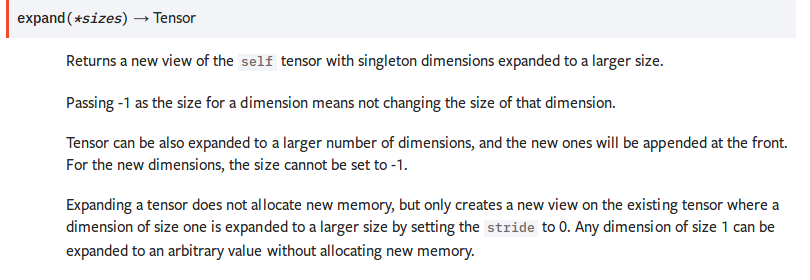
Expanding a tensor does not allocate new memory, but only creates a new view on the existing tensor where a dimension of size one is expanded to a larger size by setting the stride to 0. Any dimension of size 1 can be expanded to an arbitrary value without allocating new memory.
并不分配新内存. 只是改变了已有tensor的view. size为1的维度被扩展为更大的size.
>>> x = torch.tensor([[1], [2], [3]])

>>> x.size()

torch.Size([3, 1])

>>> x.expand(3, 4)

tensor([[ 1,  1,  1,  1],

        [ 2,  2,  2,  2],

        [ 3,  3,  3,  3]])

>>> x.expand(-1, 4)   # -1 means not changing the size of that dimension

tensor([[ 1,  1,  1,  1],

        [ 2,  2,  2,  2],

        [ 3,  3,  3,  3]])
gather
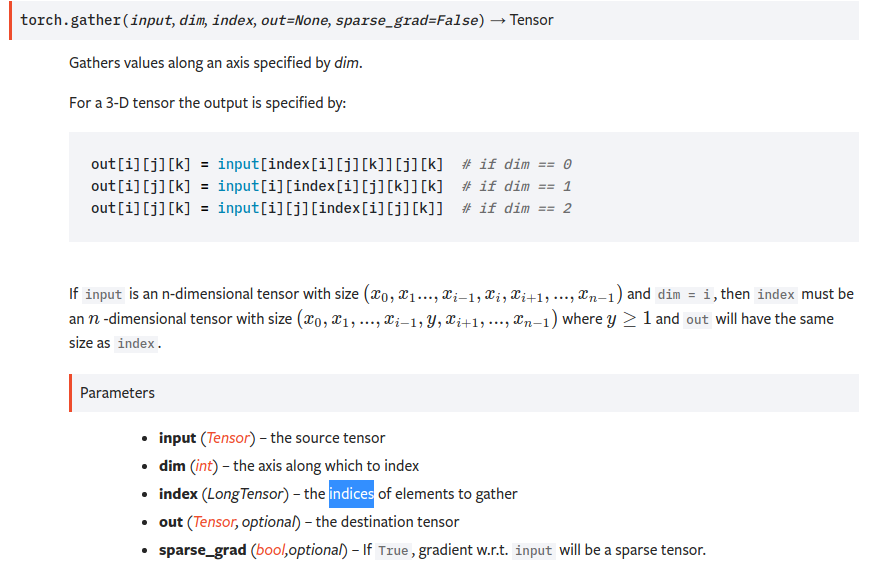
torch.gather(input, dim, index, out=None, sparse_grad=False) → Tensor
即dim维度的下标由index替换.input是n维的,index也得是n维的,tensor在第dim维度上的size可以和input不一致. 最终的output和index的shape是一致的.
即对dim维度的数据按照index来索引.
比如
import torch

t = torch.tensor([[1,2],[3,4]])

index=torch.tensor([[0,0],[1,0]])

torch.gather(t,1,index)

输出

tensor([[1, 1],

        [4, 3]])
gather(t,1,index)替换第1维度的数据(即列方向),替换成哪些列的值呢?[[0,0],[1,0]],对第一行,分别为第0列,第0列,对第二行,分别为第1列,第0列.
从而得到tensor([[1, 1],[4, 3]])
sum

沿着第n维度,求和.keepdim表示是否保持维度数目不变.
import torch

t = torch.tensor([[1,2],[3,4]])

a=torch.sum(t,0)

b=torch.sum(t,1,keepdim=True)

print(a.shape,b.shape)

print(a)

print(b)

sort
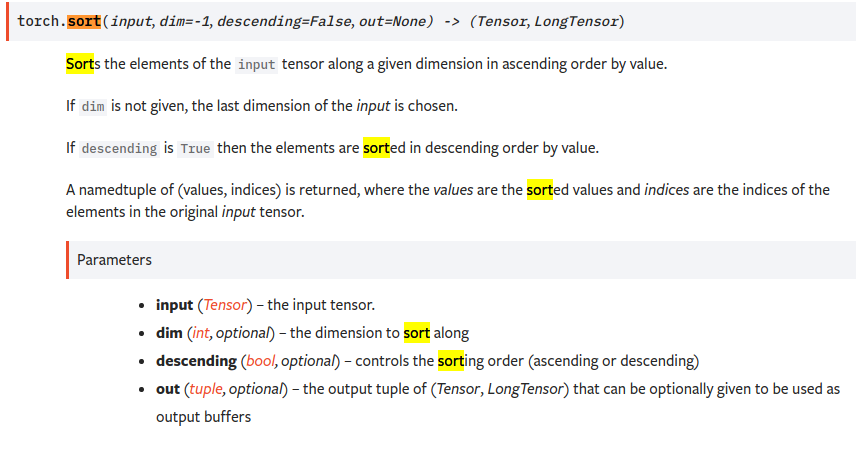
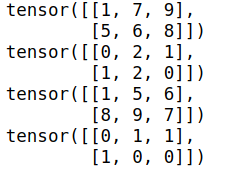
沿着第n个维度的方向排序
import torch

t = torch.tensor([[1,9,7],[8,5,6]])

_sorted,_index = t.sort(1)

print(_sorted)

print(_index)

_sorted,_index = t.sort(0)

print(_sorted)

print(_index)
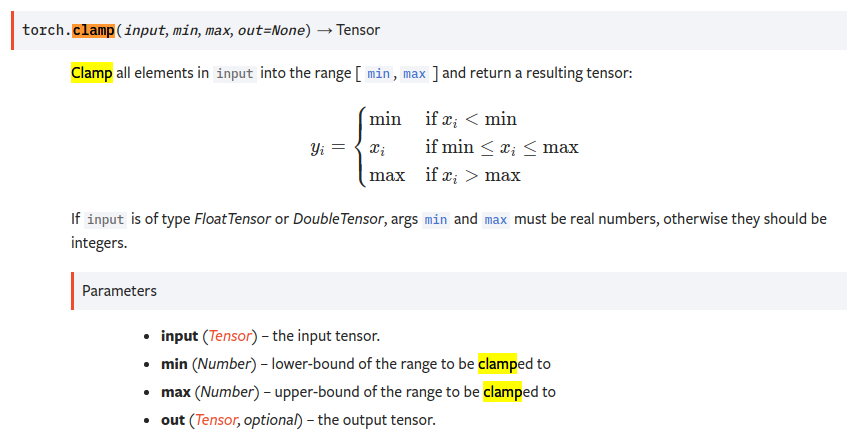
clamp
import torch

print()

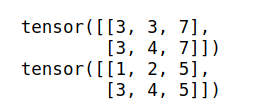
t = torch.tensor([[1,2,7],[3,4,8]])

res = t.clamp(3,7)          #<3的变为3,>7的变为7  中间范围的不变

print(res)

res2 = torch.clamp(t,max=5) #所有大于5的都改为5

print(res2)
各种损失函数
https://blog.csdn.net/zhangxb35/article/details/72464152
有用link:
pytorch笔记的更多相关文章
- [Pytorch] pytorch笔记 <三>
pytorch笔记 optimizer.zero_grad() 将梯度变为0,用于每个batch最开始,因为梯度在不同batch之间不是累加的,所以必须在每个batch开始的时候初始化累计梯度,重置为 ...
- [Pytorch] pytorch笔记 <二>
pytorch笔记2 用到的关于plt的总结 plt.scatter scatter(x, y, s=None, c=None, marker=None, cmap=None, norm=None, ...
- [Pytorch] pytorch笔记 <一>
pytorch笔记 - torchvision.utils.make_grid torchvision.utils.make_grid torchvision.utils.make_grid(tens ...
- 【转载】 pytorch笔记:06)requires_grad和volatile
原文地址: https://blog.csdn.net/jiangpeng59/article/details/80667335 作者:PJ-Javis 来源:CSDN --------------- ...
- pytorch笔记:09)Attention机制
刚从图像处理的hole中攀爬出来,刚走一步竟掉到了另一个hole(fire in the hole*▽*) 1.RNN中的attentionpytorch官方教程:https://pytorch.or ...
- [pytorch笔记] 调整网络学习率
1. 为网络的不同部分指定不同的学习率 class LeNet(t.nn.Module): def __init__(self): super(LeNet, self).__init__() self ...
- [pytorch笔记] torch.nn vs torch.nn.functional; model.eval() vs torch.no_grad(); nn.Sequential() vs nn.moduleList
1. torch.nn与torch.nn.functional之间的区别和联系 https://blog.csdn.net/GZHermit/article/details/78730856 nn和n ...
- Pytorch笔记 (3) 科学计算1
一.张量 标量 可以看作是 零维张量 向量 可以看作是 一维张量 矩阵 可以看作是 二维张量 继续扩展数据的维度,可以得到更高维度的张量 ————> 张量又称 多维数组 给定一个张量数据 ...
- Pytorch笔记 (2) 初识Pytorch
一.人工神经网络库 Pytorch ———— 让计算机 确定神经网络的结构 + 实现人工神经元 + 搭建人工神经网络 + 选择合适的权重 (1)确定人工神经网络的 结构: 只需要告诉Pytorc ...
- PyTorch笔记之 Dataset 和 Dataloader
一.简介 在 PyTorch 中,我们的数据集往往会用一个类去表示,在训练时用 Dataloader 产生一个 batch 的数据 https://pytorch.org/tutorials/begi ...
随机推荐
- jquery的api以及用法总结-数据/操作/事件
数据 .data() 在匹配元素上存储任意相关数据或返回匹配的元素集合中的第一个元素的给定名称的数据存储的值 .data(obj) 一个用于更新数据的键/值对 .data()方法允许我们再dom元素上 ...
- Gradle 梳理 - 插件
Gradle 教程:第二部分,JAVA PROJECTS[翻译] 原文地址:http://rominirani.com/2014/07/28/gradle-tutorial-part-2-java ...
- CVPR 2019 论文解读 | 小样本域适应的目标检测
引文 最近笔者也在寻找目标检测的其他方向,一般可以继续挖掘的方向是从目标检测的数据入手,困难样本的目标检测,如检测物体被遮挡,极小人脸检测,亦或者数据样本不足的算法.这里笔者介绍一篇小样本(few ...
- CentOS 安装lsof命令
1.在控制台上输入:# yum install lsof,安装过程中按y进行确认 2.使用lsof -i :port 可以产看端口的进程信息
- centos7 远程连接其他服务器mysql
在本地远程连接 在终端输入: mysql -h 服务器ip地址 -P 端口 -u 用户名 -p 然后输入密码即可.
- uC/OS-III 时间管理(二)
时间管理就是一种建立在时钟节拍上,对操作系统任务的运行实现时间上管理的一种系统内核机制. 常用以下五个函数: OSTimeDly() OSTimeDlyHMSM() OSTimeDlyResume() ...
- 体验Code::Blocks下的Windows GUI编程(32 bit and 64 bit)
0. 前言 不知道为什么,几乎所有的C++编程教程都是从命令行版(控制台应用程序)的Hello World开始的.然而,对于现在的年轻人来说,从小就用鼠标点击窗口或图标操作电脑,对于那个神秘黑色的窗口 ...
- Stanford公开课《编译原理》学习笔记(2)递归下降法
目录 一. Parse阶段 CFG Recursive Descent(递归下降遍历) 二. 递归下降遍历 2.1 预备知识 2.2 多行语句的处理思路 2.3 简易的文法定义 2.4 文法产生式的代 ...
- 理解 Redux 的中间件
将该思想抽象出来,其实和 Redux 就无关了.问题变成,怎样实现在截获函数的执行,以在其执行前后添加自己的逻辑. 为了演示,我们准备如下的示例代码来模拟 Redux dispatch action ...
- 夯实Java基础系列22:一文读懂Java序列化和反序列化
本系列文章将整理到我在GitHub上的<Java面试指南>仓库,更多精彩内容请到我的仓库里查看 https://github.com/h2pl/Java-Tutorial 喜欢的话麻烦点下 ...