
OpenStack Newton版本Ceph集成部署记录
2017年2月,OpenStack Ocata版本正式release,就此记录上一版本 Newton 结合Ceph Jewel版的部署实践。宿主机操作系统为CentOS 7.2 。
初级版:
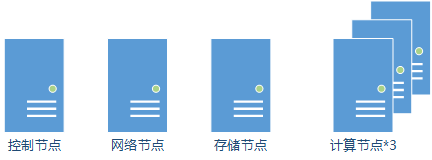

192.168.0.0/24 与 192.168.1.0/24 为Ceph使用,分别为南北向网络(Public_Network)和东西向网络(Cluster_Network)。
10.0.0.0/24 为 OpenStack 管理网络。
172.16.0.0/24 为用于 OpenStack Neutron 建立OVS bridge 用于租户业务的provider/external网络。
将它们粗暴的合并为一个网络是可以的,但在生产环境不推荐。
部署基本的 IaaS层服务核心模块:认证Keystone、镜像Glance、计算Nova、网络Neutron、块存储Cinder、Dashboard Horizon。使用 ceph-deploy部署Ceph集群,作为镜像、计算及块存储后端。
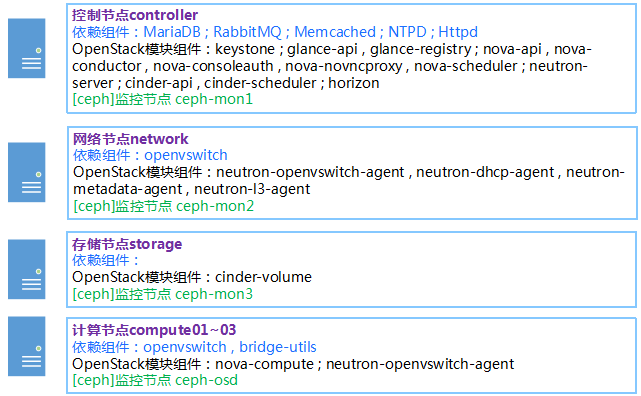
Ceph配置样例
[global]

mon_initial_members = controller, network, storage

mon_host = 192.168.0.11,192.168.0.12,192.168.0.13

auth_cluster_required = none

auth_service_required = none

auth_client_required = none

filestore_xattr_use_omap = true

osd_pool_default_size = 2

mon_clock_drift_allowed = 2

mon_clock_drift_warn_backoff = 30

mon_pg_warn_max_per_osd = 1000

public_network = 192.168.0.0/24

cluster_network = 192.168.1.0/24
3 mon+ [磁盘数] osd 使用ceph-deploy快捷部署不使用 keyring , 创建3个pool : glance , nova , cinder
根据情况调整pg_num 与pgp_num
“ 公式:
Total PGs = ((Total_number_of_OSD * 100) / max_replication_count) / pool_count
结算的结果往上取靠近2的N次方的值。比如总共OSD数量是160,复制份数3,pool数量也是3,那么按上述公式计算出的结果是1777.7。取跟它接近的2的N次方是2048,那么每个pool分配的PG数量就是2048。”
OpenStack组件配置样例
- controller
keystone.conf:

[database]

connection = mysql+pymysql://keystone:KEYSTONE_DBPASS@10.0.0.11/keystone
glance-api.conf:

[database]

connection = mysql+pymysql://glance:GLANCE_DBPASS@10.0.0.11/glance

[keystone_authtoken]

auth_uri = http://controller:5000

auth_url = http://controller:35357

memcached_servers = controller:11211

auth_type = password

project_domain_name = default

user_domain_name = default

project_name = service

username = glance

password = yourpasswd

[paste_deploy]

flavor = keystone

[glance_store]

stores = rbd

default_store = rbd

show_image_direct_url = True

rbd_store_pool = glance

rbd_ceph_conf = /etc/ceph/ceph.conf

rbd_store_chunk_size = 8
glance-registry.conf

[database]

connection = mysql+pymysql://glance:GLANCE_DBPASS@10.0.0.11/glance

[keystone_authtoken]

auth_uri = http://controller:5000

auth_url = http://controller:35357

memcached_servers = controller:11211

auth_type = password

project_domain_name = default

user_domain_name = default

project_name = service

username = glance

password = yourpasswd

[paste_deploy]

flavor = keystone
nova.conf:

[DEFAULT]

enabled_apis = osapi_compute,metadata

[api_database]

connection = mysql+pymysql://nova:NOVA_DBPASS@10.0.0.11/nova_api

[database]

connection = mysql+pymysql://nova:NOVA_DBPASS@10.0.0.11/nova

[DEFAULT]

transport_url = rabbit://openstack:RABBIT_PASS@10.0.0.11

[DEFAULT]

auth_strategy = keystone

[keystone_authtoken]

auth_uri = http://controller:5000

auth_url = http://controller:35357

memcached_servers = controller:11211

auth_type = password

project_domain_name = default

user_domain_name = default

project_name = service

username = nova

password = yourpasswd

[DEFAULT]

my_ip = 10.0.0.11

[DEFAULT]

use_neutron = True

firewall_driver = nova.virt.firewall.NoopFirewallDriver

[vnc]

vncserver_listen = 0.0.0.0

vncserver_proxyclient_address = 10.0.0.11

[glance]

api_servers = http://controller:9292

[oslo_concurrency]

lock_path = /var/lib/nova/tmp

[neutron]

url = http://controller:9696

auth_url = http://controller:35357

auth_type = password

project_domain_name = default

user_domain_name = default

region_name = RegionOne

project_name = service

username = neutron

password = yourpasswd

service_metadata_proxy = True

metadata_proxy_shared_secret = METADATA_SECRET

[DEFAULT]

metadata_listen=10.0.0.11

metadata_listen_port=8775

[cinder]

os_region_name = RegionOne
neutron.conf:

[database]

connection = mysql+pymysql://neutron:NEUTRON_DBPASS@10.0.0.11/neutron

[DEFAULT]

core_plugin = ml2

service_plugins = router

allow_overlapping_ips = True

[DEFAULT]

transport_url = rabbit://openstack:RABBIT_PASS@10.0.0.11

rpc_response_timeout = 180

[DEFAULT]

auth_strategy = keystone

[keystone_authtoken]

auth_uri = http://controller:5000

auth_url = http://controller:35357

memcached_servers = controller:11211

auth_type = password

project_domain_name = default

user_domain_name = default

project_name = service

username = neutron

password = yourpasswd

[DEFAULT]

notify_nova_on_port_status_changes = True

notify_nova_on_port_data_changes = True

[nova]

auth_url = http://controller:35357

auth_type = password

project_domain_name = default

user_domain_name = default

region_name = RegionOne

project_name = service

username = nova

password = yourpasswd

[oslo_concurrency]

lock_path = /var/lib/neutron/tmp
neutron/plugin.ini:

[ml2]

type_drivers = flat,vlan,vxlan

tenant_network_types = vxlan

mechanism_drivers = openvswitch,l2population

extension_drivers = port_security

[ml2_type_flat]

flat_networks = provider #若业务网络provider为flat则写这里

[ml2_type_geneve]

[ml2_type_gre]

[ml2_type_vlan]

network_vlan_ranges = provider:1:1000  #若业务网络provider为vlan则写这里

[ml2_type_vxlan]

vni_ranges = 1:1000

[securitygroup]

firewall_driver=neutron.agent.linux.iptables_firewall.OVSHybridIptablesFirewallDriver

enable_security_group=True
cinder.conf:

[DEFAULT]

enable_v1_api = True

transport_url = rabbit://openstack:RABBIT_PASS@10.0.0.11

auth_strategy = keystone

my_ip = 10.0.0.11

[database]

connection = mysql+pymysql://cinder:CINDER_DBPASS@10.0.0.11/cinder

[key_manager]

[keystone_authtoken]

auth_uri = http://10.0.0.11:5000

auth_url = http://10.0.0.11:35357

memcached_servers = controller:11211

auth_type = password

project_domain_name = default

user_domain_name = default

project_name = service

username = cinder

password = yourpasswd

[oslo_concurrency]

lock_path = /var/lib/cinder/tmp
- network
neutron.conf:

[DEFAULT]

core_plugin = ml2

service_plugins = router

allow_overlapping_ips = True

transport_url = rabbit://openstack:RABBIT_PASS@10.0.0.11

rpc_response_timeout = 180

auth_strategy = keystone

[agent]

[keystone_authtoken]

auth_uri = http://controller:5000

auth_url = http://controller:35357

memcached_servers = controller:11211

auth_type = password

project_domain_name = default

user_domain_name = default

project_name = service

username = neutron

password = yourpasswd

[oslo_concurrency]

lock_path = /var/lib/neutron/tmp
neutron/dhcp_agent.conf:

[DEFAULT]

interface_driver = neutron.agent.linux.interface.OVSInterfaceDriver

dhcp_driver = neutron.agent.linux.dhcp.Dnsmasq

enable_isolated_metadata = True
neutron/metadata_agent.ini:

[DEFAULT]

nova_metadata_ip = 10.0.0.11

nova_metadata_port = 8775

metadata_proxy_shared_secret = METADATA_SECRET
neutron/l3_agent.ini:

[DEFAULT]

interface_driver = neutron.agent.linux.interface.OVSInterfaceDriver

external_network_bridge=

metadata_port = 9697
openvswitch_agent.ini:

[DEFAULT]

[agent]

[ovs]

[securitygroup]

[ovs]

local_ip=10.0.0.12

bridge_mappings=provider:br-provider

[agent]

tunnel_types=vxlan

l2_population=True

prevent_arp_spoofing=True

[securitygroup]

firewall_driver=neutron.agent.linux.iptables_firewall.OVSHybridIptablesFirewallDriver

enable_security_group=True
shell command:

ovs-vsctl add-br br-provider

ovs-vsctl add-port br-provider [172.16.0.12的网卡]
- storage
cinder.conf:

[database]

connection = mysql+pymysql://cinder:CINDER_DBPASS@10.0.0.11/cinder

[DEFAULT]

transport_url = rabbit://openstack:RABBIT_PASS@10.0.0.11

[DEFAULT]

auth_strategy = keystone

[keystone_authtoken]

auth_uri = http://controller:5000

auth_url = http://controller:35357

memcached_servers = controller:11211

auth_type = password

project_domain_name = default

user_domain_name = default

project_name = service

username = cinder

password = yourpasswd

[DEFAULT]

my_ip = 10.0.0.13

[DEFAULT]

enabled_backends = ceph

[ceph]

volume_group = ceph

volume_backend_name = ceph

volume_driver = cinder.volume.drivers.rbd.RBDDriver

rbd_pool = cinder

rbd_ceph_conf = /etc/ceph/ceph.conf

rbd_flatten_volume_from_snapshot = false

rbd_max_clone_depth = 5

rbd_store_chunk_size = 4

rados_connect_timeout = -1

backup_driver = cinder.backup.drivers.ceph

backup_ceph_conf = /etc/ceph/ceph.conf

backup_ceph_chunk_size = 134217728

backup_ceph_pool = cinder

backup_ceph_stripe_unit = 0

backup_ceph_stripe_count = 0

restore_discard_excess_bytes = true

[DEFAULT]

glance_api_servers = http://controller:9292

[oslo_concurrency]

lock_path = /var/lib/cinder/tmp
- compute01-03
nova.conf:

[DEFAULT]

enabled_apis = osapi_compute,metadata

[DEFAULT]

transport_url = rabbit://openstack:RABBIT_PASS@10.0.0.11

[DEFAULT]

auth_strategy = keystone

[keystone_authtoken]

auth_uri = http://controller:5000

auth_url = http://controller:35357

memcached_servers = controller:11211

auth_type = password

project_domain_name = default

user_domain_name = default

project_name = service

username = nova

password = yourpasswd

[DEFAULT]

my_ip = 10.0.0.14 (10.0.0.15 , 10.0.0.16)

[DEFAULT]

use_neutron = True

firewall_driver = nova.virt.firewall.NoopFirewallDriver

[vnc]

enabled = True

vncserver_listen = 0.0.0.0

vncserver_proxyclient_address = $my_ip

novncproxy_base_url = http://10.0.0.11:6080/vnc_auto.html

[glance]

api_servers = http://controller:9292

[oslo_concurrency]

lock_path = /var/lib/nova/tmp

[neutron]

url = http://controller:9696

auth_url = http://controller:35357

auth_type = password

project_domain_name = default

user_domain_name = default

region_name = RegionOne

project_name = service

username = neutron

password = yourpasswd

metadata_proxy_shared_secret = METADATA_SECRET

[libvirt]

images_type = rbd

images_rbd_pool = nova

images_rbd_ceph_conf = /etc/ceph/ceph.conf

libvirt_live_migration_flag="VIR_MIGRATE_UNDEFINE_SOURCE,VIR_MIGRATE_PEER2PEER,VIR_MIGRATE_LIVE,VIR_MIGRATE_PERSIST_DEST"

libvirt_inject_password = false

libvirt_inject_key = false

libvirt_inject_partition = -2
shell command:

ovs-vsctl add-br br-provider

ovs-vsctl add-port br-provider [172.16.0.14,15,16的网卡]
增强版:
提供HA能力的架构
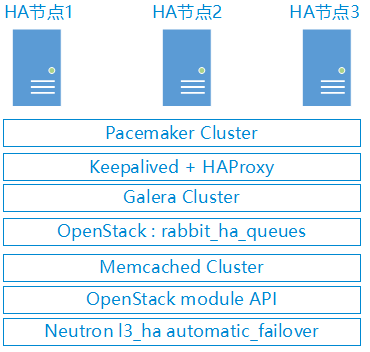
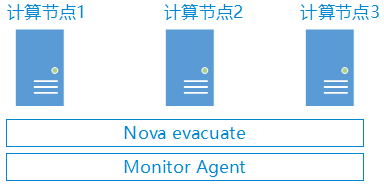
参考:
Networking configuration options
OpenStack Newton版本Ceph集成部署记录的更多相关文章
- openstack pike与ceph集成
openstack pike与ceph集成 Ceph luminous 安装配置 http://www.cnblogs.com/elvi/p/7897178.html openstack pike 集 ...
- devstack安装openstack newton版本
准备使用devstack安装openstack N版,搞一套开发环境出来.一连整了4天,遇到各种问题,各种错误,一直到第4天下午4点多才算完成. 在这个过程中感觉到使用devstack搭建openst ...
- openstack安装newton版本neutron服务部署(四)
一.管理节点部署服务: 1.安装neutron: [root@linux-node1 ~]# yum install openstack-neutron openstack-neutron-ml2 o ...
- Gitblit版本服务器环境部署记录
Gitblit介绍Gitblit 是一个纯 Java 库用来管理.查看和处理 Git 资料库.相当于 Git 的 Java 管理工具,支持linux系统.Git是分布式版本控制系统,它强调速度.数据一 ...
- 使用devstack搭建openstack Newton 版本的坑
国外源访问速度慢怎么办? 使用国外源,加之带宽紧张,搭建过程是很累的,这里推荐大家使用一下源: devstack包源.:http://git.trystack.cn pip源: [global] in ...
- 全解┃OpenStack Newton发布,23家中国企业上榜(转载)
(转载自Openstack中文社区) 陈, 翔 2016-10-8 | 暂无评论 美国奥斯汀时间10月6日(北京时间6日24点),OpenStack Newton版本正式发布,在可扩展性.可靠性和用户 ...
- openstack高可用集群21-生产环境高可用openstack集群部署记录
第一篇 集群概述 keepalived + haproxy +Rabbitmq集群+MariaDB Galera高可用集群 部署openstack时使用单个控制节点是非常危险的,这样就意味着单个节 ...
- 理解 OpenStack + Ceph (5):OpenStack 与 Ceph 之间的集成 [OpenStack Integration with Ceph]
理解 OpenStack + Ceph 系列文章: (1)安装和部署 (2)Ceph RBD 接口和工具 (3)Ceph 物理和逻辑结构 (4)Ceph 的基础数据结构 (5)Ceph 与 OpenS ...
- OpenStack Newton:集虚拟化,裸金属和容器部署的统一云平台(转载)
2016-10-08木屐大数据在线 国庆长假第六天,OpenStack第十四版本Newton(牛顿?)发布,官方介绍中强调这是一个集虚拟化.裸金属和容器技术的一体化平台,可通过一套API来管理裸金属. ...
随机推荐
- 关于 Python generator(生成器)的类比
Python 的生成器运用仿佛是最完美的 xing爱,生成器本身和循环代表男女,结束代表同时达到高潮,不是很精准,但很有趣啊!哈哈哈,一下记住了
- js,jq获取元素位置属性及兼容性写法
网页被卷起来的高度/宽度 document.documentElement.scrolltop //火狐 和 其他浏览器 document.body.scrolltop //ie,谷歌浏览器和没有 ...
- require include 一个隐藏的用法:作用域。
最近在研究php底层框架,奇怪的一点.控制器里为什么要把从model里获取的数据 需要$this->assign('items', $items); 这种形式模板文件里才可以调用到这个变量.控制 ...
- 搭建 redis 3.2.8服务器
实验环境 redis 3.2.8 + RHEL 7.3 系统 软件下载地址 http://download.redis.io/releases/redis-3.2.8.tar.gz #注意,我的软件包 ...
- 性能测试培训:批量执行Jmeter脚本之ant调用
性能测试培训:批量执行Jmeter脚本之ant调用 poptest是国内唯一一家培养测试开发工程师的培训机构,以学员能胜任自动化测试,性能测试,测试工具开发等工作为目标.在poptest的load ...
- QTP自动化测试培训:描述编程之WebElement
QTP自动化测试培训:描述编程之WebElement 通过描述性编程技术,来描述出来输入框: set po=browser("creationtime:=0").page(&q ...
- 各位Coder看过来
为了丰富博客内容,也为了解决一些实际的问题,现准备出一系列博文,内容为各位回复评论指明需要的知识点,将在近期为你解决并提供还算精要的讲解:评论内容要求 Coder:+需要的技术内容.技术内容不限领域, ...
- Win10专业版下图片拖到PS无法打开的解决技巧
PS这个软件是用户最常用的软件之一,其强大的图形处理能力毋庸置疑.有用户表示在Win10专业版系统中使用PS发现图片不能直接拖动到PS中打开,这个问题本身不是特别大的问题,但这一小小的毛病会打破用户习 ...
- (iOS)关于@property和@synthesize的理解(原创)
开始学习ios的时候,就对一些objc的语法不理解,就比如@property和@synthesize,之前都是记住然后照着用,但是写的代码多了,对objc和ios有了一些理解,再加上最近用MRC,所以 ...
- 最小函数值 洛谷P2085
题目描述: 有n个函数,分别为F1,F2,...,Fn.定义Fi(x)=Ai*x^2+Bi*x+Ci (x∈N*).给定这些Ai.Bi和Ci,请求出所有函数的所有函数值中最小的m个( ...