
iOS 动画篇 (二) CAShapeLayer与CoreAnimation结合使用
接上一篇博客 iOS 动画篇(一) Core Animation
CAShapeLayer是CALayer的一个子类,使用这个类能够很轻易实现曲线的动画。
先来一个折线动画效果:
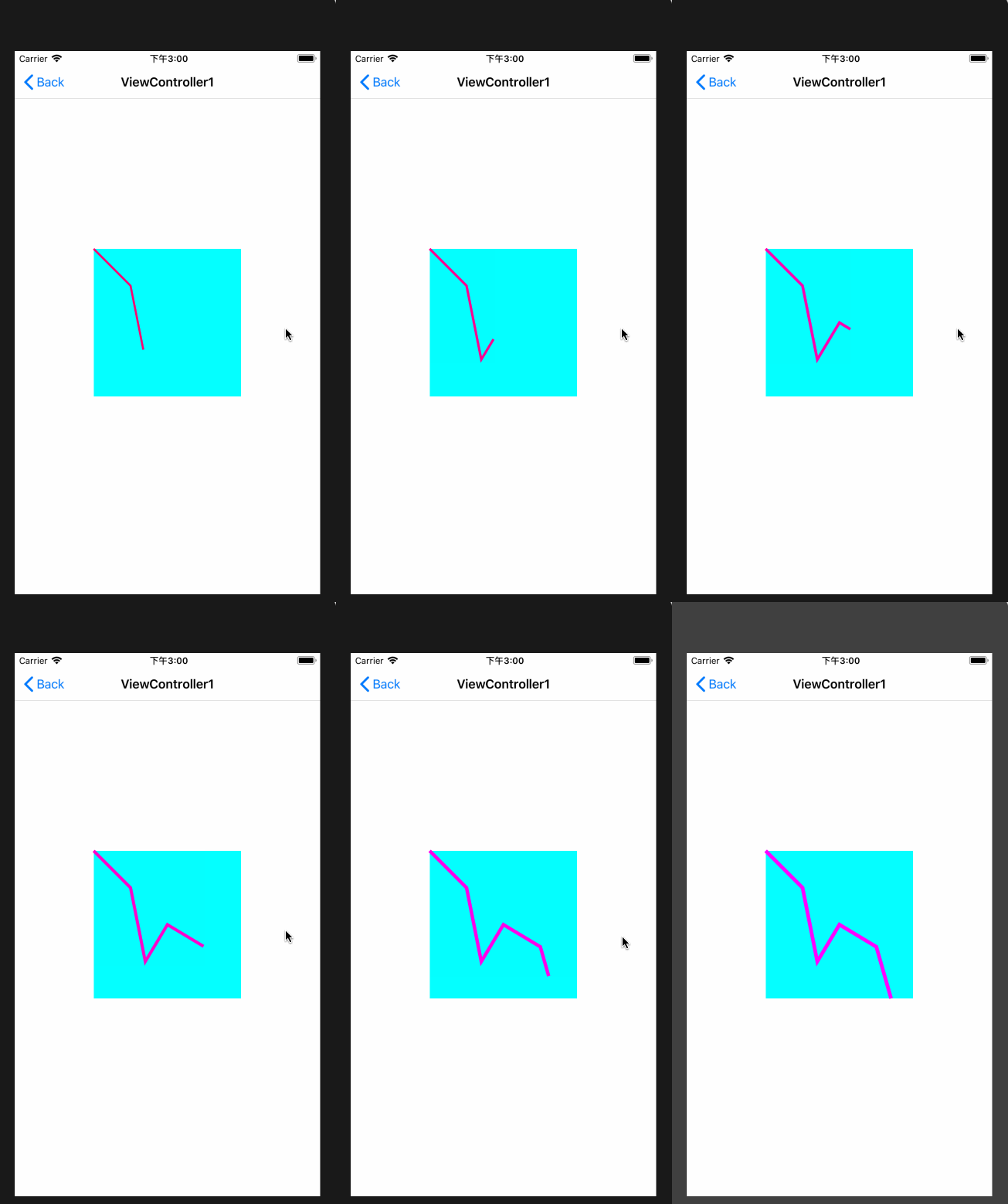
示例代码:
//1.生成path

    UIBezierPath *path = [UIBezierPath bezierPath];

    [path moveToPoint:CGPointMake(, )];

    [path addLineToPoint:CGPointMake(, )];

    [path addLineToPoint:CGPointMake(, )];

    [path addLineToPoint:CGPointMake(, )];

    [path addLineToPoint:CGPointMake(, )];

    [path addLineToPoint:CGPointMake(, )];

    self.shapeLayer.path = path.CGPath;

    //设置animation

    CABasicAnimation *strokeAnimation = [CABasicAnimation animationWithKeyPath:@"strokeEnd"];

    strokeAnimation.fromValue = @;

    strokeAnimation.toValue = @;

    strokeAnimation.duration = .f;

    CABasicAnimation *lineWidthAnimation = [CABasicAnimation animationWithKeyPath:@"lineWidth"];

    lineWidthAnimation.fromValue = @;

    lineWidthAnimation.toValue = @;

    lineWidthAnimation.duration = .f;

    CABasicAnimation *strokeColorAnimation = [CABasicAnimation animationWithKeyPath:@"strokeColor"];

    strokeColorAnimation.fromValue = (id)([UIColor redColor].CGColor);

    strokeColorAnimation.toValue = (id)([UIColor magentaColor].CGColor);

    strokeColorAnimation.duration = .f;

    CAAnimationGroup *group = [CAAnimationGroup animation];

    group.animations = @[strokeAnimation, lineWidthAnimation, strokeColorAnimation];

    group.duration = .f;

    group.fillMode = kCAFillModeForwards;

    group.removedOnCompletion = NO;

    [self.shapeLayer addAnimation:group forKey:@"groupAnimation"];
现在介绍CAShapeLayer,CAShapeLayer几乎所有的属性都可以用来做动画,比如说path、strokeEnd、strokeStart、lineWidth等等,利用这些属性可以实现多种曲线动画。
接下来,介绍一个CAShapeLayer与贝塞尔曲线结合的曲线动画,效果图:

代码:
//二次贝塞尔曲线

    UIBezierPath *path = [UIBezierPath bezierPath];

    [path moveToPoint:CGPointMake(, self.shapeLayer.bounds.size.height / )];

    [path addCurveToPoint:CGPointMake(self.shapeLayer.bounds.size.width, ) controlPoint1:CGPointMake(, ) controlPoint2:CGPointMake(, )];

    self.shapeLayer.path = path.CGPath;

    //绘制动画

    CABasicAnimation *strokeEndAnimation = [CABasicAnimation animationWithKeyPath:@"strokeEnd"];

    strokeEndAnimation.fromValue = @0.5;

    strokeEndAnimation.toValue = @;

    strokeEndAnimation.duration = .f;

    [self.shapeLayer addAnimation:strokeEndAnimation forKey:@"strokeAnimation"];

    CABasicAnimation *strokeStartAnimation = [CABasicAnimation animationWithKeyPath:@"strokeStart"];

    strokeStartAnimation.fromValue = @0.5;

    strokeStartAnimation.toValue = @;

    strokeStartAnimation.duration = .f;

    [self.shapeLayer addAnimation:strokeStartAnimation forKey:@"strokeStartAnimation"];
再来一个看着酷一点的loading动画,效果:
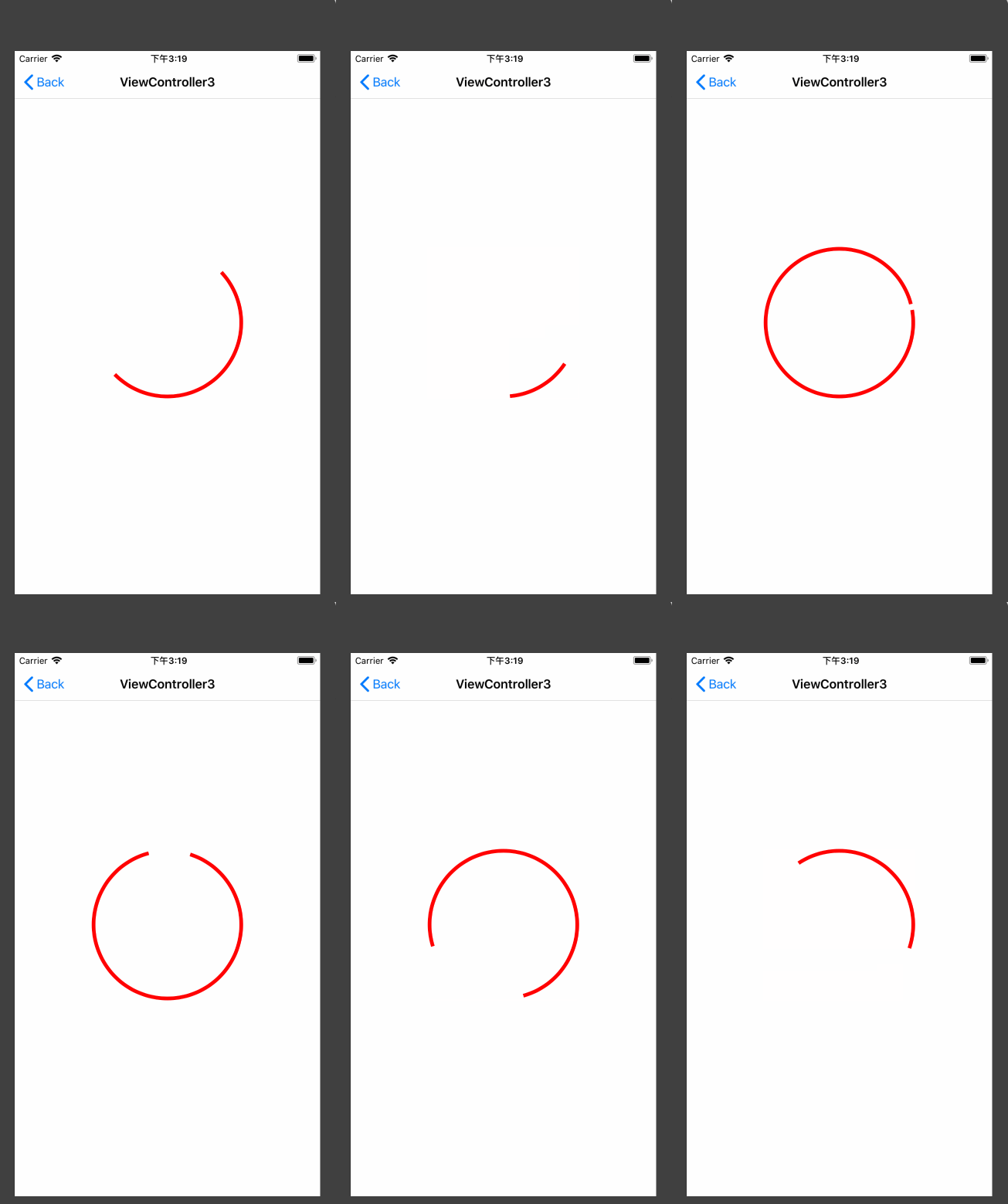
代码如下:
self.shapeLayer.backgroundColor = [UIColor clearColor].CGColor;

    self.shapeLayer.strokeColor = [UIColor redColor].CGColor;

    self.shapeLayer.fillColor = [UIColor clearColor].CGColor;

    self.shapeLayer.lineWidth = .f;

    UIBezierPath *storkePath = [UIBezierPath bezierPathWithOvalInRect:self.shapeLayer.bounds];

    self.shapeLayer.path = storkePath.CGPath;

    self.shapeLayer.strokeStart = ;

    self.shapeLayer.strokeEnd = 0.1;

    //旋转动画

    CABasicAnimation *rotateAnimaiton = [CABasicAnimation animationWithKeyPath:@"transform.rotation.z"];

    rotateAnimaiton.duration = .f;

    rotateAnimaiton.repeatCount = CGFLOAT_MAX;

    rotateAnimaiton.removedOnCompletion = NO;

    rotateAnimaiton.fillMode = kCAFillModeForwards;

    rotateAnimaiton.toValue = @(M_PI * );

    //stroke动画

    CABasicAnimation *storkeAnimation = [CABasicAnimation animationWithKeyPath:@"strokeEnd"];

    storkeAnimation.duration = .f;

    storkeAnimation.repeatCount = CGFLOAT_MAX;

    storkeAnimation.fillMode =  kCAFillModeForwards;

    storkeAnimation.removedOnCompletion = NO;

    storkeAnimation.toValue = @();

    CAAnimationGroup *animationGroup = [CAAnimationGroup animation];

    animationGroup.duration = .f;

    animationGroup.repeatCount =CGFLOAT_MAX;

    animationGroup.fillMode = kCAFillModeForwards;

    animationGroup.removedOnCompletion = NO;

    animationGroup.animations = @[rotateAnimaiton, storkeAnimation];

    animationGroup.timingFunction = [CAMediaTimingFunction functionWithName:kCAMediaTimingFunctionDefault];

    [self.shapeLayer addAnimation:animationGroup forKey:@"indicatorAnimation"];
现在我们来看一个CAShapeLayer与mask结合的动画
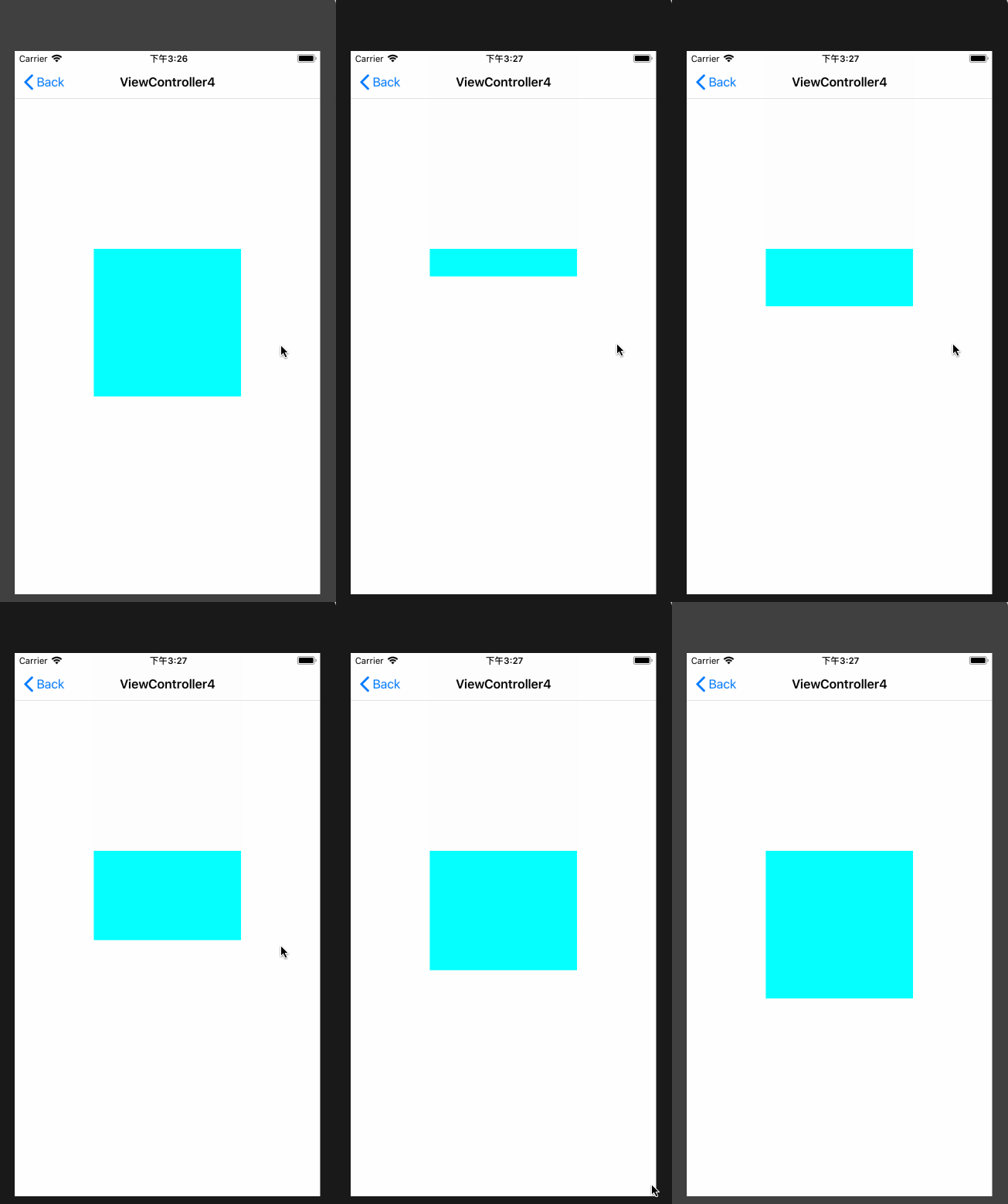
代码:
CAShapeLayer *shapeLayer = [CAShapeLayer layer];

    self.shapeLayer.mask = shapeLayer;

    UIBezierPath *fromPath = [UIBezierPath bezierPathWithRect:CGRectMake(, , , )];

    UIBezierPath *toPath = [UIBezierPath bezierPathWithRect:CGRectMake(, , , )];

    shapeLayer.path = fromPath.CGPath;

    CABasicAnimation *animation = [CABasicAnimation animationWithKeyPath:@"path"];

    animation.fromValue = (id)fromPath.CGPath;

    animation.toValue = (id)toPath.CGPath;

    animation.duration = .f;

    animation.removedOnCompletion = NO;

    animation.fillMode = kCAFillModeForwards;

    [shapeLayer addAnimation:animation forKey:@"animation"];
最后再介绍一个登录动画:
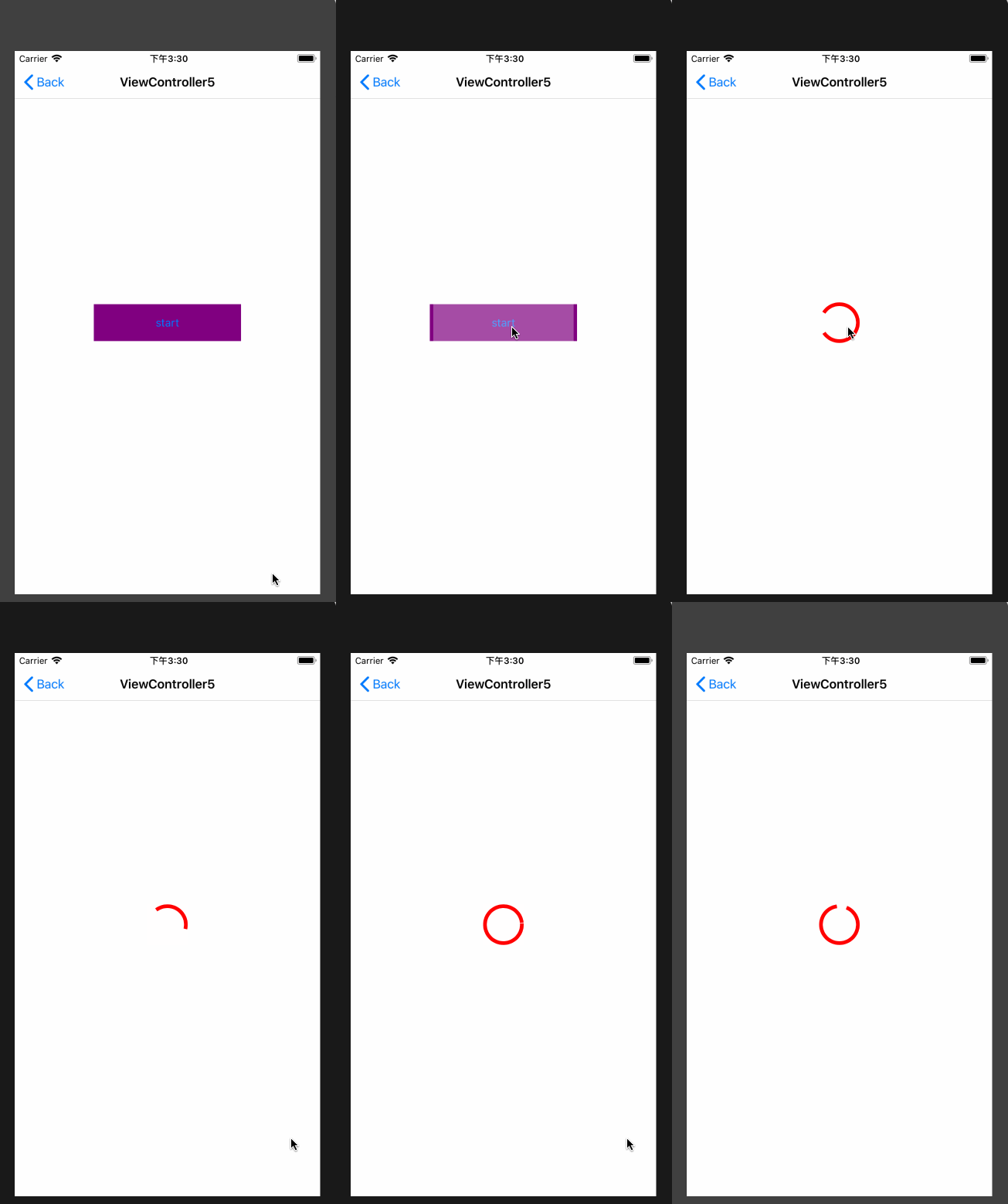
分析:这个登录动画一共分为三步
1. 在button上添加一个shapeLayer,用path属性实现layer的展开动画
2. 在展开动画结束后,为button设置一个shapeLayer的mask,利用layer的path和opacity属性实现收起按钮动画
3. 添加一个loading动画到view上
详情见代码:
- (void)viewDidLoad {

    [super viewDidLoad];

    NSLog(@"一个复杂一点的登录动画");

    [self.shapeLayer removeFromSuperlayer];

    UIButton *startButton = ({

        UIButton *btn = [UIButton buttonWithType:UIButtonTypeSystem];

        btn.backgroundColor = [UIColor purpleColor];

        [btn setTitle:@"start" forState:UIControlStateNormal];

        btn.frame = (CGRect){{, }, {, }};

        btn.center = self.view.center;

        [btn addTarget:self action:@selector(startAction:) forControlEvents:UIControlEventTouchUpInside];

        btn;

    });

    [self.view addSubview:startButton];

    self.startButton = startButton;

}

- (IBAction)startAction:(UIButton *)sender {

    [self addMaskAnimation];

}

- (void)addMaskAnimation

{

    CAShapeLayer *shapeLayer = [CAShapeLayer new];

    shapeLayer.frame = self.startButton.bounds;

    shapeLayer.fillColor = [UIColor whiteColor].CGColor;

    shapeLayer.strokeColor = [UIColor whiteColor].CGColor;

    shapeLayer.opacity = .3f;

    shapeLayer.path = [UIBezierPath bezierPathWithRect:CGRectMake(self.startButton.bounds.size.width / , , , self.startButton.bounds.size.height)].CGPath;//不初始化则无动画效果

    [self.startButton.layer addSublayer:shapeLayer];

    CABasicAnimation *animation = [CABasicAnimation animationWithKeyPath:@"path"];

    animation.duration = 0.5f;

    animation.toValue = (__bridge id)[UIBezierPath bezierPathWithRect:self.startButton.bounds].CGPath;

    animation.fillMode = kCAFillModeForwards;

    animation.removedOnCompletion = NO;

    [shapeLayer addAnimation:animation forKey:@"shapeAnimation"];

    dispatch_after(dispatch_time(DISPATCH_TIME_NOW, (int64_t)(0.5f * NSEC_PER_SEC)), dispatch_get_main_queue(), ^{

        [self addPackupAnimation];

    });

}

- (void)addPackupAnimation

{

    CAShapeLayer *maskLayer = [CAShapeLayer layer];

    maskLayer.frame = self.startButton.bounds;

    self.startButton.layer.mask = maskLayer;

    //path动画

    CABasicAnimation *pathAnimation = [CABasicAnimation animationWithKeyPath:@"path"];

    pathAnimation.duration = 0.3f;

    pathAnimation.removedOnCompletion = NO;

    pathAnimation.toValue = (__bridge id)[UIBezierPath bezierPathWithArcCenter:CGPointMake(self.startButton.bounds.size.width / , self.startButton.bounds.size.height / ) radius: startAngle: endAngle:M_PI *  clockwise:YES].CGPath;

    pathAnimation.fromValue = (__bridge id)[UIBezierPath bezierPathWithArcCenter:CGPointMake(self.startButton.bounds.size.width / , self.startButton.bounds.size.height / ) radius:self.startButton.bounds.size.width /  startAngle: endAngle:M_PI *  clockwise:YES].CGPath;

    pathAnimation.fillMode = kCAFillModeForwards;

    //透明度动画

    CABasicAnimation *opacityAnimation = [CABasicAnimation animationWithKeyPath:@"opacity"];

    opacityAnimation.duration = 0.3f;

    opacityAnimation.toValue = @();

    opacityAnimation.fromValue = @();

    opacityAnimation.removedOnCompletion = YES;

    opacityAnimation.fillMode = kCAFillModeForwards;

    CAAnimationGroup *group = [CAAnimationGroup new];

    group.animations = @[pathAnimation];

    group.removedOnCompletion = NO;

    group.fillMode = kCAFillModeForwards;

    group.duration = pathAnimation.duration;

    [maskLayer addAnimation:group forKey:@"packupAnimation"];

    dispatch_after(dispatch_time(DISPATCH_TIME_NOW, (int64_t)(0.3 * NSEC_PER_SEC)), dispatch_get_main_queue(), ^{

        self.startButton.hidden = YES;

        [self addLoadingAnimation];

    });

}

- (void)addLoadingAnimation

{

    CAShapeLayer *shapeLayer =  ({

        CAShapeLayer *layer = [CAShapeLayer layer];

        layer.position = self.view.center;

        layer.bounds = CGRectMake(, , , );

        layer.backgroundColor = [UIColor clearColor].CGColor;

        layer.strokeColor = [UIColor redColor].CGColor;

        layer.fillColor = [UIColor clearColor].CGColor;

        layer.lineWidth = .f;

        UIBezierPath *storkePath = [UIBezierPath bezierPathWithOvalInRect:layer.bounds];

        layer.path = storkePath.CGPath;

        layer.strokeStart = ;

        layer.strokeEnd = 0.1;

        layer;

    });

    [self.view.layer addSublayer:shapeLayer];

    //旋转动画

    CABasicAnimation *rotateAnimaiton = [CABasicAnimation animationWithKeyPath:@"transform.rotation.z"];

    rotateAnimaiton.duration = .f;

    rotateAnimaiton.repeatCount = CGFLOAT_MAX;

    rotateAnimaiton.removedOnCompletion = NO;

    rotateAnimaiton.fillMode = kCAFillModeForwards;

    rotateAnimaiton.toValue = @(M_PI * );

    //stroke动画

    CABasicAnimation *storkeAnimation = [CABasicAnimation animationWithKeyPath:@"strokeEnd"];

    storkeAnimation.duration = .f;

    storkeAnimation.repeatCount = CGFLOAT_MAX;

    storkeAnimation.fillMode =  kCAFillModeForwards;

    storkeAnimation.removedOnCompletion = NO;

    storkeAnimation.toValue = @();

    CAAnimationGroup *animationGroup = [CAAnimationGroup animation];

    animationGroup.duration = .f;

    animationGroup.repeatCount =CGFLOAT_MAX;

    animationGroup.fillMode = kCAFillModeForwards;

    animationGroup.removedOnCompletion = NO;

    animationGroup.animations = @[rotateAnimaiton, storkeAnimation];

    animationGroup.timingFunction = [CAMediaTimingFunction functionWithName:kCAMediaTimingFunctionDefault];

    [shapeLayer addAnimation:animationGroup forKey:@"indicatorAnimation"];

}
核心动画就介绍到这,你可以在这里查看demo。
个人原创,转载请注明出处 http://www.cnblogs.com/pretty-guy/p/8268745.html
下一篇博客打算介绍利用CADisplayLink与CoreGraphics结合实现动画
iOS 动画篇 (二) CAShapeLayer与CoreAnimation结合使用的更多相关文章
- iOS 动画笔记 (二)
有它们俩你就够了! 说明:下面有些概念我说的不怎么详细,网上实在是太多了,说了我觉得也意义不大了!但链接都给大家了,可以自己去看,重点梳理学习写动画的一个过程和一些好的博客! 一:说说这两个三方库,C ...
- iOS动画篇:UIView动画
iOS的动画效果一直都很棒很,给人的感觉就是很炫酷很流畅,起到增强用户体验的作用.在APP开发中实现动画效果有很多种方式,对于简单的应用场景,我们可以使用UIKit提供的动画来实现. UIView动画 ...
- iOS 动画篇 之 Core Animation (一)
iOS中实现动画有两种方式,一种是自己不断的通过drawRect:方法来绘制,另外一种就是使用核心动画(Core Animation). 导语: 核心动画提供高帧速率和流畅的动画,而不会增加CPU的负 ...
- iOS 动画篇 (三) CADisplayLink与CoreGraphics实现动画
本文主要介绍利用CoreGraphics和CADisplayLink来实现一个注水动画.来一个效果图先: 在介绍注水动画前,先介绍利用CoreGraphics实现进度条的绘制. 一.扇形进度绘制 效果 ...
- iOS动画篇:核心动画
转:http://www.cocoachina.com/ios/20160517/16290.html 基本概念 1.什么是核心动画 Core Animation(核心动画)是一组功能强大.效果华丽的 ...
- iOS 动画笔记 (一)
你也肯定喜欢炫酷的动画! 在APP中,动画就是一个点睛之笔!可以给用户增加一些独特的体验感,估计也有许多的和我一样的,看着那些觉得不错的动画,也就只能流口水的孩子,毕竟可能不知道从哪里下手去写!动画学 ...
- iOS动画学习
学习一下动画,感谢以下大神的文章: UIView:基础动画.关键帧动画.转场动画 Core Animation :基础动画,关键帧动画,动画组,转场动画,逐帧动画 CALayer :CALaye ...
- ios 动画学习的套路 (二)
有它们俩你就够了! 说明:下面有些概念我说的不怎么详细,网上实在是太多了,说了我觉得也意义不大了!但链接都给大家了,可以自己去看,重点梳理学习写动画的一个过程和一些好的博客! (一) 说说这两个三方库 ...
- iOS 动画基础总结篇
iOS 动画基础总结篇 动画的大体分类(个人总结可能有误) 分类.png UIView 动画 属性动画 1 2 3 4 5 6 7 8 9 10 11 12 13 14 15 16 17 18 1 ...
随机推荐
- 【DevOps】团队敏捷开发系列--开山篇
随着软件发布迭代的频率越来越高,传统的「瀑布型」(开发-测试-发布)模式已经不能满足快速交付的需求.2009 年左右 DevOps 应运而生,开发运维一体化,通过自动化工具与流程让整个软件开发构建.测 ...
- RecyclerView高速通用适配Adapter
RecyclerView Adapter 为RecyclerView提供更简单的适配器实现方式,不断更新完好中. Demo视频演示 GitHub地址 博客 使用 BaseViewHolder 的使用 ...
- 【日常学习】【线性DP】codevs1044 拦截导弹题解
题目描写叙述 Description 某国为了防御敌国的导弹突击,发展出一种导弹拦截系统.可是这样的导弹拦截系统有一个缺陷:尽管它的第一发炮弹可以到达随意的高度,可是以后每一发炮弹都不能高于前一发的高 ...
- wordpess关闭评论的方法,wordpress开发
由于某种原因,需要把wordpress的评论关闭,下面讲一下方法. 在wordpress模板中,找到文章模板页面文件single.php,在里面找到 <?php comments_templat ...
- JavaSe:代码块执行顺序
//执行顺序:(优先级从高到低.)静态代码块>mian方法>构造代码块>构造方法. 其中静态代码块只执行一次.构造代码块在每次创建对象是都会执行. //普通代码块:在方法或语句中出现 ...
- KVO的内部实现以及使用
转载自:http://www.cocoachina.com/applenews/devnews/2014/0107/7667.html KVO是实现Cocoa Bindings的基础,它提供了一种 ...
- 动态WebApi
动态WebApi实现了直接对Service的调用,其实没有跨过ApiController,只是我们自己创建出ApiController 实现主要分以下几步 一 对默认WebApi服务的替换 ApiGl ...
- Spring入门篇总结:
本文是对慕课网上"搞定SSM开发"路径的系列课程的总结,详细的项目文档和课程总结放在github上了.点击查看 视频传送门:Spring入门篇 该门课程主要从Spring的Bean ...
- xamarin android checkbox自定义样式
xamarin android checkbox自定义样式 在drawable文件在新建checkbox_bg.xml文件 <?xml version="1.0" encod ...
- 关于a标签颜色的探索
<!DOCTYPE html> <html lang="en"> <head> <meta charset="UTF-8&quo ...