
android 关于表格布局的认识
表格布局(TableLayout)
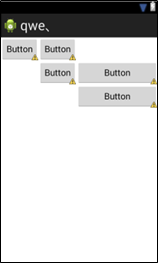
使用的知识点有:
控件
TableRow:为这个表格添加一行
table的特殊属性
android:layout_column:确定此表格的列数
android:stretchColumns:确定拉伸的列
android:shrinkColumns:确认压缩的列
table中控件可添加的属性
android:layour_column:指定此控件具体的位置
<TableLayout xmlns:android="http://schemas.android.com/apk/res/android"

    android:layout_width="fill_parent"

    android:layout_height="fill_parent"

     android:stretchColumns="2">

    <TableRow

        android:id="@+id/tableRow1"

        android:layout_width="wrap_content"

        android:layout_height="wrap_content" >

        <Button

            android:id="@+id/button1"

            android:layout_width="wrap_content"

            android:layout_height="wrap_content"

            android:text="Button" />

        <Button

            android:id="@+id/button2"

            android:layout_width="wrap_content"

            android:layout_height="wrap_content"

            android:text="Button" />

    </TableRow>

    <TableRow

        android:id="@+id/tableRow2"

        android:layout_width="match_parent"

        android:layout_height="match_parent">

        <Button

            android:id="@+id/button3"

            android:layout_width="wrap_content"

            android:layout_height="wrap_content"

            android:layout_column="1"

            android:text="Button" />

        <Button

            android:id="@+id/button4"

            android:layout_width="wrap_content"

            android:layout_height="wrap_content"

            android:layout_column="2"

            android:text="Button" />

    </TableRow>

    <TableRow

        android:id="@+id/tableRow3"

        android:layout_width="wrap_content"

        android:layout_height="wrap_content" >

        <Button

            android:id="@+id/button5"

            android:layout_width="wrap_content"

            android:layout_height="wrap_content"

            android:layout_column="2"

            android:text="Button" />

    </TableRow>

</TableLayout>
上述布局的代码
android 关于表格布局的认识的更多相关文章
- Android课程---表格布局TableLayout
特别注意:由于表格布局继承自线性布局,因此并不显示表格线 示例代码: <?xml version="1.0" encoding="utf-8"?> ...
- android:TableLayout表格布局详解
http://blog.csdn.net/justoneroad/article/details/6835915 这篇博文包括的内容:1.TableLayout简介2.TableLayout行列数的确 ...
- Android TableLayout 表格布局
TableLayout继承LinearLayout 有多少个TableRow对象就有多少行, 列数等于最多子控件的TableRow的列数 直接在TableLayout加控件,控件会占据一行 Table ...
- 【Android 复习】:Android五种布局的使用方法
---恢复内容开始--- 在Android布局中,有五种常用的布局,下面我们就来学习一下这几种布局的使用方式 1) 线性布局:LinearLayout 2) 帧布局: FrameLayout 3) ...
- android——相对布局,表格布局
1.相对布局 RelativeLayout 又称作相对布局,也是一种非常常用的布局.和LinearLayout 的排列规则不同,RelativeLayout 显得更加随意一些,它可以通过相对定位的方式 ...
- Android布局_表格布局TableLayout
一.TableLayout概述 TableLayout表格布局模型以行列的形式管理子控件,每一行为一个TableRow的对象,当然也可以是一个View的对象 二.TableLayout的全局属性 1 ...
- Android布局— — —表格布局
表格布局 以表格的形式来显示界面中的控件,表格的每一行为一个TableRow,每当一个控件添加到TableRow中,就生成一个单元格. 语法格式: <TableLayout xmlns:andr ...
- Android:控件布局(表格布局)TableLayout
TableLayout继承LinearLayout 实例:用表格布局实现计算机布局>>>>>>>>>>>> 有多少个TableR ...
- Android基础_2 Activity线性布局和表格布局
在activity的布局中,线性布局和表格布局是最简单的,这次分别从线性布局,表格布局以及线性布局和表格混合布局做了实验,实验中只需要编写 相应的xml的代码,java代码不需要更改,因为我们这里只是 ...
随机推荐
- HDU5832
A water problem Time Limit: 5000/2500 MS (Java/Others) Memory Limit: 65536/65536 K (Java/Others)T ...
- 《JAVASCRIPT高级程序设计》第一章
在使用调制解调器的时代,频繁的表单验证对客户端来说是一个很大的负担,javascript,作为一种专门进行表单验证的客户端脚本语言诞生了.到今天,javascript早已超越了当初设定的角色.Java ...
- Linux下JDK安装
最近在学习linux,倒腾了半天.终于把jdk安装好了,写篇博客记录下来,关键是jdk环境变量的配置和保存了 我用的SecureCRT连接linux,然后再在SecureCRT上敲命令,关于Secur ...
- 关于自定义的 XIB cell上的 button如何在控制器里实现点击方法
直接调用cell.button addTarget 的方法点击事件是失效的 这时需要你在xib中设置button的tag值 然后在返回cell的时候添加点击事件 UIButton *button = ...
- asp.net core mvc剖析:KestrelServer
KestrelServer是基于Libuv开发的高性能web服务器,那我们现在就来看一下它是如何工作的.在上一篇文章中提到了Program的Main方法,在这个方法里Build了一个WebHost,我 ...
- 基于DDD的.NET开发框架ABP实例,多租户 (Sass)应用程序,采用.NET MVC, Angularjs, EntityFramework-介绍
介绍 基于ABPZERO的多租户 (Sass)应用程序,采用ASP.NET MVC, Angularjs-介绍 ASP.NET Boilerplate作为应用程序框架. ASP.NET MVC和ASP ...
- PPT中翻书动画的制作
一.新建一个空白的PowerPoint文档. 二.制作两个页面: 1.点击“自选图形”右边的小三角,选择“基本图形”下的“折角形”图形,在PowerPoint中画出一个书页样的图形,宽度最好小 ...
- devexpress实现模仿Win8桌面metro风格
1.devexpress强大的控件库,可很容易的实现Win8桌面metro风格.使用的TileControl控件,拖动与Win效果相同.所有图片均来自网络资源.每个块也可实现如图所示的四种大小,如何实 ...
- 第二章:JavaScript对象
一.window对象 1.属性 2.方法 二.history对象 1.方法 三.location对象 1.属性 2.方法 四.Document对象 1.属性 2.方法
- WP8.1开发对图片进行裁剪(截取)一部分
对于这个内容,我是在学习插入图片时遇到的问题,在Windows应用中可以直接用Image类和Bitmap直接实现裁剪功能, 在wp上就不行了,后来在MSDN论坛上找到了相关方法及示例,而示例太复杂了, ...