
Machine Learning for hackers读书笔记(三)分类:垃圾邮件过滤
#定义函数,打开每一个文件,找到空行,将空行后的文本返回为一个字符串向量,该向量只有一个元素,就是空行之后的所有文本拼接之后的字符串
#很多邮件都包含了非ASCII字符,因此设为latin1就可以读取非ASCII字符
#readLines,读取每一行作为一个元素
#异常捕获是自己加的,书上没有,不加会出错,因为有些邮件没有空行
get.msg <- function(path)
{
con <- file(path, open = "rt",encoding='latin1')
text <- readLines(con)
# The message always begins after the first full line break
msg <- tryCatch(text[seq(which(text == "")[1] + 1, length(text),1)],error=function(e) return(NA))
close(con)
return(paste(msg, collapse = "\n"))
}
#dir读取目录下所有文件
spam.docs<-dir(spam.path)
#去掉目录下的cmds文件
spam.docs<-spam.docs[which(spam.docs!='cmds')]
#利用get.msg函数,读取每个邮件空行后的全部内容并形成文本向量
all.spam<-sapply(spam.docs,function(p) get.msg(paste(spam.path,p,sep='')))
#定义函数get.tdm,输入邮件文本向量,输出词项文档矩阵
#control设定如何提取文件,stopwords表示移除停用词,removePunctuation移除标点,removeNumbers移除数字,minDocFreq=2表示矩阵只包含词频>=2的词
get.tdm <- function(doc.vec)
{
control <- list(stopwords = TRUE,
removePunctuation = TRUE,
removeNumbers = TRUE,
minDocFreq = 2)
doc.corpus <- Corpus(VectorSource(doc.vec))
doc.dtm <- TermDocumentMatrix(doc.corpus, control)
return(doc.dtm)
}
#调用
spam.tdm<-get.tdm(all.spam)
#转矩阵,行为词项,列是文档
spam.matrix<-as.matrix(spam.tdm)
#rowSums创建向量,表示每个词在文档集中的频率
spam.counts<-rowSums(spam.matrix)
spam.df<-data.frame(cbind(names(spam.counts),as.numeric(spam.counts)),stringsAsFactors=FALSE)
names(spam.df)<-c('terms','frequency')
spam.df$frequency<-as.numeric(spam.df$frequency)
#通过sapply将每一行的行号传入一个无名函数,该函数统计该行中值为正数的元素个数,然后除以TDM中列的总数(垃圾邮件语料库中的文档总数),即文档频率/文档总数
spam.occurrence<-sapply(1:nrow(spam.matrix),function(i) {length(which(spam.matrix[i,]>0))/ncol(spam.matrix)})
#统计整个语料库中每个词项的频次,词频/词频总和
spam.density<-spam.df$frequency/sum(spam.df$frequency)
spam.df<-transform(spam.df,density=spam.density,occurrence=spam.occurrence)
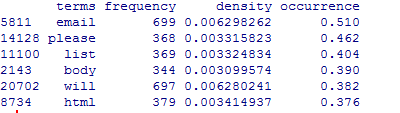
#看看情况,截图与书上并不一致
head(spam.df[with(spam.df,order(-occurrence)),])
#接下来构造正常邮件的,跟垃圾邮件一样,但要注意限制在500封,因为垃圾邮件也只有500封
easyham.path<-'data\\easy_ham\\'
easyham.docs<-dir(easyham.path)
easyham.docs<-easyham.docs[which(easyham.docs!='cmds')]
easyham.docs<-easyham.docs[1:500]
all.easyham<-sapply(easyham.docs,function(p) get.msg(paste(easyham.path,p,sep='')))
get.tdm <- function(doc.vec)
{
control <- list(stopwords = TRUE,
removePunctuation = TRUE,
removeNumbers = TRUE,
minDocFreq = 2)
doc.corpus <- Corpus(VectorSource(doc.vec))
doc.dtm <- TermDocumentMatrix(doc.corpus, control)
return(doc.dtm)
}
easyham.tdm<-get.tdm(all.easyham)
easyham.matrix<-as.matrix(easyham.tdm)
easyham.counts<-rowSums(easyham.matrix)
easyham.df<-data.frame(cbind(names(easyham.counts),as.numeric(easyham.counts)),stringsAsFactors=FALSE)
names(easyham.df)<-c('terms','frequency')
easyham.df$frequency<-as.numeric(easyham.df$frequency)
easyham.occurrence<-sapply(1:nrow(easyham.matrix),function(i) {length(which(easyham.matrix[i,]>0))/ncol(easyham.matrix)})
easyham.density<-easyham.df$frequency/sum(easyham.df$frequency)
easyham.df<-transform(easyham.df,density=easyham.density,occurrence=easyham.occurrence)
#接下来定义分类器,目的是给出一封邮件,用分类器来判定是正常邮件还是垃圾邮件
#新邮件中有些词已经在分类器中,但有些词不在分类器中,此时将未出现的词的概率c定为0.0001%
#假设是垃圾邮件和是正常邮件的可能性相同,将每一类的先验概率prior都设为50%
#以下函数用于分类
classify.email <- function(path, training.df, prior = 0.5, c = 1e-6)
{
# Here, we use many of the support functions to get the
# email text data in a workable format
msg <- get.msg(path)
msg.tdm <- get.tdm(msg)
msg.freq <- rowSums(as.matrix(msg.tdm))
# Find intersections of words
msg.match <- intersect(names(msg.freq), training.df$term)
# Now, we just perform the naive Bayes calculation
if(length(msg.match) < 1)
{
#没有任何词出现在垃圾邮件集中,length(msg.freq)是词的个数
return(prior * c ^ (length(msg.freq)))
}
else
{
#找出共现词的文档频率放到match.probs
match.probs <- training.df$occurrence[match(msg.match, training.df$term)]
return(prior * prod(match.probs) * c ^ (length(msg.freq) - length(msg.match)))
}
}
#可以应用了
hardham.docs <- dir(hardham.path)
hardham.docs <- hardham.docs[which(hardham.docs != "cmds")]
#应用正常邮件词频,得出是正常邮件的概率
hardham.spamtest <- sapply(hardham.docs,
function(p) classify.email(file.path(hardham.path, p), training.df = spam.df))
#应用垃圾邮件词频,得出是垃圾邮件的概率
hardham.hamtest <- sapply(hardham.docs,
function(p) classify.email(file.path(hardham.path, p), training.df = easyham.df))
#如果一封邮件是正常邮件的概率大于是垃圾邮件的概率,返回TRUE,否则返回FALSE
hardham.res <- ifelse(hardham.spamtest > hardham.hamtest,
TRUE,
FALSE)
summary(hardham.res)
#不能只拿正常邮件来测试,把刚才的正常和垃圾邮件都拿来分类看看效果
#结果分三个列,正常邮件概率,垃圾邮件概率和判别结果
spam.classifier <- function(path)
{
pr.spam <- classify.email(path, spam.df)
pr.ham <- classify.email(path, easyham.df)
return(c(pr.spam, pr.ham, ifelse(pr.spam > pr.ham, 1, 0)))
}
#把所有没分类的文件合并起来
easyham2.docs <- dir(easyham2.path)
easyham2.docs <- easyham2.docs[which(easyham2.docs != "cmds")]
hardham2.docs <- dir(hardham2.path)
hardham2.docs <- hardham2.docs[which(hardham2.docs != "cmds")]
spam2.docs <- dir(spam2.path)
spam2.docs <- spam2.docs[which(spam2.docs != "cmds")]
# 全部分类
easyham2.class <- suppressWarnings(lapply(easyham2.docs,
function(p)
{
spam.classifier(file.path(easyham2.path, p))
}))
hardham2.class <- suppressWarnings(lapply(hardham2.docs,
function(p)
{
spam.classifier(file.path(hardham2.path, p))
}))
spam2.class <- suppressWarnings(lapply(spam2.docs,
function(p)
{
spam.classifier(file.path(spam2.path, p))
}))
# 创建单个数据框包含了全部要分类的数据
easyham2.matrix <- do.call(rbind, easyham2.class)
easyham2.final <- cbind(easyham2.matrix, "EASYHAM")
hardham2.matrix <- do.call(rbind, hardham2.class)
hardham2.final <- cbind(hardham2.matrix, "HARDHAM")
spam2.matrix <- do.call(rbind, spam2.class)
spam2.final <- cbind(spam2.matrix, "SPAM")
class.matrix <- rbind(easyham2.final, hardham2.final, spam2.final)
class.df <- data.frame(class.matrix, stringsAsFactors = FALSE)
names(class.df) <- c("Pr.SPAM" ,"Pr.HAM", "Class", "Type")
class.df$Pr.SPAM <- as.numeric(class.df$Pr.SPAM)
class.df$Pr.HAM <- as.numeric(class.df$Pr.HAM)
class.df$Class <- as.logical(as.numeric(class.df$Class))
class.df$Type <- as.factor(class.df$Type)
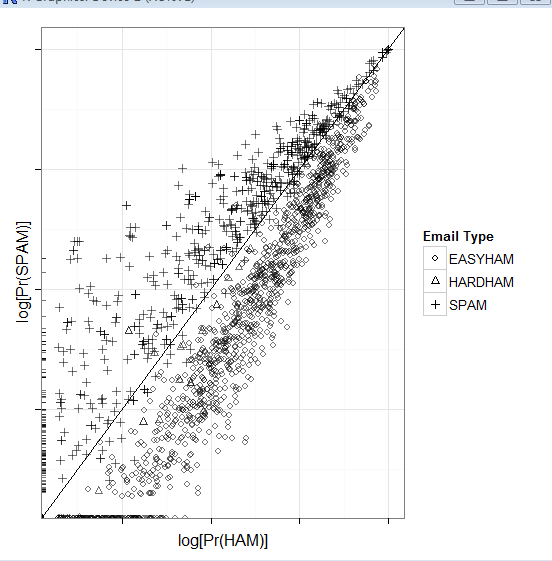
# 画图
class.plot <- ggplot(class.df, aes(x = log(Pr.HAM), log(Pr.SPAM))) +
geom_point(aes(shape = Type, alpha = 0.5)) +
stat_abline(yintercept = 0, slope = 1) +
scale_shape_manual(values = c("EASYHAM" = 1,
"HARDHAM" = 2,
"SPAM" = 3),
name = "Email Type") +
scale_alpha(guide = "none") +
xlab("log[Pr(HAM)]") +
ylab("log[Pr(SPAM)]") +
theme_bw() +
theme(axis.text.x = element_blank(), axis.text.y = element_blank())
print(class.plot)
get.results <- function(bool.vector)
{
results <- c(length(bool.vector[which(bool.vector == FALSE)]) / length(bool.vector),
length(bool.vector[which(bool.vector == TRUE)]) / length(bool.vector))
return(results)
}
# 给出正确率
easyham2.col <- get.results(subset(class.df, Type == "EASYHAM")$Class)
hardham2.col <- get.results(subset(class.df, Type == "HARDHAM")$Class)
spam2.col <- get.results(subset(class.df, Type == "SPAM")$Class)
class.res <- rbind(easyham2.col, hardham2.col, spam2.col)
colnames(class.res) <- c("NOT SPAM", "SPAM")
print(class.res)

Machine Learning for hackers读书笔记(三)分类:垃圾邮件过滤的更多相关文章
- Machine Learning for hackers读书笔记(六)正则化:文本回归
data<-'F:\\learning\\ML_for_Hackers\\ML_for_Hackers-master\\06-Regularization\\data\\' ranks < ...
- Machine Learning for hackers读书笔记(四)排序:智能收件箱
#数据集来源http://spamassassin.apache.org/publiccorpus/ #加载数据 library(tm)library(ggplot2)data.path<-'F ...
- Machine Learning for hackers读书笔记(十)KNN:推荐系统
#一,自己写KNN df<-read.csv('G:\\dataguru\\ML_for_Hackers\\ML_for_Hackers-master\\10-Recommendations\\ ...
- Machine Learning for hackers读书笔记(九)MDS:可视化地研究参议员相似性
library('foreign') library('ggplot2') data.dir <- file.path('G:\\dataguru\\ML_for_Hackers\\ML_for ...
- Machine Learning for hackers读书笔记(八)PCA:构建股票市场指数
library('ggplot2') prices <- read.csv('G:\\dataguru\\ML_for_Hackers\\ML_for_Hackers-master\\08-PC ...
- Machine Learning for hackers读书笔记(七)优化:密码破译
#凯撒密码:将每一个字母替换为字母表中下一位字母,比如a变成b. english.letters <- c('a', 'b', 'c', 'd', 'e', 'f', 'g', 'h', 'i' ...
- Machine Learning for hackers读书笔记(二)数据分析
#均值:总和/长度 mean() #中位数:将数列排序,若个数为奇数,取排好序数列中间的值.若个数为偶数,取排好序数列中间两个数的平均值 median() #R语言中没有众数函数 #分位数 quant ...
- Machine Learning for hackers读书笔记(一)使用R语言
#使用数据:UFO数据 #读入数据,该文件以制表符分隔,因此使用read.delim,参数sep设置分隔符为\t #所有的read函数都把string读成factor类型,这个类型用于表示分类变量,因 ...
- Machine Learning for hackers读书笔记_一句很重要的话
为了培养一个机器学习领域专家那样的直觉,最好的办法就是,对你遇到的每一个机器学习问题,把所有的算法试个遍,直到有一天,你凭直觉就知道某些算法行不通.
随机推荐
- 解析xml,几种方式
市面上解析xml分两种方式,1.dom 2.sax ,xml解析常见的一共有三种开发包,1.jaxp 2.jdom 3.dom4j,这三种方式最常用的是dom4j,jaxp和jdom很少有人用, ...
- Http 请求
public static string HttpGet(string url) { HttpWebRequest request = (HttpWebRequest)WebRequest.Creat ...
- iOS奔溃日志总结
1,http://www.cnblogs.com/qingjoin/p/3515902.html 2,http://blog.csdn.net/u012269653/article/details/4 ...
- Linux加载DTS设备节点的过程(以高通8974平台为例)
DTS是Device Tree Source的缩写,用来描述设备的硬件细节.在过去的ARM Linux中,arch/arm/plat-xxx和arch/arm/mach-xxx中充斥着大量的垃圾代码, ...
- 新买了ipad,在ipad上面看见的一个效果,pc上应该也见过,但是还是ipad上面有印象,如果是弹性运动就最好了
新买了ipad,在ipad上面看见的一个效果,pc上应该也见过,但是还是ipad上面有印象,如果是弹性运动就最好了 <!DOCTYPE html> <html> <hea ...
- Hearthstone-Deck-Tracker项目的编译
https://github.com/HearthSim/Hearthstone-Deck-Tracker https://github.com/HearthSim/HearthDb https:// ...
- jQuery插件之jquery editable plugin--点击编辑文字插件
jeditable是一个jquery插件,它的优点是可以就地编辑,并且提交到服务器处理,是一个不可多得的就地编辑插件.(注: 就地编辑,也有称即时编辑?一般的流程是这样的,当用户点击网页上的文字时,该 ...
- linux包的相关命令
apt-cache search package 搜索包 apt-cache show package 获取包的相关信息,如说明.大小.版本等 sudo apt-get install package ...
- 请求webservice接口的某方法数据
NSURL *url = [NSURL URLWithString:@"http://xxx.xxx.com/xxx/xxxxWS?wsdl"]; NSString *soapMs ...
- python_way ,day23 API
python_way ,day23 1.api认证 .api加密动态请求 2.自定义session 一.api认证 首先提供api的公司,如支付宝,微信,都会给你一个用户id,然后还会让你下一个SD ...