
Linux环境下安装Nginx及其使用
https://www.jb51.net/article/136161.htm
一、查看CentOS的版本
|
1
|
cat /etc/redhat-release |
二、添加资源库
在 CentOS 系统上安装 Nginx ,得先去添加一个资源库:
|
1
2
3
4
5
6
|
vim /etc/yum.repos.d/nginx.repo [nginx] name=nginx repo baseurl=http://nginx.org/packages/centos/$releasever/$basearch/ gpgcheck=0 enabled=1 |
三、安装nginx
|
1
|
yum -y install nginx |
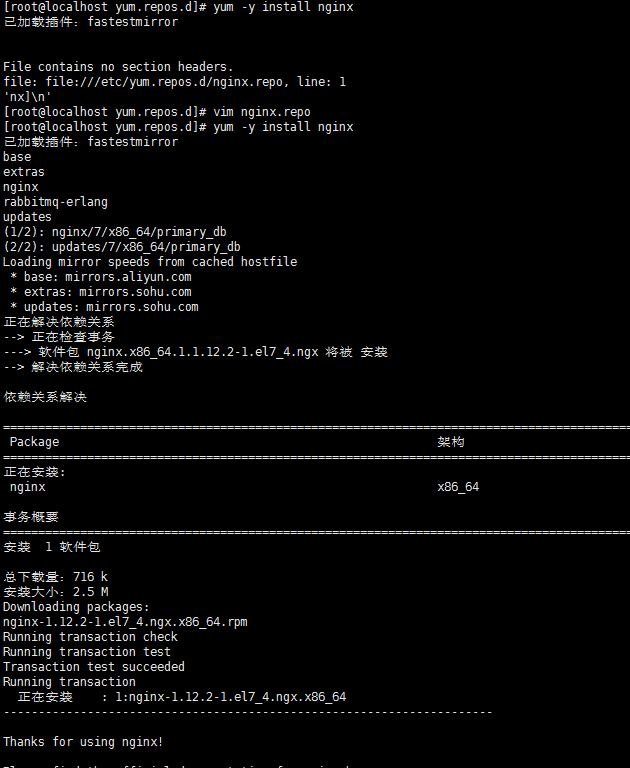
四、测试nginx配置文件是否正确
|
1
|
nginx -t |
打印如下:
nginx: the configuration file /etc/nginx/nginx.conf syntax is ok
nginx: configuration file /etc/nginx/nginx.conf test is successful
五、CentOS7.0+ nginx实现停止、启动、重启
|
1
2
3
4
|
systemctl stop nginx.service systemctl start nginx.servicesystemctl restart nginx.servicesystemctl status nginx.service |
开机自启:
|
1
|
systemctl enable nginx.service |
取消开机自启:
|
1
|
systemctl disable nginx.service |
六、nginx.conf配置示例
我的配置:
|
1
2
3
4
5
6
7
8
9
10
11
12
13
14
15
16
17
18
19
20
21
22
23
24
25
26
27
28
29
30
31
32
33
34
35
36
37
38
39
40
41
42
43
44
45
46
47
48
49
50
51
52
53
54
55
56
57
58
59
60
61
62
63
64
65
66
67
68
69
70
71
72
73
74
75
|
user nginx;worker_processes 4;error_log /var/log/nginx/error.log warn;pid /var/run/nginx.pid;events { worker_connections 1024;}http { include /etc/nginx/mime.types; default_type application/octet-stream; log_format main '$remote_addr - $remote_user [$time_local] "$request" ' '$status $body_bytes_sent "$http_referer" ' '"$http_user_agent" "$http_x_forwarded_for"'; access_log /var/log/nginx/access.log main; sendfile on; #tcp_nopush on; keepalive_timeout 65; #gzip on; include /etc/nginx/conf.d/*.conf; #设定负载均衡的服务器列表 upstream pay_server { ip_hash; server 10.74.248.01:8088 max_fails=2 fail_timeout=2; server 10.74.248.02:8088 max_fails=2 fail_timeout=2; } upstream print_server { ip_hash; server 10.74.248.03:2001 max_fails=2 fail_timeout=2; server 10.74.248.04:2001 max_fails=2 fail_timeout=2; } upstream accss_door_server { ip_hash; server 10.74.248.05:2002 max_fails=2 fail_timeout=2; server 10.74.248.06:2002 max_fails=2 fail_timeout=2; } server { listen 80; server_name wab.kupu.ccoop.com.cn; location /invengo { proxy_pass http://pay_server; index index.jsp index.html index.htm; } location /invengo/epc { proxy_pass http://print_server; index index.jsp index.html index.htm; } location /invengo/print { proxy_pass http://print_server; index index.jsp index.html index.htm; } location /checkout { proxy_pass http://accss_door_server; index index.jsp index.html index.htm; } location /asset { proxy_pass http://accss_door_server; index index.jsp index.html index.htm; } } |
常用的nginx.conf配置:
|
1
2
3
4
5
6
7
8
9
10
11
12
13
14
15
16
17
18
19
20
21
22
23
24
25
26
27
28
29
30
31
32
33
34
35
36
37
38
39
40
41
42
43
44
45
46
47
48
49
50
51
52
53
54
55
56
57
58
59
60
61
62
63
64
65
66
67
68
69
70
71
72
73
74
75
76
77
78
79
80
81
82
83
84
85
86
87
88
89
90
91
92
93
94
95
|
user www www;worker_processes 2;error_log logs/error.log;#error_log logs/error.log notice;#error_log logs/error.log info;pid logs/nginx.pid;events { use epoll; worker_connections 2048;}http { include mime.types; default_type application/octet-stream; #log_format main '$remote_addr - $remote_user [$time_local] "$request" ' # '$status $body_bytes_sent "$http_referer" ' # '"$http_user_agent" "$http_x_forwarded_for"'; #access_log logs/access.log main; sendfile on; # tcp_nopush on; keepalive_timeout 65; # gzip压缩功能设置 gzip on; gzip_min_length 1k; gzip_buffers 4 16k; gzip_http_version 1.0; gzip_comp_level 6; gzip_types text/html text/plain text/css text/javascript application/json application/javascript application/x-javascript application/xml; gzip_vary on; # http_proxy 设置 client_max_body_size 10m; client_body_buffer_size 128k; proxy_connect_timeout 75; proxy_send_timeout 75; proxy_read_timeout 75; proxy_buffer_size 4k; proxy_buffers 4 32k; proxy_busy_buffers_size 64k; proxy_temp_file_write_size 64k; proxy_temp_path /usr/local/nginx/proxy_temp 1 2; # 设定负载均衡后台服务器列表 upstream backend { #ip_hash; server 192.168.10.100:8080 max_fails=2 fail_timeout=30s ; server 192.168.10.101:8080 max_fails=2 fail_timeout=30s ; } # 很重要的虚拟主机配置 server { listen 80; server_name itoatest.example.com; root /apps/oaapp; charset utf-8; access_log logs/host.access.log main; #对 / 所有做负载均衡+反向代理 location / { root /apps/oaapp; index index.jsp index.html index.htm; proxy_pass http://backend; proxy_redirect off; # 后端的Web服务器可以通过X-Forwarded-For获取用户真实IP proxy_set_header Host $host; proxy_set_header X-Real-IP $remote_addr; proxy_set_header X-Forwarded-For $proxy_add_x_forwarded_for; proxy_next_upstream error timeout invalid_header http_500 http_502 http_503 http_504; } #静态文件,nginx自己处理,不去backend请求tomcat location ~* /download/ { root /apps/oa/fs; } location ~ .*\.(gif|jpg|jpeg|bmp|png|ico|txt|js|css)$ { root /apps/oaapp; expires 7d; } location /nginx_status { stub_status on; access_log off; allow 192.168.10.0/24; deny all; } location ~ ^/(WEB-INF)/ { deny all; } #error_page 404 /404.html; # redirect server error pages to the static page /50x.html # error_page 500 502 503 504 /50x.html; location = /50x.html { root html; } } ## 其它虚拟主机,server 指令开始} |
Linux环境下安装Nginx及其使用的更多相关文章
- Linux 环境下安装 Nginx+php+mysql 开发环境
一直以来都没有养成记录学习的好习惯,我想从这么一天开始,把自己学习和工作中的经验和坑都记录下来.等到以后老的时候还有可以回忆的地方. 最近在学习linux,虽然已经玩linux很久了,但是没有怎么用心 ...
- linux环境下安装nginx步骤
开始前,请确认gcc g++开发类库是否装好,默认已经安装. ububtu平台编译环境可以使用以下指令 apt-get install build-essential apt-get install ...
- linux环境下安装nginx步骤(不错)
开始前,请确认gcc g++开发类库是否装好,默认已经安装. ububtu平台编译环境可以使用以下指令 apt-get install build-essential apt-get install ...
- 【Nginx】 linux环境下安装nginx步骤
开始前,请确认gcc g++开发类库是否装好,默认已经安装. centos平台编译环境使用如下指令 安装make: yum -y install gcc automake autoconf libto ...
- Linux环境下安装nginx
#一般我们都需要先装pcre, zlib,前者为了重写rewrite,后者为了gzip压缩cd /usr/local/devmkdir nginxcd nginxmkdir softcd soft # ...
- Linux centos7环境下安装Nginx
Linux centos7环境下安装Nginx的步骤详解 1. 首先到Nginx官网下载Nginx安装包 http://nginx.org/download/nginx-1.5.9.tar.gz ...
- Linux和Windows环境下安装Nginx
Nginx的安装 windows环境下安装Nginx 安装 Nginx 的下载地址如下: http://nginx.org/en/download.html 选择时尽量选择 Stable 稳定版本,点 ...
- Linux 环境下安装python相关
目录 Linux 环境下安装python相关 linux软件包管理工具之yum工具(如同pip3工具) yum源理解 下载阿里云的.repo仓库文件 ,放到/etc/yum.repos.d/ yum安 ...
- Linux环境下安装Tigase XMPP Server
Tigase是一种XMPP服务器,可以作为采用XMPP协议的各种IM(Instant Messeging)工具(如Pandion.Spark等)的服务器. 在Linux环境下安装Tigase的步骤如下 ...
随机推荐
- Cesium学习系列汇总
内容比较多,完整看完需要大概10分钟,废话不多说,撸起袖子,加油干!!! 1.前言 按照套路,先介绍一下什么是Cesium. Cesium ['siːzɪəm]是JavaScript开源库,通过Ces ...
- Linux 之Shell for循环
@代表所有参数所以如果后面跟上echo $v你会发现他会一次显示user userdebug eng $poo -le ${#prodlist[@]} 这句话是说 $poo小于等于prodlist中的 ...
- BOM相关方法及属性
browser objec tmodel浏览器对象模型 BOM里面的方法大多在window对象底下,window代表窗口,也就是说,在BOM里面大多调用window下面的东西. 1.open方法是wi ...
- shell中的for循环用法详解
for i in “file1” “file2” “file3”for i in /boot/*for i in /etc/*.conffor i in $(seq -w 10) –>等宽的01 ...
- vi启动时报错:YouCompleteMe unavailable: requires Vim 7.4.1578+如何处理?
答:源码编译安装最新的vim 以redhat为例: 1. 移除旧的vi,vim sudo yum remove vi vim -y 2. 安装ncurses库 sudo yum install ncu ...
- flask的post,get请求及获取不同格式的参数
flask的post,get请求及获取不同格式的参数 1 获取不同格式参数 1.0 获取json参数 Demo from flask import Flask, request, jsonify ap ...
- mysql多实例搭建
一)多实例安装 [root@mysqlmaster01 ~]# mkdir /data/mysql_data2[root@mysqlmaster01 ~]# mkdir /data/mysql_dat ...
- Java中遍历Map的四种方式
Demo如下 Map<String, String> map = new HashMap<>(); map.put("key1","data1&q ...
- OpenStack Cinder发展动态系列--Austin峰会
在Mitaka版本,Cinder团队在多个特性和领域取得了重大进展. 本文将做一个简要的介绍:关于在Mitaka版本已经完成的功能和特性,以及讨论在Newton版本将会开发的功能和特性. 1 Cind ...
- 查看mycat日志
查看日志: tail -f /usr/local/mycat/logs/wrapper.log