
httprunner学习2-har2case录制生成脚本
前言
复制毁一生,录制穷三代,如果你只是因为不想写脚本,而去录制脚本,那我建议你还是别学录制了。
录制脚本,只是一个过渡,从0到1的一个过渡,如果让你直接写脚本,你会无从下手,可以将录制的脚本快速转化成httprunner脚本文件。
har2case可以将.har文件转化成yaml格式或者json格式的httprunner的脚本文件,生成.har格式文件可以借助fiddler或Charles抓包工具。
httprunner==1.5.8
环境准备
如果你已经安装过httprunner,那应该是自带了har2case包,如果没有的话,可以用pip安装
pip install har2case==0.3.1
查看版本号
har2case -V
0.3.1
-h查看帮助选项
C:\Users\dell>har2case -h

usage: har2case [-h] [-V] [--log-level LOG_LEVEL] [-2y] [-fmt FMT_VERSION]

                [--filter FILTER] [--exclude EXCLUDE]

                [har_source_file]

Convert HAR(HTTP Archive) to YAML/JSON testcases for HttpRunner.

positional arguments:

  har_source_file       Specify HAR source file

optional arguments:

  -h, --help            show this help message and exit

  -V, --version         show version

  --log-level LOG_LEVEL

                        Specify logging level, default is INFO.

  -2y, --to-yml, --to-yaml

                        Convert to YAML format, if not specified, convert to

                        JSON format by default.

  -fmt FMT_VERSION, --format FMT_VERSION

                        Specify YAML/JSON testcase format version, v2

                        corresponds to HttpRunner 2.2.0+.

  --filter FILTER       Specify filter keyword, only url include filter string

                        will be converted.

  --exclude EXCLUDE     Specify exclude keyword, url that includes exclude

                        string will be ignored, multiple keywords can be

                        joined with '|'
Fiddler抓包生成.har文件
以登录接口为案例,登录接口相关文档信息如下:
- 访问地址:http://127.0.0.1:8000/api/v1/login/
- 请求类型:POST
- 请求头部:application/json
- 请求参数:{"username":"test", "password":"123456"}
在Fiddler上发送接口请求后,抓包如下

抓到这个请求后,右上角File->Export Sessions->Selected Sessions->Select Export Format->勾选HTTPArchive v1.1
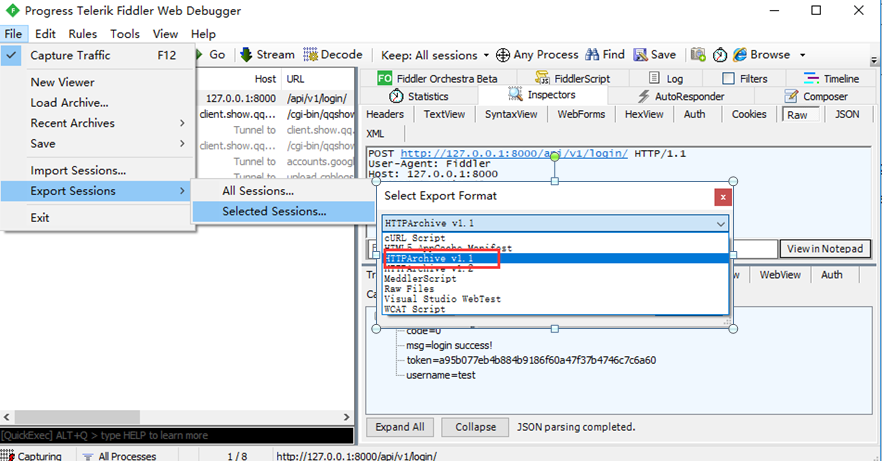
勾选HTTPArchive v1.1类型后,下一步导出为test_login_demo.har文件
har2case转yaml格式脚本
接下来将刚才生成的test_login_demo.har文件,使用har2case转成yam格式的脚本文件
har2case test_login_demo.har -2y
-2y参数是设置转成.yml格式的脚本,如果不加这个参数,默认转成json格式
D:\>har2case test_login_demo.har -2y

INFO:root:Start to generate testcase.

INFO:root:dump testcase to YAML format.

INFO:root:Generate YAML testcase successfully: test_login_demo.yml
查看刚才生的的test_login_demo.yml,内容如下
# 上海悠悠,QQ交流群:750815713

-   config:

        name: testcase description

        variables: {}

-   test:

        name: /api/v1/login/

        request:

            headers:

                Content-Type: application/json

                User-Agent: Fiddler

            json:

                password: '123456'

                username: test

            method: POST

            url: http://127.0.0.1:8000/api/v1/login/

        validate:

        -   eq:

            - status_code

            - 200

        -   eq:

            - headers.Content-Type

            - application/json

        -   eq:

            - content.code

            - 0

        -   eq:

            - content.msg

            - login success!

        -   eq:

            - content.username

            - test

        -   eq:

            - content.token

            - a95b077eb4b884b9186f60a47f37b4746c7c6a60
运行用例
.yml格式脚本生成后,接下来使用hrun运行用例
hrun test_login_demo.yml
D:\>hrun test_login_demo.yml

/api/v1/login/

INFO     POST http://127.0.0.1:8000/api/v1/login/

INFO     status_code: 200, response_time(ms): 437.79 ms, response_length: 109 bytes

INFO     start to validate.

ERROR    validate: content.token equals a95b077eb4b884b9186f60a47f37b4746c7c6a60(str)   ==> fail

c7dca34cc6ff93049985c44967f132c4146e995e(str) equals a95b077eb4b884b9186f60a47f37b4746c7c6a60(str)

ERROR    request:

headers: {'content-type': 'application/json', 'user-agent': 'Fiddler'}

json: {'password': '123456', 'username': 'test'}

ERROR    response:

status_code: 200

headers: {'Date': 'Sat, 21 Sep 2019 09:54:57 GMT', 'Server': 'WSGIServer/0.2 CPython/3.6.0', 'Content-Type': 'application/json', 'Vary': 'Accept, Cookie', 'Allow': 'POST, OPTIONS', 'X-Frame-Options': 'SAMEORIGIN', 'Content-Length': '109'}

body: '{"code": 0, "msg": "login success!", "username": "test", "token": "c7dca34cc6ff93049985c44967f132c4146e995e"}'

F

======================================================================

FAIL: runTest (httprunner.task.TestCase)

/api/v1/login/

----------------------------------------------------------------------

Traceback (most recent call last):

  File "e:\python36\lib\site-packages\httprunner\task.py", line 27, in runTest

    self.test_runner.run_test(self.testcase_dict)

httprunner.exceptions.ValidationFailure

During handling of the above exception, another exception occurred:

Traceback (most recent call last):

  File "e:\python36\lib\site-packages\httprunner\task.py", line 29, in runTest

    self.fail(repr(ex))

AssertionError: ValidationFailure()

----------------------------------------------------------------------

Ran 1 test in 0.468s

FAILED (failures=1)

INFO     Start to render Html report ...

INFO     Generated Html report: D:\reports\1569059697.html

D:\>
你会发现运行用例会失败,打开测试报告,会发现是token校验失败了,因为token每次都是动态生成的,所以token校验不能写死了
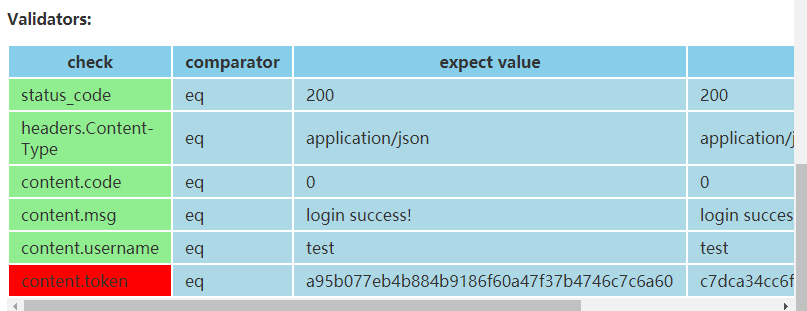
解决办法很简单,去掉这个token校验即可
        -   eq:

            - content.token

            - a95b077eb4b884b9186f60a47f37b4746c7c6a60
生成json格式脚本
har2case默认生成json格式的脚本,因为个人更喜欢yaml格式,所以json格式写在后面了.
har2case test_login_demo.har
D:\>har2case test_login_demo.har

INFO:root:Start to generate testcase.

INFO:root:dump testcase to JSON format.

INFO:root:Generate JSON testcase successfully: test_login_demo.json

D:\>
生成的test_login_demo.json内容如下
# 上海悠悠,QQ交流群:750815713

[

    {

        "config": {

            "name": "testcase description",

            "variables": {}

        }

    },

    {

        "test": {

            "name": "/api/v1/login/",

            "request": {

                "url": "http://127.0.0.1:8000/api/v1/login/",

                "method": "POST",

                "headers": {

                    "User-Agent": "Fiddler",

                    "Content-Type": "application/json"

                },

                "json": {

                    "username": "test",

                    "password": "123456"

                }

            },

            "validate": [

                {

                    "eq": [

                        "status_code",

                        200

                    ]

                },

                {

                    "eq": [

                        "headers.Content-Type",

                        "application/json"

                    ]

                },

                {

                    "eq": [

                        "content.code",

                        0

                    ]

                },

                {

                    "eq": [

                        "content.msg",

                        "login success!"

                    ]

                },

                {

                    "eq": [

                        "content.username",

                        "test"

                    ]

                },

                {

                    "eq": [

                        "content.token",

                        "a95b077eb4b884b9186f60a47f37b4746c7c6a60"

                    ]

                }

            ]

        }

    }

]
filter和exclude过滤
你可以使用filter参数,过滤url包含xxx.com的内容,如只转包含127.0.0.1的url请求
$ har2case demo.har --filter 127.0.0.1
也可以使用exclude来过滤,除xxx.com以外的内容
$ har2case demo.har--exclude xxxx.com
复制毁一生,录制穷三代 上海-悠悠,QQ交流群:750815713
httprunner学习2-har2case录制生成脚本的更多相关文章
- httprunner(4)录制生成测试用例
前言 写用例之前,我们应该熟悉API的详细信息.建议使用抓包工具Charles或AnyProxy进行抓包. har2case 我们先来了解一下另一个项目har2case 他的工作原理就是将当前主流的抓 ...
- jmeter 入门学习-通过代理录制测试脚本
通过jmeter代理录制脚本后,会产生大量的无用的请求,尽管在代理中已经过滤了一部分图片或者CSS.JS文件. 手动查看主要的请求:这里主要关注登陆请求,要确定有效的URL请求 删除除/Login.a ...
- 【HttpRunner v3.x】笔记 ——3. 录制生成测试用例
在正式手动编写case之前,我们可以先来熟悉下httprunner的录制生成用例功能. 用postman的童鞋都知道,里面有个功能可以将接口转换成代码,可以直接copy过来使用,提升case编写效率. ...
- loadrunner11录制报 NOT PROXIED!错误,无法生成脚本
使用loadrunner11,IE9录制完脚本,报错: [Net An. Error (1dec:282c)] Request Connection: Remote Server @ 210.5 ...
- 2. HttpRunnner录制生成用例
录制生成用例 为了简化测试用例的编写工作,HttpRunner 实现了测试用例生成的功能,对应的转换工具为一个独立的项目:har2case. 简单来说,就是当前主流的抓包工具和浏览器都支持将抓取得到的 ...
- 【LR】录制测试脚本中的基本菜单
学习来源: MBoo,小强老师性能测试及Loadrunner培训 ——录制测试脚本: 1.Vuser -> run-time settings ->General Run Logic : ...
- JMeter入门(3):录制JMeter脚本
一般自己手动的设置JMeter会比较麻烦,如果一边操作页面,提交表单,一边能够自动生成JMeter的脚本,则非常方便: BadBoy:录制JMeter脚本: Donwload URL:http://w ...
- 使用LR11录制手机脚本
要使用Loadrunner11录制手机脚本,需要先搭建好测试环境: 能够正常使用的LoadRunner11: 安装一个LR11的补丁包,用于手机录制: pc端和手机端的网络在同一个网段. ...
- MonkeyRunner之小白如何使用MonkeyRecorder录制回放脚本
之前摸索了好久.学习Python语言.安装工具.拉拉溜溜也慢慢地一点点进步.每天就疯狂的上网找资料.虽然大牛们写的很详细.但是自己就是笨的不知怎么做.最后找了一篇文章,真的就是万事俱备只欠东风的感觉, ...
随机推荐
- SpringMvc通过controller上传文件代码示例
上传文件这个功能用的比较多,不难,但是每次写都很别扭.记录在此,以备以后copy用. package com.**.**.**.web.api; import io.swagger.annotatio ...
- Jmeter接口测试【1】_安装配置教程
一.安装Java环境 1.下载JDK JDK 可以到官网选择windows系统版本(32位/64位)下载http://www.oracle.com/technetwork/java/javase/do ...
- jquery如何遍历table,并对table里的某一个单元格进行操作
1.如何根据每一行的某一列的值进行比较或其他操作,进而修改另一列的值或属性. $("#table_id tbody tr").each(function(){ var a = $( ...
- 如何从0搭建node服务
第一步 首先要搭一个node服务 基于 express 来快速构建node服务 npm install express 安装express 新建一个项目 myapp npm install expre ...
- [转帖]国产统一操作系统UOS龙芯版正式上线
国产统一操作系统UOS龙芯版正式上线 2019/12/13 12:49:31来源:IT之家作者:骑士责编:骑士评论:446 https://www.ithome.com/0/462/725.htm ...
- 完美解决SpringMVC中静态资源无法找到(No mapping found for HTTP request with URI)问题
https://blog.csdn.net/kingmax54212008/article/details/79330308 今天遇到一个比较新奇的问题,但是也应该是使用spring MVC框架时由于 ...
- SAP替代,出口U904在RGGBS000中未生成
报错.提示出口U904在RGGBS000中未生成. 一般情况下需要到 程序RGGBS000 中,在form:get_exit_titles 中增加下列代码. exits-name = 'U904. e ...
- 华为 S5700 交换机 批量修改端口方法
常常在配置交换机端口的时候需要将多个端口设置为相同的配置,当时各端口逐一去配置不仅慢,而且容易出错,这个时候就需要对端口进行批量设置,不仅快捷,而且避免了反复输出容易出错的情况.不同系列.不同版本交换 ...
- Google Chrome 浏览器JS无法更新解决办法
JS无法更新原因: 浏览器为了加载快,默认是按照自定规则更新缓存,非实时更新. 我们在开发的时候,JS变动很快,需要即时让浏览器加载最新文件,也就是禁用浏览器缓存 (1)使用F12进入开发者模式,找到 ...
- MongoDB netcore
mongodb.driver mongodb.driver.core url: http://dl.mongodb.org/dl/win32/x86_64 ********************* ...