
使用winform程序控制window服务的操作
继上篇
c#之添加window服务(定时任务)
基础之上,
这篇文章主要讲述,使用winform程序来控制window服务的安装,启动,停止,卸载等操作
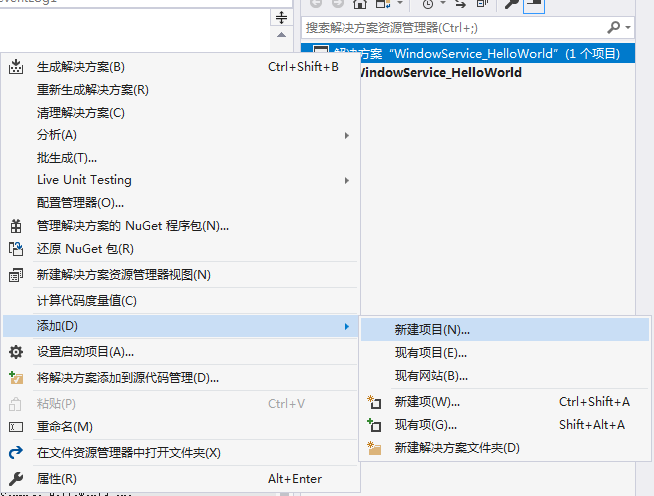
1.在同一个解决方案添加winform项目,如图
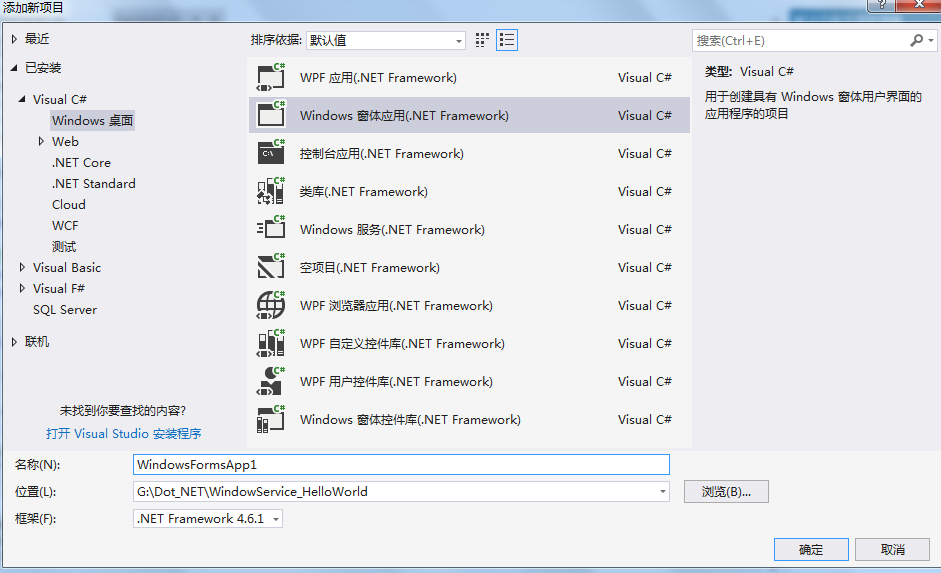
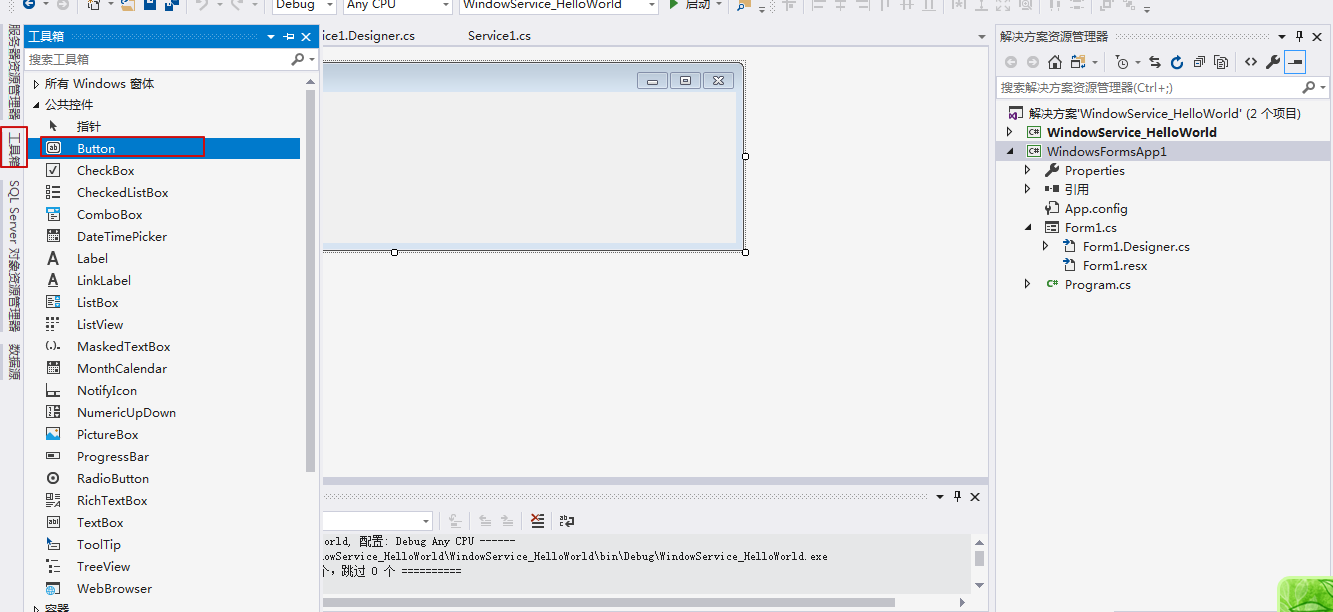
2.在winform设计器中添加按钮
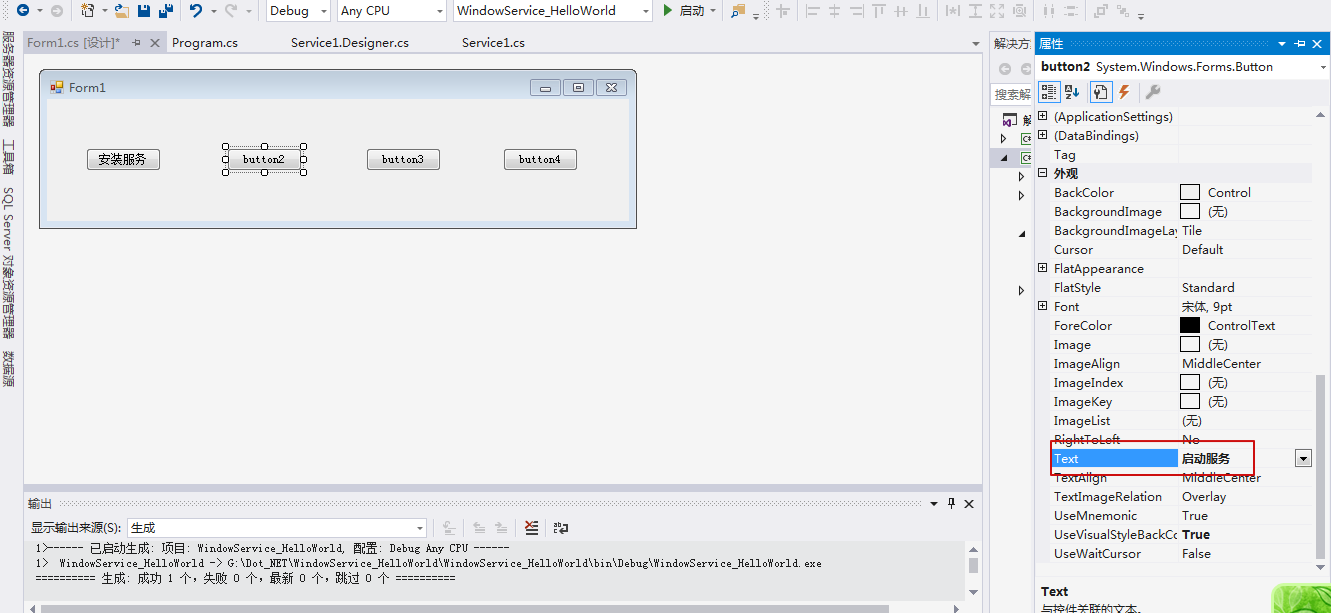
修改按钮名称依次为:安装服务、启动服务、停止服务、卸载服务
3.向winform项目中添加引用:System.Configuration.Install 和 System.ServiceProcess 两个程序集(其中涉及window服务的一些操作)

4.把之前创建的window服务也引入winform中
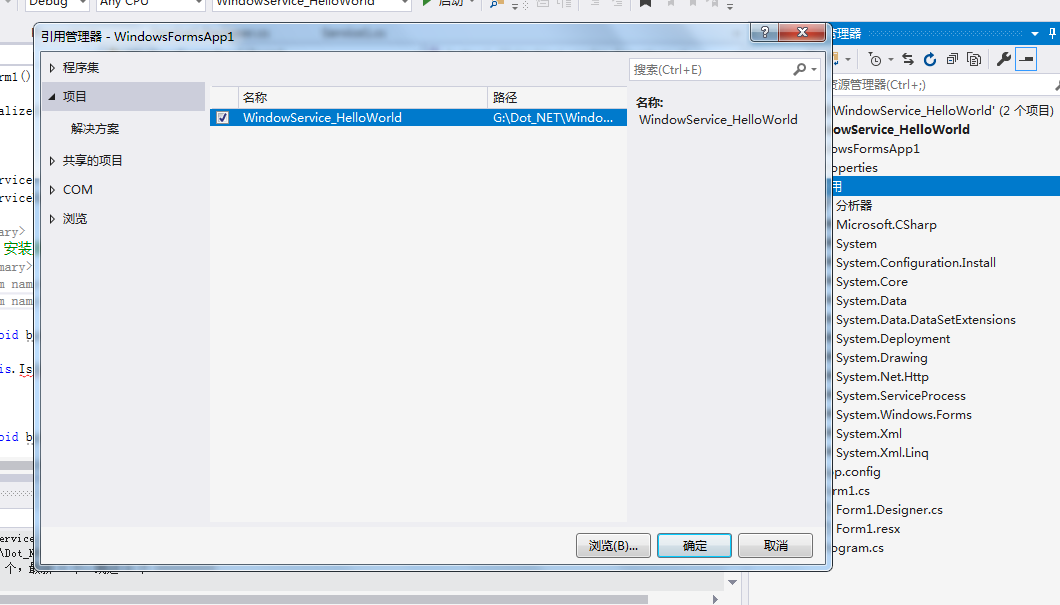
5.编写代码
 public partial class Form1 : Form

    {

        public Form1()

        {

            InitializeComponent();

        }

        //安装及卸载路径

        string serviceFilePath = $"{Application.StartupPath}\\WindowService_HelloWorld.exe";

        //服务名称

        string serviceName = "MyService";

        /// <summary>

        /// 事件:安装服务

        /// </summary>

        /// <param name="sender"></param>

        /// <param name="e"></param>

        private void button1_Click(object sender, EventArgs e)

        {

            if (IsServiceExisted(serviceName)) this.UninstallService(serviceName);

            this.InstallService(serviceFilePath);

        }

        /// <summary>

        /// 事件:启动服务

        /// </summary>

        /// <param name="sender"></param>

        /// <param name="e"></param>

        private void button2_Click(object sender, EventArgs e)

        {

            if (IsServiceExisted(serviceName)) this.ServiceStart(serviceName);

        }

        /// <summary>

        /// 停止服务

        /// </summary>

        /// <param name="sender"></param>

        /// <param name="e"></param>

        private void button3_Click(object sender, EventArgs e)

        {

            if (IsServiceExisted(serviceName)) this.ServiceStop(serviceName);

        }

        /// <summary>

        /// 卸载服务

        /// </summary>

        /// <param name="sender"></param>

        /// <param name="e"></param>

        private void button4_Click(object sender, EventArgs e)

        {

            if (IsServiceExisted(serviceName))

            {

                this.ServiceStop(serviceName);

                this.UninstallService(serviceFilePath);

            }

        }

        /// <summary>

        /// 判断服务是否存在

        /// </summary>

        /// <param name="serviceName"></param>

        /// <returns></returns>

        private bool IsServiceExisted(string serviceName)

        {

            ServiceController[] services = ServiceController.GetServices();

            foreach(ServiceController sc in services)

            {

                if (sc.ServiceName.ToLower() == serviceName.ToLower())

                {

                    return true;

                }

            }

            return false;

        }

        /// <summary>

        /// 安装服务

        /// </summary>

        /// <param name="serviceFilePath"></param>

        private void InstallService(string serviceFilePath)

        {

            using(AssemblyInstaller installer=new AssemblyInstaller())

            {

                installer.UseNewContext = true;

                installer.Path = serviceFilePath;

                IDictionary saveState = new Hashtable();

                installer.Install(saveState);

                installer.Commit(saveState);

            }

        }

        /// <summary>

        /// 卸载服务

        /// </summary>

        /// <param name="serviceFilePath"></param>

        private void UninstallService(string serviceFilePath)

        {

            using(AssemblyInstaller installer=new AssemblyInstaller())

            {

                installer.UseNewContext = true;

                installer.Path = serviceFilePath;

                installer.Uninstall(null);

            }

        }

        /// <summary>

        /// 启动服务

        /// </summary>

        /// <param name="serviceName"></param>

        private void ServiceStart(string serviceName)

        {

            using(ServiceController controller=new ServiceController(serviceName))

            {

                if (controller.Status == ServiceControllerStatus.Stopped)

                {

                    controller.Start();

                }

            }

        }

        /// <summary>

        /// 停止服务

        /// </summary>

        /// <param name="serviceName"></param>

        private void ServiceStop(string serviceName)

        {

            using(ServiceController controller=new ServiceController(serviceName))

            {

                if (controller.Status == ServiceControllerStatus.Running)

                {

                    controller.Stop();

                }

            }

        }

    }
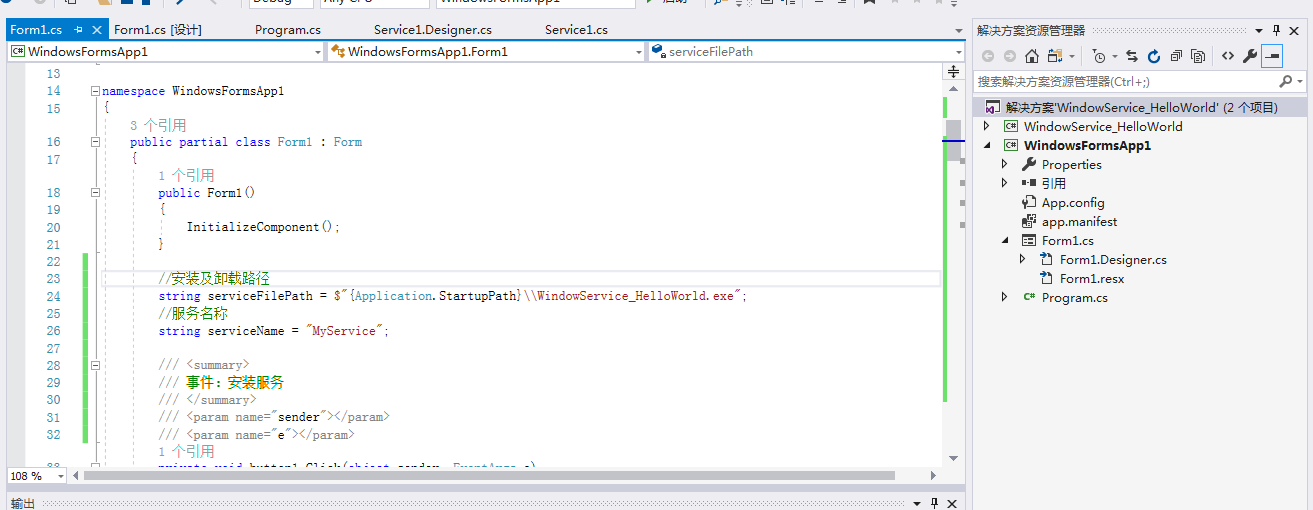
结构如下:
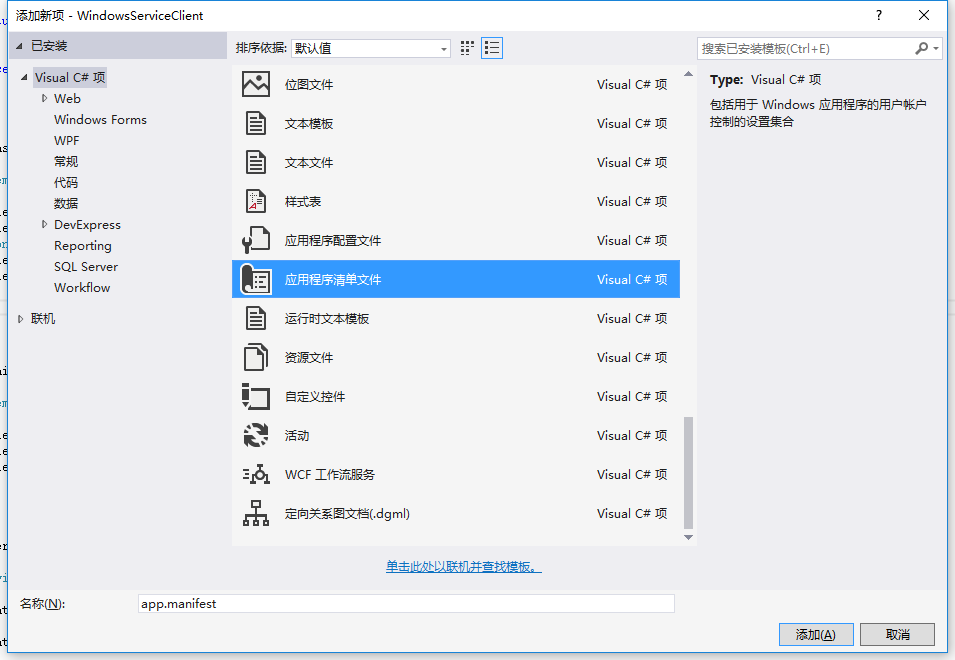
6.在项目winform中,右击项目,添加->新建项,在弹出的菜单中选择 应用程序清单文件,如图
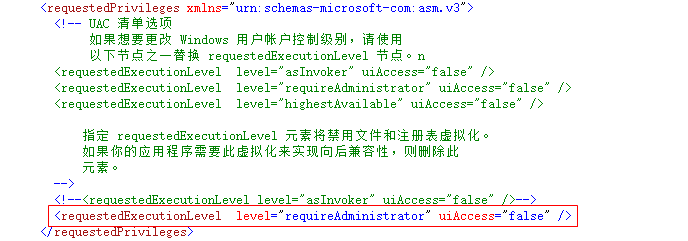
7.打开该文件,并将<requestedExecutionLevel level="asInvoker" uiAccess="false" />改为<requestedExecutionLevel level="requireAdministrator" uiAccess="false" />,如下图所示:
8.重新生成解决方案,并运行(winform自己不知道自己是谁)
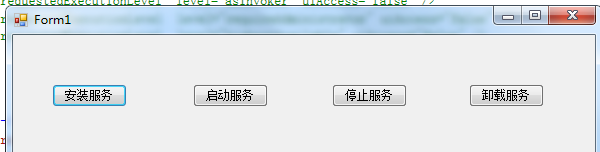
点击安装,打开window服务管理器,发现MyService安装上了,后续几个按钮依次实验,正常
另外还有一些调试技巧,这里就不多说了
给出参考网址:
https://www.cnblogs.com/cncc/p/7170951.html
https://docs.microsoft.com/en-us/dotnet/framework/windows-services/walkthrough-creating-a-windows-service-application-in-the-component-designer
使用winform程序控制window服务的操作的更多相关文章
- .NET Window服务启动又马上停止,报错IO.FileNotFoundException
最近公司需要开发一个Window服务推送系统,读取MongoDB写入消息队列,推送到各终端平台 但是在开发完成,最后的部署阶段,选中服务右击启动 看似正常,服务显示已启动(但实质已经被终止,因为Win ...
- C# 编写Window服务基础(一)
一.Windows服务介绍: Windows服务以前被称作NT服务,是一些运行在Windows NT.Windows 2000和Windows XP等操作系统下用户环境以外的程序.在以前,编写Wind ...
- 自定义Window 服务
自定义window 服务 开发到使用的流程: 1.完成对应的代码之后(代码在底下),右键MyService.cs 添加安装程序 2.添加window服务安装程序打开Service1.cs[设计]页面, ...
- 【权限维持】window服务端常见后门技术
0x00 前言 未知攻焉知防,攻击者在获取服务器权限后,通常会用一些后门技术来维持服务器权限,服务器一旦被植入后门,攻击者如入无人之境.这里整理一些window服务端常见的后门技术,了解攻击者的常见后 ...
- C#Winform窗体实现服务端和客户端通信例子(TCP/IP)
Winform窗体实现服务端和客户端通信的例子,是参考这个地址 http://www.cnblogs.com/longwu/archive/2011/08/25/2153636.html 进行了一些异 ...
- C#写的window服务内存溢出
浅谈c#垃圾回收机制(GC) 写了一个window服务,循环更新sqlite记录,内存一点点稳步增长.三天后,内存溢出.于是,我从自己的代码入手,查找到底哪儿占用内存释放不掉,最终明确是调用servi ...
- 接Window服务(二)
接Window服务(一) ServiceController方法调用 1 public partial class Service1 : ServiceBase 2 { 3 public Servic ...
- window 服务(一)
windows服务应用程序是一种长期运行在操作系统后台的程序,它对于服务器环境特别适合,它没有用户界面,不会产生任何可视输出,任何用户输出都回被写进windows事件日志.计算机启动时,服务会自动开始 ...
- C#创建一个Window服务
Window服务介绍 Microsoft Windows 服务能够创建在它们自己的 Windows 会话中可长时间运行的可执行应用程序.这些服务可以在计算机启动时自动启动,可以暂停和重新启动而且不显示 ...
随机推荐
- windows sh.exe 中文乱码
idea 需要重启 export LANG=zh_CN.utf-8 alias ls='ls --show-control-chars --color=auto'
- xmind 破解
邮箱:x@iroader 序列号: XAka34A2rVRYJ4XBIU35UZMUEEF64CMMIYZCK2FZZUQNODEKUHGJLFMSLIQMQUCUBXRENLK6NZL37JXP4P ...
- Beta冲刺(2/5)
队名:無駄無駄 组长博客 作业博客 组员情况 张越洋 过去两天完成了哪些任务 数据库实践 提交记录(全组共用) 接下来的计划 加快校园百科的进度 还剩下哪些任务 学习软工的理论课 学习代码评估.测试 ...
- Atcoder Regular Contest 060 F题第一问答案证明
一切的开始 令 \(x\) 为字符串,\(p\) 为正整数.如果对于满足 \(0\le i<|x|−p\) 的任何整数 \(i\) 满足 \(x[i]=x[i+p]\),则 \(p\) 称为 \ ...
- js中判断变量不为空或null
var content=$("content").val(); if(!content){ alert("请输出内容!"); return; ...
- 可变参数的函数(c++)【转载】
摘自<c语言精彩编程百例>,要定义可变参数的函数,在c++当中当包含<cstdarg>,在c语言当中当包含<stdarg.h>,使用任何可变长度的变元被访问之前,必 ...
- SpringBoot框架 之 Druid与Swagger2
目录 Druid Druid连接池配置 Druid数据监控 集成Swagger2 Swagger2简介 1.添加依赖 2.创建Swagger2配置类 3.在控制器方法上添加对应api信息 4.启动Sp ...
- 备份数据库的shell
#!/bin/bash #定义备份数据库名 dbname=yourdbname #定义备份数据库的用户名和密码 dbuser=yourdbuser dbpasswd=yourdbpasswd #数据库 ...
- RabbitMQ整合Spring Booot【点对点模式】
pom.xml: <project xmlns="http://maven.apache.org/POM/4.0.0" xmlns:xsi="http://www. ...
- unittest中的TestLoader使用
一:unittest中的TestLoader使用说明 第一步:unittest增加TestSuit() suite=unittest.TestSuite() 第二步:unittest增加Testloa ...