
SpringMVC教程2
五、基本操作
1.响应请求的方式
1.1ModeAndView
	/**

	 * 查询方法

	 * @return

	 */

	@RequestMapping("/query")

	public ModelAndView query(){

		System.out.println("波波烤鸭:query");

		ModelAndView mv = new ModelAndView();

		mv.setViewName("/index.jsp");

		return mv;

	}
1.2返回void
返回值为void时,方法中可以不用做任何返回,例如下面代码:
@RequestMapping("/test1")

public void test1() {

	System.out.println("test1");

}
此时,在浏览器端请求/test1接口,springmvc会默认去查找和方法同名的页面作为方法的视图返回。 如果确实不需要该方法返回页面,可以使用@ResponseBody注解,表示一个请求到此为止。
@RequestMapping("/test1")

@ResponseBody

public void test1() {

   System.out.println("test1");

}
1.3返回一个字符串
返回一个真正的字符串
/**

 * 返回一个字符串

 * @return

 */

@RequestMapping("/hello")

@ResponseBody

public String hello(){

	return "hello";

}

返回一个跳转页面名称
不需要加 @ResponseBody
/**

 * 返回一个字符串

 * @return

 */

@RequestMapping("/hi")

public String hello(){

	return "/index.jsp";

}

配置视图解析器
<beans xmlns="http://www.springframework.org/schema/beans"

	xmlns:xsi="http://www.w3.org/2001/XMLSchema-instance"

	xmlns:mvc="http://www.springframework.org/schema/mvc"

	xmlns:context="http://www.springframework.org/schema/context"

	xsi:schemaLocation="http://www.springframework.org/schema/mvc http://www.springframework.org/schema/mvc/spring-mvc-4.3.xsd

		http://www.springframework.org/schema/beans http://www.springframework.org/schema/beans/spring-beans.xsd

		http://www.springframework.org/schema/context http://www.springframework.org/schema/context/spring-context-4.3.xsd">

	<!-- 开启注解 -->

	<mvc:annotation-driven></mvc:annotation-driven>

	<!-- 开启扫描 -->

	<context:component-scan base-package="com.dpb.controller"></context:component-scan>

	<!-- 配置视图解析器 -->

	<bean class="org.springframework.web.servlet.view.InternalResourceViewResolver">

		<!-- 配置响应地址的前后缀 -->

		<property name="prefix" value="/user"/>

		<property name="suffix" value=".jsp"/>

	</bean>

</beans>
响应的代码:
/**

 * 返回一个字符串

 * @return

 */

@RequestMapping("/hello")

public String hello1(){

	// 视图解析器解析的时候会自动拼接上 /user 和  .jsp

	return "/hello";

}

重定向跳转
	/**

	 * 返回一个字符串

	 * @return

	 */

	@RequestMapping("/delete")

	public String delete(){

		System.out.println("波波烤鸭:删除数据操作....");

		// 重定向

		return "redirect:/user/query";

	}

	/**

	 *

	 * @return

	 */

	@RequestMapping("/query")

	public String query(){

		System.out.println("波波烤鸭:query");

		return "/hello";

	}
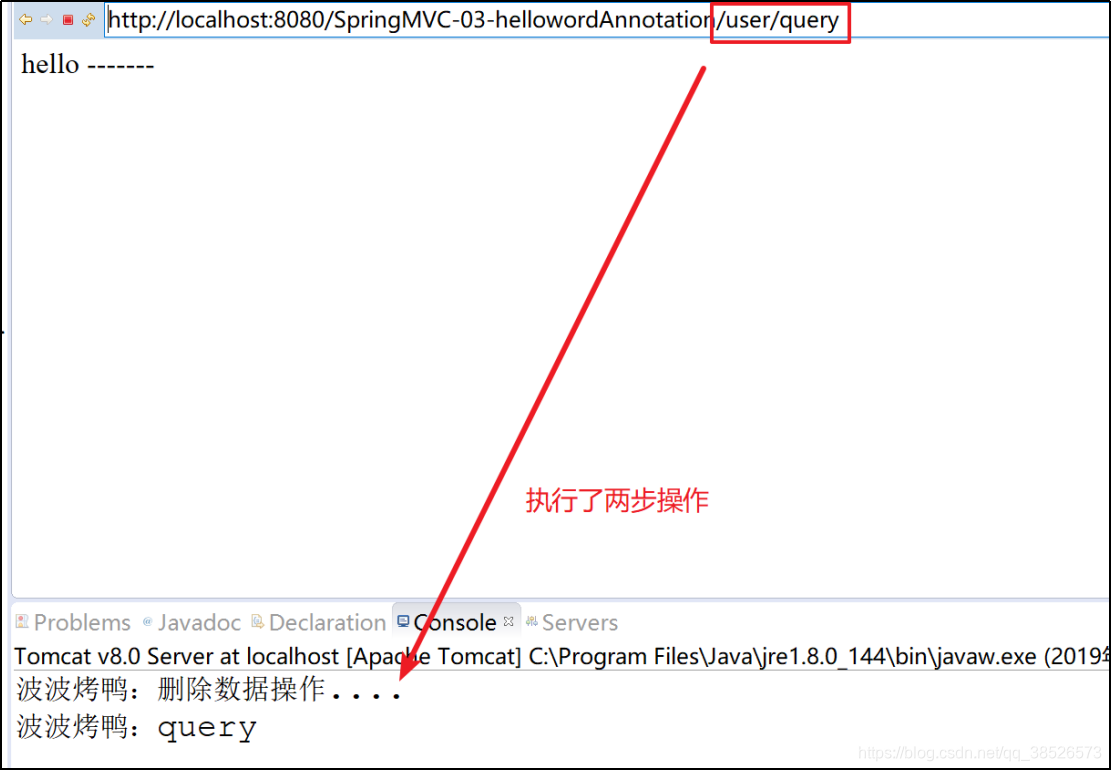
返回路径注意: 返回的字符带"/"表示从根目录下开始找,不带"/"从当前目录下查找
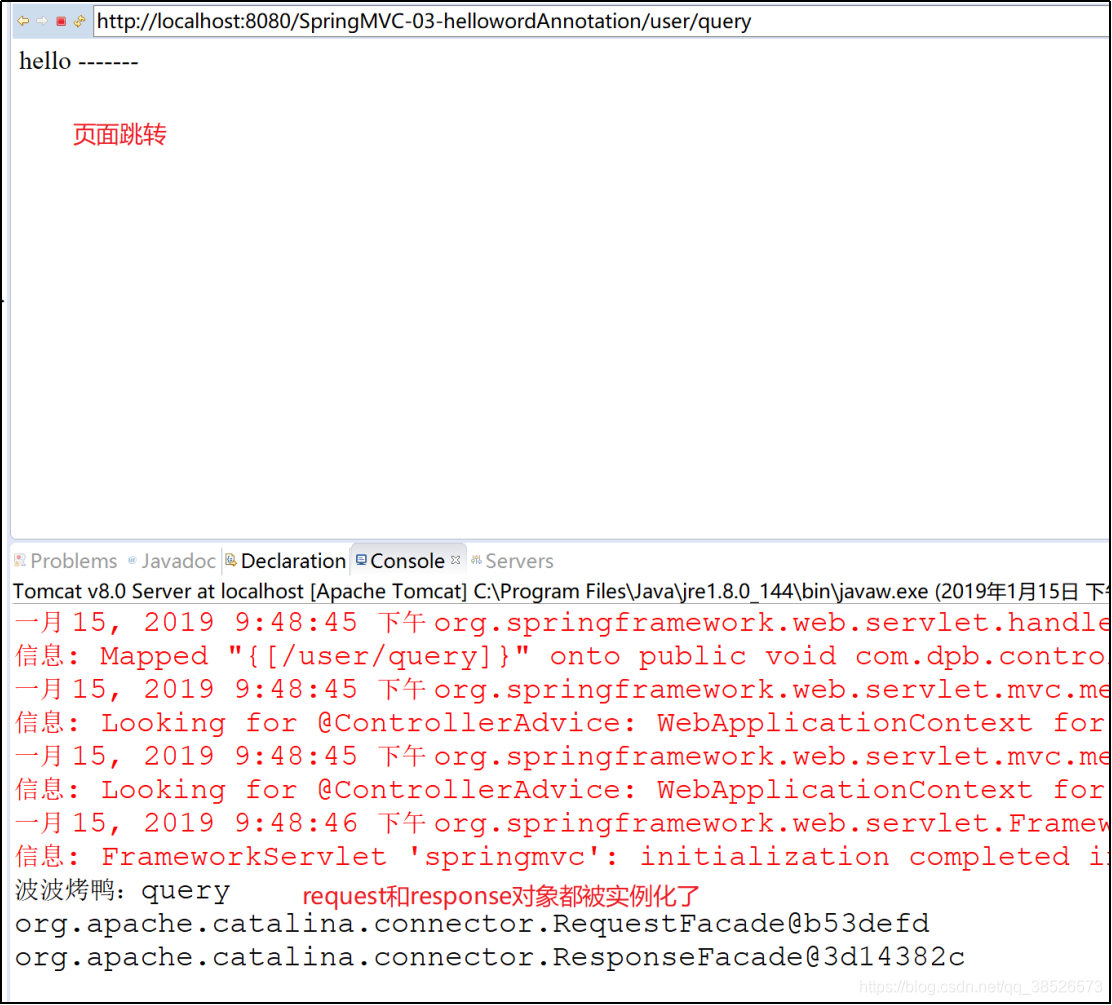
1.4通过Request和Response对象处理
/**

 * HttpServletRequest和HttpServletResponse的使用

 * @return

 * @throws IOException

 */

@RequestMapping("/query")

public void query(HttpServletRequest request,HttpServletResponse response) throws IOException{

	System.out.println("波波烤鸭:query");

	System.out.println(request);

	System.out.println(response);

	response.sendRedirect(request.getContextPath()+"/user/hello.jsp");

}
1.5 @RequestMapping的说明
- 映射路径
是个@RequestMapping最基本的功能,用法:@RequestMapping("/delete")
public String delete(){
System.out.println("波波烤鸭:删除数据操作....");
return "/hello";
}
- 窄化请求
窄化请求用来限定请求路径,即将@RequestMapping放在类上,这样,方法的请求路径是类上的@ReqmestMapping+方法上的@RequestMapping

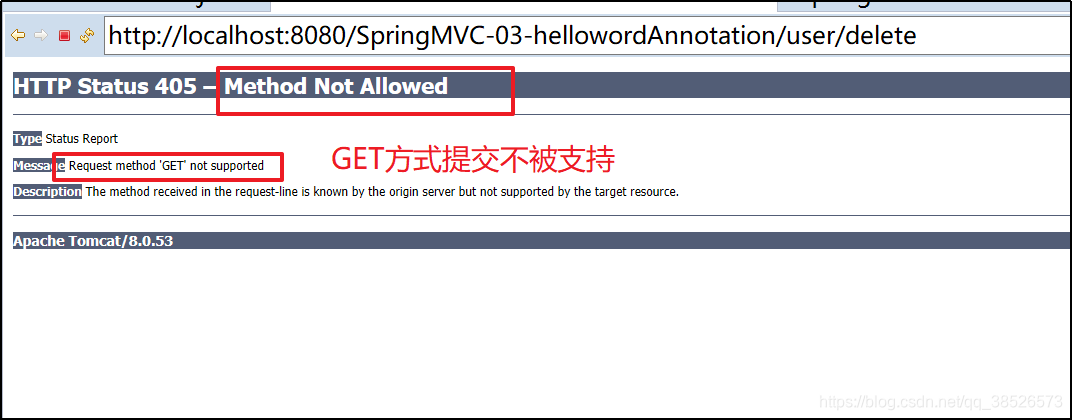
- 请求方法限定

2.参数绑定
2.1基本数据类型
Java基本数据类型+String
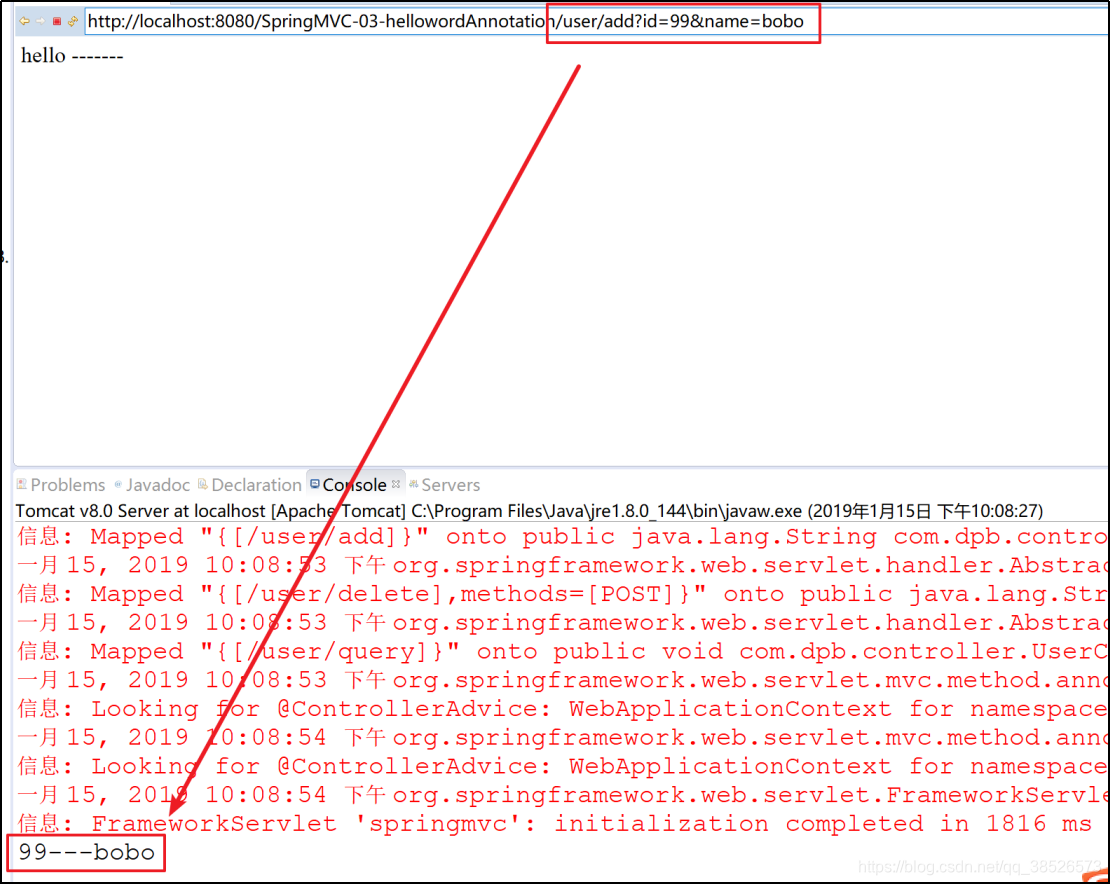
使用基本数据类型时,参数的名称必须和浏览器传来的参数的key一致,这样才能实现自动映射
/**

 * 接收参数

 *    基本数据类型

 * @param id

 * @param name

 * @return

 */

@RequestMapping("add")

public String add(int id,String name){

	System.out.println(id+"---"+name);

	return "/hello";

}
如果参数名和浏览器传来的key不一致,可以通过@RequestParam来解决。如下
/**

 * 接收参数

 *    基本数据类型

 *    请求参数如果和形参名称不一致可以通过@RequestParam类指定

 * @param id

 * @param name

 * @return

 */

@RequestMapping("add")

public String add(int id,@RequestParam("username")String name){

	System.out.println(id+"---"+name);

	return "/hello";

}
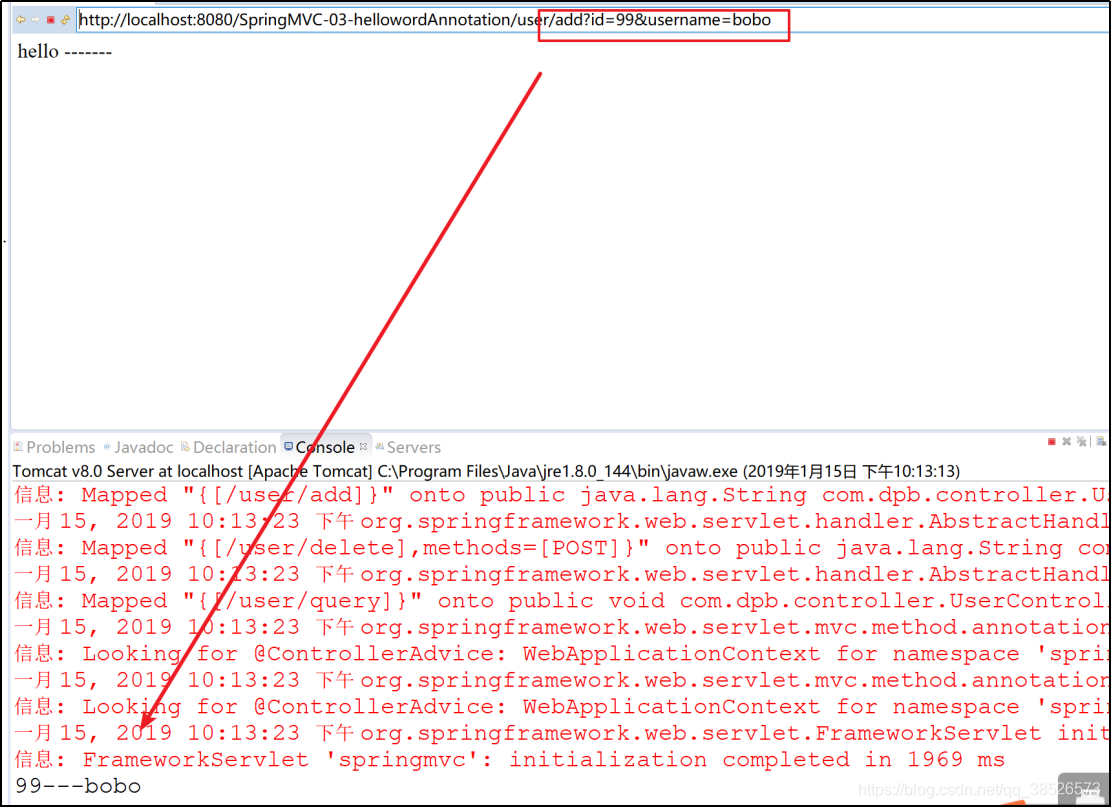
加了@RequestParam之后,如果未重新指定参数名,则默认的参数名依然是原本的参数名。
通过也要注意,添加了@RequestParam注解后,对应的参数默认将成为必填参数。如果没有传递相关的参数,则会抛出如下异常:
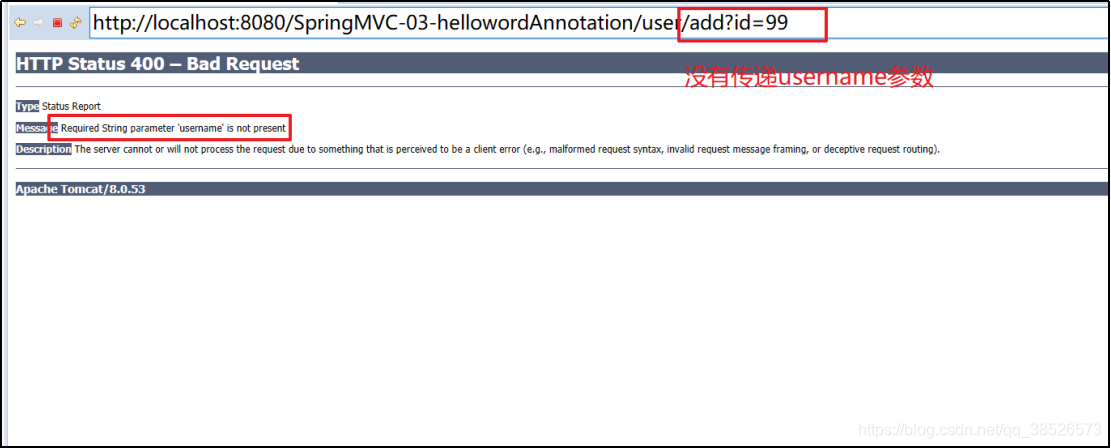
此时,如果不想传递该参数,需要明确指定,指定方式有两种:
- 通过required属性指定该参数不是必填的
/**

 * 接收参数

 *    基本数据类型

 *    请求参数如果和形参名称不一致可以通过@RequestParam类指定

 * @param id

 * @param name

 * @return

 */

@RequestMapping("add")

public String add(int id

		,@RequestParam(value="username",required=false)String name){

	System.out.println(id+"---"+name);

	return "/hello";

}
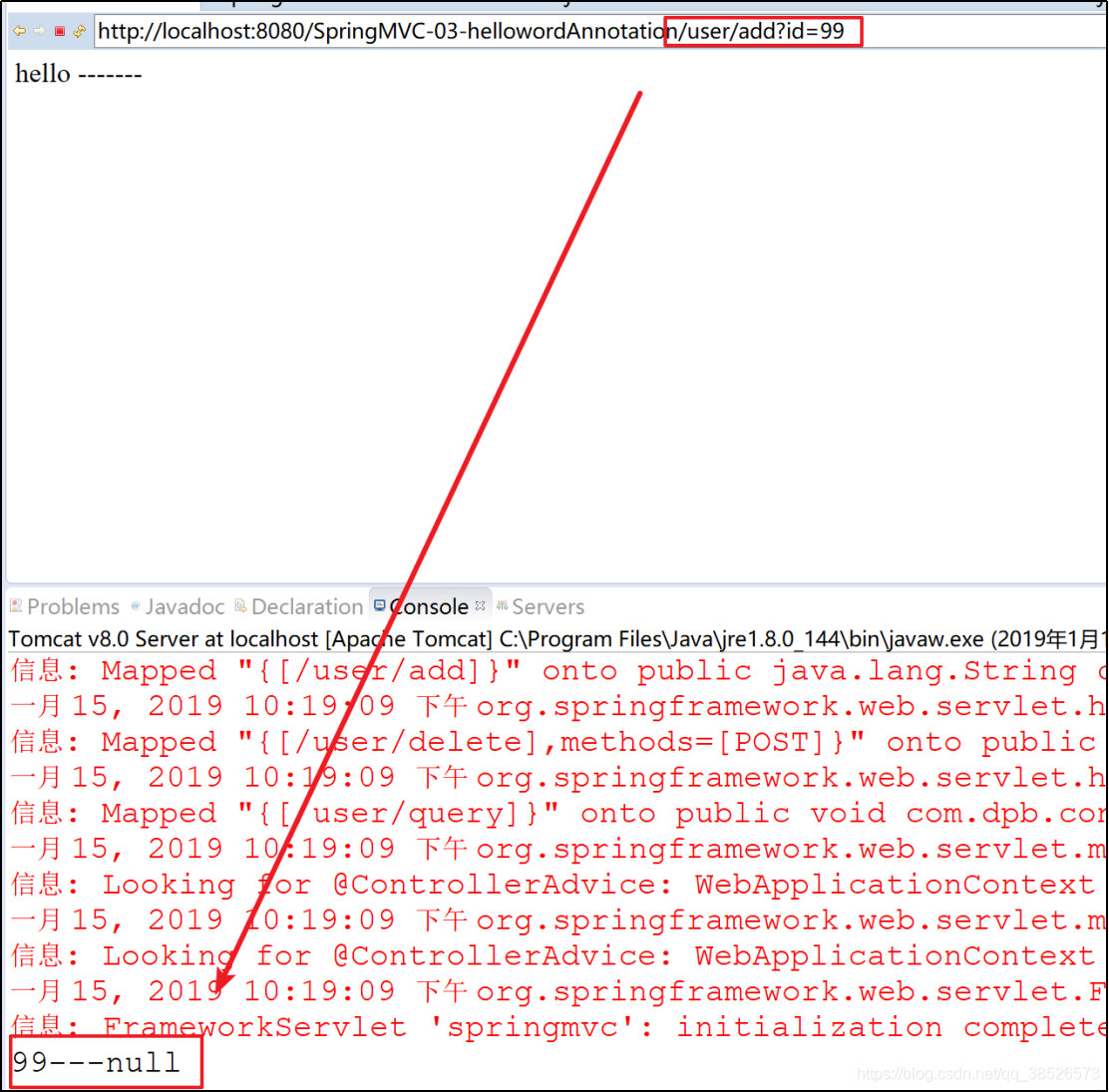
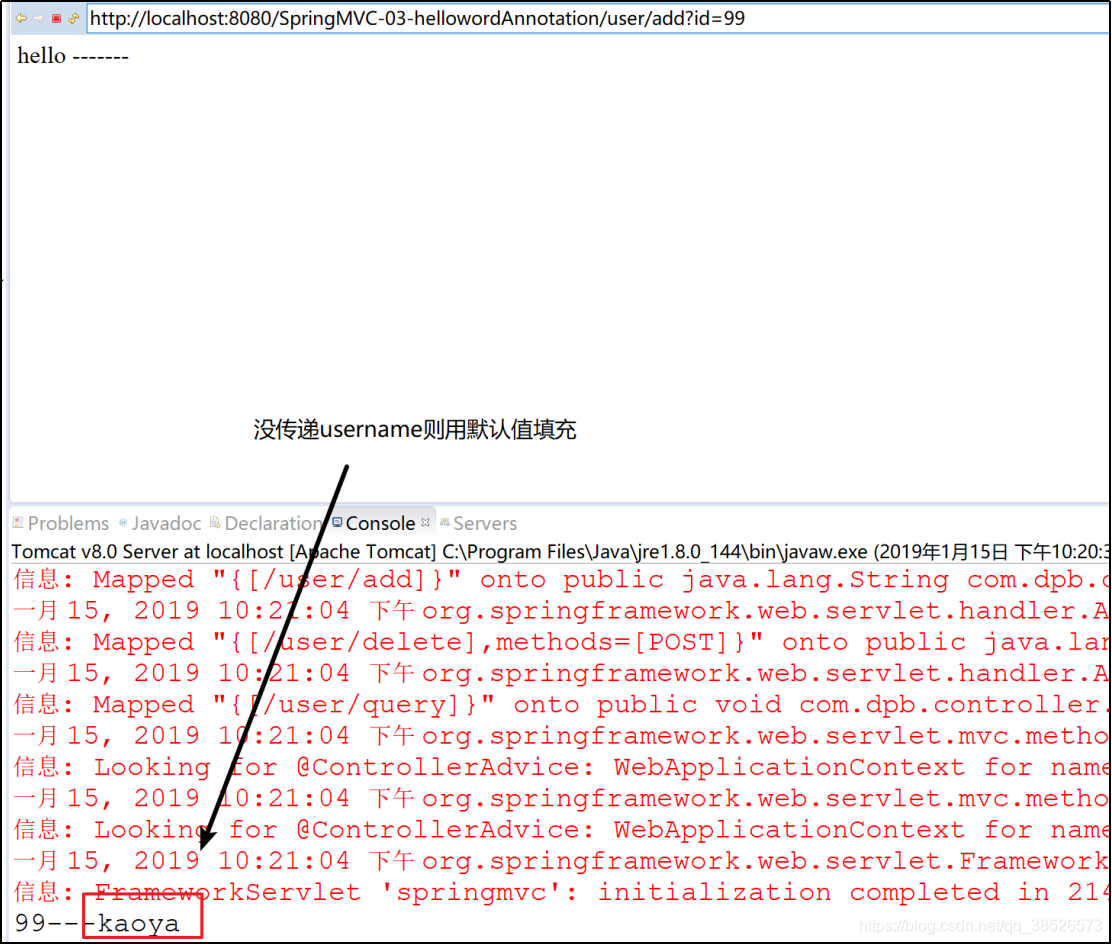
2. 通过defaultValue属性给该参数指定一个默认值
/**

 * 接收参数

 *    基本数据类型

 *    请求参数如果和形参名称不一致可以通过@RequestParam类指定

 * @param id

 * @param name

 * @return

 */

@RequestMapping("add")

public String add(int id

		,@RequestParam(value="username",defaultValue="kaoya")String name){

	System.out.println(id+"---"+name);

	return "/hello";

}
2.2对象
2.2.1简单对象
1.创建Book对象
public class Book {

	private int id;

	private String name;

	private String author;

	public int getId() {

		return id;

	}

	public void setId(int id) {

		this.id = id;

	}

	public String getName() {

		return name;

	}

	public void setName(String name) {

		this.name = name;

	}

	public String getAuthor() {

		return author;

	}

	public void setAuthor(String author) {

		this.author = author;

	}

}
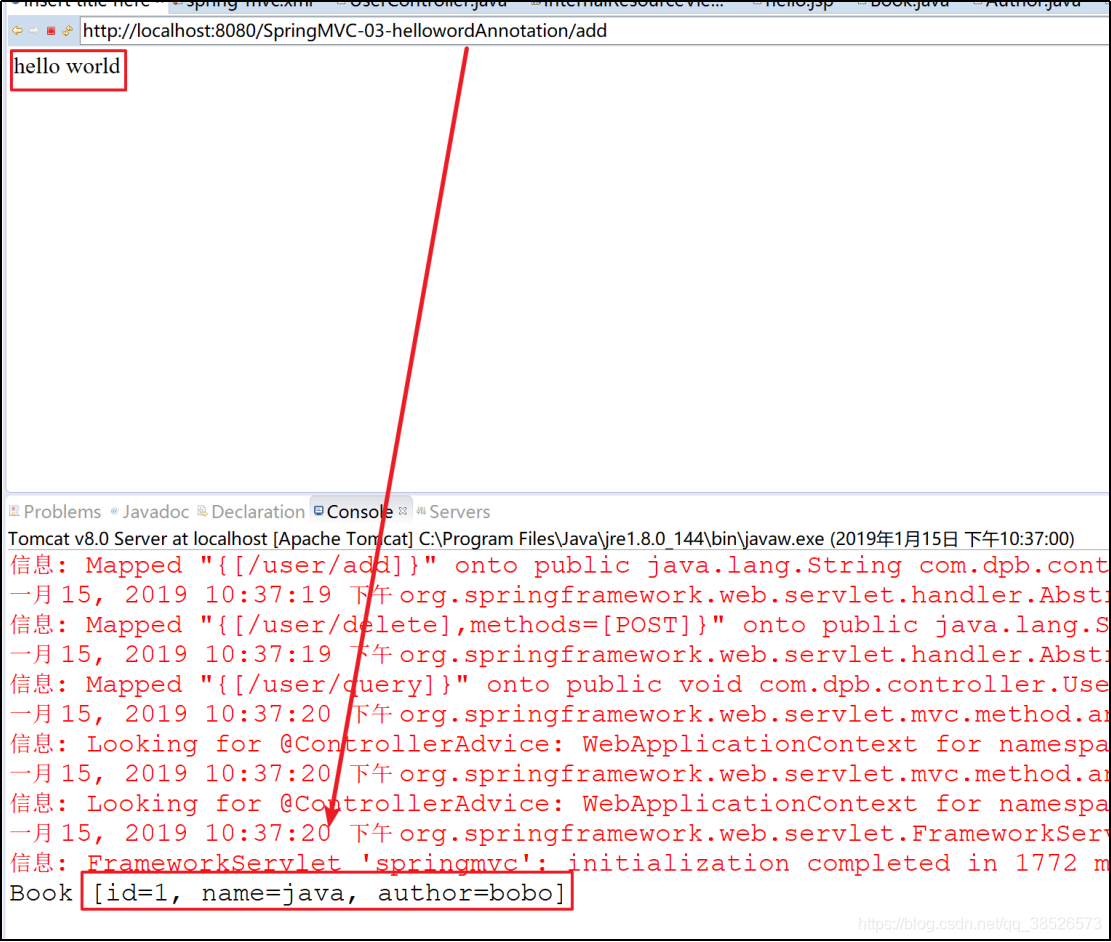
2.设置形参为Book对象接收数据
@Controller

public class BookController {

	/**

	 * 是@RequestMapping(value = "/doReg",method = RequestMethod.POST)的简写,

	 * 但是@PostMaping只能出现在方法上,不能出现在类上

	 * @param book

	 * @return

	 */

	//@RequestMapping("/add")

	@PostMapping("/add")

	public String add(Book book){

		System.out.println(book);

		return "/index.jsp";

	}

}
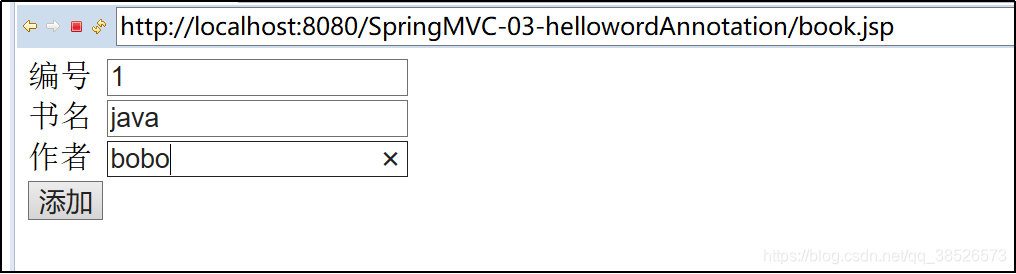
3.表单传递数据
<form action="/add" method="post">

	<table>

		<tr>

			<td>编号</td>

			<td><input type="text" name="id"></td>

		</tr>

		<tr>

			<td>书名</td>

			<td><input type="text" name="name"></td>

		</tr>

		<tr>

			<td>作者</td>

			<td><input type="text" name="author"></td>

		</tr>

		<tr>

			<td><input type="submit" value="添加"></td>

		</tr>

	</table>

</form>
2.2.2包装对象
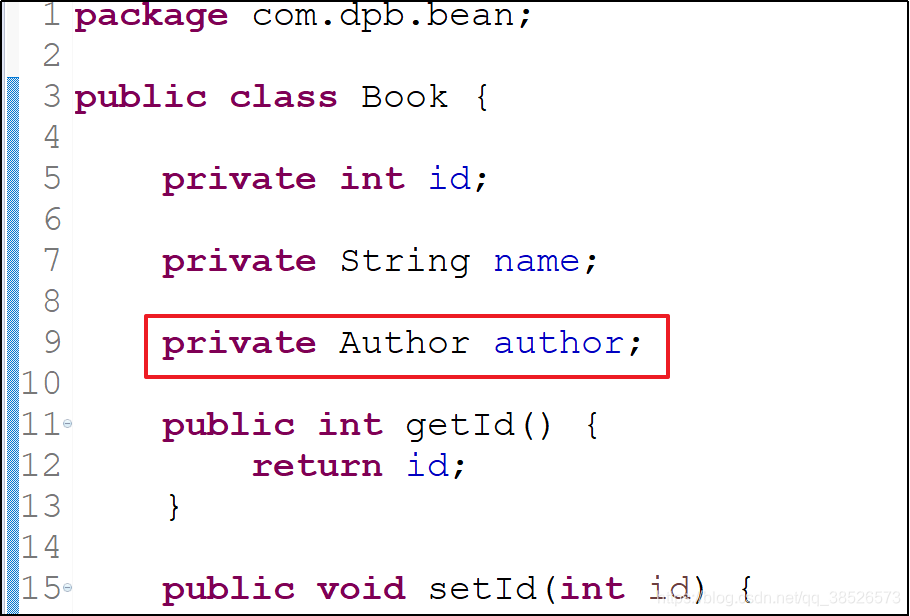
1.book对象包含Author对象
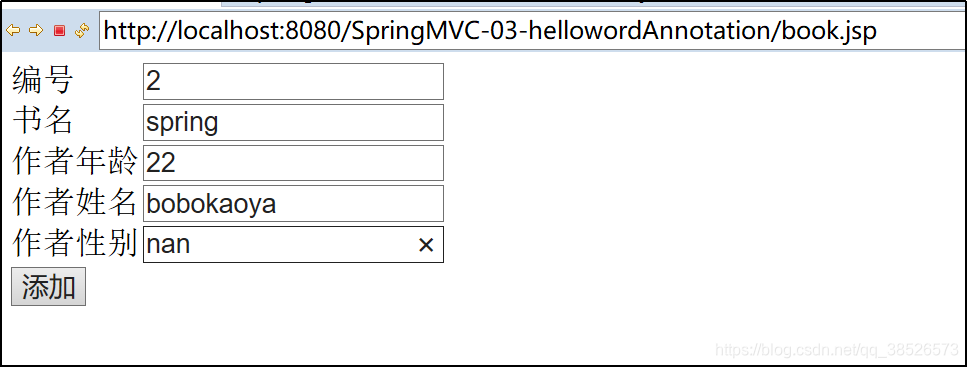
2.表单提交数据
<form action="add" method="post">

	<table>

		<tr>

			<td>编号</td>

			<td><input type="text" name="id"></td>

		</tr>

		<tr>

			<td>书名</td>

			<td><input type="text" name="name"></td>

		</tr>

		<tr>

			<td>作者年龄</td>

			<td><input type="text" name="author.age"></td>

		</tr>

		<tr>

			<td>作者姓名</td>

			<td><input type="text" name="author.name"></td>

		</tr>

		<tr>

			<td>作者性别</td>

			<td><input type="text" name="author.sex"></td>

		</tr>

		<tr>

			<td><input type="submit" value="添加"></td>

		</tr>

	</table>

</form>
3.结果

2.3数组集合类型
- 数组
表单中直接传递多个参数:
<form action="user/doReg" method="post">

	<table>

		<tr>

			<td>用户名</td>

			<td><input type="text" name="username"></td>

		</tr>

		<tr>

			<td>用户密码</td>

			<td><input type="password" name="password"></td>

		</tr>

		<tr>

			<td>兴趣爱好</td>

			<td><input type="checkbox" name="favorites" value="zuqiu">足球

				<input type="checkbox" name="favorites" value="lanqiu">篮球 <input

				type="checkbox" name="favorites" value="pingpang">乒乓球</td>

		</tr>

		<tr>

			<td><input type="submit" value="注册"></td>

		</tr>

	</table>

</form>
	@RequestMapping("/doReg")

	public String doReg(String username

			,String password,String[] favorites){

		System.out.println(username+"---"+password);

		for (String f : favorites) {

			System.out.println(f);

		}

		return "/index.jsp";

	}
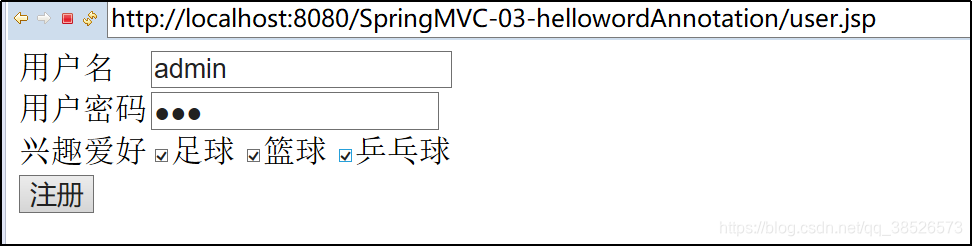
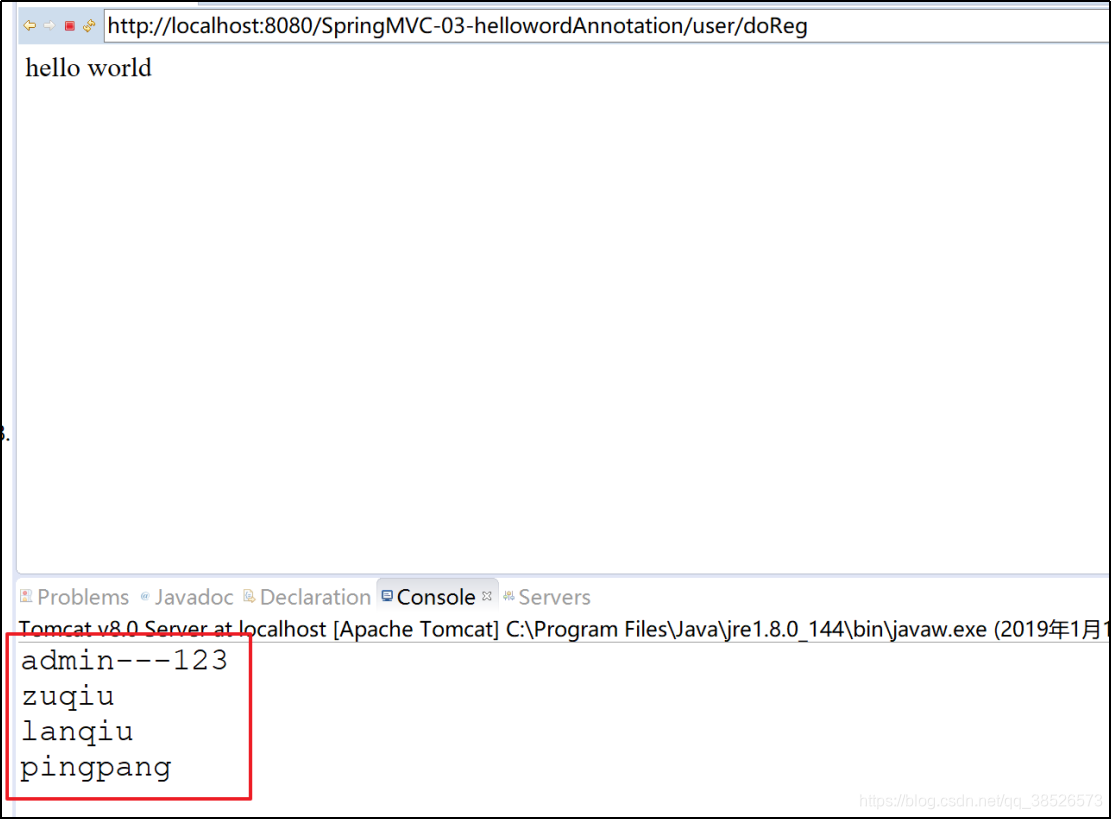
这里的参数类型,只能使用数组,不能使用集合。如果非要用集合,可以自定义参数类型转换。
2.集合
除了自定义参数类型转换,如果想要使用集合去接收参数,也可以将集合放到一个包装类中。
public class User {

	private String username;

	private String password;

	private List<String> favorites;

	@Override

	public String toString() {

		return "User{" + "username='" + username + '\'' + ", password='" + password + '\'' + ", favorites=" + favorites

				+ '}';

	}

	public String getUsername() {

		return username;

	}

	public void setUsername(String username) {

		this.username = username;

	}

	public String getPassword() {

		return password;

	}

	public void setPassword(String password) {

		this.password = password;

	}

	public List<String> getFavorites() {

		return favorites;

	}

	public void setFavorites(List<String> favorites) {

		this.favorites = favorites;

	}

}
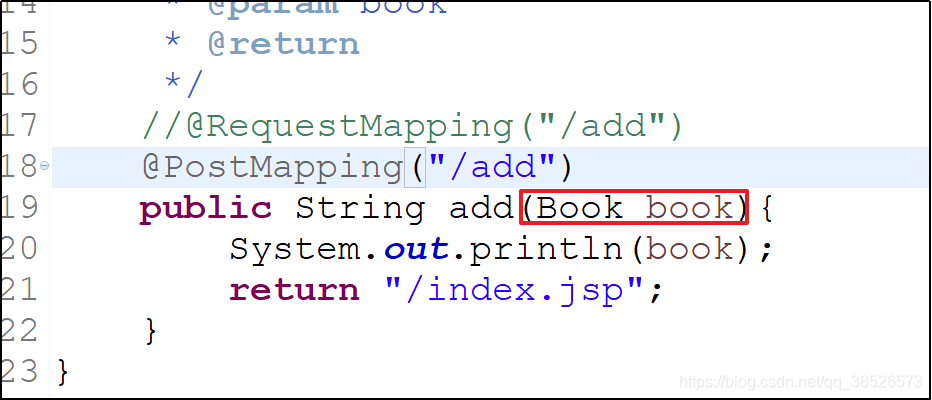
 这样,集合中也能收到传递来的参数。
总结:
1.数组(无论是基本数据类型还是对象数组)都可以直接写在接口参数中。
2.集合(无论是基本数据类型还是对象)都需要一个包装类将其包装起来,不能直接写在接口参数中。
3.对于基本数据类型,数组和集合在表单中的写法是一样的
4.对于对象数据类型,数组和集合在表单中的写法是一样的
2.4Date类型
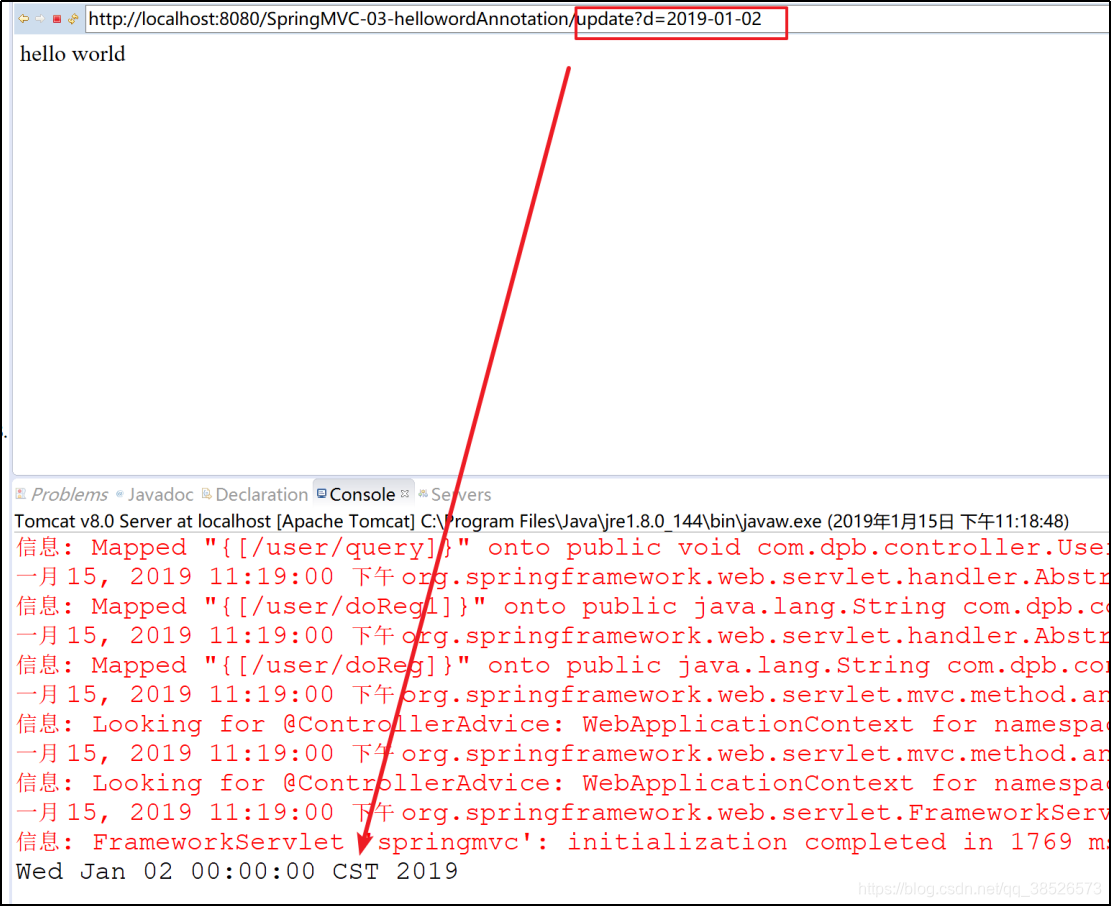
接收数据类型是Date类型的需要通过转换器进行接收
	@RequestMapping("/update")

	public String update(Date d){

		System.out.println(d);

		return "/index.jsp";

	}
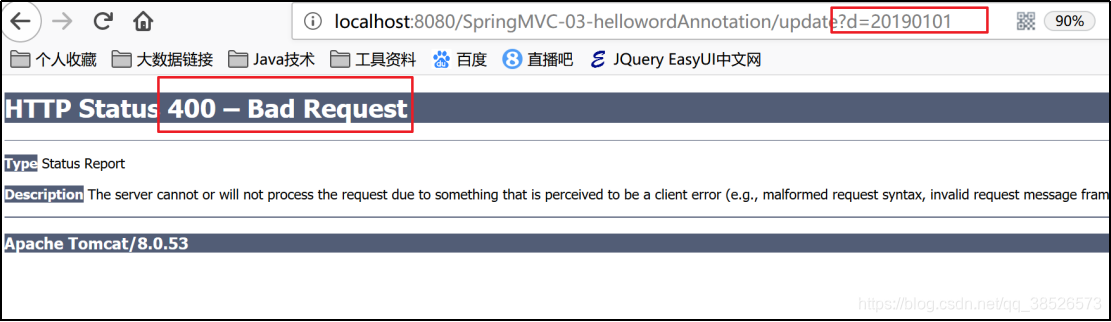
如果不转换直接访问提交会爆400错误
创建自定义的转换器
/**

 * 自定义转换器

 *

 * @author dpb【波波烤鸭】

 *

 */

public class DateConvert implements Converter<String,Date>{

	@Override

	public Date convert(String msg) {

		SimpleDateFormat sdf = new SimpleDateFormat("yyyy-MM-dd");

		try {

			return sdf.parse(msg);

		} catch (ParseException e) {

			// TODO Auto-generated catch block

			e.printStackTrace();

		}

		return null;

	}

}
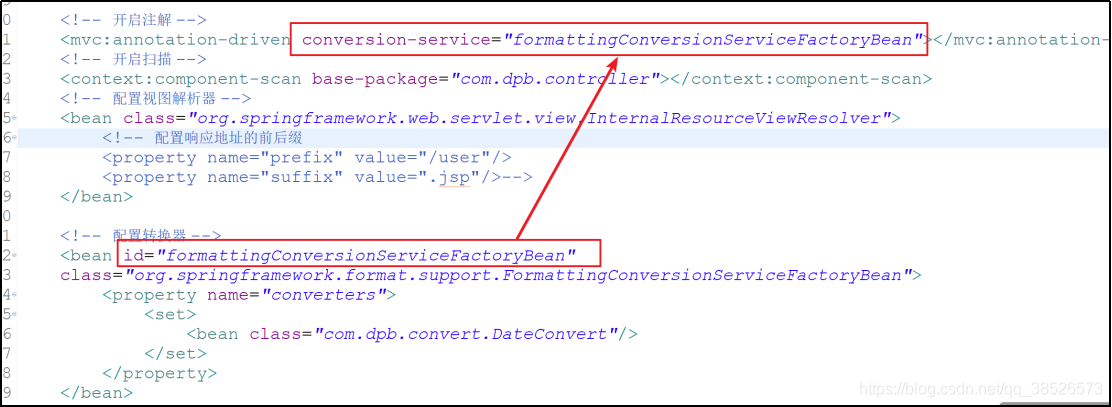
配置转换器
<beans xmlns="http://www.springframework.org/schema/beans"

	xmlns:xsi="http://www.w3.org/2001/XMLSchema-instance"

	xmlns:mvc="http://www.springframework.org/schema/mvc"

	xmlns:context="http://www.springframework.org/schema/context"

	xsi:schemaLocation="http://www.springframework.org/schema/mvc http://www.springframework.org/schema/mvc/spring-mvc-4.3.xsd

		http://www.springframework.org/schema/beans http://www.springframework.org/schema/beans/spring-beans.xsd

		http://www.springframework.org/schema/context http://www.springframework.org/schema/context/spring-context-4.3.xsd">

	<!-- 开启注解 -->

	<mvc:annotation-driven conversion-service="formattingConversionServiceFactoryBean"></mvc:annotation-driven>

	<!-- 开启扫描 -->

	<context:component-scan base-package="com.dpb.controller"></context:component-scan>

	<!-- 配置视图解析器 -->

	<bean class="org.springframework.web.servlet.view.InternalResourceViewResolver">

		<!-- 配置响应地址的前后缀

		<property name="prefix" value="/user"/>

		<property name="suffix" value=".jsp"/>-->

	</bean>

	<!-- 配置转换器 -->

	<bean id="formattingConversionServiceFactoryBean"

	class="org.springframework.format.support.FormattingConversionServiceFactoryBean">

		<property name="converters">

			<set>

				<bean class="com.dpb.convert.DateConvert"/>

			</set>

		</property>

	</bean>

</beans>
3.响应数据
3.1ModelAndView
3.2HttpServletRequest
3.3HttpSession
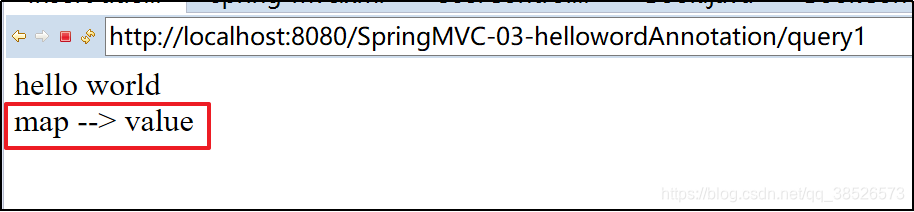
3.4Map
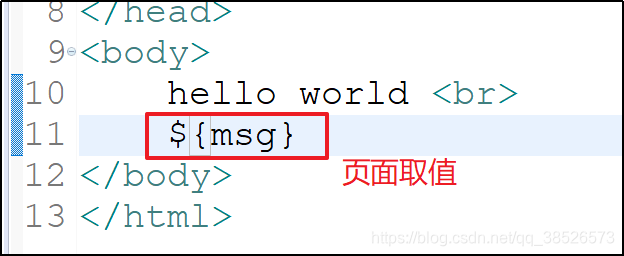
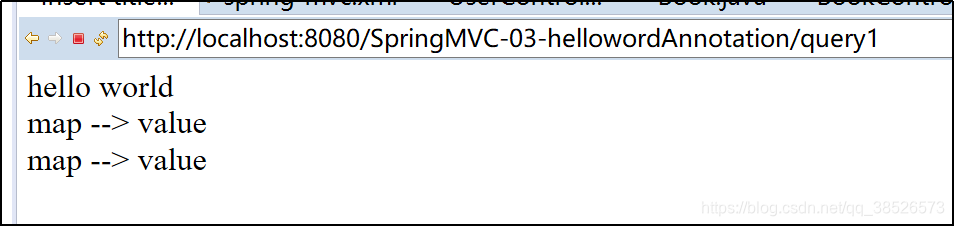
	@RequestMapping("/query1")

	public String query1(Map<String,Object> map){

		map.put("msg", "map --> value");

		return "/index.jsp";

	}
3.5Model
	@RequestMapping("/query2")

	public String query2(Model model){

		model.addAttribute("msg", "model --> value");

		return "/index.jsp";

	}

3.6ModelMap
	@RequestMapping("/query3")

	public String query3(ModelMap mm){

		mm.addAttribute("msg", "modelMap --> value");

		return "/index.jsp";

	}
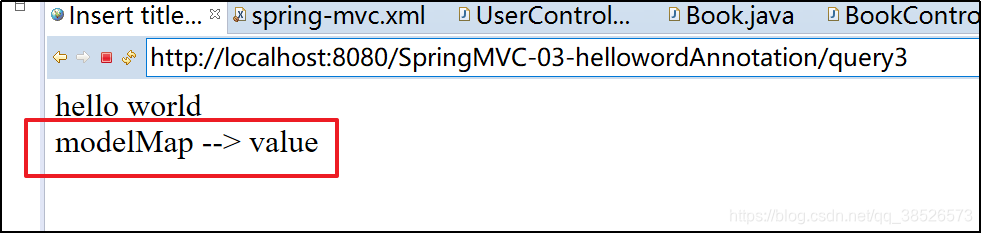
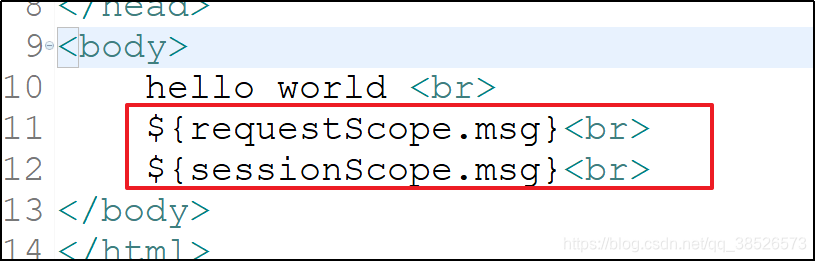
注意:@SessionAttributes将数据保存在session作用域中,上面几个传值都是request作用域

4.post方式中文乱码问题处理
在web.xml文件中添加如下代码即可
<!-- spring框架提供的字符集过滤器 -->

    <!-- spring Web MVC框架提供了org.springframework.web.filter.CharacterEncodingFilter用于解决POST方式造成的中文乱码问题  -->

<filter>

   <filter-name>encodingFilter</filter-name>

   <filter-class>org.springframework.web.filter.CharacterEncodingFilter</filter-class>

   <init-param>

       <param-name>encoding</param-name>

       <param-value>UTF-8</param-value>

   </init-param>

</filter>

<filter-mapping>

   <filter-name>encodingFilter</filter-name>

   <url-pattern>/*</url-pattern>

</filter-mapping>
上一篇:SpringMVC教程1
下一篇:SpringMVC教程3
SpringMVC教程2的更多相关文章
- SpringMVC教程3
SpringMVC教程2 一.文件上传 1.引入相关jar包 maven坐标 <!-- fileUpload 解析上传的文件用到的jar --> <dependency> &l ...
- SpringMVC教程4
SpringMVC教程3 一.数据回写 数据回写:在做数据更新的时候服务端查询的数据自动填充到表单中. 1.1默认方式 通过前面讲解的 Map Mode ModelMap绑定数据 @RequestMa ...
- SpringMVC教程1
一.SpringMVC介绍 1.MVC介绍 ==模型-视图-控制器(MVC== 是一个众所周知的以设计界面应用程序为基础的设计模式.它主要通过分离模型.视图及控制器在应用程序中的角色将业务逻辑从界面中 ...
- Java系列教程-SpringMVC教程
SpringMVC教程 1.SpringMVC概述 1.回顾MVC 1.什么是MVC MVC是模型(Model).视图(View).控制器(Controller)的简写,是一种软件设计规范. 是将业务 ...
- SpringMVC教程--Idea中使用Maven创建SpringMVC项目
1.新建项目 参照idea教程中的创建maven项目https://www.cnblogs.com/daxiang2008/p/9061653.html 2.POM中加入依赖包 (1)指定版本 (2) ...
- myeclipse配置springmvc教程
之前一直是使用Eclipse创建Web项目,用IDEA和MyEclipse的创建SpringMVC项目的时候时不时会遇到一些问题,这里把这个过程记录一下,希望能帮助到那些有需要的朋友.我是用的是MyE ...
- springmvc教程(1)
idea搭建springmvc maven项目 jdk:1.8 maven:Bundled (Maven 3) idea版本: 开始搭建第一个springmvc maven项目 1.点击File-&g ...
- SpringMVC教程--eclipse中使用maven创建springMVC项目
一.在eclipse中创建maven-archetype-webapp项目: 1.新建项目选择maven项目 2.默认,下一步 3.选择maven-archetype-webapp,其他保持默认即可 ...
- SpringMVC 教程 - Controller
原文地址:https://www.codemore.top/cates/Backend/post/2018-04-10/spring-mvc-controller 声明Controller Contr ...
随机推荐
- python基础之Day6
一.元组 定义:t=(1,2,3,4) 总结:存多个值,值为任意类型 只有读的需求,没有改的需求 有序,不可变(元组里每个值对应的索引内存地址不能变) 在元素个数相同的情况下,元组比列表更节省空间 二 ...
- Flink官方文档/介绍/教程/用例
https://flink.apache.org/ 使用谷歌浏览器进入官网后,点击页面右键,使用谷歌翻译,翻译准确率很高: 常用部分:
- suse下修改主机名
export HOSTNAME=主机名 echo $HOSTNAME>/etc/HOSTNAME /etc/rc.d/boot.localnet stop /etc/rc.d/boot.loca ...
- 第34 memcached缓存
1.缓存数据库 缓存:将数据存储在内存中,只有当磁盘胜任不了的时候,才会启用缓存. 缺点:断电数据丢失(双电),用缓存存储数据的目的只是为了应付大并发的业务,至于数据存储及可靠性不要找他了. 数据 ...
- you-get 安装和用法
以windows为例 安装 从https://github.com/soimort/you-get/releases/latest下载*-full.7z,解压后在cmd中切换至目录下执行you-get ...
- Python开发——3.基本数据类型之列表、元组和字典
一.列表(list) 1.列表的格式 li = [11,22,"kobe",["lakers","ball",11],(11,22,),{& ...
- 理解Time-Wait
What is it? TIME-WAIT状态的主要作用在于TCP连接的拆除阶段.拆除一个TCP连接通常需要交换4个segment,如下图所示: Host1上的应用程序关闭了自己这一端的连接,使得TC ...
- SDWebImage之SDWebImageDownloaderOperation
上篇讲了SDWebImageDownloader,从源码分析的过程中,我们知道,实际执行下载任务的是SDWebImageDownloaderOperation,本篇我们来看看SDWebImageDow ...
- Mybatis延迟加载、缓存
一.Mybatis中的延迟加载 1.延迟加载背景:Mybatis中Mapper配置文件中的resultMap可以实现高级映射(使用association.collection实现一对一及一对多(多对多 ...
- 分布式系统中 Unique ID 的生成方法
http://darktea.github.io/notes/2013/12/08/Unique-ID Snowflake 生成的 unique ID 的组成 (由高位到低位): 41 bits: T ...