
spring boot 与 thymeleaf (2): 常用表达式
在asp.net mvc 中, 有一个视图解析器, 可以支持Razor语法. 使用起来, 是非常的方便, 并且, 写在前台页面的后台方法, 是可调试的.
但是在java中, 目前我还没有接触到, 像.net vs 那么强大的功能.
对于mvc来说, 视图的解析, 是必不可少的. 实现的功能, 和上面是一样的, 而且, 有很多种, 例如: jsp, freemarker, thymeleaf 等.
这里, 我主要记录 thymeleaf 的一些学习笔记. 这里不牵涉原理, 只记录使用方法.
一. 添加依赖
<dependency>

    <groupId>org.springframework.boot</groupId>

    <artifactId>spring-boot-starter-thymeleaf</artifactId>

</dependency>
这里如果只添加到这里, 引用的版本, 是比较低的, 如果要使用自己特定的版本, 只需要在 pom.xml 的properties 中指定版本就行了.
<thymeleaf.version>3.0.5.RELEASE</thymeleaf.version>

<thymeleaf-layout-dialect.version>2.0.0</thymeleaf-layout-dialect.version>
二. spring boot 中, thymeleaf 的默认配置
这里首先看一下, 默认配置接收的类
/*

 * Copyright 2012-2017 the original author or authors.

 *

 * Licensed under the Apache License, Version 2.0 (the "License");

 * you may not use this file except in compliance with the License.

 * You may obtain a copy of the License at

 *

 *      http://www.apache.org/licenses/LICENSE-2.0

 *

 * Unless required by applicable law or agreed to in writing, software

 * distributed under the License is distributed on an "AS IS" BASIS,

 * WITHOUT WARRANTIES OR CONDITIONS OF ANY KIND, either express or implied.

 * See the License for the specific language governing permissions and

 * limitations under the License.

 */

package org.springframework.boot.autoconfigure.thymeleaf;

import java.nio.charset.Charset;

import org.springframework.boot.context.properties.ConfigurationProperties;

import org.springframework.util.MimeType;

/**

 * Properties for Thymeleaf.

 *

 * @author Stephane Nicoll

 * @since 1.2.0

 */

@ConfigurationProperties(prefix = "spring.thymeleaf")

public class ThymeleafProperties {

    private static final Charset DEFAULT_ENCODING = Charset.forName("UTF-8");

    private static final MimeType DEFAULT_CONTENT_TYPE = MimeType.valueOf("text/html");

    public static final String DEFAULT_PREFIX = "classpath:/templates/";

    public static final String DEFAULT_SUFFIX = ".html";

    /**

     * Check that the template exists before rendering it (Thymeleaf 3+).

     */

    private boolean checkTemplate = true;

    /**

     * Check that the templates location exists.

     */

    private boolean checkTemplateLocation = true;

    /**

     * Prefix that gets prepended to view names when building a URL.

     */

    private String prefix = DEFAULT_PREFIX;

    /**

     * Suffix that gets appended to view names when building a URL.

     */

    private String suffix = DEFAULT_SUFFIX;

    /**

     * Template mode to be applied to templates. See also StandardTemplateModeHandlers.

     */

    private String mode = "HTML5";

    /**

     * Template encoding.

     */

    private Charset encoding = DEFAULT_ENCODING;

    /**

     * Content-Type value.

     */

    private MimeType contentType = DEFAULT_CONTENT_TYPE;

    /**

     * Enable template caching.

     */

    private boolean cache = true;

    /**

     * Order of the template resolver in the chain. By default, the template resolver is

     * first in the chain. Order start at 1 and should only be set if you have defined

     * additional "TemplateResolver" beans.

     */

    private Integer templateResolverOrder;

    /**

     * Comma-separated list of view names that can be resolved.

     */

    private String[] viewNames;

    /**

     * Comma-separated list of view names that should be excluded from resolution.

     */

    private String[] excludedViewNames;

    /**

     * Enable MVC Thymeleaf view resolution.

     */

    private boolean enabled = true;

    ......

}
从这里可以看到, 默认的是 html 格式的, 且放在 classpath:/templates/ 目录下. 一般情况下, 我们不需要再对thymeleaf进行配置, 但是在开发的过程中, 可能要屏蔽缓存功能. 最后我们要做的, 只是将路径拼接进去就行了.
application.yml文件中, 可以禁用缓存.
spring:

  thymeleaf:

    cache: false
三. 基本使用
1. 表达式
变量表达式: ${...}
选择变量表达式: *{...}
URL表达式: @{...}
消息表达式: #{...}
片段表达式: ~{...}
2. 文字
文本: '123', 'abc'
数字: 1,2,0.5
布尔: true, false
空: null
3. 文本操作
字符串连接: +
文本替换: |双竖线隔起来 ${name}|
4. 算数运算符
二进制运算法(加减乘除,取模): + - * / %
5. 负号: -
6. 布尔运算符
and or not !
7. 比较和相等运算符
比较运算符(这里建议使用英文字符代替 > >= < <=) gt ge lt le
相等运算符: == !=
8. 条件运算符
三元运算符: if(...)? 'then' : 'else'
if(...)? 'then' 这里没有else, 因为else默认为 ''
为空判断 (aaa)?:bbb 如果aaa为空, 则使用bbb的值, 否则使用aaa
9. 哑操作符 _ (一个下划线)
接下来对以上部分进行测试.
controller:
package org.elvin.learn.springboot.controller;

import org.elvin.learn.springboot.pojo.Book;

import org.joda.time.DateTime;

import org.springframework.stereotype.Controller;

import org.springframework.ui.Model;

import org.springframework.web.bind.annotation.GetMapping;

import org.springframework.web.bind.annotation.RequestMapping;

import org.thymeleaf.util.MapUtils;

import java.util.*;

@Controller

@RequestMapping("thy")

public class ThyController {

    @GetMapping("index")

    public String index(Model model) {

        model.addAttribute("book0", null);

        Book book = new Book("springmvc", new DateTime().toString("yyyy-MM-dd"), 10000L);

        model.addAttribute("book", book);

        Book book1 = new Book("springboot", new DateTime().toString("yyyy-MM-dd"), 21000L);

        model.addAttribute("book1", book1);

        model.addAttribute("color", "red");

        model.addAttribute("msg", "welcome");

        model.addAttribute("nowTime", new Date());

        return "thy/index";

    }

}
html:
大体框架
<!DOCTYPE html>

<html xmlns:th="http://www.thymeleaf.org">

<head>

    <meta http-equiv="Content-Type" content="text/html; charset=UTF-8"/>

    <title>Title</title>

    <!--@ { } 链接网址表达式, 会自动加入虚拟路径-->

    <link th:href="@{/bootstrap-3.3.7/css/bootstrap.css}" rel="stylesheet"/>

    <link th:href="@{/bootstrap-3.3.7/css/bootstrap-theme.css}" rel="stylesheet"/>

    <style th:inline="css">

        /*通过[ [ $ { }]]的方式访问model中的属性*/

        .bgcolor {

            background-color: [[${color}]]

        }

    </style>

</head>

<body>

<script th:src="@{/js/jquery1.11.1/jquery-1.11.1.js}" type="text/javascript"></script>

<script th:src="@{/bootstrap-3.3.7/js/bootstrap.js}" type="text/javascript"></script>

<script th:inline="javascript">

    $(function () {

        var book = [[${book}]];

        console.log(book.name);

    });

</script>

</body>

</html>
数据准备:
在messages.properties中加入以下数据:
welcome=welcome here! {0}

hello={0} say hello to {1}

startWorkd=start from here
在templates中新建文件夹 common, 在下面建两个文件 footer.html, header.html
<!DOCTYPE html>

<html  xmlns:th="http://www.thymeleaf.org">

<head>

    <meta charset="UTF-8" />

    <title>Title</title>

</head>

<body>

    <div th:fragment="footerDiv">

        <p>common.footer 底部菜单</p>

    </div>

</body>

</html>

<!DOCTYPE html>

<html  xmlns:th="http://www.thymeleaf.org">

<head>

    <meta charset="UTF-8" />

    <title>Title</title>

</head>

<body>

    <div id="headerDiv">

        <p>common.header 头部菜单</p>

    </div>

</body>

</html>
接下来, 就是在里面添加内容了.
<div class="panel panel-primary">

    <div class="panel-heading">

        <h3 class="panel-title">URL表达式 / 消息表达式</h3>

        <!--

            URL 表达式

        -->

        <a style="background-color: #0f0f0f" th:href="@{/thy/index(lang='en_US')}">English(US)</a>

        <a style="background-color: #0f0f0f"

           th:href="@{http://localhost:8080/springboot/thy/index?lang=zh_CN}">简体中文</a>

    </div>

    <div class="panel-body">

        <!--

       1. # { }消息表达式 : 替换文本

       1.1 文本中, 预留参数

       1.2 消息key用变量替换

   -->

        <!--1.1 在消息中加入参数, 多个参数, 在传值的时候用逗号隔开-->

        <p th:text="#{startWorkd}"></p>

        <p th:utext="#{welcome(${book.name})}">hahaha</p>

        <p th:utext="#{hello(${book.name}, ${bookList[1].name})}">hahaha</p>

        <!--1.2 消息用变量替换-->

        <p th:utext="#{${msg}(${book.name})}">hahaha</p>

    </div>

</div>

<div class="panel panel-primary">

    <div class="panel-heading">

        <h3 class="panel-title">选择变量表达式</h3>

    </div>

    <div class="panel-body">

        <!-- 选择变量表达式 * { } -->

        <p th:object="${book0 ?: book1}">

            <span th:text="*{name}"></span>

            <span th:text="*{price gt 10000}?'大于100元':'小于等于100元'"></span>

            <span th:text="*{publishTime.length() ge 10}?'时间长度过长'"></span>

        </p>

        <p>

            <!--星号语法计算所选对象而不是整个上下文的表达式,

            所以, 只要没有选定的对象, $ 和 * 语法就完全相同-->

            <span th:text="*{book.name}"></span>

            <span th:text="*{book.price} / 100 + '元'"></span>

            <span th:text="*{book.publishTime}"></span>

        </p>

    </div>

</div>

<div class="panel panel-primary">

    <div class="panel-heading">

        <h3 class="panel-title">选择变量表达式</h3>

    </div>

    <div class="panel-body">

        <div style="display:none">

            <!--assert 都成立才会执行, 否则抛出异常

             th:assert="${!#strings.isEmpty(onevar)},${!#strings.isEmpty(twovar)}"

            -->

            <!--这里将模板定义成了函数的方式,

            temp1表示函数名, name1, name2 表示参数, 不同的是, 可以不写在这里, 直接在下面用的时候会写也可以-->

            <div th:fragment="temp1(name1, name2)">

                <span th:utext="|book: ${name1} , book1: ${name2}|"></span>

            </div>

            <!--th:assert="${price > 100}, ${!#strings.isEmpty(name)}"-->

            <div th:fragment="temp2">

                <span th:utext="'book: ' + ${name} + ', price: ' + ${price}"></span>

            </div>

        </div>

        <!--replace可以替换能成insert,但是他们之间是有区别的, insert会保留当前标签-->

        <div th:replace=":: temp1(${book.name}, ${book1.name})"></div>

        <div th:insert="~{:: temp2(name=${book.name}, price=${book.price})}"></div>

        <!--include官方3.0后不推荐使用-->

        <div th:include=":: temp1(name1=${book.name}, name2=${book1.name})"></div>

        <!--引入外部的文件中的某一部分内容-->

        <div th:insert="~{common/header :: #headerDiv}"></div>

        <div th:insert="~{common/footer :: footerDiv}"></div>

        <!--这里可以通过判断表达式来控制插入什么, 或者什么也不插入-->

        <div th:insert="_">啥也不插入, 也不替换任何东西</div>

        <div th:insert="${book0 == null}? ~{:: temp1(${book.name}, ${book1.name})}:~{}"></div>

    </div>

</div>
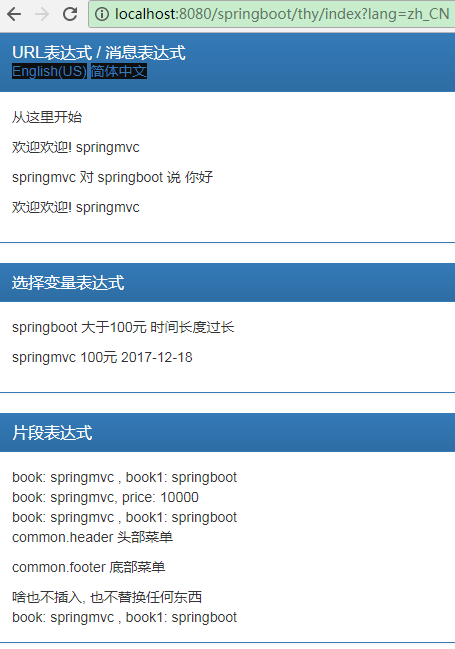
结果:
spring boot 与 thymeleaf (2): 常用表达式的更多相关文章
- Spring Boot 2 + Thymeleaf:表单字段绑定、表单提交处理
Spring Boot中Thymeleaf对表单处理的一些用法:(1)使用th:field属性:进行表单字段绑定(2)使用ids对象:一般用于lable配合radio或checkbox使用(3)表单提 ...
- 【转】Spring Boot干货系列:常用属性汇总
转自Spring Boot干货系列:常用属性汇总 附录A.常用应用程序属性 摘自:http://docs.spring.io/spring-boot/docs/current/reference/ht ...
- Spring Boot整合Thymeleaf视图层
目录 Spring Boot整合Thymeleaf Spring Boot整合Thymeleaf 的项目步骤 Thymeleaf 语法详解 Spring Boot整合Thymeleaf Spring ...
- 从零开始的Spring Boot(5、Spring Boot整合Thymeleaf)
Spring Boot整合Thymeleaf 写在前面 从零开始的Spring Boot(4.Spring Boot整合JSP和Freemarker) https://www.cnblogs.com/ ...
- Spring Boot整合 Thymeleaf 模板引擎
什么是Thymeleaf Thymeleaf是一款用于渲染XML.XHTML.HTML5内容的模板引擎.类似Velocity,FreeMaker模板引擎,它也可以轻易的与Spring MVC等Web框 ...
- Spring Boot(十五):spring boot+jpa+thymeleaf增删改查示例
Spring Boot(十五):spring boot+jpa+thymeleaf增删改查示例 一.快速上手 1,配置文件 (1)pom包配置 pom包里面添加jpa和thymeleaf的相关包引用 ...
- 一个小demo熟悉Spring Boot 和 thymeleaf 的基本使用
目录 介绍 零.项目素材 一. 创建 Spring Boot 项目 二.定制首页 1.修改 pom.xml 2.引入相应的本地 css.js 文件 3.编辑 login.html 4.处理对 logi ...
- Spring Boot2 系列教程(九)Spring Boot 整合 Thymeleaf
虽然现在慢慢在流行前后端分离开发,但是据松哥所了解到的,还是有一些公司在做前后端不分的开发,而在前后端不分的开发中,我们就会需要后端页面模板(实际上,即使前后端分离,也会在一些场景下需要使用页面模板, ...
- 极简 Spring Boot 整合 Thymeleaf 页面模板
虽然现在慢慢在流行前后端分离开发,但是据松哥所了解到的,还是有一些公司在做前后端不分的开发,而在前后端不分的开发中,我们就会需要后端页面模板(实际上,即使前后端分离,也会在一些场景下需要使用页面模板, ...
随机推荐
- AI模型训练/算法评估 测试员
- java基础-day9
第09天 java集合 今日内容介绍 u 对象数组 u 集合类之ArrayList u 学生管理系统案例 第1章 对象数组 1.1 对象数组概述 A:基本类型的数组:存储的元素为基本类型 ...
- MCU_存储器
MCU的存储器用途: RAM:数据存储器,和计算机的内存差不多,主要是用来存放程序运行产生的过程数据,掉电后会丢失数据,因此程序在上电后需要进行初始化.程序中的全局变量占据着RAM中的固定空间,局部变 ...
- 火狐浏览器(Firefox)打开EBS form的设置方法
http://yedward.net/?id=247 客户在使用EBS的时候,很多都是使用IE浏览器打开,但是EBS并不仅仅只是支持IE,对于谷歌浏览器(Chrome).火狐浏览器(Firefox)也 ...
- 数据库中表的位置,在sysdatabases中
name dbid sid mode status status2 crdate reserved category cmptlevel filename version master :: :: C ...
- Delphi 与 Word_VBA
'插入表格Sub setTable() Set myRange = ActiveDocument.Range(Start:=2, End:=2) ActiveDocument.Tables.Add ...
- C# 实现简单仿QQ登陆注册功能
闲来没事,想做一个仿QQ登陆注册的winform,于是利用工作之余,根据自己的掌握和查阅的资料,历时4天修改完成,新手水平,希望和大家共同学习进步,有不同见解希望提出! 废话不多说,进入正题: 先来看 ...
- MVVM双向绑定实现之Object.defineProperty
随着web应用的发展,直接操作dom的应用已渐行渐远,取而代之的是时下越来越流行的MVVM框架,dom操作几乎绝迹,这里面自然是框架底层封装的结果.MVVM框架的双向数据绑定使开发效率大大提高:然后在 ...
- python 通过pytz模块进行时区的转换,获取指定时区的时间
import pytz import time import datetime print(pytz.country_timezones('cn')) # 查询中国所拥有的时区 print(pytz. ...
- linux apache+php+mysql安装及乱码解决办法
1.乱码解决方法 首先确认mysql数据库字符集设置正确,php页面字符设置正确,之后修改apache配制文件http.conf 注释掉以下字符 AddDefaultCharset UTF-8 此为乱 ...