
Lerning Entity Framework 6 ------ Introduction to TPH
Sometimes, you have created two models. They have the same parent class like this:
public class Person

{

    public int PersonId { get; set; }

    public string PersonName { get; set; }

}

public class InsidePerson : Person

{

    public string Title { get; set; }

    public string Department { get; set; }

}

public class OutsidePerson : Person

{

    public string CompanyName { get; set; }

}
After you execute the command Update-Database in nuget command line, Entity Framework will create one table named people:
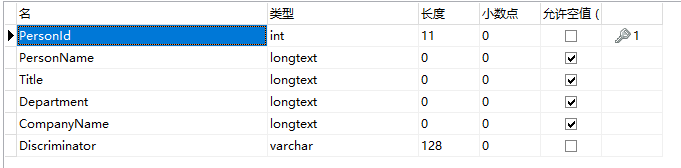
The Discriminator column is created for discriminating what model dose current row represent. this model creating type is called TPH(Table per Hierarchy Inheritance). Let's do a test. Add some codes in main function:
static void Main(string[] args)

{

    using (MyDbContext db = new MyDbContext())

    {

        Person insidePerson1 = new InsidePerson()

        {

            PersonName = "InsidePerson1",

            Title = "Manager",

            Department = "development"

        };

        db.People.Add(insidePerson1);

        InsidePerson insidePerson2 = new InsidePerson()

        {

            PersonName = "InsidePerson2",

            Title = "Manager",

            Department = "development"

        };

        db.People.Add(insidePerson2);

        InsidePerson insidePerson3 = new InsidePerson()

        {

            PersonName = "InsidePerson3",

            Title = "Manager",

            Department = "development"

        };

        db.InsidePeople.Add(insidePerson3);

        Person outsidePerson1 = new OutsidePerson()

        {

            PersonName = "outsidePerson1",

            CompanyName = "Tencent"

        };

        db.People.Add(outsidePerson1);

        db.SaveChanges();

    }

}
Let's look at the database:

If you don't like the discriminator column which entity framework auto create, you can define your column by adding these codes in OnModelCreating function of DbContext class:
protected override void OnModelCreating(DbModelBuilder modelBuilder)

{

    base.OnModelCreating(modelBuilder);

    modelBuilder.Entity<Person>()

        .Map<InsidePerson>(p => p.Requires("PersonType").HasValue(1))

        .Map<OutsidePerson>(p => p.Requires("PersonType").HasValue(2));

}
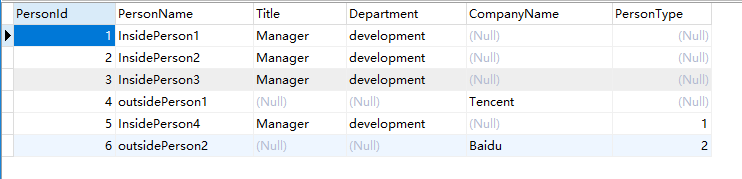
Then, execute the command Add-Migration AddPesonTypeColumn2PeopleTable and Update-Database in nuget command line. Now, look at the database again:

We can find the Entity Framework can't insert any value into PersonType column of existed rows. It's a little sad. Now, We insert some new data by coding:
static void Main(string[] args)

{

    using (MyDbContext db = new MyDbContext())

    {

        Person insidePerson4 = new InsidePerson()

        {

            PersonName = "InsidePerson4",

            Title = "Manager",

            Department = "development"

        };

        db.People.Add(insidePerson4);

        Person outsidePerson2 = new OutsidePerson()

        {

            PersonName = "outsidePerson2",

            CompanyName = "Baidu"

        };

        db.People.Add(outsidePerson2);

        db.SaveChanges();

    }

}
Look at the databas again:
That's all.
Lerning Entity Framework 6 ------ Introduction to TPH的更多相关文章
- Lerning Entity Framework 6 ------ Introduction to TPT
Sometimes, you've created a table for example named Person. Just then, you want to add some extra in ...
- Lerning Entity Framework 6 ------ Defining Relationships
There are three types of relationships in database. They are: One-to-Many One-to-One Many-to-Many Th ...
- Lerning Entity Framework 6 ------ Handling concurrency With SQL Server Database
The default Way to handle concurrency of Entity Framework is using optimistic concurrency. When two ...
- Lerning Entity Framework 6 ------ Working with in-memory data
Sometimes, you need to find some data in an existing context instead of the database. By befault, En ...
- Lerning Entity Framework 6 ------ Inserting, Querying, Updating, and Deleting Data
Creating Entities First of all, Let's create some entities to have a test. Create a project Add foll ...
- Lerning Entity Framework 6 ------ Defining the Database Structure
There are three ways to define the database structure by Entity Framework API. They are: Attributes ...
- Lerning Entity Framework 6 ------ Complex types
Complex types are classes that map to a subset of columns of a table.They don't contains key. They a ...
- Lerning Entity Framework 6 ------ Using a commandInterceptor
Sometimes, We want to check the original sql statements. creating a commandInterceptor is a good way ...
- Lerning Entity Framework 6 ------ A demo of using Entity framework with MySql
Create a new project named MySqlTest Install following packages by right-clicking on the References ...
随机推荐
- socket.io的connect连接时不断的进行自动连接,并产生错误net::ERR_EMPTY_RESPONSE
socket = io.connect('http://192.168.1.200:9043?uuid=333'); 执行上面的语句时,产生下面的错误: 后来经过排查,是由于项目的jdk版本过低引起的 ...
- spring学习 六 spring与mybatis整合
在mybatis学习中有两种配置文件 :全局配置文件,映射配置文件.mybatis和spring整合,其实就是把mybatis中的全局配置文件的配置内容都变成一个spring容器的一个bean,让sp ...
- svn checkout单个文件
http://www.letuknowit.com/archives/svn-checkout-single-file/ 有时候需要在svn版本仓库中某个比较上层的目录中(比如根目录)checkout ...
- 13个开源GIS软件 你了解几个?
地理信息系统(Geographic Information System,GIS)软件依赖于覆盖整个地球的数据集.为处理大量的 GIS 数据及其格式,编程人员创建了若干开源库和 GIS 套件. GIS ...
- FMS4.5( Adobe Flash Media Server4.5)流媒体服务器搭建
下载FMS4.5 下载地址:http://pan.baidu.com/s/1pJLi5Ur(已更新) FMS是用于用户之间相互通讯的新平台.它集成了Flash多媒体交互的特性,又添加了实时音频和实时数 ...
- 2018.12.22 spoj7258 Lexicographical Substring Search(后缀自动机)
传送门 samsamsam基础题. 题意简述:给出一个串,询问第kkk大的本质不同的串. 然而这就是弦论的简化版. 我们把samsamsam建出来然后贪心选择就行了. 代码: #include< ...
- Tomcat架构解析(一)-----Tomcat总体架构
Tomcat是非常常用的应用服务器,了解Tomcat的总体架构以及实现细节,对于理解整个java web也是有非常大的帮助. 一.Server 1.最简单的服务器结构 最简单的服务器结构如图所示: ...
- Codeforces Round #517 (Div. 2) C. Cram Time(思维+贪心)
https://codeforces.com/contest/1065 题意 给你a,b,让你找尽量多的自然数,使得他们的和<=a,<=b,用在a和b的自然数不能重复 思路 假如只有一个数 ...
- Go语言高级特性总结——Struct、Map与JSON之间的转化
Struct与Map之间互相转换 // Struct2Map convert struct to map func Struct2Map(st interface{}) map[string]inte ...
- 查阅JDK,collection与collections区别大
看起来collection,和collections相像,但其中的差别之大你造吗? Collection是Collection层次结构中的根接口.Collection表示一组对象,这也对象也称为col ...