
Android进度条学习
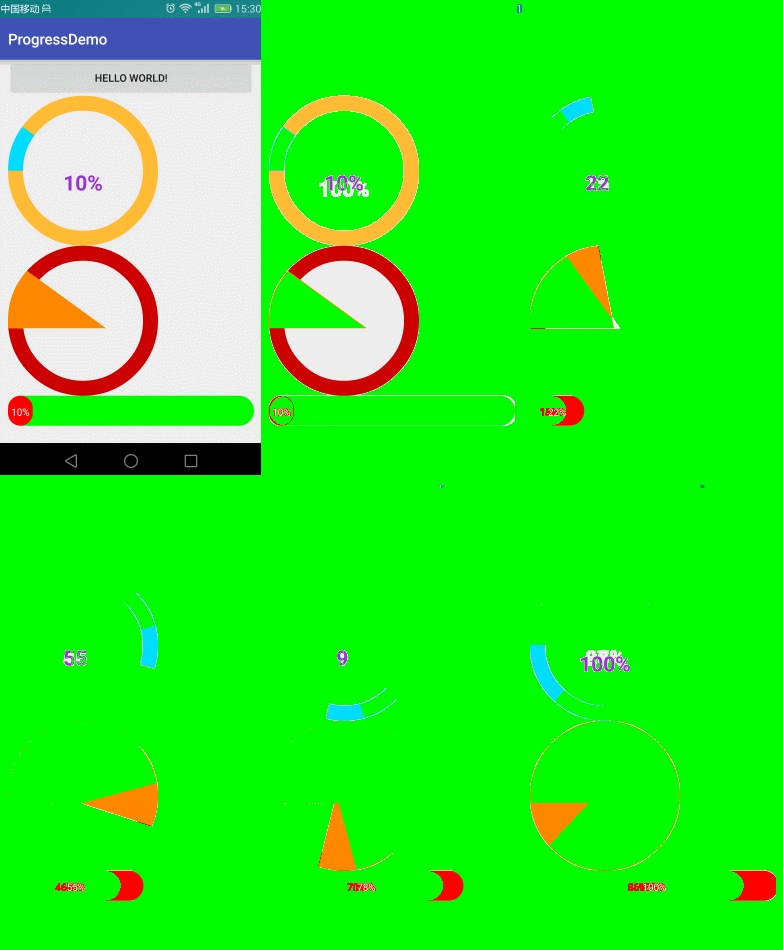
自定义属性
    <!--

    roundColor 圆环的颜色

    roundProgressColor 进度的颜色

    roundWidth 圆环的宽度

    textColor 文字颜色

    textSize  文字大小

    max 最大值

    textIsDisplayable  是否显示进度文本

    style 样式

    STROKE 空心

    FILL 实心

    -->

    <declare-styleable name="RoundProgressBar">

        <attr name="roundColor" format="color"/>

        <attr name="roundProgressColor" format="color"/>

        <attr name="roundWidth" format="dimension"></attr>

        <attr name="textColor" format="color" />

        <attr name="textSize" format="dimension" />

        <attr name="max" format="integer"></attr>

        <attr name="textIsDisplayable" format="boolean"></attr>

        <attr name="style">

            <enum name="STROKE" value="0"></enum>

            <enum name="FILL" value="1"></enum>

        </attr>

    </declare-styleable>
public RoundProgressBar(Context context, AttributeSet attrs, int defStyleAttr) {

        super(context, attrs, defStyleAttr);

        mPaint = new Paint();

        /**

         * 获取自定义的属性

         */

        TypedArray typedArray = context.obtainStyledAttributes(attrs, R.styleable.RoundProgressBar);

        //底色

        mRoundColor = typedArray.getColor(R.styleable.RoundProgressBar_roundColor, Color.RED);

        //进度的颜色

        mRoundProgressColor = typedArray.getColor(R.styleable.RoundProgressBar_roundProgressColor, Color.BLUE);

        //圆形的宽

        mRoundWidth = typedArray.getDimension(R.styleable.RoundProgressBar_roundWidth, 20);

        //字体颜色 中间

        mTextColor = typedArray.getColor(R.styleable.RoundProgressBar_textColor, Color.BLUE);

        //中间进度显示的字体大小

        mTextSize = typedArray.getDimension(R.styleable.RoundProgressBar_textSize, 15);

        //最大值

        mMax = typedArray.getInteger(R.styleable.RoundProgressBar_max, 100);

        //文字是否显示

        mTextIsDisplayable = typedArray.getBoolean(R.styleable.RoundProgressBar_textIsDisplayable, true);

        //实心或者 空心

        mStyle = typedArray.getInt(R.styleable.RoundProgressBar_style, 0);

        typedArray.recycle();

    }
绘制
        //圆心

        int centerOfCircle = getWidth() / 2;

        //radius 半径

        int radius = (int) (centerOfCircle - mRoundWidth / 2);

        //设置画笔

        mPaint.setAntiAlias(true);

        //圆环的颜色

        mPaint.setColor(mRoundColor);

        //设置空心

        mPaint.setStyle(Paint.Style.STROKE);

        //画笔宽度

        mPaint.setStrokeWidth(mRoundWidth);

        //画圆

        canvas.drawCircle(centerOfCircle, centerOfCircle, radius, mPaint);

        /**

         * 画百分比

         */

        mPaint.setStrokeWidth(0);

        //字体大小

        mPaint.setTextSize(mTextSize);

        //画笔颜色

        mPaint.setColor(mTextColor);

        //字体

        mPaint.setTypeface(Typeface.DEFAULT_BOLD);

        //计算百分比

        int percent = (int) (((float) mProgress / (float) mMax) * 100);

        //测量字体的宽度

        float textWidth = mPaint.measureText(percent + "%");

        //判断是否显示进度文字 不是0,风格是空心的

        if (mTextIsDisplayable && percent != 0 && mStyle == STROKE) {

            canvas.drawText(percent + "%", centerOfCircle - textWidth / 2, centerOfCircle + textWidth / 2, mPaint);

        }

        /**

         * 设置进度

         */

        mPaint.setColor(mRoundProgressColor);

        //画笔宽度

        mPaint.setStrokeWidth(mRoundWidth);

        mPaint.setAntiAlias(true);

        RectF oval = new RectF(centerOfCircle - radius, centerOfCircle - radius, centerOfCircle + radius, centerOfCircle + radius);

        switch (mStyle) {

            case STROKE:

                //空心

                mPaint.setStyle(Paint.Style.STROKE);

                //画圆弧

                /**

                 *

                 *开始的角度

                 */

                canvas.drawArc(oval, 180, 360 * mProgress / mMax, false, mPaint);

                break;

            case FILL:

                //实心

                mPaint.setStyle(Paint.Style.FILL_AND_STROKE);

                //画圆弧

                if(mProgress!=0) {

                    canvas.drawArc(oval, 180, 360 * mProgress / mMax, true, mPaint);

                }

                break;

        }
源码:
https://github.com/ln0491/ProgressDemo
Android进度条学习的更多相关文章
- 多种的android进度条的特效源码
多种的android进度条的特效源码,这个源码是在源码天堂那个网站上转载过来的,我已经修改一部分了,感觉很实用的,大家可以学习一下吧,我就不上传源码了,大家可以直接到那个网站上下载吧. 源码天堂下载地 ...
- android进度条
android进度条 1.达到的效果 2.布局代码 先写一个my_browser.xml文件 存放WebView <?xml version="1.0" encoding=& ...
- iOS之小功能模块--彩虹动画进度条学习和自主封装改进
前言: 首先展示一下这个iOS小示例的彩色进度条动画效果: 阅读本文先说说好处:对于基础不好的读者,可以直接阅读文末尾的"如何使用彩虹动画进度条"章节,然后将我封装好的这个功能模块 ...
- Android 进度条改变图片透明度
<?xml version="1.0" encoding="utf-8"?> <LinearLayout xmlns:android=&quo ...
- Android 进度条
<?xml version="1.0" encoding="utf-8"?> <LinearLayout xmlns:android=&quo ...
- Android—进度条
layout文件: <?xml version="1.0" encoding="utf-8"?> <LinearLayout xmlns:an ...
- Android——进度条ProgressBar
1.activity_progressbar.xml <?xml version="1.0" encoding="utf-8"?><Linea ...
- android进度条的使用
// 导入按钮事件 btnsearch.setOnClickListener(new View.OnClickListener() { @Override public void on ...
- Android 进度条按钮实现(ProgressButton)
有些App在点击下载按钮的时候,可以在按钮上显示进度,我们可以通过继承原生Button,重写onDraw来实现带进度条的按钮. Github:https://github.com/imcloudflo ...
随机推荐
- 【原创】开源.NET排列组合组件KwCombinatorics使用(三)——笛卡尔积组合
本博客所有文章分类的总目录:本博客博文总目录-实时更新 本博客其他.NET开源项目文章目录:[目录]本博客其他.NET开源项目文章目录 KwCombinatorics组件文章目录: 1. ...
- 【商业源码】生日大放送-Newlife商业源码分享
今天是农历六月二十三,是@大石头的生日,记得每年生日都会有很劲爆的重量级源码送出,今天Newlife群和论坛又一次疯狂了,吃水不忘挖井人,好的东西肯定要拿到博客园分享.Newlife组件信息: 论坛: ...
- 在 ML2 中配置 Vlan Network- 每天5分钟玩转 OpenStack(93)
上一节我们学习了 Neutron Vlan Network 的原理,今天讨论如何在 ML2 配置中 enable 它. 首先在 /etc/neutron/plugins/ml2/ml2_conf.in ...
- 2014 Visual Studio Contact(); 直播笔记
昨天微软干了几件了不起的事:.NET开发环境将开源.跨平台支持(Mac OS X和Linux).多设备支持(WP.Android和iOS)和Visual Studio免费(Visual Studio ...
- 利用SimpleExpandableListAdapter为ExpandableListActivity提供数据
首先MainActivity继承自ExpandableListActivity,其中的声明如下: setContentView(R.layout.expandmain); //定义一个:List,该L ...
- js实现动画效果框架
RT,是参照慕课的教程做的.两个多小时的教程,看完了然后晚上的时候做了下,看的时候感觉明白了,但其实做的时候还是有很多小细节需要处理的. 上代码,思想什么的直接去慕课看教程就好了.点击这里 注释也比较 ...
- PHP中常见魔术方法解析
<?php class info { private $province; //省 public $city; //城市 private $myname; //姓名 //__construct( ...
- Azure Application Gateway (4) 设置URL路由 - PowerShell
<Windows Azure Platform 系列文章目录> 本文将介绍如果使用Azure PowerShell,创建Azure Application Gateway URL Rout ...
- 注册表(C#)
Windowa注册表是包含Windows安装,用户喜好以及以安装软件和设备的所有配置信息的核心储存库.COM组件必须把它的信息出存在注册表中,才能被客户程序使用.注册表也包含了一些系统配置的信息,这些 ...
- Ionic Lab下载地址
网站被墙,留下下载链接备用 Linux版本 Mac版本 Windows版本