
DEVOPS技术实践_03:Jenkins自动构建
一、提交代码自动构建
当开发人员在gitlab提交代码后,会自动触发jenkin构建
点击项目---->点击diy_maven-TEST----->点击配置--->构建触发器---->根据需求选择触发器
1.1 安装gitlab hook插件
系统管理----->选择插件管理-------->查找gitlab-------->选择直接安装

安装完成

1.2 配置gitlab仓库
点击项目---->点击diy_maven-TEST----->点击配置--->构建触发器
发现没有变化,需要重启jenkins

点击是,jenkins重启


发现没有,升级jenkins
关机

然后重新使用Java启动war包就可以了
继续安装gitlab的其他插件尝试
点击项目---->点击diy_maven-TEST----->点击配置--->构建触发器
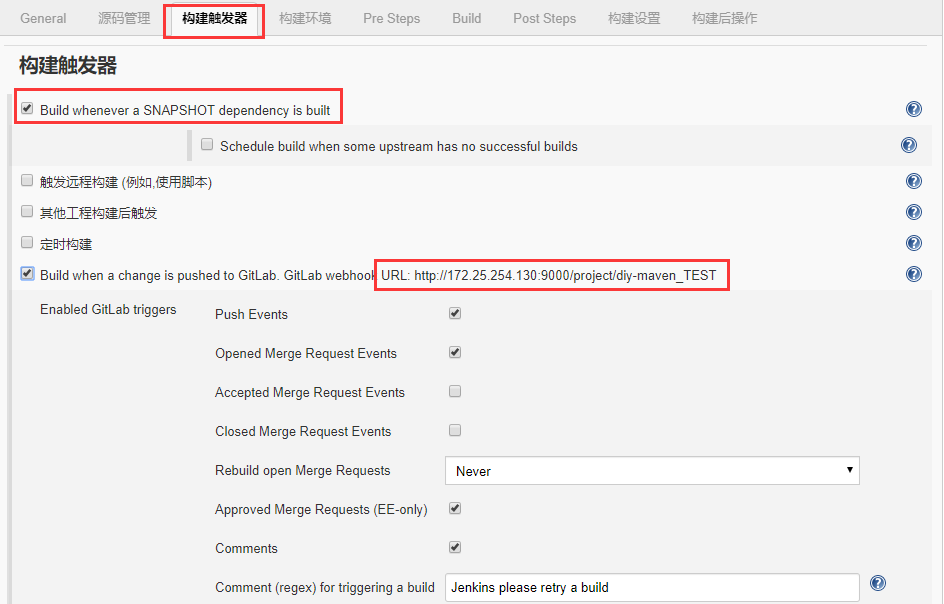
保存这个地址
http://172.25.254.130:9000/project/diy-maven_TEST
1.3 gitlab设置
选择仓库设置setting
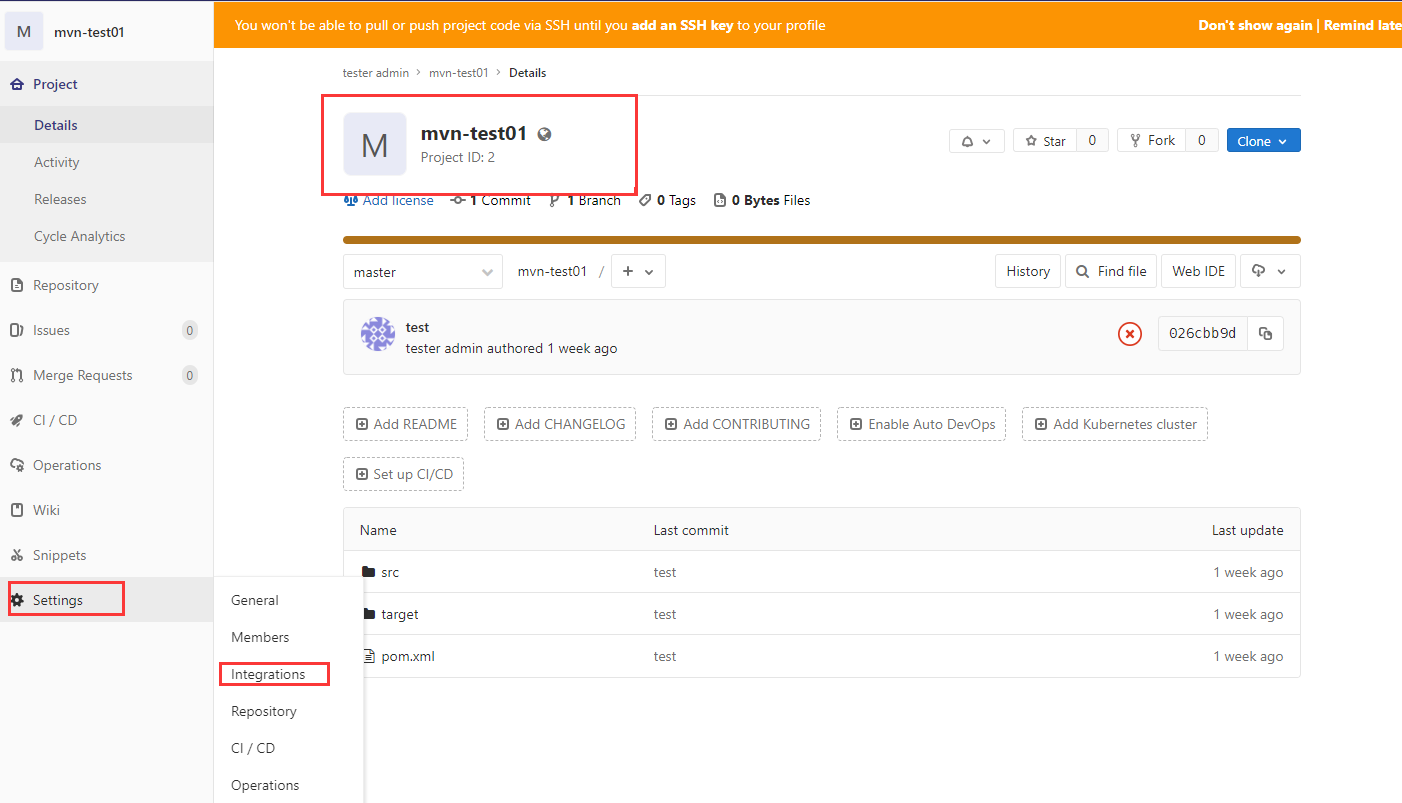
复制url到此处

1.4 点击添加

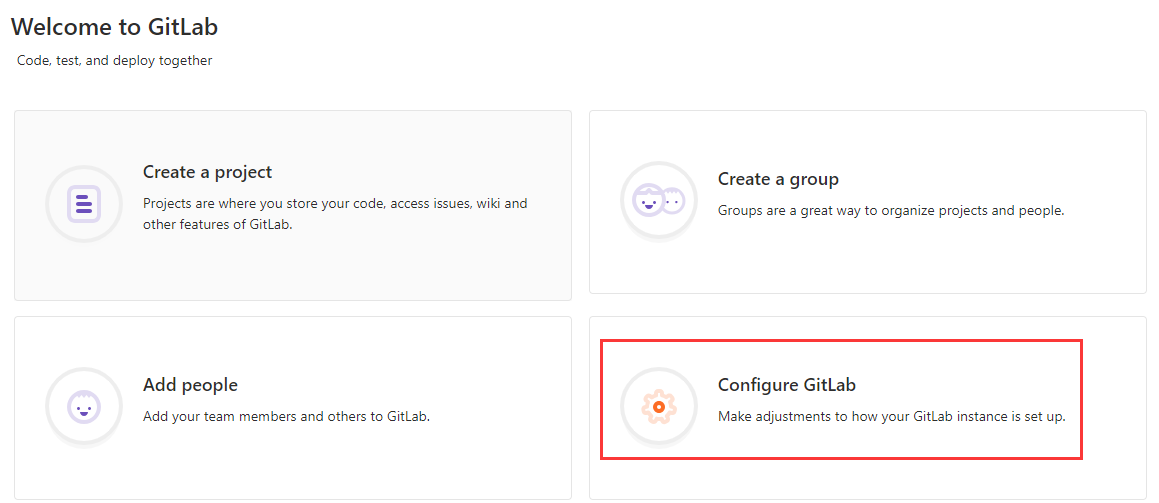
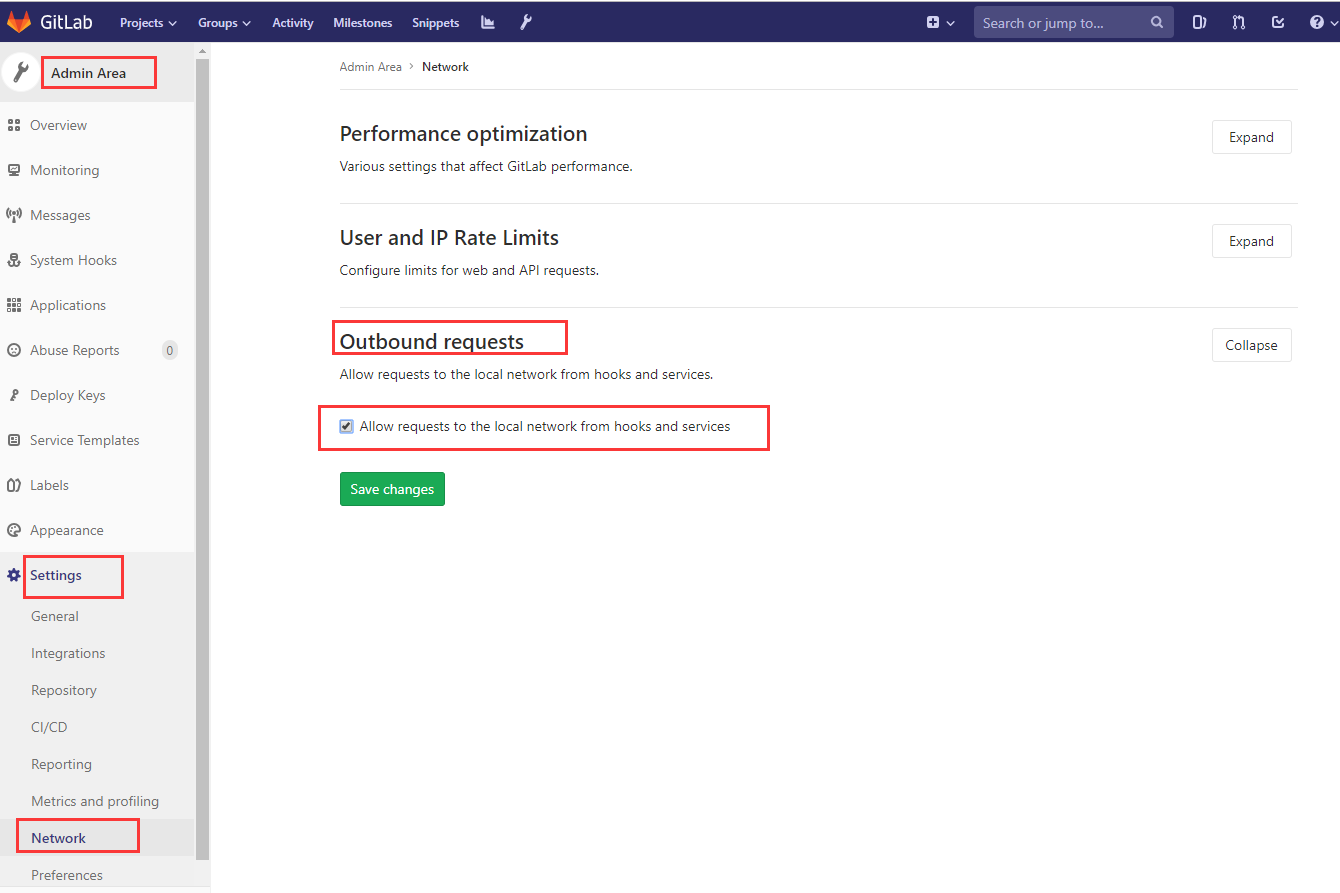
gitlab 10.6 版本以后为了安全,不允许向本地网络发送webhook请求,如果想向本地网络发送webhook请求,则需要使用管理员帐号登录,默认管理员帐号是admin@example.com,密码就是你gitlab搭建好之后第一次输入的密码,登录之后, 点击Configure Gitlab ,如下图所示
即可进入Admin area,在Admin area中,在settings标签下面,找到OutBound Request,勾选上Allow requests to the local network from hooks and services ,保存更改即可解决问题
成功

1.5 点击测试test
得到200成功

验证
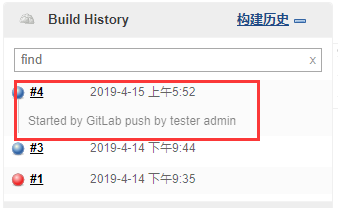
控制台输出
Started by GitLab push by tester admin

Building remotely on slave1 in workspace /var/jenkins/workspace/diy-maven_TEST

No credentials specified

 > git rev-parse --is-inside-work-tree # timeout=

Fetching changes from the remote Git repository

 > git config remote.origin.url http://172.25.254.131/tester/mvn-test01.git # timeout=10

Fetching upstream changes from http://172.25.254.131/tester/mvn-test01.git

 > git --version # timeout=

 > git fetch --tags --progress http://172.25.254.131/tester/mvn-test01.git +refs/heads/*:refs/remotes/origin/*

skipping resolution of commit remotes/origin/master, since it originates from another repository

 > git rev-parse refs/remotes/origin/master^{commit} # timeout=

 > git rev-parse refs/remotes/origin/origin/master^{commit} # timeout=

Checking out Revision 026cbb9df8efcfc15ff98a27f0fa0c255716bc6a (refs/remotes/origin/master)

 > git config core.sparsecheckout # timeout=

 > git checkout -f 026cbb9df8efcfc15ff98a27f0fa0c255716bc6a

Commit message: "test"

 > git rev-list --no-walk 026cbb9df8efcfc15ff98a27f0fa0c255716bc6a # timeout=

Parsing POMs

Established TCP socket on

maven35-agent.jar already up to date

maven35-interceptor.jar already up to date

maven3-interceptor-commons.jar already up to date

[diy-maven_TEST] $ java -cp /var/jenkins/maven35-agent.jar:/usr/local/maven/apache-maven-3.6./boot/plexus-classworlds-2.6..jar:/usr/local/maven/apache-maven-3.6./conf/logging jenkins.maven3.agent.Maven35Main /usr/local/maven/apache-maven-3.6. /usr/local/jenkins-slave/agent.jar /var/jenkins/maven35-interceptor.jar /var/jenkins/maven3-interceptor-commons.jar

<===[JENKINS REMOTING CAPACITY]===>channel started

Executing Maven:  -B -f /var/jenkins/workspace/diy-maven_TEST/pom.xml clean install

[INFO] Scanning for projects...

[INFO]

[INFO] ---------------------< com.example.app:maven-app >----------------------

[INFO] Building maven-app 1.3-SNAPSHOT

[INFO] --------------------------------[ jar ]---------------------------------

[INFO]

[INFO] --- maven-clean-plugin:2.5:clean (default-clean) @ maven-app ---

[INFO] Deleting /var/jenkins/workspace/diy-maven_TEST/target

[INFO]

[INFO] --- maven-resources-plugin:2.6:resources (default-resources) @ maven-app ---

[WARNING] Using platform encoding (UTF- actually) to copy filtered resources, i.e. build is platform dependent!

[INFO] skip non existing resourceDirectory /var/jenkins/workspace/diy-maven_TEST/src/main/resources

[INFO]

[INFO] --- maven-compiler-plugin:3.1:compile (default-compile) @ maven-app ---

[INFO] Changes detected - recompiling the module!

[WARNING] File encoding has not been set, using platform encoding UTF-, i.e. build is platform dependent!

[INFO] Compiling  source file to /var/jenkins/workspace/diy-maven_TEST/target/classes

[INFO]

[INFO] --- maven-resources-plugin:2.6:testResources (default-testResources) @ maven-app ---

[WARNING] Using platform encoding (UTF- actually) to copy filtered resources, i.e. build is platform dependent!

[INFO] skip non existing resourceDirectory /var/jenkins/workspace/diy-maven_TEST/src/test/resources

[INFO]

[INFO] --- maven-compiler-plugin:3.1:testCompile (default-testCompile) @ maven-app ---

[INFO] Changes detected - recompiling the module!

[WARNING] File encoding has not been set, using platform encoding UTF-, i.e. build is platform dependent!

[INFO] Compiling  source file to /var/jenkins/workspace/diy-maven_TEST/target/test-classes

[INFO]

[INFO] --- maven-surefire-plugin:2.12.:test (default-test) @ maven-app ---

[INFO] Surefire report directory: /var/jenkins/workspace/diy-maven_TEST/target/surefire-reports

-------------------------------------------------------

 T E S T S

-------------------------------------------------------

Running com.example.app.AppTest

Tests run: , Failures: , Errors: , Skipped: , Time elapsed: 0.002 sec

Results :

Tests run: , Failures: , Errors: , Skipped:

[JENKINS] Recording test results

[WARNING] Attempt to (de-)serialize anonymous class hudson.maven.reporters.SurefireArchiver$; see: https://jenkins.io/redirect/serialization-of-anonymous-classes/

[WARNING] Attempt to (de-)serialize anonymous class hudson.maven.reporters.BuildInfoRecorder$; see: https://jenkins.io/redirect/serialization-of-anonymous-classes/

[INFO]

[INFO] --- maven-jar-plugin:2.4:jar (default-jar) @ maven-app ---

[INFO] Building jar: /var/jenkins/workspace/diy-maven_TEST/target/maven-app-1.3-SNAPSHOT.jar

[INFO]

[INFO] --- maven-install-plugin:2.4:install (default-install) @ maven-app ---

[INFO] Installing /var/jenkins/workspace/diy-maven_TEST/target/maven-app-1.3-SNAPSHOT.jar to /root/.m2/repository/com/example/app/maven-app/1.3-SNAPSHOT/maven-app-1.3-SNAPSHOT.jar

[INFO] Installing /var/jenkins/workspace/diy-maven_TEST/pom.xml to /root/.m2/repository/com/example/app/maven-app/1.3-SNAPSHOT/maven-app-1.3-SNAPSHOT.pom

[INFO] ------------------------------------------------------------------------

[INFO] BUILD SUCCESS

[INFO] ------------------------------------------------------------------------

[INFO] Total time:  12.960 s

[INFO] Finished at: --11T12::+:

[INFO] ------------------------------------------------------------------------

Waiting for Jenkins to finish collecting data

[JENKINS] Archiving /var/jenkins/workspace/diy-maven_TEST/pom.xml to com.example.app/maven-app/1.3-SNAPSHOT/maven-app-1.3-SNAPSHOT.pom

[JENKINS] Archiving /var/jenkins/workspace/diy-maven_TEST/target/maven-app-1.3-SNAPSHOT.jar to com.example.app/maven-app/1.3-SNAPSHOT/maven-app-1.3-SNAPSHOT.jar

channel stopped

Finished: SUCCESS
1.6 限制项目于宁节点

到gitlab验证
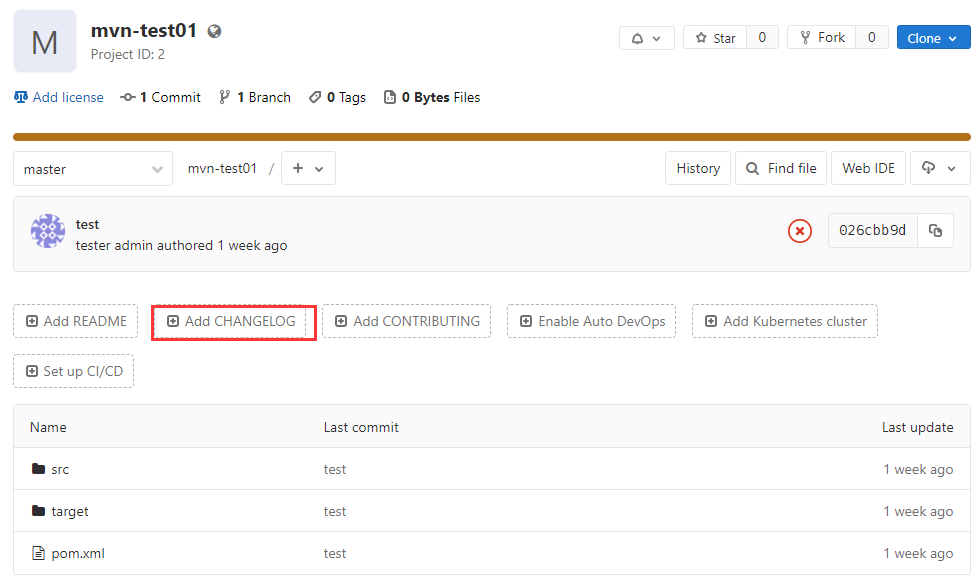
1.7 提交代码验证
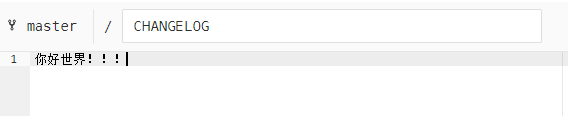
写一些内容,提交
正在构建

1.8 控制台输出
Started by GitLab push by tester admin

Building remotely on slave1 in workspace /var/jenkins/workspace/diy-maven_TEST

No credentials specified

 > git rev-parse --is-inside-work-tree # timeout=

Fetching changes from the remote Git repository

 > git config remote.origin.url http://172.25.254.131/tester/mvn-test01.git # timeout=10

Fetching upstream changes from http://172.25.254.131/tester/mvn-test01.git

 > git --version # timeout=

 > git fetch --tags --progress http://172.25.254.131/tester/mvn-test01.git +refs/heads/*:refs/remotes/origin/*

skipping resolution of commit remotes/origin/master, since it originates from another repository

 > git rev-parse refs/remotes/origin/master^{commit} # timeout=

 > git rev-parse refs/remotes/origin/origin/master^{commit} # timeout=

Checking out Revision 6454cc57fd8252c2859ff8ebd5cf78d087bbdc0d (refs/remotes/origin/master)

 > git config core.sparsecheckout # timeout=

 > git checkout -f 6454cc57fd8252c2859ff8ebd5cf78d087bbdc0d

Commit message: "Add CHANGELOG"

 > git rev-list --no-walk 026cbb9df8efcfc15ff98a27f0fa0c255716bc6a # timeout=

Parsing POMs

Established TCP socket on

maven35-agent.jar already up to date

maven35-interceptor.jar already up to date

maven3-interceptor-commons.jar already up to date

[diy-maven_TEST] $ java -cp /var/jenkins/maven35-agent.jar:/usr/local/maven/apache-maven-3.6./boot/plexus-classworlds-2.6..jar:/usr/local/maven/apache-maven-3.6./conf/logging jenkins.maven3.agent.Maven35Main /usr/local/maven/apache-maven-3.6. /usr/local/jenkins-slave/agent.jar /var/jenkins/maven35-interceptor.jar /var/jenkins/maven3-interceptor-commons.jar

<===[JENKINS REMOTING CAPACITY]===>channel started

Executing Maven:  -B -f /var/jenkins/workspace/diy-maven_TEST/pom.xml clean install

[INFO] Scanning for projects...

[INFO]

[INFO] ---------------------< com.example.app:maven-app >----------------------

[INFO] Building maven-app 1.3-SNAPSHOT

[INFO] --------------------------------[ jar ]---------------------------------

[INFO]

[INFO] --- maven-clean-plugin:2.5:clean (default-clean) @ maven-app ---

[INFO] Deleting /var/jenkins/workspace/diy-maven_TEST/target

[INFO]

[INFO] --- maven-resources-plugin:2.6:resources (default-resources) @ maven-app ---

[WARNING] Using platform encoding (UTF- actually) to copy filtered resources, i.e. build is platform dependent!

[INFO] skip non existing resourceDirectory /var/jenkins/workspace/diy-maven_TEST/src/main/resources

[INFO]

[INFO] --- maven-compiler-plugin:3.1:compile (default-compile) @ maven-app ---

[INFO] Changes detected - recompiling the module!

[WARNING] File encoding has not been set, using platform encoding UTF-, i.e. build is platform dependent!

[INFO] Compiling  source file to /var/jenkins/workspace/diy-maven_TEST/target/classes

[INFO]

[INFO] --- maven-resources-plugin:2.6:testResources (default-testResources) @ maven-app ---

[WARNING] Using platform encoding (UTF- actually) to copy filtered resources, i.e. build is platform dependent!

[INFO] skip non existing resourceDirectory /var/jenkins/workspace/diy-maven_TEST/src/test/resources

[INFO]

[INFO] --- maven-compiler-plugin:3.1:testCompile (default-testCompile) @ maven-app ---

[INFO] Changes detected - recompiling the module!

[WARNING] File encoding has not been set, using platform encoding UTF-, i.e. build is platform dependent!

[INFO] Compiling  source file to /var/jenkins/workspace/diy-maven_TEST/target/test-classes

[INFO]

[INFO] --- maven-surefire-plugin:2.12.:test (default-test) @ maven-app ---

[INFO] Surefire report directory: /var/jenkins/workspace/diy-maven_TEST/target/surefire-reports

-------------------------------------------------------

 T E S T S

-------------------------------------------------------

Running com.example.app.AppTest

Tests run: , Failures: , Errors: , Skipped: , Time elapsed: 0.002 sec

Results :

Tests run: , Failures: , Errors: , Skipped:

[JENKINS] Recording test results

[WARNING] Attempt to (de-)serialize anonymous class hudson.maven.reporters.SurefireArchiver$; see: https://jenkins.io/redirect/serialization-of-anonymous-classes/

[WARNING] Attempt to (de-)serialize anonymous class hudson.maven.reporters.BuildInfoRecorder$; see: https://jenkins.io/redirect/serialization-of-anonymous-classes/

[INFO]

[INFO] --- maven-jar-plugin:2.4:jar (default-jar) @ maven-app ---

[INFO] Building jar: /var/jenkins/workspace/diy-maven_TEST/target/maven-app-1.3-SNAPSHOT.jar

[INFO]

[INFO] --- maven-install-plugin:2.4:install (default-install) @ maven-app ---

[INFO] Installing /var/jenkins/workspace/diy-maven_TEST/target/maven-app-1.3-SNAPSHOT.jar to /root/.m2/repository/com/example/app/maven-app/1.3-SNAPSHOT/maven-app-1.3-SNAPSHOT.jar

[INFO] Installing /var/jenkins/workspace/diy-maven_TEST/pom.xml to /root/.m2/repository/com/example/app/maven-app/1.3-SNAPSHOT/maven-app-1.3-SNAPSHOT.pom

[INFO] ------------------------------------------------------------------------

[INFO] BUILD SUCCESS

[INFO] ------------------------------------------------------------------------

[INFO] Total time:  10.700 s

[INFO] Finished at: --11T12::+:

[INFO] ------------------------------------------------------------------------

Waiting for Jenkins to finish collecting data

[JENKINS] Archiving /var/jenkins/workspace/diy-maven_TEST/pom.xml to com.example.app/maven-app/1.3-SNAPSHOT/maven-app-1.3-SNAPSHOT.pom

[JENKINS] Archiving /var/jenkins/workspace/diy-maven_TEST/target/maven-app-1.3-SNAPSHOT.jar to com.example.app/maven-app/1.3-SNAPSHOT/maven-app-1.3-SNAPSHOT.jar

channel stopped

Finished: SUCCESS
二 、 Jenkins-pipeline自动化配置
https://jenkins.io/doc/book/pipeline/
2.1 安装pipeline插件
2.2 gitlab创建一个group

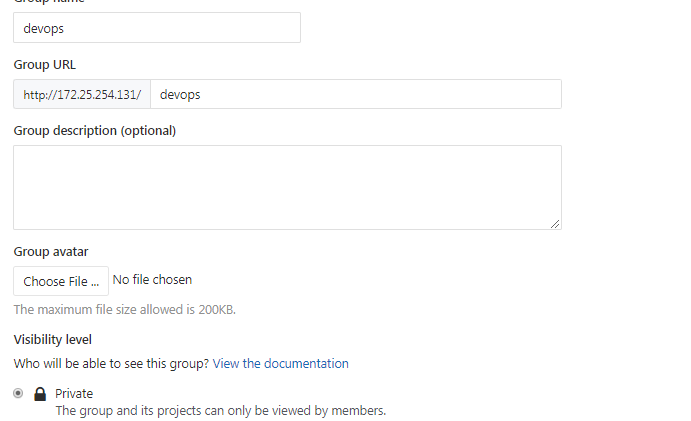
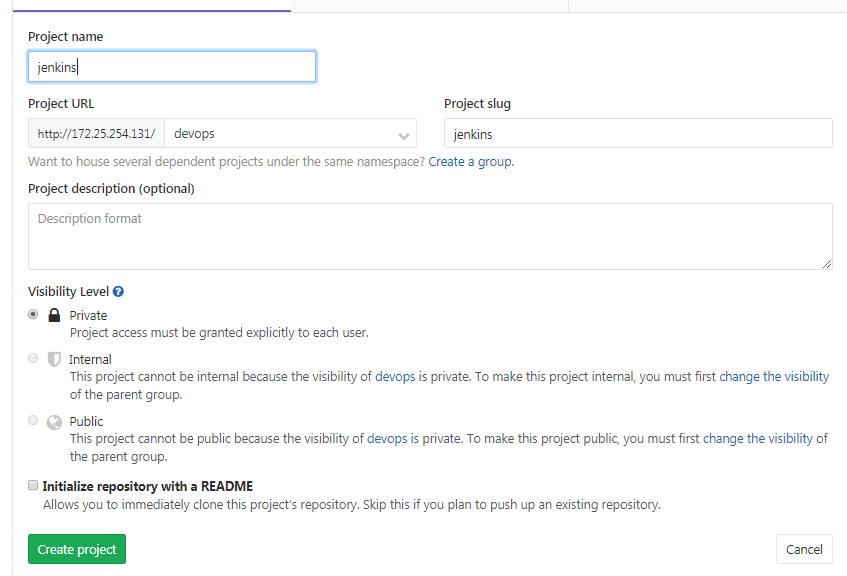
2.3 在group创建一个项目
NEW Project
2.4 Command line instructions
Git global setup

git config --global user.name "tester admin"

git config --global user.email "joy04007@gmail.com"

Create a new repository

git clone http://172.25.254.131/devops/jenkins.git

cd jenkins

touch README.md

git add README.md

git commit -m "add README"

git push -u origin master

Existing folder

cd existing_folder

git init

git remote add origin http://172.25.254.131/devops/jenkins.git

git add .

git commit -m "Initial commit"

git push -u origin master

Existing Git repository

cd existing_repo

git remote rename origin old-origin

git remote add origin http://172.25.254.131/devops/jenkins.git

git push -u origin --all

git push -u origin --tags
2.5 新加一个文件提交
NEW File:java.jenkinsfile

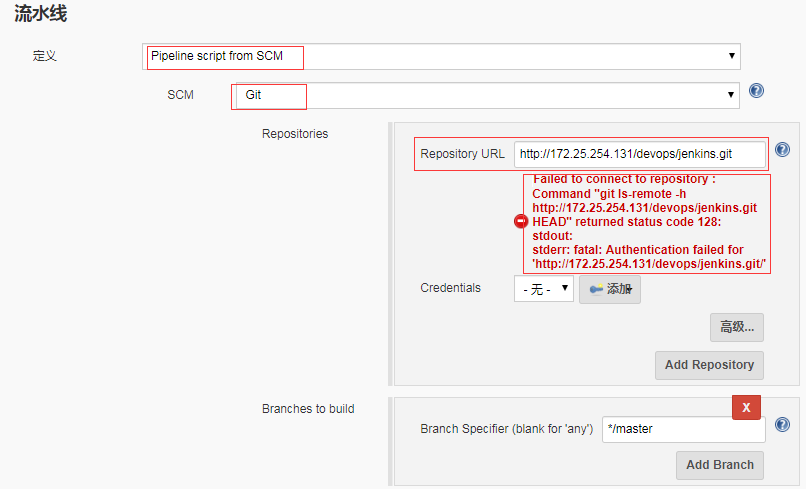
2.6 jenkins创建任务
jenkins创建一个流水线项目,然后pipeline设置

node {

   def mvnHome

   stage('Preparation') { // for display purposes

      // Get some code from a GitHub repository

      git 'https://github.com/jglick/simple-maven-project-with-tests.git'

      // Get the Maven tool.

      // ** NOTE: This 'M3' Maven tool must be configured

      // **       in the global configuration.

      mvnHome = tool 'M3'

   }

   stage('Build') {

      // Run the maven build

      if (isUnix()) {

         sh "'${mvnHome}/bin/mvn' -Dmaven.test.failure.ignore clean package"

      } else {

         bat(/"${mvnHome}\bin\mvn" -Dmaven.test.failure.ignore clean package/)

      }

   }

   stage('Results') {

      junit '**/target/surefire-reports/TEST-*.xml'

      archiveArtifacts 'target/*.jar'

   }

}

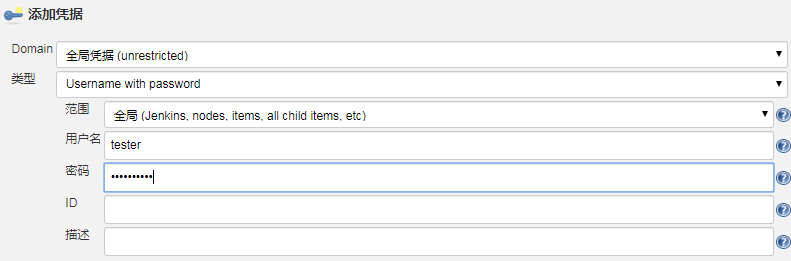
2.7 添加一个key

2.8 点击构建
Started by user unknown or anonymous

Obtained jaja.jenkinsfile from git http://172.25.254.131/devops/jenkins.git

Running in Durability level: MAX_SURVIVABILITY

[Pipeline] Start of Pipeline

[Pipeline] node

Running on Jenkins in /root/.jenkins/workspace/java_pipeline-Test

[Pipeline] {

[Pipeline] echo

Hello World

[Pipeline] }

[Pipeline] // node

[Pipeline] End of Pipeline

Finished: SUCCESS
成功!!!
2.9 写一个完整的pipeline
使用pipeline模板代码
node {

   def mvnHome

   stage('Preparation') { // for display purposes

      // Get some code from a GitHub repository

      git 'https://github.com/jglick/simple-maven-project-with-tests.git'

      // Get the Maven tool.

      // ** NOTE: This 'M3' Maven tool must be configured

      // **       in the global configuration.

      mvnHome = tool 'M3'

   }

   stage('Build') {

      // Run the maven build

      if (isUnix()) {

         sh "'${mvnHome}/bin/mvn' -Dmaven.test.failure.ignore clean package"

      } else {

         bat(/"${mvnHome}\bin\mvn" -Dmaven.test.failure.ignore clean package/)

      }

   }

   stage('Results') {

      junit '**/target/surefire-reports/TEST-*.xml'

      archiveArtifacts 'target/*.jar'

   }

}

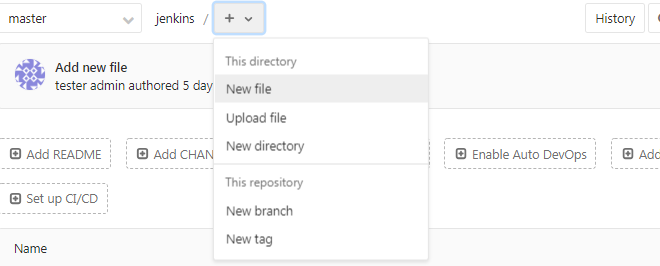
newfile

node {

   def mvnHome

   stage('Checkout') { // for display purposes

       println('checkcode')

   }

   stage('Build') {

      println('Build')

   }

   stage('Test') {

      println('test')

   }

   stage('Deploy'){

       println('Deploy')

   }

   stage('CodeScan'){

       println('code')

   }

}
Jenkins在任务配置重新配置脚本路径

点击立即创建成功
输出来信息
Started by user unknown or anonymous

Obtained Jenkinsfile from git http://172.25.254.131/devops/jenkins.git

Running in Durability level: MAX_SURVIVABILITY

[Pipeline] Start of Pipeline

[Pipeline] node

Running on Jenkins in /root/.jenkins/workspace/java_pipeline-Test

[Pipeline] {

[Pipeline] stage

[Pipeline] { (Checkout)

[Pipeline] echo

checkcode

[Pipeline] }

[Pipeline] // stage

[Pipeline] stage

[Pipeline] { (Build)

[Pipeline] echo

Build

[Pipeline] }

[Pipeline] // stage

[Pipeline] stage

[Pipeline] { (Test)

[Pipeline] echo

test

[Pipeline] }

[Pipeline] // stage

[Pipeline] stage

[Pipeline] { (Deploy)

[Pipeline] echo

Deploy

[Pipeline] }

[Pipeline] // stage

[Pipeline] stage

[Pipeline] { (CodeScan)

[Pipeline] echo

code

[Pipeline] }

[Pipeline] // stage

[Pipeline] }

[Pipeline] // node

[Pipeline] End of Pipeline

Finished: SUCCESS
DEVOPS技术实践_03:Jenkins自动构建的更多相关文章
- DEVOPS技术实践_02:jenkins自动构建项目
一.用户名密码错误 打开jenkins发现用户名密码错误,解决 1.1 找到config.xml文件 [root@jenkins-master ~]# ll -a drwxr-xr-x. root r ...
- DEVOPS技术实践_17:Jenkins使用扩展邮件功能发送邮件
一 环境准备 1.1 安装插件Email Extension 系统管理-管理插件-安装Email Extension插件 1.2 配置 配置jenkins邮箱的全局配置:系统管理-系统设置-完成邮箱配 ...
- DEVOPS技术实践_09:Jenkins多分支管道
简介 多分支的管道是在jenkins2.x中新增的功能 . 多分支管道允许你针对分布式的控制器的每个分支创建一个管道. 下图是对它的一个描述.使用jenkinsfile去创建多分支的管道,jenkin ...
- DEVOPS技术实践_07:Jenkins 管道工作
一 简介 由于在公司构建很多工作,都是使用的maven工作构建的,这种构建方式很大缺点就是所有的工作都需要一步一步的配置,当项目较多,需求变动时,需要很大的精力去修改配置,很费劲 Pipeline即为 ...
- DEVOPS技术实践_18:Jenkins的Pinpeline对于参数的使用
因为最近使用Pipeline声明式语法构建项目,但是最近项目的参数设置较多,特地的来学习一下关于参数的调用和测试,主要式从一个大神那里学习的,结尾回贴上大神的博客链接 1 构建一个pipeline项目 ...
- DEVOPS技术实践_11:Jenkins集成Sonar
前言 前面已经有介绍sonar的安装,简单应用,下面在简答的研究一下sonar和jenkins集成的简单使用,对于sonar的安装不做介绍 一 sonar的简单介绍 持续检查避免了低质量的代码,比如S ...
- DEVOPS技术实践_01:jenkins集成平台
一.准备环境 准备三台机器 角色 IP地址 用户名 密码 jenkins-master 172.25.254.130 admin meiyoumima gitlab 172.25.254 ...
- Gitlab源码库里代码提交后,如何触发jenkins自动构建?
版本库里代码提交后,如何触发jenkins自动构建?这是一个面试题,感觉自己回答的并不好,因为并没有用过这个功能,之前公司实际项目用的是svn版本管理,一般都用立刻构建,和定时任务构建(不管代码是否有 ...
- 小伙伴想学Jenkins自动构建发布项目,我:安排上了!!
写在前面 趁着十一长假,很多小伙伴都在悄悄学习,有些是为了能够顺利通过面试,进入大厂升职加薪.有些则是为了进一步巩固和提高自己的专业技能,希望有朝一日能过成为互联网架构师乃至技术专家.这不,就有小伙伴 ...
随机推荐
- MongoDB -- JAVA基本API操作
package com.example.mongodb.mongodb.demo; import com.mongodb.MongoClient; import com.mongodb.client. ...
- python 列表创建
- ROS报错:IOError:[Errno 13]permission denied: /home/neousys/.ros/roscore-11311.pid"
在安装ROS后启动ROS,输入:roscore 时报错: 这个问题是由于该路径下ros文件权限造成的. 输入以下命令修改权限: sudo chmod -R ~/.ros/ 修改完成后再次输入rosco ...
- 谷歌BERT预训练源码解析(二):模型构建
目录前言源码解析模型配置参数BertModelword embeddingembedding_postprocessorTransformerself_attention模型应用前言BERT的模型主要 ...
- 在Linux/Unix上运行SuperSocket
SuperSocket通过(Mono 2.10或更新版本)来实现跨平台的特性 由于Unix/Linux不同于Windows上的文件路径格式,SuperSocket提供了专用于Unix/Linux系统上 ...
- 54个提高PHP程序运行效率的方法
1.在可以用file_get_contents替代file.fopen.feof.fgets等系列方法的情况下,尽量用 file_get_contents,因为他的效率高得多!但是要注意file_ge ...
- URL的转义和解析
在开始python编程之前我们先来看看一个关与url的知识 在url中会有一些特殊字符,如果你写过cgi程序,并且提交一个表单去调用你的cgi,你会很清楚的 像?name=aiqier&age ...
- [C#] Parallel.For的线程数
Parallel.For会自动判断同时运行多少个线程,但你也可以进行干预. ParallelOptions可以设置Parallel.For最大的并发线程.缺省的最大线程数是CPU核数.这通常是不够多的 ...
- poj 3384 Feng Shui (Half Plane Intersection)
3384 -- Feng Shui 构造半平面交,然后求凸包上最远点对. 这题的题意是给出一个凸多边形区域,要求在其中放置两个半径为r的圆(不能超出凸多边形区域),要求求出两个圆心,使得多边形中没有被 ...
- Unity5.6.4f1 配置WebGL教程
Unity 5.6.4f1 发布WebGL的配置教程 步骤一:先查看自带的Unity是否yi配置好WebGL的项,若无,则可遵循以下教程来设置 步骤二:下图是我已经设置好的,未设置好的状态是,有个Op ...