
简单的爬虫例子——爬取豆瓣Top250的电影的排名、名字、评分、评论数
爬取思路:
url从网页上把代码搞下来
bytes decode ---> utf-8 网页内容就是我的待匹配的字符串
ret = re.findall(正则,待匹配的字符串), ret 是所有匹配到的内容组成的列表
import re

import json

from urllib.request import urlopen

# (1)re.compile——爬取到文件中

def getPage(url):

    response = urlopen(url)

    return response.read().decode('utf-8')

def parsePage(s):

    com = re.compile(

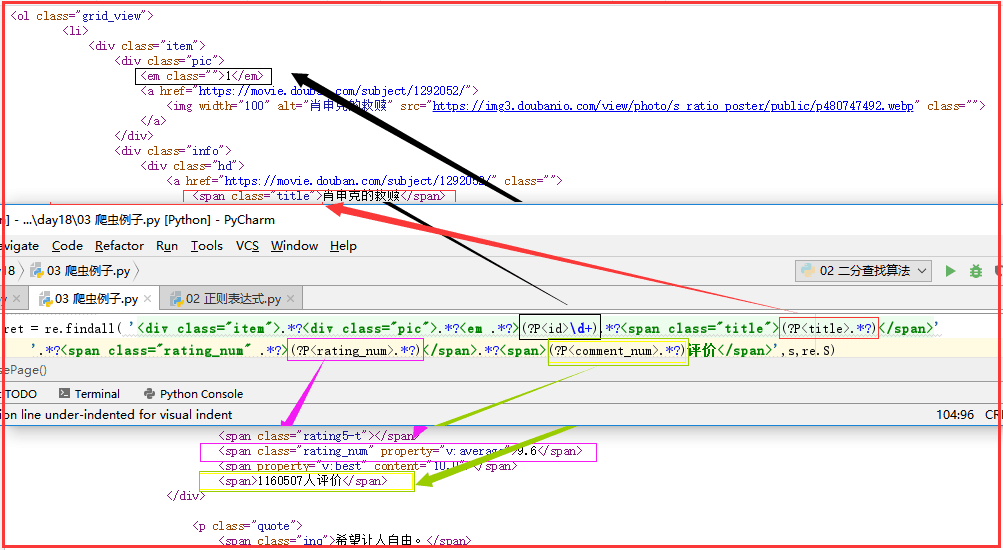
        '<div class="item">.*?<div class="pic">.*?<em .*?>(?P<id>\d+).*?<span class="title">(?P<title>.*?)</span>'

        '.*?<span class="rating_num" .*?>(?P<rating_num>.*?)</span>.*?<span>(?P<comment_num>.*?)评价</span>',re.S

    )

    ret = com.finditer(s)

    for i in ret:

        yield {

            "id":i.group("id"),

            "title":i.group("title"),

            "rating_num":i.group("rating_num"),

            "comment_num":i.group("comment_num"),

        }

def main(num):

    url = 'https://movie.douban.com/top250?start=%s&filter=' % num

    response_html = getPage(url)

    ret = parsePage(response_html)

    print(ret)

    f = open("movie_info","a",encoding="utf-8")

    for obj in ret:

        print(obj)

        data = str(obj)

        f.write(data + "\n")

    f.close()

count = 0

for i in range(10):  # 10页

    main(count)

    count += 25
import re

import json

from urllib.request import urlopen
# (2)re.findall——打印输出

import re

import json

from urllib.request import urlopen

def getPage(url):

    response = urlopen(url)

    return response.read().decode('utf-8')

def parsePage(s):

    ret = re.findall( '<div class="item">.*?<div class="pic">.*?<em .*?>(?P<id>\d+).*?<span class="title">(?P<title>.*?)</span>'

        '.*?<span class="rating_num" .*?>(?P<rating_num>.*?)</span>.*?<span>(?P<comment_num>.*?)评价</span>',s,re.S)

    return ret

def main(num):

    url = 'https://movie.douban.com/top250?start=%s&filter=' % num

    response_html = getPage(url)

    ret = parsePage(response_html)

    print(ret)

count = 0

for i in range(10): #10页

    main(count)

    count += 25
正则表达式详解:
简单的爬虫例子——爬取豆瓣Top250的电影的排名、名字、评分、评论数的更多相关文章
- 爬虫之爬取豆瓣top250电影排行榜及爬取斗图啦表情包解读及爬虫知识点补充
今日内容概要 如何将爬取的数据直接导入Excel表格 #如何通过Python代码操作Excel表格 #前戏 import requests import time from openpyxl impo ...
- python爬取豆瓣top250的电影数据并存入excle
爬取网址: https://movie.douban.com/top250 一:爬取思路(新手可以看一下) : 1:定义两个函数,一个get_page函数爬取数据,一个save函数保存数据,mian中 ...
- 零基础爬虫----python爬取豆瓣电影top250的信息(转)
今天利用xpath写了一个小爬虫,比较适合一些爬虫新手来学习.话不多说,开始今天的正题,我会利用一个案例来介绍下xpath如何对网页进行解析的,以及如何对信息进行提取的. python环境:pytho ...
- 基础爬虫,谁学谁会,用requests、正则表达式爬取豆瓣Top250电影数据!
爬取豆瓣Top250电影的评分.海报.影评等数据! 本项目是爬虫中最基础的,最简单的一例: 后面会有利用爬虫框架来完成更高级.自动化的爬虫程序. 此项目过程是运用requests请求库来获取h ...
- 一起学爬虫——通过爬取豆瓣电影top250学习requests库的使用
学习一门技术最快的方式是做项目,在做项目的过程中对相关的技术查漏补缺. 本文通过爬取豆瓣top250电影学习python requests的使用. 1.准备工作 在pycharm中安装request库 ...
- 第一个nodejs爬虫:爬取豆瓣电影图片
第一个nodejs爬虫:爬取豆瓣电影图片存入本地: 首先在命令行下 npm install request cheerio express -save; 代码: var http = require( ...
- requests爬取豆瓣top250电影信息
''' 1.爬取豆瓣top250电影信息 - 第一页: https://movie.douban.com/top250?start=0&filter= - 第二页: https://movie ...
- Python爬虫实例:爬取豆瓣Top250
入门第一个爬虫一般都是爬这个,实在是太简单.用了 requests 和 bs4 库. 1.检查网页元素,提取所需要的信息并保存.这个用 bs4 就可以,前面的文章中已经有详细的用法阐述. 2.找到下一 ...
- Python-爬虫实战 简单爬取豆瓣top250电影保存到本地
爬虫原理 发送数据 获取数据 解析数据 保存数据 requests请求库 res = requests.get(url="目标网站地址") 获取二进制流方法:res.content ...
随机推荐
- Deep Belief Network简介——本质上是在做逐层无监督学习,每次学习一层网络结构再逐步加深网络
from:http://www.cnblogs.com/kemaswill/p/3266026.html 1. 多层神经网络存在的问题 常用的神经网络模型, 一般只包含输入层, 输出层和一个隐藏层: ...
- spring boot学习(十三)SpringBoot缓存(EhCache 2.x 篇)
SpringBoot 缓存(EhCache 2.x 篇) SpringBoot 缓存 在 Spring Boot中,通过@EnableCaching注解自动化配置合适的缓存管理器(CacheManag ...
- SQL触发器实例(下)
基本语法: Create Trigger [TriggerName] ON [TableName] FOR [Insert][,Delete][,Update] AS --触发器要执行的操作语句. G ...
- POJ 2886 线段树单点更新
转载自:http://blog.csdn.net/sdj222555/article/details/6878651 反素数拓展参照:http://blog.csdn.net/ACdreamers/a ...
- JAVASCRIPT开发HTML5游戏--斗地主(网络对战PART4)
继之前用游戏引擎(青瓷引擎)做了斗地主单机版游戏之后,这里分享下使用socket.io来实现网络对战,代码可已放到github上,在此谈谈自己整个的开发思路吧. 客户端代码 服务端代码 (点击图片进入 ...
- sgu 183. Painting the balls 动态规划 难度:3
183. Painting the balls time limit per test: 0.25 sec.memory limit per test: 4096 KB input: standard ...
- python函数def
#函数就是实现一个特定功能的程序块 #下面这个函数实现了打印helloworld的功能 def print_hello(): print('hello world!') #这是调用方法 print_h ...
- 在 Ubuntu 14.04 Chrome中安装Flash Player(转)
在 Ubuntu 14.04 中安装 Pepper Flash Player For Chromium 一个 Pepper Flash Player For Chromium 的安装器已经被 Ubu ...
- the usage of String
经典算法:(整理汇总) 1)如何快速倒叙: public static char[] reverseArray(char[] c){ char t; for(int i=0;i<c.length ...
- Iview同步异步验证
直接上代码了: html: <Form ref="termForm" :model="currentData" :rules="ruleTerm ...