
python pytest测试框架介绍三
之前介绍了pytest以xUnit形式来写用例,下面来介绍pytest特有的方式来写用例
1、pytest fixture实例1
代码如下
from __future__ import print_function

import pytest

@pytest.fixture(scope='module')

def resource_a_setup(request):

    print('\nresources_a_setup()')

    def resource_a_teardown():

        print('\nresources_a_teardown()')

    request.addfinalizer(resource_a_teardown)

def test_1_that_needs_resource_a(resource_a_setup):

    print('test_1_that_needs_resource_a()')

def test_2_that_does_not():

    print('\ntest_2_that_does_not()')

def test_3_that_does(resource_a_setup):

    print('\ntest_3_that_does()')
使用-s -v运行查看详情如下
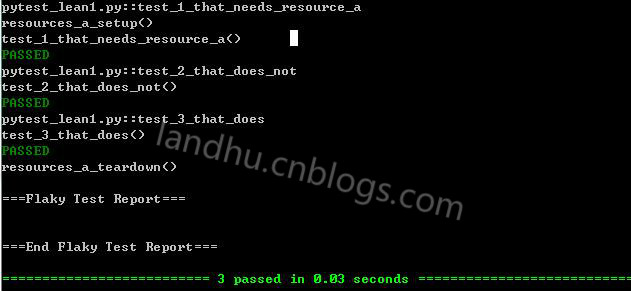
这里使用的了pytest的特有的模式来写用例,使用的方式是scope方式,scope支持多种,后面会介绍
这里还使用了pytest的addfinalizer内置功能,具体可参见官网,用处是:在最后一个测试项目中调用teardown
2、pytest fixture实例2
代码如下
from __future__ import print_function

import pytest

@pytest.fixture()

def resource_a():

    print('\nresources_a() "setup"')

def test_1_that_needs_resource_a(resource_a):

    print('test_1_that_needs_resource_a()')

def test_2_that_does_not():

    print('\ntest_2_that_does_not()')

def test_3_that_does(resource_a):

    print('test_3_that_does()')
这是最简单的一个例子,结果如下
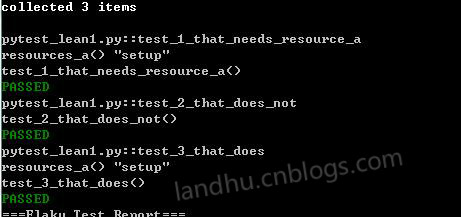
可以看出测试用例继承了用pytest.fixture的函数后,都执行了setup的功能,默认的pytest.fixture是function
3、使用pytest.fixture的几种方法
在写用例时,有几种方法使用pytest.fixture来形成框架,
方法一:
就是上面提到的这种方法,如下
pytest.fixture()

def before():

    print('\nbefore each test')

def test_1(before):

    print('test_1()')

def test_2(before):

    print('test_2()')
方法二:使用fixture修饰
@pytest.fixture()

def before():

    print('\nbefore each test')

@pytest.mark.usefixtures("before")

def test_1():

    print('test_1()')

@pytest.mark.usefixtures("before")

def test_2():

    print('test_2()')
标红的就是修饰器
4、fixture scope的范围参数
之前使用@pytest.fixture(scope='module')来定义框架,scope的参数有以下几种
- function 每一个用例都执行
- class 每个类执行
- module 每个模块执行(函数形式的用例)
- session 每个session只运行一次,在自动化测试时,登录步骤可以使用该session
如下一个用module例子
@pytest.fixture(scope='module')

def resource_a():

    print('\nresources_a() "setup"')

def test_1_that_needs_resource_a(resource_a):

    print('test_1_that_needs_resource_a()')

def test_2_that_does_not():

    print('\ntest_2_that_does_not()')

def test_3_that_does(resource_a):

    print('test_3_that_does()')
即使我们在每个用例都继承了resource_a,但在实际测试中,所有用例只执行了一次resource_a
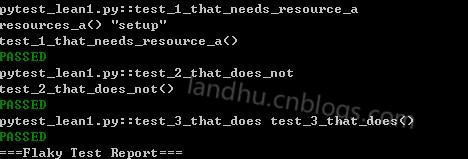
这时,你可能会问,为什么只这setup功能,没有teardown功能,要teardown怎么写,方法如下:
def cheese_db(request):

    .....

    def teardown():

        print('\n[teardown] cheese_db finalizer, disconnect from db')

    request.addfinalizer(teardown)
这里使用的还是之前介绍的request.addfinalizer功能,函数名字可以任意取,不一定要teardown
5、带参数的fixture
这里就不介绍了,看官方文档吧
6、多种fixture scope结合使用
看代码,如下
@pytest.fixture(scope="module")

def foo(request):

    print('\nfoo setup - module fixture')

    def fin():

        print('foo teardown - module fixture')

    request.addfinalizer(fin)

@pytest.fixture()

def bar(request):

    print('bar setup - function fixture')

    def fin():

        print('bar teardown - function fixture')

    request.addfinalizer(fin)

@pytest.fixture()

def baz(request):

    print('baz setup - function fixture')

    def fin():

        print('baz teardown - function fixture')

    request.addfinalizer(fin)

def test_one(foo, bar, baz):

    print('in test_one()')

def test_two(foo, bar, baz):

    print('in test_two()')
测试结果如下
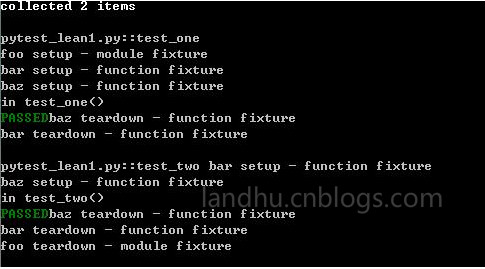
pytest还有很有用的yield功能,后续再介绍
python pytest测试框架介绍三的更多相关文章
- python pytest测试框架介绍二
在介绍一中简单介绍了pytest的安装和简单使用,接下来我们就要实际了解pytest了 一.pytest的用例发现规则 pytest可以在不同的函数.包中发现用例,发现的规则如下 文件名以test_开 ...
- python pytest测试框架介绍四----pytest-html插件html带错误截图及失败重测机制
一.html报告错误截图 这次介绍pytest第三方插件pytest-html 这里不介绍怎么使用,因为怎么使用网上已经很多了,这里给个地址给大家参考,pytest-html生成html报告 今天在这 ...
- python pytest测试框架介绍一
一.安装 pytest不是python默认的package,需要自动手工安装. pytest支持python 2.6--3.5之间的版本,同时可以在unix及windows上安装 安装方式: pip ...
- python pytest测试框架介绍五---日志实时输出
同样的,在使用pytest进行自动化测试时,需要将实时日志打印出来,而不是跑完后才在报告中出结果. 不过,好在pytest在3.3版本开始,就支持这一功能了,而不用再像nose一样,再去装第三方插件. ...
- Pytest测试框架(三):pytest fixture 用法
xUnit style 结构的 fixture用于初始化测试函数, pytest fixture是对传统的 xUnit 架构的setup/teardown功能的改进.pytest fixture为测试 ...
- 『德不孤』Pytest框架 — 1、Pytest测试框架介绍
目录 1.什么是单元测试框架 2.单元测试框架主要做什么 3.单元测试框架和自动化测试框架有什么关系 4.Pytest测试框架说明 5.Pytest框架和Unittest框架区别 (1)Unittes ...
- 【pytest系列】- pytest测试框架介绍与运行
如果想从头学起pytest,可以去看看这个系列的文章! https://www.cnblogs.com/miki-peng/category/1960108.html 前言 目前有两种纯测试的测 ...
- python nose测试框架全面介绍十---用例的跳过
又来写nose了,这次主要介绍nose中的用例跳过应用,之前也有介绍,见python nose测试框架全面介绍四,但介绍的不详细.下面详细解析下 nose自带的SkipTest 先看看nose自带的S ...
- python nose测试框架全面介绍七--日志相关
引: 之前使用nose框架时,一直使用--logging-config的log文件来生成日志,具体的log配置可见之前python nose测试框架全面介绍四. 但使用一段时间后,发出一个问题,生成的 ...
随机推荐
- JS判断设备类型跳转至PC端或移动端相应页面
if((navigator.userAgent.match(/(phone|pad|pod|iPhone|iPod|ios|iPad|Android|Mobile|BlackBerry|IEMobil ...
- 1. 自动化运维系列之Cobbler自动装机
preface 我们之前批量安装操作系统的时候都是采用pxe来安装,pxe也是通过网络安装操作系统的,但是PXE依赖于DHCP,HTTP/TFTP,kicstart等支持.安装流程如下所示: 对于上面 ...
- Python中使用MongoEngine
pymongo来操作MongoDB数据库,但是直接把对于数据库的操作代码都写在脚本中,这会让应用的代码耦合性太强,而且不利于代码的优化管理 一般应用都是使用MVC框架来设计的,为了更好地维持MVC结构 ...
- 消息队列库——ZeroMQ
消息队列库——ZeroMQ ZeroMQ(简称ZMQ)是一个基于消息队列的多线程网络库,其对套接字类型.连接处理.帧.甚至路由的底层细节进行抽象,提供跨越多种传输协议的套接字. ZMQ是网络通信中新的 ...
- MVC输出字符串常用四个方式
"); ";//@Html.Raw(s1); "); ";//@String.fomart(s3); 要MVC的Razor视图输出字符串的常用几个方式 记录下 ...
- SpringMVC由浅入深day01_5注解的处理器映射器和适配器
5 注解的处理器映射器和适配器 在spring3.1之前使用org.springframework.web.servlet.mvc.annotation.DefaultAnnotationHandle ...
- Java 数据库访问层
最近项目中需要对mysql进行操作,数据库的知识早在本科毕业那会就忘光了,这几年开发都没接触到数据库的操作. 借这个机会重新学习,数据库访问层是对数据库操作的一个封装,屏蔽底层的数据操作细节,通过使用 ...
- 第一篇:Hadoop简介
前言 本文大致介绍下Hadoop的一些背景知识,为后面深入学习打下铺垫. 什么是Hadoop Hadoop是一个开源分布式计算平台,它以HDFS文件系统和MapReduce计算框架为核心. 前者能够让 ...
- html/php/mysql乱码
1. html通过jquery的ajax传递数据给php. encodeURI("my.php?name=博客园") 2. php接受 urldecode($_GET[" ...
- 《Lua程序设计》9.3 以协同程序实现迭代器 学习笔记
例:编写一个迭代器,使其可以遍历某个数组的所有排列组合形式.代码如下: function permgen(a, n) n = n or #a -- 默认n为a的大小 then -- 还需要改变吗? p ...