
python pytest测试框架介绍五---日志实时输出
同样的,在使用pytest进行自动化测试时,需要将实时日志打印出来,而不是跑完后才在报告中出结果。
不过,好在pytest在3.3版本开始,就支持这一功能了,而不用再像nose一样,再去装第三方插件。
网上也有相关实时的日志输入说明,但我尝试后,不是我想要的,比如:pytest输出Log
看看我们下面这样一段代码,以unittest模式写的:
#coding:utf-8

'''

Created on 2017年8月31日

@author: huzq

'''

from __future__ import print_function

import pytest

from unittest import TestCase

from selenium import webdriver

import logging,sys

log = logging.getLogger(__name__)

class TestClass(TestCase):

    @classmethod

    def setUpClass(cls):

        log.info('setup_class()')

        cls.driver = webdriver.Firefox()

        cls.driver.get("http://www.baidu.com")

        log.info("xxxxxxxxxxxxxxx")

    @classmethod

    def teardown_class(cls):

        log.info('teardown_class()')

    def setUp(self):

        log.info('\nsetup_method()')

        self.addCleanup(self.screen_shot)

    def screen_shot(self):

        log.info("yyyyyyyyyyyyyy")

        log.info("sereen_shot")

    def qqq(self):

        log.info("xxxxxxxxxxxqqqq")

        assert 4==5

    #def teardown_method(self, method):

    def tearDown(self):

        log.info("ffjiafuiodafdfj___teardown")

    @pytest.mark.slow

    def test_7(self):

        import time

        time.sleep(10)

        log.info('- test_7()')

    @pytest.mark.qq

    def test_4(self):

        import pdb;pdb.set_trace()

        self.result=self.addCleanup(self.qqq)

        log.info('- test_4()')

    def test_5(self):

        log.info('- test_4()')

        assert 4==5
如果没有加日志实时输出会是怎么样的,如下:
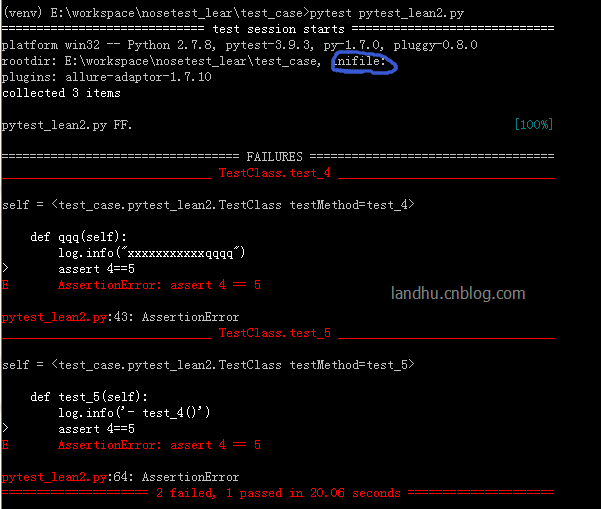
可以看出,日志在过程中没有实时输出,在实际跑项目录,这个有点不太好看。
解决:
看看pytest是怎么解决的呢。
首先pytest是从pytest.ini中读取log_cli配置的,默认是关闭的。如上图中显示,我们的pytest.ini文件是空的
再看看pytest -h文件:
关于log的help有以下:
 --no-print-logs       disable printing caught logs on failed tests.

 --log-level=LOG_LEVEL

                       logging level used by the logging module

 --log-format=LOG_FORMAT

                       log format as used by the logging module.

 --log-date-format=LOG_DATE_FORMAT

                       log date format as used by the logging module.

 --log-cli-level=LOG_CLI_LEVEL

                       cli logging level.

 --log-cli-format=LOG_CLI_FORMAT

                       log format as used by the logging module.

 --log-cli-date-format=LOG_CLI_DATE_FORMAT

                       log date format as used by the logging module.

 --log-file=LOG_FILE   path to a file when logging will be written to.

 --log-file-level=LOG_FILE_LEVEL

                       log file logging level.

 --log-file-format=LOG_FILE_FORMAT

                       log format as used by the logging module.

 --log-file-date-format=LOG_FILE_DATE_FORMAT

                       log date format as used by the logging module.
然后你还会发现一行:
[pytest] ini-options in the first pytest.ini|tox.ini|setup.cfg file found:
所以,有两种方法解决
1) 在当前文件夹下写pytest.ini或tox.ini或setup.cfg文件,然后将日志相关写在里面,如下:
[pytest]

log_cli = 1

log_cli_level = INFO

log_cli_format = %(asctime)s [%(levelname)8s] %(message)s (%(filename)s:%(lineno)s)

log_cli_date_format=%Y-%m-%d %H:%M:%S
这时就可以正常打印日志出来。
2) 直接用pytest -o方式重写,这个功能在pytest 3.4之后才实现,如下
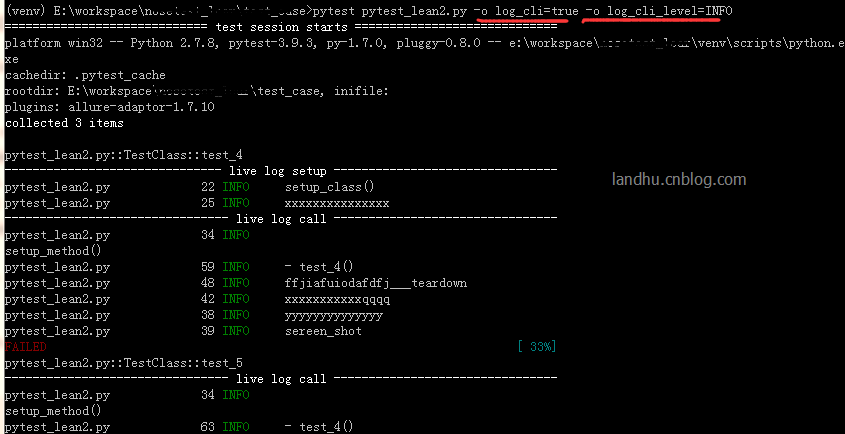
pytest pytest_lean2.py -o log_cli=true -o log_cli_level=INFO
结果如下:
update更新下:
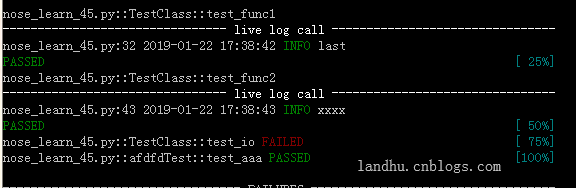
实际在项目过程中,实时日志需要时间及文件名还有行号,可在后面加这样的参数:
-vv -o log_cli=true -o log_cli_level=INFO --log-date-format="%Y-%m-%d %H:%M:%S" --log-format="%(filename)s:%(lineno)s %(asctime)s %(levelname)s %(message)s"
结果就会像下面这样
python pytest测试框架介绍五---日志实时输出的更多相关文章
- python pytest测试框架介绍二
在介绍一中简单介绍了pytest的安装和简单使用,接下来我们就要实际了解pytest了 一.pytest的用例发现规则 pytest可以在不同的函数.包中发现用例,发现的规则如下 文件名以test_开 ...
- python pytest测试框架介绍四----pytest-html插件html带错误截图及失败重测机制
一.html报告错误截图 这次介绍pytest第三方插件pytest-html 这里不介绍怎么使用,因为怎么使用网上已经很多了,这里给个地址给大家参考,pytest-html生成html报告 今天在这 ...
- python pytest测试框架介绍三
之前介绍了pytest以xUnit形式来写用例,下面来介绍pytest特有的方式来写用例 1.pytest fixture实例1 代码如下 from __future__ import print_f ...
- python pytest测试框架介绍一
一.安装 pytest不是python默认的package,需要自动手工安装. pytest支持python 2.6--3.5之间的版本,同时可以在unix及windows上安装 安装方式: pip ...
- Pytest测试框架(五):pytest + allure生成测试报告
Allure 是一款轻量级.支持多语言的开源自动化测试报告生成框架,由Java语言开发,可以集成到 Jenkins. pytest 测试框架支持Allure 报告生成. pytest也可以生成juni ...
- 『德不孤』Pytest框架 — 1、Pytest测试框架介绍
目录 1.什么是单元测试框架 2.单元测试框架主要做什么 3.单元测试框架和自动化测试框架有什么关系 4.Pytest测试框架说明 5.Pytest框架和Unittest框架区别 (1)Unittes ...
- 【pytest系列】- pytest测试框架介绍与运行
如果想从头学起pytest,可以去看看这个系列的文章! https://www.cnblogs.com/miki-peng/category/1960108.html 前言 目前有两种纯测试的测 ...
- python nose测试框架全面介绍七--日志相关
引: 之前使用nose框架时,一直使用--logging-config的log文件来生成日志,具体的log配置可见之前python nose测试框架全面介绍四. 但使用一段时间后,发出一个问题,生成的 ...
- python nose测试框架全面介绍十---用例的跳过
又来写nose了,这次主要介绍nose中的用例跳过应用,之前也有介绍,见python nose测试框架全面介绍四,但介绍的不详细.下面详细解析下 nose自带的SkipTest 先看看nose自带的S ...
随机推荐
- sencha touch - sass 使用
需要安装: 1.ruby 2.sass (3.2.12 ) 3.compass (0.12.2) sencha cmd 4以上版本 安装的sass compass 必须为以上版本,否则编译会出错 目 ...
- unity-Profiler调试Android的正确姿势(mumu模拟器)
1. 前置条件 安卓的相关环境 java.ant.sdk.ndk 什么的都装好(其实这里只需要 sdk 里面的 adb),配好 adb 工具的环境变量(意思就是 cmd 里直接输 adb 命令即可) ...
- CSS魔法堂:那个被我们忽略的outline
前言 在CSS魔法堂:改变单选框颜色就这么吹毛求疵!中我们要模拟原生单选框通过Tab键获得焦点的效果,这里涉及到一个常常被忽略的属性--outline,由于之前对其印象确实有些模糊,于是本文打算对其 ...
- Mac下的Jenkins安装
安装方式 1)通过命令行安装 brew install jenkins,可能会遇到先更新 brew 的情况 https://brew.sh/index_zh-cn: 2)通过 pkg 安装,官方 ...
- 条件式变分自编码机(Conditional Variational Autoencoders)
Conditional Variational Autoencoders 条件式变换自编码机 摘要: Conditional Variational Autoencoders --- 条件式变换自编码 ...
- SpringBoot(十二):springboot2.0.2写测试用例
导入maven依赖: <dependency> <groupId>junit</groupId> <artifactId>junit</artif ...
- git reflog
http://www.softwhy.com/article-8573-1.html https://www.cnblogs.com/irocker/p/git-reflog.html https:/ ...
- BFC 形成条件
块格式化上下文(Block Formatting Context,BFC) 是Web页面的可视化CSS渲染的一部分,是块盒子的布局过程发生的区域,也是浮动元素与其他元素交互的区域. 下列方式会创建块格 ...
- Google I/O 官方应用中的动效设计
版权声明:本文为博主原创文章,未经博主同意不得转载. https://blog.csdn.net/jILRvRTrc/article/details/82881743 作者:Nick Butcher, ...
- Mybatis(五) 延迟加载和缓存机制(一级二级缓存)
踏踏实实踏踏实实,开开心心,开心是一天不开心也是一天,路漫漫其修远兮. --WH 一.延迟加载 延迟加载就是懒加载,先去查询主表信息,如果用到从表的数据的话,再去查询从表的信息,也就是如果没用到从表的 ...