
23 正则表达式和re模块
一.正则
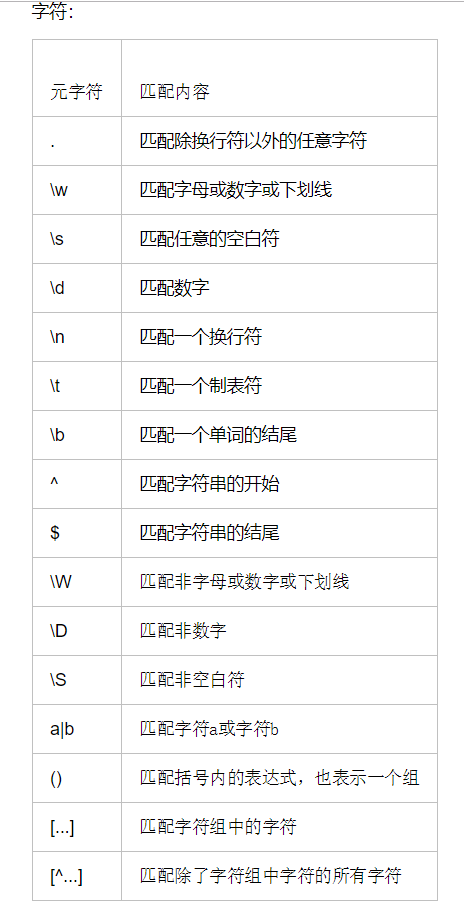
1.字符组
  [a-zA-Z0-9]字符组中的   [^a] 除了字符组的

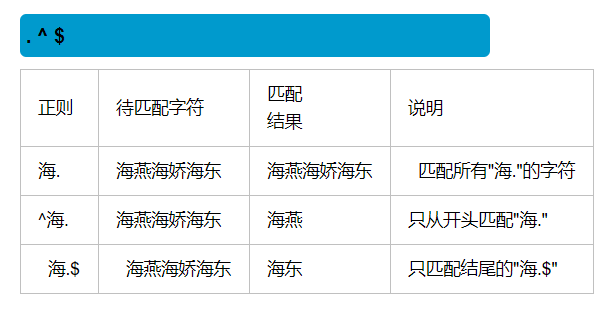
2.
3.
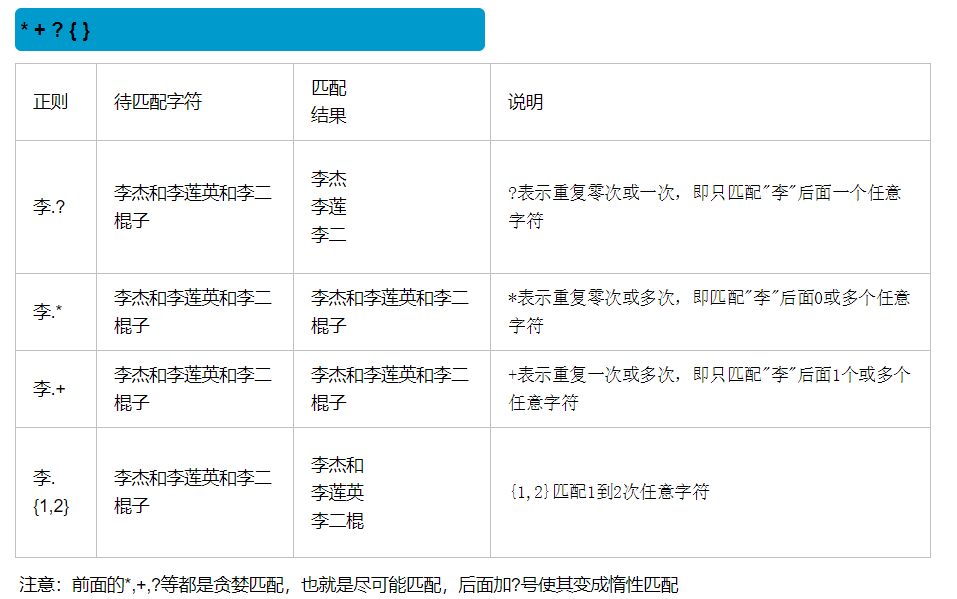
4.
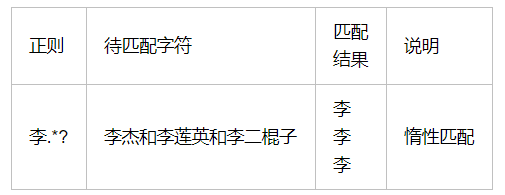


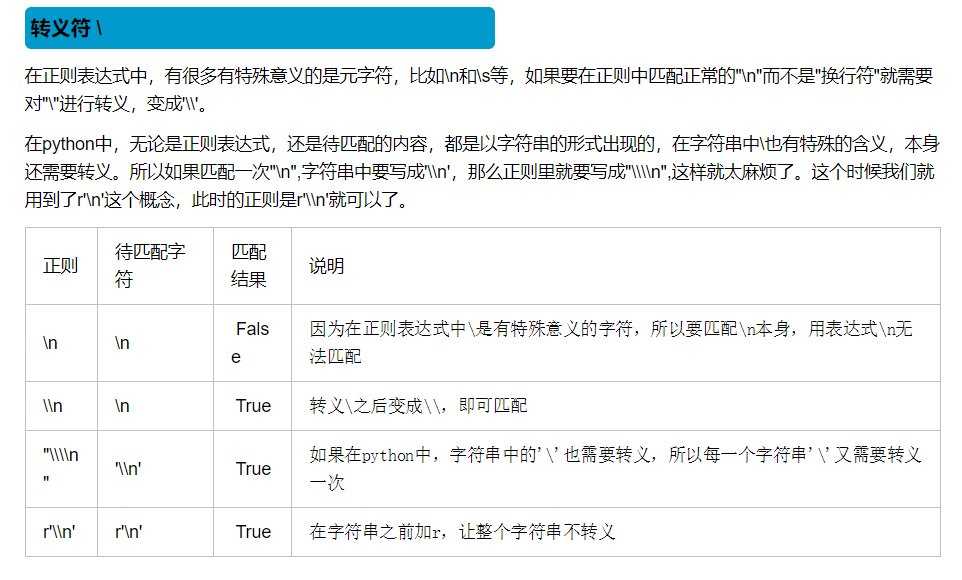
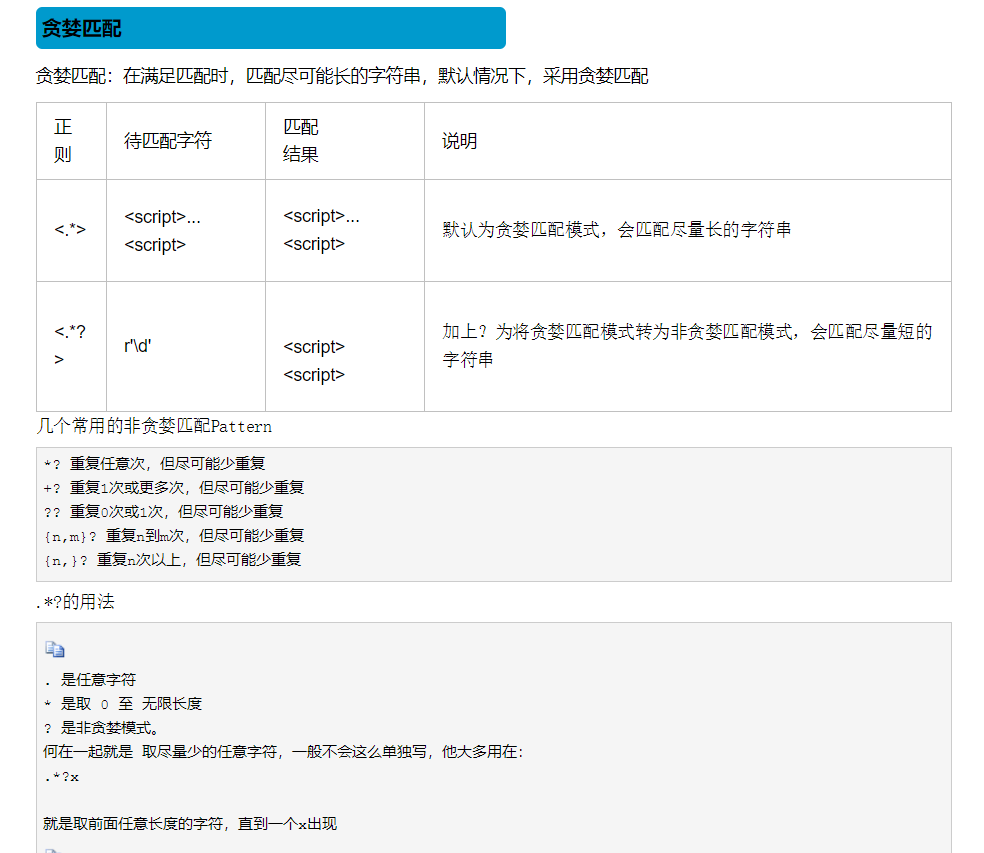
二.re模块
re.S 设置 .的换行 obj=re
1.ret=re.search(正则,content)   找到一个结果就返回
  拿到结果  需要.group   ret.group()
2.ret=re.match(正则,content)   从头匹配.  如果匹配到了。 就返回
  也需要 ret.group()
3.ret=re.findall(正则,content) 匹配到的结果全部放入列表中 ,下级元素以元组存放
import re

ret = re.findall('www.(baidu|oldboy).com', 'www.oldboy.com')

print(ret)  # ['oldboy']     这是因为findall会优先把匹配结果组里内容返回,如果想要匹配结果,取消权限即可

ret = re.findall('www.(?:baidu|oldboy).com', 'www.oldboy.com')

print(ret)  # ['www.oldboy.com']
findall优先级查询
4.ret=re.finditer(正则,content) 得到一个迭代器,循环迭代器时,取值时,也要 用group
for el in ret:
  el.group()
5.re.split(正则,字符串)  用正则中的每个元素分别进行切割
ret=re.split("\d+","eva3egon4yuan")

print(ret) #结果 : ['eva', 'egon', 'yuan']

ret=re.split("(\d+)","eva3egon4yuan")

print(ret) #结果 : ['eva', '3', 'egon', '4', 'yuan']

#在匹配部分加上()之后所切出的结果是不同的,

#没有()的没有保留所匹配的项,但是有()的却能够保留了匹配的项,

#这个在某些需要保留匹配部分的使用过程是非常重要的。
split优先级查询
6.re.sub(正则,new,字符串)  替换  用新的 替换符合正则的元素
7.re.subn(正则,new,字符串)  替换  用新的 替换符合正则的元素替换。    返回的结果带有次数
8. obj=re.compile(正则)    预加载 正则          lst=obj.findall(content)
  obj=re.compile(r"start.*?(?P<自定义名字>.*j)end",re.S)
import re

res = re.search("e", "alex and exp") # 搜索. 搜到结果就返回

print(res.group())

res = re.match("\w+", "alex is not a good man") #  从头匹配.  如果匹配到了。 就返回

print(res.group())

lst = re.findall("\w+", "alex and exo")

print(lst)

it = re.finditer("\w+", "mai le fo leng")

for el in it:

    print(el.group())

# # 这个分组是优先级

lst = re.findall(r"www\.(baidu|oldboy)\.com", "www.oldboy.com")

print(lst)

# (?: )  去掉优先级

lst = re.findall(r"www\.(?:baidu|oldboy)\.com", "www.oldboy.com")

print(lst)

# 加了括号。 split会保留你切的刀

lst = re.split("([ab])", "alex is not a sb, no he is a big sb") # 根据正则表达式进行切割

print(lst)

#

# # 替换

res = re.sub(r"\d+", "_sb_", "alex333wusir666taibai789ritian020feng")

print(res)

#

# # 替换。 返回的结果带有次数

res = re.subn(r"\d+", "_sb_", "alex333wusir666taibai789ritian020feng")

print(res)

a = eval("1+3+5+6")

print(a)

code = "for i in range(10):print(i)"

c = compile(code, "", "exec") # 编译代码

exec(c)

obj = re.compile(r"alex(?P<name>\d+)and") # 把正则表达式预加载

res = obj.search("alex250andwusir38ritian2")

print(res.group())

print(res.group("name"))
re模块
import re

from urllib.request import urlopen

#正则

obj=re.compile(r'<div class="item">.*? <a href=(?P<URL>.*?)">.*?<span class="title">(?P<name>.*?)</span>'

               r'.*?<span class="rating_num" property="v:average">(?P<fen>.*?)</span>.*?<span>(?P<pingjia>.*?)人评价</span>',re.S)

#获取网页内容函数

def get_content(url):

    content=urlopen(url).read().decode("utf-8")

    return content

#获取网页所要内容转化成字典的函数

def parse(content):

    g=obj.finditer(content)

    for el in g:

        yield {

            '电影名':el.group("name"),

            'url':el.group("URL"),

            '评分':el.group('fen'),

            '评价人数':el.group("pingjia")

        }

#分页爬取

for i in range(10):

    url="https://movie.douban.com/top250?start=%s&filter="%i*25  #每页的url  每页共25部电影

    g=parse(get_content(url))

    f=open("dian.txt","a",encoding="utf-8")

    for el in g:

        f.write(str(el)+"\n")

        # print(el)

    f.close()
爬豆瓣
import re

from urllib.request import urlopen

import json

url="https://www.dytt8.net/"

content=urlopen(url).read().decode("gbk")

obj=re.compile(r"最新电影下载</a>]<a href='(?P<URL>.*?)'>.*?《(?P<name>.*?)》",re.S)

obj2=re.compile(r'<!--Content Start--><span style="FONT-SIZE: 12px"><td>.*?'

                r'【下载地址】</font></font></strong> <br /><br /><br /><a href=".*?(?P<xiazai>.*?)"><strong>',re.S)

lst=obj.findall(content)

f=open("movie",'w',encoding="utf-8")

for el in lst:

    try:

       dic= {"name":el[1],"URL":"https://www.dytt8.net"+el[0]}

       url2=dic["URL"]

       content2=urlopen(url2).read().decode("gbk")

       dz=obj2.search(content2).group("xiazai")

       dic2={"name":dic["name"],"地址":dz}

       s=json.dumps(dic2,ensure_ascii=False)

       f.write(s+"\n")

       print(dic)

    except Exception as e:

        continue

f.close()
爬电影天堂
23 正则表达式和re模块的更多相关文章
- 【Python爬虫】正则表达式与re模块
正则表达式与re模块 阅读目录 在线正则表达式测试 常见匹配模式 re.match re.search re.findall re.compile 实战练习 在线正则表达式测试 http://tool ...
- python 正则表达式re使用模块(match()、search()和compile())
摘录 python核心编程 python的re模块允许多线程共享一个已编译的正则表达式对象,也支持命名子组.下表是常见的正则表达式属性: 函数/方法 描述 仅仅是re模块函数 compile(patt ...
- python正则表达式之re模块方法介绍
python正则表达式之re模块其他方法 1:search(pattern,string,flags=0) 在一个字符串中查找匹配 2:findall(pattern,string,flags=0) ...
- Python之正则表达式(re模块)
本节内容 re模块介绍 使用re模块的步骤 re模块简单应用示例 关于匹配对象的说明 说说正则表达式字符串前的r前缀 re模块综合应用实例 正则表达式(Regluar Expressions)又称规则 ...
- 【转】Python之正则表达式(re模块)
[转]Python之正则表达式(re模块) 本节内容 re模块介绍 使用re模块的步骤 re模块简单应用示例 关于匹配对象的说明 说说正则表达式字符串前的r前缀 re模块综合应用实例 参考文档 提示: ...
- Python与正则表达式[0] -> re 模块的正则表达式匹配
正则表达式 / Regular Expression 目录 正则表达式模式 re 模块简介 使用正则表达式进行匹配 正则表达式RE(Regular Expression, Regexp, Regex) ...
- 正则表达式之re模块
re模块一.什么是正则表达式与re模块?1.1 字符组1.2 元字符1.2.1 单个使用1.2.2 组合使用二.为什么要使用正则三.如何使用3.1 re模块的三种比较重要的方法3.1.1 findal ...
- python学习笔记(十)——正则表达式和re模块
#正则表达式和re模块 # match(pattern, string,[flag]) #在字符串开始时进行匹配 # pattern 正则表达式 # string 要匹配的字符串 # [flag] 可 ...
- 正则表达式和re模块
目录 re的元字符 字符集[ ] 转义符 分组 ( ) |符号 re下的常用方法 分组 re的元字符 import re ret = re.findall("e..a", &quo ...
随机推荐
- linux常用命令:whereis 命令
whereis命令只能用于程序名的搜索,而且只搜索二进制文件(参数-b).man说明文件(参数-m)和源代码文件(参数-s).如果省略参数,则返回所有信息. 和find相比,whereis查找的速度非 ...
- HTTP 协议入门
本文转载自:http://www.ruanyifeng.com/blog/2016/08/http.html HTTP 协议是互联网的基础协议,也是网页开发的必备知识,最新版本 HTTP/2 更是让它 ...
- linux centos系统下升级python版本
本文参考资料:https://www.cnblogs.com/leon-zyl/p/8422699.html,https://blog.csdn.net/tpc1990519/article/deta ...
- DBMS_OUTPUT.PUT_LINE()方法的简单介绍
1.最基本的DBMS_OUTPUT.PUT_LINE()方法. 随便在什么地方,只要是BEGIN和END之间,就可以使用DBMS_OUTPUT.PUT_LINE(output);然而这会有一个问题,就 ...
- 01: shell基本使用
目录: 1.1 编写登录欢迎脚本 1.2 重定向与管道操作 1.3 使用shell变量 1.4 特殊的shell变量 1.5 read与echo使用比较 1.1 编写登录欢迎脚本返回顶部 (1)新建脚 ...
- 《网络攻防》实验八:Web基础
适逢多事之际,下周二的课设答辩.全国信安竞赛初赛作品筹备.协会密码沙龙比肩接踵,这些"案牍"不仅劳形还影响了我的复习计划."甘蔗没有两头甜的"还是要有所舍得了, ...
- 20145337《网络对抗技术》逆向及BOF基础
20145337<网络对抗技术>逆向及BOF基础 实践目标 操作可执行文件pwn1,通过学习两种方法,使main函数直接执行getshall,越过foo函数. 实践内容 手工修改可执行文件 ...
- USB/232/485/TTL/CMOS(串口通信)⭐⭐⭐
1.USB:电脑的USB口信号时USB信号,为差分信号,电压范围:+400mV~-400mV间变化:直流电压5V 驱动电流500MA 2.232电平: 逻辑1(MARK)=-3V--15V 逻辑0(S ...
- Python3基础 if elif 示例 判断一个数在哪个区间内
Python : 3.7.0 OS : Ubuntu 18.04.1 LTS IDE : PyCharm 2018.2.4 Conda ...
- 简单Shell案例
使用shell命令进行左对齐或者右对齐 [root@bj-aws-yace-tbj mnt]# cat test.sh #! /bin/bash file=./test.txt echo -e &qu ...