
[Java/Python] Java 基于命令行调用 Python
需求描述
- 利用 Java 基于命令行调用 Python
实现步骤
安装 Python + PIP 环境
以基于 Ubuntu 24 的 Docker 环境为例
- Dockerfile
# OS: Ubuntu 24.04

FROM swr.cn-north-4.myhuaweicloud.com/xxx/eclipse-temurin:17-noble

COPY ./target/*.jar /app.jar

COPY ./target/classes/xxx/ /xxx/

# install : python + pip (前置操作: 更新 apt 源)

RUN sed -i 's#http[s]*://[^/]*#http://mirrors.aliyun.com#g' /etc/apt/sources.list \

  && apt-get update \

  && apt-get -y install vim \

  && apt-get -y install --no-install-recommends python3 python3-pip python3-venv \

  && python3 -m venv $HOME/.venv \

  && . $HOME/.venv/bin/activate \ # 注:Linux 中 高版本 Python (3.5以上),必须在虚拟环境下方可正常安装所需依赖包

  && pip install -i https://mirrors.aliyun.com/pypi/simple/ can cantools

#   && echo "alias python=python3" >> ~/.bashrc \ # Java程序的子进程调用中试验:未此行命令未生效;但开发者独自登录 docker 容器内,有生效

#   && echo '. $HOME/.venv/bin/activate' >> ~/.bashrc \ # Java程序的子进程调用中试验:未此行命令未生效;但开发者独自登录 docker 容器内,有生效

#   && echo 'export PYTHON=$HOME/.venv/bin/python' >> /etc/profile \ # Java程序的子进程调用中试验:未此行命令未生效;但开发者独自登录 docker 容器内,有生效

#  && echo '. /etc/profile' > $HOME/app.sh \ # Java程序的子进程调用中试验:未测通,有衍生问题未解决掉

#  && echo 'java ${JAVA_OPTS:-} -jar app.jar > /dev/null 2>&1 &' >> $HOME/app.sh \  # Java程序的子进程调用中试验:未测通,有衍生问题未解决掉

#  && echo 'java ${JAVA_OPTS:-} -jar app.jar' >> $HOME/app.sh \  # Java程序的子进程调用中试验:未测通,有衍生问题未解决掉

#  && chmod +x $HOME/app.sh \  # Java程序的子进程调用中试验:未测通,有衍生问题未解决掉

#  && chown 777 $HOME/app.sh  # Java程序的子进程调用中试验:未测通,有衍生问题未解决掉

EXPOSE 8080

# ENTRYPOINT exec sh $HOME/app.sh # Java程序的子进程调用中试验:未测通,有衍生问题未解决掉

ENTRYPOINT exec java ${JAVA_OPTS:-} -DPYTHON=$HOME/.venv/bin/python -jar app.jar # 通过 Java 获取 JVM 参数( System.getProperty("PYTHON") ) 方式获取 【 Python 可执行文件的绝对路径】的值
编写和准备 Python 业务脚本
step1 编写 Python 业务脚本 (略)
step2 如果 Python 脚本在 JAVA 工程内部(JAR包内),则需在 执行 Python 脚本前,将其提前拷贝为一份新的脚本文件到指定位置。
public XXX {

    private static String scriptFilePath;

    public static String TMP_DIR = "/tmp/xxx-sdk/";

	static {

        prepareHandleScript( TMP_DIR );

	}

    /**

     *  准备脚本文件到目标路径

     * @note 无法直接执行 jar 包内的脚本文件,需要拷贝出来。

     * @param targetScriptDirectory 目标脚本的文件夹路径

     *     而非脚本文件路径 eg: "/tmp/xxx-sdk"

     */

    @SneakyThrows

    public static void prepareHandleScript(String targetScriptDirectory){

        File file = new File(targetScriptDirectory);

        //如果目标目录不存在,则创建该目录

        if (!file.exists() && !file.isDirectory()) {

            file.mkdirs();

        }

        File targetScriptFile = new File(targetScriptDirectory + "/xxx-converter.py");// targetScriptFile = "\tmp\xxx-sdk\xxx-converter.py"

        scriptFilePath = targetScriptFile.getAbsolutePath(); // scriptFilePath = "D:\tmp\xxx-sdk\xxx-converter.py"

        URL resource = CanAscLogGenerator.class

            .getClassLoader()

            .getResource( "bin/xxx-converter.py");

        InputStream converterPythonScriptInputStream = null;

        try {

            converterPythonScriptInputStream = resource.openStream();

            FileUtils.copyInputStreamToFile( converterPythonScriptInputStream, targetScriptFile );

        } catch (IOException exception){

            log.error("Fail to prepare the script!targetScriptDirectory:{}, exception:", targetScriptDirectory, exception);

            throw new RuntimeException(exception);

        } finally {

            if(converterPythonScriptInputStream != null){

                converterPythonScriptInputStream.close();

            }

        }

    }

}
Java 调用 Python 脚本
关键点:程序阻塞问题
- 推荐文献
程序阻塞问题
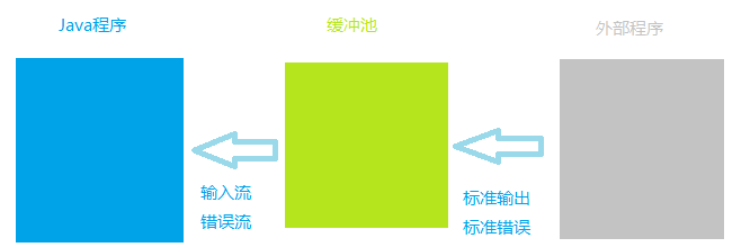
通过 Process实例.getInputStream() 和 Process实例.getErrorStream() 获取的输入流和错误信息流是缓冲池向当前Java程序提供的,而不是直接获取外部程序的标准输出流和标准错误流。
而缓冲池的容量是一定的。
因此,若外部程序在运行过程中不断向缓冲池输出内容,当缓冲池填满,那么: 外部程序将暂停运行直到缓冲池有空位可接收外部程序的输出内容为止。(
注:采用xcopy命令复制大量文件时将会出现该问题
- 解决办法: 当前的Java程序不断读取缓冲池的内容,从而为腾出缓冲池的空间。
Runtime r = Runtime.getRuntime();

try {

    Process proc = r.exec("cmd /c dir"); // 假设该操作为造成大量内容输出

  	// 采用字符流读取缓冲池内容,腾出空间

  	BufferedReader reader = new BufferedReader(new InputStreamReader(proc.getInputStream(), "gbk")));

  	String line = null;

  	while ((line = reader.readLine()) != null){

  	   System.out.println(line);

  	}

  	/* 或采用字节流读取缓冲池内容,腾出空间

  	 ByteArrayOutputStream pool = new ByteArrayOutputStream();

  	 byte[] buffer = new byte[1024];

  	 int count = -1;

  	 while ((count = proc.getInputStream().read(buffer)) != -1){

  	   pool.write(buffer, 0, count);

  	   buffer = new byte[1024];

  	 }

  	 System.out.println(pool.toString("gbk"));

  	 */

  	int exitVal = proc.waitFor();

  	System.out.println(exitVal == 0 ? "成功" : "失败");

} catch(Exception e){

  	e.printStackTrace();

}
- 注意:外部程序在执行结束后需自动关闭;否则,不管是字符流还是字节流均由于既读不到数据,又读不到流结束符,从而出现阻塞Java进程运行的情况。
cmd的参数 “/c” 表示当命令执行完成后关闭自身。
关键点: Java Runtime.exec() 方法
基本方法: Runtime.exec()
- 首先,在Linux系统下,使用Java调用Python脚本,传入参数,需要使用
Runtime.exec()方法
即 在
java中使用shell命令
这个方法有两种使用形式:
- 方式1 无参数传入 ,直接执行Linux相关命令:
Process process = Runtime.getRuntime().exec(String cmd);无参数可以直接传入字符串,如果需要传参数,就要用方式2的字符串数组实现。
- 方式2 有参数传入,并执行Linux命令:
Process process = Runtime.getRuntime().exec(String[] cmd);
执行结果
- 使用
exec方法执行命令,如果需要执行的结果,用如下方式得到:
	String line;

    while ((line = processInputStream.readLine()) != null) { // InputStream processInputStream = process.getInputStream();

    	System.out.println(line);

         if ("".equals(line)) {

               break;

          }

    }

    System.out.println("line ----> " + line);
查看错误信息
	BufferedReader errorResultReader = new BufferedReader(new InputStreamReader(process.getErrorStream()));

	String errorLine;

	while ((errorLine = shellErrorResultReader.readLine()) != null) {

    	System.out.println("errorStream:" + errorLine);

    }

    int exitCode = process.waitFor();

    System.out.println("exitCode:" + exitCode);
简单示例
	String result = "";

	String[] cmd = new String [] { "pwd" };

	Process process = Runtime.getRuntime().exec(cmd);

	InputStreamReader inputStreamReader = new InputStreamReader(process.getInputStream());

	LineNumberReader input = new LineNumberReader(inputStreamReader);

	result = input.readLine();

	System.out.println("result:" + result);
关键点: python 绝对路径
- 查看python使用的路径,然后在Java调用的时候写出绝对路径。
以解决 Linux 环境中的 Python 3.X 的虚拟环境异常问题(
pip install XXX : error: externally-managed-environment)。
Python 虚拟环境管理 - 博客园/千千寰宇
Cannot run program “python“: error=2, No such file or director(因虚拟环境问题,找不到python命令和pip安装的包)
Java 调用 Python 的实现 (必读)
@Slf4j

public class XxxxGenerator implements IGenerator<XxxxSequenceDto> {

    //python jvm 变量 (`-DPYTHON=$HOME/.venv/bin/python`)

    public static String PYTHON_VM_PARAM = "PYTHON";//System.getProperty(PYTHON_VM_PARAM)

    //python 环境变量名称 //eg: "export PYTHON=$HOME/.venv/bin/python" , pythonEnv="$HOME/.venv/bin/python"

    public static String PYTHON_ENV_PARAM = "PYTHON";//;System.getenv(PYTHON_ENV_PARAM);

    private static String PYTHON_COMMAND ;

    //默认的 python 命令

    private static String PYTHON_COMMAND_DEFAULT = "python";

	//...

    static {

        PYTHON_COMMAND = loadPythonCommand();

        log.info("PYTHON_COMMAND:{}, PYTHON_VM:{}, PYTHON_ENV:{}", PYTHON_COMMAND, System.getProperty(PYTHON_VM_PARAM), System.getenv(PYTHON_ENV_PARAM) );

		//...

    }

    /**

     * 加载 python 命令的可执行程序的路径

     * @note

     *   Linux 中,尤其是 高版本 Python(3.x) ,为避免 Java 通过 `Runtime.getRuntime().exec(args)` 方式 调用 Python 命令时,报找不到 可执行程序(`Python` 命令)\

     *   ————建议: java 程序中使用的 `python` 命令的可执行程序路径,使用【绝对路径】

     * @return

     */

    private static String loadPythonCommand(){

        String pythonVm = System.getProperty(PYTHON_VM_PARAM);

        String pythonEnv = System.getenv(PYTHON_ENV_PARAM);

        String pythonCommand = pythonVm != null?pythonVm : pythonEnv;

        pythonCommand = pythonCommand != null?pythonCommand : PYTHON_COMMAND_DEFAULT;

        return pythonCommand;

    }

    /**

     * 业务方法: CAN ASC LOG 转 BLF

     * @param ascLogFilePath

     * @param blfFilePath

     */

    protected void convertToBlf(File ascLogFilePath, File blfFilePath){

        //CanAsclogBlfConverterScriptPath = "/D:/Workspace/CodeRepositories/xxx-platform/xxx-sdk/xxx-sdk-java/target/classes/bin/can-asclog-blf-converter.py"

        //String CanAsclogBlfConverterScriptPath = CanAscLogGenerator.class.getClassLoader().getResource("bin/can-asclog-blf-converter.py").getPath();

        String canAscLogBlfConverterScriptPath = XxxxGenerator.scriptFilePath;//python 业务脚本的文件路径, eg: "D:\tmp\xxx-sdk\can-asclog-blf-converter.py"

        //String [] args = new String [] {"python", "..\\bin\\can-asclog-blf-converter.py", "-i", ascLogFilePath, "-o", blfFilePath};// ascLogFilePath="/tmp/xxx-sdk/can-1.asc" , blfFilePath="/tmp/xxx-sdk/can-1.blf"

        String [] args = new String [] { PYTHON_COMMAND, canAscLogBlfConverterScriptPath, "-i", ascLogFilePath.getPath(), "-o", blfFilePath.getPath()};

        log.info("args: {} {} {} {} {} {}", args);

        Process process = null;

        Long startTime = System.currentTimeMillis();

        try {

            process = Runtime.getRuntime().exec(args);

            Long endTime = System.currentTimeMillis();

            log.info("Success to convert can asc log file to blf file!ascLogFile:{}, blfFile:{}, timeConsuming:{}ms, pid:{}", ascLogFilePath, blfFilePath, endTime - startTime, process.pid());

        } catch (IOException exception) {

            log.error("Fail to convert can asc log file to blf file!ascLogFile:{}, blfFile:{}, exception:", ascLogFilePath, blfFilePath,  exception);

            throw new RuntimeException(exception);

        }

        //读取 python 脚本的标准输出

        // ---- input stream ----

        List<String> processOutputs = new ArrayList<>();

        try(

            InputStream processInputStream = process.getInputStream();

            BufferedReader processReader = new BufferedReader( new InputStreamReader( processInputStream ));

        ) {

            Long readProcessStartTime = System.currentTimeMillis();

            String processLine = null;

            while( (processLine = processReader.readLine()) != null ) {

                processOutputs.add( processLine );

            }

            process.waitFor();

            Long readProcessEndTime = System.currentTimeMillis();

            log.info("Success to read the can asc log to blf file's process standard output!timeConsuming:{}ms", readProcessEndTime - readProcessStartTime );

            log.info("processOutputs(System.out):{}", JSON.toJSONString( processOutputs ));

        } catch (IOException exception) {

            log.error("Fail to get input stream!IOException:", exception);

            throw new RuntimeException(exception);

        } catch (InterruptedException exception) {

            log.error("Fail to wait for the process!InterruptedException:{}", exception);

            throw new RuntimeException(exception);

        }

        // ---- error stream ----

        List<String> processErrors = new ArrayList<>();

        try(

            InputStream processInputStream = process.getErrorStream();

            BufferedReader processReader = new BufferedReader( new InputStreamReader( processInputStream ));

        ) {

            Long readProcessStartTime = System.currentTimeMillis();

            String processLine = null;

            while( (processLine = processReader.readLine()) != null ) {

                processErrors.add( processLine );

            }

            process.waitFor();

            Long readProcessEndTime = System.currentTimeMillis();

            log.error("Success to read the can asc log to blf file's process standard output!timeConsuming:{}ms", readProcessEndTime - readProcessStartTime );

            log.error("processOutputs(System.err):{}", JSON.toJSONString( processOutputs ));

        } catch (IOException exception) {

            log.error("Fail to get input stream!IOException:", exception);

            throw new RuntimeException(exception);

        } catch (InterruptedException exception) {

            log.error("Fail to wait for the process!InterruptedException:{}", exception);

            throw new RuntimeException(exception);

        }

        if( processErrors.size() > 0 ) {

            throw new RuntimeException( "convert to blf failed!\nerrors:" + JSON.toJSONString(processErrors) );

        }

    }

}
Y 推荐文献
程序阻塞问题
X 参考文献
在Java调用的时候写出绝对路径:
String[] cmd = {"/root/miniconda3/bin/python", "/home/test.py"};
Cannot run program “python“: error=2, No such file or director(因虚拟环境问题,找不到python命令和pip安装的包)
[Java/Python] Java 基于命令行调用 Python的更多相关文章
- [Java] 实现一个基于命令行的用户管理
实现基于一个命令行的用户管理,控制台操作 控制类 /* * 文 件 名: mvc.my.test.UserInterface.java * 版 权: XXX Technologies Co., Ltd ...
- Java基础之 学java从宝宝的命令行做起
JAVA学习笔记 JAVA命令行 在当前文件的命令行下 编译:输入命令javac GetGreeting.java 执行 命令 Java GetGreeting 有package包的程序 1.到文件当 ...
- Java项目导出为jar包+导出第三方jar包+使用命令行调用+传参
Java项目导出为jar包+导出第三方jar包+使用命令行调用+传参 一.打包 情况1:不需要向程序传参数,并且程序没有使用第三方jar包 Eclipse上导出jar: 然后选择一个java文件作为入 ...
- Shodan搜索引擎详解及Python命令行调用
shodan常用信息搜索命令 shodan配置命令 shodan init T1N3uP0Lyeq5w0wxxxxxxxxxxxxxxx //API设置 shodan信息收集 shodan myip ...
- python argparse:命令行参数解析详解
简介 本文介绍的是argparse模块的基本使用方法,尤其详细介绍add_argument内建方法各个参数的使用及其效果. 本文翻译自argparse的官方说明,并加上一些笔者的理解 import a ...
- Autocad中使用命令来调用python对Autocad二次开发打包后的exe程序
在Autocad中直接调用Python二次开发程序是有必要的,下面介绍一种方法来实现这个功能: 其基本思路是:先将二次开发的程序打包为可执行程序exe,然后编写lsp文件,该文件写入调用exe程序的语 ...
- 如何让python脚本支持命令行参数--getopt和click模块
一.如何让python脚本支持命令行参数 1.使用click模块 如何使用这个模块,在我前面的博客已经写过了,可参考:https://www.cnblogs.com/Zzbj/p/11309130.h ...
- 在命令行输入python出现“Warning:This Python interpreter is in a conda environment, but the environment has not been activated. Libraries may fail to load. To activate this environment please see https://conda.
[现象] 在命令行输入python出现“Warning:This Python interpreter is in a conda environment, but the environment h ...
- 在Linux命令行执行python命令
在Linux的命令行执行python的某些命令: [root@centos7 ~]# echo "import sys ;print(sys.path)"|python3.6 [' ...
- 设置PATH 环境变量、pyw格式、命令行运行python程序与多重剪贴板
pyw格式简介: 与py类似,我认为他们俩卫衣的不同就是前者运行时候不显示终端窗口,后者显示 命令行运行python程序: 在我学习python的过程中我通常使用IDLE来运行程序,这一步骤太过繁琐( ...
随机推荐
- (C++实现)2-NAF
(C++实现)2-NAF 前言 任何一个非负整数,都有一个唯一的 NAF (Non-adjacent form) 表示. 因着课程的缘由,我不得不研究一下 NAF 是怎么实现的,也是现学现用. ...
- 如何写自己的springboot starter?自动装配原理是什么?
如何写自己的springboot starter?自动装配原理是什么? 官方文档地址:https://docs.spring.io/spring-boot/docs/2.6.13/reference/ ...
- 使用 vscode-jest 插件
vscode-jest [error] Abort jest session: Not able to auto detect a valid jest command: multiple candi ...
- 深入浅出CPU眼中的函数调用&栈溢出攻击
深入浅出CPU眼中的函数调用--栈溢出攻击 原理解读 函数调用,大家再耳熟能详了,我们先看一个最简单的函数: #include <stdio.h> #include <stdlib. ...
- HarmonyOS NEXT 基于原生能力获取视频缩略图
大家好,我是 V 哥. 不得不佩服 HarmonyOS NEXT 原生能力的强大,如果你想在 鸿蒙 APP 开发中获取视频缩略图,不用依赖第三方库,就可以高效和稳定的实现,AVMetadataHelp ...
- 常见的 AI 模型格式
来源:博客链接 过去两年,开源 AI 社区一直在热烈讨论新 AI 模型的开发.每天都有越来越多的模型在 Hugging Face 上发布,并被用于实际应用中.然而,开发者在使用这些模型时面临的一个挑战 ...
- .NET & JWT
使用 JWT 库 JWT,a JWT(JSON Web Token) implementation for .NET 该库支持生成和解析JSON Web Token 你可以直接通过Nuget获取,也可 ...
- study PostgreSQL【3-get数据库中all表以及表的字段信息】
get一表的字段相关信息: SELECT col_description(a.attrelid,a.attnum) as comment,pg_type.typname as typename,a.a ...
- BotSharp + MCP 三步实现智能体开发
1. 简介 1.1 什么是MCP Model Context Protocol(MCP)模型上下文协议是一种标准化协议,它让大模型能够更容易地和外部的数据.工具连接起来.你可以把MCP想象成一个通用的 ...
- 康谋分享 | ADTF在CAN方面技术的深入探讨
在当今汽车电子系统的开发中,CAN总线作为车辆内部通信的骨干,承载着大量关键信号的传输.确保这些信号的高效.准确处理,对于车辆系统的稳定性和可靠性至关重要. 一.Signal Config Filte ...