
Android中使用shape来定义控件
本文章转接于:http://kofi1122.blog.51cto.com/2815761/521605
Android中常常使用shape来定义控件的一些显示属性,今天看了一些shape的使用,对shape有了大体的了解,稍作总结:
先看下面的代码:
<shape>
<!-- 实心 -->
<solid android:color="#ff9d77"/>
<!-- 渐变 -->
<gradient
android:startColor="#ff8c00"
android:endColor="#FFFFFF"
android:angle="270" />
<!-- 描边 -->
<stroke
android:width="2dp"
android:color="#dcdcdc" />
<!-- 圆角 -->
<corners
android:radius="2dp" />
<padding
android:left="10dp"
android:top="10dp"
android:right="10dp"
android:bottom="10dp" />
</shape>
solid:实心,就是填充的意思
android:color指定填充的颜色
gradient:渐变
android:startColor和android:endColor分别为起始和结束颜色,ndroid:angle是渐变角度,必须为45的整数倍。
另外渐变默认的模式为android:type="linear",即线性渐变,可以指定渐变为径向渐变,android:type="radial",径向渐变需要指定半径android:gradientRadius="50"。
stroke:描边
android:width="2dp" 描边的宽度,android:color 描边的颜色。
我们还可以把描边弄成虚线的形式,设置方式为:
android:dashWidth="5dp"
android:dashGap="3dp"
其中android:dashWidth表示'-'这样一个横线的宽度,android:dashGap表示之间隔开的距离。
corners:圆角
android:radius为角的弧度,值越大角越圆。
我们还可以把四个角设定成不同的角度,方法为:
<corners
android:topRightRadius="20dp" 右上角
android:bottomLeftRadius="20dp" 左下角
android:topLeftRadius="1dp" 左上角
android:bottomRightRadius="0dp" 右下角
/>
这里有个地方需要注意,bottomLeftRadius是右下角,而不是左下角,这个有点郁闷,不过不影响使用,记得别搞错了就行。
还有网上看到有人说设置成0dp无效,不过我在测试中发现是可以的,我用的是2.2,可能修复了这个问题吧,如果无效的话那就只能设成1dp了。
padding:间隔
这个就不用多说了,XML布局文件中经常用到。
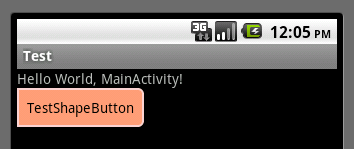
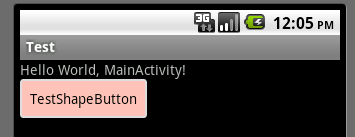
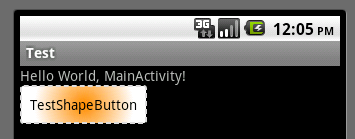
大体的就是这样,以下是一个使用的具体示例:用在Selector中作为Button的背景,分别定义了按钮的一般状态、获得焦点状态和按下时的状态,具体代码如下:
main.xml:
<Button
android:layout_width="wrap_content"
android:layout_height="wrap_content"
android:text="TestShapeButton"
android:background="@drawable/button_selector"
/>
button_selector.xml:
<?xml version="1.0" encoding="utf-8"?>
<selector
xmlns:android="http://schemas.android.com/apk/res/android">
<item android:state_pressed="true" >
<shape>
<!-- 渐变 -->
<gradient
android:startColor="#ff8c00"
android:endColor="#FFFFFF"
android:type="radial"
android:gradientRadius="50" />
<!-- 描边 -->
<stroke
android:width="2dp"
android:color="#dcdcdc"
android:dashWidth="5dp"
android:dashGap="3dp" />
<!-- 圆角 -->
<corners
android:radius="2dp" />
<padding
android:left="10dp"
android:top="10dp"
android:right="10dp"
android:bottom="10dp" />
</shape>
</item>
<item android:state_focused="true" >
<shape>
<gradient
android:startColor="#ffc2b7"
android:endColor="#ffc2b7"
android:angle="270" />
<stroke
android:width="2dp"
android:color="#dcdcdc" />
<corners
android:radius="2dp" />
<padding
android:left="10dp"
android:top="10dp"
android:right="10dp"
android:bottom="10dp" />
</shape>
</item>
<item>
<shape>
<solid android:color="#ff9d77"/>
<stroke
android:width="2dp"
android:color="#fad3cf" />
<corners
android:topRightRadius="5dp"
android:bottomLeftRadius="5dp"
android:topLeftRadius="0dp"
android:bottomRightRadius="0dp"
/>
<padding
android:left="10dp"
android:top="10dp"
android:right="10dp"
android:bottom="10dp" />
</shape>
</item>
</selector>
运行效果如下图:
一般状态:
获得焦点状态:
按下状态:
Android中使用shape来定义控件的更多相关文章
- 使用shape来定义控件的一些显示属性
Android中常常使用shape来定义控件的一些显示属性,今天看了一些shape的使用,对shape有了大体的了解,稍作总结 先看下面的代码: <shape> <!-- 实心 -- ...
- android中一个评分的控件
RatingBar android中一个评分的控件 如何使用 Android Studio下: dependencies { compile 'com.hedgehog.ratingbar:app:1 ...
- Android中的自定义视图控件
简介 当现有控件不能满足需求时,就需要自定义控件. 自定义控件属性 自定义控件首先要继承自View,重写两个构造函数. 第一个是代码中使用的: public MyRect(Context contex ...
- android中的五大布局(控件的容器,可以放button等控件)
一.android中五大布局相当于是容器,这些容器里可以放控件也可以放另一个容器,子控件和布局都需要制定属性. 1.相对布局:RelativeLayout @1控件默认堆叠排列,需要制定控件的相对位置 ...
- android 中通过代码创建控件
package bvb.de.openadbwireless.circle; import android.annotation.TargetApi; import android.app.Activ ...
- android中动态修改ImageView控件的宽高度
本例实现了动态修改ImageView控件的宽高度,有两个按钮,一个按钮实现放大image,一个按钮实现缩小image activity_main.xml <?xml version=" ...
- android中关于时间的控件
1.日期选择器 <DatePicker android:layout_width="wrap_content" android:layout_height="wra ...
- Android 拖动条/滑动条控件、星级评分控件
ProgressBar有2个子控件: SeekBar 拖动条控件 RatingBar 星级评分控件 1.拖动条控件 <SeekBar android:layout_width=" ...
- Android中查找一个Layout中指定的子控件
我们通常希望查找一个页面中指定类型的控件,单个控件知道id很容易找到,但是如果是多个呢?或者说是在程序中自定义的控件,且不知道id怎么办呢?如想找到页面中的Spinner,可用以下方法 /** * 从 ...
随机推荐
- createjs基础
<canvas id="gameView" width="400px" height="400px" style="back ...
- MDX示例:求解中位数、四分位数(median、quartile)
一个人力资源咨询集团通过网络爬虫采集手段将多个知名招聘网站上发布的求职和招聘等信息准实时采集到自己的库里,形成一个数据量浩大的招聘信息库,跟踪全国招聘和求职的行业.工种.职位.待遇等信息,并通过商业智 ...
- 三个重要的游标sp_cursoropen
請問這三個存諸過程的作用是什么﹖ sp_cursoropen, sp_cursorfetch, sp_cursorclose API 服务器游标实现 SQL Server OLE DB 提供程序. ...
- java-web-dom4j解析XML-递归方式
<?xml version="1.0" encoding="UTF-8"?><书架> <书 出版日期="2013-10 ...
- js中几个容易混淆的概念
1. var name = "The Window";var object = {name : "My Object",getName: function(){ ...
- hadoop集群之HDFS和YARN启动和停止命令
假如我们只有3台linux虚拟机,主机名分别为hadoop01.hadoop02和hadoop03,在这3台机器上,hadoop集群的部署情况如下: hadoop01:1个namenode,1个dat ...
- select p.id, name,ROW_NUMBER() over(PARTITION by name order by p.id) names from person p
select p.id, name,ROW_NUMBER() over(PARTITION by name order by p.id) names from person p
- Linux下SVN(Subversion)自动启动脚本
在Red Hat Linux中自动运行程序 1.开机启动时自动运行程序 Linux加载后, 它将初始化硬件和设备驱动,然后运行第一个进程init.init根据配置文件继续引导过程,启动其 ...
- Tomcat启动load action异常
近期将之前的项目移到另一个文件夹中(包的路径也更改了),启动Tomcat之后包错:无法加载action,看错误提示知道是路径错误,网上也有各种各样的解决方案,这里我的错误是因为项目移到了别的文件中,所 ...
- 使用WCF实现SOA面向服务编程—— 架构设计
原文地址:http://www.cnblogs.com/leslies2/archive/2011/03/29/1997889.html SOA本身就是一种面向企业级服务的系统架构,简单来说,SOA就 ...