
【原创】大数据基础之Marathon(2)marathon-lb
marathon-lb
官方:https://github.com/mesosphere/marathon-lb
一 简介
Marathon load balancer (Marathon-LB) is a proxy server and load balancer for TCP, HTTP, and HTTPS requests based on HAProxy open-source software.
marathon-lb是一个基于HAProxy的代理服务器和负载均衡器,支持TCP、HTTP、HTTPS请求;
背景
When your app is up and running, you need a way to send traffic to it, from other applications on the same cluster, and from external clients.
There are several ways to do this:
- Mesos-DNS provides service discovery through the domain name system (DNS).
- Marathon-lb provides port-based service discovery using HAProxy, a lightweight TCP/HTTP proxy.
当应用启动之后,需要一种方式使得其能够被调用方自动发现并发送请求,有两种方式可以实现:Mesos-DNS和Marathon-lb;
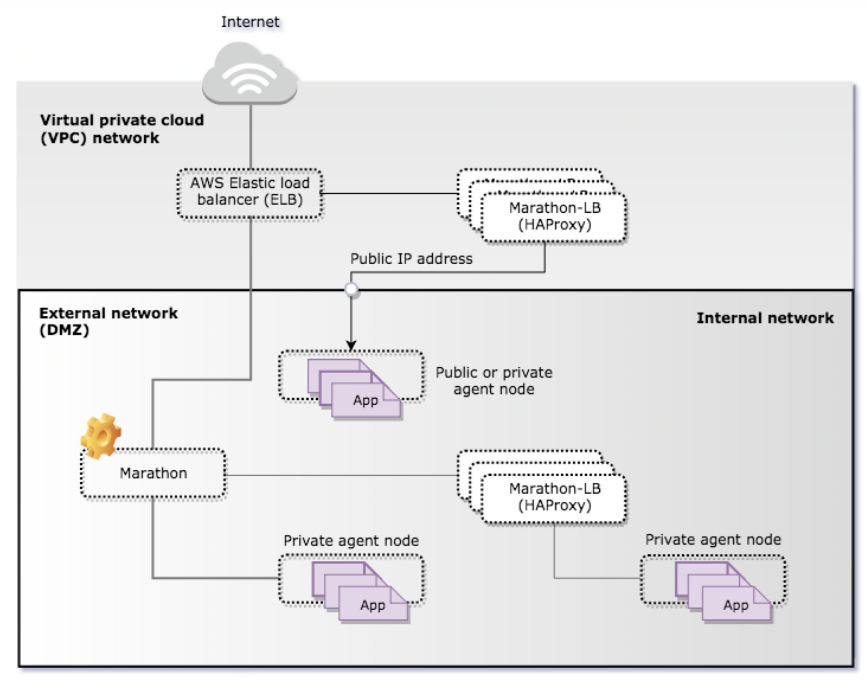
Marathon-LB locates applications through the Marathon framework port-based service discovery using a virtual or DNS-defined IP address and the frontend and backend configuration settings specified for the HAProxy program.
If you install and configure Marathon-LB, the load balancer runs the HAProxy TCP/HTTP proxy service on each host in the cluster. The HAProxy service listens for inbound connection requests on a service port on a public agent node. If clients connect to the service port to request access to an app, the HAProxy service transparently forwards the requests to a host name and port number associated with the individual application instances orchestrated by the Marathon service.
marathon-lb通过marathon框架基于端口的服务发现来定位应用,并且自动生成haproxy配置;
二 安装
1 docker
$ docker run -d --privileged -e PORTS=9090 --net=host docker.io/mesosphere/marathon-lb sse -m http://marathon1_ip:8080 -m http://marathon2_ip:8080 -m http://master3_ip:8080 --group external
2 marathon web

3 marathon api
# cat marathon-lb.json
{
"id":"marathon-lb",
"cpus": 1,
"mem": 128,
"instances": 1,
"constraints": [["hostname", "UNIQUE"]],
"container": {
"type":"DOCKER",
"docker": {
"image": "mesosphere/marathon-lb",
"privileged": true,
"network": "HOST"
}
},
"args": ["sse", "-m", "http://192.168.0.1:8080", "-m", "http://192.168.0.2:8080", "-m", "http://192.168.0.3:8080", "--group", "external"]
}
# curl -X POST http://192.168.0.1:8080/v2/apps -d@/path/to/marathon-lb.json -H "Content-type:application/json"
启动之后会绑定如下端口
tcp 0 0 0.0.0.0:80 0.0.0.0:* LISTEN 23948/haproxy
tcp 0 0 0.0.0.0:443 0.0.0.0:* LISTEN 23948/haproxy
tcp 0 0 0.0.0.0:9090 0.0.0.0:* LISTEN 23948/haproxy
tcp 0 0 0.0.0.0:9091 0.0.0.0:* LISTEN 23948/haproxy
访问:http://$marathon-lb_server:9090/haproxy?stats
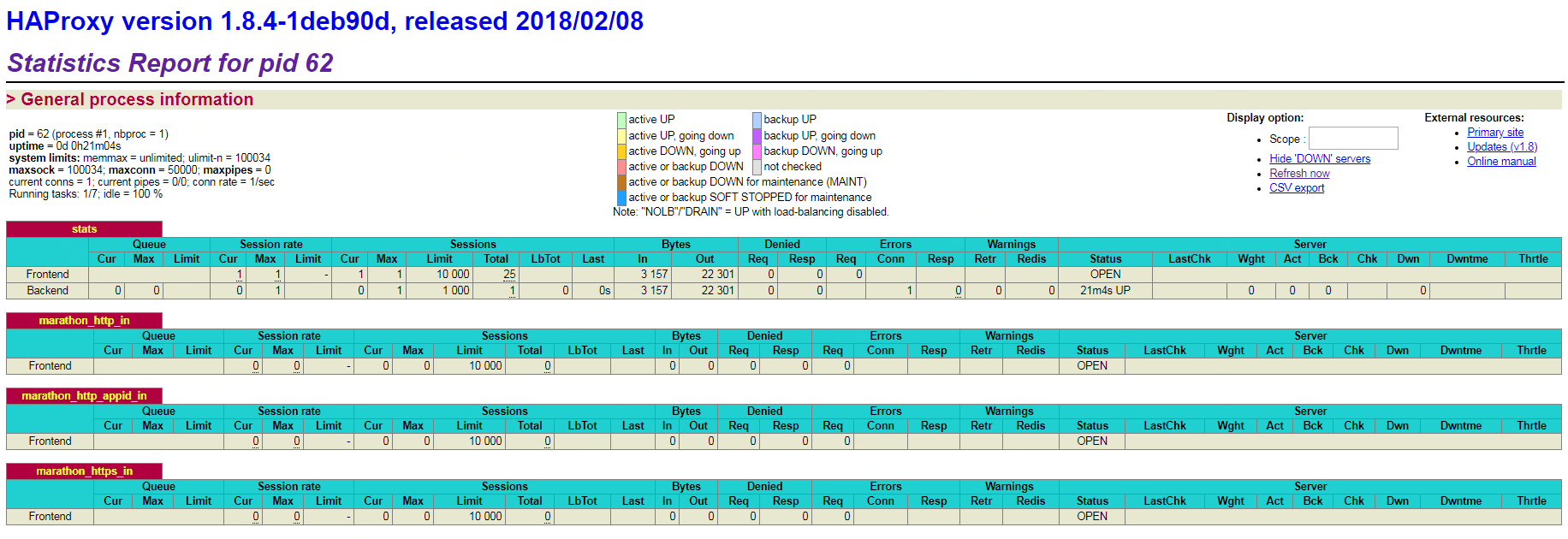
haproxy常用接口如下:
http://$haproxy_server:9090/haproxy?stats
http://$haproxy_server:9090/_haproxy_health_check
http://$haproxy_server:9090/_haproxy_getconfig
详细接口如下:
monitor-uri /_haproxy_health_check
acl getpid path /_haproxy_getpids
http-request use-service lua.getpids if getpid
acl getvhostmap path /_haproxy_getvhostmap
http-request use-service lua.getvhostmap if getvhostmap
acl getappmap path /_haproxy_getappmap
http-request use-service lua.getappmap if getappmap
acl getconfig path /_haproxy_getconfig
http-request use-service lua.getconfig if getconfigacl signalmlbhup path /_mlb_signal/hup
http-request use-service lua.signalmlbhup if signalmlbhup
acl signalmlbusr1 path /_mlb_signal/usr1
http-request use-service lua.signalmlbusr1 if signalmlbusr1
三 使用
1 http(比如nginx)
后端marathon application配置
"labels": {
"HAPROXY_0_MODE": "http",
"HAPROXY_0_BALANCE": "roundrobin",
"HAPROXY_0_GROUP": "external",
"HAPROXY_0_VHOST": "service-test.com"
},
...
"portMappings":[{"containerPort":80,"hostPort":0,"servicePort":10080,"protocol":"tcp"}]
其中HAPROXY_0_MODE默认为http,HAPROXY_0_BALANCE默认为roundrobin;生成的haproxy配置路径如下:
/marathon-lb/haproxy.cfg
然后可以通过 $marathon-lb_server:10080 来访问实际的一个或多个后端 $backend_server:80
2 tcp(比如redis)
后端marathon application配置
"labels": {
"HAPROXY_0_MODE": "tcp",
"HAPROXY_0_GROUP": "external"
},
...
"portMappings":[{"containerPort":6379,"hostPort":0,"servicePort":16379,"protocol":"tcp"}]
注意:HAPROXY_0_MODE=tcp时一定不要配置HAPROXY_0_VHOST(http mode时使用),否则会生成错误的haproxy配置导致marathon-lb启动失败
然后可以通过 $marathon-lb_server:16379 来访问实际的一个或多个后端 $backend_server:6379
参考:
https://docs.mesosphere.com/services/marathon-lb/
https://mesosphere.github.io/marathon/docs/service-discovery-load-balancing.html
【原创】大数据基础之Marathon(2)marathon-lb的更多相关文章
- 【原创】大数据基础之Zookeeper(2)源代码解析
核心枚举 public enum ServerState { LOOKING, FOLLOWING, LEADING, OBSERVING; } zookeeper服务器状态:刚启动LOOKING,f ...
- 【原创】大数据基础之词频统计Word Count
对文件进行词频统计,是一个大数据领域的hello word级别的应用,来看下实现有多简单: 1 Linux单机处理 egrep -o "\b[[:alpha:]]+\b" test ...
- 【原创】大数据基础之Impala(1)简介、安装、使用
impala2.12 官方:http://impala.apache.org/ 一 简介 Apache Impala is the open source, native analytic datab ...
- 【原创】大数据基础之Benchmark(2)TPC-DS
tpc 官方:http://www.tpc.org/ 一 简介 The TPC is a non-profit corporation founded to define transaction pr ...
- 大数据基础知识:分布式计算、服务器集群[zz]
大数据中的数据量非常巨大,达到了PB级别.而且这庞大的数据之中,不仅仅包括结构化数据(如数字.符号等数据),还包括非结构化数据(如文本.图像.声音.视频等数据).这使得大数据的存储,管理和处理很难利用 ...
- 大数据基础知识问答----spark篇,大数据生态圈
Spark相关知识点 1.Spark基础知识 1.Spark是什么? UCBerkeley AMPlab所开源的类HadoopMapReduce的通用的并行计算框架 dfsSpark基于mapredu ...
- 大数据基础知识问答----hadoop篇
handoop相关知识点 1.Hadoop是什么? Hadoop是一个由Apache基金会所开发的分布式系统基础架构.用户可以在不了解分布式底层细节的情况下,开发分布式程序.充分利用集群的威力进行高速 ...
- hadoop大数据基础框架技术详解
一.什么是大数据 进入本世纪以来,尤其是2010年之后,随着互联网特别是移动互联网的发展,数据的增长呈爆炸趋势,已经很难估计全世界的电子设备中存储的数据到底有多少,描述数据系统的数据量的计量单位从MB ...
- 大数据基础总结---HDFS分布式文件系统
HDFS分布式文件系统 文件系统的基本概述 文件系统定义:文件系统是一种存储和组织计算机数据的方法,它使得对其访问和查找变得容易. 文件名:在文件系统中,文件名是用于定位存储位置. 元数据(Metad ...
- 学习大数据基础框架hadoop需要什么基础
什么是大数据?进入本世纪以来,尤其是2010年之后,随着互联网特别是移动互联网的发展,数据的增长呈爆炸趋势,已经很难估计全世界的电子设备中存储的数据到底有多少,描述数据系统的数据量的计量单位从MB(1 ...
随机推荐
- react暴露webpack配置文件
在react中安装create-react-app脚手架新建项目,但是新建的项目中没有配置文件. webpack的配置文件webpack.base.conf.js隐藏在了node_modules文件夹 ...
- 子线程导致 Windows 服务停止的情况(Topshelf 结合 Quartz.NET)
Ø 前言 本文主要记录子线程导致 Topshelf 和 Quartz.NET 的 Windows 服务停止的现象,以及使用几种常用子线程的注意事项.因为我们有时可能需要开启多个线程执行复杂的逻辑,如 ...
- 设计前沿:16款扁平风格 iOS 7 图标设计
最新发布的 iOS 7 抛弃了曾经倍受追捧的拟物化设计,采用扁平化,极简设计的界面.对于 iOS 平台来说,采用没有阴影的平面设计其实是有道理的.以前的屏幕分辨率有限,必要的阴影可以填补小尺寸,分辨率 ...
- CSS 快速学习
[快速学习让我不再思考太多,更多专注在一个 box 当中,上下文朝着正交方向前进~] [Think small,]https://learnxinyminutes.com/docs/zh-cn/css ...
- 虚拟机中Linux安装(转)
地址:http://blog.csdn.net/u013142781/article/details/50529030 不是每一个程序员都必须玩过linux,只是博主觉得现在的很多服务器都是linux ...
- Educational Codeforces Round 47 (Rated for Div. 2)E.Intercity Travelling
题目链接 大意:一段旅途长度N,中间可能存在N-1个休息站,连续走k长度时,疲劳值为a1+a2+...+aka_1+a_2+...+a_ka1+a2+...+ak,休息后a1a_1a1开始计, ...
- flask处理cookie
一 什么是cookie 什么是cookie?如果单单从数据结构的角度来说,它可以被理解成用来保存数据的一个dictionary,由一组组键值对组成.如果从作用上来说,我们知道Http协议是一种无状态的 ...
- NPOI 设置样式为粗体
CellStyle style = hssfworkbook.CreateCellStyle(); Font f = hssfworkbook.CreateFont(); f.Boldweight = ...
- 自定义gradle插件
重点学习https://www.jianshu.com/p/804d79415258 https://blog.csdn.net/l2show/article/details/53925543 htt ...
- 20165234 《Java程序设计》实验一 Java开发环境的熟悉
一.实验报告封面 课程:Java程序设计 班级:1652班 姓名:刘津甫 学号:20165234 指导教师:娄嘉鹏 实验日期:2018年4月2日 实验时间:15:35 - 17:15 实验序 ...