
Spring Security构建Rest服务-0701-个性化用户认证流程
上一篇说了用户认证的基本流程,但是上一篇当访问一个受保护的服务后,如果未认证会调到默认的登录页面,这样是不行的,而且认证成功后,就直接访问了那个服务,如果想要做认证成功后做一些操作,还需要自定义。
个性化用户认证流程:
1)自定义登录页面
2)自定义登录成功处理(如给用户发积分或者签到)
3)自定义登录失败处理(如记录密码失败次数,超过3次不让登录等)
1,自定义登录页面
在BrowserSecurityConfig类里配置:
@Configuration //这是一个配置

public class BrowserSecurityConfig extends WebSecurityConfigurerAdapter{

    //注意是org.springframework.security.crypto.password.PasswordEncoder

    @Bean

    public PasswordEncoder passwordencoder(){

        //BCryptPasswordEncoder implements PasswordEncoder

        return new BCryptPasswordEncoder();

    }

    @Override

    protected void configure(HttpSecurity http) throws Exception {

        //实现需要认证的接口跳转表单登录,安全=认证+授权

        //http.httpBasic() //这个就是默认的弹框认证

        http.formLogin() //表单认证

            .loginPage("/login.html") //登录页面

            //登录过滤器UsernamePasswordAuthenticationFilter默认登录的url是"/login",在这能改

            .loginProcessingUrl("/authentication/form")

            .and()

            .authorizeRequests() //下边的都是授权的配置

            .antMatchers("/login.html").permitAll() //放过登录页不过滤,否则报错

            .anyRequest()        //任何请求

            .authenticated();    //都需要身份认证

    }

}
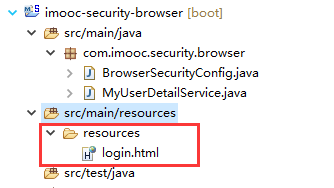
在src/main/resource下新建resources目录,新建login页面
<body>

    <h2>登录页</h2>

    <form action="/authentication/form" method="post">

        <table border="1">

            <tr>

                <td>用户名:</td>

                <td><input type="text" name="username"/></td>

            </tr>

            <tr>

                <td>密码:</td>

                <td><input type="password" name="password"/></td>

            </tr>

            <tr>

                <td colspan="2" align="right"><button type="submit">登录</button></td>

            </tr>

        </table>

    </form>

  </body>
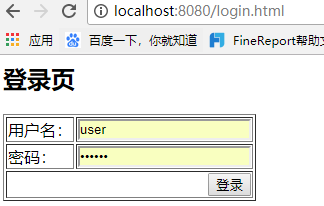
访问 http://localhost:8080/user跳转到自定义的登录页:

此时点击登录:
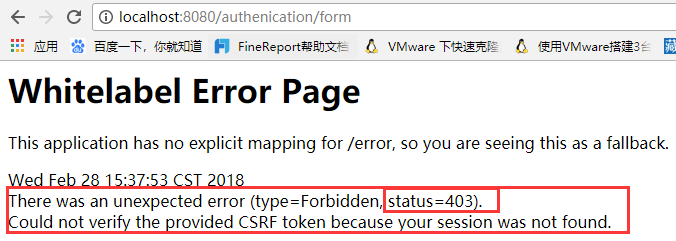
SpringSecurity默认提供了CSRF(跨站请求伪造)防护,是用CSRF token来完成防护的。暂时关闭CSRF防护,在BrowserSecurityConfig里设置:
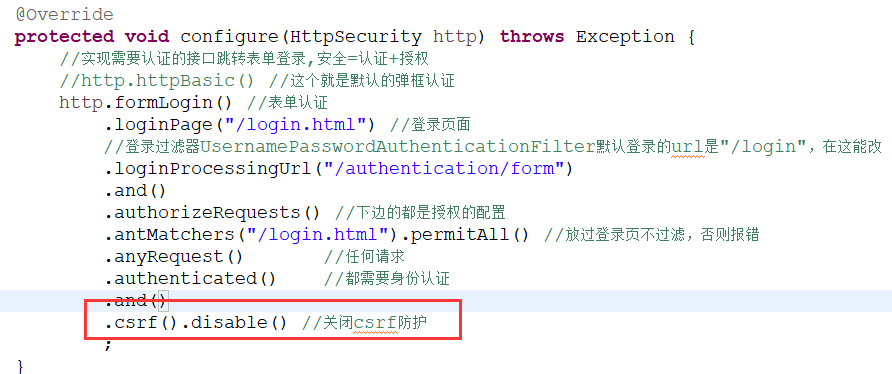
然后再访问localhost:8080/user,登录成功后,返回查询信息

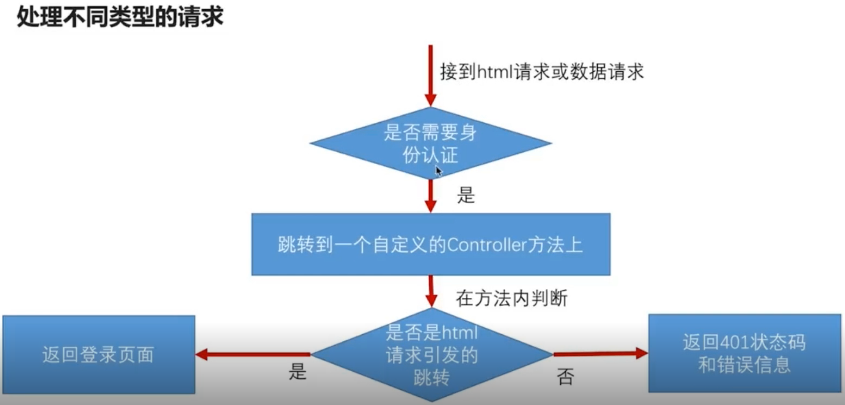
到此为止,自定义登录页已经做好了,但是我们发出的是Rest服务,应该返回状态码+json信息,而这里返回时html页,是不合理的,可以做成像SpringBoot对错误处理的机制一样,如果是浏览器发过来的请求,就跳转到登录页,如果是app发过来的请求,就返回Json。
而且随后要做成可重用的安全模块,现在限制死了登录页,是不合理的。
解决:
1,处理不同类型的请求
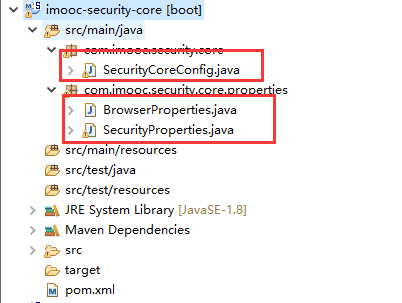
最终的项目结构:
浏览器项目:

核心项目:
引用安全模块的demo项目:
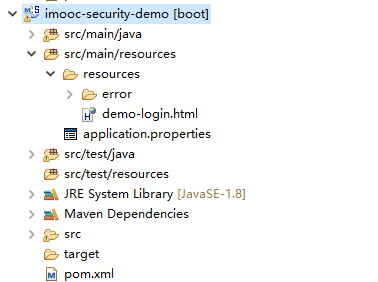
思路:在浏览器项目里新建一个控制器BrowserSecurityController,处理用户认证,浏览器和app的请求做不同的处理。在core核心项目里,封装读取application.properties里自定义配置的类,这样在demo项目引用开发的安全模块时,可以根据application.properties里的配置,跳转到自定义的登录页。
第一步,BrowserSecurityConfig配置的configure方法中,http.formLogin() .loginPage("/authentication/require") 标红处就不应该是一个login.html的登录页了,让他跳转到自定义的BrowserSecurityController,浏览器和app的请求做不同的处理,SpringSecurity里有一些工具类RequestCache可以帮我们拿到请求的url:
/**

 * 处理用户认证Controller,浏览器和app的请求做不同的处理

 * ClassName: BrowserSecurityController

 * @Description: 处理用户认证Controller,浏览器和app的请求做不同的处理

 * @author lihaoyang

 * @date 2018年2月28日

 */

@RestController

public class BrowserSecurityController {

    private Logger logger = LoggerFactory.getLogger(getClass());

    //缓存的请求,SpringSecurity通过HttpSessionRequestCache把请求信息缓存到session里

    private RequestCache requestCache = new HttpSessionRequestCache();

    //跳转的工具

    private RedirectStrategy redirectStrategy = new DefaultRedirectStrategy();

    @Autowired

    private SecurityProperties securityProperties;

    /**

     * 当需要身份认证时,跳转到这里处理

     * @Description: TODO

     * @param @param request

     * @param @param response

     * @param @return

     * @return String

     * @throws Exception

     * @throws

     * @author lihaoyang

     * @date 2018年2月28日

     */

    @RequestMapping("/authentication/require")

    @ResponseStatus(code=HttpStatus.UNAUTHORIZED)//返回状态码401 未授权

    public SimpleResponse requireAuthentication(HttpServletRequest request,HttpServletResponse response) throws Exception{

        //拿出缓存的请求 引发跳转的请求

        SavedRequest savedRequest = requestCache.getRequest(request, response);

        if(savedRequest != null){

            //拿到引发请求的url

            String targetUrl = savedRequest.getRedirectUrl();

            logger.info("引发跳转的url:"+targetUrl);

            if(StringUtils.endsWithIgnoreCase(targetUrl, ".html")){//请求是否以.html结尾

                redirectStrategy.sendRedirect(request, response, securityProperties.getBrowser().getLoginPage());//要跳转的页面,此处应该做成可配置的页面

            }

        }

        return new SimpleResponse("访问的服务需要身份认证,请引导用户到登录页");

    }

}
现在需要处理的就是上边标红的代码,他的作用是能够动态配置登录页,下一步,在demo项目的application.properties里配置登录页:
#自定义登录页
imooc.security.browser.loginPage = /demo-login.html
现在问题就是读取这个配置,在core核心项目里,做配置的封装:
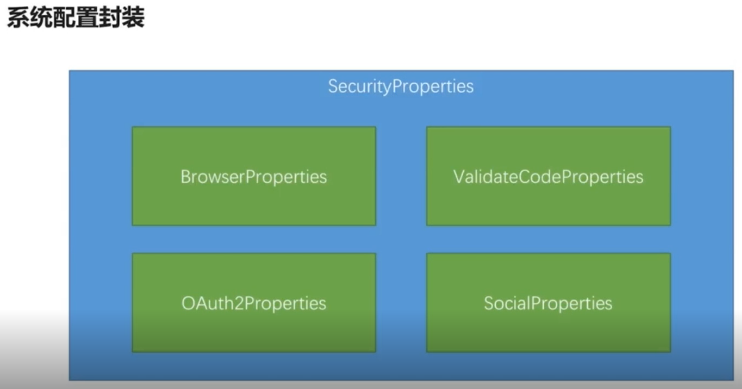
SecurityProperties:
package com.imooc.security.core.properties;

import org.springframework.boot.context.properties.ConfigurationProperties;

import org.springframework.context.annotation.Configuration;

/**

 * 自定义配置项

 * ClassName: SecurityProperties

 * @Description: 自定义配置项

 * 这个类会读取application.properties里所有以imooc.security开头的配置项

 *

 * imooc.security.browser.loginPage = /demo-login.html

 * 其中的browser的配置会读取到BrowserProperties中去

 * 这是以点分割的,一级一级的和类的属性对应

 * @author lihaoyang

 * @date 2018年2月28日

 */

@ConfigurationProperties(prefix="imooc.security")

public class SecurityProperties {

    private BrowserProperties browser = new BrowserProperties();

    public BrowserProperties getBrowser() {

        return browser;

    }

    public void setBrowser(BrowserProperties browser) {

        this.browser = browser;

    }

}
BrowserProperties:
package com.imooc.security.core.properties;

/**

 * 浏览器配置项

 * ClassName: BrowserProperties

 * @Description: 浏览器配置项

 * @author lihaoyang

 * @date 2018年2月28日

 */

public class BrowserProperties {

    private String loginPage = "login.html"; //用户未配置默认登录页

    public String getLoginPage() {

        return loginPage;

    }

    public void setLoginPage(String loginPage) {

        this.loginPage = loginPage;

    }

}
SecurityCoreConfig:
package com.imooc.security.core;

import org.springframework.boot.context.properties.EnableConfigurationProperties;

import org.springframework.context.annotation.Configuration;

import com.imooc.security.core.properties.SecurityProperties;

/**

 * 使配置SecurityProperties生效

 * ClassName: SecurityCoreConfig

 * @Description: 使配置SecurityProperties生效

 * @author lihaoyang

 * @date 2018年2月28日

 */

@Configuration

@EnableConfigurationProperties(SecurityProperties.class)

public class SecurityCoreConfig {

}
这三个类就和application.properties里的配置:imooc.security.browser.loginPage = /demo-login.html 对应上了。
在需要读取配置的地方,直接注入SecurityCoreConfig即可,此时在 BrowserSecurityConfig 里注入SecurityCoreConfig 配置,即可让过滤器读取到配置的登录页。
@Configuration //这是一个配置

public class BrowserSecurityConfig extends WebSecurityConfigurerAdapter{

    //读取用户配置的登录页配置

    @Autowired

    private SecurityProperties securityProperties;

    //注意是org.springframework.security.crypto.password.PasswordEncoder

    @Bean

    public PasswordEncoder passwordencoder(){

        //BCryptPasswordEncoder implements PasswordEncoder

        return new BCryptPasswordEncoder();

    }

    //版本一:配置死的登录页

//    @Override

//    protected void configure(HttpSecurity http) throws Exception {

//        //实现需要认证的接口跳转表单登录,安全=认证+授权

//        //http.httpBasic() //这个就是默认的弹框认证

//        http.formLogin() //表单认证

//            .loginPage("/login.html") //登录页面

//            //登录过滤器UsernamePasswordAuthenticationFilter默认登录的url是"/login",在这能改

//            .loginProcessingUrl("/authentication/form")

//            .and()

//            .authorizeRequests() //下边的都是授权的配置

//            .antMatchers("/login.html").permitAll() //放过登录页不过滤,否则报错

//            .anyRequest()        //任何请求

//            .authenticated()    //都需要身份认证

//            .and()

//            .csrf().disable() //关闭csrf防护

//            ;

//    }

    //版本二:可配置的登录页

    @Override

    protected void configure(HttpSecurity http) throws Exception {

        //实现需要认证的接口跳转表单登录,安全=认证+授权

        //http.httpBasic() //这个就是默认的弹框认证

        http.formLogin() //表单认证

            .loginPage("/authentication/require") //处理用户认证BrowserSecurityController

            //登录过滤器UsernamePasswordAuthenticationFilter默认登录的url是"/login",在这能改

            .loginProcessingUrl("/authentication/form")

            .and()

            .authorizeRequests() //下边的都是授权的配置

            // /authentication/require:处理登录,securityProperties.getBrowser().getLoginPage():用户配置的登录页

            .antMatchers("/authentication/require",securityProperties.getBrowser().getLoginPage()).permitAll() //放过登录页不过滤,否则报错

            .anyRequest()        //任何请求

            .authenticated()    //都需要身份认证

            .and()

            .csrf().disable() //关闭csrf防护

            ;

    }

}
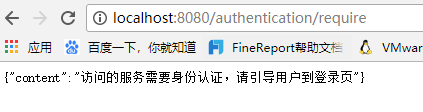
此时再访问localhost:8080/user ,会响应未登录信息和401状态码。此时发ajax请求的前端就可以引导用户到登录页去。

此时访问:http://localhost:8080/index.html,会跳转到demo项目配置的登录页。
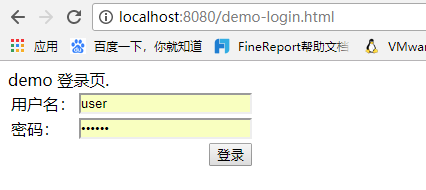
注释掉demo项目的登录页配置再访问,#imooc.security.browser.loginPage = /demo-login.html ,就会跳转到browser项目配置的 /login.html 登录页
上述过程只是完成了开篇说的个性化用户认证流程中的第一个步骤,自定义登录页面,下一篇说其他两项。
github代码:https://github.com/lhy1234/spring-security
Spring Security构建Rest服务-0701-个性化用户认证流程的更多相关文章
- Spring Security构建Rest服务-1001-spring social开发第三方登录之spring social基本原理
OAuth协议是一个授权协议,目的是让用户在不将服务提供商的用户名密码交给第三方应用的条件下,让第三方应用可以有权限访问用户存在服务提供商上的资源. 接着上一篇说的,在第三方应用获取到用户资源后,如果 ...
- Spring Security构建Rest服务-1300-Spring Security OAuth开发APP认证框架之JWT实现单点登录
基于JWT实现SSO 在淘宝( https://www.taobao.com )上点击登录,已经跳到了 https://login.taobao.com,这是又一个服务器.只要在淘宝登录了,就能直接访 ...
- Spring Security构建Rest服务-1202-Spring Security OAuth开发APP认证框架之重构3种登录方式
SpringSecurityOAuth核心源码解析 蓝色表示接口,绿色表示类 1,TokenEndpoint 整个入口点,相当于一个controller,不同的授权模式获取token的地址都是 /oa ...
- Spring Security构建Rest服务-1201-Spring Security OAuth开发APP认证框架之实现服务提供商
实现服务提供商,就是要实现认证服务器.资源服务器. 现在做的都是app的东西,所以在app项目写代码 认证服务器: 新建 ImoocAuthenticationServerConfig 类,@Ena ...
- Spring Security构建Rest服务-1203-Spring Security OAuth开发APP认证框架之短信验证码登录
浏览器模式下验证码存储策略 浏览器模式下,生成的短信验证码或者图形验证码是存在session里的,用户接收到验证码后携带过来做校验. APP模式下验证码存储策略 在app场景下里是没有cookie信息 ...
- Spring Security构建Rest服务-1200-SpringSecurity OAuth开发APP认证框架
基于服务器Session的认证方式: 前边说的用户名密码登录.短信登录.第三方登录,都是普通的登录,是基于服务器Session保存用户信息的登录方式.登录信息都是存在服务器的session(服务器的一 ...
- Spring Security构建Rest服务-0900-rememberMe记住我
Spring security记住我基本原理: 登录的时候,请求发送给过滤器UsernamePasswordAuthenticationFilter,当该过滤器认证成功后,会调用RememberMeS ...
- Spring Security构建Rest服务-1205-Spring Security OAuth开发APP认证框架之Token处理
token处理之二使用JWT替换默认的token JWT(Json Web Token) 特点: 1,自包含:jwt token包含有意义的信息 spring security oauth默认生成的t ...
- Spring Security构建Rest服务-1204-Spring Security OAuth开发APP认证框架之Token处理
token处理之一基本参数配置 处理token时间.存储策略,客户端配置等 以前的都是spring security oauth默认的token生成策略,token默认在org.springframe ...
随机推荐
- IntelliJ IDEA 2017版 spring-boot加载jsp配置详解(详细图文实例)
一.创建项目 (File--->New-->Project) 2.项目配置内容 3.选择配置项目的Group包名,Artifact项目名称 4.选择项目类型为web类型 5.创建成功,点击 ...
- python读写操作
import sys 1 def test(): a=int(input()) x=[int(i) for i in input().split(' ')] y=[int(j) for j in sy ...
- ansible-playbook api 2.0 直接运行
官方文档见 http://docs.ansible.com/ansible/dev_guide/developing_api.html 拿官方的例子修改如下 import json from col ...
- 从hbase到hive,以及sqoop转到mysql解析
https://blog.csdn.net/qq_33689414/article/details/80328665 hive关联hbase的配置文件 hive和hbase同步https://cwik ...
- jsPlumb学习笔记
这就是一个给元素画连接线的工具. <!DOCTYPE html> <html> <head> <title>jsPlumb</title> ...
- date(): It is not safe to rely on the system’s timezone settings.
在执行php脚本时出现的错误: date(): It is not safe to rely on the system’s timezone settings.You are *required* ...
- SSH框架中配置log4j的方法
SSH框架中使用log4j的方便之处 1. 动态的改变记录级别和策略,即修改log4j.properties,不需要重启Web应用,这需要在web.xml中设置一下.2. 把log文件定在 /WEB- ...
- SQL Server 索引基本概念与优化
数据页和区 页 SQL Server 中的数据以“页”(Page)的形式保存数据,页是SQL Server 的IO单位,读/写一次至少是一页.一页为8K(8192byte). 页由三部分组成,页头,数 ...
- DBCC--CHECKDB--不可被替代的原因
CHECKSUM不能发现的两类问题 1. 发生在内存中的页错误,如内存损坏+第三方程序修改等 2. MS SQL Server潜在BUG导致的逻辑错误,该类错误可以使用重建索引或重建约束来修复 CHE ...
- Global.asax和HttpModule的执行顺序
Application_Start-->用户自定义的HttpModule-->Application_BeginRequest (注册->调用) 看到Init方法(在用户自定义的 ...