
Linux High Availabi RHCS
-----本文大纲
简介
术语
环境配置
实现过程
命令行管理工具
-------------
一、简介
RHCS
即 RedHat Cluster Suite ,中文意思即红帽集群套件。红帽集群套件(RedHat Cluter Suite,
RHCS)是一套综合的软件组件,可以通过在部署时采用不同的配置,以满足你的对高可用性,负载均衡,可扩展性,文件共享和节约成本的需要。对于需要最大
正常运行时间的应用来说,带有红帽集群套件(Red Hat Cluster Suite)的红帽企业 Linux
集群是最佳的选择。红帽集群套件专为红帽企业 Linux 量身设计,它提供有如下两种不同类型的集群:
1、应用/服务故障切换-通过创建n个节点的服务器集群来实现关键应用和服务的故障切换 2、IP 负载均衡-对一群服务器上收到的 IP
网络请求进行负载均衡利用红帽集群套件,可以以高可用性配置来部署应用,从而使其总是处于运行状态-这赋予了企业向外扩展(scale-
out)Linux 部署的能力。对于网络文件系统(NFS)、Samba 和Apache
等大量应用的开源应用来说,红帽集群套件提供了一个随时可用的全面故障切换解决方案。
二、术语
分布式集群管理器(CMAN)
- 锁管理(DLM)
简称DLM,表示一个分布式锁管理器,它是RHCS的一个底层基础构件,同时也为集群提供了一个公用的锁运行机制,在RHCS集群系统中,DLM运行在集
群的每个节点上,GFS通过锁管理器的锁机制来同步访问文件系统元数据。CLVM通过锁管理器来同步更新数据到LVM卷和卷组。
- 配置文件管理(CCS)
/etc/cluster/cluster.conf的状态,当这个文件发生任何变化时,都将此变化更新到集群中的每个节点,时刻保持每个节点的配置文件
同步。例如,管理员在节点A上更新了集群配置文件,CCS发现A节点的配置文件发生变化后,马上将此变化传播到其它节点上去。rhcs的配置文件是cluster.conf,它是一个xml文件,具体包含集群名称、集群节点信息、集群资源和服务信息、fence设备等,这个会在后面讲述。
- 栅设备(FENCE)
- 高可用服务管理器
- 集群配置管理工具
- Redhat GFS
系统提供的一个存储解决方案,它允许集群多个节点在块级别上共享存储,每个节点通过共享一个存储空间,保证了访问数据的一致性,更切实的说,GFS是
RHCS提供的一个集群文件系统,多个节点同时挂载一个文件系统分区,而文件系统数据不受破坏,这是单一的文件系统,例如EXT3、EXT2所不能做到
的。为了实现多个节点对于一个文件系统同时读写操作,GFS使用锁管理器来管理I/O操作,当一个
写进程操作一个文件时,这个文件就被锁定,此时不允许其它进程进行读写操作,直到这个写进程正常完成才释放锁,只有当锁被释放后,其它读写进程才能对这个
文件进行操作,另外,当一个节点在GFS文件系统上修改数据后,这种修改操作会通过RHCS底层通信机制立即在其它节点上可见。在搭建RHCS集群时,GFS一般作为共享存储,运行在每个节点上,并且可以通过RHCS管理工具对GFS进行配置和管理。这些需要说明的是RHCS和GFS之间的关系,一般初学者很容易混淆这个概念:运行RHCS,GFS不是必须的,只有在需要共享存储时,才需要GFS支持,而搭建GFS集群文件系统,必须要有RHCS的底层支持,所以安装GFS文件系统的节点,必须安装RHCS组件
三、环境配置
| 系统 | 角色 | ip地址 | 安装包 |
| Centos6.5 x86_64 | 管理集群节点端 | 192.168.1.110 | luci |
| Centos6.5 x86_64 | web节点端(node1) | 192.168.1.103 | ricci |
| Centos6.5 x86_64 | web节点端(node2) | 192.168.1.109 | ricci |
| Centos6.5 x86_64 | web节点端(node3) | 192.168.1.108 | ricci |
四、实现过程
前提
ssh互信
注:如果yum源中有epel源要禁用,这是因为,此套件为redhat官方只认可自己发行的版本,如果不是认可的版本,可能将无法启动服务
管理集群节点端
[root@essun ~]# yum install -y luci

[root@essun ~]# service luci start

Adding following auto-detected host IDs (IP addresses/domain names), corresponding to `essun.node4.com' address, to the configuration of self-managed certificate `/var/lib/luci/etc/cacert.config' (you can change them by editing `/var/lib/luci/etc/cacert.config', removing the generated certificate `/var/lib/luci/certs/host.pem' and restarting luci):

    (none suitable found, you can still do it manually as mentioned above)

Generating a  bit RSA private key

writing new private key to '/var/lib/luci/certs/host.pem'

Starting saslauthd:                                        [  OK  ]

Start luci...                                              [  OK  ]

Point your web browser to https://essun.node4.com:8084 (or equivalent) to access luci

[root@essun ~]# ss -tnpl |grep

LISTEN                                    *:                     *:*      users:(("python",,))

[root@essun ~]#
而节点间要安装ricci,并且要为各节点上的ricci用户创建一个密码,以便集群服务管理各节点,为每一个节点提供一个测试页面(此处以一个节点为例,其它两个节点安装方式一样)
[root@essun .ssh]# yum install ricci -y

[root@essun ~]# service ricci start

Starting oddjobd:                                          [  OK  ]

generating SSL certificates...  done

Generating NSS database...  done

Starting ricci:                                            [  OK  ]

[root@essun ~]# ss -tnlp |grep ricci

LISTEN                                   :::                   :::*      users:(("ricci",,))

#ricci默认监听于11111端口

[root@essun .ssh]# echo "ricci" |passwd --stdin ricci

Changing password for user ricci.

passwd: all authentication tokens updated successfully.

#此处以ricci为密码

[root@essun html]# echo "<h1>`hostname`</h1>" >index.html

[root@essun html]# service httpd start

Starting httpd:                                            [  OK  ]
打开web界面就可以配置了
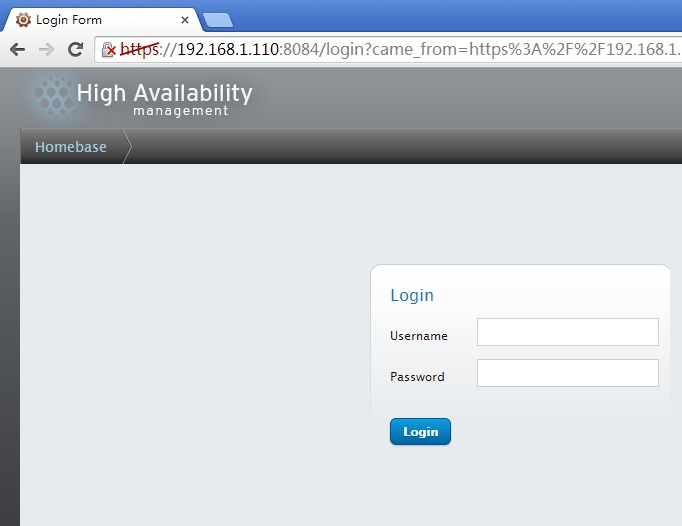
输入正确的用户及密码就可登录了,如果是root登录会有警告提示信息

这时就可以使用Manager Clusters管理集群了

创建一个集群
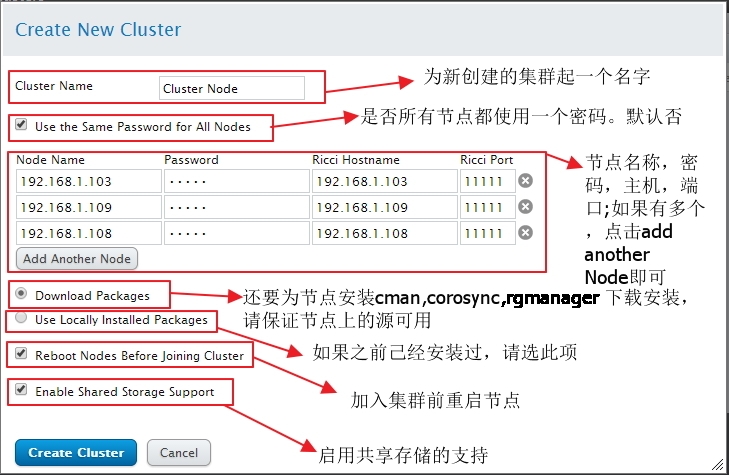
创建完成后
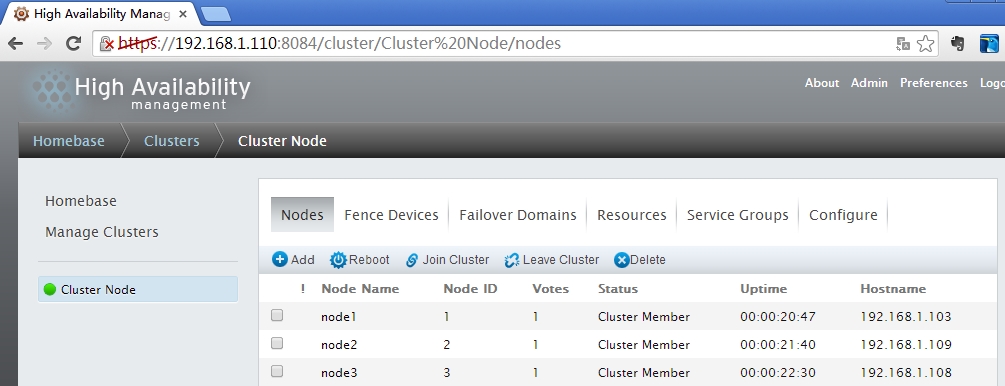
标签说明
定义故障转移域
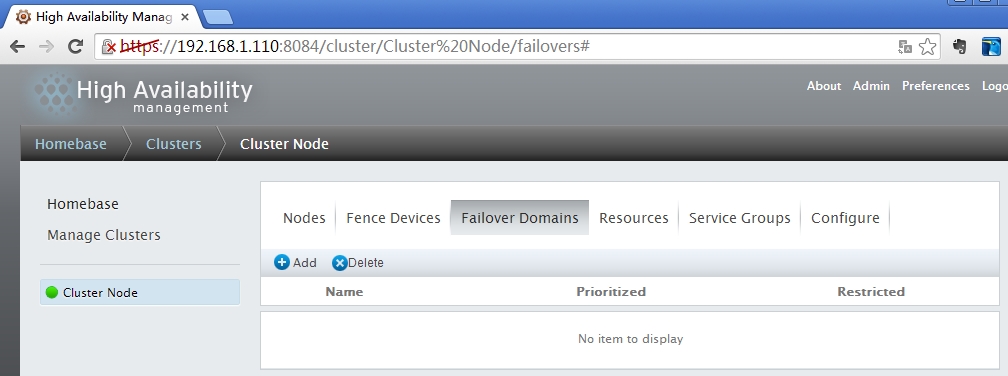
定义故障转移域的优先级,当节点重新上线后,资源是否切换

添加后的状态

可以选择的资源类型
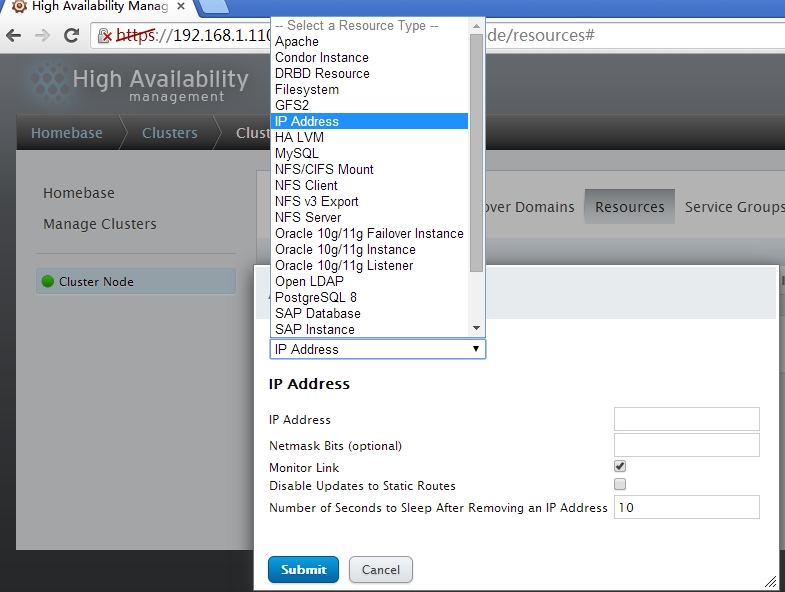
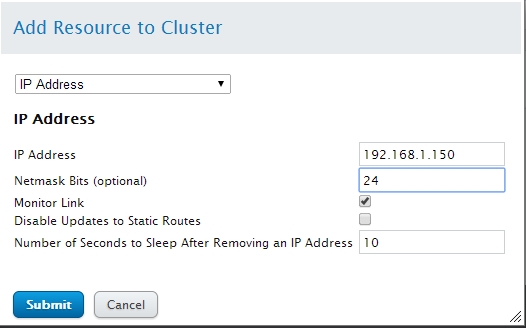
添加一个ip地址
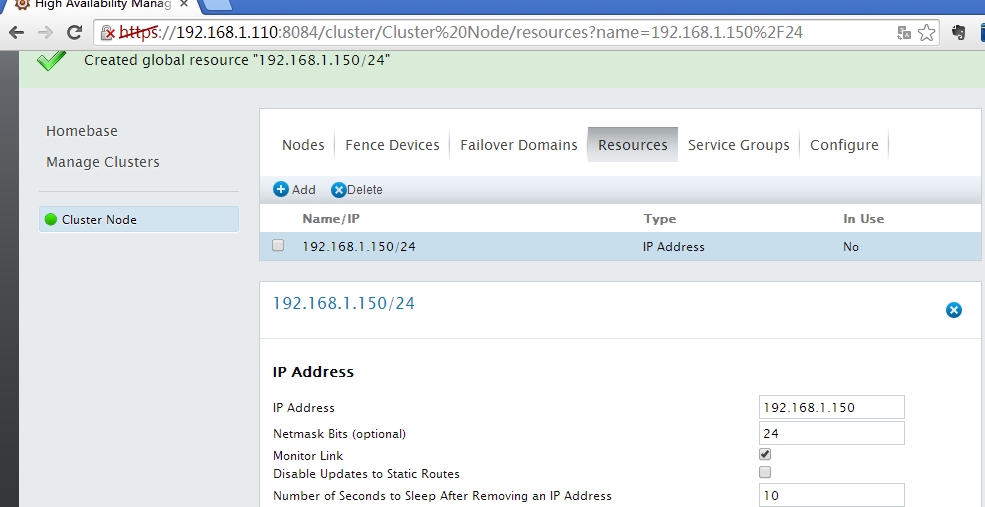
- 提交后生成的一条记录
将此资源添加到组中(也可以在service group定义资源)

还可以添加资源
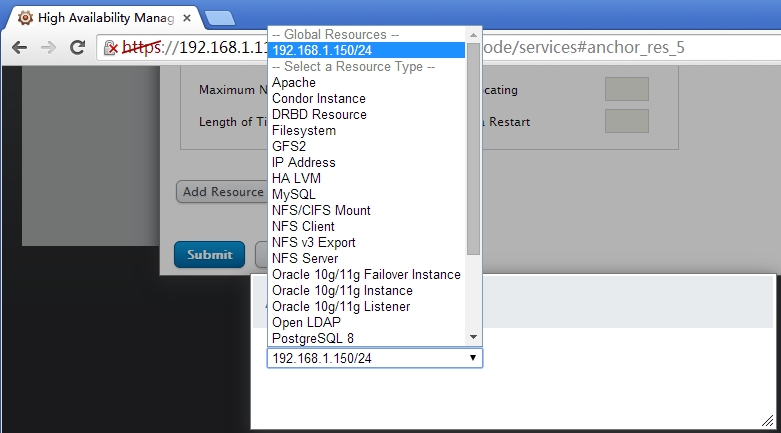
将己经定义的资源添加到组中(之前己经定义过的ip地址)
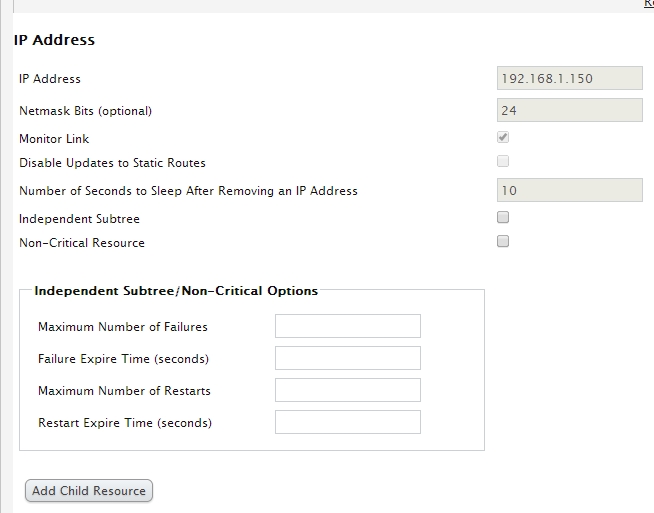
添加一个web服务
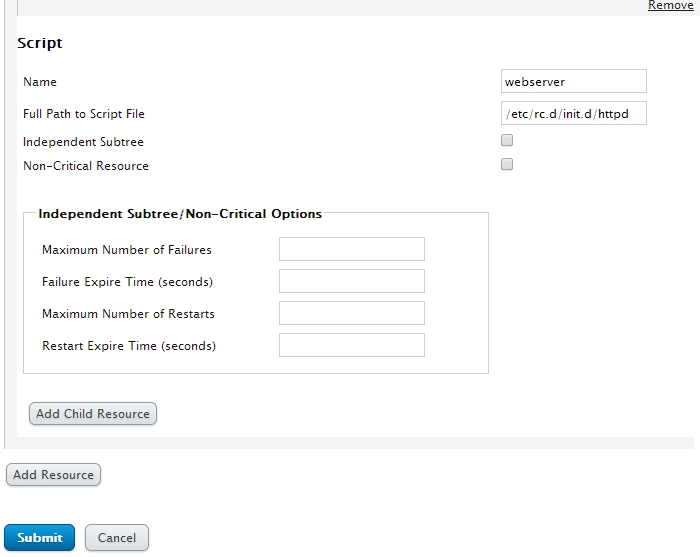
定义完成后就可以提交了,如果此资源想撤销,可以点击右上角remove即可
提交后的组资源

- 重启组资源(Restart)
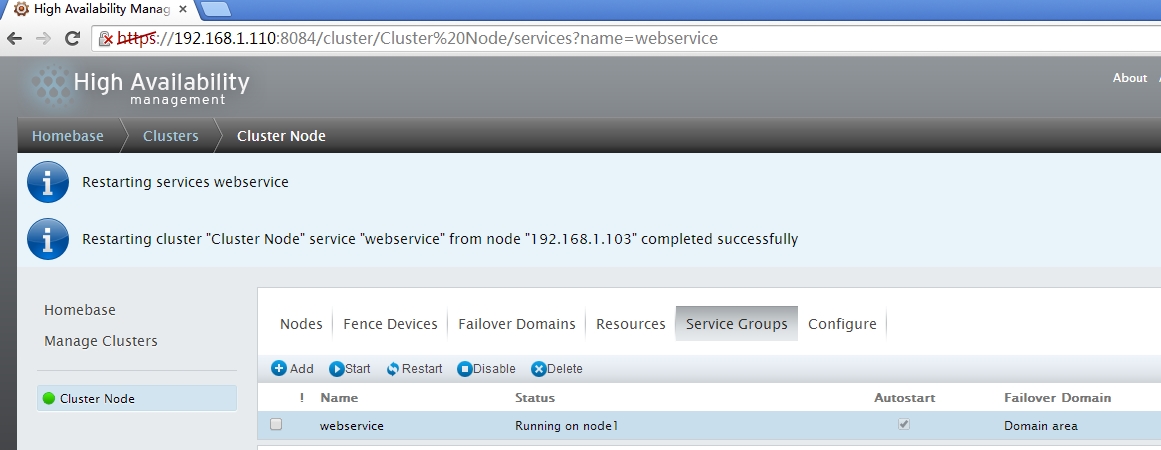
- 当前的状态己经显示运行于节点node1上
访问测试一下,己经运行于node1上

- 模拟故障转移
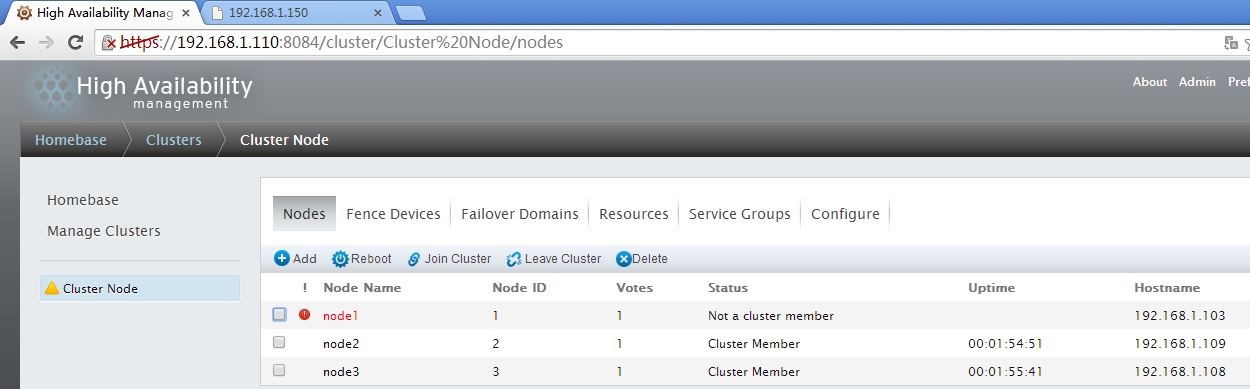
查看资源是否转移,可以查看service group,也可能通过网页测试
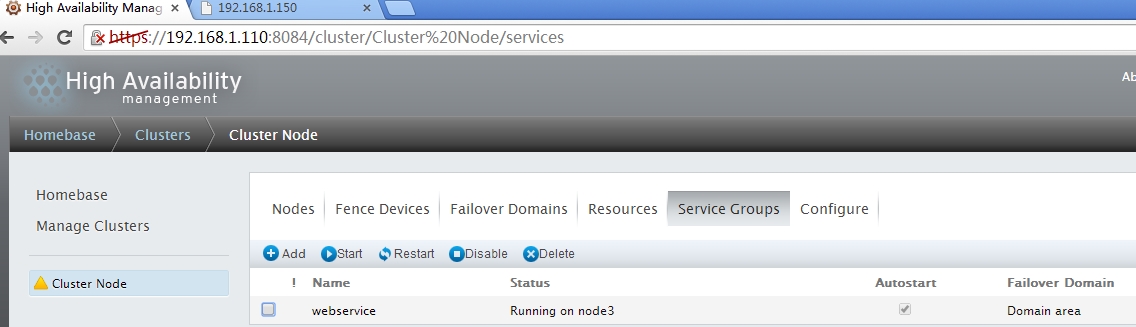
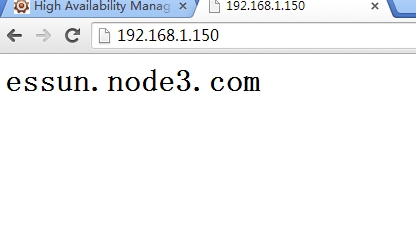
服务己经切换到node3上,访问一下网页看一下效果
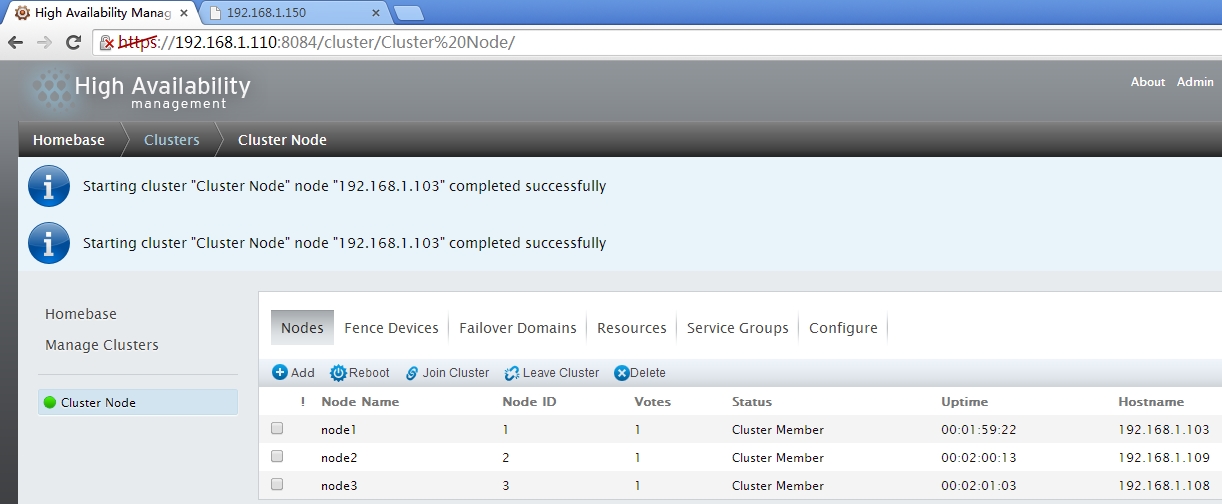
资源的确己经切换了,让node1重新上线后,资源是不会切换回到node1上的,因为在定义节时己经设置了no failback
五、命令行管理工具
1、clustat
clustat 显示集群状态。它为您提供成员信息、仲裁查看、所有高可用性服务的状态,并给出运行 clustat 命令的节点(本地)
命令参数
[root@essun html]# clustat --help

clustat: invalid option -- '-'

usage: clustat <options>

    -i <interval>      Refresh every <interval> seconds.  May not be used

                       with -x.

    -I                 Display local node ID and exit

    -m <member>        Display status of <member> and exit

    -s <service>       Display status of <service> and exit

    -v                 Display version and exit

    -x                 Dump information as XML

    -Q                 Return  if quorate,  if not (no output)

    -f                 Enable fast clustat reports

    -l                 Use long format for services

#查看节点状态信息

[root@essun html]# clustat -l

Cluster Status for Cluster Node @ Wed May   ::

Member Status: Quorate

 Member Name                                        ID   Status

 ------ ----                                        ---- ------

 node1                                                   Online, Local, rgmanager

 node2                                                   Online

 node3                                                   Online

Service Information

------- -----------

Service Name      : service:webservice

  Current State   : started ()

  Flags           : none ()

  Owner           : node1

  Last Owner      : none

  Last Transition : Wed May   ::
2、clusvcadm
您可以使用 clusvcadm 命令管理 HA 服务。使用它您可以执行以下操作:
重启服务
命令参数
[root@essun html]# clusvcadm

usage: clusvcadm [command]

Resource Group Control Commands:

  -v                     Display version and exit

  -d <group>             Disable <group>.  This stops a group

                         until an administrator enables it again,

                         the cluster loses and regains quorum, or

                         an administrator-defined event script

                         explicitly enables it again.

  -e <group>             Enable <group>

  -e <group> -F          Enable <group> according to failover

                         domain rules (deprecated; always the

                         case when using central processing)

  -e <group> -m <member> Enable <group> on <member>

  -r <group> -m <member> Relocate <group> [to <member>]

                         Stops a group and starts it on another

                         cluster member.

  -M <group> -m <member> Migrate <group> to <member>

                         (e.g. for live migration of VMs)

  -q                     Quiet operation

  -R <group>             Restart a group in place.

  -s <group>             Stop <group>.  This temporarily stops

                         a group.  After the next group or

                         or cluster member transition, the group

                         will be restarted (if possible).

  -Z <group>             Freeze resource group.  This prevents

                         transitions and status checks, and is

                         useful if an administrator needs to

                         administer part of a service without

                         stopping the whole service.

  -U <group>             Unfreeze (thaw) resource group.  Restores

                         a group to normal operation.

  -c <group>             Convalesce (repair, fix) resource group.

                         Attempts to start failed, non-critical

                         resources within a resource group.

Resource Group Locking (for cluster Shutdown / Debugging):

  -l                     Lock local resource group managers.

                         This prevents resource groups from

                         starting.

  -S                     Show lock state

  -u                     Unlock resource group managers.

                         This allows resource groups to start.

#资源迁移

[root@essun html]# clusvcadm -r webservice -m node1

Trying to relocate service:webservice to node1...Success

service:webservice is now running on node1

[root@essun html]# curl http://192.168.1.150

<h1>essun.node1.com</h1>
3、cman_tool
cman_tool是一种用来管理CMAN集群管理子系统的工具集,cman_tool可以用来添加集群节点,杀死另一个集群节点或改变预期集群的选票的价值。
注意:cman_tool发出的命令会影响你的集群中的所有节点。
命令参数
[root@essun html]# cman_tool -h

Usage:

cman_tool <join|leave|kill|expected|votes|version|wait|status|nodes|services|debug> [options]

Options:

  -h               Print this help, then exit

  -V               Print program version information, then exit

  -d               Enable debug output

join

  Cluster & node information is taken from configuration modules.

  These switches are provided to allow those values to be overridden.

  Use them with extreme care.

  -m <addr>        Multicast address to use

  -v <votes>       Number of votes this node has

  -e <votes>       Number of expected votes for the cluster

  -p <port>        UDP port number for cman communications

  -n <nodename>    The name of this node (defaults to hostname)

  -c <clustername> The name of the cluster to join

  -N <id>          Node id

  -C <module>      Config file reader (default: xmlconfig)

  -w               Wait until node has joined a cluster

  -q               Wait until the cluster is quorate

  -t               Maximum time (in seconds) to wait

  -k <file>        Private key file for Corosync communications

  -P               Don't set corosync to realtime priority

  -X               Use internal cman defaults for configuration

  -A               Don't load openais services

  -D<fail|warn|none> What to do about the config. Default (without -D) is to

                   validate the config. with -D no validation will be done.

                   -Dwarn will print errors but allow the operation to continue.

  -z           Disable stderr debugging output.

wait               Wait until the node is a member of a cluster

  -q               Wait until the cluster is quorate

  -t               Maximum time (in seconds) to wait

leave

  -w               If cluster is in transition, wait and keep trying

  -t               Maximum time (in seconds) to wait

  remove           Tell other nodes to ajust quorum downwards if necessary

  force            Leave even if cluster subsystems are active

kill

  -n <nodename>    The name of the node to kill (can specify multiple times)

expected

  -e <votes>       New number of expected votes for the cluster

votes

  -v <votes>       New number of votes for this node

status             Show local record of cluster status

nodes              Show local record of cluster nodes

  -a                 Also show node address(es)

  -n <nodename>      Only show information for specific node

  -F <format>        Specify output format (see man page)

services           Show local record of cluster services

version

  -r               Reload cluster.conf and update config version.

  -D <fail,warn,none> What to do about the config. Default (without -D) is to

                   validate the config. with -D no validation will be done. -Dwarn will print errors

                   but allow the operation to continue

  -S               Don't run ccs_sync to distribute cluster.conf (if appropriate)

#查看节点属性

[root@essun html]# cman_tool status

Version: 6.2.

Config Version:

Cluster Name: Cluster Node

Cluster Id:

Cluster Member: Yes

Cluster Generation:

Membership state: Cluster-Member

Nodes:

Expected votes:

Total votes:

Node votes:

Quorum:

Active subsystems:

Flags:

Ports Bound:

Node name: node1

Node ID:

Multicast addresses: 239.192.105.112

Node addresses: 192.168.1.103
Linux High Availabi RHCS的更多相关文章
- What is the Linux High Availabi
What is the Linux High Availabi 简介: 高可用性群集的出现是为了使群集的整体服务尽可能可用,以便考虑计算硬件和软件的易错性.如果高可用性群集中的主节点发生 ...
- Linux 驱动开发
linux驱动开发总结(一) 基础性总结 1, linux驱动一般分为3大类: * 字符设备 * 块设备 * 网络设备 2, 开发环境构建: * 交叉工具链构建 * NFS和tftp服务器安装 3, ...
- Linux RHCS 基础维护命令
本文只是介绍Linux RHCS最基本的一些维护命令,属于DBA应该了解的层面. 查看集群状态 集群正常启动 集群正常关闭 查看服务是否关闭开机启动 1. 查看集群状态 clustat cman_to ...
- linux RHCS集群 高可用web服务器
RHCS集群,高可用服务器 高可用 红帽集群套件,提供高可用性,高可靠性,负载均衡,快速的从一个节点切换到另一个节点(最多16个节点)负载均衡 通过lvs提供负载均衡,lvs将负载通过负载分配策略,将 ...
- 马哥linux运维初级+中级+高级 视频教程 教学视频 全套下载(近50G)
马哥linux运维初级+中级+高级 视频教程 教学视频 全套下载(近50G)目录详情:18_02_ssl协议.openssl及创建私有CA18_03_OpenSSH服务及其相关应用09_01_磁盘及文 ...
- 《Linux企业应用案例精解(第2版)》新书发售啦
本书在出版当年就获得了不错的销量,同时被中国科学院国家科学图书馆.中国国家图书馆.首都图书馆.清华大学.北京大学等上百所国内综合性大学图书馆收录为馆藏图书,在IT业界赢得了良好的口碑.随后2012年年 ...
- Linux 集群
html,body { } .CodeMirror { height: auto } .CodeMirror-scroll { } .CodeMirror-lines { padding: 4px 0 ...
- RedHat 6.7 Enterprise x64环境下使用RHCS部署Oracle 11g R2双机双实例HA
环境 软硬件环境 硬件环境: 浪潮英信服务器NF570M3两台,华为OceanStor 18500存储一台,以太网交换机两台,光纤交换机两台. 软件环境: 操作系统:Redhat Enterpris ...
- RedHat 6.7 Enterprise x64环境下使用RHCS部署Oracle 11g R2双机HA
环境 软硬件环境 硬件环境: 浪潮英信服务器NF570M3两台,华为OceanStor 18500存储一台,以太网交换机两台,光纤交换机两台. 软件环境: 操作系统:Redhat Enterprise ...
随机推荐
- 25 The Go image/draw package go图片/描绘包:图片/描绘包的基本原理
The Go image/draw package go图片/描绘包:图片/描绘包的基本原理 29 September 2011 Introduction Package image/draw de ...
- python中的多进程
具体参考这个博客地址:http://www.cnblogs.com/lxmhhy/p/6052167.html
- 从源码分析StringUtils包
今天用到StringUtils.join方法,闲来无聊,看了下源码 当然不可能自己分析,你傻啊,在这里推荐一个别人分析的; http://blog.csdn.net/baidu_31071595/ar ...
- 获取随机字符串的方法 GetRandomString
方法1:推荐方便. System.Hash 单元 Memo1.Lines.Add(THash.GetRandomString(50)); 方法二(自己写的): function TStrApi.Sui ...
- (二) solr 索引数据导入:xml格式
xml 是最常用的数据索引格式,不仅可以索引数据,还可以对文档与字段进行增强,从而改变它们的重要程度. 下面就是具体的实现方式: schema.xml的字段配置部分如下: <field name ...
- python 统计MySQL大于100万的表
一.需求分析 线上的MySQL服务器,最近有很多慢查询.需要统计出行数大于100万的表,进行统一优化. 需要筛选出符合条件的表,统计到excel中,格式如下: 库名 表名 行数 db1 users 1 ...
- Spark(六)Spark之开发调优以及资源调优
Spark调优主要分为开发调优.资源调优.数据倾斜调优.shuffle调优几个部分.开发调优和资源调优是所有Spark作业都需要注意和遵循的一些基本原则,是高性能Spark作业的基础:数据倾斜调优,主 ...
- C++ 内存分配(new,operator new)详解
参考:C++ 内存分配(new,operator new)详解 如何限制对象只能建立在堆上或者栈上 new运算符和operator new() new:指我们在C++里通常用到的运算符,比如A* a ...
- Jersey入门二:运行项目
1.项目有了,在终端窗口进入项目的根目录(即 \simple-service ) 2.现在先测试运行下: mvn clean test  项目将会被编译,并且进行单元测试  上面可以看看到测试通过 ...
- mysql proxy代理安装和配置
mysql proxy代理安装和配置 服务器说明: 192.168.1.219 mysql主库(主从复制) 192.168.1.177 mysql从库(主从复制) 192.168.1.202 ...