
windows下redis安装及应用
一、下载安装Redis(windows版本)
1、下载地址:https://github.com/MicrosoftArchive/redis/releases
2、安装:
1)打开运行窗口,输出cmd,进入DOS命令窗口。然后打开至redis目录,执行redis-service redis.windows.conf命令(下图为安装成功)。
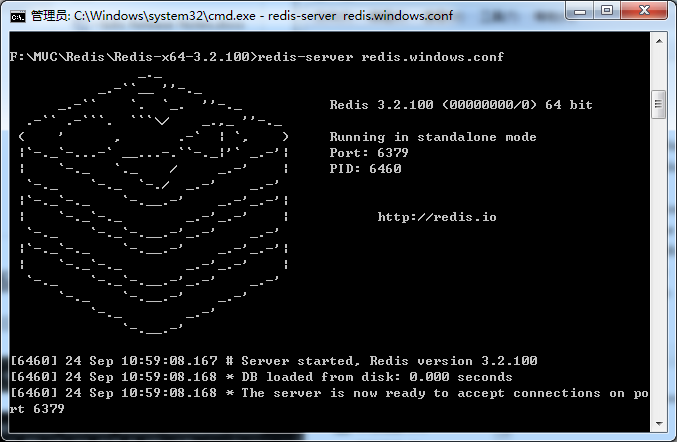
2)这个窗口要保持开启关闭时redis服务会自动关闭,所以需要把redis添加到windows服务(可以保存成两个bat批处理文件)。
安装命令:redis-server.exe --service-install redis.windows.conf --loglevel verbose
卸载命令:redis-server --service-uninstall
二、.net环境应用,以ServiceStack.Redis类库为例(功能:删除商品下Key值为xxxxx的缓存)。
1、定义redis单独配置文件。
1)web.config


2)redis.config
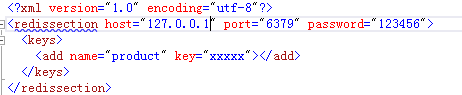
2、定义RedisSection类,redis相关属性等。
namespace Demo.Util

{

    public class RedisSection : ConfigurationSection

    {

        private static RedisSection _instance;

        public static RedisSection Instatce

        {

            get

            {

                _instance = ConfigurationManager.GetSection("redissection") as RedisSection;

                return _instance;

            }

        }

        /// <summary>

        /// 服务器

        /// </summary>

        [ConfigurationProperty("host", IsRequired = true)]

        public string Host

        {

            get { return this["host"].ToString(); }

        }

        /// <summary>

        /// 端口号

        /// </summary>

        [ConfigurationProperty("port", IsRequired = true)]

        public string Port

        {

            get { return this["port"].ToString(); }

        }

        /// <summary>

        /// 密码

        /// </summary>

        [ConfigurationProperty("password", IsRequired = false)]

        public string Password

        {

            get { return this["password"].ToString(); }

        }

        /// <summary>

        /// 过期时间 单位:小时

        /// </summary>

        [ConfigurationProperty("expireTime", IsRequired = false)]

        public int ExpireTime

        {

            get { return int.Parse(this["expireTime"].ToString()); }

        }

        /// <summary>

        /// 最大写链接数

        /// </summary>

        [ConfigurationProperty("MaxWritePoolSize", IsRequired = false, DefaultValue = )]

        public int MaxWritePoolSize

        {

            get

            {

                int maxWritePoolSize = (int)base["MaxWritePoolSize"];

                return maxWritePoolSize >  ? maxWritePoolSize : ;

            }

            set

            {

                base["MaxWritePoolSize"] = value;

            }

        }

        /// <summary>

        /// 最大读链接数

        /// </summary>

        [ConfigurationProperty("MaxReadPoolSize", IsRequired = false, DefaultValue = )]

        public int MaxReadPoolSize

        {

            get

            {

                int maxReadPoolSize = (int)base["MaxReadPoolSize"];

                return maxReadPoolSize >  ? maxReadPoolSize : ;

            }

            set

            {

                base["MaxReadPoolSize"] = value;

            }

        }

        /// <summary>

        /// 自动重启

        /// </summary>

        [ConfigurationProperty("AutoStart", IsRequired = false, DefaultValue = true)]

        public bool AutoStart

        {

            get

            {

                return (bool)base["AutoStart"];

            }

            set

            {

                base["AutoStart"] = value;

            }

        }

        [ConfigurationProperty("keys", IsDefaultCollection = true)]

        public KeyCollection Keys

        {

            get { return this["keys"] as KeyCollection; }

        }

    }

    public class KeyCollection : ConfigurationElementCollection

    {

        protected override ConfigurationElement CreateNewElement()

        {

            return new KeyElement();

        }

        protected override object GetElementKey(ConfigurationElement element)

        {

            return ((KeyElement)element).Name;

        }

        public KeyElement this[int index]

        {

            get

            {

                return this.BaseGet(index) as KeyElement;

            }

        }

        new public KeyElement this[string Name]

        {

            get

            {

                return (KeyElement)BaseGet(Name);

            }

        }

        new public int Count

        {

            get { return base.Count; }

        }

    }

    public class KeyElement : ConfigurationElement

    {

        [ConfigurationProperty("name", IsRequired = false)]

        public string Name

        {

            get { return this["name"].ToString(); }

        }

        [ConfigurationProperty("key", IsRequired = true)]

        public string Key

        {

            get { return this["key"].ToString(); }

        }

    }

}
3、定义RedisHelper类,redis相关操作。
public class RedisHelper

    {

        private static string password = string.IsNullOrEmpty(RedisSection.Instatce.Password) ? "" : RedisSection.Instatce.Password + "@";

        //Redis服务器和端口号(密码@127.0.0.1:6379)

        private static string RedisPath = string.Format("{0}:{1}", password + RedisSection.Instatce.Host, RedisSection.Instatce.Port);

        //过期时间(小时)

        //private static int ExpireTime = RedisSection.Instatce.ExpireTime;

        private static PooledRedisClientManager prcm = CreateManager(new string[] { RedisPath }, new string[] { RedisPath });

        /// <summary>

        /// 缓存池

        /// </summary>

        /// <param name="readWriteHosts">“写”链接池链接数</param>

        /// <param name="readOnlyHosts">“读”链接池链接数</param>

        /// <returns></returns>

        private static PooledRedisClientManager CreateManager(string[] readWriteHosts, string[] readOnlyHosts)

        {

            // 支持读写分离,均衡负载

            return new PooledRedisClientManager(readWriteHosts, readOnlyHosts, new RedisClientManagerConfig

            {

                MaxWritePoolSize = RedisSection.Instatce.MaxWritePoolSize,

                MaxReadPoolSize = RedisSection.Instatce.MaxReadPoolSize,

                AutoStart = RedisSection.Instatce.AutoStart

            });

        }

        public static void Remove(string key)

        {

            using (var redis = prcm.GetClient())

            {

                redis.Remove(key);

            }

        }

        public static void RemoveAll(IEnumerable<string> keys)

        {

            using (var redis = prcm.GetClient())

            {

                redis.RemoveAll(keys);

            }

        }

    }
4、使用
var key = RedisSection.Instatce.Keys["product"].Key;

Util.Redis.RedisHelper.Remove(key);
windows下redis安装及应用的更多相关文章
- windows下Redis安装及利用java操作Redis
一.windows下Redis安装 1.Redis下载 下载地址:https://github.com/MicrosoftArchive/redis 打开下载地址后,选择版本 然后选择压缩包 下载 R ...
- windows下redis安装和配置
windows下redis安装和配置 redis介绍 Redis是一个开源,高级的键值存储和一个适用的解决方案,用于构建高性能,可扩展的Web应用程序. Redis有三个主要特点,使它优越于其它键值数 ...
- Windows下Redis安装配置和使用注意事项
Windows下Redis安装配置和使用注意事项 一:下载 下载地址: https://github.com/microsoftarchive/redis/releases 文件介绍: 本文以3.2. ...
- Windows下Redis安装+可视化工具Redis Desktop Manager使用
Redis是有名的NoSql数据库,一般Linux都会默认支持.但在Windows环境中,可能需要手动安装设置才能有效使用.这里就简单介绍一下Windows下Redis服务的安装方法,希望能够帮到你. ...
- windows下redis安装
最近因公司项目原因,去了趟昆明出差,其中第一次接触安装redis,配置sentinel,学习到不少,但也都是皮毛而已,本随笔记下所学知识. 1.首先介绍下redis,来源自百度百科 redis是一个k ...
- windows下redis安装及配置
1.简介: redis是一个高性能的key-value数据库:redis能读的速度为11万次/秒,写的速度是8.1万次/秒 redis支持丰富的数据类型:String, List, Hash(map) ...
- Windows下Redis安装及使用
1.下载安装Redis(安装直接下一步就行,此步骤省略) Redis-x64-3.2.100.exe 2.Redis使用 安装目录如下: ①cmd启动redis: ②将redis安装为服务 此时如果安 ...
- 1.windows下Redis安装
参考文档:https://www.cnblogs.com/Leo_wl/p/6392196.html?utm_source=itdadao&utm_medium=referral Redis数 ...
- Windows下Redis安装过程
1.去github下载Redis-x64-2.8.2402.zip压缩包 2.将压缩包解压到你要安装的目录下 3.将redis设置为开机自启动服务 redis-server --service-ins ...
随机推荐
- 内部存储 openFileInputStream openFileOutputStream
package com.qianfeng.gp08_day24_internalstorage; import java.io.FileInputStream; import java.io.File ...
- 接触mybatis使用
1.mybatis mybatis是一个自定义sql.存储过程和高级映射的持久层框架,是Apache下的顶级项目. mybatis可以让程序员将主要精力放在sql上,通过mybatis提供的映射方式. ...
- Castle ActiveRecord学习(三)数据映射及特性描述
Model中的Demo: using Castle.ActiveRecord; using Castle.ActiveRecord.Queries; using System; using Syste ...
- MVC,MVP,MVVM区别联系
本质上都是MVC,MVC在不同技术中的应用衍生出MVP,MVVM MVC:b/s MVP:c/s,尤其winform MVVM:wpf http://www.codeproject.com/Artic ...
- SqlServer中批量update
现在我有两张表分别是S_PERSON,S_USER S_PERSON S_USER 我现在想把S_USER表中的ACCOUNT批量修改成S_PERSON的ACCOUNT 我们可以发现S_USER表中有 ...
- Netty 零拷贝(三)Netty 对零拷贝的改进
Netty 零拷贝(三)Netty 对零拷贝的改进 Netty 系列目录 (https://www.cnblogs.com/binarylei/p/10117436.html) Netty 的&quo ...
- 开始Java之旅
从今天起,cgg将给大家讲讲Java这种神奇的东西. 至于配置环境变量,大家可以看看我的博客:环境变量上面有详细解释. 下面先给大家一个公式: public class [文件名]{ ...
- 2018.08.28 洛谷P3345 [ZJOI2015]幻想乡战略游戏(点分树)
传送门 题目就是要求维护带权重心. 因此破题的关键点自然就是带权重心的性质. 这时发现直接找带权重心是O(n)的,考虑优化方案. 发现点分树的树高是logn级别的,并且对于以u为根的树,带权重心要么就 ...
- 《Linux多线程服务端编程——使用muduo C++网络库》读书笔记
第一章 线程安全的对象生命期管理 第二章 线程同步精要 第三章 多线程服务器的适用场合与常用编程模型 第四章 C++多线程系统编程精要 1.(P84)11个常用的最基本Pthreads函数: 2个:线 ...
- HDU 3247 Resource Archiver (AC自动机+BFS+状压DP)
题意:给定 n 个文本串,m个病毒串,文本串重叠部分可以合并,但合并后不能含有病毒串,问所有文本串合并后最短多长. 析:先把所有的文本串和病毒都插入到AC自动机上,不过标记不一样,可以给病毒标记-1, ...