
python爬虫(1)——BeautifulSoup库函数find_all() (转)
原文地址:http://blog.csdn.net/depers15/article/details/51934210
python——BeautifulSoup库函数find_all()
一、语法介绍
find_all( name , attrs , recursive , string , **kwargs )

find_all() 方法搜索当前tag的所有tag子节点,并判断是否符合过滤器的条件
二、参数及用法介绍
1、name参数
这是最简单而直接的一种办法了,我么可以通过html标签名来索引;

sb = soup.find_all('img')
2、keyword参数
所谓关键字参数其实就是通过一个html标签的id、href(这个主要指的是a标签的 )和title,我测试了class,这个方法好像不行,不过没有关系,下面我会谈到这个点的!
soup.find_all(href=re.compile("elsie"))
# [<a class="sister" href="http://example.com/elsie" id="link1">Elsie</a>]
soup.find_all(id='link2')
# [<a class="sister" href="http://example.com/lacie" id="link2">Lacie</a>]
这里的true指的就是选中所有有id这个属性的标签;
soup.find_all(id=True)
# [<a class="sister" href="http://example.com/elsie" id="link1">Elsie</a>,
# <a class="sister" href="http://example.com/lacie" id="link2">Lacie</a>,
# <a class="sister" href="http://example.com/tillie" id="link3">Tillie</a>]
当然还可以设置多个筛选的属性;
soup.find_all(href=re.compile("elsie"), id='link1')
# [<a class="sister" href="http://example.com/elsie" id="link1">three</a>]
还有有些属性在搜索时就不能使用,就比如HTML5中的 data-* 属性,咋办?
data_soup = BeautifulSoup('<div data-foo="value">foo!</div>')
data_soup.find_all(data-foo="value")
# SyntaxError: keyword can't be an expression
但是可以通过 find_all() 方法的 attrs 参数定义一个字典参数来搜索包含特殊属性的tag:
data_soup.find_all(attrs={"data-foo": "value"})
# [<div data-foo="value">foo!</div>]
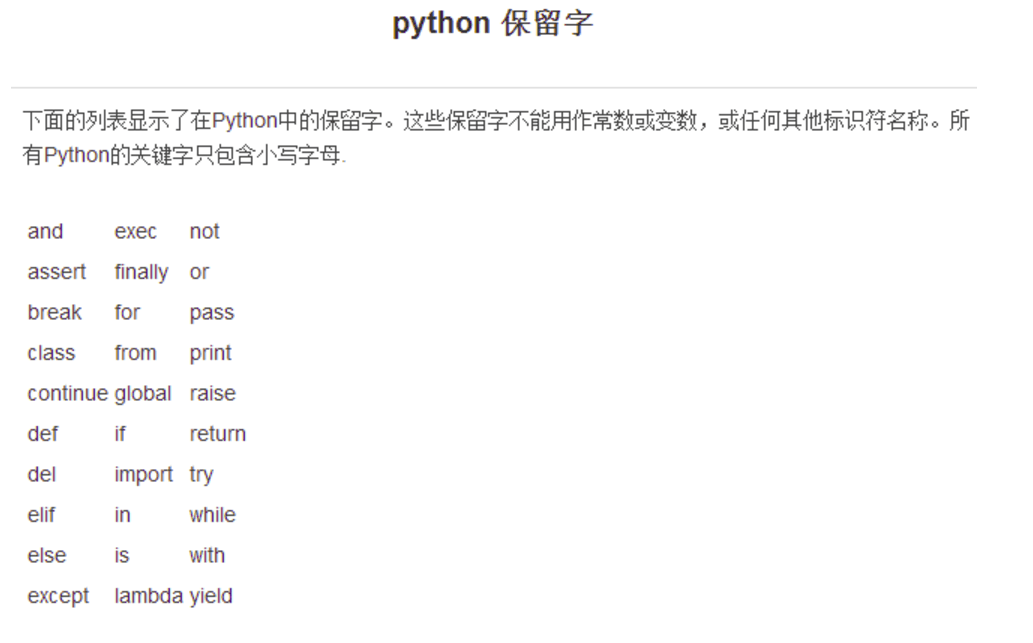
虽然我们不能像id他们那样使用,因为class在python中是保留字(保留字(reserved word),指在高级语言中已经定义过的字,使用者不能再将这些字作为变量名或过程名使用。
),所以呢,直接使用是回报错的,所以class_应运而生;
所以呢,顺便上一张图片,让我们看一看python都有哪些保留字:
通过标签名和属性名一起用:
soup.find_all("a", class_="sister")
# [<a class="sister" href="http://example.com/elsie" id="link1">Elsie</a>,
# <a class="sister" href="http://example.com/lacie" id="link2">Lacie</a>,
# <a class="sister" href="http://example.com/tillie" id="link3">Tillie</a>]
除此之外呢,还有就是class_ 参数同样接受不同类型的 过滤器 ,字符串,正则表达式,方法或 True :当然,上面的属性也可以和标签名结合起来使用;
soup.find_all(class_=re.compile("itl"))
# [<p class="title"><b>The Dormouse's story</b></p>]
def has_six_characters(css_class):
return css_class is not None and len(css_class) == 6
soup.find_all(class_=has_six_characters)
#这里的这个函数,其实就是一个布尔值True;
# [<a class="sister" href="http://example.com/elsie" id="link1">Elsie</a>,
# <a class="sister" href="http://example.com/lacie" id="link2">Lacie</a>,
# <a class="sister" href="http://example.com/tillie" id="link3">Tillie</a>]
3.sting参数
通过 string 参数可以搜搜文档中的字符串内容.与 name 参数的可选值一样, string 参数接受 字符串 , 正则表达式 , 列表, True;
soup.find_all("a", string="Elsie")

# [<a href="http://example.com/elsie" class="sister" id="link1">Elsie</a>]
4.limit参数
这个参数其实就是控制我们获取数据的数量,效果和SQL语句中的limit一样;
soup.find_all("a", limit=2)

# [<a class="sister" href="http://example.com/elsie" id="link1">Elsie</a>,

#  <a class="sister" href="http://example.com/lacie" id="link2">Lacie</a>]
5.recursive参数
调用tag的 find_all() 方法时,Beautiful Soup会检索当前tag的所有子孙节点,如果只想搜索tag的直接子节点,可以使用参数 recursive=False;
Html:
<html>

 <head>

  <title>

   The Dormouse's story

  </title>

 </head>

...
python:
soup.html.find_all("title")

# [<title>The Dormouse's story</title>]

soup.html.find_all("title", recursive=False)

# []
所以他只获取自己的直接子节点,也就是他自己,这个标签自己就是他的直接子节点;
Beautiful Soup 提供了多种DOM树搜索方法. 这些方法都使用了类似的参数定义. 比如这些方法: find_all(): name, attrs, text, limit. 但是只有 find_all() 和 find() 支持 recursive 参数.
python爬虫(1)——BeautifulSoup库函数find_all() (转)的更多相关文章
- 使用Python爬虫库BeautifulSoup遍历文档树并对标签进行操作详解(新手必学)
为大家介绍下Python爬虫库BeautifulSoup遍历文档树并对标签进行操作的详细方法与函数下面就是使用Python爬虫库BeautifulSoup对文档树进行遍历并对标签进行操作的实例,都是最 ...
- 【Python爬虫】BeautifulSoup网页解析库
BeautifulSoup 网页解析库 阅读目录 初识Beautiful Soup Beautiful Soup库的4种解析器 Beautiful Soup类的基本元素 基本使用 标签选择器 节点操作 ...
- Python爬虫之BeautifulSoup的用法
之前看静觅博客,关于BeautifulSoup的用法不太熟练,所以趁机在网上搜索相关的视频,其中一个讲的还是挺清楚的:python爬虫小白入门之BeautifulSoup库,有空做了一下笔记: 一.爬 ...
- Python爬虫——用BeautifulSoup、python-docx爬取廖雪峰大大的教程为word文档
版权声明:本文为博主原创文章,欢迎转载,并请注明出处.联系方式:460356155@qq.com 廖雪峰大大贡献的教程写的不错,写了个爬虫把教程保存为word文件,供大家方便下载学习:http://p ...
- Python爬虫系列-BeautifulSoup详解
安装 pip3 install beautifulsoup4 解析库 解析器 使用方法 优势 劣势 Python标准库 BeautifulSoup(markup,'html,parser') Pyth ...
- Python爬虫之Beautifulsoup模块的使用
一 Beautifulsoup模块介绍 Beautiful Soup 是一个可以从HTML或XML文件中提取数据的Python库.它能够通过你喜欢的转换器实现惯用的文档导航,查找,修改文档的方式.Be ...
- Python 爬虫—— requests BeautifulSoup
本文记录下用来爬虫主要使用的两个库.第一个是requests,用这个库能很方便的下载网页,不用标准库里面各种urllib:第二个BeautifulSoup用来解析网页,不然自己用正则的话很烦. req ...
- python爬虫之BeautifulSoup
爬虫有时候写正则表达式会有假死现象 就是正则表达式一直在进行死循环查找 例如:https://social.msdn.microsoft.com/forums/azure/en-us/3f4390ac ...
- python爬虫入门--beautifulsoup
1,beautifulsoup的中文文档:https://www.crummy.com/software/BeautifulSoup/bs4/doc.zh/ 2, from bs4 import Be ...
随机推荐
- 拖放API中的drag和drop实战
原文地址:→传送门 写在前面 在HTML5之前,实现拖放功能需要借助mousedown/mousemove/mouseover/mouseout/mouseup等鼠标事件来完成,HTML5中拖放API ...
- 使用HttpClient4来构建Spring RestTemplate
Spring RestTemplate简单说明 现在REST服务已经很普及了,在我们的程序中,经常会需要调用REST API,这时候会有很多选择,原始一点的JDK自带的,再进一步点使用HttpClie ...
- php每天自动备份数据库
php每天自动备份数据库 windows中如何添加计划任务? 前提:添加windows计划任务,每天打开备份数据库的页面.1.打开http://localhost/thinkphp3.2/index. ...
- 利用PhantomJS生成网站截图
var page = require('webpage').create(); page.open('http://qq.com', function () { page.render('exampl ...
- 关于aspx.designer.cs的研究
.aspx文件..aspx.cs文件和.aspx.designer.cs的一些说明 .aspx文件:(页面)书写页面代码.存储的是页面design代码.只是放各个控件的代码,处理代码一般放在.cs文件 ...
- python初步学习-python函数(一)
python 函数 函数是组织好的,可重复使用的,用来实现单一或者相关联功能的代码段. 函数能提高应用的模块性和代码的重复利用率. 函数定义 python中函数定义有一些简单的规则: 函数代码块以de ...
- 好消息! 不用再羡慕Python有jupyter 我R也有Notebook了【附演示视频】
熟悉python的朋友可能知道jupyter notebook.它是一个Web应用程序,允许你创建和共享代码,方程,可视化和说明性文本文档.现在,我们可以在RStudio中实现R Notebook的功 ...
- ASP.NET Core 2.0 MVC 发布部署--------- Ubuntun 16.04 X64 具体操作
.Net Core 部署到Ubuntu 16.04 中的步骤 1.安装工具 1.apache 2..Net Core(dotnet-sdk-2.0) 3.Supervisor(进程管理工具,目的是服务 ...
- 构建基于TCP的应用层通信模型
各层的关系如下图,表述的是两个应用或CS间通信的过程: 通常使用TCP构建应用时,需要考虑传输层的通信协议,以便应用层能够正确识别消息请求.比如,一个请求的内容很长(如传文件),那肯定要分多次发送 ...
- mysql视图学习总结(转)
一.使用视图的理由是什么?1.安全性.一般是这样做的:创建一个视图,定义好该视图所操作的数据.之后将用户权限与视图绑定.这样的方式是使用到 了一个特性:grant语句可以针对视图进行授予权限.2.查询 ...