
C#调用windows API实现 smallpdf客户端程序进行批量压缩
一、背景
Smallpdf 网站针对PDF文件提供了非常齐全的功能:PDF 与 Word、PPT、Excel、JPG 的相互转化、PDF 的压缩、编辑、合并、分割、解密、加密等功能,用户无需注册即可免费使用。
但是不注册每小时只能处理有限的PDF,对于我们这种有大量PDF需要压缩的人来说就不太合适啦,所以购买了专业版,其在线版本提供了批量压缩的功能,需要上批量上传等待压缩后再下载(存在批量上传后,浏览器卡死或者无法压缩一直等待,以及压缩成功后无法下载,速度只有几十K),而客户端程序版本又没有批量压缩的功能,只能一篇一篇的打开压缩。
为了解解上述问题,经过考虑,准备利用其客户端的压缩功能来进行批量压缩,虽然时间花得久点,但是在本地不用考虑网络因素这些,至少非常可控,但是是不可能人工一篇一篇来压的,所以这就是这篇文章的由来。
Smallpdf website provides a very complete function for PDF files: PDF and Word, PPT, Excel, JPG mutual conversion, PDF compression, editing, merging, segmentation, decryption, encryption and other functions, users can use it for free without registration.
But if you don't register for a limited number of PDFs per hour, it's not suitable for us who have a large number of PDFs to compress, so we bought a professional version. The online version provides batch compression, which requires a batch upload waiting for compression before downloading (there are batch uploads, browsers are stuck or no browsers). The method compression has been waiting, and the compression can not be downloaded after success, the speed is only a few dozen K), and the client version of the program does not have the function of mass compression, can only open and compress one article at a time.
In order to understand the above problems, after consideration, ready to use its client compression function for batch compression, although it takes a long time, but do not consider the local network factors, at least very controllable, but it is impossible to manually press each article, so this is the origin of this article.
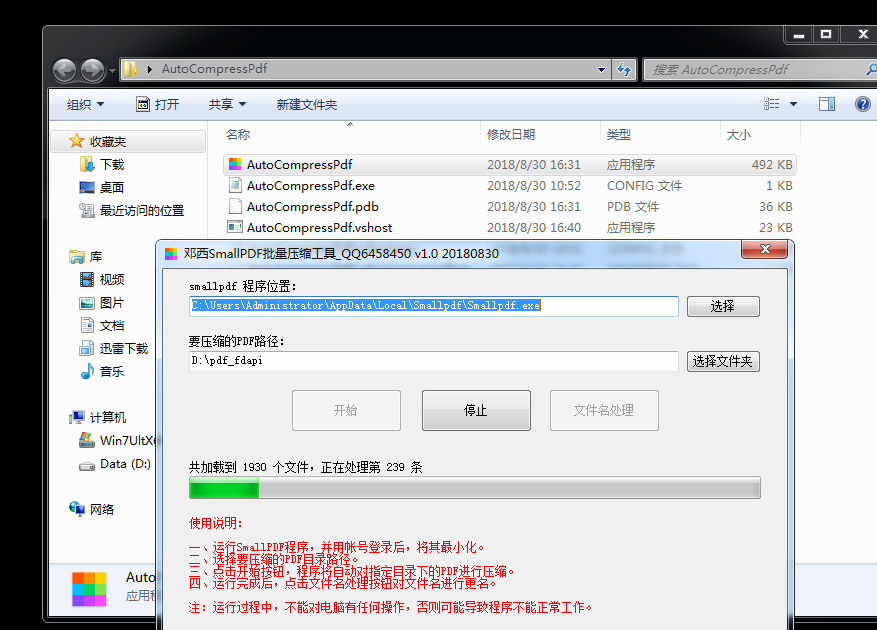
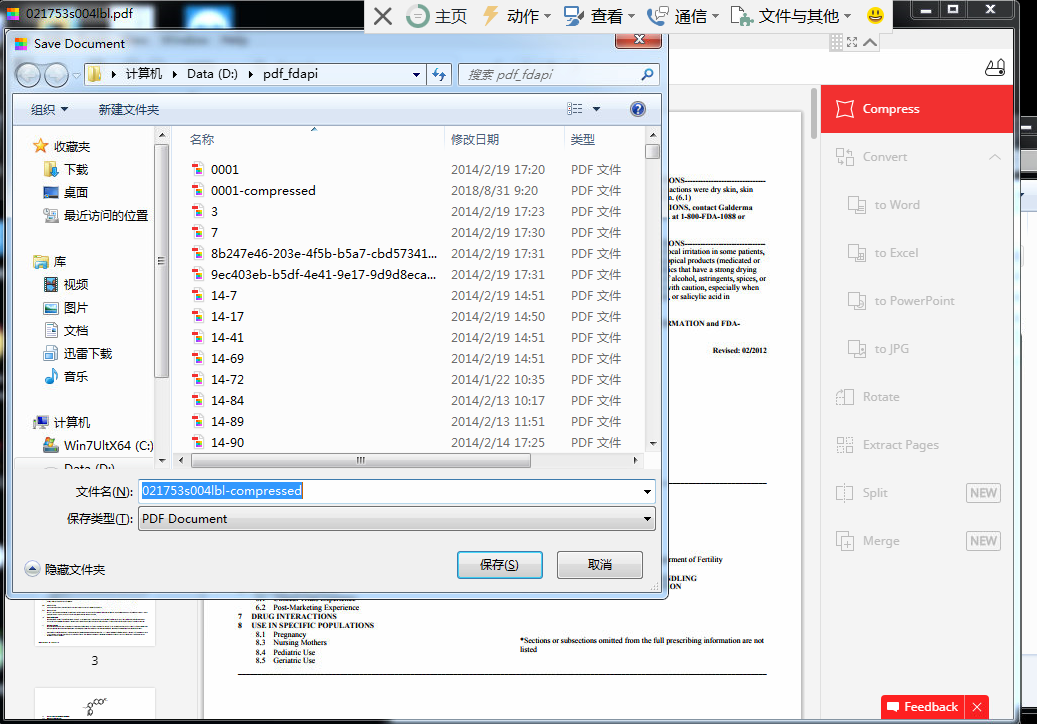
二、先看实现后的效果(录了gif图,居然显示不了):
三、实现原理
主要的原理就是调用WIN API模拟点击,辅助其它的操作完成整个功能,主要的实现就贴主要的代码了,看注释。
需要的API
        [DllImport("User32.dll", EntryPoint = "FindWindow")]

        public extern static IntPtr FindWindow(string lpClassName, string lpWindowName);

        [DllImport("User32.dll", EntryPoint = "FindWindowEx")]

        public static extern IntPtr FindWindowEx(IntPtr hwndParent, IntPtr hwndChildAfter, string lpClassName, string lpWindowName);

        [DllImport("User32.dll", EntryPoint = "SendMessage")]

        public static extern int SendMessage(IntPtr hWnd, int Msg, IntPtr wParam, string lParam);

        [DllImport("user32.dll")]

        public static extern void SwitchToThisWindow(IntPtr hWnd, bool fAltTab);

        [DllImport("user32.dll")]

        [return: MarshalAs(UnmanagedType.Bool)]

        static extern bool GetWindowRect(IntPtr hWnd, ref RECT lpRect);

        [StructLayout(LayoutKind.Sequential)]

        public struct RECT

        {

            public int Left;

            public int Top;

            public int Right;

            public int Bottom;

        }

        const int WM_CLOSE = 0x0010;

        const int WM_CLICK = 0x00F5;

          enum MouseEventFlag : uint

        {

            Move = 0x0001,

            LeftDown = 0x0002,

            LeftUp = 0x0004,

            RightDown = 0x0008,

            RightUp = 0x0010,

            MiddleDown = 0x0020,

            MiddleUp = 0x0040,

            XDown = 0x0080,

            XUp = 0x0100,

            Wheel = 0x0800,

            VirtualDesk = 0x4000,

            Absolute = 0x8000

        }

        [DllImport("user32.dll")]

        static extern void mouse_event(MouseEventFlag flags, int dx, int dy, uint data, UIntPtr extraInfo);

        [DllImport("user32.dll")]

        public static extern int SetCursorPos(int x, int y);

        public static void MouseLefClickEvent(int dx, int dy, uint data)

        {

            SetCursorPos(dx, dy);

            mouse_event(MouseEventFlag.LeftDown, dx, dy, data, UIntPtr.Zero);

            mouse_event(MouseEventFlag.LeftUp, dx, dy, data, UIntPtr.Zero);

        }
核心实现:
           var pdfFile = PdfFiles[Index];

            var pdfName = Path.GetFileName(pdfFile);

            //用smallpdf打开指定PDF

            System.Diagnostics.Process.Start(SMALLPDFEXE, $"\"{pdfFile}\"");

            while (true)

            {

                //加入等待时间,打开PDF需要一定时间

                Thread.Sleep(5000);

                //smallpdf窗体句柄

                IntPtr parentWnd = new IntPtr(0);

                parentWnd = FindWindow(null, pdfName);

                if (!parentWnd.Equals(IntPtr.Zero))

                {

                    //保存窗口句柄

                    IntPtr saveWnd = new IntPtr(0);

                    //保存按钮句柄

                    IntPtr btnSave = new IntPtr(0);

                    while (true)

                    {

                        //将指定的pdf居最上面显示

                        SwitchToThisWindow(parentWnd, true);

                        //获取窗口位置信息,用于计算压缩按钮所在位置

                        RECT rc = new RECT();

                        GetWindowRect(parentWnd, ref rc);

                        //点击压缩按钮

                        MouseFlag.MouseLefClickEvent(rc.Right - 50, rc.Top + 100, 0);

                        Thread.Sleep(2000);

                        saveWnd = FindWindow(null, "Save Document");

                        //当找到保存窗口时点击保存按钮,否则一直循环等待

                        if (!saveWnd.Equals(IntPtr.Zero))

                        {

                            btnSave = FindWindowEx(saveWnd, IntPtr.Zero, "Button", "保存(&S)");

                            if (!btnSave.Equals(IntPtr.Zero))

                            {

                                break;

                            }

                        }

                    }

                    //点击保存按钮

                    SendMessage(btnSave, WM_CLICK, IntPtr.Zero, "0");

                    //保存过程等待

                    bool isCompressed = false;

                    int j = 0, checkCount = 60;

                    while (j < checkCount)

                    {

                        //0001-compressed.pdf

                        string compressPdfName = $"{ Path.GetFileNameWithoutExtension(pdfName)}{COMPRESSED}{Path.GetExtension(pdfFile)}";

                        string compressPdfPath = Path.Combine(PDFDIR, compressPdfName);

                        if (File.Exists(compressPdfPath))

                        {

                            isCompressed = true;

                            break;

                        }

                        Thread.Sleep(1000);

                        j++;

                    }

                    //关闭窗体

                    SendMessage(parentWnd, WM_CLOSE, IntPtr.Zero, "0");

                    //如果超时都还没有压缩文件生成,认为压缩不成功,记录。

                    if (!isCompressed)

                    {

                       ///记录

                    }

                    break;

                }

            }

        }
C#调用windows API实现 smallpdf客户端程序进行批量压缩的更多相关文章
- C#调用Windows API(示例:显示任务管理器里的程序名称)
作为初学者来说,在C#中使用API确是一件令人头疼的问题. 在使用API之前你必须知道如何在C#中使用结构.类型转换.安全/不安全代码,可控/不可控代码等许多知识. 在.Net Framework S ...
- C#调用windows API的一些方法
使用C#调用windows API(从其它地方总结来的,以备查询) C#调用windows API也可以叫做C#如何直接调用非托管代码,通常有2种方法: 1. 直接调用从 DLL 导出的函数. 2. ...
- C#中调用Windows API的要点 .
介绍 API(Application Programming Interface),我想大家不会陌生,它是我们Windows编程的常客,虽然基于.Net平台的C#有了强大的类库,但是,我们还是不能否认 ...
- c# 判断窗体是否永在最前(TopMost),调用windows API
许多程序都可以把自身的窗体设为最前显示状态,这个可以参考博客c#让窗体永在最前 调用windows api 将窗体设为topmost.那么如何判断桌面上的一个窗体是否为最前显示状态呢,不光是自己的程序 ...
- c#让窗体永在最前 调用windows api 将窗体设为topmost
有时候应用程序需要将一个窗体始终位于屏幕的最前面,即使切换到其它窗体也能看到该窗体,这样的窗体就叫做TopMost窗体. 用C#制作TopMost窗体之前,首先要了解如何声明SetWindowPos函 ...
- 善于 调用Windows API
前一段时间看见别人做的一个自动填写信息并且点击登录的程序,觉得很有意思. 其实就是在程序中调用Windows的API,那么如何调用,下面就做个简单的介绍. 写的简单粗暴, 不喜轻喷. 0.首先引入名称 ...
- VBS调用Windows API函数
Demon's Blog 忘记了,喜欢一个人的感觉 Demon's Blog » 程序设计 » VBS调用Windows API函数 « 用VBS修改Windows用户密码 在VB中创建和使用 ...
- C#调用Windows API函数截图
界面如下: 下面放了一个PictureBox 首先是声明函数: //这里是调用 Windows API函数来进行截图 //首先导入库文件 [System.Runtime.InteropServices ...
- 【转】用C#调用Windows API向指定窗口发送
一.调用Windows API. C#下调用Windows API方法如下: 1.引入命名空间:using System.Runtime.InteropServices; 2.引用需要使用的方法,格式 ...
随机推荐
- 啥是IOC ?啥是DI ?
1.IOC是什么? IOC (inverse of controll)控制反转:所谓控制反转就是把创建对象(bean),和维护对象(bean)的关系的权利从程序中转移到spring的容器(appl ...
- MYSQL 的事物处理(四大特性)
什么是事物? MySQL 事务主要用于处理操作量大,复杂度高的数据.比如说,在人员管理系统中,你删除一个人员,你即需要删除人员的基本资料,也要删除和该人员相关的信息,如信箱,文章等等,这样,这些数据库 ...
- mysql远程连接错误10038--navicat for mysql (10038)
1.确定3306端口是否对外开放 如果是阿里云服务器,需要添加安全组规则 2.授权 执行sql,账号密码按照自己服务器而定 grant all privileges on *.* to 'root'@ ...
- Redis【4】Java Jedis 操作 Redis~
package redis.redis; import redis.clients.jedis.Jedis; import redis.clients.jedis.JedisPool; /** * 描 ...
- Django 解决跨域问题(写入到中间件中)
class MiddlewareMixin(object): def __init__(self, get_response=None): self.get_response = get_respon ...
- 用户吐槽不断:Android 10.0没法用
如果你升级到Android Q第三个测试版的话,那么最近是不是被设备不断重启搞崩溃了,事实上也确实如此,因为有很多用户都遇到了类似的情况,大家吐槽谷歌的声音越来越大. 不少用户发现,自己设备升级至An ...
- yum 问题
[root@localhost ~]# yum update There are no enabled repos. Run "yum repolist all" to see t ...
- 构造函数为何不能用abstract, static, final修饰
不同于方法,构造器不能是abstract, static, final的. 1.构造器不是通过继承得到的,所以没有必要把它声明为final的. 2.同理,一个抽象的构造器将永远不会被实现,所以它也不能 ...
- (转) Delete/Truncate删除,释放表空间、降低高水位线、resize释放磁盘空间相关优化
硬盘空间不足,打算删除数据库中的多余数据,但删除数据后,硬盘硬盘空间不能释放.[delete后用:alter table table_name move truncate后用:alter tab ...
- java医院交费机
1.读卡器 钱币识别器 身份证识别等 2.与银行交互 socket客户端 发送 10001 返回解析 查询余额 密码发送 3.界面展示freemaker ftl文件展示 4.hql语句 5.webse ...