
Android中的AlertDialog使用示例一(警告对话框)
在Android开发中,我们经常会需要在Android界面上弹出一些对话框,比如询问用户或者让用户选择。这些功能我们叫它Android Dialog对话框,AlertDialog实现方法为建造者模式。下面我们模拟卸载应用程序时弹出的最为普通的警告对话框,如下图:
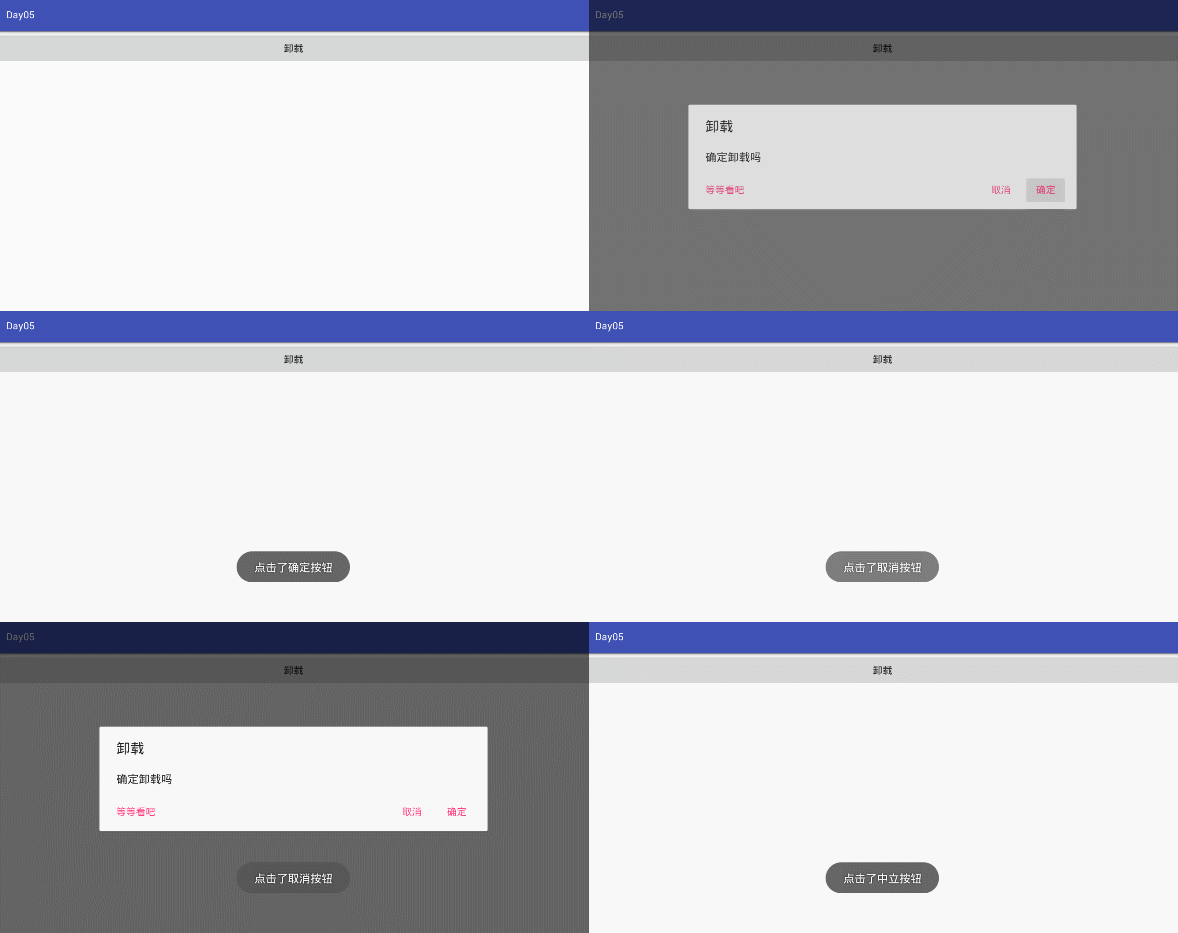
layout布局界面代码示例:
 <?xml version="1.0" encoding="utf-8"?>

 <LinearLayout xmlns:android="http://schemas.android.com/apk/res/android"

     android:orientation="vertical" android:layout_width="match_parent"

     android:layout_height="match_parent">

     <Button

         android:text="卸载"

         android:layout_width="match_parent"

         android:layout_height="wrap_content"

         android:onClick="show"

         android:id="@+id/button" />

 </LinearLayout>
Java实现代码:
 import android.content.DialogInterface;

 import android.os.Bundle;

 import android.support.annotation.Nullable;

 import android.support.v7.app.AlertDialog;

 import android.support.v7.app.AppCompatActivity;

 import android.view.View;

 import android.widget.Toast;

 /**

  * Created by panchengjia on 2016/11/21.

  */

 public class AlertDialogDemo extends AppCompatActivity {

     @Override

     protected void onCreate(@Nullable Bundle savedInstanceState) {

         super.onCreate(savedInstanceState);

         setContentView(R.layout.alterdialog);

     }

     public void show(View v){

         //实例化建造者

         AlertDialog.Builder builder = new AlertDialog.Builder(this);

         //设置警告对话框的标题

         builder.setTitle("卸载");

         //设置警告显示的图片

 //        builder.setIcon(android.R.drawable.ic_dialog_alert);

         //设置警告对话框的提示信息

         builder.setMessage("确定卸载吗");

         //设置”正面”按钮,及点击事件

         builder.setPositiveButton("确定", new DialogInterface.OnClickListener() {

             @Override

             public void onClick(DialogInterface dialog, int which) {

                 Toast.makeText(AlertDialogDemo.this,"点击了确定按钮",Toast.LENGTH_SHORT).show();

             }

         });

         //设置“反面”按钮,及点击事件

         builder.setNegativeButton("取消", new DialogInterface.OnClickListener() {

             @Override

             public void onClick(DialogInterface dialog, int which) {

                 Toast.makeText(AlertDialogDemo.this,"点击了取消按钮",Toast.LENGTH_SHORT).show();

             }

         });

         //设置“中立”按钮,及点击事件

         builder.setNeutralButton("等等看吧", new DialogInterface.OnClickListener() {

             @Override

             public void onClick(DialogInterface dialog, int which) {

                 Toast.makeText(AlertDialogDemo.this,"点击了中立按钮",Toast.LENGTH_SHORT).show();

             }

         });

         //显示对话框

         builder.show();

     }

 }
Android中的AlertDialog使用示例一(警告对话框)的更多相关文章
- Android中的AlertDialog使用示例二(普通选项对话框)
在Android开发中,我们经常会需要在Android界面上弹出一些对话框,比如询问用户或者让用户选择.这些功能我们叫它Android Dialog对话框,AlertDialog实现方法为建造者模式. ...
- Android中的AlertDialog使用示例三(单向选择确定对话框)
在Android开发中,我们经常会需要在Android界面上弹出一些对话框,比如询问用户或者让用户选择.这些功能我们叫它Android Dialog对话框,AlertDialog实现方法为建造者模式. ...
- Android中的AlertDialog使用示例五(自定义对话框)
在Android开发中,我们经常会需要在Android界面上弹出一些对话框,比如询问用户或者让用户选择.这些功能我们叫它Android Dialog对话框,AlertDialog实现方法为建造者模式. ...
- Android中的AlertDialog使用示例四(多项选择确定对话框)
在Android开发中,我们经常会需要在Android界面上弹出一些对话框,比如询问用户或者让用户选择.这些功能我们叫它Android Dialog对话框,AlertDialog实现方法为建造者模式. ...
- Android 中的AlertDialog使用自定义布局
Android使用指定的View开发弹窗功能 Android开发中进程会使用到我们的AlertDialog,但是比较可惜的是我们的Android原生的AlertDialog的效果又比较的简陋,这个时候 ...
- Android中使用AlertDialog实现几种不同的对话框
场景 app中常见的对话框. 简单的带确定取消按钮的对话框 带列表的对话框 带单项选择的对话框 带多项选择的对话框 注: 博客: https://blog.csdn.net/badao_liumang ...
- Android中ProgressDialog的简单示例
网上一般对进度条的示例都是如何显示,没有在任务结束如何关闭的文章,参考其他文章经过试验之后把整套进度条显示的简单示例如下: 建立android工程等工作都略去,Google一下就可以了. 下面来介绍主 ...
- android中的AlertDialog具体概述
android的AlertDialog具体解释 AlertDialog的构造方法所有是Protected的.所以不能直接通过new一个AlertDialog来创建出一个AlertDialog. 要创建 ...
- Android中的AlertDialog和ProgressDialog用法
手机APP对话框是很多APP都有的下面来看下怎么实现的吧, 打开Android studio 然他自动创建好布局和类; 下面我们修改activity_main.xml中的代码 <?xml ver ...
随机推荐
- VB.NET 创建文件以及文件的读写(创建随机数)
创建文件 Dim strFile As String = String.Format("C:\ErrorLog.txt", DateTime.Today.ToString(&quo ...
- Vue.js实现checkbox的全选和反选
小颖之前写的代码存在一个bug,就是当你选择全选的时候去掉后面的一个选项,再点全选结果就是反的了.很感谢博客园的朋友帮我改了这个问题嘻嘻,下面一起来看看具体是怎么实现的吧. 1.html <te ...
- 前端学PHP之数组函数
× 目录 [1]键值操作 [2]记数[3]回调函数[4]组合[5]栈和队列[6]顺序 前面的话 PHP中的数组功能非常强大,数组处理函数有着强大.灵活.高效的特点.PHP5提供了近100个操作数组的系 ...
- javascript运动系列第七篇——鼠标跟随运动
× 目录 [1]眼球转动 [2]苹果菜单[3]方向跟随 前面的话 运动除了直线运动和曲线运动两种运动形式外,还有一种运动形式是鼠标跟随运动,而这种跟随运动需要用到三角函数的相关内容或者需要进行比例运算 ...
- JMM和happens-before原则
JMM: Java Memory Model(Java内存模型),围绕着在并发过程中如何处理可见性.原子性.有序性这三个特性而建立的模型. 可见性: JMM提供了volatile变量定义.final. ...
- 应用程序框架实战二十九:Util Demo介绍
上文介绍了我选择EasyUi作为前端框架的原因,并发放了最新Demo.本文将对这个Demo进行一些介绍,以方便你能够顺利运行起来. 这个Demo运行起来以后,是EasyUi的一个简单CRUD操作,数据 ...
- 高级javascript---模块化编程
随着网站逐渐变成“互联网应用程序",嵌入网页的Javascript代码越来越庞大,越来越复杂 网页越来越像桌面程序,需要一个团队分工协作.进度管理.单元测试等等......开发者不得不使用软 ...
- 【记录】JS toUpperCase toLowerCase 大写字母/小写字母转换
小写:toLowerCase() 大写:toUpperCase() 示例代码: <script type="text/javascript" language="j ...
- Java基础--反射机制的知识点梳理
什么是反射? 正常编译执行java文件时,会生成一个.class文件,反射就是一个反编译的过程,它可以通过.class文件得到一个java对象.一个类会有很多组成部分,比如成员变量,成员方法,构造方法 ...
- composer安装yii2问题总结
今天周六,在家安装yii2的advanced版本, 过程有些坎坷, 不过最后总算安装好了. 总结一下, 主要遇到下面两个问题: 1, 下载速度慢, 主要原因是网络问题 下载yii2时, 模板(除了ve ...