
[图像处理] YUV图像处理入门3
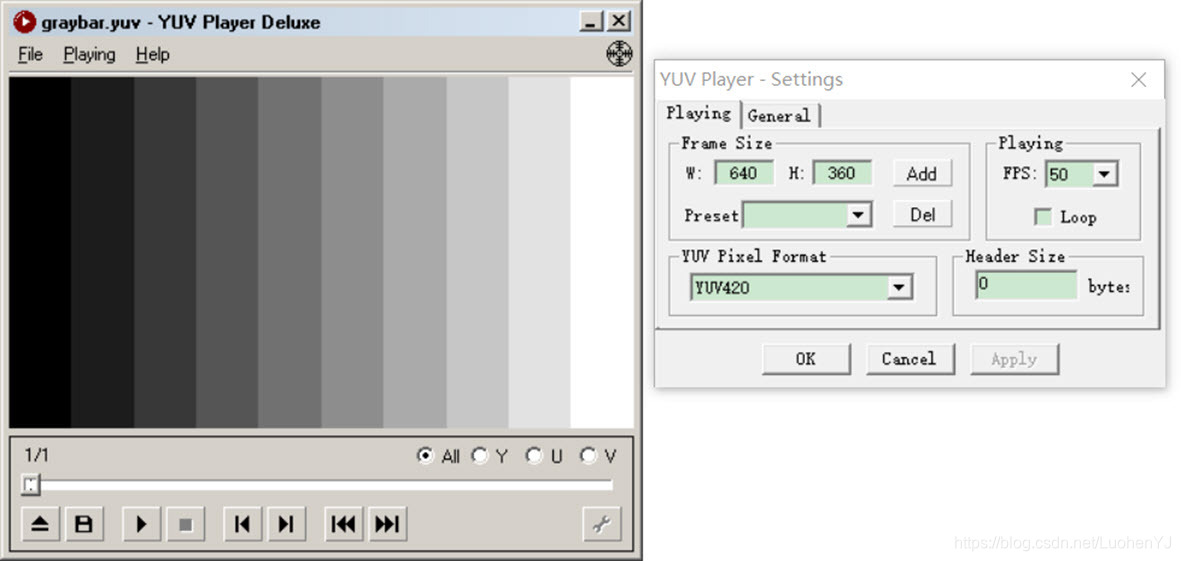
5 yuv420格式的灰阶测试图
本程序中的函数主要是为YUV420P视频数据流的第一帧图像添加边框。函数的代码如下所示:
/**

 * @file 5 yuv_graybar.cpp

 * @author luohen

 * @brief gray scale bar of yuv

 * @date 2018-12-07

 *

 */

#include "stdafx.h"

#include <stdio.h>

#include <stdlib.h>

#include <string.h>

#include <math.h>

#include <iostream>

using namespace std;

/**

 * @brief

 *

 * @param width		width of input yuv420p file

 * @param height	height of input yuv420p file

 * @param ymin		minimum value of y

 * @param ymax		maximum value of y

 * @param barnum 	Number of bars

 * @param url		location of input yuv420p file

 * @return int

 */

int yuv420_graybar(int width, int height, int ymin, int ymax, int barnum, const char *url)

{

	//每个灰度条的宽度

	int barwidth;

	//每个灰度阶次范围

	float lum_inc;

	//计算Y值

	unsigned char lum_temp;

	//uv分量宽高

	int uv_width, uv_height;

	//reading yuv image

	FILE *input_fp;

	if ((input_fp = fopen(url, "rb")) == NULL)

	{

		printf("%s open error!\n", url);

		return -1;

	}

	else

	{

		printf("%s open.\n", url);

	}

	//writing yuv image

	FILE *output_fp = fopen("video_result/gray_test.yuv", "wb+");

	int t = 0, i = 0, j = 0;

	//每个灰度条的宽度

	barwidth = width / barnum;

	//每个灰度阶次范围

	lum_inc = ((float)(ymax - ymin)) / ((float)(barnum - 1));

	//uv分量宽高

	uv_width = width / 2;

	uv_height = height / 2;

	unsigned char *data_y = new unsigned char[width * height];

	unsigned char *data_u = new unsigned char[uv_width * uv_height];

	unsigned char *data_v = new unsigned char[uv_width * uv_height];

	//Output Info

	//输出信息

	printf("Y, U, V value from picture's left to right:\n");

	for (t = 0; t < (width / barwidth); t++)

	{

		//计算Y值

		lum_temp = ymin + (char)(t * lum_inc);

		printf("%3d, 128, 128\n", lum_temp);

	}

	//保存数据

	for (j = 0; j < height; j++)

	{

		for (i = 0; i < width; i++)

		{

			t = i / barwidth;

			lum_temp = ymin + (char)(t * lum_inc);

			data_y[j * width + i] = lum_temp;

		}

	}

	for (j = 0; j < uv_height; j++)

	{

		for (i = 0; i < uv_width; i++)

		{

			data_u[j * uv_width + i] = 128;

		}

	}

	for (j = 0; j < uv_height; j++)

	{

		for (i = 0; i < uv_width; i++)

		{

			data_v[j * uv_width + i] = 128;

		}

	}

	fwrite(data_y, width * height, sizeof(unsigned char), output_fp);

	fwrite(data_u, uv_width * uv_height, sizeof(unsigned char), output_fp);

	fwrite(data_v, uv_width * uv_height, sizeof(unsigned char), output_fp);

	fclose(input_fp);

	fclose(output_fp);

	delete[] data_y;

	delete[] data_u;

	delete[] data_v;

	return 0;

}

/**

 * @brief main

 *

 * @return int

 */

int main()

{

	int state = yuv420_graybar(640, 360, 0, 255, 10, "video/graybar.yuv");

	return 0;

}
调用函数为:
int yuv420_graybar(int width, int height, int ymin, int ymax, int barnum, const char *url);实际上这部分代码和前面代码差不多,先取得YUV数据流,类似一个一维数组,读第一帧图像,然后依次读到y,u,v三个分量起始位置,再对y,u,v的像素值分别进行处理。
结果如图所示:
6 两张yuv420p图像的峰值信噪比(psnr)计算
本程序中的函数主要是比较两张yuv420p图像的峰值信噪。函数的代码如下所示:
/**

 * @file 6 yuv420_psnr.cpp

 * @author luohen

 * @brief Compute the PSNR values of two yuv files

 * @date 2018-12-08

 *

 */

#include "stdafx.h"

#include <stdio.h>

#include <stdlib.h>

#include <string.h>

#include <math.h>

#include <iostream>

using namespace std;

/**

 * @brief

 *

 * @param url1	location of input yuv420p file1

 * @param url2	location of input yuv420p file2

 * @param w		width of input yuv420p file

 * @param h		height of input yuv420p file

 * @return int

 */

int yuv420_psnr(const char *url1, const char *url2, int w, int h)

{

	//reading yuv iamges

	FILE *fp1 = fopen(url1, "rb+");

	FILE *fp2 = fopen(url2, "rb+");

	unsigned char *pic1 = new unsigned char[w * h];

	unsigned char *pic2 = new unsigned char[w * h];

	fread(pic1, 1, w * h, fp1);

	fread(pic2, 1, w * h, fp2);

	double mse_sum = 0, mse = 0, psnr = 0;

	//computing mse

	for (int j = 0; j < w * h; j++)

	{

		mse_sum += pow((double)(pic1[j] - pic2[j]), 2);

	}

	mse = mse_sum / (w * h);

	//computing psnr

	psnr = 10 * log10(255.0 * 255.0 / mse);

	printf("%5.3f\n", psnr);

	delete[] pic1;

	delete[] pic2;

	fclose(fp1);

	fclose(fp2);

	return 0;

}

/**

 * @brief main

 *

 * @return int

 */

int main()

{

	int state = yuv420_psnr("video/akiyo.yuv", "video/distort_akiyo.yuv", 352, 288);

	return 0;

}
调用函数为:
int yuv420_psnr(const char *url1, const char *url2, int w, int h);这段代码主要是计算两张图像的接近程度,psnr值具体介绍可以见文章:
https://www.cnblogs.com/ranjiewen/p/6390846.html。
本文所用的两张图像一张是akiyo视频流首帧图像,另外一张是前面为akiyo加上边框的图像。两张图像的psnr值为13.497。一般psnr值越大两张图像越接近。
7 yuv420图像顺时针旋转90度
本程序中的函数主要是将YUV420P视频数据流的第一帧图像顺时针旋转90度。函数的代码如下所示:
/**

 * @file 7 yuv_Rotation90.cpp

 * @author luohen

 * @brief 90 degree rotation of yuv420 images

 * @date 2018-12-08

 *

 */

#include "stdafx.h"

#include <stdio.h>

#include <stdlib.h>

#include <string.h>

#include <math.h>

#include <iostream>

using namespace std;

/**

 * @brief Pre-defined image size

 *

 */

#define image_h 288

#define image_w 352

/**

  * @brief

  *

  * @param url location of input yuv420p file

  * @return int

  */

int yuv420_Rotation90(const char *url)

{

	//reading yuv files

	FILE *input_fp;

	//writingyuv files

	FILE *output_fp = fopen("video_result/output_rotation.yuv", "wb+");

	//reading yuv datas

	if ((input_fp = fopen(url, "rb")) == NULL)

	{

		printf("%s open error!\n", url);

		return -1;

	}

	else

	{

		printf("%s open.\n", url);

	}

	//Input image array definition

	unsigned char input_Y[image_h][image_w];

	unsigned char input_U[image_h / 2][image_w / 2];

	unsigned char input_V[image_h / 2][image_w / 2];

	//Output image array definition

	unsigned char output_Y[image_w][image_h];

	unsigned char output_U[image_w / 2][image_h / 2];

	unsigned char output_V[image_w / 2][image_h / 2];

	int w = image_w;

	int h = image_h;

	fread(input_Y, sizeof(unsigned char), w * h, input_fp);

	fread(input_U, sizeof(unsigned char), w / 2 * h / 2, input_fp);

	fread(input_V, sizeof(unsigned char), w / 2 * h / 2, input_fp);

	//Y 90 degree rotation

	for (int x = 0; x < h; x++)

	{

		for (int y = 0; y < w; y++)

		{

			//旋转之后,输出的x值等于输入的y坐标值

			//y值等于输入列高-输入x坐标值-1

			output_Y[y][h - x - 1] = input_Y[x][y];

		}

	}

	//u 90 degree rotation

	for (int x = 0; x < h / 2; x++)

	{

		for (int y = 0; y < w / 2; y++)

		{

			//旋转之后,输出的x值等于输入的y坐标值

			//y值等于输入列高-输入x坐标值-1

			output_U[y][h / 2 - x - 1] = input_U[x][y];

		}

	}

	//v 90 degree rotation

	for (int x = 0; x < h / 2; x++)

	{

		for (int y = 0; y < w / 2; y++)

		{

			//旋转之后,输出的x值等于输入的y坐标值

			//y值等于输入列高-输入x坐标值-1

			output_V[y][h / 2 - x - 1] = input_V[x][y];

		}

	}

	fwrite(output_Y, sizeof(unsigned char), w * h, output_fp);

	fwrite(output_U, sizeof(unsigned char), w / 2 * h / 2, output_fp);

	fwrite(output_V, sizeof(unsigned char), w / 2 * h / 2, output_fp);

	fclose(input_fp);

	fclose(output_fp);

	return 0;

}

/**

 * @brief main

 *

 * @return int

 */

int main()

{

	int state = yuv420_Rotation90("video/akiyo.yuv");

	return 0;

}
调用函数为:
int yuv420_Rotation90(const char *url);这段代码主要是分别提取yuv分量,然后将y,u,v分量分别旋转90度。但是提取yuv分量和以前的代码有所不同。
首先是建立yuv三个分量输入的静态二维数组,相比使用动态数组,这种方式处理数据简单很多,但是需要实现确定输入图像的大小。
unsigned char input_Y[image_h][image_w];

unsigned char input_U[image_h / 2][image_w / 2];

unsigned char input_V[image_h / 2][image_w / 2];
然后建立旋转后的输出数组,输出数组定义是,由于是旋转90度,长宽进行了对调。
unsigned char output_Y[image_w][image_h];

unsigned char output_U[image_w / 2][image_h / 2];

unsigned char output_V[image_w / 2][image_h / 2];
其他旋转操作,就是图像赋值过程。旋转后akiyo图像尺寸变为(288,352)
结果如图所示:

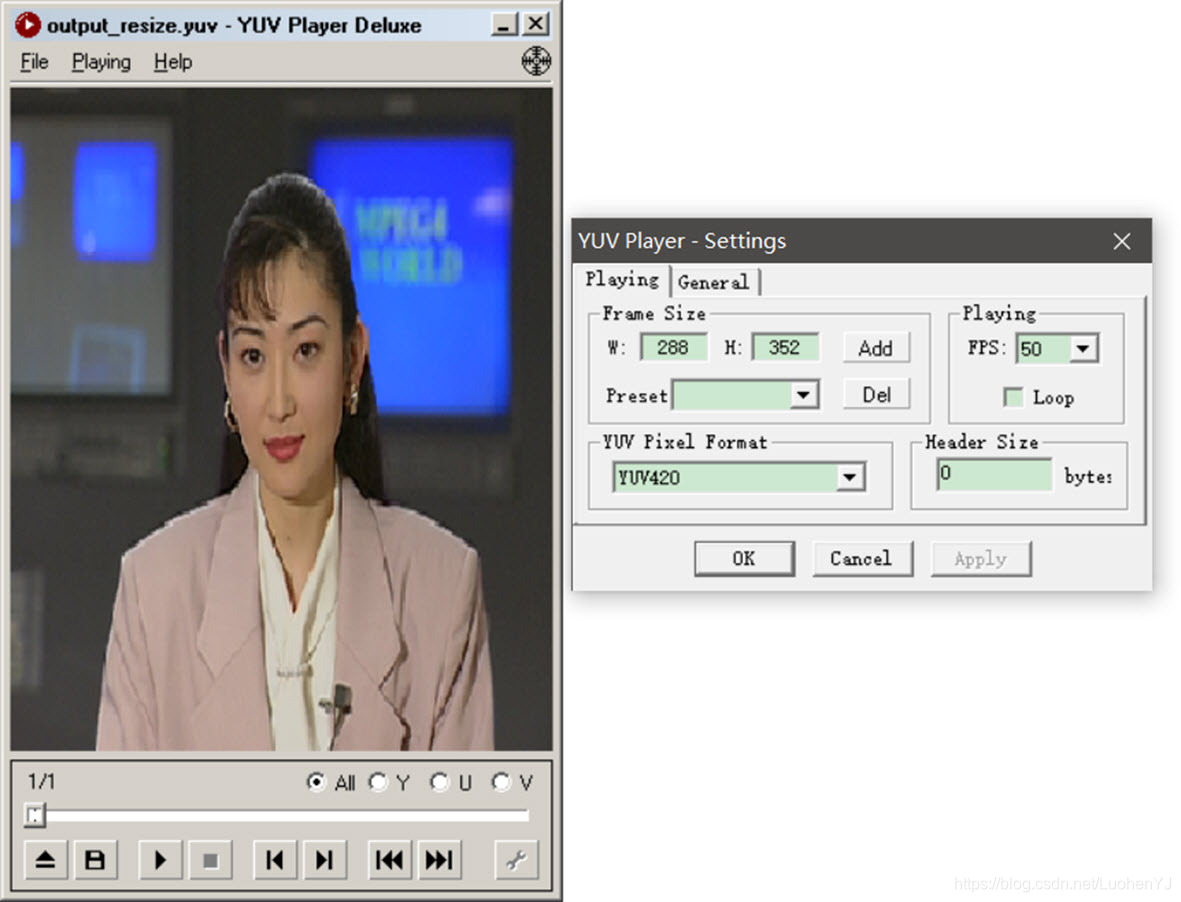
8 yuv420图像大小重置
本程序中的函数主要是对YUV420P视频数据流的第一帧图像进行缩放或者放大。类似opencv中的resize函数,函数的代码如下所示:
/**

 * @file 8 yuv_resize.cpp

 * @author luohen

 * @brief adjusting yuv image size

 * @date 2018-12-08

 *

 */

#include "stdafx.h"

#include <stdio.h>

#include <stdlib.h>

#include <string.h>

#include <math.h>

#include <string.h>

#include <iostream>

using namespace std;

#define HEIGHT 288

#define WIDTH 352

/**

 * @brief

 *

 * @param url			location of input yuv420p file

 * @param out_width		output image width

 * @param out_height	output image height

 * @return int

 */

int yuv420_resize(const char *url, int out_width, int out_height)

{

	//input array

	unsigned char yin[HEIGHT][WIDTH];

	unsigned char uin[HEIGHT / 2][WIDTH / 2];

	unsigned char vin[HEIGHT / 2][WIDTH / 2];

	//output array

	unsigned char *yout = new unsigned char[out_width * out_height];

	unsigned char *uout = new unsigned char[out_width / 2 * out_height / 2];

	unsigned char *vout = new unsigned char[out_width / 2 * out_height / 2];

	///reading yuv file

	FILE *input_fp;

	//writing yuv file

	FILE *output_fp = fopen("video_result/output_resize.yuv", "wb+");

	if ((input_fp = fopen(url, "rb")) == NULL)

	{

		printf("%s open error!\n", url);

		return -1;

	}

	else

	{

		printf("%s open.\n", url);

	}

	fread(yin, sizeof(unsigned char), HEIGHT * WIDTH, input_fp);

	fread(uin, sizeof(unsigned char), HEIGHT * WIDTH / 4, input_fp);

	fread(vin, sizeof(unsigned char), HEIGHT * WIDTH / 4, input_fp);

	//Y

	for (int i = 0; i < out_height; i++)

	{

		for (int j = 0; j < out_width; j++)

		{

			int i_in = round(i * HEIGHT / out_height);

			int j_in = round(j * WIDTH / out_width);

			yout[i * out_width + j] = yin[i_in][j_in];

		}

	}

	//U

	for (int i = 0; i < out_height / 2; i++)

	{

		for (int j = 0; j < out_width / 2; j++)

		{

			int i_in = round(i * (HEIGHT / 2) / (out_height / 2));

			int j_in = round(j * (WIDTH / 2) / (out_width / 2));

			uout[i * out_width / 2 + j] = uin[i_in][j_in];

		}

	}

	//V

	for (int i = 0; i < out_height / 2; i++)

	{

		for (int j = 0; j < out_width / 2; j++)

		{

			int i_in = round(i * (HEIGHT / 2) / (out_height / 2));

			int j_in = round(j * (WIDTH / 2) / (out_width / 2));

			vout[i * out_width / 2 + j] = vin[i_in][j_in];

		}

	}

	fwrite(yout, sizeof(unsigned char), out_width * out_height, output_fp);

	fwrite(uout, sizeof(unsigned char), out_width * out_height / 4, output_fp);

	fwrite(vout, sizeof(unsigned char), out_width * out_height / 4, output_fp);

	delete[] yout;

	delete[] uout;

	delete[] vout;

	fclose(input_fp);

	fclose(output_fp);

	return 0;

}

/**

 * @brief main

 *

 * @return int

 */

int main()

{

	int state = yuv420_resize("video/akiyo.yuv", 288, 352);

	return 0;

}
调用函数为:
int yuv420_resize(const char *url, int out_width, int out_height);这段代码也是通过事先设定yuv输入输出的静态二维数组来进行处理的。其中out_width, out_height
是输出图像的宽高,这段代码中输出图像的宽高可以设定为任意值。所用图像resize方法是最简单的最邻近插值法。
插值方法见文章:
https://blog.csdn.net/caomin1hao/article/details/81092134。
当设置调整后的图像宽高为288,352时,结果如下:
[图像处理] YUV图像处理入门3的更多相关文章
- [图像处理] YUV图像处理入门1
目前数字图像处理技术已经应用生活各个方面,但是大部分教程都是利用第三方库(如opencv)对RGB图像格式进行处理.对于YUV图像格式的图像处理教程较少.于是博主搬运总结了多个大牛的文章,总结出来这个 ...
- [图像处理] YUV图像处理入门2
1 分离YUV420中YUV分量 本程序中的函数主要是将YUV420P视频数据流的第一帧图像中的Y.U.V三个分量分离开并保存成三个文件.函数的代码如下所示: /** * @file 1 yuv_sp ...
- [图像处理] YUV图像处理入门4
9 yuv420图像截取 本程序中的函数主要是对YUV420P视频数据流的第一帧图像进行截取.类似opencv中的rect函数,函数的代码如下所示: /** * @file 9 yuv_clip.cp ...
- [图像处理] YUV图像处理入门5
12 yuv420转换为rgb(opencv mat) yuv格式具有亮度信息和色彩信息分离的特点,但大多数图像处理操作都是基于RGB格式,而且自己造轮子工作量太大.因此通常都会将yuv转换为rgb, ...
- Python图像处理库Pillow入门
http://python.jobbole.com/84956/ Pillow是Python里的图像处理库(PIL:Python Image Library),提供了了广泛的文件格式支持,强大的图像处 ...
- MATLAB图像处理_Bayer图像处理 & RGB Bayer Color分析
Bayer图像处理 Bayer是相机内部的原始图片, 一般后缀名为.raw. 很多软件都可以查看, 比如PS. 我们相机拍照下来存储在存储卡上的.jpeg或其它格式的图片, 都是从.raw格式转化 ...
- 打基础丨Python图像处理入门知识详解
摘要:本文讲解图像处理基础知识和OpenCV入门函数. 本文分享自华为云社区<[Python图像处理] 一.图像处理基础知识及OpenCV入门函数>,作者: eastmount. 一.图像 ...
- Atitit 图像处理知识点 知识体系 知识图谱v2
Atitit 图像处理知识点 知识体系 知识图谱v2 霍夫变换(Hough Transform) 霍夫变换是图像处理中从图像中识别几何形状的基本方法之一,应用很广泛,也有很多改进算法.主要用来从图像 ...
- Atitit 图像处理知识点 知识体系 知识图谱
Atitit 图像处理知识点 知识体系 知识图谱 图像处理知识点 图像处理知识点体系 v2 qb24.xlsx 基本知识图像金字塔op膨胀叠加混合变暗识别与检测分类肤色检测other验证码生成 基本 ...
随机推荐
- C#中Math.Round()实现中国式四舍五入问题
C#中的Math.Round()并不是使用的"四舍五入"法.实际上是四舍六入五取偶. 对于这个问题我们常见的解决方式是使用MidpointRounding.AwayFromZero ...
- 详解商业智能“前世今生”,“嵌入式BI”到底是如何产生的?
嵌入式分析是使任何应用程序或用户更容易获得数据分析和商业智能的技术. 商业智能是通过分析业务数据辅助决策获取数据背后的 0信息. 商业智能软件和技术包含了报表查询,OLAP,数据挖掘及高级数据分析,最 ...
- asp.net core web 解决方案多项目模板制作打包总结
一.文件夹\项目结构 1.1.文件夹 net6.0:针对.net 6.0 项目模板 net6.0pack:针对net6.0打包 1.2.项目结构 Web\WebApi多项目.各层项目.单元测试项目 目 ...
- 论文解读(GGD)《Rethinking and Scaling Up Graph Contrastive Learning: An Extremely Efficient Approach with Group Discrimination》
论文信息 论文标题:Rethinking and Scaling Up Graph Contrastive Learning: An Extremely Efficient Approach with ...
- JSP中使用response对象实现定时跳转网页
5秒后跳转到登录页面 <% response.setHeader("refresh","5;URL="login.jsp"); %>
- 使用python获取window注册表值的方法
提供regfullpath的方法,可以自行封装个regpath的函数import loggingimport pywintypes import win32apiimport win32con def ...
- JavaScript进阶(Learning Records)
背景:对JavaScript的深入学习 参考:<JavaScript高级程序设计><冴羽 JavaScript 深入> 从原型到原型链 prototype prototype是 ...
- 题解 P6355 [COCI2007-2008#3] DEJAVU
kcm的原题.. 貌似是个组合数(? \(\sf {Solution}\) 对于每一个点,我们需要统计与它同一行的点数\(a\) 和同一列的点数\(b\) ,则该点对结果\(ans\) 的贡献为\(( ...
- 机器学习中in-domine, out-domine的区别
in-domine 为域内数据,即为训练模型时使用的数据: out-domine 为域外数据,即为检验模型时使用的数据.
- jvm双亲委派机制详解
双亲委派机制 记录一下JVM的双亲委派机制学习记录. 类加载器种类 当我们运行某一个java类的main方法时,首先需要由java虚拟机的类加载器将我们要执行的main方法所在的class文件 ...