
#2 create and populate a database && realistic and practical applications (PART 2)
Extends from the last chapter , This chapter takes a look at some real-world problems that can occur as you move your application
from testing to a live website, Through this chapter you will learn more important PHP and SQL code.
First Problem : Its never safe to assume a web form will be used exactly the way it was intended.
SO try and head off these kinds of problems by anticipating that some users will misuse your forms.
So the form is in need of validation, which is the process of checking to make sure form data is OK before doing anything with it.
Validation means making the data you get is the data you expect .
Just a tip here: you can also validating data on the client by JavaScript. But the server is the last line of defense for catching bad form data,
So server-side validation can't be ignored even if you have checked the data on the client-side.
Above the last project, we should add some code to sendemail.php that examines the values in the text boxes and checks to make
sure they aren't empty. If everything checks out OK, the script sends out the emails.
A form that references itself. An HTML form that is part of the PHP script that process it is known as self-referencing.(自引用表格,表格会提交到自身)
When a form is smart enough to remember data entered into it in prior submissions, its know as a sticky form, data sticks to it!
you can make the sendemail.php a self-referencing form like this :
<form action="sendemail.php" method="post">
or you can do it like this :
<form action="<?php echo $_SERVER['PHP_SELF']; ?>" method="post">
superglobal variable $_SERVER['PHP_SELF'], which stores the name of the current script. You can replace the script URL in the form action to
$_SERVER['PHP_SELF'], and not ever have to worry about updating anything if you ever need to rename the script.
To make the form Validation and Sticky , you can edit the sendemail.php like this :
 <!DOCTYPE html PUBLIC "-//W3C//DTD XHTML 1.0 Transitional//EN"

   "http://www.w3.org/TR/xhtml1/DTD/xhtml1-transitional.dtd">

 <html xmlns="http://www.w3.org/1999/xhtml" xml:lang="en" lang="en">

 <head>

   <meta http-equiv="Content-Type" content="text/html; charset=utf-8" />

   <title>Make Me Elvis - Send Email</title>

   <link rel="stylesheet" type="text/css" href="style.css" />

 </head>

 <body>

   <img src="blankface.jpg" width="161" height="350" alt="" style="float:right" />

   <img name="elvislogo" src="elvislogo.gif" width="229" height="32" border="0" alt="Make Me Elvis" />

   <p><strong>Private:</strong> For Elmer's use ONLY<br />

   Write and send an email to mailing list members.</p>

 <?php

   if (isset($_POST['submit'])) {

     $from = 'elmer@makemeelvis.com';

     $subject = $_POST['subject'];

     $text = $_POST['elvismail'];

     $output_form = false;

     if (empty($subject) && empty($text)) {

       // We know both $subject AND $text are blank

       echo 'You forgot the email subject and body text.<br />';

       $output_form = true;

     }

     if (empty($subject) && (!empty($text))) {

       echo 'You forgot the email subject.<br />';

       $output_form = true;

     }

     if ((!empty($subject)) && empty($text)) {

       echo 'You forgot the email body text.<br />';

       $output_form = true;

     }

   }

   else {

     $output_form = true;

   }

   if ((!empty($subject)) && (!empty($text))) {

     $dbc = mysqli_connect("localhost","root","root","elvis_store")

     or die("Error connectiong to MySQL");

     echo "Connecting success! </br>";

     $query = "SELECT * FROM email_list";

     $result = mysqli_query($dbc, $query)

     or die("Error querying database!");

     echo "Quering success! </br>";

     while( $row = mysqli_fetch_array($result) ) {

       $first_name = $row['first_name'];

       $last_name = $row['last_name'];

       $to = $row['email'];

       $msg = "Dear $first_name $last_name, \n $text";

       mail($to, $subject, $msg, 'From: '.$from );

       echo 'Emai sent to :'.$to. "<br/>";

     }

     mysqli_close($dbc);

   }

   if ($output_form) {

 ?>

   <form method="post" action="<?php echo $_SERVER['PHP_SELF']; ?>">

     <label for="subject">Subject of email:</label><br />

     <input id="subject" name="subject" type="text" value="<?php echo $subject; ?>" size="30" /><br />

     <label for="elvismail">Body of email:</label><br />

     <textarea id="elvismail" name="elvismail" rows="8" cols="40"><?php echo $text; ?></textarea><br />

     <input type="submit" name="submit" value="Submit" />

   </form>

 <?php

   }

 ?>

 </body>

 </html>

Next we should the alter the table to make table rows should be uniquely identifialbe.
SQL has a command that lets you make changes to an existing table without losing any data.
ALTER TABLE table_name ADD column_name column_type
you can use it like this :
ALTER TABLE email_list ADD id INT NOT NULL AUTO_INCREMENT FIRST,
ADD PRIMARY KEY(id) #this little chunk of code tells MySQL that new id column is the primary key for the table, you can learn more detail here
After you have changed the database, you should also add validation to the addemail.php just like what we did before:
<?

/**

 * Created by IntelliJ IDEA.

 * User: beyond_acm

 * Date: 9/1/2015

 * Time: 9:58 AM

 */

?>

<!DOCTYPE html PUBLIC "-//W3C//DTD XHTML 1.0 Transitional//EN"

    "http://www.w3.org/TR/xhtml1/DTD/xhtml1-transitional.dtd">

<html xmlns="http://www.w3.org/1999/xhtml" xml:lang="en" lang="en">

<head>

    <meta http-equiv="Content-Type" content="text/html; charset=utf-8" />

    <title>Make Me Elvis - Add Email</title>

    <link rel="stylesheet" type="text/css" href="style.css" />

</head>

<body>

<img src="blankface.jpg" width="161" height="350" alt="" style="float:right" />

<img name="elvislogo" src="elvislogo.gif" width="229" height="32" border="0" alt="Make Me Elvis" />

<p>Enter your first name, last name, and email to be added to the <strong>Make Me Elvis</strong> mailing list.</p>

<?php

    if( isset($_POST['submit']) ) {

        // if submit the form

        $first_name = $_POST['firstname'];

        $last_name = $_POST['lastname'];

        $email = $_POST['email'];

        $output_form = 'no';

        //TODO the validation

        if (empty($first_name) || empty($last_name) || empty($email)) {

            // We know at least one of the input fields is blank

            echo 'Please fill out all of the email information.<br />';

            $output_form = 'yes';

        }

    } else {

        $output_form = 'yes';

    }

    //If the form is validate, then todo insert the data into the database

    if (!empty($first_name) && !empty($last_name) && !empty($email)) {

        $dbc = mysqli_connect('localhost', 'root', 'root', 'elvis_store')

        or die('Error connecting to MySQL server.');

        $query = "INSERT INTO email_list (first_name, last_name, email)  VALUES ('$first_name', '$last_name', '$email')";

        mysqli_query($dbc, $query)

        or die ('Data not inserted.');

        echo 'Customer added.';

        mysqli_close($dbc);

    }

    if ($output_form == 'yes') {

?>

    <form method="post" action="<?php echo $_SERVER['PHP_SELF']; ?>">

        <label for="firstname">First name:</label>

        <input type="text" id="firstname" name="firstname" /><br />

        <label for="lastname">Last name:</label>

        <input type="text" id="lastname" name="lastname" /><br />

        <label for="email">Email:</label>

        <input type="text" id="email" name="email" /><br />

        <input type="submit" name="submit" value="Submit" />

    </form>

<?php

    }

?>

</body>

</html>
Last we should add a removeemail.php to delete users from the table, the removeemail.php is as followed :
<?

/**

 * Created by IntelliJ IDEA.

 * User: Administrator

 * Date: 9/1/2015

 * Time: 10:29 AM

 */

?>

<!DOCTYPE html PUBLIC "-//W3C//DTD XHTML 1.0 Transitional//EN"

    "http://www.w3.org/TR/xhtml1/DTD/xhtml1-transitional.dtd">

<html xmlns="http://www.w3.org/1999/xhtml" xml:lang="en" lang="en">

<head>

    <meta http-equiv="Content-Type" content="text/html; charset=utf-8" />

    <title>Make Me Elvis - Remove Email</title>

    <link rel="stylesheet" type="text/css" href="style.css" />

</head>

<body>

    <img src="blankface.jpg" width="161" height="350" alt="" style="float:right" />

    <img name="elvislogo" src="elvislogo.gif" width="229" height="32" border="0" alt="Make Me Elvis" />

    <p>Please select the email addresses to delete from the email list and click Remove.</p>

    <form action="<?php echo $_SERVER['PHP_SELF']; ?>" method="post">

        <?php

            $dbc = mysqli_connect('localhost', 'root', 'root', 'elvis_store')

                        or die('Error connecting to MySQL server');

            //Delete the customer rows (only if the form has been submitted)

            if( isset($_POST['submit']) ) {

                foreach( $_POST['todelete'] as $delete_id ) {

                    $query = "DELETE FROM email_list WHERE id = $delete_id";

                    mysqli_query($dbc, $query)

                        or die('Error quering database');

                }

                echo 'Customer(s) removed. </br>';

            }

            //Display the customer rows with checkboxed for deleting

            $query = "SELECT * FROM email_list";

            $result = mysqli_query($dbc, $query);

            while( $row = mysqli_fetch_array($result) ) {

                echo '<input type="checkbox" value=' .$row['id']. ' name="todelete[]" />';

                echo $row['first_name'];

                echo ' '.$row['last_name'];

                echo ' '.$row['email'];

                echo '</br>';

            }

            mysqli_close($dbc);

        ?>

        <input type="submit" name="submit" value="Remove">

    </form>

</body>

</html>
if you get it right, you should see some pages as follows :
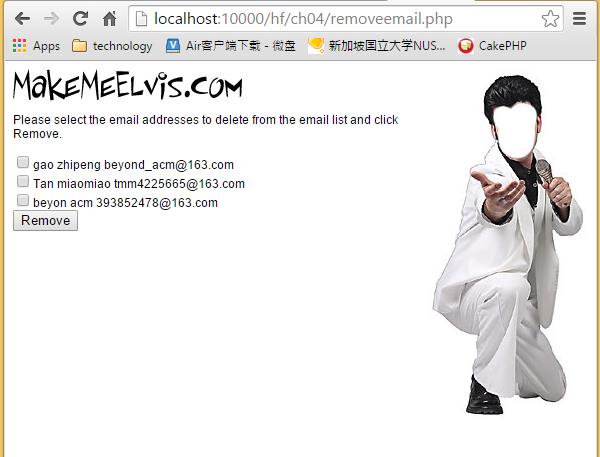
Now you can delete the registerd user stored in the database, Cool you have finished a real webapp.
#2 create and populate a database && realistic and practical applications (PART 2)的更多相关文章
- #2 create and populate a database && realistic and practical applications
The Chapter3 & Chapter4 of this book tells you how to create a realistic app on the web through ...
- Create a SQL Server Database on a network shared drive
(原文地址:http://blogs.msdn.com/b/varund/archive/2010/09/02/create-a-sql-server-database-on-a-network-sh ...
- [转]How to: Create a Report Server Database (Reporting Services Configuration)
本文转自:https://docs.microsoft.com/en-us/previous-versions/sql/sql-server-2008-r2/ms157300%28v%3dsql.10 ...
- Create an Azure SQL database in the Azure portal
Create a SQL database An Azure SQL database is created with a defined set of compute and storage res ...
- [Windows Azure] How to Create and Configure SQL Database
How to Create and Configure SQL Database In this topic, you'll step through logical server creation ...
- HiveSQLException: Error while compiling statement: No privilege 'Create' found for outputs { database:default }
今天用Hive的JDBC实例时出现了HiveSQLException: Error while compiling statement: No privilege 'Create' found for ...
- [odb-users] Create schema error (unknown database schema '')
Boris Kolpackov boris at codesynthesis.comFri May 31 11:13:02 EDT 2013 Previous message: [odb-users] ...
- [置顶] How to create Oracle 11g R2 database manually in ASM?
Step 1: Specify an Instance Identifier (SID) export ORACLE_SID=maomi Step 2: Ensure That the Require ...
- Create schema error (unknown database schema '')
Andrey Devyatka 4 years ago Permalink Raw Message Hi,Please tell me, can I use the static library in ...
随机推荐
- kafka基础一
基本概念: 消息系统的组成由生产者,消费者以及存储系统.消费者从存储系统中读取生产者生产的消息.Kafka作为分布式的消息系统支持多个生产者多个消费者,写消息时允许多个生产者写到同一个Partitio ...
- 一、 Spring IOC 简介
一 . 什么是IOC(Inversion of Control) IOC :控制反转,也称为依赖注入(DI).听起来有点云里雾里,他到底是个啥,为什么Spirng中最基础的就是它? 我们的项目其实都是 ...
- 浏览器兼容圆角Border-radius的问题
圆角css代码:border-radius只有在以下版本的浏览器:Firefox4.0+.Google Chrome 10.0+.Opera 10.5+.IE9+支持border-radius标准语法 ...
- amap -bq 192.168.5.9 80 3306
amap -bq 192.168.5.9 80 3306 查看运行在指定端口上运行的服务
- Java 中 Double 相关问题
在项目当中,对于double类型数据的使用比较频繁.尤其是处理金钱相关的数据,在使用Double类型的数据时,涉及到精度,显示,四舍五入等等问题. 1. 显示问题,当double 数据 小于 0.0 ...
- C#调用Python脚本并使用Python的第三方模块
[转载]http://zh.5long.me/2015/dotnet-call-python/ 前言 InronPython是一种在.NET和Mono上实现的Python语言,使用InronPytho ...
- linux 命令——56 ss(转)
ss是Socket Statistics的缩写.顾名思义,ss命令可以用来获取socket统计信息,它可以显示和netstat类似的内容.但ss的优势在于它能够显示更多更详细的有关TCP和连接状态的信 ...
- POJ 2104 K-th Number(分桶,线段树,主席树)
一道比较经典的数据结构题.可以用多种方式来做. 一,分桶法(平方分解). 根据数字x的大小和区间内不大于x的数字数量cnt的单调性,可知第k大数kth对应的cnt应该满足cnt≥k, 且kth是满足条 ...
- CDQ分治入门
前言 \(CDQ\)分治是一个神奇的算法. 它有着广泛的用途,甚至在某些题目中还能取代\(KD-Tree\).树套树等恶心的数据结构成为正解,而且常数还小得多. 不过它也有一定的缺点,如必须离线操作, ...
- 关于profile集合
profile集合是mongodb的慢操作日志 > db.getProfilingStatus() { , , } 可以通过getProfilingStatus来查看当前profile设置 pr ...