
Logical Volume Manager (Linux)
http://en.wikipedia.org/wiki/Logical_Volume_Manager_(Linux)
Logical Volume Manager (Linux)
| Original author(s) | Heinz Mauelshagen |
|---|---|
| Stable release | 3.12.4 (8 December 2013; 1 day ago)[±][1] |
| Preview release | 3.13-rc3(6 December 2013; 3 days ago) [±][2] |
| Written in | C |
| Operating system | Linux |
| License | GNU GPL |
| Website | kernel.org
|
LVM is a logical volume manager for the Linux kernel; it manages disk drives and similar mass-storage devices. The term "volume" refers to a disk drive or partition thereof. It was originally written in 1998 by Heinz Mauelshagen, who based its design on that of the LVM in HP-UX.
The installers for the Arch Linux, CrunchBang, CentOS, Debian, Fedora, Gentoo, Mandriva, MontaVista Linux, openSUSE,Pardus, Red Hat Enterprise Linux, Slackware, SLED, SLES, Linux Mint, and Ubuntu distributions are LVM-aware and can install a bootable system with a root filesystem on a logical volume.
Contents
[hide]
Common uses[edit]
LVM is commonly used for the following purposes:
- Managing large hard disk farms by allowing disks to be added and replaced without downtimes and services disruption, in combination with hot swapping.
- On small systems (like a desktop at home), instead of having to estimate at installation time how big a partition might need to be in the future, LVM allows file systems to be easily resized later as needed.
- Performing consistent backups by taking snapshots of the logical volumes.
- Creating single logical volumes of multiple physical volumes or entire hard disks (somewhat similar to RAID 0, but more similar to JBOD), allowing for dynamic volume resizing.
- the Ganeti solution stack relies on the Linux Logical Volume Manager
LVM can be considered as a thin software layer on top of the hard disks and partitions, which creates an abstraction of continuity and ease-of-use for managing hard drive replacement, re-partitioning, and backup.
Features[edit]
The LVM can:
- Resize volume groups online by absorbing new physical volumes (PV) or ejecting existing ones.
- Resize logical volumes (LV) online by concatenating extents onto them or truncating extents from them.
- Create read-only snapshots of logical volumes (LVM1).
- Create read-write snapshots of logical volumes (LVM2).
- Create RAID logical volumes (since recent LVM implementations, such as Red Hat Enterprise Linux v6 [1]): RAID1, RAID5, RAID6, etc.
- Stripe whole or parts of logical volumes across multiple PVs, in a fashion similar to RAID 0.
- Mirror whole or parts of logical volumes, in a fashion similar to RAID 1.
- Allocate thin-provisioned logical volumes from a pool [2]
- Move online logical volumes between PVs.
- Split or merge volume groups in situ (as long as no logical volumes span the split). This can be useful when migrating whole logical volumes to or from offline storage.
The LVM will also work in a shared-storage cluster (where disks holding the PVs are shared between multiple host computers), but requires an additional daemon to propagate state changes between cluster nodes.
Implementation[edit]
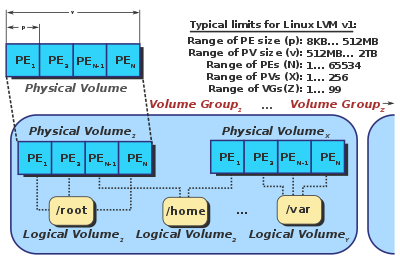

Inner workings of the version 1 of LVM. In this diagram, PE stands for a Physical Extent.

Relationship between various elements of the LVM.
LVM keeps a metadata header at the start of every physical volume, each of which is uniquely identified by a UUID. Each PV's header is a complete copy of the entire volume group's layout, including the UUIDs of all other PVs, the UUIDs of all logical volumes and an allocation map of PEsto LEs. This simplifies data recovery in the event of PV loss.
In the 2.6-series of the Linux Kernel, the LVM is implemented in terms of the device mapper, a simple block-level scheme for creating virtual block devices and mapping their contents onto other block devices. This minimizes the amount of relatively hard-to-debug kernel code needed to implement the LVM. It also allows its I/O redirection services to be shared with other volume managers (such as EVMS). Any LVM-specific code is pushed out into its user-space tools, which merely manipulate these mappings and reconstruct their state from on-disk metadata upon each invocation.
To bring a volume group online, the "vgchange" tool:
- Searches for PVs in all available block devices.
- Parses the metadata header in each PV found.
- Computes the layouts of all visible volume groups.
- Loops over each logical volume in the volume group to be brought online and:
- Checks if the logical volume to be brought online has all its PVs visible.
- Creates a new, empty device mapping.
- Maps it (with the "linear" target) onto the data areas of the PVs the logical volume belongs to.
To move an online logical volume between PVs on the same Volume Group, use the "pvmove" tool:
- Creates a new, empty device mapping for the destination.
- Applies the "mirror" target to the original and destination maps. The kernel will start the mirror in "degraded" mode and begin copying data from the original to the destination to bring it into sync.
- Replaces the original mapping with the destination when the mirror comes into sync, then destroys the original.
These device mapper operations take place transparently, without applications or file systems being aware that their underlying storage is moving.
Caveats[edit]
Until Linux kernel 2.6.31,[3] write barriers were not supported (fully supported in 2.6.33). This means that the guarantee against filesystem corruption offered by journaled file systems like ext3and XFS was negated under some circumstances.[4]
See also[edit]
References[edit]
- Jump up^ Kroah-Hartman, Greg (8 December 2013). "Linux 3.12.4 released". Linux kernel mailing list. Retrieved 9 December 2013.
- Jump up^ Torvalds, Linus (6 December 2013). "Linux 3.13-rc3". Linux kernel mailing list. Retrieved 6 December 2013.
- Jump up^ "Bug 9554 - write barriers over device mapper are not supported". 2009-07-01. Retrieved 2010-01-24.
- Jump up^ "Barriers and journaling filesystems". LWN. 2008-05-22. Retrieved 2008-05-28.
Further reading[edit]
- Lewis, AJ (2006-11-27). "LVM HOWTO". Linux Documentation Project. Retrieved 2008-03-04..
- US patent 5129088, Auslander, et al., "Data Processing Method to Create Virtual Disks from Non-Contiguous Groups of Logically Contiguous Addressable Blocks of Direct Access Storage Device", issued 1992-7-7 (fundamental patent).
- "RedHat Linux: What is Logical Volume Manager or LVM?". techmagazinez.com. 6 August 2013. Retrieved 4 September 2013.
- "LVM2 Resource Page". sourceware.org. 8 June 2012. Retrieved 4 September 2013.
- "How-To: Install Ubuntu on LVM partitions". Debuntu.org. 28 July 2007. Retrieved 4 September 2013.
- "Logical Volume Manager". markus-gattol.name. 13 July 2013.
|
|||||||||||||||||||||||||||||||||||||||||||||||||||||||||||||||||||||||||||||||||||||||||||||||||||||||
Logical Volume Manager (Linux)的更多相关文章
- Linux 系统 LVM(Logical Volume Manager)逻辑卷管理
一.前言 每个Linux使用者在安装Linux时都会遇到这样的困境:在为系统分区时,如何精确评估和分配各个硬盘分区的容量,因为系统管理员不但要考虑到 当前某个分区需要的容量,还要预见该分区以后可能需要 ...
- Linux学习-逻辑滚动条管理员 (Logical Volume Manager)
LVM 可以整合多个实体 partition 在一起, 让这些 partitions 看起来就像是一个磁盘一样!而且,还可以在未来新增或移除其他的实 体 partition 到这个 LVM 管理的磁盘 ...
- 逻辑卷管理LVM (Logical Volume Manager)
什么是LVM? LVM(Logical Volume Manager)逻辑卷管理,是一种将一个或多个硬盘的分区在逻辑上集合,相当于一个大硬盘来使用,当硬盘的空间不够使用的时候,可以继续将其它的硬盘的 ...
- Logical Volume Manager (LVM)
LVM 是一种可用在Linux内核的逻辑分卷管理器:可用于管理磁盘驱动器或其他类似的大容量存储设备. 本文提供如何在 Arch Linux 中配置和使用 Logical Volume Manager ...
- 逻辑卷管理-LVM(Logical Volume Manager)
一. 概念与由来 LVM:逻辑卷管理(Logical Volume Manager) 普通的磁盘分区管理方式在逻辑分区划分好之后就无法改变其大小,当一个逻辑分区存放不下某文件时,这个文件因为受上层文件 ...
- LVM(Logical Volume Manager)逻辑卷管理
本文实验部分,完全由本人亲自动手实践得来 文章中有部分的内容是我个人通过实验测试出来的,虽以目前本人的能力还没发现不通之处,但错误难免,所以若各位朋友发现什么错误,或有疑惑.更好的建议等,盼请各位能在 ...
- 【原理】LVM(Logical Volume Manager)动态卷管理
一张图让你学会LVM 导读 随着科技的进步,人们不知不觉的就进入了大数据的时代,数据的不断增加我们发现我们的磁盘越来越不够用了,接下来就是令人头疼的事情--加硬盘,数据的备份与还原.LVM就是Li ...
- 逻辑卷管理LVM(logical volume manager)
LVM的全名是logical volume manager,中文翻译逻辑卷管理器.之所以称为卷是因为可以将文件系统像卷一样伸长和缩短,LVM的做法是将几个物理的分区(或磁盘)通过软件组合成为一块独立的 ...
- 学习OpenStack之 (4): Linux 磁盘、分区、挂载、逻辑卷管理 (Logical Volume Manager)
0. 背景: inux用户安装Linux操作系统时遇到的一个常见的难以决定的问题就是如何正确地评估各分区大小,以分配合适的硬盘空间.普通的磁盘分区管理方式在逻辑分区划分好之后就无法改变其大小,当一个逻 ...
随机推荐
- rsync配置和同步数据
rsync的搭建配置1.环境和配置文件 rsyncd.conf(主配置文件) rsyncd.secrets(密码文件) pc1:192.168.0.1,rsync的服务器,配置rsyncd.conf文 ...
- Spring 依赖注入(一、注入方式)
首先装配一个实体类People package com.maya.model; public class People { private int id; private String name; p ...
- 刷题总结:排序机械臂(石室中学oj)(splay)
题目: 题目描述 为了把工厂中高低不等的物品按从低到高排好序,工程师发明了一种排序机械臂.它遵循一个简单的排序规则,第一次操作找到最低的物品位置 P1,并把从左起第 1 个至第 P1 个之间的物品反序 ...
- Cannot open include file: 'initializer_list': No such file or directory
Cannot open include file: 'initializer_list': No such file or directory今天使用VS2012编译一个项目的时候,遇到了这个问题,上 ...
- jiffies溢出与时间先后比较-time_after,time_before
参考地址: http://blog.csdn.net/jk110333/article/details/8177285 http://blog.chinaunix.net/uid-23629988-i ...
- react-native 适配问题
const ScreenWidth = Dimensions.get('window').width; static DimensionsTransform(px) { // 设计图纸以750为基准 ...
- es6 String.raw()
模板字符串可以是原始的: ES6还为原生的String对象,提供了一个raw方法. 若使用String.raw 作为模板字符串的前缀,则模板字符串可以是原始(raw)的.反斜线也不再是特殊字符,\n ...
- Boost Asio介绍--之一
原文:http://www.tuicool.com/articles/YbeYR3 Boost Asio介绍--之一 时间 2014-03-26 17:57:39 CSDN博客 原文 http:/ ...
- logging模块配置共享以及使用文件配置
1.配置共享 如果每个文件都配置logging,那就太繁琐了,logging提供了父子模块共享配置的机制, 会根据Logger的名称来自动加载父模块的配置.首先定义一个 main.py 文件: imp ...
- luogu P3808 【模板】AC自动机(简单版)
题目背景 这是一道简单的AC自动机模板题. 用于检测正确性以及算法常数. 为了防止卡OJ,在保证正确的基础上只有两组数据,请不要恶意提交. 管理员提示:本题数据内有重复的单词,且重复单词应该计算多次, ...