
PopupWindow 实现 查看所有手机应用弹出框

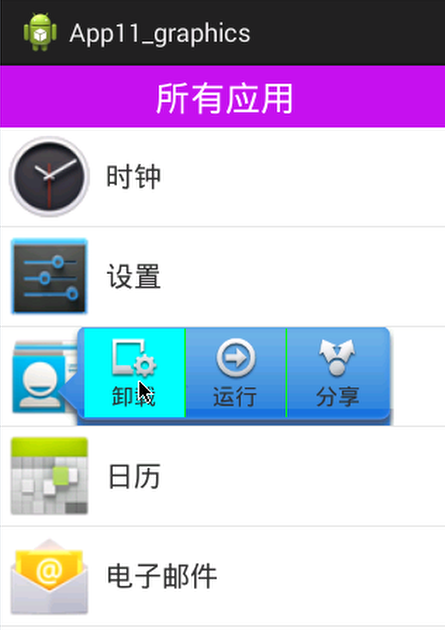
public class MainActivity extends Activity implements OnItemLongClickListener, OnClickListener {

    private ListView lv_main;
    private List<AppInfo> data;
    private AppAdapter adapter;

    private PopupWindow pw;
    private View pwView;

    @Override
    protected void onCreate(Bundle savedInstanceState) {
        super.onCreate(savedInstanceState);
        setContentView(R.layout.activity_main);

        //初始化成员变量
        lv_main = (ListView) findViewById(R.id.lv_main);
        data = getAllAppInfos();
        adapter = new AppAdapter();
        //显示列表
        lv_main.setAdapter(adapter);

        //给ListView设置item的点击监听
        lv_main.setOnItemClickListener(new OnItemClickListener() {
            /**
             * parent : ListView
             * view : 当前行的item视图对象
             * position : 当前行的下标
             */
            @Override
            public void onItemClick(AdapterView<?> parent, View view,
                    int position, long id) {
                //提示当前行的应用名称
                String appName = data.get(position).getAppName();
                //提示
                //Toast.makeText(MainActivity.this, appName, 0).show();

                if(pw==null) {
                    pwView = View.inflate(MainActivity.this, R.layout.pw_layout, null);
                    //得到子view设置点击监听
                    pwView.findViewById(R.id.ll_pw_uninstall).setOnClickListener(MainActivity.this);
                    pwView.findViewById(R.id.ll_pw_run).setOnClickListener(MainActivity.this);
                    pwView.findViewById(R.id.ll_pw_share).setOnClickListener(MainActivity.this);

                    pw = new PopupWindow(pwView, view.getWidth()-80, view.getHeight());
                    pw.setBackgroundDrawable(new BitmapDrawable());//必须指定一个背景图片,随便一个即可,不然以下设置的动画不显示
                }

                //如果正在显示, 移除
                if(pw.isShowing()) {
                    pw.dismiss();//只是不显示了, 但对象仍然在内存中
                }

                //(再)显示
                pw.showAsDropDown(view, 40, -view.getHeight());

                //缩放动画
                ScaleAnimation animation = new ScaleAnimation(0, 1, 0, 1);
                animation.setDuration(1000);
                //启动动画
                pwView.startAnimation(animation);
            }
        });

        //给LitView设置Item的长按监听
        lv_main.setOnItemLongClickListener(this);
        //设置listView的滚动监听
        lv_main.setOnScrollListener(new OnScrollListener() {

            /*
             * SCROLL_STATE_IDLE : 空闲(不动)
             * SCROLL_STATE_TOUCH_SCROLL : 跟着手指滚动
             * SCROLL_STATE_FLING : 快速滚动
             */
            //当listView的滚动状态发生改变时调用
            @Override
            public void onScrollStateChanged(AbsListView view, int scrollState) {
                Log.e("TAG", "onScrollStateChanged()..."+scrollState);
                if(scrollState==OnScrollListener.SCROLL_STATE_TOUCH_SCROLL) {
                    //移除正在显示的pw
                    if(pw!=null && pw.isShowing()) {
                        pw.dismiss();
                    }
                }
            }

            //当listView正在滚动时调用(产生move时不断调用)
            @Override
            public void onScroll(AbsListView view, int firstVisibleItemPosition,
                    int visibleItemCount, int totalItemCount) {
                Log.e("TAG", "onScroll()...");
            }
        });
    }

    class  AppAdapter extends BaseAdapter {

        @Override
        public int getCount() {
            return data.size();
        }

        @Override
        public Object getItem(int position) {
            return data.get(position);
        }

        @Override
        public long getItemId(int position) {
            // TODO Auto-generated method stub
            return 0;
        }

        //返回带数据当前行的Item视图对象
        @Override
        public View getView(int position, View convertView, ViewGroup parent) {

            //1. 如果convertView是null, 加载item的布局文件
            if(convertView==null) {
                Log.e("TAG", "getView() load layout");
                convertView = View.inflate(MainActivity.this, R.layout.item_main, null);

            }
            //2. 得到当前行数据对象
            AppInfo appInfo = data.get(position);
            //3. 得到当前行需要更新的子View对象
            ImageView imageView = (ImageView) convertView.findViewById(R.id.iv_item_icon);
            TextView textView = (TextView) convertView.findViewById(R.id.tv_item_name);
            //4. 给视图设置数据
            imageView.setImageDrawable(appInfo.getIcon());
            textView.setText(appInfo.getAppName());

            //返回convertView
            return convertView;
        }

    }

    /*
     * 得到手机中所有应用信息的列表
     * AppInfo
     *  Drawable icon  图片对象
     *  String appName
     *  String packageName
     */
    protected List<AppInfo> getAllAppInfos() {

        List<AppInfo> list = new ArrayList<AppInfo>();
        // 得到应用的packgeManager
        PackageManager packageManager = getPackageManager();
        // 创建一个主界面的intent
        Intent intent = new Intent();
        intent.setAction(Intent.ACTION_MAIN);
        intent.addCategory(Intent.CATEGORY_LAUNCHER);
        // 得到包含应用信息的列表
        List<ResolveInfo> ResolveInfos = packageManager.queryIntentActivities(
                intent, 0);
        // 遍历
        for (ResolveInfo ri : ResolveInfos) {
            // 得到包名
            String packageName = ri.activityInfo.packageName;
            // 得到图标
            Drawable icon = ri.loadIcon(packageManager);
            // 得到应用名称
            String appName = ri.loadLabel(packageManager).toString();
            // 封装应用信息对象
            AppInfo appInfo = new AppInfo(icon, appName, packageName);
            // 添加到list
            list.add(appInfo);
        }
        return list;
    }

    @Override
    public boolean onItemLongClick(AdapterView<?> parent, View view,
            int position, long id) {
        //删除当前行
            //删除当前行的数据
        data.remove(position);
            //更新列表
        //lv_main.setAdapter(adapter);//显示列表, 不会使用缓存的item的视图对象
        adapter.notifyDataSetChanged();//通知更新列表, 使用所有缓存的item的视图对象

        return true;
    }

    @Override
    public void onClick(View v) {
        switch (v.getId()) {
        case R.id.ll_pw_uninstall:
            pw.dismiss();
            Toast.makeText(this, "卸载", 0).show();
            break;
        case R.id.ll_pw_run:
            pw.dismiss();
            Toast.makeText(this, "运行", 0).show();
            break;
        case R.id.ll_pw_share:
            pw.dismiss();
            Toast.makeText(this, "分享", 0).show();
            break;

        default:
            break;
        }
    }
}
item_bg_selector
<?xml version="1.0" encoding="utf-8"?>
<selector xmlns:android="http://schemas.android.com/apk/res/android" >

    <item android:state_pressed="true">
        <shape>
            <solid android:color="#00ffff"></solid>
        </shape>
    </item>

</selector>

pw_layout

<?xml version="1.0" encoding="utf-8"?>
<LinearLayout xmlns:android="http://schemas.android.com/apk/res/android"
    android:layout_width="match_parent"
    android:layout_height="80dp"
    android:background="@drawable/local_popup_bg"
    android:orientation="horizontal"
    android:paddingLeft="20dp" >

    <LinearLayout
        android:id="@+id/ll_pw_uninstall"
        android:layout_width="0dp"
        android:layout_height="match_parent"
        android:layout_weight="1"
        android:gravity="center"
        android:orientation="vertical"
        android:background="@drawable/item_bg_selector" >

        <ImageView
            android:layout_width="wrap_content"
            android:layout_height="wrap_content"
            android:src="@drawable/img1" />

        <TextView
            android:layout_width="wrap_content"
            android:layout_height="wrap_content"
            android:text="卸载"
            android:textSize="16sp" />
    </LinearLayout>

    <View
        android:layout_width="1dp"
        android:layout_height="fill_parent"
        android:background="#00ff00" />

    <LinearLayout
        android:id="@+id/ll_pw_run"
        android:layout_width="0dp"
        android:layout_height="match_parent"
        android:layout_weight="1"
        android:gravity="center"
        android:orientation="vertical"
        android:background="@drawable/item_bg_selector" >

        <ImageView
            android:layout_width="wrap_content"
            android:layout_height="wrap_content"
            android:src="@drawable/img2" />

        <TextView
            android:layout_width="wrap_content"
            android:layout_height="wrap_content"
            android:text="运行"
            android:textSize="16sp" />
    </LinearLayout>

    <View
        android:layout_width="1dp"
        android:layout_height="fill_parent"
        android:background="#00ff00" />

    <LinearLayout
        android:id="@+id/ll_pw_share"
        android:layout_width="0dp"
        android:layout_height="match_parent"
        android:layout_weight="1"
        android:gravity="center"
        android:orientation="vertical"
        android:background="@drawable/item_bg_selector">

        <ImageView
            android:layout_width="wrap_content"
            android:layout_height="wrap_content"
            android:src="@drawable/img3" />

        <TextView
            android:layout_width="wrap_content"
            android:layout_height="wrap_content"
            android:text="分享"
            android:textSize="16sp" />
    </LinearLayout>

</LinearLayout>
PopupWindow 实现 查看所有手机应用弹出框的更多相关文章
- android 三种弹出框之一PopupWindow
PopupWindow 在android的弹出框我目前了解到的是有三种:AlertDialog,PopupWindow,Activity伪弹框, AlertDialog太熟悉了,这里就不介绍了 就先看 ...
- iOS风格的弹出框(alert,prompt,confirm)
前两天,自己写了一个简单的插件,在移动端使用,不管是安卓手机还是iOS系统的手机,弹出框统一使用iOS风格的. 该弹出框是依赖于jQuery的,当然也可以将用jq写的几句代码转换为原生代码. 今天把代 ...
- bootstrap 弹出框 另类运用
下面是我在做一个简单登录页面时,应用boostrap弹出框,通过调节做成警示框的过程,前后经过了一番波折.因为摸索过程十分有趣,最后也是成功的,使用弹出框做除了警示框的效果,下面我们来看一下吧. 首先 ...
- 自定义PopupWindow弹出框(带有动画)
使用PopupWindow来实现弹出框,并且带有动画效果 首先自定义PopupWindow public class LostPopupWindow extends PopupWindow { pub ...
- 练习PopupWindow弹出框之实现界面加载的时候显示弹出框到指定的view下面--两种延迟方法
今天在练习PopupWindow弹出框的时候,打算在界面加载的时候将弹出框展现出来并显示在指定的view下面. 初步方法是直接在OnResume方法里面直接执行showPopupWindows方法. ...
- 通用的popupwindow底部弹出框
前段时间做项目的时候,有几个底部弹出框,当时因为忙着赶进度所有就单独写了好几个popupwindow.后来就想着怎么实现一个通用的PopupWindow工具类 就是在要用到的时候创建该工具类的对象,并 ...
- [Phonegap+Sencha Touch] 移动开发19 某些安卓手机上弹出消息框 点击后不消失的解决的方法
Ext.Msg.alert等弹出框在某些安卓手机上,点击确定后不消失. 原因是: 消息框点击确定后有一段css3 transform动画,动画完毕后才会隐藏(display:none). 有些奇葩手机 ...
- 安卓自动化测试工具MonkeyRunner之使用ID进行参数化,以及List选择某项和弹出框点击确定的写法
一.List选择某项的操作步骤: 1.通过父结点得出列表各子项 2.将选择项的文本与列表中的子项进行比较 3.计算出选择项的坐标位置 截取实例: from com.android.monkeyrunn ...
- javascript基于对象的弹出框封装
先睹为快,移动端:戳这里,打开页面后点击投票查看效果.PC端测试直接切换body的overflow属性:hidden和auto一样可以,比下面相对简化,又有人说这样偶尔不行..如果你知道优缺点欢迎给出 ...
随机推荐
- arcgis10安装及破解
操作系统:win7 arcgis版本:10.0 1.运行arcgis10安装包里的esri.exe,出现以下安装界面.先点“许可管理器”的“安装”,一路点下去,什么都不用管. 2.完成后在lic ...
- wmware下载地址
https://my.vmware.com/cn/group/vmware/info?slug=desktop_end_user_computing/vmware_workstation/8_0 粗体 ...
- Drools学习笔记
Drools是一款基于Java的开源规则引擎 实现了将业务决策从应用程序中分离出来. 优点: 1.简化系统架构,优化应用 2.提高系统的可维护性和维护成本 3.方便系统的整合 4.减少编写“硬代码”业 ...
- k8s学习(二)——etcdctl工具的使用
k8s的实现核心实际上就是通过读写etcd数据库实现对资源的存储,管理和控制. k8s所有资源的本源都是存储在etcd中的一个个键值对. 理论上可以观察到etcd数据库中的数据变化.具体的使用方式如下 ...
- 2016.3.23 集成新版activiti-modeler(5.17+)到项目中
书:<activiti实战> 博客: http://www.kafeitu.me/activiti/2013/03/10/integrate-activiti-modeler.html h ...
- Android 使用意图播放本地视频
Android播放视频的方式有三种: 一.使用意图播放,调用本地安装的播放器,选择一个进行播放. 二.使用VideoView播放(VideoView事实上是对MediaPlayer的封装,使用起来非常 ...
- mongodb模拟生产环境的分片集群
分片是指数据拆分 将其分散在不同的机器上的过程,有时候也叫分区来表示这个概念.将数据分散到不同机器上 不需要功能强大的计算机就可以储存更多的数据,处理更大的负载. 几乎所有的数据库 ...
- 对国外某hotel的内网域简单渗透
Penetration Testing不单单是一个博客,更热衷于技术分享的平台. 本文将讲述对国外某一hotel的渗透测试,让更多的人安全意识得到提高,有攻才有防,防得在好,也有疏忽的地方,这就是为啥 ...
- java:注解(二)
自定义注解 使用@interface自定义注解时,自动继承了java.lang.annotation.Annotation接口,由编译程序自动完成其他细节.在定义注解时,不能继承其他的注解或接口.@i ...
- 点击出现黑色背景的解决:-webkit-tap-highlight-color:rgba(0,0,0,0)
在手机上(iphone)点击按钮的时候,屏幕总会闪动一下,这让页面看起来很不友好也不流畅.解决方案加了一句css就解决了: -webkit-tap-highlight-color:rgba(0,0,0 ...