
通用的popupwindow底部弹出框
前段时间做项目的时候,有几个底部弹出框,当时因为忙着赶进度所有就单独写了好几个popupwindow.后来就想着怎么实现一个通用的PopupWindow工具类
就是在要用到的时候创建该工具类的对象,并传入相应的框体布局,就可以实现了.
先看看效果,下面的两是调用同一个PopupWindowUtils创建的:
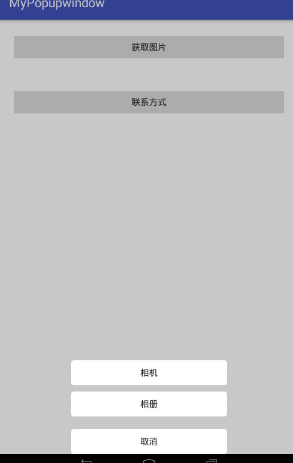
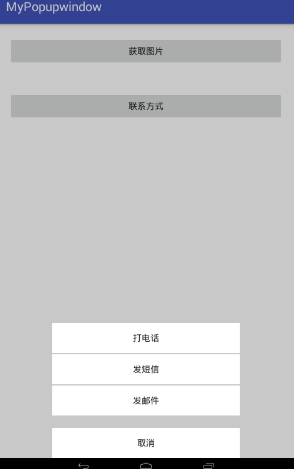
ok,先看看popupWindow的具体实现
import android.app.Activity;

import android.graphics.drawable.ColorDrawable;

import android.view.Gravity;

import android.view.LayoutInflater;

import android.view.MotionEvent;

import android.view.View;

import android.view.ViewGroup;

import android.view.WindowManager;

import android.widget.PopupWindow;

/**

 * Created by 95 on 2017/8/22.

 */

public class PopupWindowUtils extends View implements View.OnTouchListener{

    private Activity mContext;

    private int mXml;

    public View mMenuView;

    public PopupWindow popupWindow;

    public PopupWindowUtils(Activity mContext, int mXml) {

        super(mContext);

        this.mContext = mContext;

        this.mXml = mXml;

        newPopu();

    }

//创建popupWinow对象

    private void newPopu() {

        LayoutInflater inflater = LayoutInflater.from(mContext);

        mMenuView = inflater.inflate(mXml, null);

        popupWindow = new PopupWindow(mMenuView, ViewGroup.LayoutParams.MATCH_PARENT, ViewGroup.LayoutParams.WRAP_CONTENT, true);

        popupWindow.setAnimationStyle(R.style.popwin_anim_style);//弹出,关闭动画

        ColorDrawable dw = new ColorDrawable(mContext.getResources().getColor(R.color.btn));//popupWindow的背景设置为透明

        popupWindow.setBackgroundDrawable(dw);

        //popupWindow 的取消监听当dismiss()被调用的时候发生

        popupWindow.setOnDismissListener(new PopupWindow.OnDismissListener() {

            @Override

            public void onDismiss() {

              background(1f);

            }

        });

        //触摸监听

        mMenuView.setOnTouchListener(this);

    }

//popupWindow状态改变的时候修改整体背景

    private void background(float mfloat) {

        WindowManager.LayoutParams lp = mContext.getWindow().getAttributes();

        lp.alpha = mfloat;

        mContext.getWindow().setAttributes(lp);

        mContext.getWindow().addFlags(WindowManager.LayoutParams.FLAG_DIM_BEHIND);

    }

    //触摸关闭

    @Override

    public boolean onTouch(View v, MotionEvent event) {

        int height = mMenuView.getHeight();

        int y = (int) event.getY();

        if (event.getAction() == MotionEvent.ACTION_UP) {

            if (y < height) {

                popupWindow.dismiss();

            }

        }

        return true;

    }

    //弹出

    public void show() {

        background(0.5f);

        View rootView = ((ViewGroup) mContext.findViewById(android.R.id.content)).getChildAt(0);

        popupWindow.showAtLocation(rootView, Gravity.BOTTOM | Gravity.CENTER_HORIZONTAL, 0, 0);

    }

//外部调用关闭

    public void dismiss() {

        popupWindow.dismiss();

    }

}
弹出,关闭的动画
在style.xml添加
 <style name="popwin_anim_style">

        <item name="android:windowEnterAnimation">@anim/ppwindow_show_anim</item>

        <item name="android:windowExitAnimation">@anim/ppwindow_hide_anim</item>

    </style>
并创建anim文件和动画
1.开启
<?xml version="1.0" encoding="utf-8"?>

<set xmlns:android="http://schemas.android.com/apk/res/android">

    <translate

        android:duration="300"

        android:fromXDelta="0"

        android:toXDelta="0"

        android:fromYDelta="200"

        android:toYDelta="0"

        />

    <alpha

        android:duration="300"

        android:fromAlpha="0"

        android:toAlpha="1"

        />

</set>
2.关闭
<?xml version="1.0" encoding="utf-8"?>

<set xmlns:android="http://schemas.android.com/apk/res/android">

    <translate

        android:duration="300"

        android:fromXDelta="0"

        android:toXDelta="0"

        android:fromYDelta="0"

        android:toYDelta="200"

        />

    <alpha

        android:duration="300"

        android:fromAlpha="1"

        android:toAlpha="0"

        />

</set>
popupWindow的背景设置为透明
<?xml version="1.0" encoding="utf-8"?>

<selector xmlns:android="http://schemas.android.com/apk/res/android">

    <item android:color="#00000000"/>

</selector>
ok,popupWindowUtils就完成了,现在就该调用了
import android.os.Bundle;

import android.support.v7.app.AppCompatActivity;

import android.view.View;

import android.widget.Toast;

public class MainActivity extends AppCompatActivity implements View.OnClickListener{

    private PopupWindowUtils popup;

    private PopupWindowUtils popup2;

    @Override

    protected void onCreate(Bundle savedInstanceState) {

        super.onCreate(savedInstanceState);

        setContentView(R.layout.activity_main);

        findViewById(R.id.button1).setOnClickListener(this);

        findViewById(R.id.button2).setOnClickListener(this);

    }

    @Override

    public void onClick(View v) {

        switch (v.getId()) {

            case R.id.button1://创建第一个

                popup = new PopupWindowUtils(this, R.layout.activity_popu1);

                popup.mMenuView.findViewById(R.id.popupbtn1).setOnClickListener(this);

                popup.mMenuView.findViewById(R.id.popupbtn2).setOnClickListener(this);

                popup.mMenuView.findViewById(R.id.popupbtn3).setOnClickListener(this);

                popup.show();//弹出

                break;

            case R.id.button2://创建第二个

                popup2 = new PopupWindowUtils(this, R.layout.activity_popu2);

                popup2.mMenuView.findViewById(R.id.popup2btn1).setOnClickListener(this);

                popup2.mMenuView.findViewById(R.id.popup2btn2).setOnClickListener(this);

                popup2.mMenuView.findViewById(R.id.popup2btn3).setOnClickListener(this);

                popup2.mMenuView.findViewById(R.id.popup2btn4).setOnClickListener(this);

                popup2.show();//弹出

                break;

            //------------------第一个的使用-----------------

            case R.id.popupbtn1:

                Toast.makeText(MainActivity.this, "相机", Toast.LENGTH_LONG).show();

                break;

            case R.id.popupbtn2:

                Toast.makeText(MainActivity.this, "相册", Toast.LENGTH_LONG).show();

                break;

            case R.id.popupbtn3:

                Toast.makeText(MainActivity.this, "退出", Toast.LENGTH_LONG).show();

                popup.dismiss();//关闭

                break;

            //--------------------第二个的使用-----------------

            case R.id.popup2btn1:

                Toast.makeText(MainActivity.this,"popup2打电话",Toast.LENGTH_LONG).show();

                break;

            case R.id.popup2btn2:

                Toast.makeText(MainActivity.this,"popup2发短信",Toast.LENGTH_LONG).show();

                break;

            case R.id.popup2btn3:

                Toast.makeText(MainActivity.this,"popup2发邮件",Toast.LENGTH_LONG).show();

                break;

            case R.id.popup2btn4:

                Toast.makeText(MainActivity.this,"popup2退出",Toast.LENGTH_LONG).show();

                popup2.dismiss();//关闭

                break;

        }

    }

}
MainActivity的布局文件
<?xml version="1.0" encoding="utf-8"?>

<RelativeLayout xmlns:android="http://schemas.android.com/apk/res/android"

    xmlns:tools="http://schemas.android.com/tools"

    android:id="@+id/activity_main"

    android:layout_width="match_parent"

    android:layout_height="match_parent"

    tools:context="map.com.mypopupwindow.MainActivity">

    <Button

        android:id="@+id/button1"

        android:layout_margin="20dp"

        android:layout_width="match_parent"

        android:layout_height="wrap_content"

        android:text="获取图片" />

    <Button

        android:layout_below="@+id/button1"

        android:id="@+id/button2"

        android:layout_margin="20dp"

        android:layout_width="match_parent"

        android:layout_height="wrap_content"

        android:text="联系方式" />

</RelativeLayout>
popup1布局
<?xml version="1.0" encoding="utf-8"?>

<LinearLayout xmlns:android="http://schemas.android.com/apk/res/android"

    android:layout_width="match_parent"

    android:layout_height="wrap_content"

    android:background="#00000000"

    android:orientation="vertical">

    <LinearLayout

        android:layout_width="match_parent"

        android:layout_height="wrap_content"

        android:background="#00000000"

        android:gravity="center"

        android:orientation="vertical">

        <Button

            android:clickable="true"

            android:id="@+id/popupbtn1"

            android:layout_width="250dp"

            android:layout_height="40dp"

            android:layout_marginTop="20dp"

            android:background="@drawable/btn"

            android:text="相机" />

        <Button

            android:id="@+id/popupbtn2"

            android:layout_width="250dp"

            android:layout_height="40dp"

            android:layout_marginTop="10dp"

            android:background="@drawable/btn"

            android:text="相册" />

        <Button

            android:id="@+id/popupbtn3"

            android:layout_width="250dp"

            android:layout_height="40dp"

            android:layout_marginTop="20dp"

            android:background="@drawable/btn"

            android:text="取消" />

    </LinearLayout>

</LinearLayout>
popup2布局
<?xml version="1.0" encoding="utf-8"?>

<LinearLayout xmlns:android="http://schemas.android.com/apk/res/android"

    android:orientation="vertical" android:layout_width="match_parent"

    android:layout_height="match_parent">

<LinearLayout

    android:layout_gravity="center"

    android:orientation="vertical"

    android:gravity="center"

    android:layout_width="300dp"

    android:layout_height="wrap_content">

    <Button

        android:id="@+id/popup2btn1"

        android:layout_marginTop="2dp"

        android:text="打电话"

        android:background="#ffffff"

        android:layout_width="match_parent"

        android:layout_height="wrap_content" />

    <Button

        android:id="@+id/popup2btn2"

        android:layout_marginTop="2dp"

        android:text="发短信"

        android:background="#ffffff"

        android:layout_width="match_parent"

        android:layout_height="wrap_content" />

    <Button

        android:id="@+id/popup2btn3"

        android:layout_marginTop="2dp"

        android:text="发邮件"

        android:background="#ffffff"

        android:layout_width="match_parent"

        android:layout_height="wrap_content" />

    <Button

        android:id="@+id/popup2btn4"

        android:layout_marginTop="20dp"

        android:layout_width="match_parent"

        android:layout_height="wrap_content"

        android:background="#ffffff"

        android:text="取消" />

</LinearLayout>

</LinearLayout>
ok.所有代码都在这了,
使用的话直接使用popupWindowUtils就可以了
通用的popupwindow底部弹出框的更多相关文章
- UIActionSheet底部弹出框
<底部弹出框来提示用户信息> 1.遵循代理方法<UIActionSheetDelete> 2.调用放法 [UIActionSheet *sheet=[UIActio ...
- PopupWindow底部弹出
说明:从屏幕底部弹出PopupWindow,有弹出隐藏动画效果.背景设置透明度. 效果图如下: 1.MainActivity.java 显示popwindow,宽高跟屏幕大小一样,设置一个透明度背 ...
- 微信小程序之自定义底部弹出框动画
最近做小程序时,会经常用到各种弹框.直接做显示和隐藏虽然也能达到效果,但是体验性太差,也比较简单粗暴.想要美美地玩,添加点动画还是非常有必要的.下面做一个底部上滑的弹框. wxml <view ...
- IOS UIActionSheet(底部 弹出框的使用)
UIActionSheet *sheet = [[UIActionSheet alloc] initWithTitle:@"确定要注销?" delegate:self cancel ...
- Android仿ios底部弹出框效果
准备: public class ActionSheet { public interface OnActionSheetSelected { void onClick(int whichButton ...
- Android 底部弹出Dialog(横向满屏)
项目中经常需要底部弹出框,这里我整理一下其中我用的比较顺手的一个方式(底部弹出一个横向满屏的dialog). 效果图如下所示(只显示关键部分): 步骤如下所示: 1.定义一个dialog的布局(lay ...
- 移动端页面 弹出框滚动,底部body锁定,不滚动 / 微信网页禁止回弹效果
需求:页面有弹出层菜单,当弹出层菜单超出屏幕可视区域时,不能滚动.加上滚动后,底部body的滚动事件如何禁止,加上了overflow:hidden;还是不可用. 如下图:地区弹出框可以滚动,而底部的b ...
- android PopupWindow实现从底部弹出或滑出选择菜单或窗口
本实例弹出窗口主要是继承PopupWindow类来实现的弹出窗体,布局可以根据自己定义设计.弹出效果主要使用了translate和alpha样式实现,具体实习如下: 第一步:设计弹出窗口xml: &l ...
- 仿iOS底部弹出popUpWindow
上面为弹出来的效果 popUpWindow布局: <?xml version="1.0" encoding="utf-8"?> <Linear ...
随机推荐
- 洛谷 P1503 鬼子进村
题目背景 小卡正在新家的客厅中看电视.电视里正在播放放了千八百次依旧重播的<亮剑>,剧中李云龙带领的独立团在一个县城遇到了一个鬼子小队,于是独立团与鬼子展开游击战. 题目描述 描述 县城里 ...
- c# 委托访问listbox多线程操作
c# 委托访问listbox多线程操作 using System;using System.Collections.Generic;using System.ComponentModel;using ...
- BZOJ - 2440 容斥定理
组合枚举n/i/i,贡献为miu倍 /*H E A D*/ int mu[maxn],prime[maxn],cnt; bool isprime[maxn]; void sai(int n){ mu[ ...
- 马的移动(BFS) 详细注释 一个具有情怀的题目
题目描述 小明很喜欢下国际象棋,一天,他拿着国际象棋中的"马"时突然想到一个问题: 给定两个棋盘上的方格a和b,马从a跳到b最少需要多少步? 现请你编程解决这个问题. 提示:国际象 ...
- 2.在centos7虚拟机搭建nginx网站
1.nginx配置目录 cd /etc/nginx/conf.d/ 添加 vi www.18cat.conf server{ listen 80; server_name www.18cat.com; ...
- PIE SDK自定义滤波
1.算法功能简介 自定义滤波可以自由设置滤波模板,对数据进行处理,自定义滤波器的一般规则要求: ( 1) 滤波器的大小应该是奇数,这样它才有一个中心,例如 3x3, 5x5 或者 7x7.有中心了,也 ...
- git修改密码
1.Windows10下更换Git用户名或密码 https://jingyan.baidu.com/article/642c9d3435a6e9644a46f732.html
- nginx优化项目
隐藏版本信息 server_tokensSyntax: server_tokens on | off | build | string;Default: server_tokens o ...
- (转)同步异步,阻塞非阻塞 和nginx的IO模型
同步异步,阻塞非阻塞 和nginx的IO模型 原文:https://www.cnblogs.com/wxl-dede/p/5134636.html 同步与异步 同步和异步关注的是消息通信机制 (sy ...
- Kettle集群部署(1台Windows主机和2台Linux服务器)
不多说,直接上干货! http://blog.csdn.net/jianglushou9763/article/details/70859616