
实验一 c++简单程序设计
一、实验内容
1、ex 2_28
(1) 用if...else判断
 #include<iostream>

 using namespace std;

 int main()

 {

     char i;

     cout<<"Menu: A(dd) D(elect) S(ort) Q(uit), Select one:";

     while(cin>>i)

     {

         if(i=='A')

             cout<<"Data has been added."<<endl;

         else if(i=='D')

             cout<<"Data has been delected."<<endl;

         else if(i=='S')

             cout<<"Data has been sorted."<<endl;

         else if(i=='Q') exit();

         else

             cout<<"Have no choice,please select another one."<<endl;

         cout<<"Menu: A(dd) D(elect) S(ort) Q(uit), Select one:";

     }

        return ;

 }
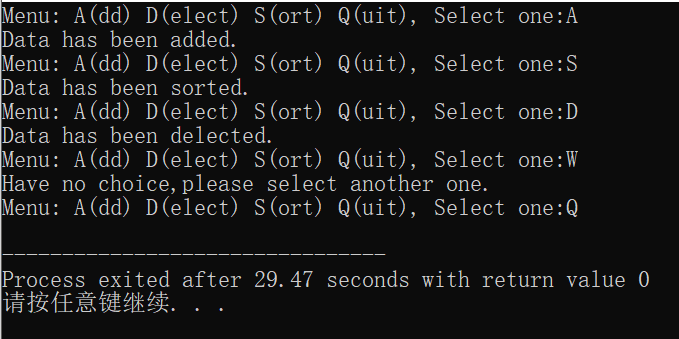
运行结果如下:
(2)用switch语句
 #include<iostream>

 using namespace std;

 int main()

 {

     char i;

     cout<<"Menu: A(dd) D(elect) S(ort) Q(uit), Select one:";

     while(cin>>i)

     {

         switch(i)

         {

             case 'A':cout<<"Data has been added."<<endl;break;

             case 'D':cout<<"Data has been delected."<<endl;break;

             case 'S':cout<<"Data has been sorted."<<endl;break;

             case 'Q':exit();

             default:cout<<"have no choice,please select another one."<<endl;

         }

         cout<<"Menu: A(dd) D(elect) S(ort) Q(uit), Select one:";

     }

        return ;

 }
结果同上。
2、ex 2_29
(1)while循环
 #include<iostream>

 #include<iomanip>

 using namespace std;

 int main()

 {

     int i=,j,k=;

     while(i<=)

     {

         j=;

         while(j<=i)

         {

             if(i%j==) break;

             j++;

         }

         if(i==j)

         {

           cout<<setw()<<i;

           k++;

         }

         i++;

         if(k%==) cout<<endl;

     }

        return ;

 }
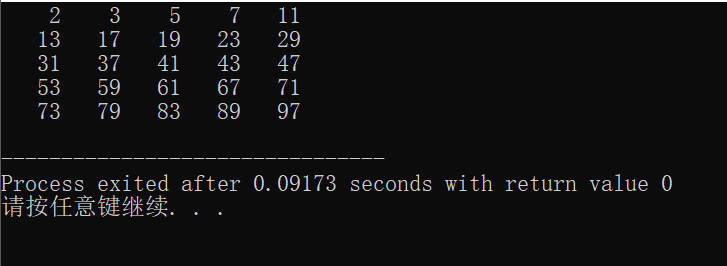
结果如下:
(2)do...while循环
 #include<iostream>

 #include<iomanip>

 using namespace std;

 int main()

 {

     int i=,j,k=;

     do

     {

         j=;

         do

         {

             if(i%j==) break;

             j++;

         }while(j<=i);

         if(i==j)

         {

           cout<<setw()<<i;

           k++;

         }

         i++;

         if(k%==) cout<<endl;

     }while(i<=);

        return ;

 }
(3)for循环
 #include<iostream>

 #include<iomanip>

 using namespace std;

 int main()

 {

     int i,j,k=;

     for(i=;i<=;i++)

     {

         for(j=;j<=i;j++)

             if(i%j==) break;

         if(i==j)

         {

           cout<<setw()<<i;

           k++;

         }

         if(k%==) cout<<endl;

     }

        return ;

 }
3、ex 2_32
(1)while循环
 #include<iostream>

 #include <cstdlib>

 #include <ctime>

 using namespace std;

 int main()

 {

     srand(time());

     int m=rand()%+,n;

     cout<<"Please write down the number you guess:";

     while(cin>>n)

     {

     if(m<n)

         cout<<"What you guess is bigger than the number."<<endl;

     if(m>n)

         cout<<"What you guess is smaller than the number."<<endl;

     if(m==n)

         {cout<<"Congratulation!"<<endl;break;}

     cout<<"Please write down the number you guess:";

     }

        return ;

 }
(2)do...while循环
 #include<iostream>

 #include <cstdlib>

 #include <ctime>

 using namespace std;

 int main()

 {

     srand(time());

     int m=rand()%+,n;

     cout<<"Please write down the number you guess:";

     do

     {

        cin>>n;

       if(m<n)

         cout<<"What you guess is bigger than the number."<<endl;

       if(m>n)

         cout<<"What you guess is smaller than the number."<<endl;

       if(m==n)

         {cout<<"Congratulation!"<<endl;break;}

     cout<<"Please write down the number you guess:";

     }while(m!=n);

        return ;

 }
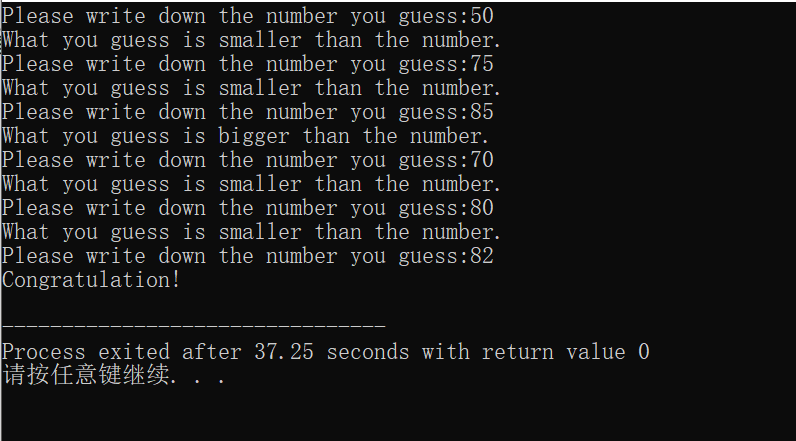
效果如下:
4、ex 2_34
 #include<iostream>

 #include<iomanip>

 using namespace std;

 enum Balls{red,yellow,blue,white,black};

 void Print(int a)

 {

     switch(a)

     {

         case :cout<<setw()<<"red";break;

         case :cout<<setw()<<"yellow";break;

         case :cout<<setw()<<"blue";break;

         case :cout<<setw()<<"white";break;

         case :cout<<setw()<<"black";break;

     }

 }

 int main()

 {

     int n=,i,j,k;

     for(i=red;i<=blue;i++)

     {

         for(j=i+;j<=white;j++)

         {

          for(k=j+;k<=black;k++)

          {

            Print(i);Print(j);Print(k);

            cout<<endl;

            n++;

          }

        }

     }

     cout<<"There are "<<n<<" ways in all."<<endl;

        return ;

 }
效果如下:

二、实验反思
1、注意"A"与'A'的区别,"A"表示字符串,'A'表示字符,比较的是ASCII码。
2、三种循环各具特点,用前应思考其作用,明显看出29题用for循环简洁。
3、生成随机数时,注意头文件cstdlib,ctime;设置域宽时,注意头文件iomanip。
4、使用枚举类型,返回球颜色时,我使用一个了函数将数字与颜色对应。
三、实验小评
https://www.cnblogs.com/fifi1224/p/10555549.html
https://www.cnblogs.com/yinyinzuinihai/p/10556280.html#4213197
https://www.cnblogs.com/sora5934/p/10562100.html
实验一 c++简单程序设计的更多相关文章
- 实验1:c++简单程序设计(1)
//文中有格式错误请无视 //这个编辑器一言难尽 实验目的 1. 掌握c++中类c部分的编程知识: 数据类型,常量,变量,运算符,表达式,分支结构,循环结构 2. 掌握C++中数据输入和输出的基本方法 ...
- 实验二 Java面向对象程序设计
实验二 Java面向对象程序设计 实验内容 1. 初步掌握单元测试和TDD 2. 理解并掌握面向对象三要素:封装.继承.多态 3. 初步掌握UML建模 4. 熟悉S.O.L.I.D原则 5. 了解设计 ...
- 160809209_李梦鑫_C语言程序设计实验3 循环结构程序设计
<C语言程序设计>实验报告 学 号 160809209 姓 名 李梦鑫 专业.班 计科16-2班 学 期 2016-2017 第1学期 指导教师 黄俊莲 吉吉老师 实验地点 C05 ...
- 20145206《Java程序设计》实验二Java面向对象程序设计实验报告
20145206<Java程序设计>实验二Java面向对象程序设计实验报告 实验内容 初步掌握单元测试和TDD 理解并掌握面向对象三要素:封装.继承.多态 初步掌握UML建模 熟悉S.O. ...
- 20145208 实验三 Java面向对象程序设计
20145208 实验三 Java面向对象程序设计 实验内容 初步掌握单元测试和TDD 理解并掌握面向对象三要素:封装.继承.多态 初步掌握UML建模 熟悉S.O.L.I.D原则 了解设计模式 实验步 ...
- 20162330 实验四 《Android程序设计》 实验报告
2016-2017-2 实验报告目录: 1 2 3 4 5 20162330 实验四 <Android程序设计> 实验报告 课程名称:<程序设计与数据结构> 学生班级:1623 ...
- 20162302 实验四《Android程序设计》实验报告
实 验 报 告 课程:程序设计与数据结构 姓名:杨京典 班级:1623 学号:20162302 实验名称:Android程序设计 实验器材:装有Android Studio的联想拯救者80RQ 实验目 ...
- java实验四《Android程序设计》实验报告
一.实验报告封面 课程:Java程序设计 班级:1653班 姓名:张士洋 学号:20165308 指导教师:娄嘉鹏 实验日期:2018年5月14日 实验时间:13:45 - 15:25 实验序号:08 ...
- 2017-2018-2 20165312 实验四《Android程序设计》实验报告
2017-2018-2 20165312 实验四<Android程序设计>实验报告 一.安装Android Studio并进行Hello world测试和调试程序 安装Android St ...
随机推荐
- Halcon阈值化算子dual_threshold和var_threshold的理解
Halcon中阈值二值化的算子众多,通常用得最多的有threshold.binary_threshold.dyn_threshold等. threshold是最简单的阈值分割算子,理解最为简单:bin ...
- [DT] 数据结构术语中英文对照
数据结构术语中英文对照 数据 Data 数据元素 Data element 数据项 Data item 数据结构 Data structure 逻辑结构 Logical structure 数据类型 ...
- 20172325《Java程序设计》第一周学习总结
20172325<Java程序设计>第一周学习总结 教材学习内容总结 第一章 1.1软件质量 软件工程是一门关于高质量软件开发的技术和理论的学科. 高质量软件的特征 1.2 数据结构 软件 ...
- Laravel 多态关联使用的案例
1.实现的功能,:短信发送,需要签名和模板审核,审核结果要插进审核记录表 2,在signature(签名表模型)和 template(模板表模型)添加多态对应关系代码其实一样,代码如下: 审核记录表需 ...
- tp5生成纯静态html
这只是一个demo 第一步:使用php的ob缓存实现页面静态化 控制器方法: <?php namespace app\test\controller; use app\test\model\De ...
- (博弈 sg入门)kiki's game -- hdu -- 2147
链接: http://acm.hdu.edu.cn/showproblem.php?pid=2147 题意: 在一个n*m的棋盘上,从 (1,m),即右上角开始向左下角走. 下棋者只能往左边(lef ...
- php数组转成php编程代码
将php数组转成可以在php上面运行的编程代码,支持一维及多维数组 <?php //一维数组 $test1 = array(1,2,3); //二维数组 $test2[0] = array( ' ...
- Markdown编辑器——常用语法
Markdown是什么? 简短来说,他就是一款特别适用于写博客的编辑器.为什么适合呢,因为它特别的方便.以博客园的编辑界面来说,它原本的界面是这样的(有没有一种Word2003的既视感): 但是,当你 ...
- 转载:爬虫技术浅析(Python)
http://drops.wooyun.org/tips/3915 0x00 前言 网络爬虫(Web crawler),是一种“自动化浏览网络”的程序,或者说是一种网络机器人.它们被广泛用于互联网搜索 ...
- HTML解析器软件
HTML解析器软件 HTML文档解析器 HTMLParser HTML Parser 是一个对HTML进行分析的快速实时的解析器,最新的发行版本是1.6,另外2.0的开发版本已经两年没有进展了.示例代 ...