
Change SSH Welcome Banner on Ubuntu
One of the easiest way to protect and secure SSH logins by displaying warming message to UN-authorized users or display welcome or informational messages to authorized users.
Being a system administrator whenever configure Linux servers I always use to configure a security banners for ssh logins. The banner contains some security warning information or general information. See my example banner message which I used for my all servers.
ALERT! You are entering into a secured area! Your IP, Login Time, Username has been noted and has been sent to the server administrator!
This service is restricted to authorized users only. All activities on this system are logged.
Unauthorized access will be fully investigated and reported to the appropriate law enforcement agencies.
There are two way to display messages one is using issue.net file and second one is using MOTD file.
- issue.net : Display a banner message before the password login prompt.
- motd : Display a banner message after the user has logged in.
So, I strongly recommended all system administrator to display a banner messages before allowing users to log in to systems. Just follow below simple steps to enable SSH logging messages.
Display SSH Warning Message to Users Before Login
To display Welcome or Warning message for SSH users before login. We use issue.net file to display a banner massages. Open the following file with VI editor.
# vi /etc/issue.net
Add the following banner sample message and save the file. You can add any custom banner message to this file.
###############################################################

#                                                      Welcome to TecMint.com                                                           #

#                                   All connections are monitored and recorded                                         #

#                          Disconnect IMMEDIATELY if you are not an authorized user!                    #

###############################################################
Open the master ssh configuration file and enable banners.
# vi /etc/ssh/sshd_config
Search for the word “Banner” and uncomment out the line and save the file.
#Banner /some/path
It should be like this.
Banner /etc/issue.net (you can use any path you want)
Next, restart the SSH daemon to reflect new changes.
# /etc/init.d/sshd restart

Stopping sshd:                                             [  OK  ]

Starting sshd:                                             [  OK  ]
Now try to connect to server you will see banner message similar to below.
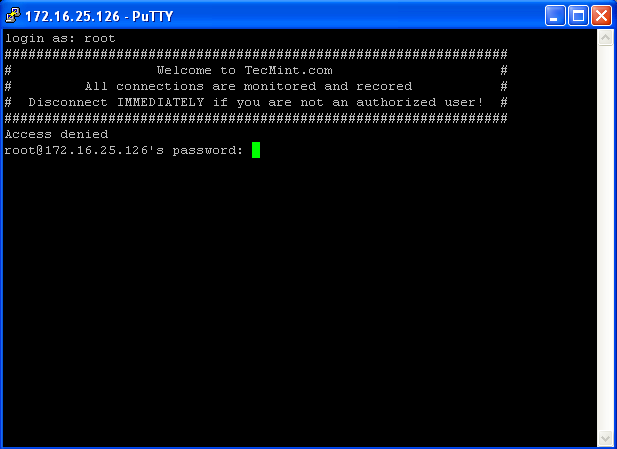
SSH Banner Messages Before Login
Display SSH Warning Message to Users After Login
To display banner messages after login, we use motd file, which is used to display banner massages after login. Now open it with VI editor.
vi /etc/motd
Place the following banner sample message and save the file.
###############################################################

#                                                   Welcome to TecMint.com                                                             #

#                                    All connections are monitored and recorded                                       #

#                           Disconnect IMMEDIATELY if you are not an authorized user!                  #

###############################################################
Now again try to login into server you will get both the banner messages. See the screenshot attached below.
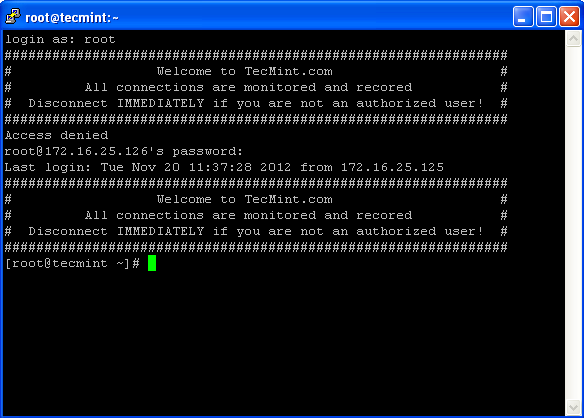
Display SSH Banner After Login
Change SSH Welcome Banner on Ubuntu的更多相关文章
- [错误解决]paramiko.ssh_exception.SSHException: Error reading SSH protocol banner 设置
报错信息 上午的时候数据组的同事跟我说有几个程序报错,经过查看log发现找到报错信息: paramiko.ssh_exception.SSHException: Error reading SSH p ...
- SSHException: Error reading SSH protocol banner
当我在使用ssh 远程connect 另一台机器的server 时出现了错误,错误如下,起初以为是自己代码写的有问题,后来本地了一下看了跑的没问题,我就开始根据报错去查寻原因, 起初在论坛博客看到这 ...
- Hide SSH Welcome Banner/Message on Ubuntu14.04+
Introduction Usually when you logged in you linux based PC remotely via SSH, a long banner will be d ...
- How to permit SSH root Login in Ubuntu 18.04
https://www.ubuntu18.com/ssh-permitrootlogin/ SSH root login is disabled by default in Ubuntu 18.04. ...
- 使用SecureCRT远程 SSH 登陆 CentOS 和 Ubuntu
1.CentOS下安装SSH 使用下列命令查看当前系统是否已经安装 ssh 和 rsync.rsync是一个远程数据同步工具,可通过LAN/WAN快速同步多台主机间的文件. rpm –qa | gre ...
- 【解决问题】SSH连不上Ubuntu虚拟机解决办法
1. 安装openssh-client Ubuntu默认缺省安装了openssh-client,apt-get安装即可 sudo apt-get install openssh-client 2. 安 ...
- 不能ssh连接ubuntu linux 服务器 secureCRT不能ssh连接服务器 不能远程ssh连接虚拟机的ubuntu linux
我是用的是secureCRT,远程连接我的虚拟机里面的ubuntu 直接报错,连接不上 1,先分别在windows上ipconfig和ubuntu上ifconfig下 互ping一下,是可以ping通 ...
- ssh连接docker镜像ubuntu与debian
用密码登录root docker官网给的sshdemo是ubuntu的,https://docs.docker.com/engine/examples/running_ssh_service/ 亲 ...
- 使用SSH密钥方式登录ubuntu Linux,指令(ssh-keygen 和 ssh-copy-id)
实验目的 从myVM1(本地主机)上登录myVM2(远程主机).采用密钥方式,不输入密码. 测试环境 主机:window7 sp1 64位 专业版 虚拟机:VMware workstation 12 ...
随机推荐
- 第三方库PIL
第三方库PIL 一.Python简介 Python是一门简洁高效.通俗易懂的高阶动态编程语言,也可以理解成是一种面向对象的解释型计算机程序设计语言. Python具有丰富和强大的库.也经常被行内人员称 ...
- ospf基础理论
OSPF简介 OSPF(Open Shortest Path First 开放式最短路径优先)协议是IETF为IP网络开发的IGP路由选择协议.它是一种典型的链路状态(link-state)路由协议. ...
- 内核诊断(二)-- patch 和diff
patch文件结构 生成patch文件 --diff命令 patch 使用 -- patch命令 3.1 打path 3.1撤销patch 使用举例 4.1 基本命令使用 4.2 内核打补丁 1. p ...
- 5 个 iOS 和 Android 最佳的开源自动化工具[转]
自动化测试时下在产品测试上有着非常重要的作用.实现测试自动化有多种积极的方式,包括最大限度地减少测试执行时间:在关键的发布阶段,用更少的时间确保更大的覆盖范围:在产品开发阶段,可靠又重复性地运行以确保 ...
- 开源一个C# Class实现Openfire登陆、推出、消息发送,方便其他系统集成IM功能了
using System; using System.Collections.Generic; using System.Linq; using System.Text; using System.T ...
- 利用IDEA创建Web Service服务端和客户端的详细过程
创建服务端 一.file–>new–>project 二.点击next后输入服务端名,点击finish,生成目录如下 三.在 HelloWorld.Java 文件中右击,选 WebServ ...
- 微服务Kong(四)——添加插件
在本节中,您将学习到,如何配置使用KONG的插件来管理您的API.KONG的核心原则之一就是通过插件来实现API的扩展.插件可以使您更为简单的扩展和管理您的API. 在以下的步骤中,您将通过配置key ...
- 图说使用socket建立TCP连接
在网络应用如火如荼的今天,熟悉TCP/IP网络编程,那是最好不过.如果你并不非常熟悉,不妨花几分钟读一读. 为了帮助快速理解,先上个图,典型的使用socket建立和使用TCP/UDP连接过程为(截图来 ...
- 《高质量c++/c编程指南》学习摘要
1. 尽可能在定义变量的同时初始化该变量(就近原则)——防止忘记初始化,引用未被初始化的变量,可能导致程序错误 2. 代码行最大长度宜控制在70~80个字符以内(长行拆分)——否则眼睛看不过来,也不便 ...
- Upgrading WebLogic Application Environments --官方文档
http://docs.oracle.com/cd/E13179_01/common/docs92/upgrade/dirstruct.html WebLogic Domain Directory S ...