
Appium元素定位(uiautomatorviewer)
一、uiautomatorviewer元素定位
1.adroid-sdk的安装目录tools下有1个自带的工具uiautomatorviewer,打开后,如下所示:

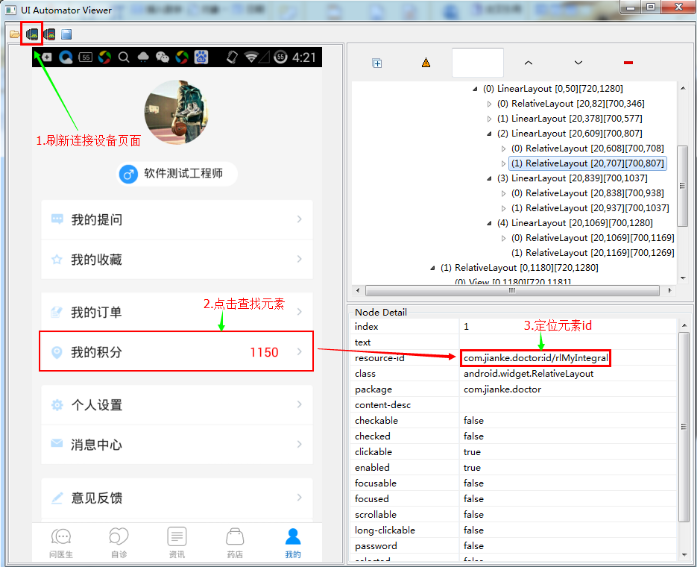
点击后,如图所示:
步骤:
a.链接设备,打开APP
b.点击页面设备图标,刷新页面,与设备页面同步
c.点击需要定位的元素
d.在Node Detail模块,查看resource-id
二、元素定位方法
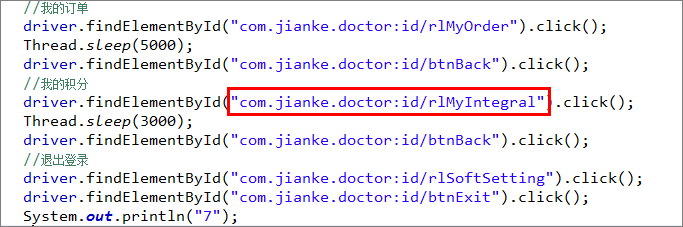
1.findElementById
例:el = driver.findElementById("android:id/title");
assertThat(el.getText(),equalTo("Add note"));
2.findElementByAccessibilityId
例:el = driver.findElementByAccessibilityId("menu_add_note_description");
assertThat(el.getText(),equalTo("node"));
3.findElementByCssSelector
4.findElementByLinkText
5.findElementByPartialLinkText
6.findElementByTagName
7.findEelementByXPath
例:el = driver.findElementByXPath("//android.widget.TextView[contains(@text,'Add note')]");
//el = driver.findElement(By.xpath("//android.widget.TextView"));
assertThat(el.getText(),equalTo("Add note"));
Appium元素定位(uiautomatorviewer)的更多相关文章
- 4、通过uiautomatorviewer实现appium元素定位
熟悉selenium自动化的小伙伴应该知道WebDriver 提供了八种元素定位方法: idnameclass nametag namelink textpartial link textxpathc ...
- Python Appium 元素定位方法简单介绍
Python Appium 元素定位 常用的八种定位方法(与selenium通用) # id定位 driver.find_element_by_id() # name定位 driver.find_ ...
- appium元素定位总结
appium元素定位方法总结 使用uiautomator定位 driver.find_element_by_android_uiautomator(uia_string) 根据resourceId属性 ...
- appium元素定位工具
appium元素定位工具介绍 使用uiautomatorviewer定位工具 使用Appium Inspector定位工具 使用uiautomatorviewer定位工具 谷歌在Android S ...
- APP 自动化之appium元素定位(三)
APP自动化测试关键环节--元素定位,以下我们来了解appium提供的元素定位方法! 1. id定位,id一个控件的唯一标识,由开发人员在项目中指定,如果一个元素有对应的resource-id,我们就 ...
- Appium + Python自动化 - 元素定位uiautomatorviewer
元素定位主要介绍如何使用uiautiomatorviewer,通过定位到页面上的元素,然后进行相应的点击等操作.uiautiomatorviewer是android-sdk自带的一个元素定位工具,非常 ...
- Appium+python自动化-元素定位uiautomatorviewer的使用
前言 环境搭建好了,下一步元素定位,元素定位本篇主要介绍如何使用uiautomatorviewer,通过定位到页面上的元素,然后进行相应的点击等操作. uiautomatorviewer是androi ...
- appium 元素定位工具
两种元素定位工具: 1.uiautomatorviewer是android-sdk自带的一个元素定位工具,目录D:\androidsdk\androidsdk\tools\bin . 双击启动uiau ...
- Appium——元素定位
首先介绍两种定位元素的工具,appium自带的 Inspector 和 android SDK自带的 uiautomatorviewer 1.UIAutomator Viewer比较简单,在模拟器打开 ...
随机推荐
- 关于莫比乌斯函数的塞 : 莫比乌斯前n项和 , 莫比乌斯函数绝对值的前n项和
https://ac.nowcoder.com/acm/contest/874#submit/{%22problemIdFilter%22%3A25455%2C%22statusTypeFilter% ...
- [转] Scala 的集合类型与数组操作
[From] https://blog.csdn.net/gongxifacai_believe/article/details/81916659 版权声明:本文为博主原创文章,转载请注明出处. ht ...
- golang (5) http 请求分析
http 分析包分析 fmt.Println("get Content-Type: ", r.Header.Get("Content-Type")) var r ...
- Android开发最佳实践
Android开发最佳实践 摘要 ●使用 Gradle 和它推荐的工程结构 ●把密码和敏感数据放在gradle.properties ●不要自己写 HTTP 客户端,使用Volley或OkHttp库 ...
- 【JSP】jsp报错:Syntax error, insert "}" to complete MethodBody
使用MyEclipse编写JSP的时候有时会报错误如下 Syntax error, insert "}" to complete MethodBody 大体意思就是说方法体缺少缺少 ...
- InnoDB的B+树索引
B+树索引其本质就是B+树在数据库中的实现,但是B+索引在数据库中有一个特点就是其高扇出性,因此在数据库中,B+树的高度一般都在2-3层,也就是对于查找某一键值的行记录,最多只需要2到3次IO,这倒不 ...
- 理解Python语言里的异常(Exception)
Exception is as a sort of structured "super go to".异常是一种结构化的"超级goto". 作为一个数十年如一日 ...
- Flex4 初始化过慢解决方法
昨天找了个免费.net空间,想测试一下做的一个简单Flex4 上传项目的效果.上传所有文件到网站之后,访问项目页面,进度条一点一点艰难的向前移动,到了100%后却不出现程序界面,等待一会儿还是没有出现 ...
- AutoDetectChangesEnabled及AddRange解决EF插入的性能问题
转自:http://www.cnblogs.com/nianming/archive/2013/06/07/3123103.html#2699851 记录下. 园友莱布尼茨写了一篇<Entity ...
- vue.js 开发环境搭建
1.安装node.js(http://www.runoob.com/nodejs/nodejs-install-setup.html) 2.基于node.js,利用淘宝npm镜像安装相关依赖 在cmd ...