
Qt-QML-电子罗盘
使用QML中的Canvas实现电子罗盘绘制,效果图如下
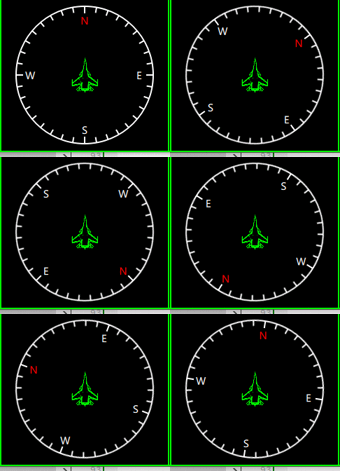
一个简单的电子罗盘,红色N极。其中中间飞机表示当前的指向,
还是比较简单的,直接上代码吧
/*
作者:张建伟
时间:2018年4月27日
简述:电子罗盘界面实现
*/
importQtQuick2.0
Rectangle
{
id:root
width:200
height:200
anchors.centerIn:parent
color:"transparent"
propertyintm_Angle:0
Rectangle
{
width:parent.width
height:parent.height
color:"transparent"
rotation:root.m_Angle
Canvas
{
anchors.fill:parent
onPaint:
{
varctx=getContext("2d");
//绘制圆圈
ctx.lineWidth=2;
ctx.strokeStyle="#FFFFFF";
ctx.globalAlpha=1.0;
ctx.beginPath();
ctx.arc(width/2,width/2,width/2-2,0,2*Math.PI);
ctx.stroke();
ctx.restore();
for(vari=0;i<36;i++)
{
ctx.save();
ctx.translate(width/2,height/2);
ctx.rotate(i*10*Math.PI/180);
ctx.beginPath();
if(i%9==0)
{
ctx.moveTo(0,-width/2+12);
ctx.lineTo(0,-width/2+2);
}
else
{
ctx.moveTo(0,-width/2+10);
ctx.lineTo(0,-width/2+2);
}
ctx.stroke();
ctx.restore();
}
}
}
Rectangle
{
width:20
height:20
anchors.horizontalCenter:parent.horizontalCenter
anchors.top:parent.top
anchors.topMargin:12
rotation:-parent.rotation
color:"#00000000"
Text{
anchors.centerIn:parent
font.family:"微软雅黑"
font.pixelSize:14
color:"#FF0000"
text:qsTr("N")
}
}
Rectangle
{
width:20
height:20
anchors.verticalCenter:parent.verticalCenter
anchors.right:parent.right
anchors.rightMargin:12
color:"#00000000"
rotation:-parent.rotation
Text{
anchors.centerIn:parent
font.family:"微软雅黑"
font.pixelSize:14
color:"#FFFFFF"
text:qsTr("E")
}
}
Rectangle
{
width:20
height:20
anchors.verticalCenter:parent.verticalCenter
anchors.left:parent.left
anchors.leftMargin:12
color:"#00000000"
rotation:-parent.rotation
Text{
anchors.centerIn:parent
font.family:"微软雅黑"
font.pixelSize:14
color:"#FFFFFF"
text:qsTr("W")
}
}
Rectangle
{
width:20
height:20
anchors.horizontalCenter:parent.horizontalCenter
anchors.bottom:parent.bottom
anchors.bottomMargin:12
color:"#00000000"
rotation:-parent.rotation
Text{
anchors.centerIn:parent
font.family:"微软雅黑"
font.pixelSize:14
color:"#FFFFFF"
text:qsTr("S")
}
}
Rectangle
{
width:50
height:50
color:"transparent"
rotation:-parent.rotation
anchors.centerIn:parent
Image{
anchors.fill:parent
source:"file:Images/Su_33_Pointer.png"
}
}
}
}

Qt-QML-电子罗盘的更多相关文章
- Qt qml 单例模式
Qt qml 单例模式,没什么好说的,看代码吧.单例模式很适合做全局的配置文件. [示例下载] http://download.csdn.net/detail/surfsky/8539313 [以下是 ...
- Qt qml listview 列表视图控件(下拉刷新、上拉分页、滚动轴)
Qt qml listview下拉刷新和上拉分页主要根据contentY来判断.但要加上顶部下拉指示器.滚动条,并封装成可简单调用的组件,着实花了我不少精力:) [先看效果] [功能] 下拉刷新 ...
- qt qml qchart 图表组件
qt qml qchart 图表组件 * Author: Julien Wintz * Created: Thu Feb 13 23:41:59 2014 (+0100) 这玩意是从chart.js迁 ...
- qt qml中PropertyAnimation的几种使用方法
qml文章 qt qml中PropertyAnimation的几种使用方法 动画应用场景有以下几种: 首先如果一个Rectangle.动画是要改变它的x和y值 1,Rectangle一旦被创建,就要移 ...
- Qt QML referenceexamples attached Demo hacking
/********************************************************************************************* * Qt ...
- Qt qml的软件架构设计
google: qt qml application architecture 有很多资源. 1 https://www.ics.com/blog/multilayered-architecture- ...
- QT QML目录导航列表视图
[功能] /目录.文件 /文件过滤 /递归 /事件 /高亮当前行 /当前选项 /目录切换动画 /限制根目录 [下载]:http://download.csdn.net/detail/surfsky/8 ...
- Qt(QML)本地化
Internationalization and Localization with Qt Quick 程序国际化 1) Use qsTr() for all Literial UI strings ...
- qt qml 利用xmlhttprequest 调用有赞api
最近朋友在有赞商城上面开了一个店铺,因为有实体店,一般卖商品后送货上门,但是打票时候老是人工用world文档人工复制黏贴订单打印小票, 所以就找我帮忙做一个软件专门打印小票的,就研究起来调用有赞第三方 ...
- QT QML 3D模型查看器
原文链接:http://amin-ahmadi.com/2018/01/28/viewing-3d-models-using-qt/ 本文使用QT Quick中的Scene3D QML类型来查看3D模 ...
随机推荐
- virtualbox+vagrant学习-4-Vagrantfile-8-WinSSH
WinSSH WinSSH通信器是专门为OpenSSH的Windows本机端口构建的.它不依赖于类posix的环境,这种环境消除了额外的软件安装(如cygwin)以获得适当功能的需求. 想获得更多的信 ...
- vim全选复制粘贴
感谢来源:http://blog.sina.com.cn/s/blog_6e70abbd0100zbk9.html ggVG #gg: 光标跳转到首行,在vim才有效,vi中无效 #V 是进入Visu ...
- 一种基于openflow的虚拟化层软件flowvisor的API测试
注明:本文并不对openflow进行分析,本人也是略略知道这个概念,对flowvisor也只是对其API有所测试,更深的源码并未涉及,只是希望该文能对以后的flowvisor研究者提供些许帮助. 一: ...
- Reading Meticulous Measurement of Control Packets in SDN
SOSR 17 概要 网络流量中有一部分是用于网络管理,(根据packet process survey,该部分流量属于包转发的slow path部分)由于sdn的数控分离,交换机需要向控制器发送大量 ...
- 【学时总结】 ◆学时 · I◆ A*算法
[学时·I]A*算法 ■基本策略■ --A*(A Star)无非就是BFS的升级,当BFS都超时的时候-- 同样以队列为基础结构,BFS使用FIFO队列(queue),而A*则使用优先队列(prior ...
- VS2017 编译 QT5.10.1 X64位 静态库 MT
参考文章 https://blog.csdn.net/Devout_programming/article/details/78827112 准备工作* Supported compiler (Vis ...
- js清除浏览器缓存
浏览器缓存 所有的数据都可以存到服务器中,但这样并不高效,当我们访问网页的时候,一会卡顿,二会浪费服务器的存储空间,三会给服务器造成压力 浏览器缓存,可以提高网站性能和浏览器的速度,但对于需要经常更新 ...
- $.ajax 完整参数
jquery中的ajax方法参数 url: 要求为String类型的参数,(默认为当前页地址)发送请求的地址. type: 要求为String类型的参数,请求方式(post或get)默认为get.注意 ...
- tp3.2和Bootstrap模态框导入excel表格数据
导入按钮 <button class="btn btn-info" type="button" id="import" data-to ...
- php向页面输出中文时出现乱码的解决方法
今天,刚刚学习PHP发现用echo输出中文时,页面会出现乱码,然后查了一下资料说是浏览器编码格式有问题,要改成utf-8.但是每个人的浏览器编码可能会有所不同,所以找到了一个很好的解决方法, 就是在p ...