
解决 Error running ‘Application‘: Command line is too long.
一、项目场景:
运行刚拉取下来的项目代码,出现下面问题描述的错误提示。
二、问题描述
Error running 'Application': Command line is too long. Shorten command line for Application or also for Spring Boot default configuration?
翻译翻译:
运行“Application”时出错:命令行太长。缩短应用程序或Spring Boot默认配置的命令行?
三、原因分析:
springboot项目启动命令过长!
四、解决方案:
解决步骤:
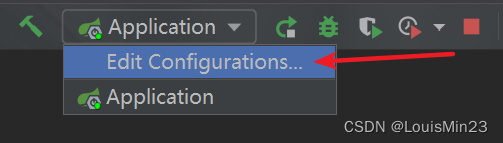
- 点击项目启动配置项
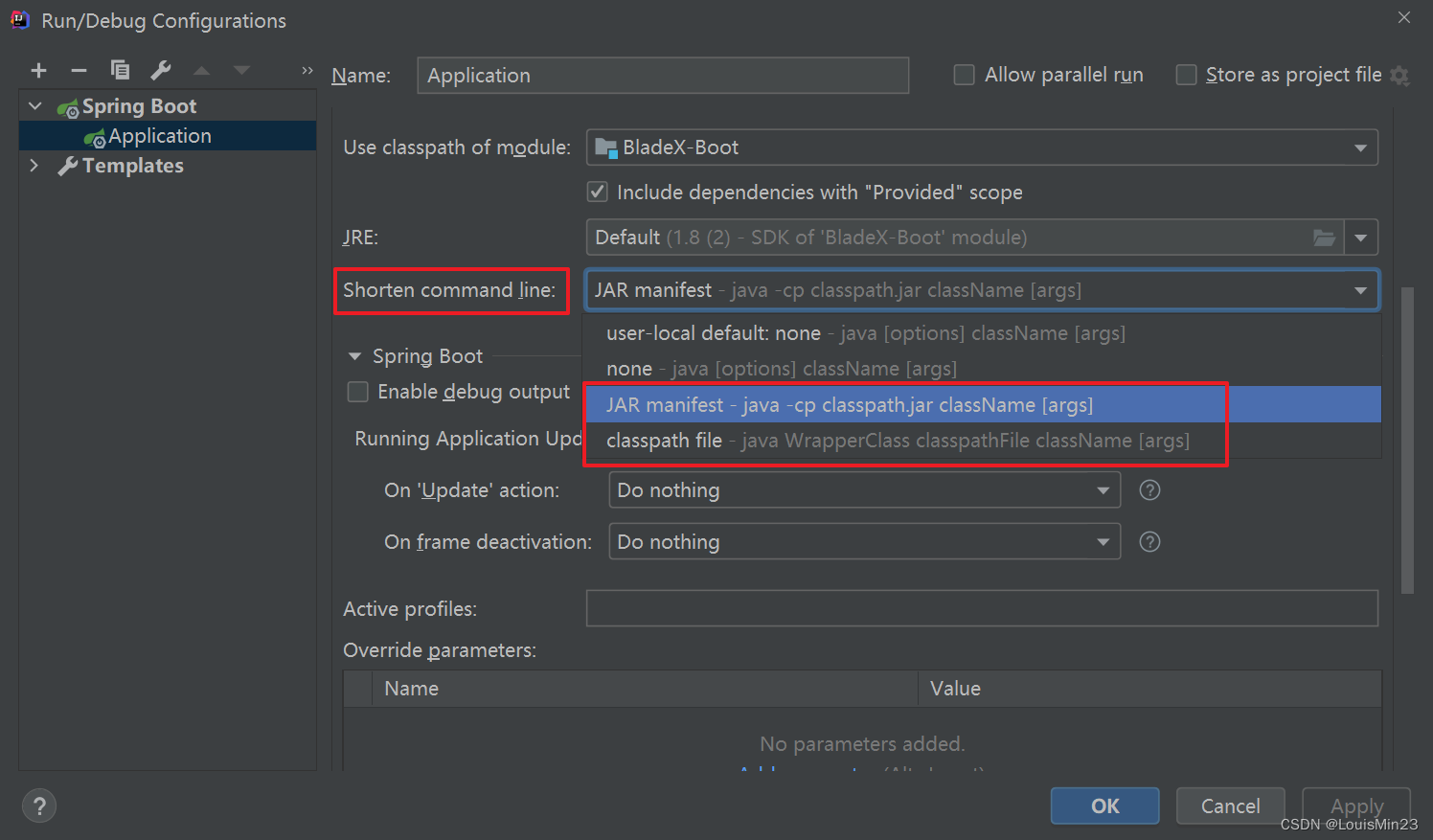
- shorten command line 选项选择
JAR manifest或者classpath file选项 - 重新启动工程运行即可
Step1:点击项目启动配置项
Step2: shorten command line 选项选择 JAR manifest 或者 classpath file 选项
解决 Error running ‘Application‘: Command line is too long.的更多相关文章
- IDEA报错Error running ‘Application‘: Command line is too long解决方案
IDEA报错Error running 'Application': Command line is too long.Shorten command line for Application or ...
- [Java/IDE]IDEA运行Java类时报错:Error running 'MainTest': Command line is too long. Shorten command line for MainTest or also for Application default configuration
报错原因 Java项目启动命令过长 解决方法 点击项目启动配置项 -> shorten command line 选项选择 classpath file 或 java manifest 选项 - ...
- 运行springboot项目报错 Error running 'ResourceApplication': Command line is too long. Shorten comma
方法1 IDEA 运行报错:Error running '***': Command line is too long 技术标签: IDEA Error running 'Test': Com ...
- bug处理记录:Error running 'WorkflowApplication': Command line is too long. Shorten command line for WorkflowApplication or also for Spring Boot default configuration?
1.报错信息 Error running 'WorkflowApplication': Command line is too long. Shorten command line for Workf ...
- Error running 'xxx': Command line is too long. Shorten command line for xxx
跑单元测试时,报错如下: Error running 'xxx': Command line is too long. Shorten command line for xxx 解决方案: 在项目所在 ...
- idea报错:Error running $classname: Command line is too long. Shorten command line for $classname.
Command line is too long 打印的变量太长了,超过了限制,这都会报错...我只想知道idea基于什么原理会报这个错... 解决 1.按照提示修改该类的配置,选择jar manif ...
- idea启动springboot项目报Error running 'ServiceStarter': Command line is too long. Shorten command line for ServiceStarter or also for Application
解决办法:在.idea文件夹下面的workspace.xml中的 <component name="PropertiesComponent">标签下面添加: <p ...
- idea 启动 Error running 'XxGatewayApplication': Command line is too long. Shorten command line for XxGatewayApplication or also for Spring Boot default
在idea workspace里 <component name="PropertiesComponent">标签下加入 <property name=" ...
- Error running 'App': Command line is too long. Shorten command line for App or also for Spring Boot default configuration.
找到标签 <component name="PropertiesComponent">.在标签里加一行 : <property name="dynam ...
- IDEA命令行缩短器助你解决此问题:Command line is too long. Shorten command line...
生命太短暂,不要去做一些根本没有人想要的东西.本文已被 https://www.yourbatman.cn 收录,里面一并有Spring技术栈.MyBatis.JVM.中间件等小而美的专栏供以免费学习 ...
随机推荐
- 用积木讲运维,这样的IT人太会了
简介: 日志服务SLS提供数据采集.加工.分析.告警可视化与投递功能,为AIOps.大数据分析.运营服务.大数据安全等场景提供支撑,并能以搭积木的方式适配各类运维场景,辅助企业的IT决策.近日,日志服 ...
- 问题排查不再愁,Nacos 上线推送轨迹功能
简介: 微服务体系下,注册中心的调用和配置变更是家常便饭,例如阿里每天就有百万级变更.亿级推送.可是,一旦出现调用或配置异常,问题排查就成了用户最大的困惑:是注册和配置中心导致的,还是上下游业务自身的 ...
- MYSQL深潜 - 剖析Performance Schema内存管理
简介: 本文主要是通过对PFS引擎的内存管理的源码的阅读,解读PFS内存分配及释放原理,深入剖析其中存在的一些问题,以及一些改进思路.本文源代码分析基于Mysql-8.0.24版本. 作者 | ...
- 一文总结Java\JDK 17发布的新特性
简介: JDK 17已经于2021年3月16日如期发布.本文介绍JDK 17新特性.JDK 17于2021年9月14日正式发布(General-Availability Release).JDK 1 ...
- [FAQ] iCloud 照片共享, 收到xx集团邀你xx, 拒绝 or 关闭 ?
如果你收到邀请日历这是垃圾邮件和简单地选择"拒绝"选项,这个问题不会消失. 事实上,很可能增加,因为垃圾邮件发送者知道该帐户被激活.这同样适用于iCloud的照片共享. 对于iCl ...
- Process-与操作系统中的进程进行交互
1.Process介绍 在Java中,Process类是一个抽象类,它提供了与操作系统中的进程进行交互的方法.当你在Java程序中启动一个新的进程(例如,运行一个外部程序或脚本)时,JVM会创建一个P ...
- ITIL是标准吗?
ITIL不是标准 OGC:是一个推荐的管理框架,一个模版,可根据运维实践自由裁量落地 itil诞生环境:欧美思维.欧美文化.欧美制度.欧美人文习惯.... 对欧美来说可能是最佳实践,但是对中国特色文化 ...
- 一键自动化博客发布工具,用过的人都说好(segmentfault篇)
segmentfault是我在这些平台中看过界面最为简洁的博客平台了. 今天就以segmentfault为例,讲讲在blog-auto-publishing-tools中的实现原理. 前提条件 前提条 ...
- Android Studio自强迫升级到4.2版本后调试Native项目时总是卡死问题
原文地址:https://www.zhaimaojun.top/Note/5464968 就在昨天,也就是2021年5月6号,Android Studio强迫用户升级到4.2版本, 原因就是jcent ...
- redis aof数据持久化
AOF(Append Only File) 将我们所有的命令都记录下来,history,恢复的时候就把这个文件全部再执行一遍! 是什么 以日志的形式来记录每个写操作,将Redis执行过的所有指令记录下 ...