
马昕璐 201771010118《面向对象程序设计(java)》第十八周学习总结
实验十八 总复习
实验时间 2018-12-30
1、实验目的与要求
(1) 综合掌握java基本程序结构;
(2) 综合掌握java面向对象程序设计特点;
(3) 综合掌握java GUI 程序设计结构;
(4) 综合掌握java多线程编程模型;
(5) 综合编程练习。
2、实验内容和步骤
任务1:填写课程课后调查问卷,网址:https://www.wjx.cn/jq/33108969.aspx。
任务2:综合编程练习
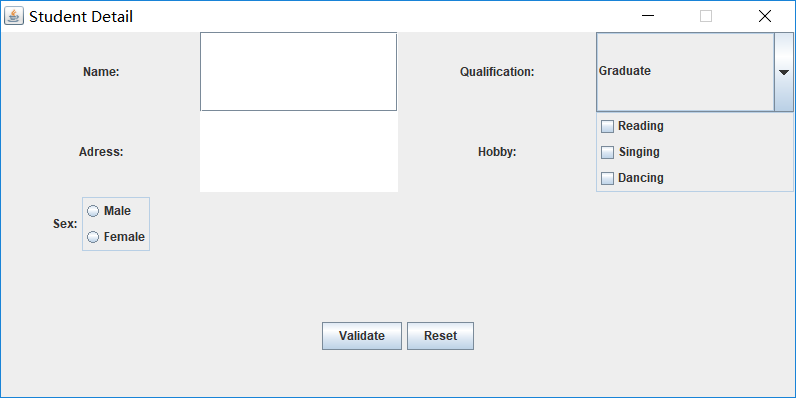
练习1:设计一个用户信息采集程序,要求如下:
1) 用户信息输入界面如下图所示:
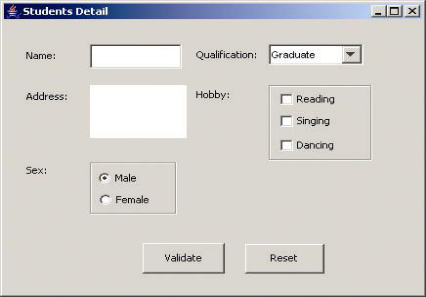
(1)用户点击提交按钮时,用户输入信息显示控制台界面;
(2)用户点击重置按钮后,清空用户已输入信息;
(3)点击窗口关闭,程序退出。
package demo;

import java.awt.*;
import javax.swing.*;

public class Test {
    public static void main(String[] args) {
        EventQueue.invokeLater(() -> {
            Frame frame = new Frame();
            frame.setTitle("Student Detail");
            frame.setDefaultCloseOperation(JFrame.EXIT_ON_CLOSE);
            frame.setVisible(true);
            frame.setResizable(false);
        });
    }
}
package demo;

import java.awt.*;
import javax.swing.*;
import java.awt.event.*;

public class Frame extends JFrame {
    private JPanel panel;
    private JPanel panel1;
    private JPanel panel2;
    private JPanel buttonPanel;
    private JComboBox<String> faceCombo;
    private JCheckBox Reading;
    private JCheckBox Singing;
    private JCheckBox Dancing;
    private JPanel panelDanXuan;
    private ButtonGroup option;
    private JRadioButton optionA;
    private JRadioButton optionB;
    private static final int DEFAULT_WITH = 800;
    private static final int DEFAULT_HEIGHT = 400;

    public Frame() {
        //框架a
        panel = new JPanel();
        panel.setPreferredSize(new Dimension(200,160));
        panel.setLayout(new GridLayout(2,4));
        JLabel lab = new JLabel("Name:", JLabel.CENTER);
        final JTextField jt = new JTextField();
        JLabel lab1 = new JLabel("Qualification:", JLabel.CENTER);
        faceCombo = new JComboBox<>();
        faceCombo.addItem("Graduate");
        faceCombo.addItem("Not graduated");
        JLabel lab2 = new JLabel("Adress:", JLabel.CENTER);
        final JTextArea jt1 = new JTextArea();
        JLabel lab3 = new JLabel("Hobby:", JLabel.CENTER);
        panel1 = new JPanel();
        Reading = new JCheckBox("Reading");
        Singing = new JCheckBox("Singing");
        Dancing = new JCheckBox("Dancing ");
        //框架b
        panel2 = new JPanel();
        panel2.setPreferredSize(new Dimension(200,160));
        JLabel lab4 = new JLabel("Sex:", JLabel.CENTER);
        panelDanXuan = new JPanel();
        option = new ButtonGroup();
        optionA = new JRadioButton("Male");
        optionB = new JRadioButton("Female");
        //框架c
        buttonPanel = new JPanel();
        buttonPanel.setPreferredSize(new Dimension(200,80));
        JButton jButton1 = new JButton("Validate");
        JButton jButton2 = new JButton("Reset");

        panel.add(lab);
        panel.add(jt);
        panel.add(lab1);
        panel.add(faceCombo);
        panel.add(lab2);
        panel.add(jt1);
        panel.add(lab3);

        panel1.add(Reading);
        panel1.add(Singing);
        panel1.add(Dancing);
        panel1.setBorder(BorderFactory.createTitledBorder(""));
        panel1.setLayout(new BoxLayout(panel1, BoxLayout.Y_AXIS));
        panel.add(panel1);

        panel2.add(lab4);
        option.add(optionA);
        option.add(optionB);
        panelDanXuan.add(optionA);
        panelDanXuan.add(optionB);
        panelDanXuan.setBorder(BorderFactory.createTitledBorder(""));
        panelDanXuan.setLayout(new BoxLayout(panelDanXuan, BoxLayout.Y_AXIS));

        panel2.add(panelDanXuan);
        buttonPanel.add(jButton1);
        buttonPanel.add(jButton2);
        add(panel, BorderLayout.NORTH);
        add(panel2, BorderLayout.WEST);
        add(buttonPanel, BorderLayout.SOUTH);
        setSize(DEFAULT_WITH, DEFAULT_HEIGHT);

        jButton1.addActionListener(new ActionListener() {
            public void actionPerformed(ActionEvent e) {
                String Name = jt.getText();
                if (Name != null) {
                    System.out.println("Name:"+Name);
                }
                String m = faceCombo.getSelectedItem().toString();
                System.out.println("Qualification:"+m);
                String Adress = jt1.getText();
                if (Adress != null) {
                    System.out.println("Adress:"+Adress);
                }
                System.out.println("Hobby:");
                if(Reading.isSelected()) {
                System.out.println(Reading.getText());
                }
                if(Singing.isSelected()) {
                System.out.println(Singing.getText());
                }
                if(Dancing.isSelected()) {
                System.out.println(Dancing.getText());
                }
                System.out.println("Sex:");
                if(optionA.isSelected()) {
                System.out.println(optionA.getText());
                }
                if(optionB.isSelected()) {
                System.out.println(optionB.getText());
                }
            }
        });
        jButton2.addActionListener(new ActionListener() {
            public void actionPerformed(ActionEvent e) {
                jt.setText("");
                jt1.setText("");
                faceCombo.setSelectedItem("Graduate");
                Reading.setSelected(false);
                Singing.setSelected(false);
                Dancing.setSelected(false);
                option.clearSelection();
            }
        });
    }
}
练习2:采用GUI界面设计以下程序:
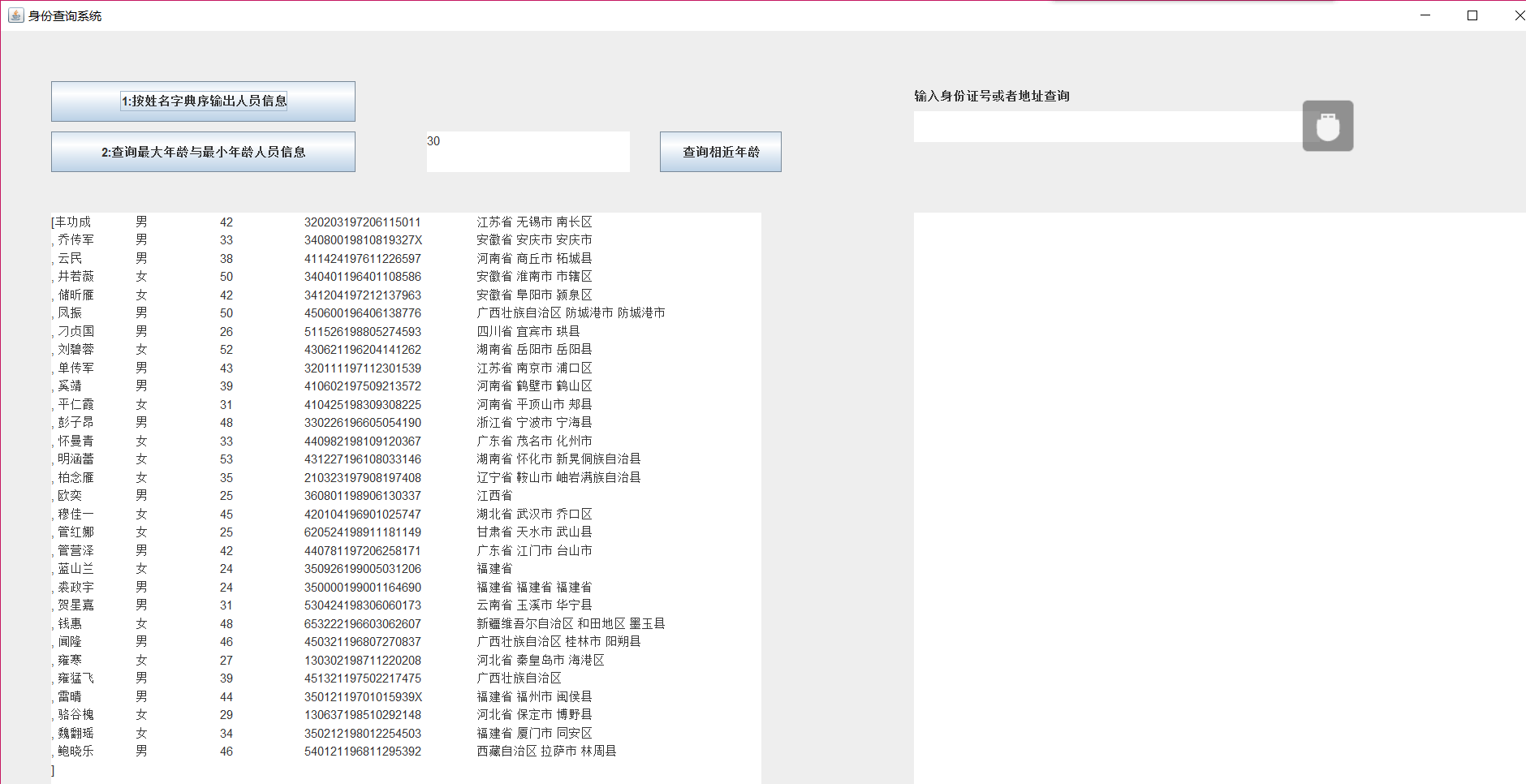
l 编制一个程序,将身份证号.txt 中的信息读入到内存中;
l 按姓名字典序输出人员信息;
l 查询最大年龄的人员信息;
l 查询最小年龄人员信息;
l 输入你的年龄,查询身份证号.txt中年龄与你最近人的姓名、身份证号、年龄、性别和出生地;
l 查询人员中是否有你的同乡。
l 输入身份证信息,查询所提供身份证号的人员信息,要求输入一个身份证数字时,查询界面就显示满足查询条件的查询结果,且随着输入的数字的增多,查询匹配的范围逐渐缩小。
package 身份查询;

    import java.awt.Dimension;
    import java.awt.EventQueue;
    import java.awt.Toolkit;

    import javax.swing.JFrame;

    public class Out {

         public static void main (String args[])
            {
                 Toolkit t=Toolkit.getDefaultToolkit();
                Dimension s=t.getScreenSize();
                EventQueue.invokeLater(() -> {
                    JFrame frame = new Main1();
                    frame.setBounds(0, 0,(int)s.getWidth(),(int)s.getHeight());
                    frame.setTitle("身份查询系统");
                    frame.setDefaultCloseOperation(JFrame.EXIT_ON_CLOSE);
                    frame.setVisible(true);
                 });
            }

    }
package 身份查询;

    public class Person implements Comparable<Person> {
        private String name;
        private String ID;
        private int age;
        private String sex;
        private String birthplace;

        public String getname() {
        return name;
        }
        public void setname(String name) {
        this.name = name;
        }
        public String getID() {
        return ID;
        }
        public void setID(String ID) {
        this.ID= ID;
        }
        public int getage() {

        return age;
        }
        public void setage(int age) {
        this.age= age;
        }
        public String getsex() {
        return sex;
        }
        public void setsex(String sex) {
        this.sex= sex;
        }
        public String getbirthplace() {
        return birthplace;
        }
        public void setbirthplace(String birthplace) {
        this.birthplace= birthplace;
        }

        public int compareTo(Person o) {
           return this.name.compareTo(o.getname());

        }

        public String toString() {
            return  name+"\t"+sex+"\t"+age+"\t"+ID+"\t"+birthplace+"\n";

        }

        }
package 身份查询;

    import java.awt.BorderLayout;
    import java.awt.event.ActionEvent;
    import java.awt.event.ActionListener;
    import java.io.BufferedReader;
    import java.io.File;
    import java.io.FileInputStream;
    import java.io.FileNotFoundException;
    import java.io.IOException;
    import java.io.InputStreamReader;
    import java.util.*;
    import java.util.Timer;
    import javax.swing.*;

    public class Main1 extends JFrame
    {
        private static ArrayList<Person> Personlist;

        Scanner scanner = new Scanner(System.in);
        File file = new File("F:\\身份证号.txt");

        private JPanel Panel;
        private JLabel JLabel1;
        private JButton Button,Button2,Button3;
        private JTextArea text,text1,text2,text3;
        boolean tru=true;

        public  Main1() {

            Panel = new JPanel();Panel.setLayout(null);
            Button = new JButton("1:按姓名字典序输出人员信息");
            Button2 = new JButton("2:查询最大年龄与最小年龄人员信息");
            Button3 = new JButton("查询相近年龄");
            JLabel1 = new JLabel("输入身份证号或者地址查询");JLabel1.setBounds(900, 50, 400, 30);

            text=new JTextArea(30,80);text.setBounds(50, 180, 700, 700);
            text1=new JTextArea(1,30);text1.setBounds(900, 80, 400, 30);
            text2=new JTextArea(30,80);text2.setBounds(900,180,700, 700);
            text3=new JTextArea(30,80);text3.setBounds(420,100,200,40);

            Button.addActionListener(new Action());Button.setBounds(50,50,300,40);
            Button2.addActionListener(new Action1());Button2.setBounds(50,100,300,40);
            Button3.addActionListener(new Action2());Button3.setBounds(650,100,120,40);
            Panel.add(JLabel1);
            Panel.add(Button);
            Panel.add(Button2);
            Panel.add(Button3);
            Panel.add(text);
            Panel.add(text2);
            Panel.add(text1);
            Panel.add(text3);
            add(Panel);

            Timer timer = new Timer();
            TimerTask timeTask=new TimerTask() {

                 @Override
                public void run()
                 {
                         // TODO Auto-generated method stub
                         text2.setText(null);
                         String place=text1.getText().toString().trim();
                         for (int i = 0; i <Personlist.size(); i++)
                         {

                             String Str=(String)Personlist.get(i).getbirthplace();
                             if(Str.contains(place)&&!place.equals(""))
                                 {
                                 text2.append(Personlist.get(i).toString());
                                 }
                        }
                         for (int i = 0; i <Personlist.size(); i++)
                         {

                             String Str=(String)Personlist.get(i).getID();
                             if(Str.contains(place)&&!place.equals(""))
                                 {
                                 text2.append(Personlist.get(i).toString());
                                 }
                        }

                }

            };timer.schedule(timeTask, 0,100);

            Personlist = new ArrayList<>();
            try {
                FileInputStream fis = new FileInputStream(file);
                BufferedReader in = new BufferedReader(new InputStreamReader(fis));
                String temp = null;
                while ((temp = in.readLine()) != null) {
                    Scanner linescanner = new Scanner(temp);
                    linescanner.useDelimiter(" ");
                    String name = linescanner.next();
                    String ID = linescanner.next();
                    String sex = linescanner.next();
                    String age = linescanner.next();
                    String place =linescanner.nextLine();
                    Person Person = new Person();
                    Person.setname(name);
                    Person.setID(ID);
                    Person.setsex(sex);
                    int a = Integer.parseInt(age);
                    Person.setage(a);
                    Person.setbirthplace(place);
                    Personlist.add(Person);

                }
            } catch (FileNotFoundException e) {
                System.out.println("查找不到信息");
                e.printStackTrace();
            } catch (IOException e) {
                System.out.println("信息读取有误");
                e.printStackTrace();
            }

        }

        private class Action implements ActionListener
        {
        public void actionPerformed(ActionEvent event)
            {
             text.setText(null);
             Collections.sort(Personlist);
             text.append(Personlist.toString());
            }

        }

        private class Action1 implements ActionListener
            {
            public void actionPerformed(ActionEvent event)
                {
                text.setText(null);
                int max=0,min=100;int j,k1 = 0,k2=0;
                for(int i=1;i<Personlist.size();i++)
                {
                    j=Personlist.get(i).getage();
                   if(j>max)
                   {
                       max=j;
                       k1=i;
                   }
                   if(j<min)
                   {
                       min=j;
                       k2=i;
                   }
                }
                text.append("年龄最大:   "+Personlist.get(k1)+"\n"+"年龄最小:  "+Personlist.get(k2));
                }

            }

        private class Action2 implements ActionListener
        {
        public void actionPerformed(ActionEvent event)
            {
             text.setText(null);
             int a = Integer.parseInt(text3.getText().toString().trim());
             int d_value=a-Personlist.get(agenear(a)).getage();

             for (int i = 0; i < Personlist.size(); i++)
             {
                 int p=Personlist.get(i).getage()-a;

                 if(p==d_value||-p==d_value) text.append(Personlist.get(i).toString());
             }
            }

        }

        public static int agenear(int age) {

            int j=0,min=53,d_value=0,k=0;
             for (int i = 0; i < Personlist.size(); i++)
             {
                 d_value=Personlist.get(i).getage()-age;
                 if(d_value<0) d_value=-d_value;
                 if (d_value<min)
                 {
                    min=d_value;
                    k=i;
                 }

              }    return k;

          }

    }
练习3:采用GUI界面设计以下程序
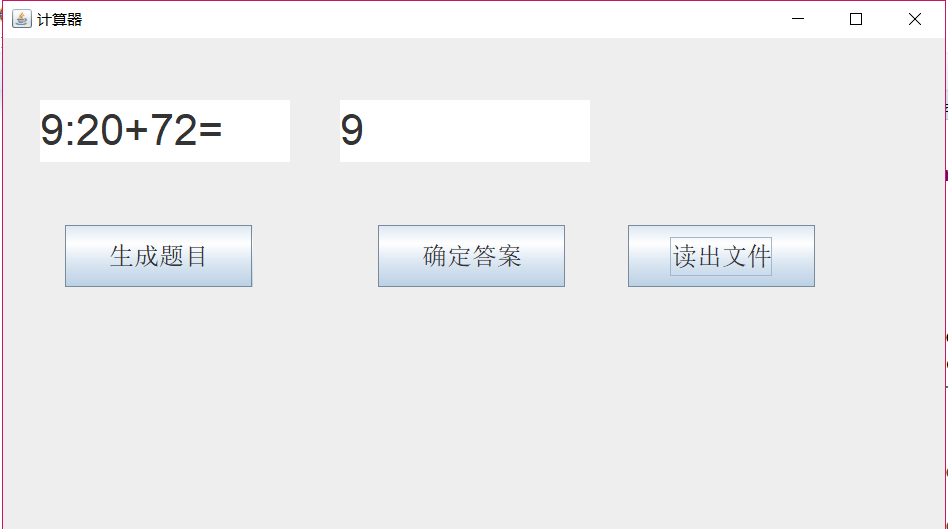
l 编写一个计算器类,可以完成加、减、乘、除的操作
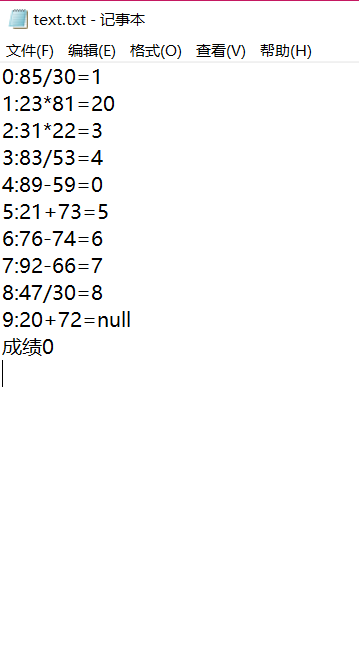
l 利用计算机类,设计一个小学生100以内数的四则运算练习程序,由计算机随机产生10道加减乘除练习题,学生输入答案,由程序检查答案是否正确,每道题正确计10分,错误不计分,10道题测试结束后给出测试总分;
l 将程序中测试练习题及学生答题结果输出到文件,文件名为test.txt。
package 计算器;

    import java.awt.Dimension;
    import java.awt.EventQueue;
    import java.awt.Toolkit;

    import javax.swing.JFrame;

    public class New {

         public static void main (String args[])
            {
                 Toolkit t=Toolkit.getDefaultToolkit();
                Dimension s=t.getScreenSize();
                EventQueue.invokeLater(() -> {
                    JFrame frame = new Demo();
                    frame.setBounds(0, 0,(int)s.getWidth()/2,(int)s.getHeight()/2);
                    frame.setTitle("计算器");
                    frame.setDefaultCloseOperation(JFrame.EXIT_ON_CLOSE);
                    frame.setVisible(true);
                 });
            }

    }
package 计算器;

    import java.awt.Font;
    import java.awt.event.ActionEvent;
    import java.awt.event.ActionListener;
    import java.io.FileNotFoundException;
    import java.io.PrintWriter;
    import java.util.Collections;
    import java.util.Scanner;

    import javax.swing.*;

    import java.math.*;

    public class Demo extends JFrame {

        private String[] c=new String[10];
        private String[] c1=new String[10];
        private int[] list=new int[10];
        int i=0,i1=0,sum = 0;
        private PrintWriter out = null;
        private JTextArea text,text1;
        private int counter;

        public Demo()  {
            JPanel Panel = new JPanel();Panel.setLayout(null);
            JLabel JLabel1=new JLabel("");JLabel1.setBounds(500, 800, 400, 30);JLabel1.setFont(new Font("Courier",Font.PLAIN,35));
            JButton Button = new JButton("生成题目");Button.setBounds(50,150,150,50);Button.setFont(new Font("Courier",Font.PLAIN,20)); Button.addActionListener(new Action());
            JButton Button2 = new JButton("确定答案");Button2.setBounds(300,150,150,50);Button2.setFont(new Font("Courier",Font.PLAIN,20));Button2.addActionListener(new Action1());
            JButton Button3 = new JButton("读出文件");Button3.setBounds(500,150,150,50);Button3.setFont(new Font("Courier",Font.PLAIN,20));Button3.addActionListener(new Action2());
             text=new JTextArea(30,80);text.setBounds(30, 50, 200, 50);text.setFont(new Font("Courier",Font.PLAIN,35));
             text1=new JTextArea(30,80);text1.setBounds(270, 50, 200, 50);text1.setFont(new Font("Courier",Font.PLAIN,35));

             Panel.add(text);
             Panel.add(text1);

             Panel.add(Button);
             Panel.add(Button2);
             Panel.add(Button3);
             Panel.add(JLabel1);
             add(Panel);
        }

        private class Action implements ActionListener
        {
        public void actionPerformed(ActionEvent event)
            {
            text1.setText("0");
            if(i<10) {

            int a = 1+(int)(Math.random() * 99);
            int b = 1+(int)(Math.random() * 99);
            int m= (int) Math.round(Math.random() * 3);
          switch(m)
          {
          case 0:
              while(a<b){  b = (int) Math.round(Math.random() * 100);a = (int) Math.round(Math.random() * 100); }
              c[i]=(i+":"+a+"/"+b+"=");
                list[i]=Math.floorDiv(a, b);
                text.setText(i+":"+a+"/"+b+"=");
                i++;

              break;
          case 1:
              c[i]=(i+":"+a+"*"+b+"=");
              list[i]=Math.multiplyExact(a, b);
              text.setText(i+":"+a+"*"+b+"=");
             i++;
              break;
          case 2:
              c[i]=(i+":"+a+"+"+b+"=");
              list[i]=Math.addExact(a, b);
             text.setText(i+":"+a+"+"+b+"=");
             i++;
              break ;
          case 3:
              while(a<=b){  b = (int) Math.round(Math.random() * 100);a = (int) Math.round(Math.random() * 100); }
              c[i]=(i+":"+a+"-"+b+"=");
              text.setText(i+":"+a+"-"+b+"=");
              list[i]=Math.subtractExact(a, b);i++;

              break ;
              }
            }
          }
        }
        private class Action1 implements ActionListener
        {
        public void actionPerformed(ActionEvent event)
            {
            if(i<10) {
            text.setText(null);
            String daan=text1.getText().toString().trim();
            int a = Integer.parseInt(daan);
            if(text1.getText()!="") {
             if(list[i1]==a) sum+=10;
             }

             c1[i1]=daan;

             i1++;

            }
            }

        }

        private class Action2 implements ActionListener
        {
        public void actionPerformed(ActionEvent event)
            {

            try {
                out = new PrintWriter("text.txt");
            } catch (FileNotFoundException e) {
                // TODO Auto-generated catch block
                e.printStackTrace();
            }
            for(int counter=0;counter<10;counter++)
            {
                out.println(c[counter]+c1[counter]);
            }
            out.println("成绩"+sum);
            out.close();

            }

        }
    }
务3:本学期课程已结束,请汇总《面向对象程序设计课程学习进度条》的数据,统计个人专业能力提升的数据。并从学习内容、学习方法、学习心得几个方面进行课程学习总结,也希望你对课程的不足提出建议和意见。
学习内容:
Java语言特点与开发环境配置(第1章、第2章)
Java基本程序结构(第3章)
Java面向对象程序结构(第4章、第5章、第6章)
类、类间关系、类图
Java JDK预定义类/接口及其API(String-第3章、 Arrays-第3章、Files-第3章62页、LocalDate-第4章、 Object-第5章、对象包装器-第5章、Comparator-第6章、 异常类-第7章、ArrayList-第5+8章、第9章、第10-12章、 第14章)
Java异常处理编程模型
Java GUI编程模型
Java并发程序设计(第14章)
Java应用程序部署(第13章)
学习心得:
通过本学期的学习,掌握了java的一些基本知识,对java有了一定的深入了解,并可以通过java编程来解决一些小问题,在实际问题的解决当中依然有问题。在今后的学习中还会继续努力学习java,提升运用java编程去解决实际生活中的问题的能力。在今后的学习中会尝试着去学习其他一些与java有关的课程。
在这一学期的学习中我收获了很多,同时也感谢老师和助教学长一学期的悉心教导,在课程学习方面对我帮助了许多。
马昕璐 201771010118《面向对象程序设计(java)》第十八周学习总结的更多相关文章
- 201771010118马昕璐《面向对象程序设计java》第八周学习总结
第一部分:理论知识学习部分 1.接口 在Java程序设计语言中,接口不是类,而是对类的一组需求描述,由常量和一组抽象方法组成.Java为了克服单继承的缺点,Java使用了接口,一个类可以实现一个或多个 ...
- 201571030332 扎西平措 《面向对象程序设计Java》第八周学习总结
<面向对象程序设计Java>第八周学习总结 项目 内容 这个作业属于哪个课程 https://www.cnblogs.com/nwnu-daizh/ 这个作业的要求在哪里 https: ...
- 201771010134杨其菊《面向对象程序设计java》第八周学习总结
第八周学习总结 第一部分:理论知识 一.接口.lambda和内部类: Comparator与comparable接口: 1.comparable接口的方法是compareTo,只有一个参数:comp ...
- 201771010118 马昕璐《面向对象程序设计java》第十二周学习总结
第一部分:理论知识学习部分 用户界面:用户与计算机系统(各种程序)交互的接口 图形用户界面:以图形方式呈现的用户界面 AET:Java 的抽象窗口工具箱包含在java.awt包中,它提供了许多用来设计 ...
- 201771010118 马昕璐《面向对象程序设计java》第十周学习总结
第一部分:理论知识学习部分 泛型:也称参数化类型(parameterized type)就是在定义类.接口和方法时,通过类型参数 指示将要处理的对象类型. 泛型程序设计(Generic program ...
- 201771010118 马昕璐 《面向对象设计 java》第十七周实验总结
1.实验目的与要求 (1) 掌握线程同步的概念及实现技术: (2) 线程综合编程练习 2.实验内容和步骤 实验1:测试程序并进行代码注释. 测试程序1: l 在Elipse环境下调试教材651页程序1 ...
- 马凯军201771010116《面向对象程序设计Java》第八周学习总结
一,理论知识学习部分 6.1.1 接口概念 两种含义:一,Java接口,Java语言中存在的结构,有特定的语法和结构:二,一个类所具有的方法的特征集合,是一种逻辑上的抽象.前者叫做“Java接口”,后 ...
- 周强201771010141《面向对象程序设计Java》第八周学习总结
一.理论知识学习部分 Java为了克服单继承的缺点,Java使用了接口,一个类可以实现一个或多个接口. 接口体中包含常量定义和方法定义,接口中只进行方法的声明,不提供方法的实现. 类似建立类的继承关系 ...
- 201777010217-金云馨《面向对象程序设计Java》第八周学习总结
项目 内容 这个作业属于哪个课程 https://www.cnblogs.com/nwnu-daizh/ 这个作业的要求在哪里 https://www.cnblogs.com/nwnu-daizh/p ...
- 201771010118 马昕璐 《面向对象程序设计(java)》第十三周学习总结
第一部分:理论知识学习部分 事件处理基础 1.事件源(event source):能够产生事件的对象都可以成为事件源.一个事件源是一个能够注册监听器并向监听器发送事件对象的对象. 2.事件监听器(ev ...
随机推荐
- 分布式系列十: Redis安装和命令
redis是一个开源的, 内存数据结构存储, 一般用来作为数据库,缓存和消息代理. Redis的优势 多种数据结构 字符类型String 散列类型Hash 列表类型List 集合类型Set 有序集合类 ...
- Asp.net Mvc 与WebForm 混合开发
根据项目实际需求,有时候会想在项目中实现Asp.net Mvc与Webform 混合开发,比如前台框架用MVC,后台框架用WebForm.其实要是实现也很简单,如下: (1)在MVC 中使用Web ...
- Android运行时权限
Android 6.0加入了运行时权限这一概念.对于危险权限,应用必须在使用的时候进行申请.可以使用命令行查看危险权限:adb shell pm list permissions -d -g CALE ...
- echarts-map-区县
首先通过百度获取经纬度 <!DOCTYPE html> <html> <head> <meta http-equiv="Content-Type&q ...
- 企业面试必会shell
企业面试题1: 使用for循环在/oldboy目录下通过随机小写10个字母加固定字符串oldboy批量创建10个html文件,名称例如为: [root@oldboy oldboy]# sh /serv ...
- asp.net core 自定义中间件
官方文档:https://docs.microsoft.com/zh-cn/aspnet/core/fundamentals/middleware/?view=aspnetcore-2.1 中间件的定 ...
- 利用广度优先搜索(BFS)与深度优先搜索(DFS)实现岛屿个数的问题(java)
需要说明一点,要成功运行本贴代码,需要重新复制我第一篇随笔<简单的循环队列>代码(版本有更新). 进入今天的主题. 今天这篇文章主要探讨广度优先搜索(BFS)结合队列和深度优先搜索(DFS ...
- Nuxt.js国际化vue-i18n的搭配使用
Nuxt.js国际化的前提是,已经使用脚手架工具搭建好了Nuxt.js的开发环境. 我使用的环境是nuxt@2.3 + vuetify@1.4 + vue-i18n@7.3 1. 先安装vue-i18 ...
- Angular changeDetction
ChangeDection 检测程序内部状态,然后反映到UI上. 引起状态变化:Events,XHR,Timers ApplicationRef监听NgZone的onTurnDone,然后执行检测. ...
- C#处理JavaScript引擎
概述 通常JavaScript在Web浏览器执行展现特定效果,C#也可以后台执行JavaScript里面方法:C#通常调用第三方DLL方式:MsieJavaScriptEngine或者JavaScri ...