
NLTK基础
Python上著名的⾃然语⾔处理库
- ⾃带语料库,词性分类库
- ⾃带分类,分词,等等功能
- 强⼤的社区⽀持
- 还有N多的简单版wrapper
安装语料库
# 方式一

import nltk

nltk.download()

showing info https://raw.githubusercontent.com/nltk/nltk_data/gh-pages/index.xml
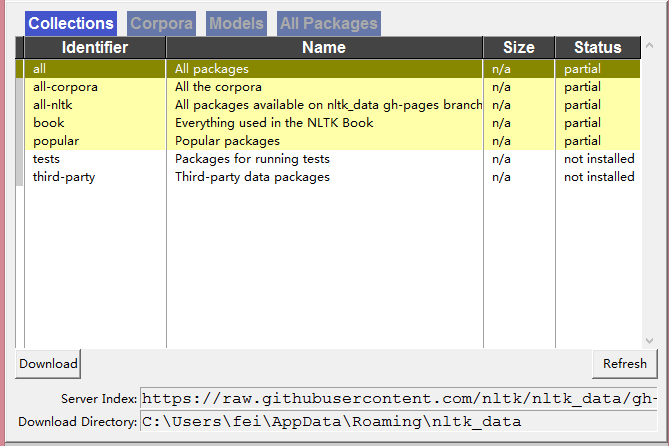
若下载速度慢或因其他原因下载失败
官方下载地址 http://www.nltk.org/nltk_data/
githup下载地址 https://github.com/nltk/nltk_data
- 下载packages文件,重命名为nltk_data
from nltk import data

data.path.append('D:/python3.6/nltk_data')
功能一览表
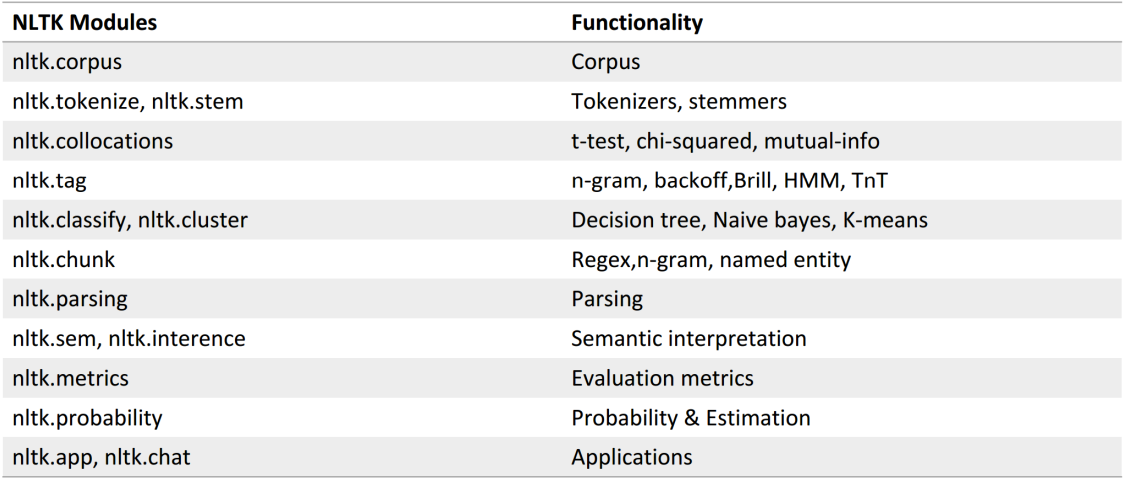
下载语料库
# 请下载

nltk.download('brown')

[nltk_data] Downloading package brown to

[nltk_data]     C:\Users\fei\AppData\Roaming\nltk_data...

[nltk_data]   Unzipping corpora\brown.zip.
nltk自带语料库
# nltk自带语料库

from nltk.corpus import brown

brown.categories()

['adventure',

 'belles_lettres',

 'editorial',

 'fiction',

 'government',

 'hobbies',

 'humor',

 'learned',

 'lore',

 'mystery',

 'news',

 'religion',

 'reviews',

 'romance',

 'science_fiction']

brown.readme()   # 语料信息描述

print(brown.words()[:10])    # 单词

print(len(brown.words()))

['The', 'Fulton', 'County', 'Grand', 'Jury', 'said', 'Friday', 'an', 'investigation', 'of']

1161192

print(brown.sents()[:10])    # 句子

print(brown.sents().__len__())

[['The', 'Fulton', 'County', 'Grand', 'Jury', 'said', 'Friday', 'an', 'investigation', 'of', "Atlanta's", 'recent', 'primary', 'election', 'produced', '``', 'no', 'evidence', "''", 'that', 'any', 'irregularities', 'took', 'place', '.'], ['The', 'jury', 'further', 'said', 'in', 'term-end', 'presentments', 'that', 'the', 'City', 'Executive', 'Committee', ',', 'which', 'had', 'over-all', 'charge', 'of', 'the', 'election', ',', '``', 'deserves', 'the', 'praise', 'and', 'thanks', 'of', 'the', 'City', 'of', 'Atlanta', "''", 'for', 'the', 'manner', 'in', 'which', 'the', 'election', 'was', 'conducted', '.'], ['The', 'September-October', 'term', 'jury', 'had', 'been', 'charged', 'by', 'Fulton', 'Superior', 'Court', 'Judge', 'Durwood', 'Pye', 'to', 'investigate', 'reports', 'of', 'possible', '``', 'irregularities', "''", 'in', 'the', 'hard-fought', 'primary', 'which', 'was', 'won', 'by', 'Mayor-nominate', 'Ivan', 'Allen', 'Jr.', '.'], ['``', 'Only', 'a', 'relative', 'handful', 'of', 'such', 'reports', 'was', 'received', "''", ',', 'the', 'jury', 'said', ',', '``', 'considering', 'the', 'widespread', 'interest', 'in', 'the', 'election', ',', 'the', 'number', 'of', 'voters', 'and', 'the', 'size', 'of', 'this', 'city', "''", '.'], ['The', 'jury', 'said', 'it', 'did', 'find', 'that', 'many', 'of', "Georgia's", 'registration', 'and', 'election', 'laws', '``', 'are', 'outmoded', 'or', 'inadequate', 'and', 'often', 'ambiguous', "''", '.'], ['It', 'recommended', 'that', 'Fulton', 'legislators', 'act', '``', 'to', 'have', 'these', 'laws', 'studied', 'and', 'revised', 'to', 'the', 'end', 'of', 'modernizing', 'and', 'improving', 'them', "''", '.'], ['The', 'grand', 'jury', 'commented', 'on', 'a', 'number', 'of', 'other', 'topics', ',', 'among', 'them', 'the', 'Atlanta', 'and', 'Fulton', 'County', 'purchasing', 'departments', 'which', 'it', 'said', '``', 'are', 'well', 'operated', 'and', 'follow', 'generally', 'accepted', 'practices', 'which', 'inure', 'to', 'the', 'best', 'interest', 'of', 'both', 'governments', "''", '.'], ['Merger', 'proposed'], ['However', ',', 'the', 'jury', 'said', 'it', 'believes', '``', 'these', 'two', 'offices', 'should', 'be', 'combined', 'to', 'achieve', 'greater', 'efficiency', 'and', 'reduce', 'the', 'cost', 'of', 'administration', "''", '.'], ['The', 'City', 'Purchasing', 'Department', ',', 'the', 'jury', 'said', ',', '``', 'is', 'lacking', 'in', 'experienced', 'clerical', 'personnel', 'as', 'a', 'result', 'of', 'city', 'personnel', 'policies', "''", '.']]

57340

print(brown.tagged_words()[:10])    # 词性标注

print(brown.tagged_words().__len__())

[('The', 'AT'), ('Fulton', 'NP-TL'), ('County', 'NN-TL'), ('Grand', 'JJ-TL'), ('Jury', 'NN-TL'), ('said', 'VBD'), ('Friday', 'NR'), ('an', 'AT'), ('investigation', 'NN'), ('of', 'IN')]

1161192
二、文本处理流程
1.preprocess
2.tokenize
3.stopwords
4....
5.make features
6.machine learning
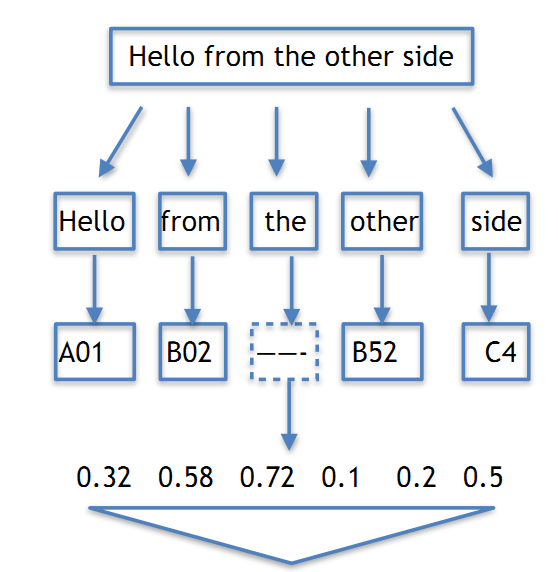
一、Tokenize
把句子拆成有意义的小部件
import nltk

sentence = 'Never underestimate the heart of a champion '

tokens = nltk.word_tokenize(sentence)

tokens

['Never', 'underestimate', 'the', 'heart', 'of', 'a', 'champion']
中文分词
import jieba

seg_list = jieba.cut("我来到北京清华⼤学", cut_all=True)

print("全模式:", "/ ".join(seg_list))  # 全模式

seg_list = jieba.cut("我来到北京清华⼤学", cut_all=False)

print("精确模式:", "/ ".join(seg_list))  # 精确模式

seg_list = jieba.cut("他来到了⽹易杭研⼤厦") # 默认是精确模式

print('新词识别:',", ".join(seg_list))

seg_list = jieba.cut_for_search("⼩明硕⼠毕业于中国科学院计算所,后在⽇本京都⼤学深造")

print('搜索引擎模式:',','.join(seg_list))

全模式: 我/ 来到/ 北京/ 清华/ / / 学

精确模式: 我/ 来到/ 北京/ 清华/ ⼤/ 学

新词识别: 他, 来到, 了, ⽹, 易, 杭研, ⼤, 厦

搜索引擎模式: ⼩,明硕,⼠,毕业,于,中国,科学,学院,科学院,中国科学院,计算,计算所,,,后,在,⽇,本,京都,⼤,学,深造
社交网络语言的分词
例子
# 社交网络语言的tokenize

from nltk.tokenize import word_tokenize

tweet = 'RT @angelababy: love you baby! :D http://ah.love #168cm'

print(word_tokenize(tweet))

['RT', '@', 'angelababy', ':', 'love', 'you', 'baby', '!', ':', 'D', 'http', ':', '//ah.love', '#', '168cm']
解决方法:正则表达式过滤
import re

emoticons_str = r"""

    (?:

        [:=;] # 眼睛

        [oO\-]? # ⿐⼦

        [D\)\]\(\]/\\OpP] # 嘴

    )"""

regex_str = [

    emoticons_str,

    r'<[^>]+>', # HTML tags

    r'(?:@[\w_]+)', # @某⼈

    r"(?:\#+[\w_]+[\w\'_\-]*[\w_]+)", # 话题标签

    r'http[s]?://(?:[a-z]|[0-9]|[$-_@.&+]|[!*\(\),]|(?:%[0-9a-f][0-9a-f]))+',

                   # URLs

    r'(?:(?:\d+,?)+(?:\.?\d+)?)', # 数字

    r"(?:[a-z][a-z'\-_]+[a-z])", # 含有 - 和 ‘ 的单词

    r'(?:[\w_]+)', # 其他

    r'(?:\S)' # 其他

]
正则表达式对照表
http://www.regexlab.com/zh/regref.htm
tokens_re = re.compile(r'('+'|'.join(regex_str)+')', re.VERBOSE | re.IGNORECASE)

emoticon_re = re.compile(r'^'+emoticons_str+'$', re.VERBOSE | re.IGNORECASE)

def tokenize(s):

    return tokens_re.findall(s)

def preprocess(s, lowercase=False):

    tokens = tokenize(s)

    if lowercase:

        tokens = [token if emoticon_re.search(token) else token.lower() for token in

tokens]

    return tokens

tweet = 'RT @angelababy: love you baby! :D http://ah.love #168cm'

print(preprocess(tweet))

['RT', '@angelababy', ':', 'love', 'you', 'baby', '!', ':D', 'http://ah.love', '#168cm']
二、词型归一化
纷繁复杂的词形
- Inflection变化: walk => walking => walked
- 影响词性
- derivation 引申: nation (noun) => national (adjective) => nationalize (verb)
- 不影响词性
Stemming 词⼲提取:⼀般来说,就是把不影响词性的inflection的⼩尾巴砍掉
- walking 砍ing = walk
- walked 砍ed = walk
- Lemmatization 词形归⼀:把各种类型的词的变形,都归为⼀个形式
- went 归⼀ = go
- are 归⼀ = be
1. 词干提取
from nltk.stem.porter import PorterStemmer

porter_stemmer = PorterStemmer()

print(porter_stemmer.stem('maximum'))

print(porter_stemmer.stem('presumably'))

print(porter_stemmer.stem('multiply'))

print(porter_stemmer.stem('provision'))

maximum

presum

multipli

provis
2. 词型归一
from nltk.stem import WordNetLemmatizer

wordnet_lemmatizer = WordNetLemmatizer()

print(wordnet_lemmatizer.lemmatize('dogs'))

print(wordnet_lemmatizer.lemmatize('churches'))

print(wordnet_lemmatizer.lemmatize('aardwolves'))

print(wordnet_lemmatizer.lemmatize('abaci'))

print(wordnet_lemmatizer.lemmatize('hardrock'))

dog

church

aardwolf

abacus

hardrock
没有pos tag,,默认是nn
# ⽊有POS Tag,默认是NN 名词

wordnet_lemmatizer.lemmatize('are')

'are'

wordnet_lemmatizer.lemmatize('is')

'is'
词性标注
方式一:手动标注
# 加上POS Tag

print(wordnet_lemmatizer.lemmatize('is', pos='v'))

print(wordnet_lemmatizer.lemmatize('are', pos='v'))

'be'

'be'
方式二:
import nltk

text = nltk.word_tokenize('what does the fox say')

print(text)

print(nltk.pos_tag(text))

['what', 'does', 'the', 'fox', 'say']

[('what', 'WDT'), ('does', 'VBZ'), ('the', 'DT'), ('fox', 'NNS'), ('say', 'VBP')]
词性关系表
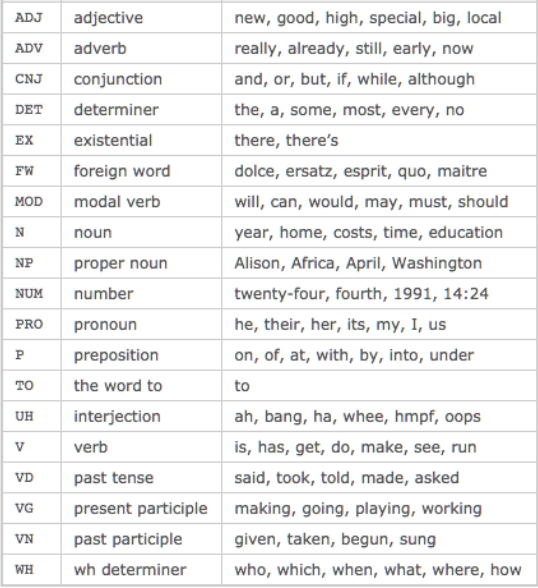
三、Stopwords
⼀千个HE有⼀千种指代
⼀千个THE有⼀千种指事
对于注重理解⽂本『意思』的应⽤场景来说
歧义太多
全体stopwords列表 http://www.ranks.nl/stopwords
nltk去除stopwords
⾸先记得在console⾥⾯下载⼀下词库
或者nltk.download(‘stopwords’)
from nltk.corpusimportstopwords

#先token⼀把,得到⼀个word_list

# ...

#然后filter⼀把

filtered_words =

[wordforwordinword_listifwordnot instopwords.words('english')]
四、nltk频率统计
import nltk

from nltk import FreqDist

# 做个词库先

corpus = 'this is my sentence ' \

           'this is my life ' \

           'this is the day'

# 随便tokenize⼀下

# 显然, 正如上⽂提到,

# 这⾥可以根据需要做任何的preprocessing:

# stopwords, lemma, stemming, etc.

tokens = nltk.word_tokenize(corpus)

print(tokens)

['this', 'is', 'my', 'sentence', 'this', 'is', 'my', 'life', 'this', 'is', 'the', 'day']
# 借⽤NLTK的FreqDist统计⼀下⽂字出现的频率

fdist = FreqDist(tokens)

# 它就类似于⼀个Dict

# 带上某个单词, 可以看到它在整个⽂章中出现的次数

print(fdist.most_common(50))

for k,v in fdist.items():

    print(k,v)

[('this', 3), ('is', 3), ('my', 2), ('sentence', 1), ('life', 1), ('the', 1), ('day', 1)]

this 3

is 3

my 2

sentence 1

life 1

the 1

day 1

# 好, 此刻, 我们可以把最常⽤的50个单词拿出来

standard_freq_vector = fdist.most_common(50)

size = len(standard_freq_vector)

print(standard_freq_vector)

[('this', 3), ('is', 3), ('my', 2), ('sentence', 1), ('life', 1), ('the', 1), ('day', 1)]
Func: 按照出现频率⼤⼩, 记录下每⼀个单词的位置
def position_lookup(v):

    res = {}

    counter = 0

    for word in v:

        res[word[0]] = counter

        counter += 1

    return res

# 把标准的单词位置记录下来

standard_position_dict = position_lookup(standard_freq_vector)

print(standard_position_dict)

# 得到⼀个位置对照表

{'this': 0, 'is': 1, 'my': 2, 'sentence': 3, 'life': 4, 'the': 5, 'day': 6}
这时,我们有个新句子
[1, 1, 0, 0, 0, 0, 0]sentence = 'this is cool'

# 先新建⼀个跟我们的标准vector同样⼤⼩的向量

freq_vector = [0] * size

# 简单的Preprocessing

tokens = nltk.word_tokenize(sentence)

# 对于这个新句⼦⾥的每⼀个单词

for word in tokens:

    try:

        # 如果在我们的词库⾥出现过

        # 那么就在"标准位置"上+1

        freq_vector[standard_position_dict[word]] += 1

    except KeyError:

        # 如果是个新词

        # 就pass掉

        continue

print(freq_vector)

# 第⼀个位置代表 is, 出现了⼀次

# 第⼆个位置代表 this, 出现了⼀次

# 后⾯都⽊有

[1, 1, 0, 0, 0, 0, 0]
五、nltk实现tf-idf
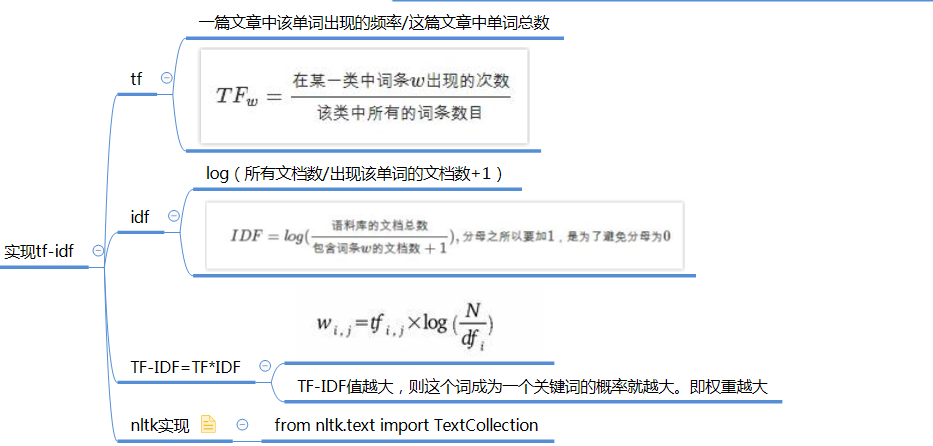
import nltk

from nltk.text import TextCollection

sents = ['this is sentence one', 'this is sentence two', 'this is sentence three']

sents = [nltk.word_tokenize(sent) for sent in sents]

corpus = TextCollection(sents)

# 直接就能算出tfidf

# (term: ⼀句话中的某个term, text: 这句话)

print(corpus.idf('three'))

print(corpus.tf('four',nltk.word_tokenize('this is a sentence four')))

print(corpus.tf_idf('four',nltk.word_tokenize('this is a sentence four')))

1.0986122886681098

0.2

0.0
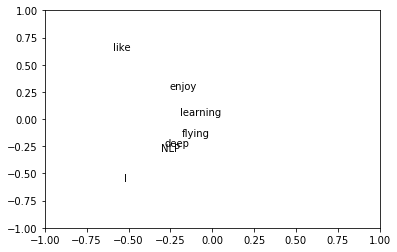
六、svd降维
%matplotlib inline

import numpy as np

import matplotlib.pyplot as plt

la = np.linalg

words = ['I','like','enjoy','deep','learning','NLP','flying']

X = np.array([[0,2,1,0,0,0,0,0],

              [2,0,0,1,0,1,0,0],

              [1,0,0,0,0,0,1,0],

              [0,1,0,0,1,0,0,0],

              [0,0,0,1,0,0,0,1],

              [0,1,0,0,0,0,0,1],

              [0,0,1,0,0,0,0,1],

              [0,0,0,0,1,1,1,0],

             ])

U,s,Vh = la.svd(X,full_matrices=False)

# print(U,s,Vh)

for i in range(len(words)):

    plt.text(U[i,0],U[i,1],words[i])

plt.xlim(-1,1)

plt.ylim(-1,1)

plt.show()
七、nltk经典应用-情感分析
简单的情感分析
import nltk

words = nltk.word_tokenize('I am very happy,i love you')

sentiment_dictionary = {}

for line in open('data/AFINN/AFINN-111.txt'):

    word, score = line.split('\t')

    sentiment_dictionary[word] = int(score)

# 把这个打分表记录在⼀个Dict上以后

# 跑⼀遍整个句⼦,把对应的值相加

total_score = sum(sentiment_dictionary.get(word, 0) for word in words)

# 有值就是Dict中的值,没有就是0

# 于是你就得到了⼀个 sentiment score

print(total_score)

6
配上ML的情感分析
from nltk.classify import NaiveBayesClassifier

# 随⼿造点训练集

s1 = 'this is a good book'

s2 = 'this is a awesome book'

s3 = 'this is a bad book'

s4 = 'this is a terrible book'

def preprocess(s):

    # Func: 句⼦处理

    # 这⾥简单的⽤了split(), 把句⼦中每个单词分开

    # 显然 还有更多的processing method可以⽤

    return {word: True for word in s.lower().split()}

    # return⻓这样:

    # {'this': True, 'is':True, 'a':True, 'good':True, 'book':True}

    # 其中, 前⼀个叫fname, 对应每个出现的⽂本单词;

    # 后⼀个叫fval, 指的是每个⽂本单词对应的值。

        # 这⾥我们⽤最简单的True,来表示,这个词『出现在当前的句⼦中』的意义。

    # 当然啦, 我们以后可以升级这个⽅程, 让它带有更加⽜逼的fval, ⽐如 word2vec

# 把训练集给做成标准形式

training_data = [[preprocess(s1), 'pos'],

                 [preprocess(s2), 'pos'],

                 [preprocess(s3), 'neg'],

                 [preprocess(s4), 'neg']]

# 喂给model吃

model = NaiveBayesClassifier.train(training_data)

# 打出结果

print(model.classify(preprocess('this is a good book')))

pos
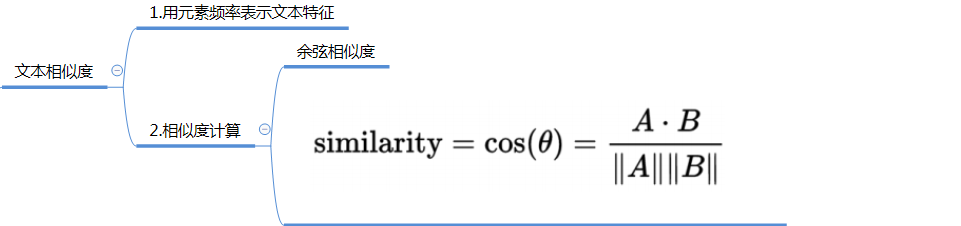
八、nltk应用-文本相似度
NLTK基础的更多相关文章
- 《NLTK基础教程》译者序
购买<NLTK基础教程> 说来也凑巧,在我签下这本书的翻译合同时,这个世界好像还不知道AlphaGo的存在.而在我完成这本书的翻译之时,Master已经对人类顶级高手连胜60局了.至少从媒 ...
- Python文本处理nltk基础
自然语言处理 -->计算机数据 ,计算机可以处理vector,matrix 向量矩阵. NLTK 自然语言处理库,自带语料,词性分析,分类,分词等功能. 简单版的wrapper,比如textbl ...
- NLTK基础学习
学习视频来自:Youtube 学习文档来自:简书 NLTK:自然语言工具包 目的:将段落拆分为句子.拆分词语,识别这些词语的词性,高亮主题,帮助机器了解文本关于什么.这个小节将解决意见挖掘或情感分析的 ...
- 学习笔记CB014:TensorFlow seq2seq模型步步进阶
神经网络.<Make Your Own Neural Network>,用非常通俗易懂描述讲解人工神经网络原理用代码实现,试验效果非常好. 循环神经网络和LSTM.Christopher ...
- 学习笔记CB013: TensorFlow、TensorBoard、seq2seq
tensorflow基于图结构深度学习框架,内部通过session实现图和计算内核交互. tensorflow基本数学运算用法. import tensorflow as tf sess = tf.S ...
- Python 学习书籍推荐
谁会成为AI 和大数据时代的第一开发语言? 这本已是一个不需要争论的问题.如果说三年前,Matlab.Scala.R.Java 和 Python还各有机会,局面尚且不清楚,那么三年之后,趋势已经非常明 ...
- AI 经典书单 | 人工智能学习该读哪些书
转载 2018年01月16日 00:00:00 人工智能相关岗位中,涉及到的内容包含: 算法.深度学习.机器学习.自然语言处理.数据结构.Tensorflow.Python .数据挖掘.搜索开发. ...
- 【自然语言处理篇】--以NLTK为基础讲解自然语⾔处理的原理和基础知识
一.前述 Python上著名的⾃然语⾔处理库⾃带语料库,词性分类库⾃带分类,分词,等等功能强⼤的社区⽀持,还有N多的简单版wrapper. 二.文本预处理 1.安装nltk pip install - ...
- nltk模块基础操作
几个基础函数 (1)搜索文本:text.concordance(word) 例如,在text1中搜索词”is”在文本中出现的次数以及上下文的词:text1.concordance("is& ...
随机推荐
- Redhat安装Oracle 11g (转)
1.1 安装前准备 1.1.1 修改操作系统核心参数 在Root用户下执行以下步骤: 1.1.1.1 修改/etc/security/limits.conf文件 输入命令:vi /et ...
- python2.7生成exe可执行文件
1.安装对应python版本的py2exe py2exe下载地址 2.假设你要生成test.py脚本的exe文件 新建一个setup.py,在里面输入如下代码 #!/usr/bin/python fr ...
- SQLServer数据事务日志操作
日志备份 (log backup) 包括以前日志备份中未备份的所有日志记录的事务日志备份. (完整恢复模式) 使用SSMS数据库管理工具备份事务日志 1.连接数据库,选择数据库->右键点击-&g ...
- 7 Best Free RAR Password Unlocker Software For Windows
Here is the list of Best Free RAR Password Unlocker Software for Windows. These software run differe ...
- Sklearn中的回归和分类算法
一.sklearn中自带的回归算法 1. 算法 来自:https://my.oschina.net/kilosnow/blog/1619605 另外,skilearn中自带保存模型的方法,可以把训练完 ...
- OSGI嵌入tomcat应用服务器(gem-web)——tomcat插件环境搭建
相关的资源下载,参考:https://www.cnblogs.com/dyh004/p/10642769.html 新建普通的plugin工程 新建工程运行环境 在工程中,新建运行环境 新建存放运行环 ...
- Django admin注册model究竟要怎么写才优雅 批量注册model
比如在Django admin 注册models时,会用到. 对于APP里自带的models,可以使用这种方式注册. from django.contrib import admin # Regist ...
- Django rest framework(8)---- 视图和渲染器
django rest framework 之视图 序列化器 PagerSerialiser from rest_framework import serializers from api im ...
- JDBC连接池之C3P0
1.导入jar包 c3p0-0.9.1.jar mchange-commons-java-0.2.3.4(注:该jar包是c3p0数据库连接池的辅助包,没有这个包系统启动的时候会报classnotfo ...
- Ajax跨域请求,无法传递及接收cookie信息
最近在做一个系统遇到一个问题,在网上找个一个和我遇到相同问题的(原文地址:https://www.cnblogs.com/helloyy/p/6109665.html)按照他的步骤还是没有解决,继续查 ...