
TabHost
(一)
知识点:id使用系统自带
1.效果图:

2.布局
activity_main.xml
 <?xml version="1.0" encoding="utf-8"?>

 <TabHost

     android:id="@android:id/tabhost"

     android:layout_width="match_parent"

     android:layout_height="wrap_content"

     xmlns:android="http://schemas.android.com/apk/res/android">

     <LinearLayout

         android:orientation="vertical"

         android:layout_width="match_parent"

         android:layout_height="wrap_content">

         <!--选项卡标题表-->

          <TabWidget

              android:id="@android:id/tabs"

              android:layout_width="match_parent"

              android:layout_height="wrap_content"></TabWidget>

          <!--选项卡布局-->

         <FrameLayout

             android:id="@android:id/tabcontent"

             android:layout_width="match_parent"

             android:layout_height="match_parent"></FrameLayout>

     </LinearLayout>

 </TabHost>
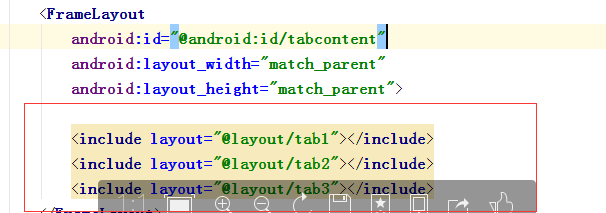
也可以在 activity_main.xml布局中使用include
tab1.xml
 <?xml version="1.0" encoding="utf-8"?>

 <LinearLayout xmlns:android="http://schemas.android.com/apk/res/android"

     android:layout_width="match_parent"

     android:layout_height="match_parent"

     android:id="@+id/tab01">

     <TextView

         android:text="LinnerLayout"

         android:layout_width="match_parent"

         android:layout_height="wrap_content" />

 </LinearLayout>
tab2.xml
 <?xml version="1.0" encoding="utf-8"?>

 <RelativeLayout

     android:layout_width="match_parent"

     android:layout_height="match_parent"

     xmlns:android="http://schemas.android.com/apk/res/android"

     android:id="@+id/tab02">

     <TextView

     android:text="RelativeLayout"

     android:layout_width="match_parent"

     android:layout_height="wrap_content" />

 </RelativeLayout>
tab3.xml
 <?xml version="1.0" encoding="utf-8"?>

 <AbsoluteLayout

     android:layout_width="match_parent"

     android:layout_height="match_parent"

     xmlns:android="http://schemas.android.com/apk/res/android"

     android:id="@+id/tab03">

     <TextView

         android:text="AbsoluteLayout"

         android:layout_width="match_parent"

         android:layout_height="wrap_content" />

 </AbsoluteLayout>
2.MainActivity.java
 package com.example.administrator.hello2;

 import android.app.TabActivity;

 import android.support.v7.app.AppCompatActivity;

 import android.os.Bundle;

 import android.view.LayoutInflater;

 import android.widget.TabHost;

 public class MainActivity extends TabActivity {

     private TabHost tabHost;

     @Override

     protected void onCreate(Bundle savedInstanceState) {

         super.onCreate(savedInstanceState);

         setContentView(R.layout.activity_main);

         tabHost = getTabHost();

         LayoutInflater.from(MainActivity.this).inflate(R.layout.tab1,tabHost.getTabContentView(),true);

         LayoutInflater.from(MainActivity.this).inflate(R.layout.tab2,tabHost.getTabContentView(),true);

         LayoutInflater.from(MainActivity.this).inflate(R.layout.tab3,tabHost.getTabContentView(),true);

         tabHost.addTab(tabHost.newTabSpec("TAB1").setIndicator("线性布局").setContent(R.id.tab01));

         tabHost.addTab(tabHost.newTabSpec("TAB1").setIndicator("相对布局").setContent(R.id.tab02));

         tabHost.addTab(tabHost.newTabSpec("TAB1").setIndicator("绝对布局").setContent(R.id.tab03));

     }

 }
TabHost的更多相关文章
- android 使用Tabhost 发生could not create tab content because could not find view with id 错误
使用Tabhost的时候经常报:could not create tab content because could not find view with id 错误. 总结一下发生错误的原因,一般的 ...
- Android 轮换页面+TabHost 实例
最终效果展示: 首先我们需要一个ViewPager控件,不过可以发现在左侧的控件列表中并没有这个控件 这时我们要去升级包中查看 然后在厘米找到 ViewPager.class 这时我们双击这个发现不能 ...
- tabhost 下 setOnItemClickListener失效的问题
分析了一下代码,应该是tabhost 的ontabchangedListener接管了下面应该由setOnItemClickListener接管的部分,导致不能相应setOnItemClickList ...
- 安卓初級教程(5):TabHost的思考
package com.myhost; import android.os.Bundle; import android.view.LayoutInflater; import android.wid ...
- Android 实现分页(使用TabWidget/TabHost)
注:本文为转载,但该内容本人已亲身尝试,确认该方法可行,代码有点小的改动,转载用作保存与分享. 原作者地址:http://gundumw100.iteye.com/blog/853967 个人吐嘈:据 ...
- 安卓TabHost页面
<?xml version="1.0" encoding="UTF-8"?> <!-- TabHost组件id值不可变--> <T ...
- Android TabHost使用
TabHost是Android中自带的选项卡控件,效果图如下: 主布局文件 <RelativeLayout xmlns:android="http://schemas.android. ...
- tabhost使用
Tabhost用法 使用方法一:使用同一个布局文件 在xml中如此定义tabhost: <RelativeLayout xmlns:android="http://schemas.an ...
- tab使用 TabActivity TabHost Tabspec常用方法
本文是参考Android官方提供的sample里面的ApiDemos的学习总结. TabActivity 首先Android里面有个名为TabActivity来给我们方便使用.其中有以下可以关 ...
- Android工作学习第5天之TabHost实现菜单栏底部显示
TabHost是一个装载选项卡窗口的容器,实现分模块显示的效果.像新浪微博客户端.微信客户端都是使用tabehost组件来开发的. TabHost的组成: |---TabWidget:实现标签栏,可供 ...
随机推荐
- jquery实现通用结构折叠面板效果
效果截图: 说明:可以任意添加多个类似结构样式,点击标题栏图片对应隐藏.显示. jquery代码: 思路一:基本方法 <script src="http://apps.bdimg.co ...
- vue2.0基础知识,及webpack中vue的使用
## 基础指令 ## [v-cloak]{ Display:none; } <p v-cloak>xx{{msg}}xx</p> //解决闪烁问 ...
- 小程序根据input输入,动态设置按钮的样式
[需求]实现当手机号已填写和协议已勾选时,“立即登录”按钮变亮,按钮可点击:若有一个不满足,按钮置灰,不可点击:实现获取短信验证码,倒计时提示操作:对不满足要求内容进行toast弹窗提示. <v ...
- (转)C/S 与 B/S 区别
感谢:http://www.cnblogs.com/xiaoshuai/archive/2010/05/25/1743741.html C/S结构,即Client/Server(客户机/服务器)结构, ...
- 在Idea中使用Eclipse编译器
Eclipse编译器对Javac编译器的优点如下: 1.Proceed on errors 如果使用Javac编译器,你除了在执行之前修复所有错误之外没有其它的选择.然而Eclipse编译器却可以不管 ...
- 【洛谷 P2346】四子连棋(状态压缩,搜索)
其实这题可以直接二进制状压做,1表示黑棋,0表示白棋,另外记录下2个空点的位置就行了. 具体看代码(冗长): #include <iostream> #include <cstdio ...
- 如何利用好chrome控制台这个神器好好调试javascript代码
上面的文章已经大致介绍了一下console对象具体有哪些方面以及基本的应用,下面简单介绍一下如何利用好chrome控制台这个神器好好调试javascript代码(这个才是我们真正能用到实处的地方) 1 ...
- 自动化测试===【转】Robot Framework作者建议如何选择自动化测试框架
原文:http://www.infoq.com/cn/news/2012/06/robot-author-suggest-autotest 软件自动化测试,作为手工测试的替代,越来越受到关注.Pekk ...
- Python Requests 小技巧总结
关于 Python Requests ,在使用中,总结了一些小技巧把,分享下. 1:保持请求之间的Cookies,我们可以这样做. import requests self.session = req ...
- Java反射——java.lang.Class 类简介
Java的基本思想之一是万事万物即对象,类也是一种对象.但是类是什么对象呢?Java中的类是java.lang.Class的实例化对象,这被成为类类型. //java.lang.Class类中的的主要 ...