
TabHost
(一)
知识点:id使用系统自带
1.效果图:

2.布局
activity_main.xml
 <?xml version="1.0" encoding="utf-8"?>

 <TabHost

     android:id="@android:id/tabhost"

     android:layout_width="match_parent"

     android:layout_height="wrap_content"

     xmlns:android="http://schemas.android.com/apk/res/android">

     <LinearLayout

         android:orientation="vertical"

         android:layout_width="match_parent"

         android:layout_height="wrap_content">

         <!--选项卡标题表-->

          <TabWidget

              android:id="@android:id/tabs"

              android:layout_width="match_parent"

              android:layout_height="wrap_content"></TabWidget>

          <!--选项卡布局-->

         <FrameLayout

             android:id="@android:id/tabcontent"

             android:layout_width="match_parent"

             android:layout_height="match_parent"></FrameLayout>

     </LinearLayout>

 </TabHost>
也可以在 activity_main.xml布局中使用include
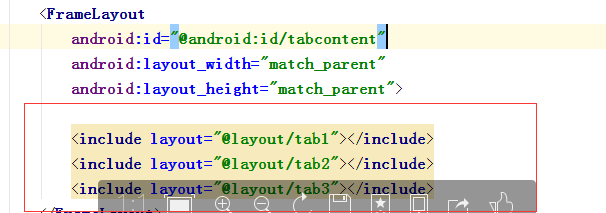
tab1.xml
 <?xml version="1.0" encoding="utf-8"?>

 <LinearLayout xmlns:android="http://schemas.android.com/apk/res/android"

     android:layout_width="match_parent"

     android:layout_height="match_parent"

     android:id="@+id/tab01">

     <TextView

         android:text="LinnerLayout"

         android:layout_width="match_parent"

         android:layout_height="wrap_content" />

 </LinearLayout>
tab2.xml
 <?xml version="1.0" encoding="utf-8"?>

 <RelativeLayout

     android:layout_width="match_parent"

     android:layout_height="match_parent"

     xmlns:android="http://schemas.android.com/apk/res/android"

     android:id="@+id/tab02">

     <TextView

     android:text="RelativeLayout"

     android:layout_width="match_parent"

     android:layout_height="wrap_content" />

 </RelativeLayout>
tab3.xml
 <?xml version="1.0" encoding="utf-8"?>

 <AbsoluteLayout

     android:layout_width="match_parent"

     android:layout_height="match_parent"

     xmlns:android="http://schemas.android.com/apk/res/android"

     android:id="@+id/tab03">

     <TextView

         android:text="AbsoluteLayout"

         android:layout_width="match_parent"

         android:layout_height="wrap_content" />

 </AbsoluteLayout>
2.MainActivity.java
 package com.example.administrator.hello2;

 import android.app.TabActivity;

 import android.support.v7.app.AppCompatActivity;

 import android.os.Bundle;

 import android.view.LayoutInflater;

 import android.widget.TabHost;

 public class MainActivity extends TabActivity {

     private TabHost tabHost;

     @Override

     protected void onCreate(Bundle savedInstanceState) {

         super.onCreate(savedInstanceState);

         setContentView(R.layout.activity_main);

         tabHost = getTabHost();

         LayoutInflater.from(MainActivity.this).inflate(R.layout.tab1,tabHost.getTabContentView(),true);

         LayoutInflater.from(MainActivity.this).inflate(R.layout.tab2,tabHost.getTabContentView(),true);

         LayoutInflater.from(MainActivity.this).inflate(R.layout.tab3,tabHost.getTabContentView(),true);

         tabHost.addTab(tabHost.newTabSpec("TAB1").setIndicator("线性布局").setContent(R.id.tab01));

         tabHost.addTab(tabHost.newTabSpec("TAB1").setIndicator("相对布局").setContent(R.id.tab02));

         tabHost.addTab(tabHost.newTabSpec("TAB1").setIndicator("绝对布局").setContent(R.id.tab03));

     }

 }
TabHost的更多相关文章
- android 使用Tabhost 发生could not create tab content because could not find view with id 错误
使用Tabhost的时候经常报:could not create tab content because could not find view with id 错误. 总结一下发生错误的原因,一般的 ...
- Android 轮换页面+TabHost 实例
最终效果展示: 首先我们需要一个ViewPager控件,不过可以发现在左侧的控件列表中并没有这个控件 这时我们要去升级包中查看 然后在厘米找到 ViewPager.class 这时我们双击这个发现不能 ...
- tabhost 下 setOnItemClickListener失效的问题
分析了一下代码,应该是tabhost 的ontabchangedListener接管了下面应该由setOnItemClickListener接管的部分,导致不能相应setOnItemClickList ...
- 安卓初級教程(5):TabHost的思考
package com.myhost; import android.os.Bundle; import android.view.LayoutInflater; import android.wid ...
- Android 实现分页(使用TabWidget/TabHost)
注:本文为转载,但该内容本人已亲身尝试,确认该方法可行,代码有点小的改动,转载用作保存与分享. 原作者地址:http://gundumw100.iteye.com/blog/853967 个人吐嘈:据 ...
- 安卓TabHost页面
<?xml version="1.0" encoding="UTF-8"?> <!-- TabHost组件id值不可变--> <T ...
- Android TabHost使用
TabHost是Android中自带的选项卡控件,效果图如下: 主布局文件 <RelativeLayout xmlns:android="http://schemas.android. ...
- tabhost使用
Tabhost用法 使用方法一:使用同一个布局文件 在xml中如此定义tabhost: <RelativeLayout xmlns:android="http://schemas.an ...
- tab使用 TabActivity TabHost Tabspec常用方法
本文是参考Android官方提供的sample里面的ApiDemos的学习总结. TabActivity 首先Android里面有个名为TabActivity来给我们方便使用.其中有以下可以关 ...
- Android工作学习第5天之TabHost实现菜单栏底部显示
TabHost是一个装载选项卡窗口的容器,实现分模块显示的效果.像新浪微博客户端.微信客户端都是使用tabehost组件来开发的. TabHost的组成: |---TabWidget:实现标签栏,可供 ...
随机推荐
- Drac6-Web界面无法访问
1. ssh idracip, and reset RAC -- will need around 10mins /admin1-> racadm racreset RAC reset oper ...
- vue.单选和多选,纯css自定义单选框样式
<!DOCTYPE html> <html lang="en"> <head> <meta charset="UTF-8&quo ...
- netty的Udp单播、组播、广播实例+Java的Udp单播、组播、广播实例
网络上缺乏netty的udp的单播.组播案例,经过一番学习总结之后终于把这两个案例调通,下面把这两个案例的代码放在这里分享一下. 首先推荐博文: http://colobu.com/2014/10/2 ...
- 51Nod 1081前缀和
#include <iostream> #include <stdio.h> using namespace std; ]; ]; int main() { int n; ci ...
- Python基础(9)三元表达式、列表解析、生成器表达式
一.三元表达式 三元运算,是对简单的条件语句的缩写. # if条件语句 if x > f: print(x) else: print(y) # 条件成立左边,不成立右边 x if x > ...
- 【bzoj3926- [Zjoi2015]诸神眷顾的幻想乡】广义sam
题意:给定一棵树,每个节点有一个颜色,问树上有多少种子串(定义子串为某两个点上的路径),保证叶子节点数<=20.n<=10^5 题解: 叶子节点小于等于20,考虑将每个叶子节点作为根把树给 ...
- Python阶段复习 - part 2 - Python序列/持久化
1. 把一个数字的list从小到大排序,然后写入文件,然后从文件中读取出来文件内容,然后反序,在追加到文件的下一行中 >>> import json >>> imp ...
- python升级3.6后 yum出错File "/usr/bin/yum", line 30 ^
问题描述: # yum provides ifconfig File "/usr/bin/yum", line 30 except KeyboardInterrupt, e: ^ ...
- 如何加快Eclipse的启动速度?
http://it.taocms.org/12/6457.htm 浅析配置更快的Eclipse方法 What is the Metadata GC Threshold and how do I tun ...
- 详解SHOW PROCESSLIST显示哪些线程正在运行列出的状态
SHOW PROCESSLIST显示哪些线程正在运行.您也可以使用mysqladmin processlist语句得到此信息.如果您有SUPER权限,您可以看到所有线程.否则,您只能看到您自己的线程( ...