
吴裕雄--天生自然 R语言开发学习:基础知识
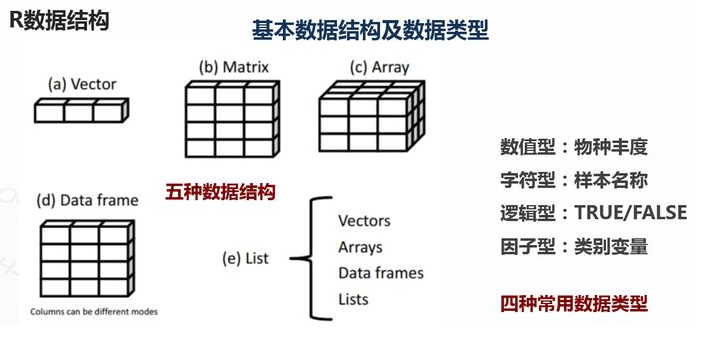

1.基础数据结构

1.1 向量

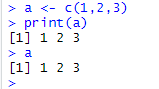
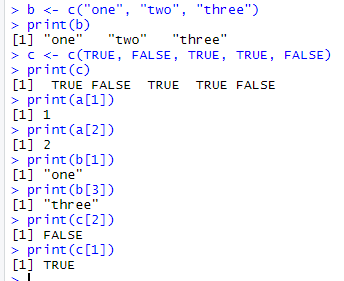
# 创建向量a

a <- c(1,2,3)

print(a)

1.2 矩阵

#创建矩阵

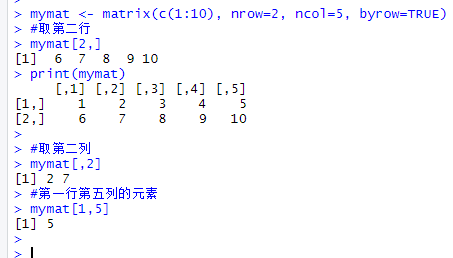
mymat <- matrix(c(1:10), nrow=2, ncol=5, byrow=TRUE)

#取第二行

mymat[2,]

#取第二列

mymat[,2]

#第一行第五列的元素

mymat[1,5]

1.3 数组

#创建数组

myarr <- array(c(1:12),dim=c(2,3,2))

print(myarr)

#取矩阵或数组的维度

dim(myarr)

#取第一个矩阵的第一行第二列

myarr[1,2,1]


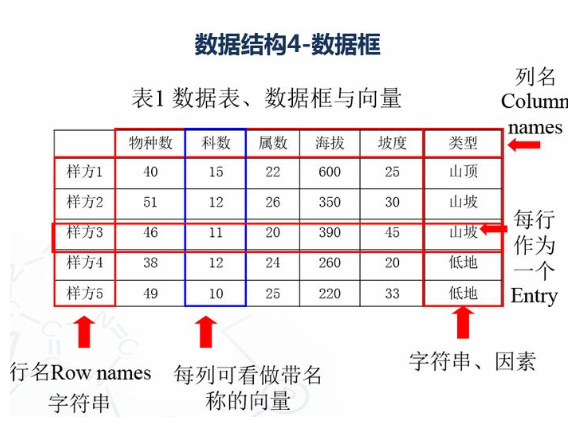
1.4 数据框

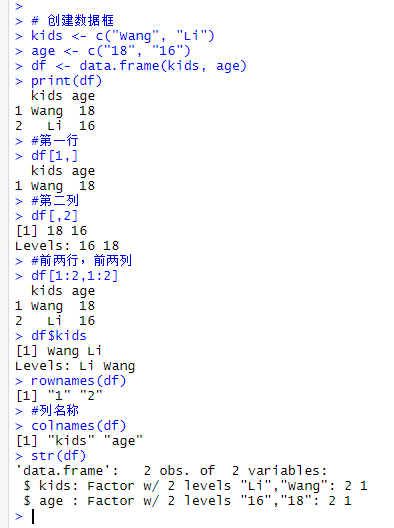
# 创建数据框

kids <- c("Wang", "Li")

age <- c("", "")

df <- data.frame(kids, age)

print(df)

#第一行

df[1,]

#第二列

df[,2]

#前两行,前两列

df[1:2,1:2]

#根据列名称

df$kids

#行名称

rownames(df)

#列名称

colnames(df)

str(df)
1.4.1 因子变量

变量:类别变量,数值变量

类别数据对于分组数据研究非常有用。(男女,高中低)

R中的因子变量类似于类别数据。

1.5 列表

列表以一种简单的方式组织和调用不相干的信息,R函数的许多运行结果都是以列表的形式返回

#创建列表

lis <- list(name='fred',wife='mary',no.children=3,child.ages=c(4,7,9))

print(lis)

#列表组件名

lis$name

#列表位置访问

lis[[1]]

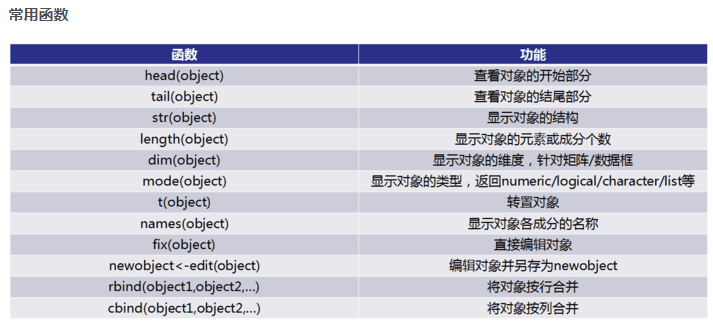
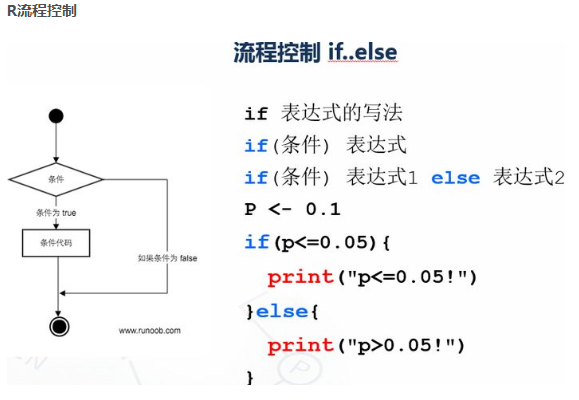
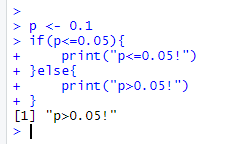
p <- 0.1

if(p<=0.05){

print("p<=0.05!")

}else{

print("p>0.05!")

}

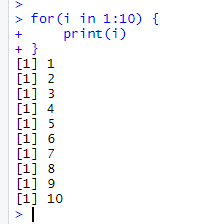
for(i in 1:10) {

print(i)

}
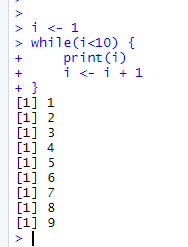
i <- 1

while(i<10) {

print(i)

i <- i + 1

  }
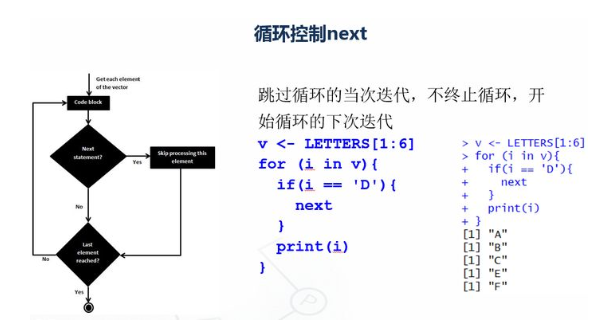
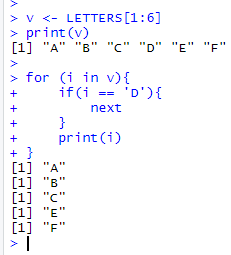
v <- LETTERS[1:6]

print(v)

for (i in v){

    if(i == 'D'){

        next

  }

  print(i)

}
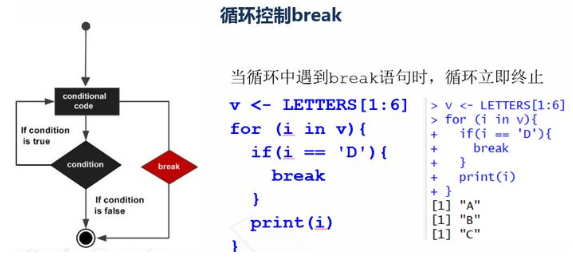
v <- LETTERS[1:6]

for (i in v){

    if(i == 'D'){

        break

  }

  print(i)

}

2.5 R函数

函数是组织好的,可重复使用的,用来实现单一,或相关联功能的代码段

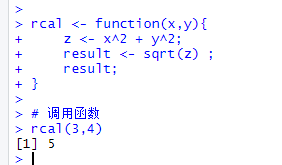
rcal <- function(x,y){

  z <- x^2 + y^2;

  result <- sqrt(z) ;

  result;

}

# 调用函数

rcal(3,4)
3. 读写数据

#数据读入

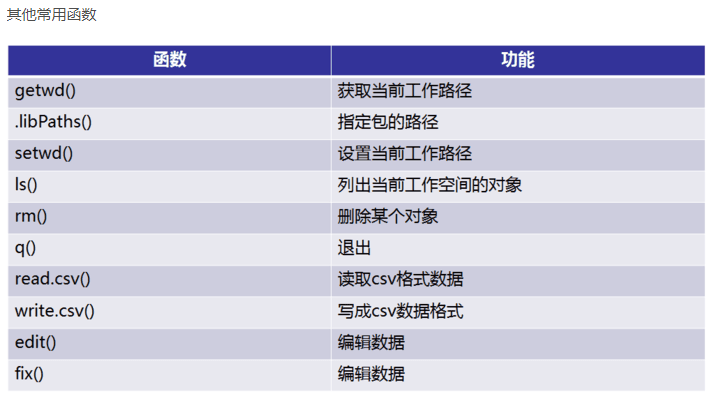
getwd()

setwd('C:/Users/Administrator/Desktop/file')

dir()

top <- read.table("otu_table.p10.relative.tran.xls",header=T,row.names=1,sep='\t',stringsAsFactors = F)

top10 <- t(top)

#数据写出logtop10<-log(top10+0.000001)

head(top10, n=2)

write.csv(logtop10,file="logtop10.csv", quote=FALSE,  row.names = TRUE)

write.table(logtop10,file="logtop10.xls",sep="\t", quote=FALSE, row.names = TRUE, col.names = TRUE)
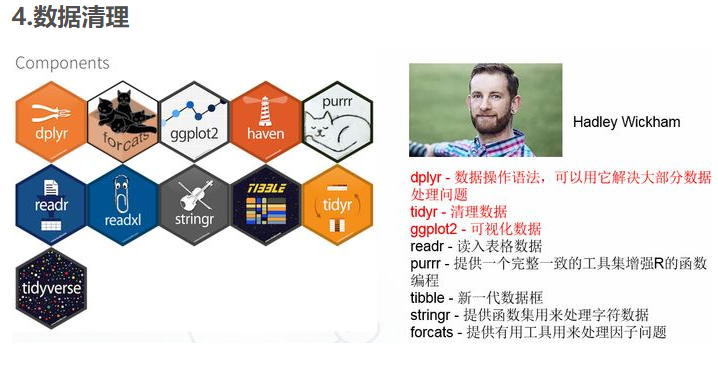
4.1 tidyr包

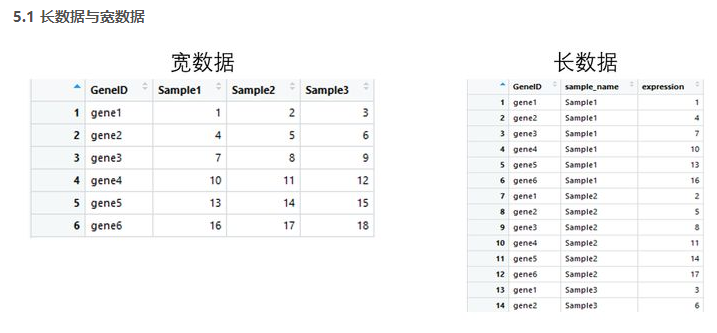
tidyr包的四个函数

宽数据转为长数据:gather()

长数据转为宽数据:spread()

多列合并为一列: unite()

将一列分离为多列:separate()
library(tidyr)

gene_exp <- read.table('geneExp.csv',header = T,sep=',',stringsAsFactors = F)

head(gene_exp)

#gather 宽数据转为长数据

gene_exp_tidy <- gather(data = gene_exp, key = "sample_name", value = "expression", -GeneID)

head(gene_exp_tidy)

#spread 长数据转为宽数据

gene_exp_tidy2<-spread(data = gene_exp_tidy, key = "sample_name", value = "expression")

head(gene_exp_tidy2)

4.2 dplyr包

dplyr包五个函数用法:

筛选: filter

排列: arrange()

选择: select()

变形: mutate()

汇总: summarise()

分组: group_by()
library(tidyr)

library(dplyr)

gene_exp <- read.table("geneExp.csv",header=T,sep=",",stringsAsFactors = F)

gene_exp_tidy <- gather(data = gene_exp, key = "sample_name", value = "expression", -GeneID)

#arrange 数据排列

gene_exp_GeneID <- arrange(gene_exp_tidy, GeneID)

#降序加

deschead(gene_exp_GeneID )

#filter 数据按条件筛选

gene_exp_fiter <- filter(gene_exp_GeneID ,expression>10)

head(gene_exp_fiter)

#select 选择对应的列

gene_exp_select <- select(gene_exp_fiter ,sample_name,expression)

head(gene_exp_select)


library(tidyr)

library(ggplot2)

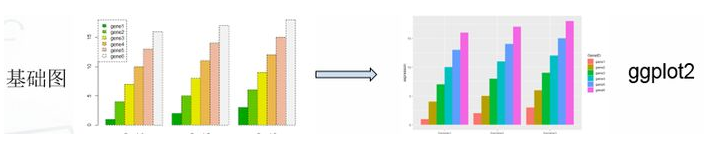
#基础绘图

#宽数据file

file <- read.table("geneExp.csv",header=T,sep=",",stringsAsFactors = F,row.names = 1)

barplot(as.matrix(file),names.arg = colnames(file), beside =T ,col=terrain.colors(6))

legend("topleft",legend = rownames(file),fill = terrain.colors(6))

#ggplot2绘图

gene_exp <- read.table("geneExp.csv",header=T,sep=",",stringsAsFactors = F)

gene_exp_tidy <- gather(data = gene_exp, key = "sample_name", value = "expression", -GeneID)

#长数据head(gene_exp_tidy)

ggplot(gene_exp_tidy,aes(x=sample_name,y=expression,fill=GeneID)) + geom_bar(stat='identity',position='dodge')
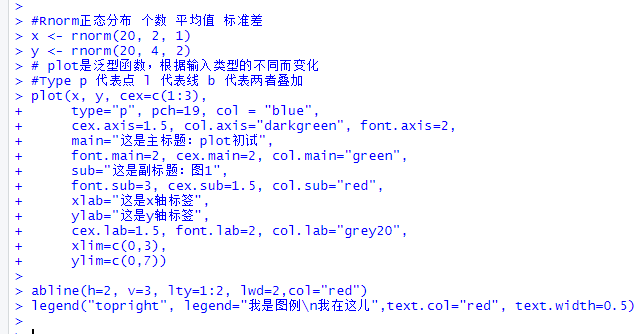
#Rnorm正态分布 个数 平均值 标准差

x <- rnorm(20, 2, 1)

y <- rnorm(20, 4, 2)

# plot是泛型函数,根据输入类型的不同而变化

#Type p 代表点 l 代表线 b 代表两者叠加

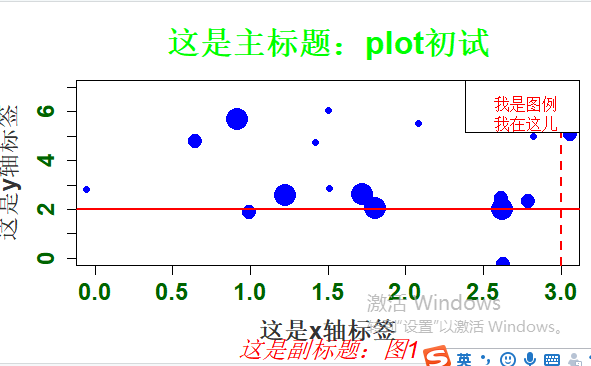
plot(x, y, cex=c(1:3),

type="p", pch=19, col = "blue",

cex.axis=1.5, col.axis="darkgreen", font.axis=2,

main="这是主标题:plot初试",

font.main=2, cex.main=2, col.main="green",

sub="这是副标题:图1",

font.sub=3, cex.sub=1.5, col.sub="red",

xlab="这是x轴标签",

ylab="这是y轴标签",

cex.lab=1.5, font.lab=2, col.lab="grey20",

xlim=c(0,3),

ylim=c(0,7))

abline(h=2, v=3, lty=1:2, lwd=2,col="red")

legend("topright", legend="我是图例\n我在这儿",text.col="red", text.width=0.5)
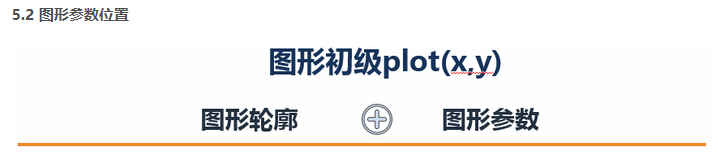
图形参数:

符号和线条:pch、cex、lty、lwd

颜色:col、col.axis、col.lab、col.main、col.sub、fg、bg

文本属性:cex、cex.axis、cex.lab、cex.main、cex.sub、font、font.axis、font.lab、font.main、font.sub

文本添加、坐标轴的自定义和图例

title()、main、sub、xlab、ylab、text()

axis()、abline()

legend()

多图绘制时候,可使用par()设置默认的图形参数

par(lwd=2, cex=1.5)

图形参数设置:

par(optionname=value,…)

par(pin=c(width,height)) 图形尺寸

par(mfrow=c(nr,nc)) 图形组合,一页多图

layout(mat) 图形组合,一页多图

par(mar=c(bottom,left,top,right)) 边界尺寸

par(fig=c(x1,x2,y1,y2),new=TURE) 多图叠加或排布成一幅图
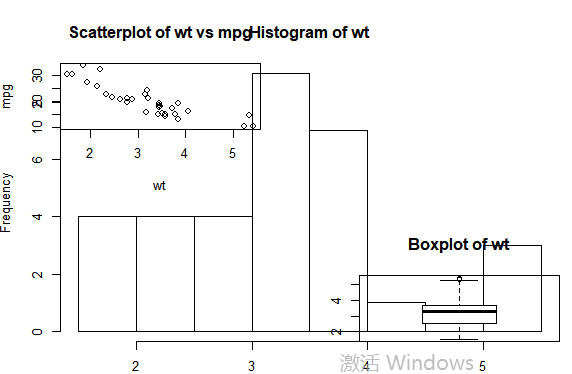
#图形组合:

attach(mtcars)

#复制当前图形参数设置

opar <- par(no.readonly=TRUE)

#设置图形参数

par(mfrow=c(2,2))

layout(matrix(c(1,2,2,3),2,2,byrow=TRUE))

plot(wt,mpg,main="Scatterplot of wt vs mpg")

hist(wt,main="Histogram of wt")

boxplot(wt,main="Boxplot of wt")

#返回原始图形参数detach(mtcars)

par(opar)

5.3 柱形图
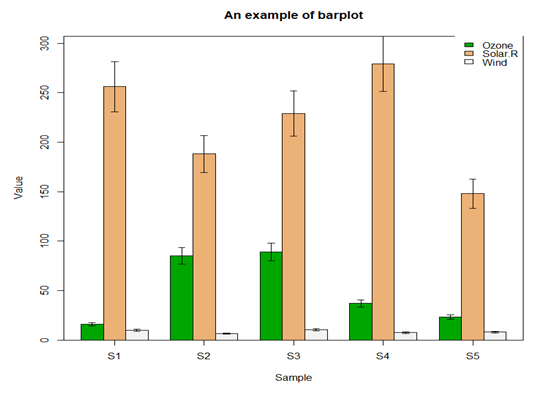
file <- read.table("barData.csv",header=T,row.names=1,sep=",",stringsAsFactors = F)

#转化为矩阵

dataxx <- as.matrix(file)

#抽取颜色

cols <- terrain.colors(3)

#误差线函数

plot.error <- function(x, y, sd, len = 1, col = "black") {

    len <- len * 0.05

    arrows(x0 = x, y0 = y, x1 = x, y1 = y - sd, col = col, angle = 90, length = len)

    arrows(x0 = x, y0 = y, x1 = x, y1 = y + sd, col = col, angle = 90, length = len)

}

x <- barplot(dataxx, offset = 0, ylim=c(0, max(dataxx) * 1.1),axis.lty = 1, names.arg = colnames(dataxx), col = cols, beside = TRUE)

box()

legend("topright", legend = rownames(dataxx), fill = cols, box.col = "transparent")

title(main = "An example of barplot", xlab = "Sample", ylab = "Value")

sd <- dataxx * 0.1

for (i in 1:3) {

  plot.error(x[i, ], dataxx[i, ], sd = sd[i, ])

}
5.4 二元图
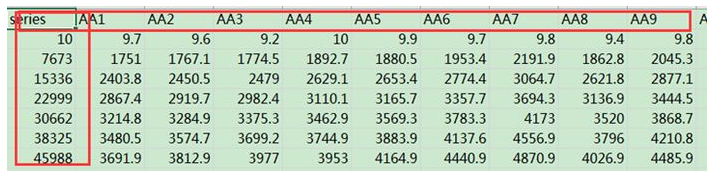
matdata <- read.table("plot_observed_species.xls", header=T)

#查看数据属性和结构

tbl_df(matdata)

y<-matdata[,2:145]

attach(matdata)

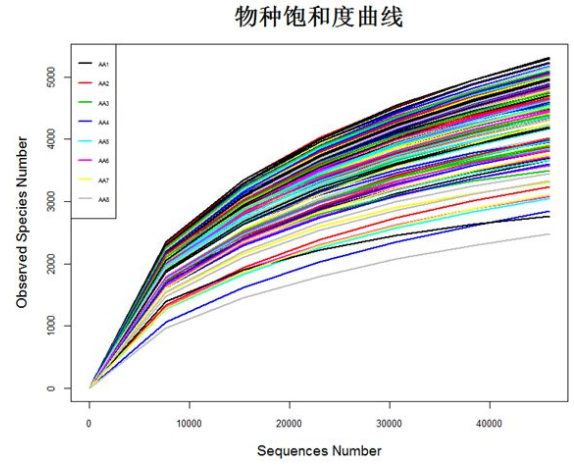
matplot(series,y,

        ylab="Observed Species Number",xlab="Sequences Number",

        lty=1,lwd=2,type="l",col=1:145,cex.lab=1.2,cex.axis=0.8)

legend("topleft",lty=1, lwd=2, legend=names(y)[1:8], cex=0.5,col=1:145)

detach(matdata)
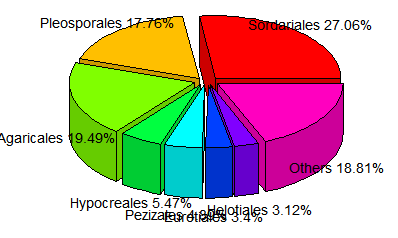
5.5 饼状图
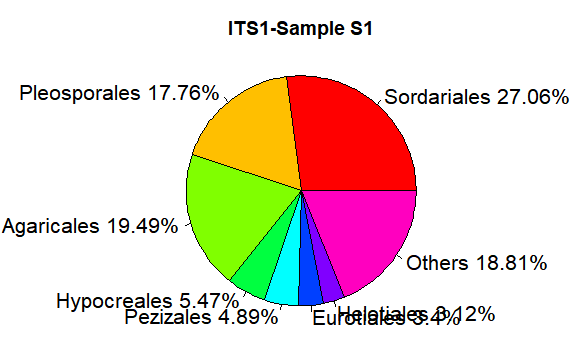
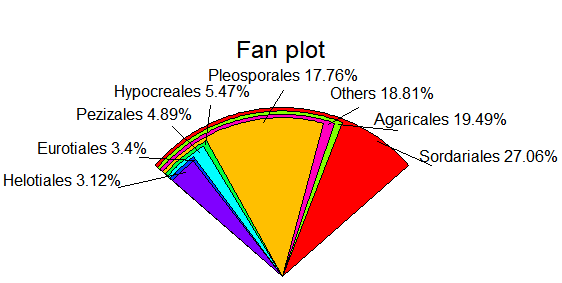
relative <- c(0.270617,0.177584,0.194911,0.054685,0.048903,0.033961, 0.031195,0.188143)

taxon <- c("Sordariales","Pleosporales","Agaricales","Hypocreales","Pezizales","Eurotiales","Helotiales","Others")

ratio <- round(relative*100,2)

ratio <- paste(ratio,"%",sep="")

label <- paste(taxon,ratio,sep=" ")
pie(relative,labels=label, main="ITS1-Sample S1",radius=1,col=rainbow(length(label)),cex=1.3)
library(plotrix)

fan.plot(relative,labels=label,main="Fan plot")
pie3D(relative,labels=label, height=0.2, theta=pi/4, explode=0.1, col=rainbow(length(label)),border="black",font=2,radius=1,labelcex=0.9)
5.6 直方图
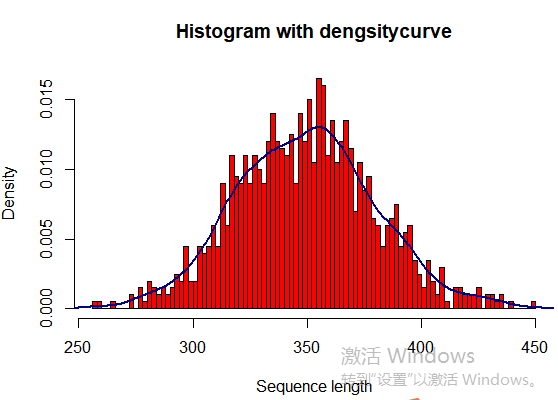
seqlength <- rnorm(1000, 350, 30)

hist(seqlength,breaks=100,col="red",

freq=FALSE,

main="Histogram with dengsitycurve",

ylab="Density",

xlab="Sequence length")

lines(density(seqlength),col="blue4",lwd=2)
5.7 聚类图
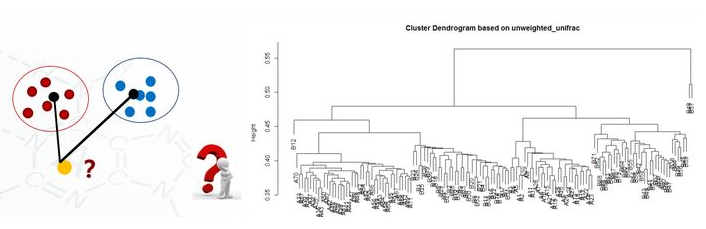
clu <- read.table("unweighted_unifrac_dm.txt", header=T, row.names=1, sep="\t")

head(clu)

dis <- as.dist(clu)

h <- hclust(dis, method="average")

plot(h, hang = 0.1, axes = T, frame.plot = F, main="Cluster Dendrogram based on unweighted_unifrac", sub="UPGMA")

#保存图片代码
pdf(file="file.pdf", width=7, height=10)

png(file="file.png",width=480,height=480)

jpeg(file="file.png",width=480,height=480)

tiff(file="file.png",width=480,height=480)

dev.off()
吴裕雄--天生自然 R语言开发学习:基础知识的更多相关文章
- 吴裕雄--天生自然 R语言开发学习:R语言的安装与配置
下载R语言和开发工具RStudio安装包 先安装R
- 吴裕雄--天生自然 R语言开发学习:数据集和数据结构
数据集的概念 数据集通常是由数据构成的一个矩形数组,行表示观测,列表示变量.表2-1提供了一个假想的病例数据集. 不同的行业对于数据集的行和列叫法不同.统计学家称它们为观测(observation)和 ...
- 吴裕雄--天生自然 R语言开发学习:导入数据
2.3.6 导入 SPSS 数据 IBM SPSS数据集可以通过foreign包中的函数read.spss()导入到R中,也可以使用Hmisc 包中的spss.get()函数.函数spss.get() ...
- 吴裕雄--天生自然 R语言开发学习:使用键盘、带分隔符的文本文件输入数据
R可从键盘.文本文件.Microsoft Excel和Access.流行的统计软件.特殊格 式的文件.多种关系型数据库管理系统.专业数据库.网站和在线服务中导入数据. 使用键盘了.有两种常见的方式:用 ...
- 吴裕雄--天生自然 R语言开发学习:R语言的简单介绍和使用
假设我们正在研究生理发育问 题,并收集了10名婴儿在出生后一年内的月龄和体重数据(见表1-).我们感兴趣的是体重的分 布及体重和月龄的关系. 可以使用函数c()以向量的形式输入月龄和体重数据,此函 数 ...
- 吴裕雄--天生自然 R语言开发学习:图形初阶(续二)
# ----------------------------------------------------# # R in Action (2nd ed): Chapter 3 # # Gettin ...
- 吴裕雄--天生自然 R语言开发学习:图形初阶(续一)
# ----------------------------------------------------# # R in Action (2nd ed): Chapter 3 # # Gettin ...
- 吴裕雄--天生自然 R语言开发学习:图形初阶
# ----------------------------------------------------# # R in Action (2nd ed): Chapter 3 # # Gettin ...
- 吴裕雄--天生自然 R语言开发学习:基本图形(续二)
#---------------------------------------------------------------# # R in Action (2nd ed): Chapter 6 ...
随机推荐
- 自己简单配置webpack
第一步 // 1.在新建文件夹中,npm init -y,生成package.json文件 // package.json 文件内容 { "name": "02webpa ...
- LeetCode——221. 最大正方形
在一个由 0 和 1 组成的二维矩阵内,找到只包含 1 的最大正方形,并返回其面积. 示例: 输入: 1 0 1 0 0 1 0 1 1 1 1 1 1 1 1 1 0 0 1 0 输出: 4 暴力法 ...
- Django1.11模型类数据库操作
django模型类数据库操作 数据库操作 添加数据 1,创建类对象,属性赋值添加 book= BookInfo(name='jack',pub_date='2010-1-1') book.save() ...
- 2020/1/29 PHP代码审计之XSS漏洞
0x00 XSS漏洞简介 人们经常将跨站脚本攻击(Cross Site Scripting)缩写为CSS,但这会与层叠样式表(Cascading Style Sheets,CSS)的缩写混淆.因此,有 ...
- POJ 1789:Truck History
Truck History Time Limit: 2000MS Memory Limit: 65536K Total Submissions: 21376 Accepted: 8311 De ...
- 18 11 05 继续补齐对python中的class不熟悉的地方 和 pygame 精灵
---恢复内容开始--- class game : #历史最高分----- 是定义类的属性 top_score =0 def __init__(self, player_name) : #是定义的实例 ...
- C++内联函数作用及弊端
为什么要使用内联函数? 因为函数调用时候需要创建时间.参数传入传递等操作,造成了时间和空间的额外开销.C++追求效率所以引入了内联的概念. 通过编译器预处理,在调用内联函数的地方将内联函数内的语句Co ...
- JAVA内存分配-通俗讲解
Java的内存分配上,主要分4个块: 一块是用来装代码的,就是编译的东西. 一块是用来装静态变量的,例如用static关键字的变量,例如字符串常量. 一块是stack,也就是栈,是用来装变量和引用类型 ...
- 结点选择(树形DP)
Description 有一棵 n 个节点的树,树上每个节点都有一个正整数权值.如果一个点被选择了,那么在树上和它相邻的点都不能被选择.求选出的点的权值和最大是多少? Input 接下来的一行包含 n ...
- android设备内部添加apn信息
由于工作原因今天需要给多台android设备中写入某张sim卡的apn相关信息,虽然可以通过sqlite命令写sql语句来写入到设备中,但设备一多起来就太低效了,所以在学习的过程中摸索着写了一个将ap ...