
微信小程序云开发-云存储的应用-识别身份证(正面和反面)
一、准备工作
1、创建云函数identify
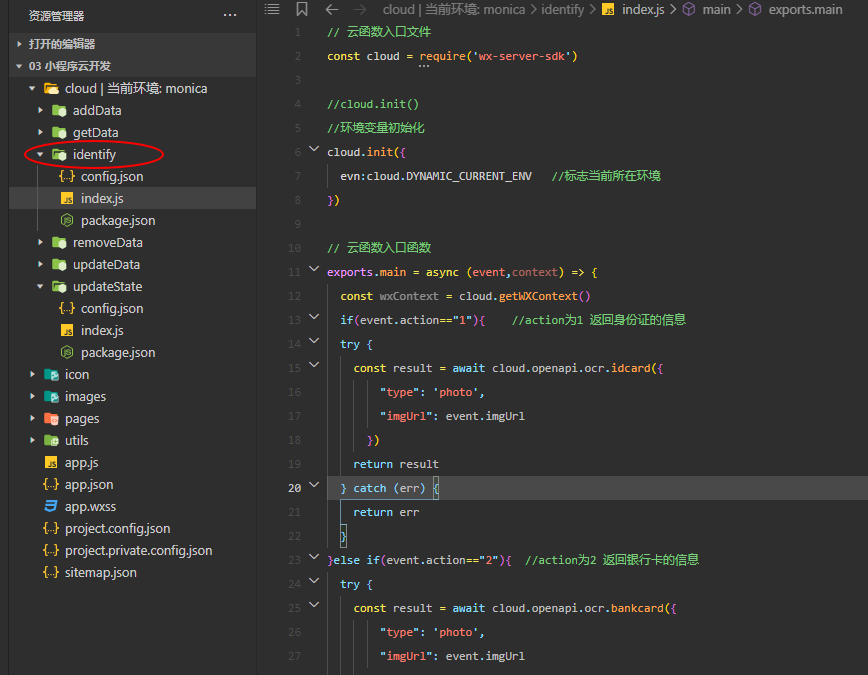
2、云函数identify中index.js代码
 1 // 云函数入口文件

 2 const cloud = require('wx-server-sdk')

 3

 4 //cloud.init()

 5 //环境变量初始化

 6 cloud.init({

 7   evn:cloud.DYNAMIC_CURRENT_ENV   //标志当前所在环境

 8 })

 9

10 // 云函数入口函数

11 exports.main = async (event,context) => {

12   const wxContext = cloud.getWXContext()

13   if(event.action=="1"){    //action为1 返回身份证的信息

14   try {

15     const result = await cloud.openapi.ocr.idcard({

16         "type": 'photo',

17         "imgUrl": event.imgUrl

18       })

19     return result

20   } catch (err) {

21     return err

22   }

23 }else if(event.action=="2"){  //action为2 返回银行卡的信息

24   try {

25     const result = await cloud.openapi.ocr.bankcard({

26         "type": 'photo',

27         "imgUrl": event.imgUrl

28       })

29     return result

30   } catch (err) {

31     return err

32   }

33 }else if(event.action=="3"){  //action为3 返回驾驶证的信息

34   try {

35     const result = await cloud.openapi.ocr.driverLicense({

36         "type": 'photo',

37         "imgUrl": event.imgUrl

38       })

39     return result

40   } catch (err) {

41     return err

42   }

43 }else if(event.action=="4"){        //action为4 返回行驶证的信息

44   try {

45     const result = await cloud.openapi.ocr.vehicleLicense({

46         "type": 'photo',

47         "imgUrl": event.imgUrl

48       })

49     return result

50   } catch (err) {

51     return err

52   }

53 }else if(event.action=="5"){        //action为5 返回营业执照的信息

54   try {

55     const result = await cloud.openapi.ocr.businessLicense({

56         "imgUrl": event.imgUrl

57       })

58     return result

59   } catch (err) {

60     return err

61   }

62 }else if(event.action=="6"){        //action为6 返回通用印刷体的信息

63   try {

64     const result = await cloud.openapi.ocr.businessLicense({

65         "imgUrl": event.imgUrl

66       })

67     return result

68   } catch (err) {

69     return err

70   }

71 }

72 }
二、创建页面并写相应代码
创建页面IdentifyIdcard,用于OCR识别身份证正面和反面
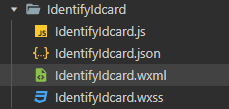
1、IdentifyIdcard.wxml
<button bindtap="identifyIdcardFront" type="primary">识别身份证正面</button>

<!-- 把识别到的身份证正面图片显示到页面上 -->

<view class="idcard">

<image src="{{idcardFrontURL}}"></image>

</view>

<!-- 把识别到的身份证正面信息显示到页面上 -->

<view class="front" wx:if="{{showIdCardFront}}">

<view>正反:{{idcardFrontMsg.type}}</view>

<view>身份证号:{{idcardFrontMsg.id}}</view>

<view>姓名:{{idcardFrontMsg.name}}</view>

<view>住址:{{idcardFrontMsg.addr}}</view>

<view>性别:{{idcardFrontMsg.gender}}</view>

<view>民族:{{idcardFrontMsg.nationality}}</view>

</view>

<button bindtap="identifyIdcardBack" type="primary">识别身份证背面</button>

<!-- 把识别到的身份证背面图片显示到页面上 -->

<view class="idcard">

<image src="{{idcardBackURL}}" ></image>

</view>

<!-- 把识别到的身份证背面信息显示到页面上 -->

<view class="front" wx:if="{{showIdCardBack}}">

<view>正反:{{idcardBankMsg.type}}</view>

<view>有效期:{{idcardBankMsg.validDate}}</view>

<view>公安局:{{idcardBankMsg.authority}}</view>

<view>属性:{{idcardBankMsg.cardProperty}}</view>

</view>
2、IdentifyIdcard.wxss
 1 button{

 2   margin: 20rpx;

 3 }

 4 .front{

 5   margin: 20rpx;

 6 }

 7

 8 .idcard{

 9   text-align: center;

10 }

11 .idcard image{

12   width: 95%rpx;

13   height: 300rpx;

14 }
3、IdentifyIdcard.js
  1 Page({

  2   //初始化数据

  3   data:{

  4     showIdCardFront:false,

  5     showIdCardBack:false,

  6     //定义对象,存放需要展示在页面的信息

  7     idcardFrontMsg:{},

  8     idcardBankMsg:{},

  9   },

 10 /*

 11 识别身份信息。分为4步:

 12     //第一步:选择图片

 13     //第二步:上传图片到云存储

 14     //第三步:获取云存储图片的真实链接

 15     //第四步:OCR识别图片信息

 16 */

 17

 18 //识别身份证正面信息

 19 identifyIdcardFront(){

 20   //调用函数,实现选择图片

 21   this.chooseImage()

 22 },

 23

 24 //自定义函数,从相册/拍照选择图片

 25 chooseImage(){

 26   wx.chooseImage({

 27     count: 1,

 28     sizeType: ['original', 'compressed'],

 29     sourceType: ['album', 'camera'],

 30   }).then(res=>{

 31     console.log("图片选择成功",res);

 32     console.log("所选图片的临时链接",res.tempFilePaths[0]);

 33     //调用函数,实现上传图片到云存储(传递参数为临时链接)

 34     this.uploadFile(res.tempFilePaths[0])

 35   }).catch(err=>{

 36     console.log("图片选择失败",err);

 37   })

 38 },

 39

 40 //自定义函数,上传所选图片到云存储

 41 uploadFile(tempFile){

 42   wx.cloud.uploadFile({

 43     cloudPath: (new Date()).valueOf()+'.png',

 44     filePath: tempFile,

 45   }).then(res=>{

 46     console.log("图片上传到云存储成功",res);

 47     console.log("图片在云存储里的fileID",res.fileID);

 48     //调用函数,实现获取图片的真实链接(传递参数为云存储的fileID)

 49     this.getImageURL(res.fileID)

 50     //将上传成功的图片显示到页面上

 51     this.setData({

 52       idcardFrontURL:res.fileID

 53     })

 54   }).catch(err=>{

 55     console.log("图片上传到云存储失败",err);

 56   })

 57 },

 58

 59 //自定义函数,用获取云函数图片的真实链接

 60 getImageURL(fileID){

 61   wx.cloud.getTempFileURL({

 62     fileList:[fileID]

 63   }).then(res=>{

 64     console.log("获取图片真实链接成功",res);

 65     //调用函数,实现识别身份证信息(传递参数为图片在云存储中的真实链接)

 66     this.identify(res.fileList[0].tempFileURL)

 67   }).catch(err=>{

 68     console.log("获取图片真实链接失败",err);

 69   })

 70 },

 71

 72 //自定义函数,识别身份证信息

 73 identify(imgUrl){

 74   //调用云函数OCR识别身份证信息

 75   wx.cloud.callFunction({

 76     name:"identify",

 77     data:{

 78       imgUrl:imgUrl,   //传递参数给云函数

 79       action:"1"

 80     }

 81   }).then(res=>{

 82     console.log("身份证图片识别成功",res);

 83     this.setData({

 84       idcardFrontMsg:res.result,

 85       showIdCardFront:true,

 86       showIdCardBack:false,

 87     })

 88   }).catch(err=>{

 89     console.log("身份证图片识别失败",err);

 90   })

 91 },

 92

 93 //识别身份证背面信息

 94 identifyIdcardBack(){

 95   //选择图片

 96   wx.chooseImage({

 97     count: 1,

 98     sizeType: ['original', 'compressed'],

 99     sourceType: ['album', 'camera'],

100   }).then(res=>{

101     console.log("图片选择成功",res);

102     console.log("所选图片的临时链接",res.tempFilePaths[0]);

103     //上传图片

104     wx.cloud.uploadFile({

105       cloudPath: (new Date()).valueOf()+'.png',

106       filePath: res.tempFilePaths[0],

107     }).then(res=>{

108       console.log("图片上传到云存储成功",res);

109       console.log("图片在云存储里的fileID",res.fileID);

110       //将上传成功的图片显示到页面上

111       this.setData({

112         idcardBackURL:res.fileID,

113       })

114       //获取图片真实URL

115       wx.cloud.getTempFileURL({

116         fileList:[res.fileID]

117       }).then(res=>{

118         console.log("获取图片真实链接成功",res);

119         //识别身份证背面信息

120         wx.cloud.callFunction({

121           name:"identify",

122           data:{

123             imgUrl:res.fileList[0].tempFileURL,   //传递参数给云函数

124             action:"1"       //action为1表示身份证,2表示银行卡,3表示驾驶证(在云函数中自定义的)

125           }

126         }).then(res=>{

127           console.log("身份证图片识别成功",res);

128           this.setData({

129             idcardBankMsg:res.result,

130             showIdCardBack:true,

131           })

132         }).catch(err=>{

133           console.log("身份证图片识别失败",err);

134         })

135       }).catch(err=>{

136         console.log("获取图片真实链接失败",err);

137       })

138     }).catch(err=>{

139       console.log("图片上传到云存储失败",err);

140     })

141

142   }).catch(err=>{

143     console.log("图片选择失败",err);

144   })

145 }

146 })
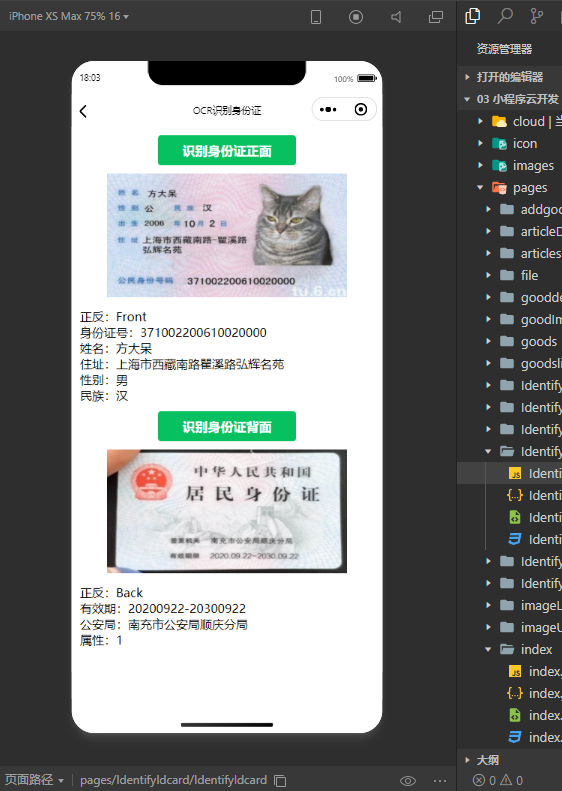
三、效果展示
1、图片展示
2、视频展示

································································································································································································
报错分析:
1、报错:调用云函数识别身份证时,报错fail not enough market quota hint
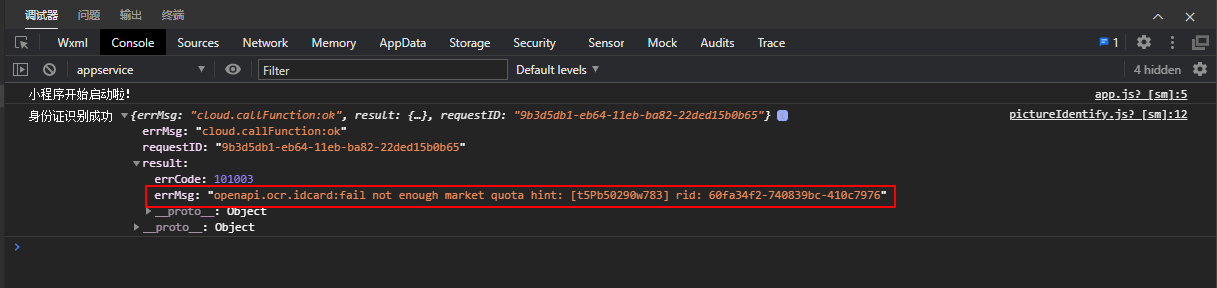
解决方案:
1、进入微信服务平台购买https://developers.weixin.qq.com/community/servicemarket/detail/000ce4cec24ca026d37900ed551415
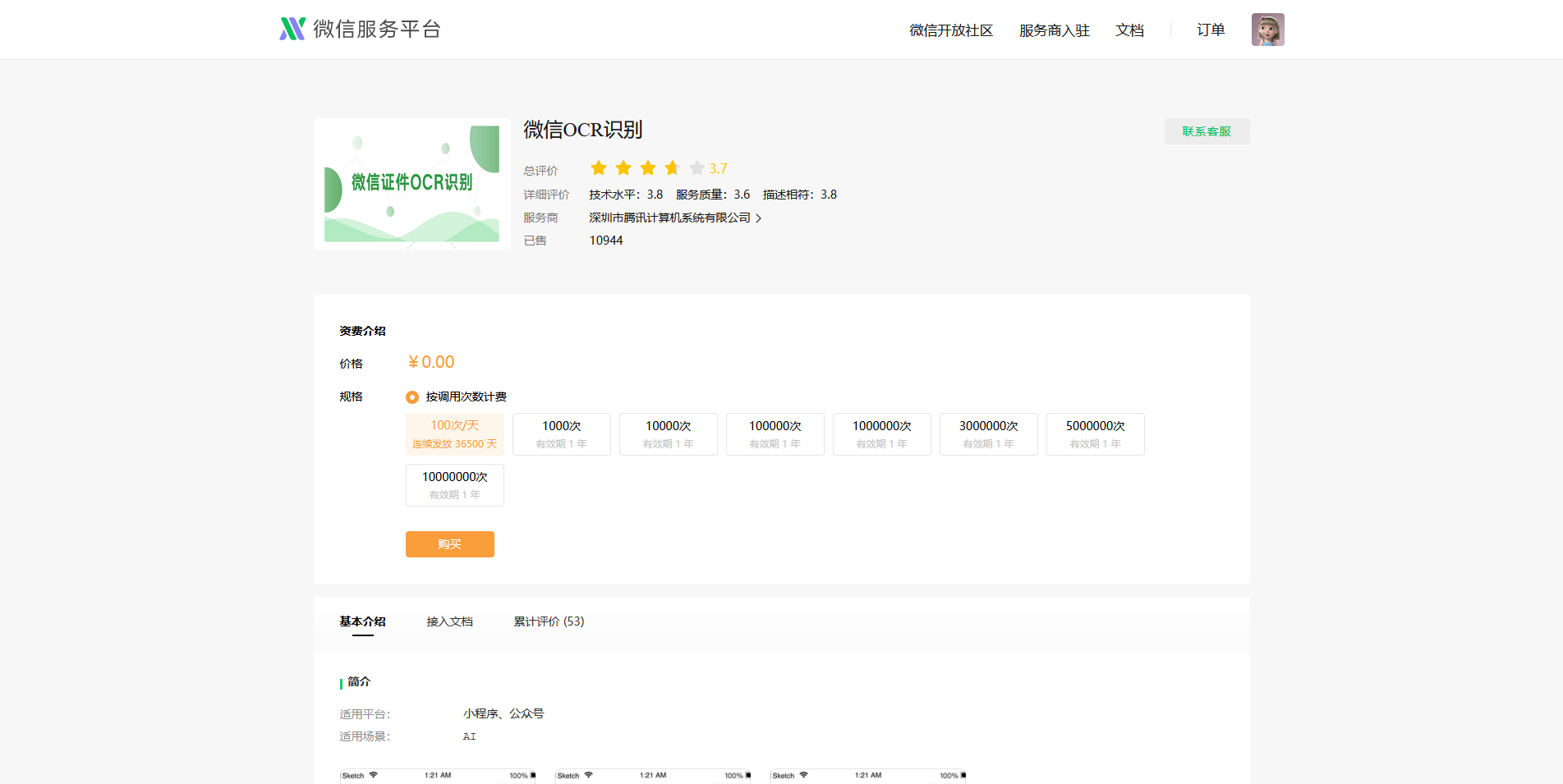
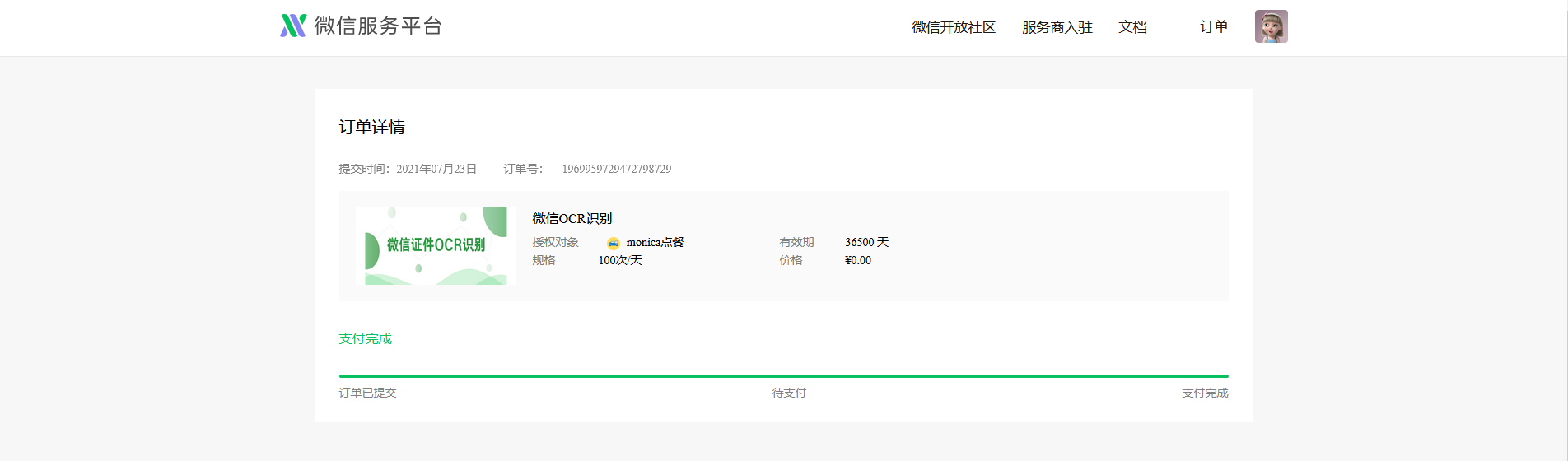
2、选择自己想要的规格。然后授权你的小程序,提交订单购买即可。

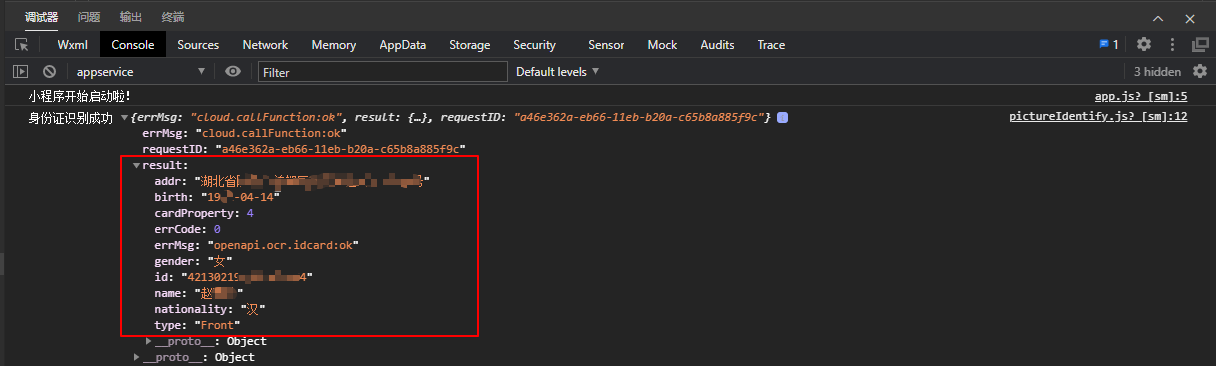
3、重新编译,即可成功获取result信息。
微信小程序云开发-云存储的应用-识别身份证(正面和反面)的更多相关文章
- 微信小程序+腾讯云直播的实时音视频实战笔记
欢迎访问我的GitHub https://github.com/zq2599/blog_demos 内容:所有原创文章分类汇总及配套源码,涉及Java.Docker.Kubernetes.DevOPS ...
- 微信小程序腾讯云php后台解决方案
微信小程序腾讯云php后台解决方案 微信小程序前段需要添加必要的文件以配合后端 (1)wafer2-client-sdk sdk提供了几种接口包括登陆,获取用户openid,图片上传等 (2)conf ...
- 微信小程序-视频教程-百度云-下载
链接: https://pan.baidu.com/s/16WGL3whutozx-UXqsDPhhA 提取码: 关注公众号[GitHubCN]回复获取 什么是微信小程序?小程序是一种不需要下载安 ...
- 小程序语音红包开发中 汉字转拼音的问题 微信小程序红包开发遇到的坑
公司最近在开发微信小程序的红包功能,语音红包需要用到文字转拼音的功能. 之前介绍过怎么将中文的汉字转为拼音的,具体看下面这篇文章. 微信语音红包小程序开发如何提高精准度 红包小程序语音识别精准度 微信 ...
- 《微信小程序商城开发实战》笔者的新书,欢迎各位粉丝上京东购买
作者图书京东链接,请点击------>>> **微信小程序商城开发实战** 附京东真实评价截图: 编辑推荐 在当今移动互联网大潮中,微信应用凭借其庞大的用户基数和极强的用户黏性 ...
- Django微信小程序后台开发教程
本文链接:https://blog.csdn.net/qq_43467898/article/details/83187698Django微信小程序后台开发教程1 申请小程序,创建hello worl ...
- vue+uni-app商城实战 | 第一篇:【有来小店】微信小程序快速开发接入Spring Cloud OAuth2认证中心完成授权登录
一. 前言 本篇通过实战来讲述如何使用uni-app快速进行商城微信小程序的开发以及小程序如何接入后台Spring Cloud微服务. 有来商城 youlai-mall 项目是一套全栈商城系统,技术栈 ...
- 微信小程序快速开发
微信小程序快速开发 一.注册小程序账号,下载IDE 1.官网注册https://mp.weixin.qq.com/,并下载IDE. 2.官方文档一向都是最好的学习资料. 注意:1)注册账号之后会有一个 ...
- 【微信小程序】开发实战 之 「配置项」与「逻辑层」
微信小程序作为微信生态重要的一环,在实际生活.工作.商业中的应用越来越广泛.想学习微信小程序开发的朋友也越来越多,本文将在小程序框架的基础上就微信小程序项目开发所必需的基础知识及语法特点进行了详细总结 ...
随机推荐
- AI芯片结构目标图形处理
AI芯片结构目标图形处理 AI chip architecture targets graph processing 东京--AI处理器设计师Blaize,原名ThinCI(发音为"Thin ...
- springcloud-config配置异常Cannot clone or checkout repository 和 Authentication is required but no CredentialsProvider has been registered解决过程
Cannot clone or checkout repository, 出现这个异常,通过检查是因为自己本地没有配置 ssh,所以配置了, https://blog.csdn.net/zy_2818 ...
- 『动善时』JMeter基础 — 41、使用JMeter连接数据库(MySQL)
目录 1.为什么要使用JMeter连接数据库 2.JMeter连接数据库的前提 3.JDBC连接配置组件界面介绍 4.JMeter连接数据库演示 (1)测试计划内包含的元件 (2)测试计划中添加链接数 ...
- Java8 中使用Stream 让List 转 Map使用总结
在使用 Java 的新特性 Collectors.toMap() 将 List 转换为 Map 时存在一些不容易发现的问题,这里总结一下备查. 空指针风险 java.lang.NullPointerE ...
- Android客户端网络预连接优化机制探究
一.背景 一般情况下,我们都是用一些封装好的网络框架去请求网络,对底层实现不甚关注,而大部分情况下也不需要特别关注处理.得益于因特网的协议,网络分层,我们可以只在应用层去处理业务就行.但是了解底层的一 ...
- 《Learning to warm up cold Item Embeddings for Cold-start Recommendation with Meta Scaling and Shifting Networks》论文阅读
<Learning to warm up cold Item Embeddings for Cold-start Recommendation with Meta Scaling and Shi ...
- 循序渐进BootstrapVue,开发公司门户网站(1)---基于Bootstrap网站模板构建组件界面
在前面随笔<使用BootstrapVue相关组件,构建Vue项目界面>概括性的介绍了BootstrapVue的使用过程,其实选用这个主要就是希望能够用来构建一些公司门户网站的内容,毕竟基于 ...
- Git操作文档
Git 操作文档 Git 是一个十分流行的版本控制系统,Git 和 SVN 区别在于,SVN使用增量文件系统,存储每次提交之间的差异.而 git 使用全量文件系统,存储每次提交的文件的全部内容(sna ...
- 【二分 贪心】覆盖问题 BZOJ1052 HAOI2007
覆盖问题 bzoj1052 题目来源:HAOI 2007 题目描述 某人在山上种了N棵小树苗.冬天来了,温度急速下降,小树苗脆弱得不堪一击,于是树主人想用一些塑料薄膜把这些小树遮盖起来,经过一番长久的 ...
- Spring Boot 无侵入式 实现RESTful API接口统一JSON格式返回
前言 现在我们做项目基本上中大型项目都是选择前后端分离,前后端分离已经成了一个趋势了,所以总这样·我们就要和前端约定统一的api 接口返回json 格式, 这样我们需要封装一个统一通用全局 模版api ...