
海信A6/A6L A7Pro/CC A5PRO/A5PRO CC 安装gms google service指南
用过海信双面屏或者eink手机的朋友都知道,海信手机就是死活安装不了谷歌全家桶,因为海信的领导说跟谷歌有协议不能安装谷歌框架(还说后期google审核坚决不给安装,人家其他ov mui都可以安装)。不信的朋友可以去海信论坛求证,杠精走开。
海信手机没有安装GSM Google Mobile Service 也没有 youtube,gmail,google map。在国外的朋友们用起来很难受,别说打游戏了,就日常出行也离不开google service,也是找了很久找到一个国外大神对海信A7 Pro下安装的教程,尝试在A6l也可以装,后面 Hisense A5PRO/CC
Hisense A7/CC A6/A6L A2/A2Pro 其实都是通用的。
不过这个大神的教程并不是root来安装,对于在保的小伙伴们还是依然可以享受保修,系统升级(虽然海信基本百年不更新的),现在开始介绍下如何让海信eink系列获得GMS
安装步骤
- 下载 adb
- 关闭一堆系統內建的 垃圾
Apps的功能(可以不关闭看自己了) - 下载 Aurora Store (这步骤完全没用上,看个人了,国外大神推荐要下载)
- 先依照順序 安裝 4个基础服务 apk,安装完成后可以正常登陆google账号了
- 再 按照顺序 安裝 3个 其他服务 apk(可以不按照顺序,国外大神说的是需要按照顺序)
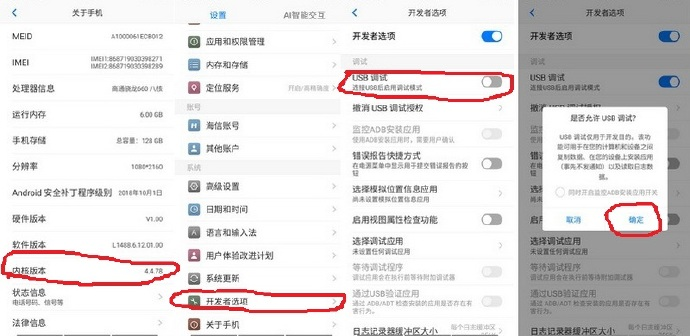
前置步驟:开启开发者模式
打开 开发者模式
步骤1:下载安装 adb 程序
Mac可以直接输入命令:brew install android-platform-tools 具体 brew 是啥自行百度
Windows 平台参考:
先从这里下载 adb,然后下一步,下一步就行,到安装完成。
安装好后启动 adb,这里只介绍几个命令,对于装个 GAPPS 已经足够了。
- 查看设备:
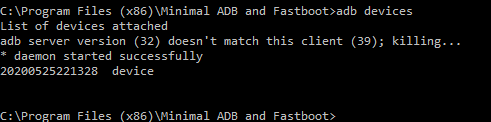
adb devices看到xxxxxx device即表示连接成功 - 查看手机IP:
adb shell ifconfig | grep Mask - 通过IP地址连接手机:
adb connect <device-ip-address> - 断开连接:
adb disconnect <device-ip-address> - 设备监听:
adb tcpip 5555
这里差不多了,更多可以参考下这里,下面开始介绍如何连接手机
首先打开开发者模式,用数据线连接电脑
看到有设备的即使连接成功
让设备在 5555 端口监听 TCP/IP 连接:
这里需要手机和电脑处于一个网络中,没有的话,可以用手机分享个热点,或者电脑分享个热点手机连上即可。
adb tcpip 5555
断开 USB 连接。
通过ip连接上就可以断开了
找到设备的 IP 地址。
一般能在「设置」-「关于手机」-「状态信息」-「IP地址」找到,也可以使用命令查看
adb shell ifconfig | grep Mask

# 或

adb shell ifconfig wlan0

# 下面的inet addr就是IP地址

wlan0     Link encap:Ethernet  HWaddr xx:xx:xx:xx:xx:xx

          inet addr:172.30.96.xx  Bcast:172.30.111.xx  Mask:255.255.240.xx

          inet6 addr: xx::xx:xx:xx:xx/xx Scope: Link

          UP BROADCAST RUNNING MULTICAST  MTU:xxx Metric:1

          RX packets:xxx errors:0 dropped:xxx overruns:0 frame:0

          TX packets:xxx errors:xx dropped:0 overruns:0 carrier:0

          collisions:0 txqueuelen:xxx

          RX bytes:xxx TX bytes:xxx
通过 IP 地址连接设备。
adb connect <device-ip-address> # <device-ip-address> 就是上一步中找到的设备 IP 地址。

# 确认连接状态。

adb devices # <device-ip-address>:5555 device说明连接成功。
到这一步已经完成连接了。
步骤2:删除海信手机里的垃圾软件(可选)
这里要么一个个复制执行,可以写个cmd文件 复制进去就行 扩展名 .cmd 执行文件
这里其实关闭这些垃圾app可以减少很多内存,我全都关掉后,基本上比平时多400-500M的内存,可以替换为自己喜欢的第三方app
db shell pm disable-user --user 0 com.android.hplayer

adb shell pm disable-user --user 0 com.android.browser

adb shell pm disable-user --user 0 com.android.calendar

adb shell pm disable-user --user 0 com.android.firewall

adb shell pm disable-user --user 0 com.android.hplayer

adb shell pm disable-user --user 0 com.android.providers.downloads.ui

adb shell pm disable-user --user 0 com.android.sos

adb shell pm disable-user --user 0 com.hmct.account

adb shell pm disable-user --user 0 com.hmct.antivirus

adb shell pm disable-user --user 0 com.hmct.assist

adb shell pm disable-user --user 0 com.hmct.einklauncher.plugin.wechat

adb shell pm disable-user --user 0 com.hmct.imageedit

adb shell pm disable-user --user 0 com.hmct.mobileclear

adb shell pm disable-user --user 0 com.hmct.questionnaire

adb shell pm disable-user --user 0 com.hmct.theme

adb shell pm disable-user --user 0 com.hmct.voiceassist

adb shell pm disable-user --user 0 com.hmct.voicetranslate

adb shell pm disable-user --user 0 com.hmct.music

adb shell pm disable-user --user 0 com.hmct.hmctmanual

adb shell pm disable-user --user 0 com.hmct.userexperienceprogram

adb shell pm disable-user --user 0 com.tencent.soter.soterserver

adb shell pm disable-user --user 0 org.hapjs.mockup

adb shell pm disable-user --user 0 com.hmct.jdreader

adb shell pm disable-user --user 0 com.tencent.android.location

adb shell pm disable-user --user 0 com.hmct.hiphone.juplugin

adb shell pm disable-user --user 0 com.hmct.einklauncher.plugin.wechat

adb shell pm disable-user --user 0 com.hmct.voiceassist

adb shell pm disable-user --user 0 com.hmct.ftmode

adb shell pm disable-user --user 0 com.hmct.semantic.analysis
步骤3:下载极光商店和Lawnchair (可选)
手动下载也行,在手机上下也行,download from APKMirror
使用以下命令通过ADB设置为默认lawnchair启动程序:
adb shell cmd package set-home-activity "ch.deletescape.lawnchair.plah"

# 完成后重启手机,我是没装这步骤
步骤4 安装GAPPS
首先下载所需的apk,这里直接贴上大神给的下载地址理论上 A7Pro/CC 可以直接用
这是大佬的:
huawei-p40
huawei
这是我打包的包含A6l:HISENSE
如果怕也可以自行下载,在搜索对应的软件名称www.apkmirror.com,看好版本号,如:Requires newer sdk version #29 (current version is #24),这种就是属于安卓版本对不上。
这种就属于安卓版本和软件版本不一致,如A6l是9 A7Pro是10,不能互通。 问题可以参考这里:https://github.com/rom1v/sndcpy/issues/37
adb: failed to install sndcpy.apk: Failure [INSTALL_FAILED_OLDER_SDK: Failed parse during installPackageLI:

 /data/app/vmdl1606743385.tmp/base.apk (at Binary XML file line #7): Requires newer sdk version #29 (current version is #28)]
下面按照顺序依次安装完即可(也可以不按照顺序)
- 001-Google Play services-com.google.android.gms-1…apk
- 002-Google_Account_Manager.apk
- 003-Google Play Store.apk
- 004-com.google.androi….apk (到这里不能正常使用google play store)
- 005-Google Services Framework-com.google.android.gsf-29-v10.apk
- 006-modagain1gsm.apk
- 007-com.google.android.gms2.apk
安装命令: 替换<package_name> 为上述的包名,注意路径。
adb install <package_name>
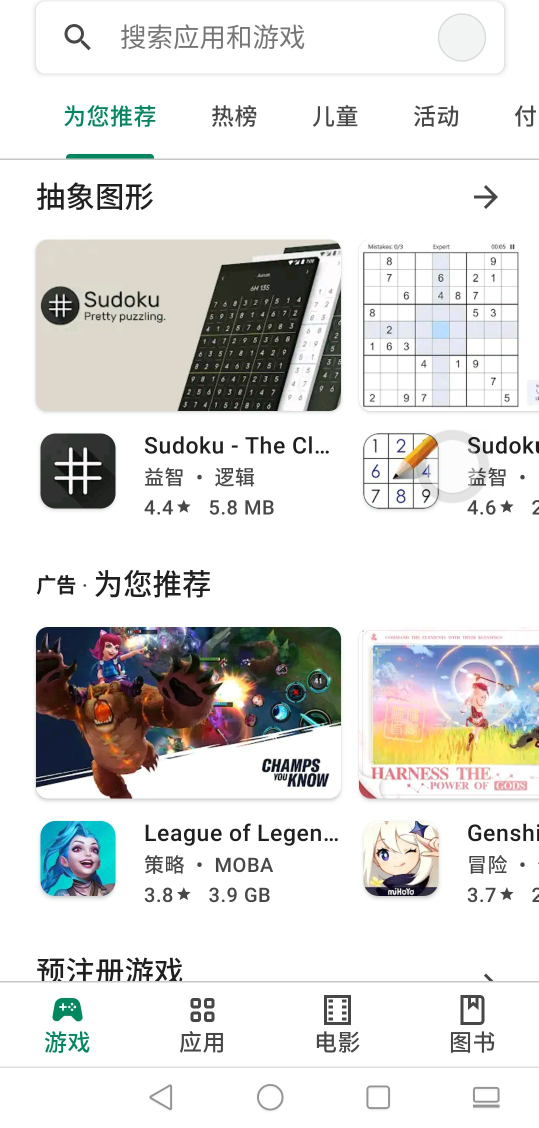
安装完成后就可以正常使用google全家桶了。再也不怕出国不能打车了。

Reference
Install the GAPPS on HISENSE A7 / A7CC / A5PRO / A5PRO CC
Install and use ADB on HISENSE A5PRO / A5PRO CC
海信A6/A6L A7Pro/CC A5PRO/A5PRO CC 安装gms google service指南的更多相关文章
- 【Hello CC.NET】CC.NET 实现自动化集成
一.背景 公司的某一金融项目包含 12 个子系统,新需求一般按分支来开发,测完后合并到主干发布.开发团队需要同时维护开发环境.测试环境.模拟环境(主干).目前面临最大的两个问题: 1.子系统太多,每次 ...
- Atitti.dw cc 2015 绿色版本安装总结
Atitti.dw cc 2015 绿色版本安装总结 1.1. 安装程序无法初始化.请下载adobe Support Advisor检测该问题.1 1.1.1. Adobe Application M ...
- cc.RepeatForever和cc.Spawn冲突
正确 var tmpShip3 = cc.Sprite.createWithSpriteFrameName("w1_1.png"); tmpShip3.setPosition(,) ...
- adobe cc最新版 软件安装与激活
adobe cc最新版 软件安装与激活:https://m.weike.fm/lecture/4912961 说明#:Adobe CC2017的所有软件都可以按照以上方法进行安装,如:Premier ...
- Adobe Audition CC 2017 (10.0)安装教程
Adobe Audition CC 2017 (10.0)安装教程 注:下载地址在文章末尾 第一步:首先请将电脑的网络断开,很简单:禁用本地连接或者拔掉网线,这样就可以免除登录Creative Clo ...
- 关于cc.easesinexxx 与 cc.easeexponentiallxxx 的几种效果简单描述
代码样例: var biggerEase = cc.scaleBy(0.7,1.2,1.2).easing(cc.easeSineInOut()) 呈正弦变化 1)CCEaseSineIn ...
- Adobe Photoshop CC 2015(PS CC 2015)看图不说话
- 【Hello CC.NET】巧用模板简化配置
从 <[Hello CC.NET]CC.NET 实现自动化集成> 到 <[Hello CC.NET]自动化发布时 Web.config 文件维护> ,大神在评论里提到的方案还没 ...
- 【Hello CC.NET】自动化发布时 Web.config 文件维护
在 <[Hello CC.NET]CC.NET 实现自动化集成> 的 HellowWorld 中经实现: 1.获取源码 2.编译项目 3.集成测试 4.Ftp发布项目 5.创建安装包 6. ...
随机推荐
- 快速使用 Docker 上手 Sentry-CLI - 玩转 Source Maps 使用 (create-react-app)
系列 快速使用 Docker 上手 Sentry-CLI - 创建版本 入门 使用 sentry-cli 上传 source maps 时,您需要设置构建系统以创建版本(release)并上传与该版本 ...
- MySQL 源码安装规范
一 .目录规划 MySQL 的目录包括 base 目录和 data 目录,base 目录存放软件文件,每个版本的软件单 独一个目录,例如/usr/local/mysql/mysql5.6.19.dat ...
- SpringMVC笔记(3)
一.SpringMVC 拦截器 1.1 快速入门 步骤 创建拦截器类实现HandlerInterceptor接口 public class MyInterceptor01 implements Han ...
- Linux centos7 -bash: pstree: 未找到命令
2021-08-12 1. 命令简介pstree命令将所有行程以树状图显示,树状图将会以 pid (如果有指定) 或是以 init 这个基本行程为根 (root),如果有指定使用者 id,则树状图会只 ...
- EternalBlue永恒之蓝渗透测试
Eternal Blue(永恒之蓝)-ms17-010渗透测试 第一次做的渗透测试,也是第一次去写博客,还望各位师傅多多指正 :) 工具 1.靶机系统 window7 开放445以及139端口 2.k ...
- JAVA 之 每日一记 之 算法( 给你一个Excel表列序号,返回出它对应的数字 )
代码结果:(只想要代码的可以离开了,代码给你了,绝对能用的.想要思路的往下看.) class Solution { public int titleToNumber(String s) { int a ...
- kivy之ProgressBar、ToggleButton实操学习
之所以将kivy的ProgressBar(进度条)与ToggleButton(切换按钮)作一篇内容来记录学习,是因为这两个内容比较简单,源码内容篇幅也少. 两个功能实例源码均以main.py+prog ...
- JAVA反序列化的简单探究
JAVA反序列化的简单探究 本文主要是探究,在反序列化过程中是怎么调用到readObject.readResolve.readExternal方法的问题 新建一个需要被序列化的类ObjectA,写入r ...
- C# 动态构建表达式树(一)—— 构建 Where 的 Lambda 表达式
C# 动态构建表达式树(一)-- 构建 Where 的 Lambda 表达式 前言 记得之前同事在做筛选功能的时候提出过一个问题:如果用户传入的条件数量不确定,条件的内容也不确定(大于.小于和等于), ...
- Consul+Ocelot+Polly在.NetCore中使用(.NET5)-网关Ocelot+Consul
相关文章 Consul+Ocelot+Polly在.NetCore中使用(.NET5)-Consul服务注册,服务发现 Consul+Ocelot+Polly在.NetCore中使用(.NET5)-网 ...