
App开发流程之右滑返回手势功能续
上一篇记录了利用系统私有变量和方法实现右滑返回手势功能:http://www.cnblogs.com/ALongWay/p/5893515.html
这篇继续记录另一种方案:利用UINavigationController的delegate方法。
核心代理方法有如下两个:
- (nullable id <UIViewControllerInteractiveTransitioning>)navigationController:(UINavigationController *)navigationController

                          interactionControllerForAnimationController:(id <UIViewControllerAnimatedTransitioning>) animationController NS_AVAILABLE_IOS(7_0);

- (nullable id <UIViewControllerAnimatedTransitioning>)navigationController:(UINavigationController *)navigationController

                                   animationControllerForOperation:(UINavigationControllerOperation)operation

                                                fromViewController:(UIViewController *)fromVC

                                                  toViewController:(UIViewController *)toVC  NS_AVAILABLE_IOS(7_0);
第一个代理方法,要求在视图控制器变换时候,返回一个实现UIViewControllerInteractiveTransitioning协议的对象,该对象用于控制交互进度和状态。
UIKit.h/UIViewControllerTransitioning.h中已经准备好了一个这样的对象,名为UIPercentDrivenInteractiveTransition。
主要关注其如下三个方法:
- (void)updateInteractiveTransition:(CGFloat)percentComplete;//控制交互进度的百分比
- (void)cancelInteractiveTransition;//中途取消交互
- (void)finishInteractiveTransition;//完成交互
可以在一个实现了代理方法的类中,定义一个手势目标方法来调用上述方法,达到控制作为变量的UIPercentDrivenInteractiveTransition对象的目的。
主要代码如下:
- (id<UIViewControllerInteractiveTransitioning>)navigationController:(UINavigationController *)navigationController interactionControllerForAnimationController:(id<UIViewControllerAnimatedTransitioning>)animationController

{

    if ([animationController isKindOfClass:[PopAnimation class]])

        return _interactivePopTransition;

    return nil;

}

- (id<UIViewControllerAnimatedTransitioning>)navigationController:(UINavigationController *)navigationController animationControllerForOperation:(UINavigationControllerOperation)operation fromViewController:(UIViewController *)fromVC toViewController:(UIViewController *)toVC

{

    if (operation == UINavigationControllerOperationPop)

        return _popAnimation;

    return nil;

}

- (void)handlePopGestureOperation:(UIPanGestureRecognizer *)recognizer{

    //将手指在屏幕上的移动距离与屏幕宽度比例作为动画的进度

    CGPoint translationInScreen = [recognizer translationInView:[UIApplication sharedApplication].keyWindow];

    CGFloat progress = translationInScreen.x / [UIScreen mainScreen].bounds.size.width;

    progress = MIN(1.0, MAX(0.0, progress));

    if (recognizer.state == UIGestureRecognizerStateBegan) {

        //新建手势交互对象

        _interactivePopTransition = [[UIPercentDrivenInteractiveTransition alloc] init];

        //开始执行pop动画

        [_naviController popViewControllerAnimated:YES];

    }else if (recognizer.state == UIGestureRecognizerStateChanged) {

         //更新进度

        [_interactivePopTransition updateInteractiveTransition:progress];

    }else if (recognizer.state == UIGestureRecognizerStateEnded

              || recognizer.state == UIGestureRecognizerStateCancelled) {

        //手势结束时如果进度大于一半,那么就完成pop操作,否则取消

        if (progress > 0.5) {

            [_interactivePopTransition finishInteractiveTransition];

        }else {

            [_interactivePopTransition cancelInteractiveTransition];

        }

        //手势交互结束,清理对象

        _interactivePopTransition = nil;

    }

}
第二个代理方法,要求在操作开始时候,返回一个实现UIViewControllerAnimatedTransitioning协议的对象,该对象实现了动画内容和执行时间。
该协议有三个方法:
// This is used for percent driven interactive transitions, as well as for container controllers that have companion animations that might need to

// synchronize with the main animation.

- (NSTimeInterval)transitionDuration:(nullable id <UIViewControllerContextTransitioning>)transitionContext;

// This method can only  be a nop if the transition is interactive and not a percentDriven interactive transition.

- (void)animateTransition:(id <UIViewControllerContextTransitioning>)transitionContext;

@optional

// This is a convenience and if implemented will be invoked by the system when the transition context's completeTransition: method is invoked.

- (void)animationEnded:(BOOL) transitionCompleted;
第一个方法返回动画时间;第二个方法,可以得到实现了UIViewControllerContextTransitioning协议的对象;第三个方法可选,如果transitionContext对象调用了completeTransition:方法,该代理方法会被调用。
重点是第二个方法的transitionContext对象,其重要的方法如下:
// The view in which the animated transition should take place.

- (nullable UIView *)containerView;//动画所在的容器view

- (BOOL)transitionWasCancelled;//转换是否取消// This must be called whenever a transition completes (or is cancelled.)

// Typically this is called by the object conforming to the

// UIViewControllerAnimatedTransitioning protocol that was vended by the transitioning

// delegate.  For purely interactive transitions it should be called by the

// interaction controller. This method effectively updates internal view

// controller state at the end of the transition.

- (void)completeTransition:(BOOL)didComplete;//完成转换,必须在动画完成时调用

// Currently only two keys are defined by the

// system - UITransitionContextToViewControllerKey, and

// UITransitionContextFromViewControllerKey.

// Animators should not directly manipulate a view controller's views and should

// use viewForKey: to get views instead.

- (nullable __kindof UIViewController *)viewControllerForKey:(NSString *)key;//取得视图控制器

// Currently only two keys are defined by the system -

// UITransitionContextFromViewKey, and UITransitionContextToViewKey

// viewForKey: may return nil which would indicate that the animator should not

// manipulate the associated view controller's view.

- (nullable __kindof UIView *)viewForKey:(NSString *)key NS_AVAILABLE_IOS(8_0);//取得视图控制器的view,兼容iOS7,可以直接用上面取到的viewController.view
创建一个实现UIViewControllerAnimatedTransitioning协议的对象PopAnimation,重要代码如下:
- (NSTimeInterval)transitionDuration:(id <UIViewControllerContextTransitioning>)transitionContext {

    return _transitionDuration;

}

- (void)animateTransition:(id <UIViewControllerContextTransitioning>)transitionContext {

    _transitionContext = transitionContext;

    //当前控制器

    UIViewController *fromViewController = [transitionContext viewControllerForKey:UITransitionContextFromViewControllerKey];

    //动画结束显示的控制器

    UIViewController *toViewController = [transitionContext viewControllerForKey:UITransitionContextToViewControllerKey];

    //执行交互动画的容器view

    UIView *containerView = [transitionContext containerView];

    [containerView insertSubview:toViewController.view belowSubview:fromViewController.view];

    NSTimeInterval duration = [self transitionDuration:transitionContext];

    switch (_popAnimationType) {

        case PopAnimationTranslation: {

            CGFloat containerWidth = containerView.frame.size.width;

            toViewController.view.transform = CGAffineTransformMakeTranslation(-containerWidth / 4.0, );

            [UIView animateWithDuration:duration animations:^{

                toViewController.view.transform = CGAffineTransformMakeTranslation(, );

                fromViewController.view.transform = CGAffineTransformMakeTranslation(containerWidth, );

            }completion:^(BOOL finished) {

                //动画结束,必须调用此方法

                [transitionContext completeTransition:!transitionContext.transitionWasCancelled];

            }];

            break;

        }

        case PopAnimationFlip: {

            [UIView beginAnimations:@"View Flip" context:nil];

            [UIView setAnimationDuration:duration];

            [UIView setAnimationDelegate:self];

            [UIView setAnimationTransition:UIViewAnimationTransitionFlipFromLeft forView:containerView cache:YES];

            [UIView setAnimationDidStopSelector:@selector(animationDidStop:finished:)];

            [UIView commitAnimations];

            [containerView exchangeSubviewAtIndex: withSubviewAtIndex:];

            break;

        }

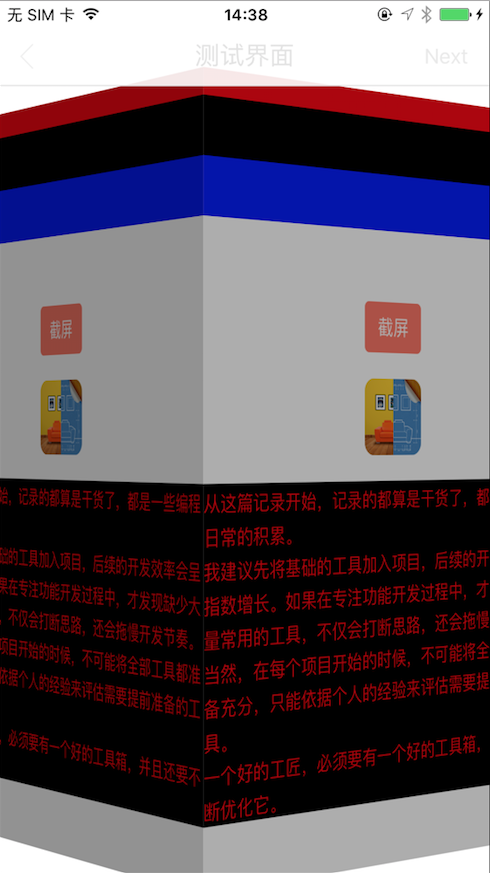
        case PopAnimationCube: {

            CATransition *transiton = [CATransition animation];

            transiton.type = @"cube";

            transiton.subtype = @"fromLeft";

            transiton.duration = duration;

            transiton.removedOnCompletion = NO;

            transiton.fillMode = kCAFillModeForwards;

            transiton.delegate = self;

            [containerView.layer addAnimation:transiton forKey:nil];

            [containerView exchangeSubviewAtIndex: withSubviewAtIndex:];

            break;

        }

    }

}

- (void)animationDidStop:(CATransition *)anim finished:(BOOL)flag {

    [_transitionContext completeTransition:!_transitionContext.transitionWasCancelled];

}
剩下的工作:
在上一篇的基础上,修改UINavigationController的base_pushViewController方法
- (void)base_pushViewController:(UIViewController *)viewController animated:(BOOL)animated

{

    if (![self.interactivePopGestureRecognizer.view.gestureRecognizers containsObject:self.base_panGestureRecognizer]) {

        [self.interactivePopGestureRecognizer.view addGestureRecognizer:self.base_panGestureRecognizer];

        self.base_panGestureRecognizer.delegate = [self base_panGestureRecognizerDelegateObject];

        self.base_currentDelegateObject = [[NavigationControllerDelegateObject alloc] initWithUINavigationController:self];

        [self.base_panGestureRecognizer addTarget:self.base_currentDelegateObject action:@selector(handlePopGestureOperation:)];

        self.interactivePopGestureRecognizer.enabled = NO;

    }

    [self base_setupViewControllerBasedNavigationBarAppearanceIfNeeded:viewController];

    if (![self.viewControllers containsObject:viewController]) {

        [self base_pushViewController:viewController animated:animated];

    }

}
可以看到,去除了私有变量和方法的调用,自定义了名为NavigationControllerDelegateObject的对象,其实现了UINavigationControllerDelegate协议,并实现了pan手势的处理方法。在此,我暴露了该属性对象,考虑到以后可能会增加或者修改UINavigationControllerDelegate的实现协议,可以为该对象增加分类来达到目的;还有一个目的,便于修改popAnimation的动画类型和执行时间。
总结:
两篇记录,从不同的方向,记录了右滑返回手势功能的实现。利用系统变量和方法,方便快捷;利用协议方法,高度自定义。
但是,利用协议方法,需要处理的方面比较多。虽然上述已经记录了实现核心,示例代码中也有详细代码,但是仍然还有很多方面未考虑。
目前,我发现的一些问题:
1.导航栏交互效果也需要自行实现,暂未实现原生效果
2.导航栏由隐藏到显示的效果,有时会出现异常
3.如果带有bottomBar,效果不理想
如果有好的解决办法,希望告知,谢谢。
base项目已更新:git@github.com:ALongWay/base.git
项目增加了新的UINavigationController+PopOperation分类,但是未引用到项目中,需要的同学,可先删除PopGesture分类的引用,再添加该分类的应用。
App开发流程之右滑返回手势功能续的更多相关文章
- App开发流程之右滑返回手势功能
iOS7以后,导航控制器,自带了从屏幕左边缘右滑返回的手势功能. 但是,如果自定义了导航栏返回按钮,这项功能就失效了,需要自行实现.又如果需要修改手势触发范围,还是需要自行实现. 广泛应用的一种实现方 ...
- iOS开发之自定义导航栏返回按钮右滑返回手势失效的解决
我相信针对每一个iOS开发者来说~除了根视图控制器外~所有的界面通过导航栏push过去的界面都是可以通过右滑来返回上一个界面~其实~在很多应用和APP中~用户已经习惯了这个功能~然而~作为开发者的我们 ...
- 第二十六篇、因为自定item(nav)而使系统右滑返回手势失效的解决方法
@interface ViewController () <uigesturerecognizerdelegate> @end@implementation ViewController ...
- 解决右滑返回手势和UIScrollView中的手势冲突
当在一个viewController中添加了scrollView或者tableView的时候,贴边侧滑返回的时候会首先触发滚动而失效,要解决这个问题,需要通过requireGestureRecogni ...
- 关于iOS自定义返回按钮右滑返回手势失效的解决:
在viewDidLoad方法里面添加下面这一句代码即可 self.navigationController.interactivePopGestureRecognizer.delegate=(id)s ...
- 全新的手势,侧滑返回、全局右滑返回都OUT啦!
前言 Android快速开发框架-ZBLibrary 最近将以前的 全局右滑返回 手势功能改成了 底部左右滑动手势. 为什么呢?为了解决滑动返回手势的问题. 目前有3种滑动返回手势 一.侧滑返回 代表 ...
- iOS系统右滑返回全局控制方案
前言 今天有个小需求,在点击导航条上的返回按钮之前要调用某个API,并弹出UIAlertView来显示,根据用户的选项判断是否是返回还是继续留在当前控制器.举个简单的例子,当点击导航条上的左上角返回按 ...
- swift 关于FDFullscreenPopGesture的右滑返回
关于导航栏右滑返回的工具库 FDFullscreenPopGesture 是 OC 版本,用了 runtime 等各种骚操作 关于 swift ,我在 UINavigationController 的 ...
- iOS页面右滑返回的实现方法总结
1.边缘触发的系统方法 ①系统返回按钮 self.navigationController.interactivePopGestureRecognizer.enabled = YES; ②自定义返回 ...
随机推荐
- C#实现WinForm窗体逐渐显示效果
C#实现WinForm窗体逐渐显示效果,这个博客园里面已经有其它人已经实现了,原理很简单,就是通过定时改变窗体的透明度(从0到1,即透明度从完全透明到不透明),我这里也是按照这个思路来实现的,但是我做 ...
- .Net魔法堂:开启IIS的WebGarden、WebFarm和StateServer之旅
前言 公司系统虽然配置有1台NLB后拖4台App Server最后搭一台强劲无比的DB Server,但每天下午4点左右总被投诉系统慢,报表下载不了等问题.究其原因,原来NLB采用锁定sessionI ...
- Html5离线缓存详细讲解
离线缓存是Html5新特性之一,简单理解就是第一次加载后将数据缓存,在没有清除缓存前提下,下一次没有网络也可以加载,用在静态数据的网页或游戏比较好用.当然,Html5新的特性都不是所有浏览器都能支持的 ...
- Android SDK Manager国内更新代理
在Android SDK Manager Setting 窗口设置HTTP Proxy server和HTTP Proxy Port这个2个参数,分别设置为: HTTP Proxy server:mi ...
- STOP:c0000218 {Registry File Failure}
这几天够折腾的了,一台很老很老的服务器,在启动之后,一个阵列磁盘掉线了: 也许是磁盘坏了: 服务器4个硬盘做的是RAID1,正常来说,坏了其中一二个硬盘是没有问题的.现更换了一个好的硬盘之后,系统无法 ...
- 走进异步世界-犯傻也值得分享:ConfigureAwait(false)使用经验分享
在上周解决“博客程序异步化改造之后遭遇的性能问题”的过程中,我们干了一件自以为很有成就感的事——在表现层(MVC与WebForms)将所有使用await的地方都加上了ConfigureAwait(fa ...
- EC笔记,第一部分:1.视C++为一个语言联邦
C++可看作由以下四种次语言组合而成1.C语言 高效,内置数据类型,数组,区块,语句,指针,预处理器,没有重载.异常.模板2.类 构造,析构,封装,继承,多态,迟绑定3.模板 模板元 ...
- Eclipse设置风格
如果觉得Eclipse的颜色太刺眼,可以修改背景与字体颜色,方法如下: (1)到http://eclipsecolorthemes.org/下载主题文件,可以选择xml文件或者epf文件: (2)Ec ...
- Scalaz(35)- Free :运算-Trampoline,say NO to StackOverflowError
在前面几次讨论中我们介绍了Free是个产生Monad的最基本结构.它的原理是把一段程序(AST)一连串的运算指令(ADT)转化成数据结构存放在内存里,这个过程是个独立的功能描述过程.然后另一个独立运算 ...
- 新一代编程:scala泛函编程技术-唠叨
准备了半年后,终于决定在这里开始我的scala编程技术学习体验撰写之旅.初步打算在这里把我学习.体验.掌握scala编程的过程与有兴趣的朋友分享.我想,虽然我这不是正式论文或者教课书之类的,但写个开场 ...