
springBoot(6):web开发-模板引擎jsp
一、新建工程
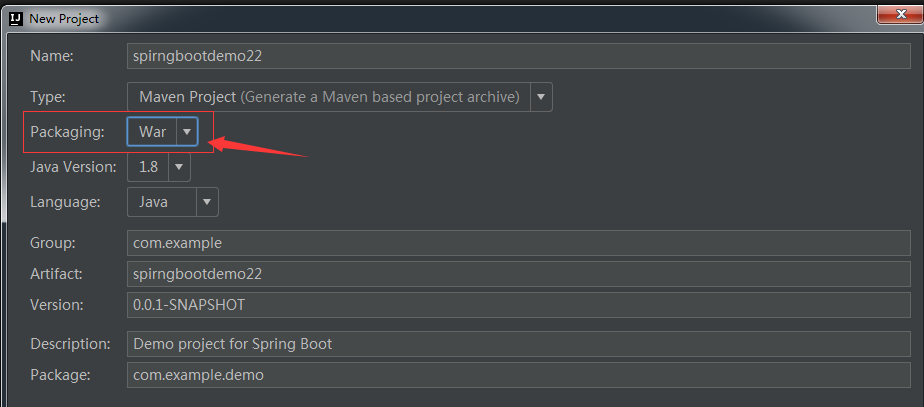
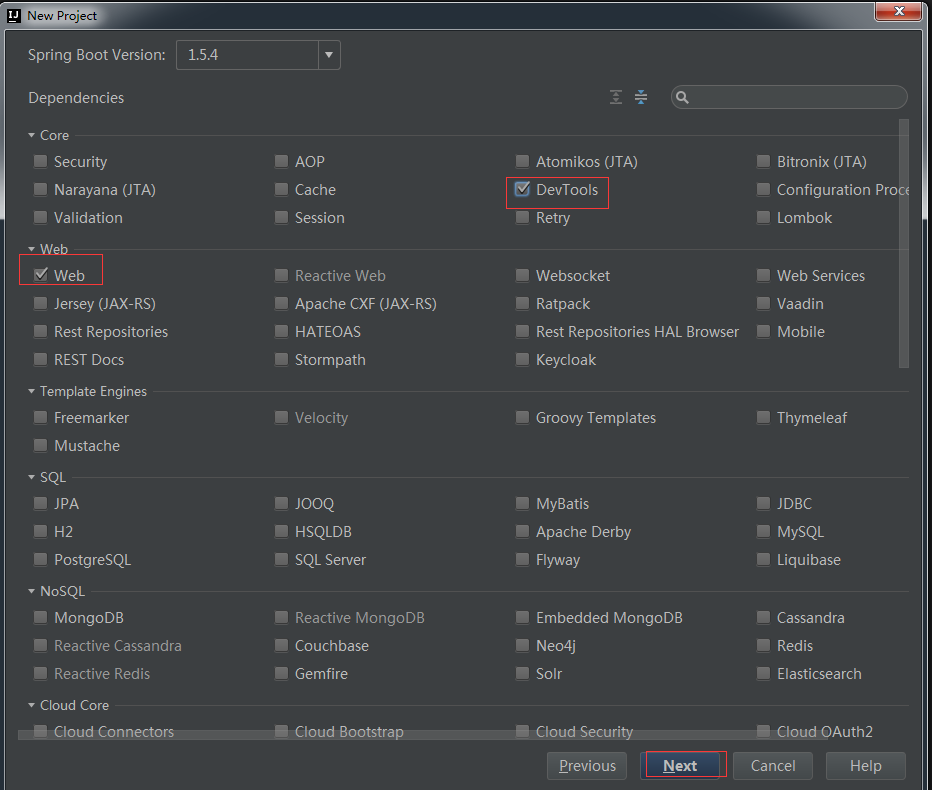
注意新建的工程下没有webapp目录eclipse下会自动创建webapp目录这里我们需要自动创建一个webapp目录并创建WEB-INF。
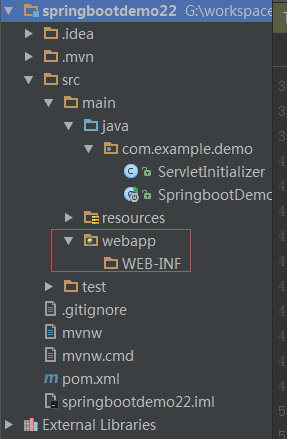
对ServletInitializer.java进行说明
1、这个类相当于我们以前的web.xml
2、只有3.0以上才可以否则需要添加web.xml
二、配置
2.1、pom.xml配置
|
1
2
3
4
5
6
7
8
9
|
<dependency>
<groupId>org.apache.tomcat.embed</groupId>
<artifactId>tomcat-embed-jasper</artifactId>
<scope>provided</scope>
</dependency>
<dependency>
<groupId>javax.servlet</groupId>
<artifactId>jstl</artifactId>
</dependency>
|
2.2、配置前缀与后缀类似于sspringmvc
|
1
2
3
4
|
spring.profiles.active=dev#配置前缀与后缀spring.mvc.view.prefix=/WEB-INF/templates/spring.mvc.view.suffix=.jsp |
四、代码
|
1
2
3
4
5
6
7
8
9
10
11
12
13
14
15
16
17
18
|
package com.example.demo.controller;
import org.springframework.stereotype.Controller;
import org.springframework.ui.Model;
import org.springframework.web.bind.annotation.RequestMapping;
/** * Created by ly on 2017/6/16.
*/
@Controller@RequestMapping("/demo1")
public class Index {
@RequestMapping("/index")
public String index(Model model) throws Exception {
model.addAttribute("title" ,"ceshi");
return "index";
}
} |
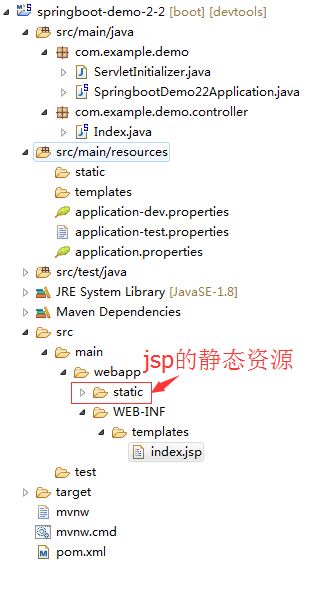
idea这里有点问题下面改用eclipse结构如下
index.jsp
|
1
2
3
4
5
6
7
8
9
10
11
12
13
14
15
16
17
18
19
20
21
22
23
24
25
26
27
28
29
30
31
|
<%@ taglib prefix="spring" uri="http://www.springframework.org/tags"%><%@ taglib prefix="c" uri="http://java.sun.com/jsp/jstl/core"%><!DOCTYPE html><html>
<head lang="en">
<title>Spring Boot Demo - FreeMarker</title>
<link href="/static/css/index.css" rel="stylesheet" />
</head>
<body>
<h1 id="title">${title}</h1>
<c:url value="http://www.roncoo.com" var="url"/>
<spring:url value="http://www.roncoo.com" htmlEscape="true" var="springUrl" />
Spring URL: ${springUrl}
<br>
JSTL URL: ${url}
<!-- <script type="text/javascript" src="/static/webjars/jquery/2.1.4/jquery.min.js"></script>
<script>
$(function(){
$('#title').click(function(){
alert('1o');
});
})
</script> -->
</body>
</html>
|
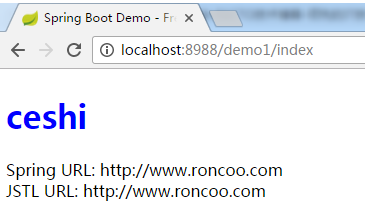
访问http://localhost:8988/demo1/index
本文转自我爱大金子博客51CTO博客,原文链接http://blog.51cto.com/1754966750/1939115如需转载请自行联系原作者
我爱大金子
springBoot(6):web开发-模板引擎jsp的更多相关文章
- SpringBoot(四) Web开发 --- Thymeleaf、JSP
Spring Boot提供了spring-boot-starter-web为Web开发予以支持,spring-boot-starter-web为我们提供了嵌入的Tomcat以及Spring MVC的依 ...
- SpringBoot:Web开发
西部开源-秦疆老师:基于SpringBoot 2.1.6 的博客教程 , 基于atguigu 1.5.x 视频优化 秦老师交流Q群号: 664386224 未授权禁止转载!编辑不易 , 转发请注明出处 ...
- SpringBoot之WEB开发-专题二
SpringBoot之WEB开发-专题二 三.Web开发 3.1.静态资源访问 在我们开发Web应用的时候,需要引用大量的js.css.图片等静态资源. 默认配置 Spring Boot默认提供静态资 ...
- springboot用于web开发
1.使用SpringBoot:1)创建SpringBoot应用,选中我们需要的模块:2)SpringBoot已经默认将这些场景配置好了,只需要在配置文件中指定少量配置就可以运行起来3)自己编写业务代码 ...
- SpringBoot学习(七)-->SpringBoot在web开发中的配置
SpringBoot在web开发中的配置 Web开发的自动配置类:在Maven Dependencies-->spring-boot-1.5.2.RELEASE.jar-->org.spr ...
- springboot java web开发工程师效率
基础好工具 idea iterm2 和 oh-my-zsh git 热加载 java web项目每次重启时间成本太大. 编程有一个过程很重要, 就是试验, 在一次次试验中探索, 积累素材优化调整程序模 ...
- SpringBoot系列:Spring Boot使用模板引擎JSP
一.Java模板引擎 模板引擎(这里特指用于Web开发的模板引擎)是为了使用户界面与业务数据(内容)分离而产生的,它可以生成特定格式的文档,用于网站的模板引擎就会生成一个标准的HTML文档. 在jav ...
- SpringBoot(四) -- SpringBoot与Web开发
一.发开前准备 1.创建一个SpringBoot应用,引入我们需要的模块 2.SpringBoot已经默认将这些场景配置好了,只需要在配置文件中指定少量配置,就能运行起来 3.编写业务代码 二.静态资 ...
- Spring Boot整合模板引擎jsp
jsp也算是一种模板引擎吧.整合jsp前,先说一下运行SpringBoot项目的几种方式 1. 运行SpringBoot项目的几种方式 1.1 使用内嵌Tomcat运行项目 在IDE中右键运行启动类, ...
随机推荐
- Linux基础:Day03
Linux的网络 以太网的发明--PC之间文件共享情况出现 网卡硬件设备 -- MAC地址 一层:物理层 HUB -- 集线器 总线型结构 泛洪 广播域/冲突域 二层: 在早期的网络中,PC互通 ...
- Vulnhub DC-6靶机渗透
信息搜集 nmap -sP 192.168.146.0/24 #找靶机ip nmap -sS -Pn -A 192.168.146.143 #扫描靶机信息 22和80端口,老朋友了. 先直接访问htt ...
- spring05
通过静态工厂的方法创建bean:和实例工厂方法: <?xml version="1.0" encoding="UTF-8"?> <beans ...
- C#两大知名Redis客户端连接哨兵集群的姿势
前言 前面利用<Docker-Compose搭建Redis高可用哨兵集群>, 我们的思路是将Redis.Sentinel.Redis Client App链接到同一个网桥网络,这个网桥内的 ...
- 08-jmeter-plugins-manager.jar插件安装
1.安装第三方插件:jmeter-plugins-manager 2.将此jar包下载好后放到jmeter的安装目录lib/ext文件夹内, 3.然后运行jmeter,选择菜单“选项”可见插件入口 4 ...
- C语言局部数组大小与内存的栈的关系
今天有个同学问了一个问题,我居然答不上来,为什么不能开局部整型二维数组[1000][1000]?但是在数组前面加上一个static就可以了? windows下栈的大小(不是数据结构里面的栈)是2MB, ...
- Web开发与设计之Google兵器谱-Web开发与设计利器
Web开发与设计之Google兵器谱-Web开发与设计利器 博客分类: Java综合 WebGoogleAjaxChromeGWT 笔者是个Java爱好者也是用Java进行web开发的工作者.平时笔者 ...
- web中拖拽排序与java后台交互实现
一.业务需求 1,在后台的管理界面通过排序功能直接进入排序界面 2,在排序界面能够人工的手动拖动需要排序的标题,完成对应的排序之后提交 3,在app或者是前端就有对应的排序实现了 二.页面展示 将整体 ...
- FastAPI框架
目录 FastAPI框架 安装 基本使用 模版渲染 安装jinja2 基本使用 form表单数据交互 基本数据 文件交互 静态文件配置 FastAPI框架 该框架的速度(天然支持异步)比一般的djan ...
- Python 编程环境搭建(Windows 系统中)
由于大家普遍使用 Windows 系统,所以本文只介绍 Windows 系统中 Python 环境的安装. 在 Windows 中安装 Python 与安装普通软件没什么差别,下载所需版本的安装包后, ...