
Python爬虫(三)——开封市58同城出租房决策树构建
决策树框架:
 # coding=utf-8

 import matplotlib.pyplot as plt

 decisionNode = dict(boxstyle='sawtooth', fc='')

 leafNode = dict(boxstyle='round4', fc='0.8')

 arrow_args = dict(arrowstyle='<-')

 def plotNode(nodeTxt, centerPt, parentPt, nodeType):

     createPlot.ax1.annotate(nodeTxt, xy=parentPt, xycoords='axes fraction', \

                             xytext=centerPt, textcoords='axes fraction', \

                             va='center', ha='center', bbox=nodeType, arrowprops \

                                 =arrow_args)

 def getNumLeafs(myTree):

     numLeafs = 0

     firstStr = list(myTree.keys())[0]

     secondDict = myTree[firstStr]

     for key in secondDict:

         if (type(secondDict[key]).__name__ == 'dict'):

             numLeafs += getNumLeafs(secondDict[key])

         else:

             numLeafs += 1

     return numLeafs

 def getTreeDepth(myTree):

     maxDepth = 0

     firstStr = list(myTree.keys())[0]

     secondDict = myTree[firstStr]

     for key in secondDict:

         if (type(secondDict[key]).__name__ == 'dict'):

             thisDepth = 1 + getTreeDepth((secondDict[key]))

         else:

             thisDepth = 1

         if thisDepth > maxDepth: maxDepth = thisDepth

     return maxDepth

 def retrieveTree(i):

     # 预先设置树的信息

     listOfTree = []

     return listOfTree[i]

 def createPlot(inTree):

     fig = plt.figure(1, facecolor='white')

     fig.clf()

     axprops = dict(xticks=[], yticks=[])

     createPlot.ax1 = plt.subplot(111, frameon=False, **axprops)

     plotTree.totalW = float(getNumLeafs(inTree))

     plotTree.totalD = float(getTreeDepth(inTree))

     plotTree.xOff = -0.5 / plotTree.totalW;

     plotTree.yOff = 1.0

     plotTree(inTree, (0.5, 1.0), '')

     plt.title('kaifeng.58.com\n')

     plt.show()

 def plotMidText(cntrPt, parentPt, txtString):

     xMid = (parentPt[0] - cntrPt[0]) / 2.0 + cntrPt[0]

     yMid = (parentPt[1] - cntrPt[1]) / 2.0 + cntrPt[1]

     createPlot.ax1.text(xMid, yMid, txtString)

 def plotTree(myTree, parentPt, nodeTxt):

     numLeafs = getNumLeafs(myTree)

     depth = getTreeDepth(myTree)

     firstStr = list(myTree.keys())[0]

     cntrPt = (plotTree.xOff + (1.0 + float(numLeafs)) / 2.0 / plotTree.totalW, \

               plotTree.yOff)

     plotMidText(cntrPt, parentPt, nodeTxt)

     plotNode(firstStr, cntrPt, parentPt, decisionNode)

     secondDict = myTree[firstStr]

     plotTree.yOff = plotTree.yOff - 1.0 / plotTree.totalD

     for key in secondDict:

         if type(secondDict[key]).__name__ == 'dict':

             plotTree(secondDict[key], cntrPt, str(key))

         else:

             plotTree.xOff = plotTree.xOff + 1.0 / plotTree.totalW

             plotNode(secondDict[key], (plotTree.xOff, plotTree.yOff), \

                      cntrPt, leafNode)

             plotMidText((plotTree.xOff, plotTree.yOff), cntrPt, str(key))

     plotTree.yOff = plotTree.yOff + 1.0 / plotTree.totalD

 if __name__ == '__main__':

     myTree = retrieveTree(2)

     createPlot(myTree)
构造信息:
  [{'no surfacing': {0: 'no', 1: {'flipper': {0: 'no', 1: 'yes'}}}},

                   {'no surfacing': {0: 'no', 1: {'flipper': {0: {'head': {0: 'no', 1: 'yes'}}, 1: 'no'}}}},

                   {'House prices <= 2000': {

                       1: {'Room size >= 50': {1: 'Yes', 0: 'No'}}, 0: 'No'}}]
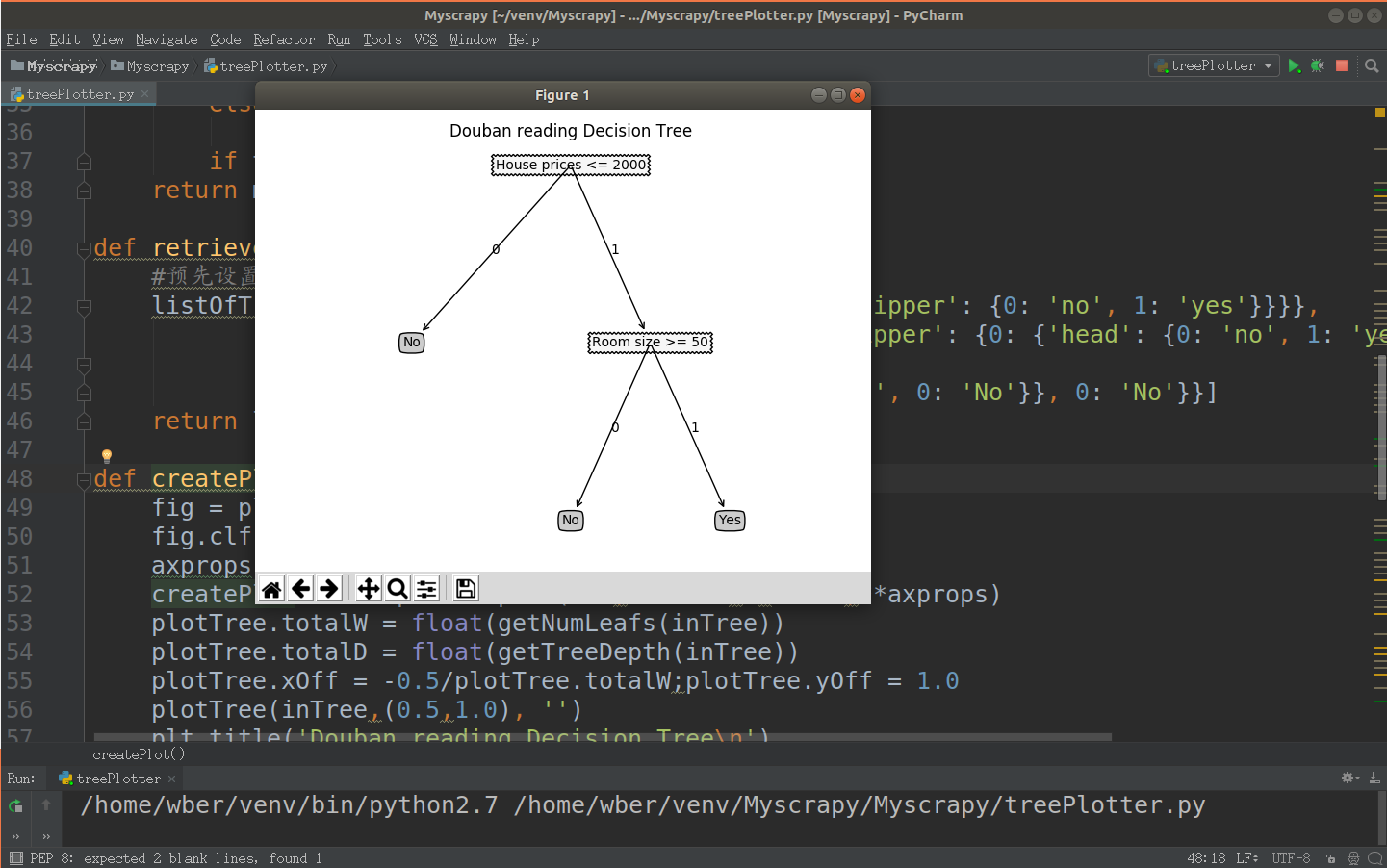
结果:
Python爬虫(三)——开封市58同城出租房决策树构建的更多相关文章
- Python爬虫(四)——开封市58同城数据模型训练与检测
前文参考: Python爬虫(一)——开封市58同城租房信息 Python爬虫(二)——对开封市58同城出租房数据进行分析 Python爬虫(三)——对豆瓣图书各模块评论数与评分图形化分析 数据的构建 ...
- Python爬虫(二)——对开封市58同城出租房数据进行分析
出租房面积(area) 出租房价格(price) 对比信息 代码 import matplotlib as mpl import matplotlib.pyplot as plt import pan ...
- Python爬虫(一)——开封市58同城租房信息
代码: # coding=utf-8 import sys import csv import requests from bs4 import BeautifulSoup reload(sys) s ...
- 养只爬虫当宠物(Node.js爬虫爬取58同城租房信息)
先上一个源代码吧. https://github.com/answershuto/Rental 欢迎指导交流. 效果图 搭建Node.js环境及启动服务 安装node以及npm,用express模块启 ...
- python3爬虫-爬取58同城上所有城市的租房信息
from fake_useragent import UserAgent from lxml import etree import requests, os import time, re, dat ...
- 用Python写爬虫爬取58同城二手交易数据
爬了14W数据,存入Mongodb,用Charts库展示统计结果,这里展示一个示意 模块1 获取分类url列表 from bs4 import BeautifulSoup import request ...
- python 爬虫入门----案例爬取上海租房图片
前言 对于一个net开发这爬虫真真的以前没有写过.这段时间学习python爬虫,今天周末无聊写了一段代码爬取上海租房图片,其实很简短就是利用爬虫的第三方库Requests与BeautifulSoup. ...
- python爬虫(三)
Requests模块 这个库的标准文档有个极其幽默的地方就是它的中文翻译,我就截取个开头部分,如下图: 是不是很搞笑,在正文中还有许多,管中窥豹,可见一斑.通过我的使用,感觉Requests库的确是给 ...
- Python爬虫(三)爬淘宝MM图片
直接上代码: # python2 # -*- coding: utf-8 -*- import urllib2 import re import string import os import shu ...
随机推荐
- ux.form.field.Year 只能选年的时间扩展
效果如图,亲测6.2.1版本可用,用法同时间选择控件 //只选择年的控件 Ext.define('ux.picker.Year', { extend: 'Ext.Component', alias: ...
- 11.1 vue(2)
2018-11-1 19:41:00 2018年倒数第二个月! 越努力越幸运!!!永远不要高估自己! python视频块看完了!还有30天吧就结束了! 今天老师讲的vue 主要是看官网文档 贴上连接 ...
- 振兴中华(dfs or dp )
小明参加了学校的趣味运动会,其中的一个项目是:跳格子. 地上画着一些格子,每个格子里写一个字,如下所示:(也可参见p1.jpg) 从我做起振 我做起振兴 做起振兴中 起振兴中华 比赛时,先站在左上角的 ...
- SQL 资源整理
https://linux.linuxidc.com/index.php 资源链接:linux.linuxidc.com SQL必知必会(第4版)是SQL经典畅销书,内容丰富,简洁实用.本书是麻省理工 ...
- linux中的pwd
https://www.cnblogs.com/crazylqy/p/5818745.html
- mysql批量插入
有多种方式 其中效率高 要求低的方式 是 把sql拼接出来 后一次性commit: eg: public int insertBatch(List<PeccDetailModel> lis ...
- SparkSQL与Hive on Spark的比较
简要介绍了SparkSQL与Hive on Spark的区别与联系 一.关于Spark 简介 在Hadoop的整个生态系统中,Spark和MapReduce在同一个层级,即主要解决分布式计算框架的问题 ...
- 《nginx - 基本操作/配置》
一:基本操作 - 开启 Nginx nginx -c nginx.conf - Nginx 的平滑重启 kill -HUP nginx主进程号(平滑重启) - 停止 Nginx * Kill -Q ...
- Ch05 类 - 练习
1. 改进5.1节的Counter类,让它不要在Int.MaxValue是变成负数. class Counter{ private var value = Int.MaxValue d ...
- pandas处理时间序列(2):DatetimeIndex、索引和选择、含有重复索引的时间序列、日期范围与频率和移位、时间区间和区间算术
一.时间序列基础 1. 时间戳索引DatetimeIndex 生成20个DatetimeIndex from datetime import datetime dates = pd.date_rang ...