
Python爬虫(三)——开封市58同城出租房决策树构建
决策树框架:
 # coding=utf-8

 import matplotlib.pyplot as plt

 decisionNode = dict(boxstyle='sawtooth', fc='')

 leafNode = dict(boxstyle='round4', fc='0.8')

 arrow_args = dict(arrowstyle='<-')

 def plotNode(nodeTxt, centerPt, parentPt, nodeType):

     createPlot.ax1.annotate(nodeTxt, xy=parentPt, xycoords='axes fraction', \

                             xytext=centerPt, textcoords='axes fraction', \

                             va='center', ha='center', bbox=nodeType, arrowprops \

                                 =arrow_args)

 def getNumLeafs(myTree):

     numLeafs = 0

     firstStr = list(myTree.keys())[0]

     secondDict = myTree[firstStr]

     for key in secondDict:

         if (type(secondDict[key]).__name__ == 'dict'):

             numLeafs += getNumLeafs(secondDict[key])

         else:

             numLeafs += 1

     return numLeafs

 def getTreeDepth(myTree):

     maxDepth = 0

     firstStr = list(myTree.keys())[0]

     secondDict = myTree[firstStr]

     for key in secondDict:

         if (type(secondDict[key]).__name__ == 'dict'):

             thisDepth = 1 + getTreeDepth((secondDict[key]))

         else:

             thisDepth = 1

         if thisDepth > maxDepth: maxDepth = thisDepth

     return maxDepth

 def retrieveTree(i):

     # 预先设置树的信息

     listOfTree = []

     return listOfTree[i]

 def createPlot(inTree):

     fig = plt.figure(1, facecolor='white')

     fig.clf()

     axprops = dict(xticks=[], yticks=[])

     createPlot.ax1 = plt.subplot(111, frameon=False, **axprops)

     plotTree.totalW = float(getNumLeafs(inTree))

     plotTree.totalD = float(getTreeDepth(inTree))

     plotTree.xOff = -0.5 / plotTree.totalW;

     plotTree.yOff = 1.0

     plotTree(inTree, (0.5, 1.0), '')

     plt.title('kaifeng.58.com\n')

     plt.show()

 def plotMidText(cntrPt, parentPt, txtString):

     xMid = (parentPt[0] - cntrPt[0]) / 2.0 + cntrPt[0]

     yMid = (parentPt[1] - cntrPt[1]) / 2.0 + cntrPt[1]

     createPlot.ax1.text(xMid, yMid, txtString)

 def plotTree(myTree, parentPt, nodeTxt):

     numLeafs = getNumLeafs(myTree)

     depth = getTreeDepth(myTree)

     firstStr = list(myTree.keys())[0]

     cntrPt = (plotTree.xOff + (1.0 + float(numLeafs)) / 2.0 / plotTree.totalW, \

               plotTree.yOff)

     plotMidText(cntrPt, parentPt, nodeTxt)

     plotNode(firstStr, cntrPt, parentPt, decisionNode)

     secondDict = myTree[firstStr]

     plotTree.yOff = plotTree.yOff - 1.0 / plotTree.totalD

     for key in secondDict:

         if type(secondDict[key]).__name__ == 'dict':

             plotTree(secondDict[key], cntrPt, str(key))

         else:

             plotTree.xOff = plotTree.xOff + 1.0 / plotTree.totalW

             plotNode(secondDict[key], (plotTree.xOff, plotTree.yOff), \

                      cntrPt, leafNode)

             plotMidText((plotTree.xOff, plotTree.yOff), cntrPt, str(key))

     plotTree.yOff = plotTree.yOff + 1.0 / plotTree.totalD

 if __name__ == '__main__':

     myTree = retrieveTree(2)

     createPlot(myTree)
构造信息:
  [{'no surfacing': {0: 'no', 1: {'flipper': {0: 'no', 1: 'yes'}}}},

                   {'no surfacing': {0: 'no', 1: {'flipper': {0: {'head': {0: 'no', 1: 'yes'}}, 1: 'no'}}}},

                   {'House prices <= 2000': {

                       1: {'Room size >= 50': {1: 'Yes', 0: 'No'}}, 0: 'No'}}]
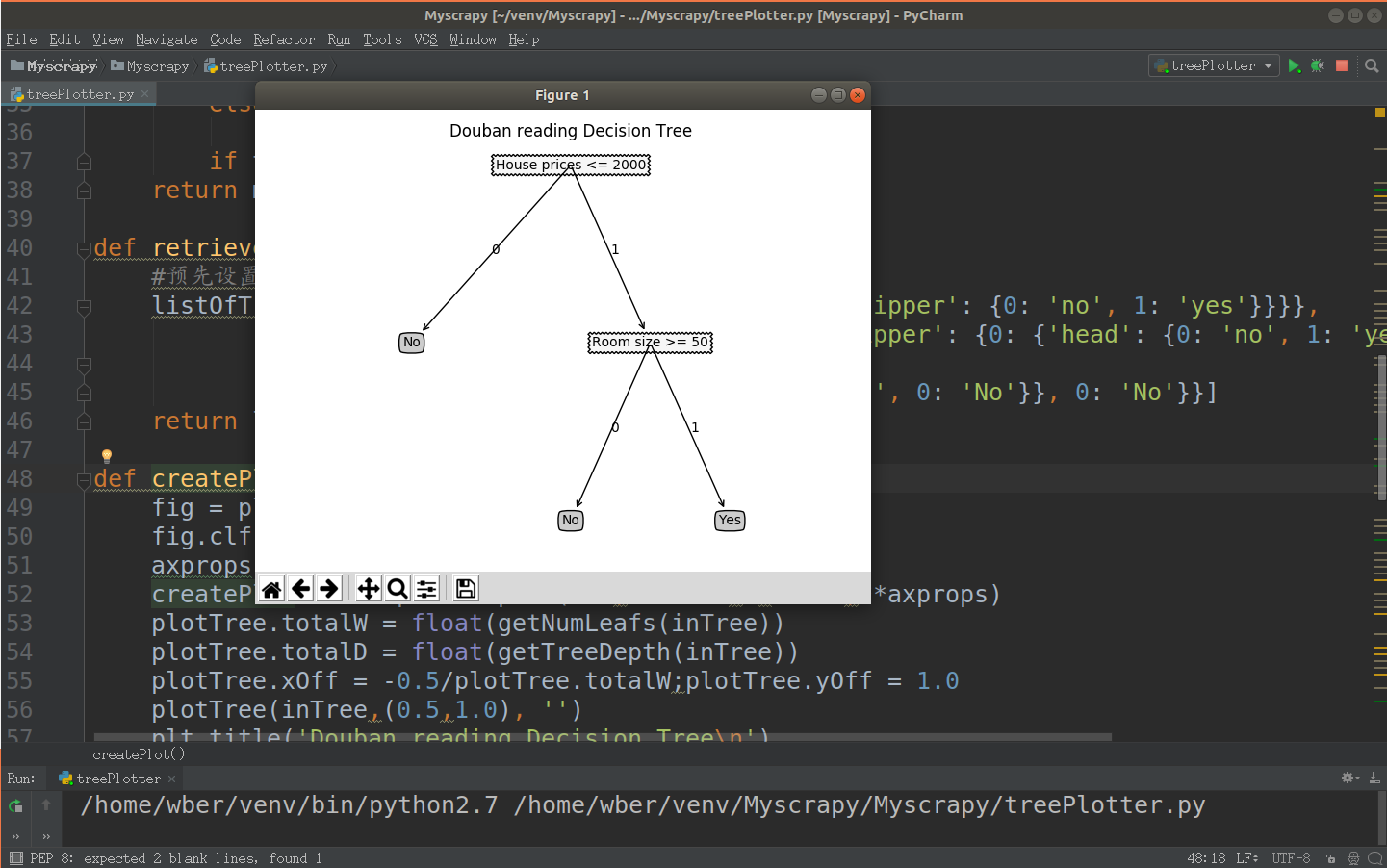
结果:
Python爬虫(三)——开封市58同城出租房决策树构建的更多相关文章
- Python爬虫(四)——开封市58同城数据模型训练与检测
前文参考: Python爬虫(一)——开封市58同城租房信息 Python爬虫(二)——对开封市58同城出租房数据进行分析 Python爬虫(三)——对豆瓣图书各模块评论数与评分图形化分析 数据的构建 ...
- Python爬虫(二)——对开封市58同城出租房数据进行分析
出租房面积(area) 出租房价格(price) 对比信息 代码 import matplotlib as mpl import matplotlib.pyplot as plt import pan ...
- Python爬虫(一)——开封市58同城租房信息
代码: # coding=utf-8 import sys import csv import requests from bs4 import BeautifulSoup reload(sys) s ...
- 养只爬虫当宠物(Node.js爬虫爬取58同城租房信息)
先上一个源代码吧. https://github.com/answershuto/Rental 欢迎指导交流. 效果图 搭建Node.js环境及启动服务 安装node以及npm,用express模块启 ...
- python3爬虫-爬取58同城上所有城市的租房信息
from fake_useragent import UserAgent from lxml import etree import requests, os import time, re, dat ...
- 用Python写爬虫爬取58同城二手交易数据
爬了14W数据,存入Mongodb,用Charts库展示统计结果,这里展示一个示意 模块1 获取分类url列表 from bs4 import BeautifulSoup import request ...
- python 爬虫入门----案例爬取上海租房图片
前言 对于一个net开发这爬虫真真的以前没有写过.这段时间学习python爬虫,今天周末无聊写了一段代码爬取上海租房图片,其实很简短就是利用爬虫的第三方库Requests与BeautifulSoup. ...
- python爬虫(三)
Requests模块 这个库的标准文档有个极其幽默的地方就是它的中文翻译,我就截取个开头部分,如下图: 是不是很搞笑,在正文中还有许多,管中窥豹,可见一斑.通过我的使用,感觉Requests库的确是给 ...
- Python爬虫(三)爬淘宝MM图片
直接上代码: # python2 # -*- coding: utf-8 -*- import urllib2 import re import string import os import shu ...
随机推荐
- C#获取一个数组中的最大值、最小值、平均值
C#获取一个数组中的最大值.最小值.平均值 1.给出一个数组 ,,,,,-,,,,}; 2.数组Array自带方法 本身是直接可以调用Min(),Max(),Average()方法来求出 最小值.最大 ...
- windows环境下Oracle数据库冷备份和恢复
1.点击开始菜单的“运行”,输入sqlplus/nolog 2.在弹出的命令行窗口以sysdba身份登陆,要输入:系统用户名/登陆密码@数据库实例名,如sys/testora@orcl 3.输入 al ...
- 设置头像、商品、轮播图为背景图时需要的css
background-repeat: no-repeat;background-size: cover;background-position: center center;
- 部署WEB项目到服务器(三)安装mysql到linux服务器(Ubuntu)详解
突发奇想,想在自己电脑上部署一个web网站. 1,首先是下载一个适合自己已安装服务器版本的mysql数据库. 这里使用网上的链接http://dev.mysql.com/downloads/mysql ...
- java学习笔记-集合set
equals指内容(值)相等,== 指地址相等 ===============set类 set继承自collection,但set没有新增方法,只是set里的元素不重复,下面是set常用方法 ==== ...
- 分析Hello2代码
代码如下String username = request.getParameter("username"); if (username != null && us ...
- SQL两张表筛选相同数据和不同数据
原文链接:http://www.cnblogs.com/onesmail/p/6148979.html 方法一: select distinct A.ID from A where A.ID not ...
- pycharm import pygame 出现报错:No module named 'pygame'
首先发现装的Python 有问题原来的Python3.6.4版本安装完成后Scripts文件夹里空白的,什么也没有,从https://www.python.org/downloads/windows/ ...
- asp.net NPOI导出xlsx格式文件,打开文件报“Excel 已完成文件级验证和修复。此工作簿的某些部分可能已被修复或丢弃”
NPOI导出xlsx格式文件,会出现如下情况: 点击“是”: 导出代码如下: /// <summary> /// 将datatable数据写入excel并下载 /// </summa ...
- (转)Linux vi 命令大全
进入vi的命令 vi filename :打开或新建文件,并将光标置于第一行首 vi +n filename :打开文件,并将光标置于第n行首 vi + filename :打开文件,并将光标置于最后 ...